
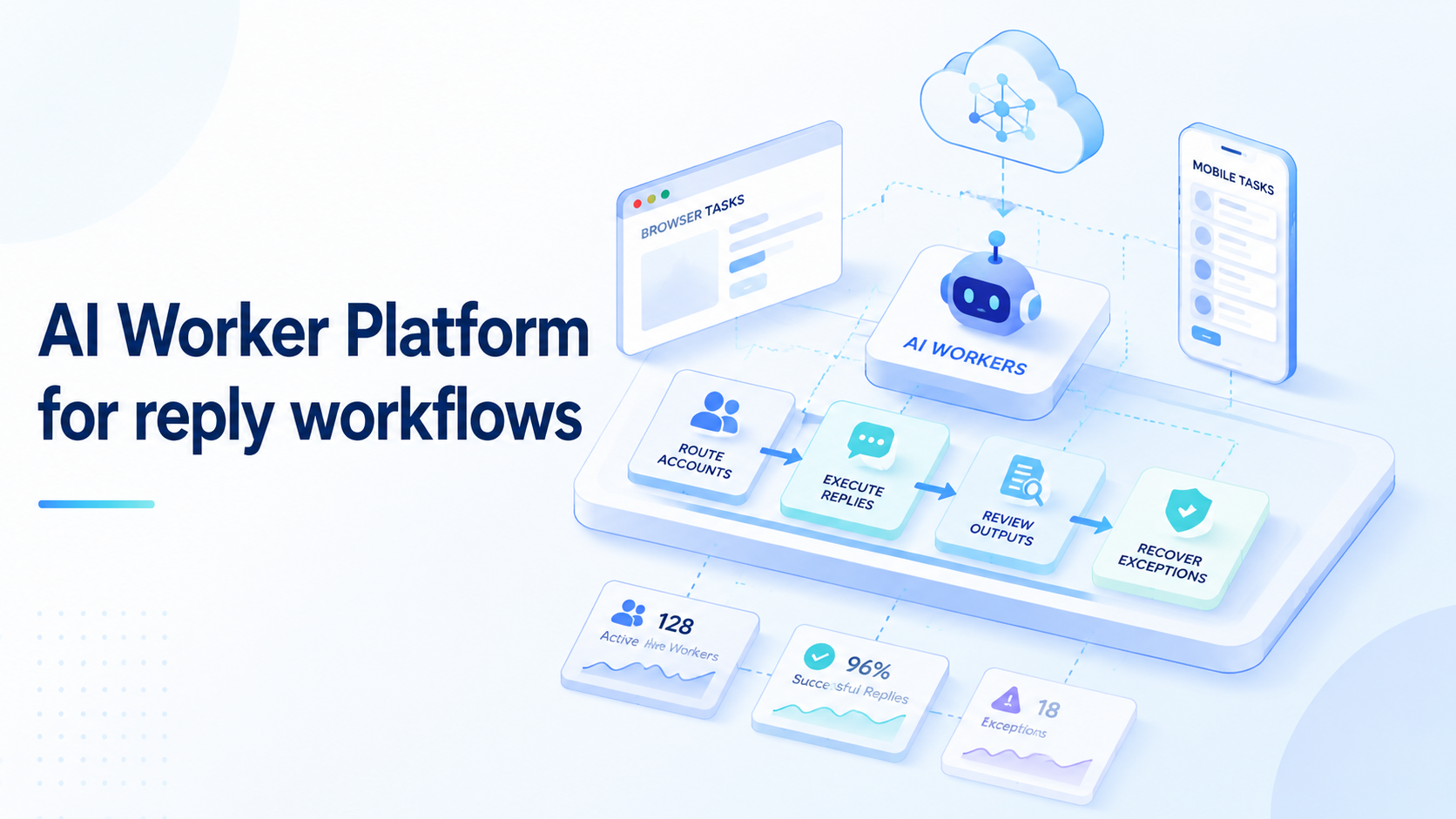
An AI worker platform is a controlled execution system for reply workflows. It assigns repeatable response tasks to AI workers, routes them through the right account environment, and keeps the output reviewable before it moves forward.
Reply operations are not only about writing text. They also involve account context, message state, approval rules, and recovery when a conversation does not match the expected pattern.
Reply workflows appear in sales, support, social operations, community management, and marketplace teams. One queue may live in a web dashboard. Another may depend on a mobile app. A third may require a human reviewer before anything is sent.
Different lanes matter.
The useful platform is not the one that writes the most replies. The useful platform is the one that keeps reply work traceable. Teams need to know who assigned the task, which account was used, what message state appeared, what draft was produced, and whether a reviewer approved the result.
Key Takeaways
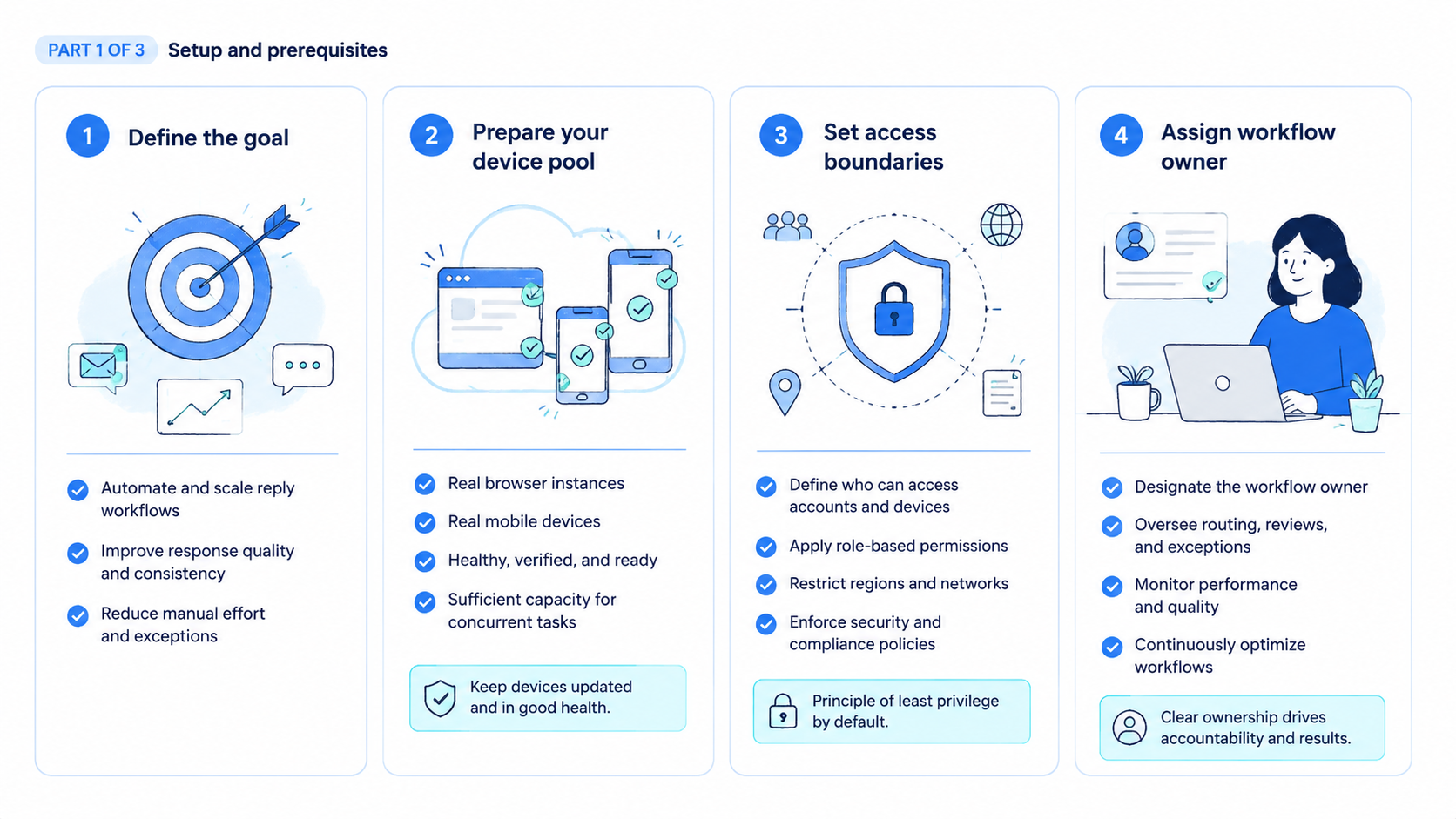
- An AI worker platform fits reply workflows with clear inputs, account context, and review rules
- Browser and mobile reply queues should be routed through the right execution lane
- Drafting, approving, sending, and recovering should be separate workflow states
- The first pilot should use one reply queue, one account group, and one reviewer
- Exceptions reveal whether the workflow is ready to scale
What Is an AI Worker Platform for Reply Workflows?
A platform for reply workflows turns repetitive response work into assigned, reviewable tasks. The worker may read a message, classify it, prepare a draft, update a record, or send the item to a human reviewer. The platform controls the environment and records what happened.
The distinction matters. A text generator can draft a reply, but it does not know the account lane, message state, customer record, or approval rule by itself. A platform connects the worker to those operating details.
Reply workflows usually need four controls:
- Queue control: which messages enter the worker lane
- Account control: which profile, app, or inbox is used
- Draft control: what the worker may write or suggest
- Review control: who approves, rejects, or escalates the reply
For web-based queues, an AI browser execution layer can keep browser tasks inside controlled profiles. For app-based queues, teams may need a mobile lane. The platform should choose the lane based on where the reply work actually happens.
Why AI Worker Platform for Reply Workflows Matters
Reply work is sensitive because it faces real people. Pause here. A bad enrichment task may create cleanup work. A reviewer needs the original message, account state, and allowed action before trusting the response. A bad reply can create confusion, account risk, or customer frustration.
That does not mean teams should avoid AI workers. Boundaries matter. It means reply workflows need stronger boundaries than simple internal updates.
The common misunderstanding is that reply automation starts with tone. Tone matters, but routing and approval matter first. A polite draft from the wrong account is still wrong. A good answer sent before review may still violate team policy.
Google Search Central's guidance on creating helpful content is written for public content, yet the operating principle is useful here: output should serve a real user need. Reply workflows should help the recipient and the team, not only increase response volume.
Teams also need to respect platform rules when replies happen inside apps or marketplaces. Google Play's Policy Center is one example of why app-related workflows need policy awareness and careful operating boundaries.
Reply quality is therefore a workflow question. Not volume. The draft, account context, reviewer decision, and exception trail all matter. A platform gives those parts a shared structure.
Key Benefits and Use Cases
The strongest benefit is operational clarity. A reply queue becomes a set of tasks with known inputs and outcomes. No guessing.
The assigned worker uses the account lane defined by the workflow, while the reviewer sees enough context to judge the draft without rebuilding the whole conversation from memory.
Common use cases include sales reply preparation, support inbox triage, social comment routing, marketplace question drafts, community moderation queues, and follow-up reminders. These workflows have different risk levels, but they all benefit from account routing and review evidence.
| Reply workflow | Worker task | Human review point |
|---|---|---|
| Sales follow-up | Prepare draft and source note | Approve before sending |
| Support inbox | Classify and suggest answer | Escalate sensitive cases |
| Social comments | Sort by intent and priority | Review public response |
| Marketplace questions | Draft answer from known fields | Confirm product detail |
| Community queue | Flag routine vs sensitive items | Decide final action |
Mobile-first queues need more than browser automation. A team may need a cloud phone product, a phone farm, or mobile automation when the reply state exists in an app. The point is not to add devices for decoration. The point is to execute where the account state actually lives.
How to Get Started with an AI Worker Platform for Reply Workflows
Start with one narrow reply queue. Do not begin with every channel, every account, and every message type. A small queue makes evidence easier to inspect and failures easier to explain.
Use this setup checklist:
- Choose one queue
- Define the account group
- Identify the source system
- Decide browser lane or mobile lane
- Define message types the worker may process
- Define restricted message types
- Create draft and review states
- Assign one reviewer
- Record exception reasons
- Review every pilot run
The queue rule should be strict. A good first workflow might be "draft replies for low-risk support questions that match known help topics." A weak first workflow would be "answer anything that arrives." The second version hides too many decisions inside the worker.
Review state should be separate from send state. Drafted, reviewed, revised, approved, and sent are not the same thing.
Keep the trail visible. Audit first. Combining every state into one done flag makes the audit trail weak. Too vague.
For teams with many inboxes, multi-account management helps separate account groups. Device isolation matters when app or device context is part of the reply lane. A single shared environment is easy to start and hard to audit.
The first success metric is reviewer confidence. If the reviewer can see the original message, account, suggested reply, source context, and stop reason, the workflow has a foundation. If the reviewer must ask where the draft came from, the pilot is not ready to scale.
AI Worker Platform Mistakes That Reduce Reply Quality
One mistake is letting the worker send replies too early. Draft first. Wait for proof. Sending should wait until the team has clear approval rules, message categories, and escalation paths. Hold back.
Another mistake is treating every reply as routine. Some messages ask for pricing, refunds, legal terms, private account details, or platform-specific actions. Those should move to a human lane unless the team has an explicit rule.
Shared account context creates a third problem. If several workers use the same account lane without ownership, the reviewer may not know which worker handled the message. Account confusion makes reply quality harder to verify.
Avoid these early patterns:
- One worker handles every channel
- Drafts are sent without state labels
- Sensitive replies are not escalated
- Source context is missing
- App replies are forced into browser-only workflows
- Failed runs only show a generic error
Android's app quality guidance is useful background when reply workflows depend on app state. Screens, sessions, and repeatability affect execution quality. A reply platform should expose those states instead of assuming they stay fixed.
Approval States and Account Routing for Reply Workflows
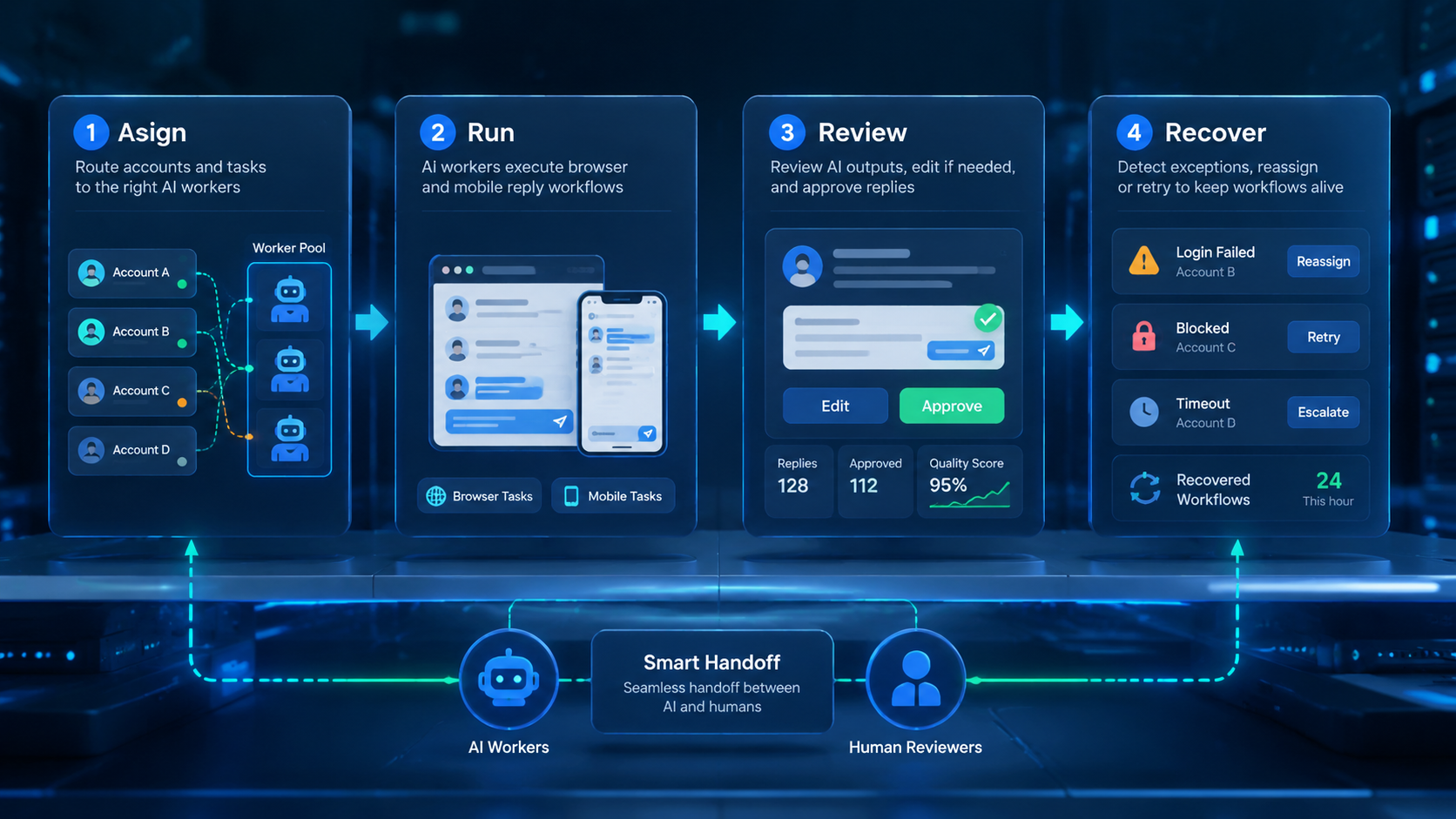
Approval states make reply operations easier to audit. Labels matter.
A draft is not an approved reply. An approved reply is not always a sent reply, and a sent reply may still need a follow-up task, CRM update, or exception note.
Teams should name these states before the first pilot. Without labels, the worker may mark work complete while a manager still expects review. That mismatch creates confusion in the queue and weakens trust in the system.
Use a simple state model:
- New message: the queue item has not been classified
- Draft prepared: the worker produced a suggested reply
- Needs review: a human must approve, revise, or reject
- Approved: the response can move to the next action
- Sent or completed: the reply action is finished
- Escalated: the item moved out of the worker lane
- Blocked: the worker stopped because context was missing
Account routing should sit beside the state model. The platform needs to know which account group owns the queue, which browser profile or mobile lane belongs to that group, and which reviewer is responsible for the final decision. When these fields are missing, the draft may look correct but still belong to the wrong operating lane.
Reply work also needs source context. A worker should show the original message, any retrieved customer or lead record, the reason for its draft, and the rule that allowed the draft. That evidence lets the reviewer judge both content and process.
The strongest teams treat routing as part of quality. A clear reply from the wrong profile is still a failed run. A cautious draft with full context may be slower at first, but it gives the team a better base for scaling.
Operating Rules for Safer Reply Automation
Reply automation needs boundaries that are easy to inspect. The worker should not decide every message category on its own.
Stop there. It should process only the categories the team has mapped and pause when the message falls outside that map.
One rule can separate low-risk and high-risk work. Routine status replies, known help topics, and simple follow-up drafts can enter the worker lane. Pricing disputes, refunds, private account changes, legal terms, and angry customer messages should move to a human lane unless the team has a specific escalation process.
The rule should be visible in the task output. A reviewer should see why a message was handled by the worker or why it stopped. Silent routing makes review slower because the human has to reverse-engineer the decision.
Good operating rules also reduce prompt drift. Instead of asking the worker to "reply well," the team asks it to handle a defined queue, use known source fields, prepare a draft, and stop on named exceptions. That is easier to test.
Small rules compound. That matters. A queue with clear state labels, account routing, source evidence, and stop reasons gives managers a real workflow.
Better review. A queue with only generated text gives them another place to check manually.
Who It Fits and When It Is a Strong Match
Strong-fit teams already have repeated reply queues. They know which channels matter, which account groups own them, and which replies need approval. The team may be in sales, support, social operations, ecommerce, or community management.
Weak-fit teams still rely on individual judgment for nearly every message. If every reply needs a new strategy, a worker can still prepare context, but it should not run the whole workflow. The boundary belongs in writing before a pilot begins.
Strong match
- Known reply queues
- Clear account ownership
- Repeatable message types
- Reviewer available
- Source evidence visible
Wait or narrow scope
- Unclear escalation rules
- Shared accounts without owners
- High-risk message categories
- No approval state
- No exception tracking
The decision rule is simple. A workflow may be ready when the team can describe the message type, allowed action, account lane, and reviewer. Otherwise, the team should map the process first.
Pilot Rollout, Measurement, and Recovery Checks
A pilot should test the workflow, not just the model. Give the worker a small queue and require a reviewer to inspect every result. The reviewer should see the original message, account lane, draft, source context, and exception reason.
Measure the pilot with a compact scorecard:
| Check | Pass signal | Stop signal |
|---|---|---|
| Account lane | Correct account used | Worker chooses loosely |
| Message type | Category is clear | Sensitive message misrouted |
| Draft quality | Useful draft with context | Generic reply with no source |
| Review state | Approved, revised, or rejected | Done flag hides decision |
| Recovery | Clear exception reason | Blind retry or silent fail |
Recovery checks should be deliberate. Test expired sessions, changed app screens, duplicate messages, missing source context, and uncertain customer intent. The worker should stop when the message does not fit the rule.
A daily review loop helps. Look at rejected drafts, repeated exceptions, and unclear account routing.
Those signals show whether the workflow needs tighter instructions, better source fields, a narrower queue, or a different execution lane for app-based replies.
Scale should follow evidence. When the team can explain why replies were accepted, revised, or stopped, it can add more accounts or channels with less confusion.
Frequently Asked Questions
1. What is an AI worker platform for reply workflows
It is a system for assigning reply tasks to AI workers, routing them through controlled environments, and reviewing output before the work continues. The core value is state control, not just faster writing.
2. Is it just an auto-reply tool
No. Auto-reply tools focus on sending responses. A worker platform manages task state, account context, review, and exceptions.
3. Which reply workflows should start first
Start with low-risk queues that have known message types and clear source context. Keep sensitive or commercial replies in human review.
4. Does the worker need mobile execution
Only when the reply queue lives in a mobile app or depends on mobile account state. Browser queues can stay in controlled browser profiles.
5. What should the reviewer check
Check the account, original message, draft, source context, approval state, and exception reason. Missing context should stop the run.
6. Can the worker send replies directly
It can only do that when the workflow has explicit approval rules. Most teams should begin with drafts and reviewed sending.
7. How do teams measure value
Measure review speed, accepted draft rate, exception clarity, account routing accuracy, and reduced manual triage. Avoid measuring volume alone.
8. What is the first setup step
Choose one reply queue and write the stop rules. Start narrow. Name the boundary before launch if a message type should not enter the worker lane.
Conclusion
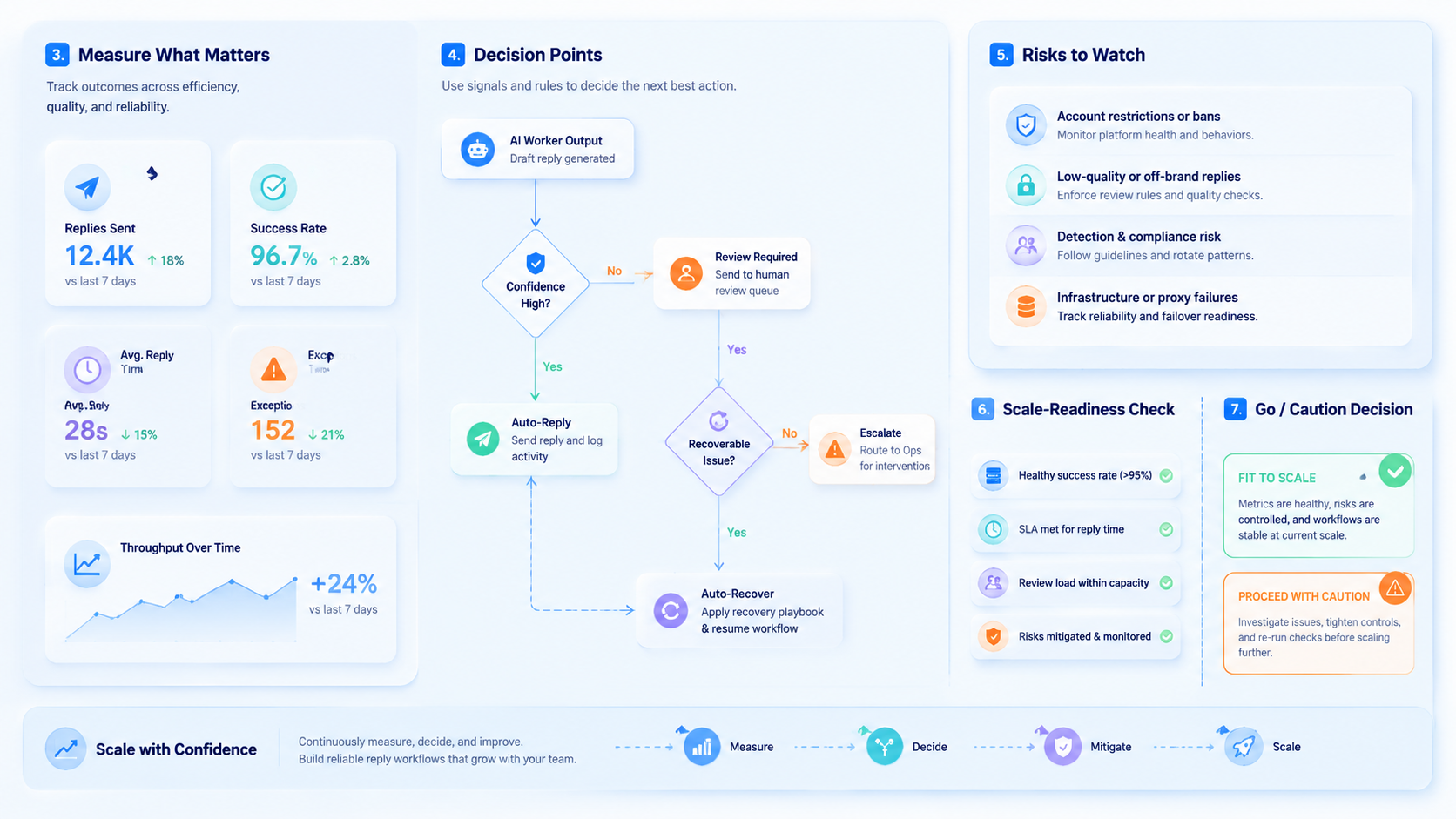
This setup is useful for reply workflows when it controls more than text generation, because the hardest reply problems usually come from context loss rather than weak phrasing. Context first. It should route accounts, define draft states, capture evidence, and make exceptions visible for the reviewer.
That structure protects the team from confusing activity with reliable execution.
The next step is a narrow pilot. Pick one reply queue, one account group, one environment lane, and one reviewer. Run a small batch, inspect every result, and record why each exception stopped. When the team can trust the evidence trail, it can expand reply workflows with better control.



