
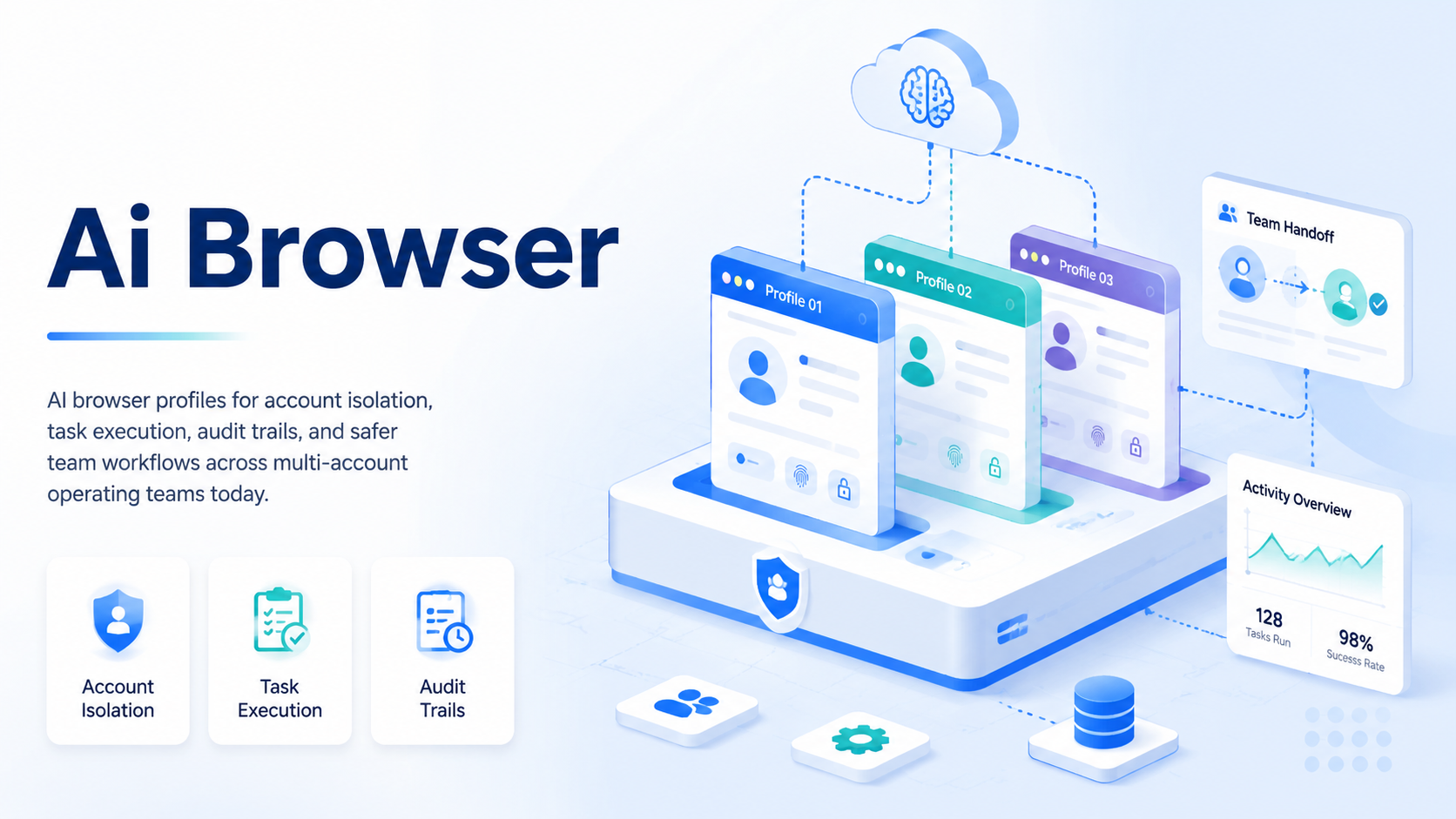
AI browser is an execution workspace that keeps account identity, browser context, routing, and task rules separate. Profiles apply that workspace model to specific accounts, customers, regions, or operators.
Key Takeaways
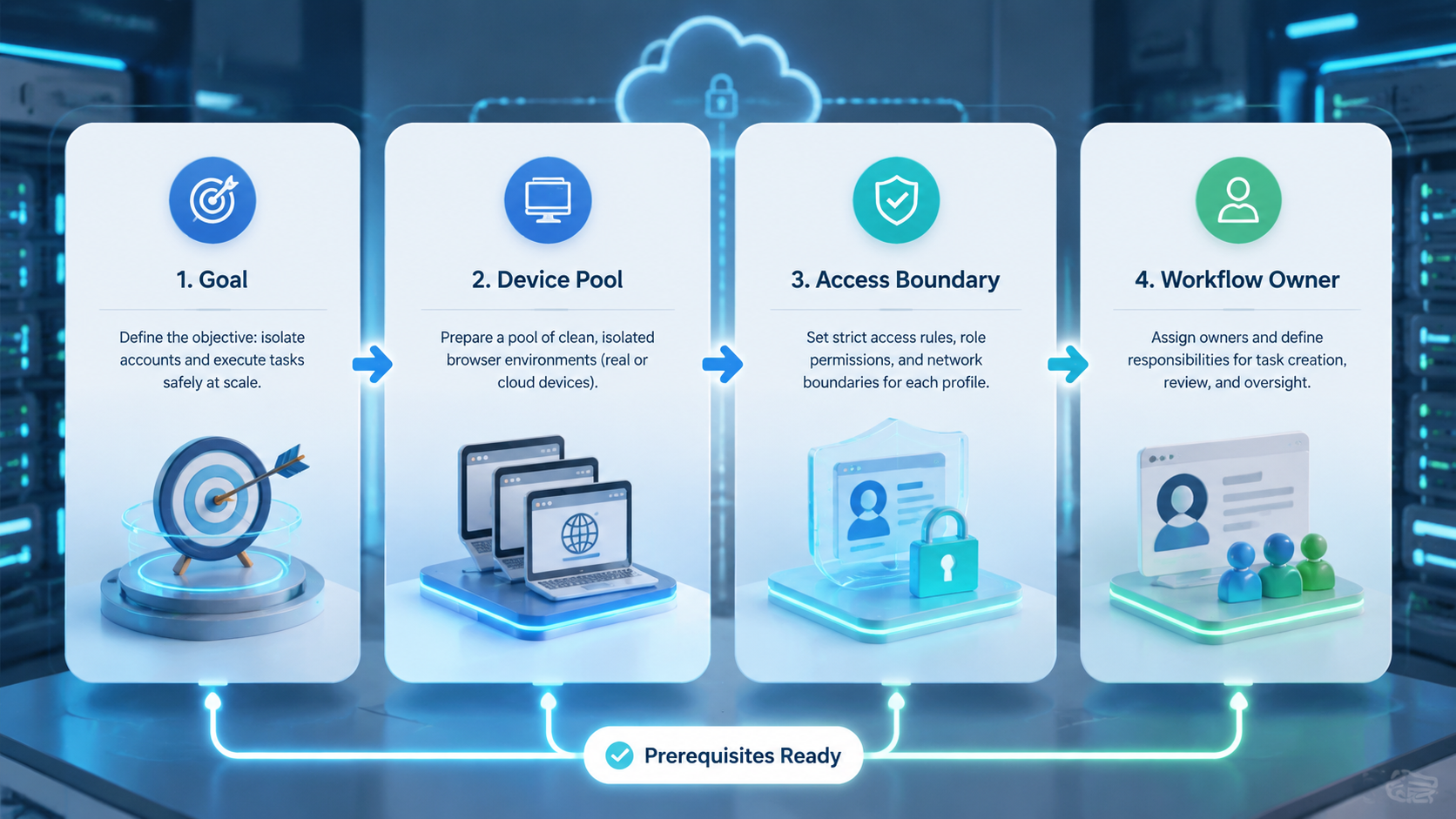
- A profile pairs identity context, routing, permissions, and task execution rules
- Account isolation works only when teams also control proxies, device signals, storage, and operator access
- Profiles move teams from manual browser switching to repeatable execution with clearer ownership
- The right setup includes stop rules, logs, and review steps instead of unchecked automation
- A pilot should measure task completion, review load, account errors, and handoff quality
What Is AI Browser Profiles for Account Isolation and Task Execution?
AI browser profiles are separate browser workspaces that keep account identity, session data, routing, and task instructions apart. Each profile acts like an operating lane for one account, customer, region, or workflow.
The practical goal is not cosmetic separation. A useful profile makes it harder for operators to mix cookies, reuse the wrong proxy, or run the wrong task under the wrong account. Managers also get a clear unit they can assign, review, pause, or retire when the work changes.
Teams usually judge a profile system through three checks:
- Identity boundary: cookies, storage, browser fingerprinting settings, and login state stay scoped to one workspace.
- Execution boundary: tasks run with the correct account, routing, and approval rules.
- Audit boundary: reviewers can see what happened without relying on memory or chat messages.
This matters because multi-account work fails when the workspace is informal. A spreadsheet can track accounts, but it can't stop an operator from opening the wrong session or using the wrong environment.
Why AI Browser Profiles Matter for Account Isolation
Account isolation turns a browser profile into an operational control. The profile should make the correct path easier than the accidental one.
Consider a support team that manages regional web portals. One operator handles account A in the morning and account B after lunch. If both accounts share the same local browser, profile storage, and network route, small mistakes become hard to diagnose.
With a profile-based setup, the team can separate access by customer, account type, or workflow. The operator opens the assigned profile, completes the task, and leaves a trace for review. That does not remove every platform or compliance issue, but it reduces avoidable mixing.
That is the control point.
Useful isolation also connects to infrastructure. A browser workspace may need clean routing through a proxy network, device-level separation through device isolation, or mobile execution through a cloud phone. The browser layer should not pretend to solve every signal alone.
For general content quality and user-first guidance, Google Search Central recommends creating helpful content for people, not search engines. The same discipline applies to internal operating systems: explain the workflow clearly, then measure whether it helps the team work better. Source: Google Search Central.
Key Benefits and Use Cases
The strongest use cases appear when teams need repeatable web work across many accounts. The profile becomes a controlled work cell, not a personal browser shortcut.
Good fit
- Customer support teams that need separate customer portals.
- Marketing teams running approved social or marketplace workflows.
- Research teams checking regional dashboards or competitor pages.
- Operations teams that need consistent handoff between shifts.
Poor fit
- Workflows without account ownership or review rules.
- Tasks that ignore platform terms or customer permissions.
- Teams that want automation before they define the SOP.
- Setups where nobody reviews failures or unusual account behavior.
For multi account management, profiles make assignment easier. A manager can map accounts to profiles, operators to profile groups, and recurring tasks to approved runbooks.
For mobile-heavy workflows, browser profiles may sit beside mobile automation. The browser handles web dashboards, while mobile infrastructure handles app-side execution. That split is cleaner than forcing every action through one tool.
Do not blur that split.
How to Get Started with AI Browser Profiles
Start with the workflow, not the tool list. A profile system should mirror the way accounts are actually used.
- Group accounts by operating context: separate by customer, market, platform, risk level, or team role
- Define profile fields: track owner, purpose, proxy route, device context, login method, review cadence, and allowed tasks
- Set access rules: give operators the profiles they need, not a shared pool with unclear ownership
- Attach task runbooks: point each profile to the right SOP, checklist, or approval step
- Create stop rules: pause work when login prompts, unusual verification, account warnings, or data mismatches appear
- Review logs weekly: look for repeated failures, routing mistakes, skipped steps, and unclear ownership
The National Institute of Standards and Technology treats identity, access, and monitoring as ongoing cybersecurity functions rather than one-time setup work. That framing is useful here because profile control should include preparation, operation, and review. Source: NIST Cybersecurity Framework.
Common Mistakes to Avoid
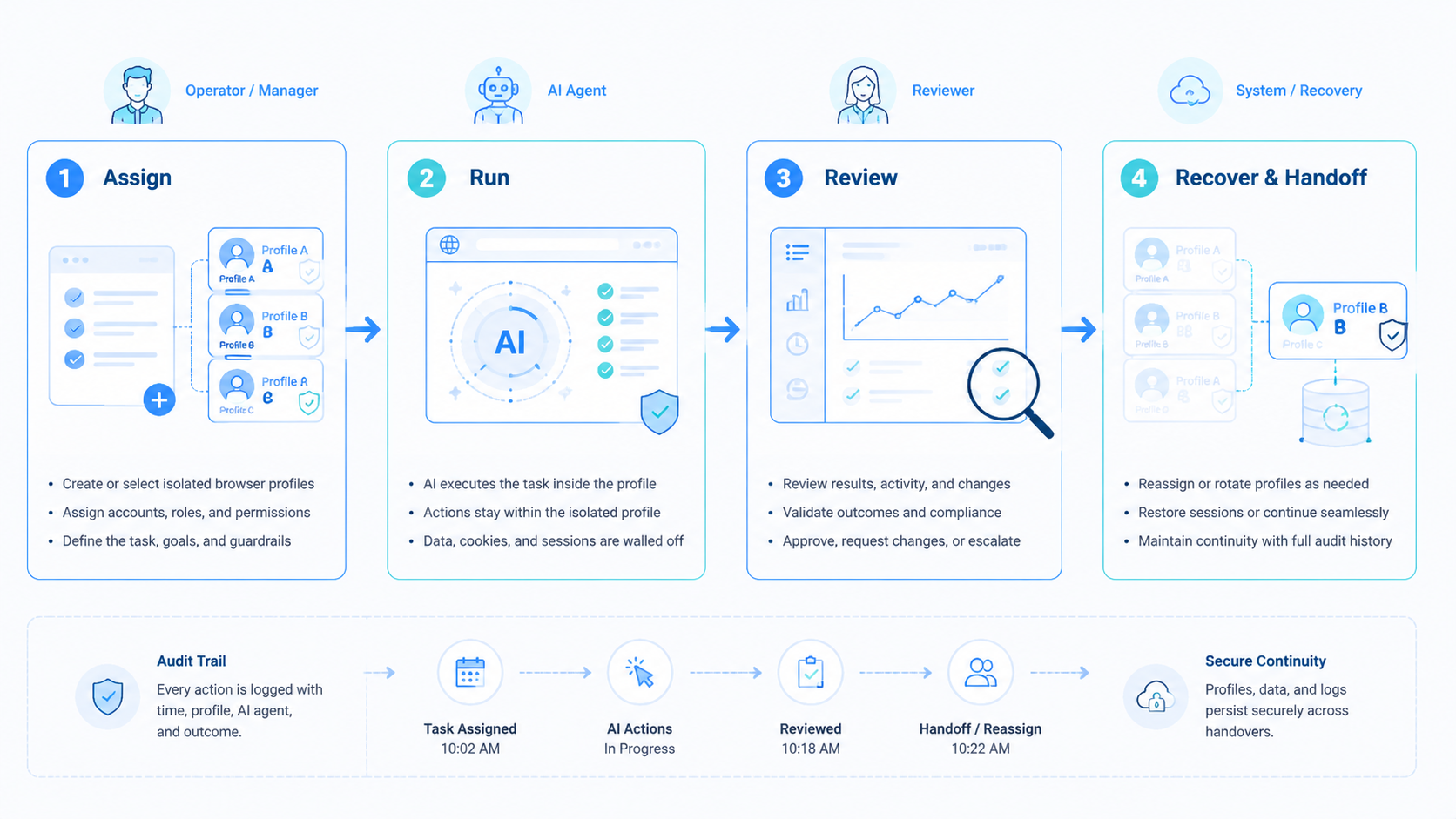
The common mistake is treating a profile as a magic shield. It is only a boundary. The boundary still needs clean inputs, clear permissions, and disciplined use.
One failure mode is proxy reuse without a plan. If several accounts share routes randomly, the team may not know whether an issue came from the account, the IP, the operator, or the task. A profile should record routing choices so failures can be traced.
Another failure mode is over-automation. Teams sometimes connect task agents before they understand exception handling. A safer pilot starts with assisted execution, human approval for sensitive steps, and a narrow task list.
Logging also needs care. OWASP recommends logging enough security-relevant information to support investigation while avoiding careless exposure of sensitive data. Browser profile systems should follow the same principle when storing task notes, credentials, or customer context. Source: OWASP Logging Cheat Sheet.
Pilot and Measurement Checklist
A profile rollout should start small enough to inspect. Ten well-run profiles usually teach more than one hundred unmanaged ones.
Use a two-week pilot with a narrow workflow:
- Task completion rate: assigned tasks that finish without manual rescue
- Review load: actions that need manager approval or correction
- Account errors: prompts, warnings, or login failures that appear
- Handoff quality: whether another operator can understand the profile state
- Routing accuracy: whether each profile used the expected route and environment
- SOP gaps: moments where operators asked for clarification
The decision rule should be simple. Expand only after the team can explain failures, fix runbooks, and repeat the same workflow with less confusion.
Simple AI Browser Profile Example
Start with a small live test.
A small team may start with three web accounts and two staff members. One person posts updates each morning, while the other checks forms, replies, and marks work as done.
Without profiles, both people may share one laptop or one saved login list. That feels fast on day one, but it blurs who did what and makes small errors hard to trace.
With profiles, each account gets its own lane. The team names the lane, adds the right route, and links the task list, so staff open only the lane they need that day.
When a login check appears, work stops. The note should say what changed, what screen appeared, who saw it, and what the next person should avoid. This slow step keeps the team from guessing under stress.
After a week, the manager checks simple facts:
- Lane with the most errors
- Task that took the most time
- Note that helped the next person finish the work
This small test gives the team a safer base. It shows where the SOP is clear, where training is weak, and where the setup needs a better split.
AI Browser Profile Fields to Track
Keep the profile record short. Teams skip fields when the form is too long, so each field should help with handoff or review.
| Field | What to record | Why it matters |
|---|---|---|
| Owner | Team lead or named staff member | Clear person to ask when work stalls |
| Account use | Support, posting, review, research, or QA | Stops a profile from being used for mixed work |
| Route | Expected proxy, region, and access path | Makes route errors easier to spot |
| Task list | Allowed steps and steps that need approval | Keeps staff from guessing under time pressure |
| Last check | Date, result, issue note, and next owner | Helps the next person start from a known state |
Frequently Asked Questions
Is an AI browser the same as a fingerprint browser?
No. A fingerprint browser focuses on browser identity settings. An AI-assisted browser profile may also include task instructions, approvals, and execution workflows.
Do profiles remove account risk?
No. Profiles reduce avoidable mixing, but they do not override platform policies, bad inputs, or careless automation.
How many accounts should one profile manage?
Usually one account or one tightly scoped operating context. Shared profiles make review and recovery harder.
Should every task be automated?
No. Sensitive actions need human review, especially during a pilot or after unusual account prompts.
What should teams log?
Log task status, operator, profile, route, exceptions, and review decisions. Avoid storing unnecessary secrets.
When should a profile be retired?
Retire it when the account, customer, route, or workflow no longer matches its original purpose.
Where does mobile execution fit?
Use browser profiles for web work and mobile infrastructure for app-side workflows. Don't mix the two without a clear handoff rule, because mixed tools make errors harder to trace.
Conclusion
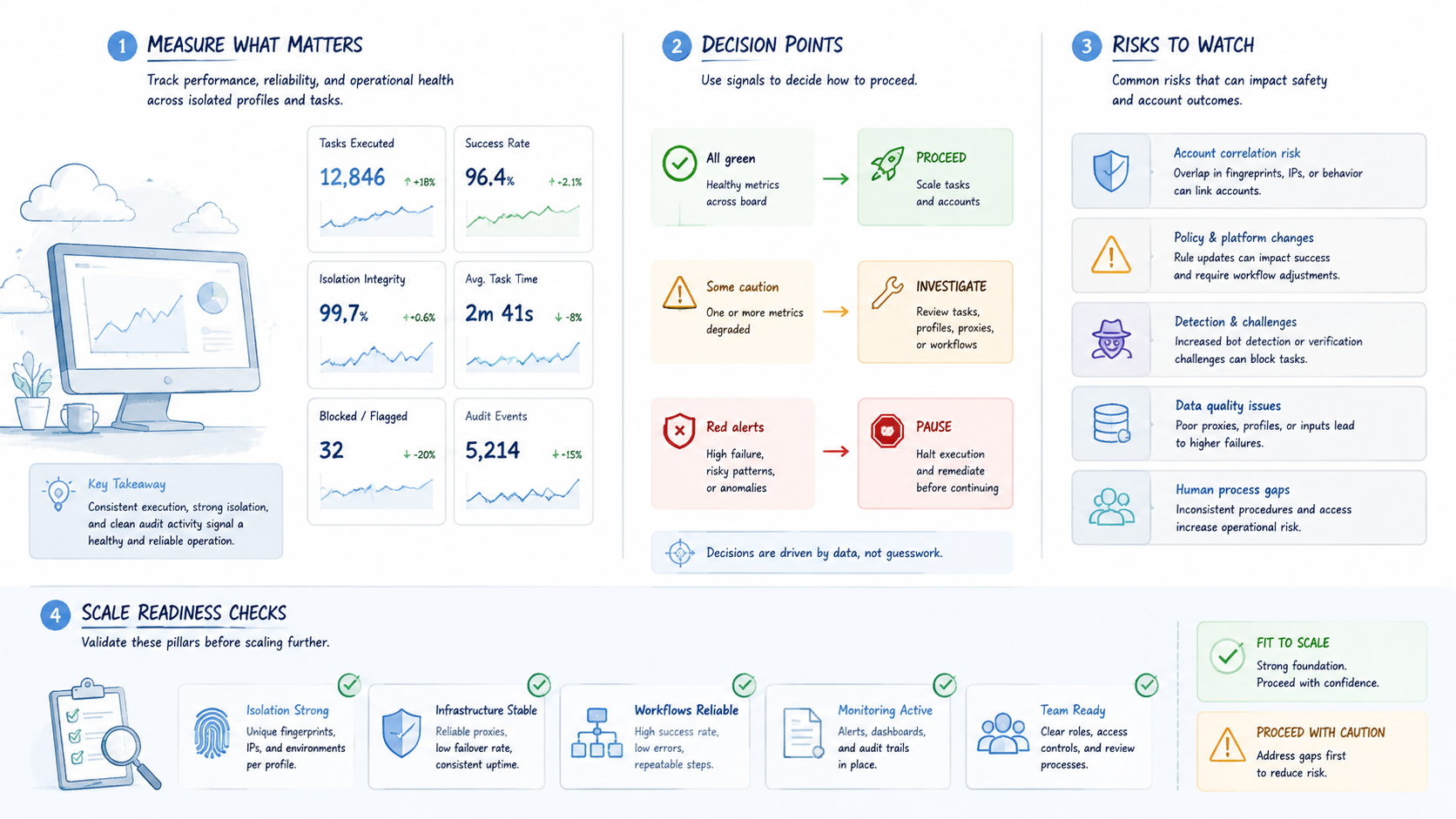
AI browser profiles work best when they are treated as operating units. Each profile should connect account identity, routing, access, task instructions, and review history.
Before scaling, choose one workflow and build a small pilot. If the team can complete tasks, explain failures, and hand off profiles cleanly, the profile model is ready for a wider rollout.



