

An AI employee platform is an execution layer where digital workers use tools, accounts, browser sessions, mobile environments, and review rules to complete real business tasks. The point is not to make a chatbot sound busy. The goal is to give AI workers a controlled place to act.
Teams search for this category when content generation and task suggestions are no longer enough. They need repeatable work done inside dashboards, forms, inboxes, mobile apps, CRM tools, marketplaces, and social platforms, with account ownership, permissions, logs, and a way to stop when the result is unclear.
That is the gap. The practical question is simple: can a digital worker move from instruction to execution without creating operational chaos? A good platform answers that with workflow boundaries, browser and mobile access, human review, and measurable outcomes.
Key Takeaways
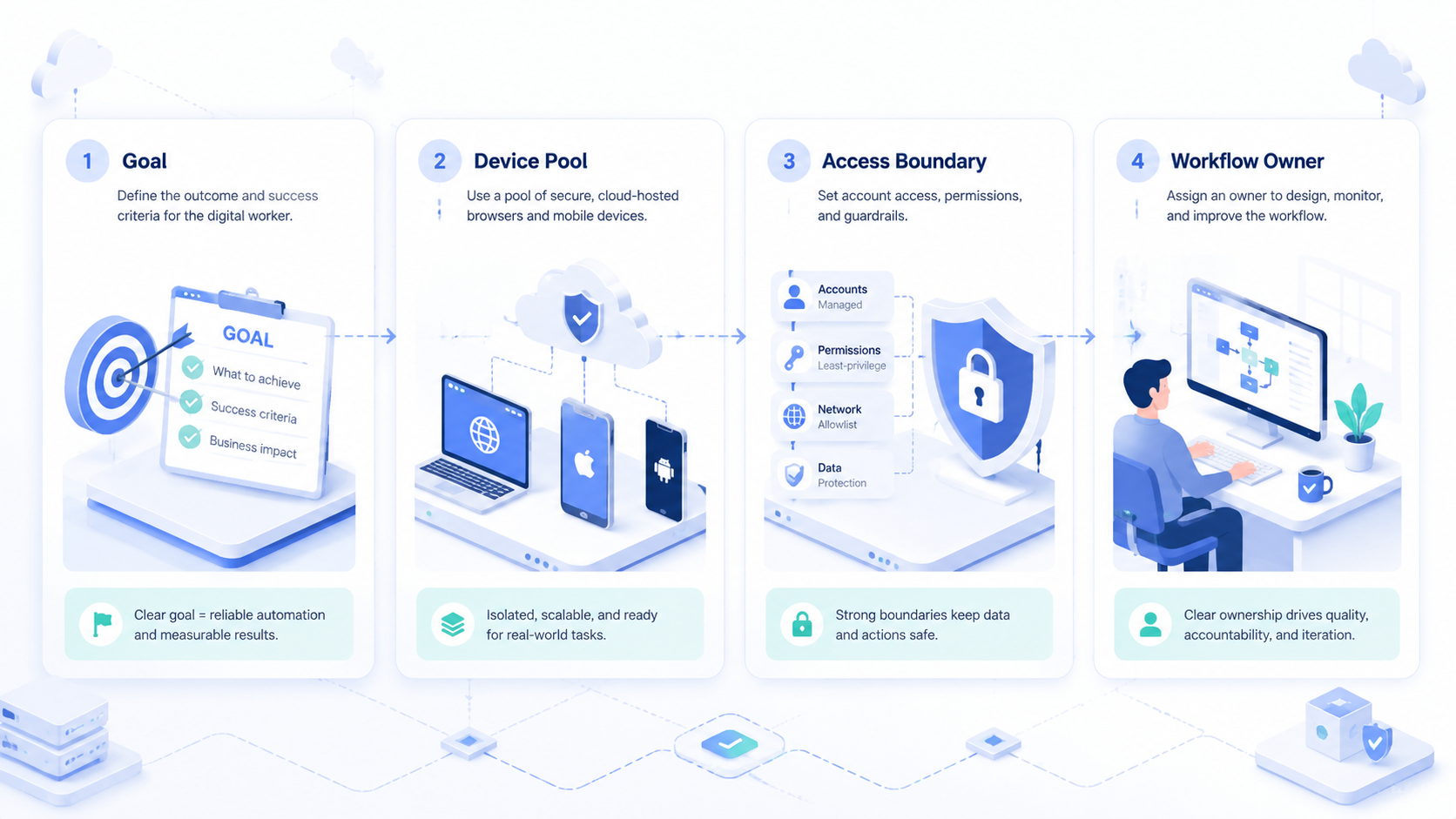
- Digital workers need controlled execution.
- Real execution needs accounts, sessions, logs, approvals, browser access, mobile environments, output destinations, and a way to pause uncertain work.
- Start narrow, measure errors, then expand.
- The best fit is repeated online work with clear inputs, expected outputs, named account owners, and a human escalation path.
What an AI employee platform actually does
The biggest misunderstanding is that digital workers are just chatbots with a job title. A chatbot can answer, draft, or reason. A digital worker must also use tools, keep state, act inside systems, and leave a record that a manager can review.
A practical workbench may include browser profiles, account credentials, task queues, mobile devices, APIs, logs, approvals, and output destinations. Without those pieces, the worker may understand the task but still fail during execution.
Think about a daily operations task. A human opens a dashboard, checks new items, copies approved data, updates a sheet, sends a note, and flags exceptions. The digital worker needs the same context: which account to use, which data is allowed, what action is blocked, and when a human should review the result.
Workflow memory is another requirement. The system should know what task ran, which account was used, what output was saved, which step failed, and who reviewed the exception. That record matters because business teams cannot manage invisible automation.
For background on building reliable AI systems, OpenAI's public agent guidance is useful for understanding tools, instructions, and oversight. Business teams still need to translate those ideas into operating rules for accounts, browsers, phones, and team ownership.
How digital workers execute real browser and mobile tasks
Execution usually moves through a chain of controlled steps. Each step should be explicit, because vague automation usually breaks at the first account, permission, or review problem.
| Execution layer | What it controls | Why it matters |
|---|---|---|
| Task queue | What work starts and when | Prevents random or duplicate runs |
| Identity | Which account or profile is used | Protects ownership and review clarity |
| Browser session | Web pages, forms, dashboards, uploads | Covers most online business workflows |
| Mobile environment | App-only steps and mobile account checks | Keeps browser work connected to phone work |
| Approval gate | Actions that need human review | Stops sensitive changes before they go live |
| Logs | Step history, result, failure reason | Makes the worker auditable |
A browser session is often the first execution layer. The worker can open pages, read tables, fill forms, collect screenshots, and move results to another system. Tools such as Playwright show how browser automation can drive pages, but an AI worker platform needs more than scripted selectors.
Mobile execution is the second layer for many teams. Social apps, marketplace tools, ad checks, app QA, and account verification may happen inside mobile environments. MoiMobi's cloud phone infrastructure is relevant when a workflow needs browser tasks and mobile app tasks under one operating model.
Digital workers should not receive unlimited access. Each one should receive a narrow work order. A good work order says where to go, what to collect, what not to change, where to save the result, and who reviews uncertain cases.
Why teams need a platform instead of loose AI agents
Loose AI agents are easy to demo. They are harder to run in a business environment. The problem is not only intelligence. The problem is control.
A team may have multiple brands, clients, regions, channels, and operators. Each may need its own account environment and review path. A digital worker that uses the wrong profile can create reporting confusion, customer friction, or account ownership problems.
This is why account isolation matters. A platform should separate browser profiles, mobile device environments, proxy routes, credentials, and logs. MoiMobi's device isolation page is a natural next step for teams evaluating how account environments stay separate.
Loose agents also make handoff difficult. If a task fails, the manager needs to know where it failed.
The handoff record should answer a few plain questions:
- Was the page different from the expected state
- Was a login or verification step required
- Did the worker lack permission
- Did the output need judgment
- Could a person continue without repeating the whole task
Use this practical test before expanding access:
- Account ownership is visible for every task
- Sensitive actions pause for review
- Changed pages or app states stop the run
- Results can be compared across runs
- A person can take over without starting from zero
If the answer is no, the team has a demo, not an operating platform.
Best-fit workflows for an AI employee platform
The best workflows are repetitive, bounded, and easy to review. They do not have to be trivial. They do need a clear definition of a good result.
Good starting workflows include dashboard checks, content queue review, lead enrichment, marketplace listing checks, support inbox triage, app QA, basic reporting, and social account monitoring. These tasks share a pattern: the worker gathers data, applies rules, prepares output, and escalates exceptions.
A growth team might use a digital worker to check campaign dashboards each morning. The run reads spend, flags unusual changes, captures screenshots, and prepares a short review note. A person still approves decisions. The time saved comes from removing tab-switching and copy work.
An operations team might use the same model for marketplace checks. The digital operator opens seller tools, reviews pending items, saves status fields, and flags anything that requires judgment. It works because the team already knows the manual process and can spot a wrong result quickly.
Mobile-heavy teams may need cloud phones or a managed device fleet. MoiMobi's mobile automation and phone farm resources fit workflows where browser work and app work need to run together.
Poor starting workflows are different. Avoid tasks where the success criteria are unclear, the worker needs broad authority, or the action affects customers without review. Begin with observation and preparation before live changes.
Fit and no-fit boundaries for digital workers
Fit boundaries keep the rollout honest. The strongest use cases are not the flashiest ones. They are the tasks where a digital worker can follow a clear route, produce a reviewable output, and stop when the state changes.
Good fit looks like this:
| Fit signal | What it means in practice |
|---|---|
| Repeated path | The task happens daily or weekly |
| Clear owner | One team owns the account and result |
| Visible output | The result can be reviewed quickly |
| Limited authority | The worker prepares or updates within rules |
| Known exceptions | The team can name what should stop the run |
No-fit cases are just as important. A digital worker should not be the first owner of a vague customer issue, a major budget change, a sensitive account appeal, or a workflow where nobody agrees on the correct human process. Those tasks may still use AI support, but they need heavier human judgment.
The boundary can change over time. A task that starts as no-fit may become fit after the team writes a runbook, defines approval rules, and collects enough failure examples. This is why the platform should support gradual permission changes instead of forcing one all-or-nothing setup.
Operating roles inside an AI employee platform
Rollout usually fails when nobody owns the system. The platform may be technical, but the operating model is a people problem first. Each role should be simple enough for a small team to apply.
| Role | Responsibility |
|---|---|
| Workflow owner | Defines the task, expected output, and stop rule |
| Account owner | Controls the profile, phone, credential, and access level |
| Reviewer | Checks sensitive results and approves exceptions |
| Operator | Watches run quality and reports recurring failure reasons |
| Admin | Maintains permissions, logs, and integration settings |
One person can hold more than one role in a small team. Name the roles before automation scales, because vague ownership turns every failure into a debate about who should fix the workflow.
Use the role map during the first pilot review. A failed run with no clear owner is not only a technical issue; it is a sign that the team needs tighter operating rules before adding more accounts or tasks.
How to evaluate an AI employee platform
Evaluation should start with operations, not feature names. A platform that looks advanced in a demo may still be hard to trust if it cannot handle accounts, review, and recovery.
Use this checklist before a pilot:
-
Define one workflow.
Pick a real task that people already repeat. Avoid choosing a task only because it looks impressive in a demo. -
Map every account.
Write down which browser profile, cloud phone, credential, proxy route, and human owner belong to the workflow. -
Set allowed actions.
Separate read-only actions from write actions. Anything that changes customer, account, payment, or publishing state should usually require review. -
Require useful logs.
The platform should show task start, account used, key steps, result saved, failure reason, and reviewer. -
Test handoff.
A person should be able to take over from a failed run without rebuilding context from memory. -
Measure quality.
Track completion rate, correction count, review time, failure reasons, and business output. Speed alone is not enough.
Security review should also be part of the evaluation. The NIST Cybersecurity Framework is not specific to AI employees, but it gives teams a useful structure for thinking about identify, protect, detect, respond, and recover.
Pilot metrics for digital worker execution
A pilot should answer whether the platform makes work more reliable. It should not only prove that the worker can finish one impressive task.
Begin with a small pass/fail scorecard:
| Metric | Example pilot rule |
|---|---|
| Completion | 80% of low-risk runs finish without manual rescue |
| Review effort | Reviewer can judge output in under 30 minutes per day |
| Corrections | Fewer than 3 manual corrections per day |
| Account control | No runs happen in the wrong profile or device |
| Escalation | Every uncertain result has a clear human owner |
These numbers are internal examples, not universal benchmarks. A support team, agency, ecommerce operator, and QA team may set different thresholds. The important part is choosing the threshold before the pilot starts.
Review failures by category:
- Page changed
- Login blocked
- Data unclear
- Account mismatch
- Output too vague
- Human approval missing
Each category points to a different fix. A changed page may need better recovery logic. An account mismatch may need stronger profile assignment. A vague output may need a tighter result format.
Do not scale until the review loop is boring. Boring means the team knows what the worker did, what it skipped, and why a person had to step in. That is when automation starts to become infrastructure.
Common mistakes that reduce results
The first mistake is automating an unclear process. If a human team cannot explain the task in plain language, the digital worker will not repair the confusion. It will only make the confusion faster.
The second mistake is giving too much access too early. Begin with read-only or draft-preparation tasks, then add write access only after the team trusts the logs, review gates, and account boundaries.
The third mistake is treating mobile work as an afterthought. Many online workflows cross between web dashboards and mobile apps, so unmanaged phone steps can leave the final output dependent on manual recovery.
The fourth mistake is measuring only time saved. Time matters, but correction rate, review effort, account errors, and missed exceptions decide whether the process is actually better.
The fifth mistake is hiding failures. A good platform should make failed runs useful. Failure logs show where the process needs better instructions, better data, or a human decision.
Frequently Asked Questions
What is an AI employee platform?
This type of platform is software infrastructure that lets digital workers execute business tasks with tools, accounts, workflows, and review controls. It is different from a chatbot because it focuses on action and operational management.
Is an AI employee platform the same as AI employee software?
They overlap, but the platform term usually implies a broader execution layer. AI employee software may describe the worker experience, while a platform should also handle accounts, permissions, logs, integrations, and recovery.
What tasks should a team automate first?
Choose repeated tasks that have clear inputs and outputs. Dashboard review, queue checks, reporting, content preparation, lead enrichment, and app QA are better first choices than high-risk live decisions.
Does a digital worker need browser access?
Most online business workflows need some browser access. The digital worker may need to read dashboards, open forms, collect data, or save results. The browser should run inside a controlled profile with clear ownership.
When does mobile execution matter?
Mobile execution matters when the workflow includes app-only tools, social accounts, marketplace apps, mobile QA, or account checks that cannot be completed in a desktop browser. A cloud phone can make those steps easier to manage.
How much human review is needed?
Review depends on the risk of the action. Read-only tasks may need light review. Publishing, account changes, customer-facing actions, payment changes, or policy-sensitive work should have stronger approval gates.
What should teams avoid during rollout?
Avoid broad access, unclear goals, missing logs, and live customer-facing changes before the pilot is stable. Keep the first workflow narrow and expand only after failures are understood.
Conclusion
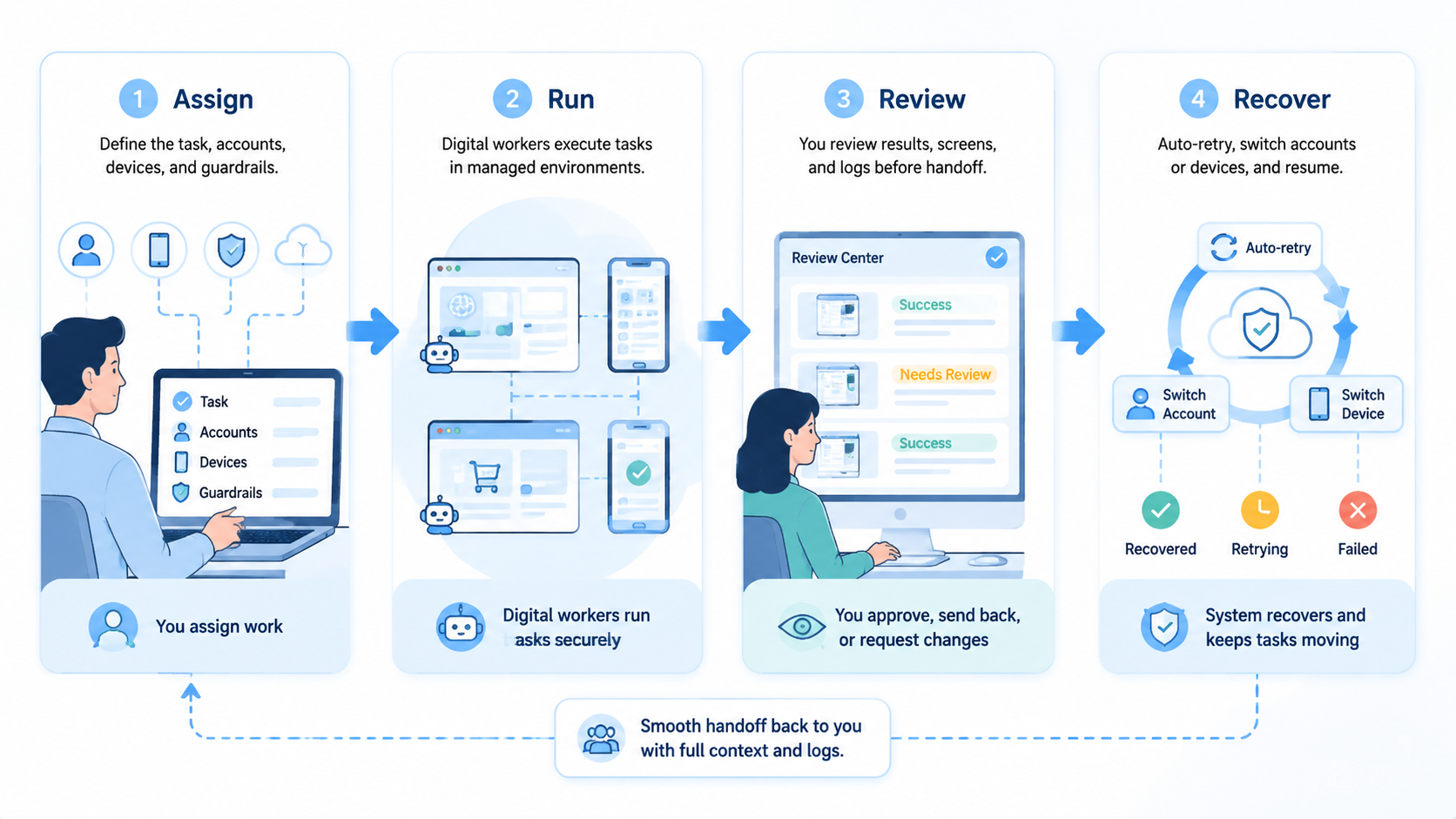
This category is useful when a team needs digital workers to execute real work under control. The value is not the job title. The value is a system that connects tasks, accounts, browsers, mobile environments, permissions, logs, and human review.
The safest path is narrow. Pick one repeated workflow, define the account and output, add review gates, and measure failure reasons. If the worker improves reliability without adding account confusion or review burden, the team can add another task.
For teams that already run browser and mobile operations, the next practical check is infrastructure fit. Map where the workflow happens today, then decide whether browser profiles, cloud phones, device isolation, and mobile automation need to work together before the AI worker can scale.



