
Key Takeaways
- AI browser automation is the use of browser-based agents, scripts, and workflow rules to handle repeatable web tasks for a team
- Time savings come from fewer handoffs, fewer copy-paste steps, faster checks, and clearer recovery after failed tasks
- Teams should start with narrow workflows such as monitoring, data entry, account checks, report pulls, or queue review
- Browser automation is not the right layer for every task; mobile app workflows may need cloud phones or device isolation
- A pilot should measure task time, error reason, review effort, and recovery time before the team scales
AI browser automation is the use of browser-based agents, scripts, and workflow rules to complete repeatable web tasks with less manual effort. It helps teams save time when the same browser actions happen many times: open a site, log in, check status, copy data, submit a form, review a queue, or pull a report.
The gain is not magic. A team saves time when routine browser work becomes a defined flow with clear inputs, known stop rules, and a record of what happened. Without that structure, an AI agent can make the same mess faster.
For operations teams, the best use case is simple. Move repeatable web steps out of private tabs and into a shared execution model. One person should not need to remember every login path, status field, spreadsheet column, or failed attempt. The workflow should carry that context.
Browser tools have a long history of automation. MDN describes WebDriver as a way to remotely control user agents: MDN WebDriver. Modern AI browser work builds on the same core idea of controlled browser actions, then adds task planning, model-driven decisions, and team-level execution rules.
The Core Idea Behind AI Browser Automation
The common myth is that AI browser automation saves time because the agent "understands the web." That is only partly true. The real time saving comes from turning repeatable tasks into a flow that can be run, checked, and improved.
Think about a weekly account review. A person may open five dashboards, check account status, copy values into a sheet, flag exceptions, and message a teammate. None of those steps is hard. The cost comes from repetition, context switching, and mistakes after the tenth account.
An AI browser workflow can reduce that cost when the task has a clear shape:
- The input is known
- The sites are known
- The action path is known
- The stop conditions are known
- The review owner is known
- The result format is known
Small rules matter. "Check the account page and summarize issues" is weak. "Open the status page, record account state, payment state, last login date, and any warning banner, then stop if a new verification step appears" is much stronger.
Playwright explains browser contexts as isolated clean-slate environments for tests, with separate storage such as cookies and local storage: Playwright browser contexts. That idea is useful for team automation too. Browser state needs a boundary. Stop there. State leakage between workflows can make the team question every result.
The agent is only one part of a wider work system with people, records, policies, and review points. Teams also need profile rules, task queues, logs, permissions, and recovery steps. Keep the frame plain. A browser agent executes work; an operations system keeps that work understandable.
Why Teams Search for This Topic
Teams search for this topic when manual browser work has become too slow to manage by memory. The first signal is repeated copy-paste work. Operators move the same fields between tools every day, then spend time checking whether the data landed in the right place.
The second signal is shift handoff pain. One operator starts a task, another person takes over, and no one knows the exact browser state.
Was the form submitted? Was the account checked? Did a warning appear? When the answer lives in a private chat, the workflow is already fragile.
The third signal is weak evidence after failure. A task fails, but the team cannot tell whether the issue came from login state, page layout, route choice, account status, or a bad instruction. Chrome DevTools Protocol documents low-level browser inspection areas such as page, runtime, and network domains: Chrome DevTools Protocol. Operations teams may not need raw protocol access, but they do need enough logs to explain failures.
Here is the practical time map:
| Manual cost | What automation can reduce | What still needs people |
|---|---|---|
| Opening the same pages | Scheduled or queued browser runs | Choosing which workflow matters |
| Copying fields | Structured extraction into a sheet or system | Reviewing odd values |
| Checking status pages | Repeatable health checks | Deciding what a warning means |
| Switching accounts | Profile and task assignment | Account policy and escalation |
| Writing updates | Standard result summaries | Client or manager judgment |
Time saved in one row is not enough. A team needs the full flow to improve. If browser work runs faster but review takes twice as long, the workflow is not finished.
Who Benefits Most and In What Situations
AI browser automation fits teams that repeat web tasks across accounts, clients, markets, or internal systems. Agencies, social teams, growth operators, QA groups, and support teams often see this pattern. The exact task changes, but the pain is similar.
A good fit has clear task lanes. The exact task changes, but the lane rule stays steady. Map one lane before adding another.
For example, one lane may check account status across client dashboards. Another lane may pull weekly metrics.
A third lane may monitor pages for change. Each lane has a start point, a normal result, a stop rule, and an owner.
This model is useful when people waste time on:
- Same-page checks across many accounts
- Routine report pulls from web dashboards
- Queue triage with clear labels
- Form fills that follow a known pattern
- Simple web research with set fields
- Account health checks before a campaign
Teams with web plus mobile work need a wider view. A browser agent can work in web dashboards, but it cannot replace native app execution. MoiMobi's mobile automation layer is a better fit when the work lives inside Android apps. A cloud phone can also serve as part of the execution layer when real mobile environments matter.
Not every team should automate early. If the task changes every day, the account policy is unclear, or no one owns review, manual cleanup comes first. Automating a poor process usually creates faster confusion.
How to Start Using AI Browser Automation
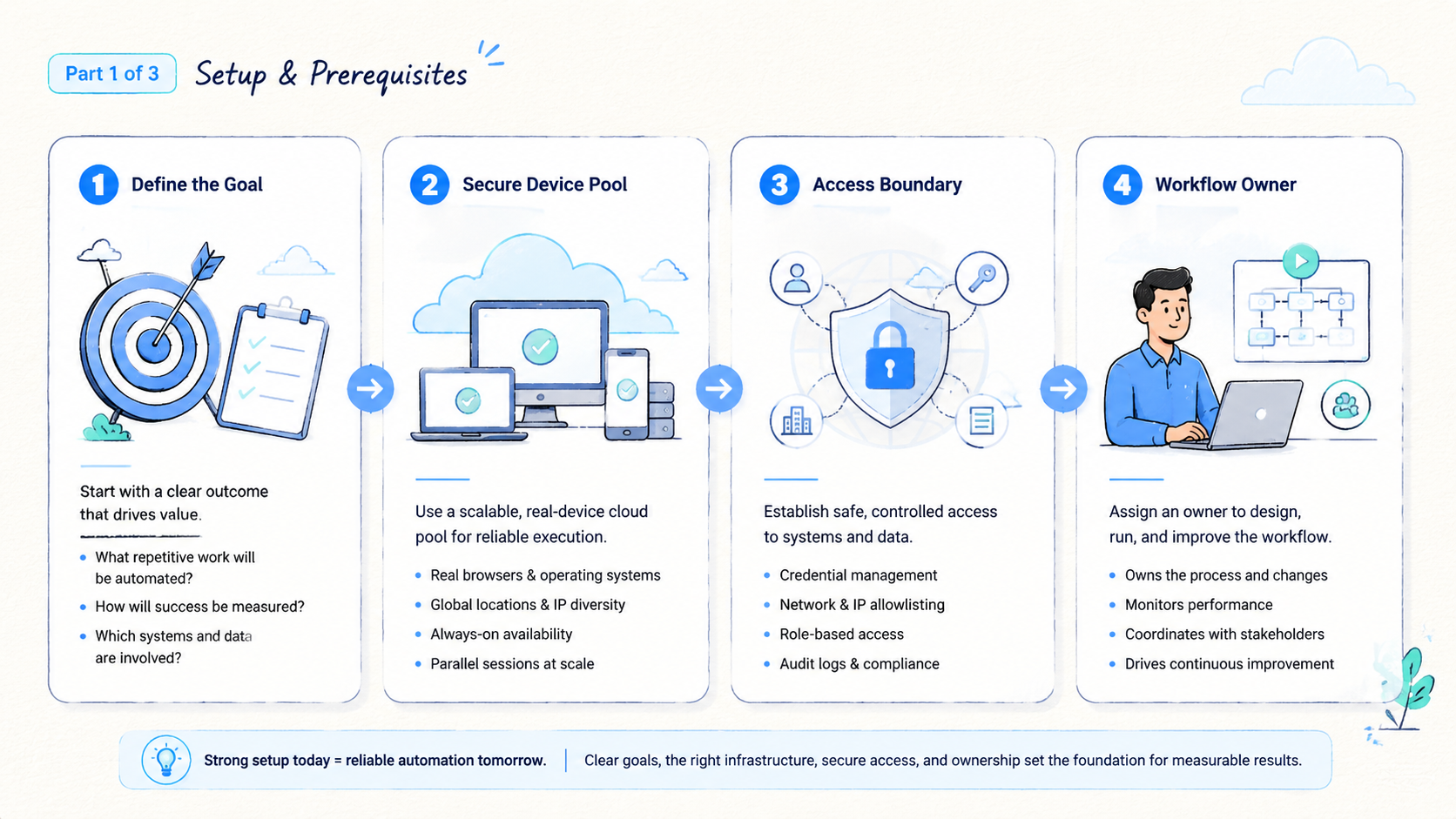
Do not start with the largest task. Start with the task that is boring, frequent, and easy to verify. This gives the team a clean test of the execution model.
- Pick one workflow: choose one task lane, such as report pull, status check, or queue review
- Write the normal path: list the exact pages, fields, buttons, and expected result
- Write the stop path: define when the agent must stop and ask for review
- Set the profile rule: decide which browser profile or account lane belongs to the task
- Set the output format: use a table, ticket, sheet row, or short status note
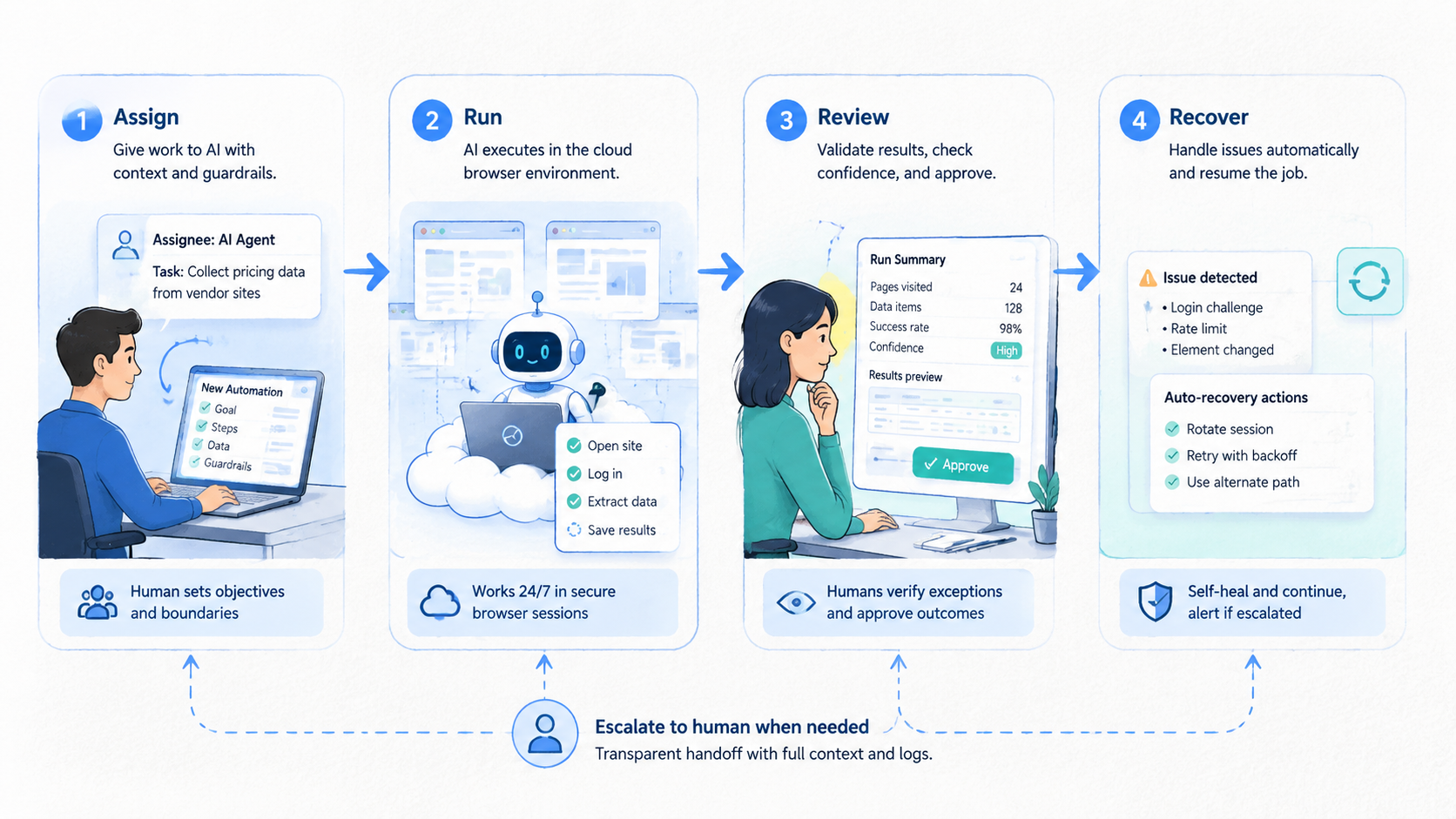
- Assign review: one person checks the first runs and labels failure reasons
- Expand slowly: add more accounts only after the first lane produces clear results
Use a field list before writing scripts:
| Field | Example |
|---|---|
| Workflow name | Weekly account status check |
| Account lane | Client A, dashboard group two |
| Input | Account URL list |
| Normal result | Status, warning, last update, next action |
| Stop rule | New login prompt, missing page, unknown warning |
| Owner | Operations lead |
| Review window | Same day before handoff |
The stop rule is the most important part. It protects the team from silent bad output. A browser agent should not guess through a new security screen, unknown payment warning, or changed workflow. Stop there.
Teams also need profile boundaries. When multiple accounts share a browser state by accident, the time saved from automation can be lost in cleanup. For account-heavy work, connect browser workflows to multi-account management rules before expanding the pool.
Fit Boundaries for AI Browser Automation?
AI browser automation is strongest for web tasks. It is weaker when the work depends on mobile app state, device identity, physical device signals, or app-specific flows. That boundary matters for teams that manage social, marketplace, or app-based operations.
Use this fit check:
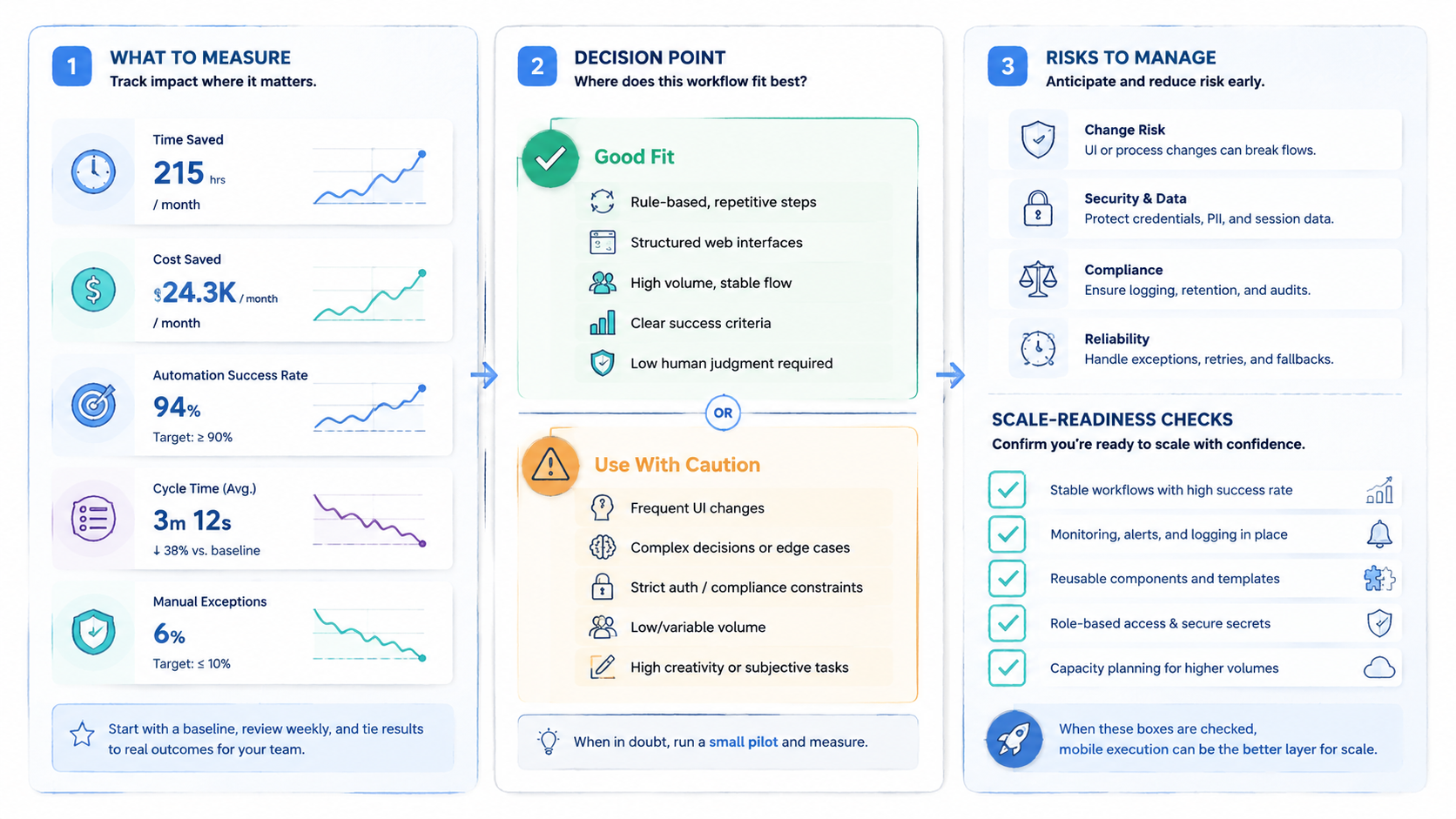
- Strong fit: web dashboard checks, account status review, form entry, data pull, report download, queue triage
- Partial fit: tasks that start in a browser but require app approval, mobile message review, or device-side confirmation
- Weak fit: native app actions, app install flows, mobile-only identity checks, device-level isolation needs
When mobile-side work is central, a browser agent may become only the front desk. It can start a task, record a result, or update a dashboard. Use that split. It should not be treated as the full execution layer.
Device isolation matters when multi-account work depends on separate device state, app behavior, and clean team handoff. Accounts that need separate device environments may need more than a browser profile. MoiMobi's device isolation layer is built for teams that need cleaner separation across mobile execution. Browser automation can still help, but it should not carry the whole risk model.
Network routing is another boundary. Stop here. A browser task may need a route that matches the account lane and team policy. Unclear route use is a stop sign.
Pause the pilot and fix the routing rule. A proxy network should be tied to account policy, not changed silently during a run.
Mistakes That Reduce AI Browser Automation Results
The first mistake is using an agent as a replacement for task design. A vague instruction may work once, but it will not support a team. The workflow needs named steps, clear fields, and a safe stop point.
The second mistake is skipping review. AI browser automation can reduce manual effort, but it still needs a human review loop for new workflows, high-value accounts, and changed screens. Review time should shrink as the workflow matures. It should not disappear before the team has evidence.
Avoid these failure modes:
- Letting an agent continue after a new login or security prompt
- Mixing accounts in one browser state without a profile rule
- Saving output without a source page or timestamp
- Scaling to more accounts before failure reasons are known
- Measuring only task speed while ignoring cleanup time
- Treating mobile app tasks as browser tasks
Google Search Central advises site owners to create helpful, reliable content rather than content made only to attract search visits: Google Search Central. The same standard works inside operations. Automate tasks because the result is clearer, faster, and easier to review, not because automation sounds modern.
Another mistake is hiding edge cases. Keep them visible. When a warning appears in three out of fifty runs, the team should see that pattern. Small signals are often the start of a better workflow rule.
Pilot Rollout, Measurement, and Recovery Checks
A pilot should answer one question: does AI browser automation reduce total team effort without making the result harder to trust? That means measuring time, quality, and recovery together.
Use four numbers:
- Task time: minutes from start to saved result
- Review time: minutes needed to confirm the output
- Error count: failures by reason, not just total failures
- Recovery time: minutes to return the account or profile to a known state
Run the pilot on one workflow for a full cycle. Weekly tasks need at least one week. Daily tasks need several days. Do not judge from one clean demo.
A simple review note works well:
- Run ID: status-check-2026-05-07
- Account lane: client A, group two
- Normal results: 42
- Stopped results: 3
- Top stop reason: new verification screen
- Review owner: Mia
- Next fix: add a stop label and owner note
That note gives the next person a path. It also shows whether the team should improve the prompt, the route rule, the browser profile, or the account process.
Recovery is the real test. When a task fails and the team can return to a known state fast, the workflow is safe enough to improve. Reduce scope if no one can explain the state. Smaller is better until evidence is clear.
Use one extra field during the first pilot: "what surprised us." It catches issues that a simple error list misses. A changed button, a slow page, a new banner, or a confusing note can all become better rules. Keep it short. One plain sentence is enough.
Frequently Asked Questions
Short answers first.
What is AI browser automation?
It is the use of AI-driven agents or scripts to run repeatable tasks in a browser. The team defines the workflow, profile, stop rule, and output format.
Which tasks should teams automate first?
Use a narrow test.
Start with frequent tasks that have a clear path and easy review. Status checks, report pulls, queue review, and structured form entry are better first pilots than complex judgment tasks because the result is easy to verify.
Does it remove the need for operators?
Keep people in charge.
No. Operators still choose workflows, review exceptions, manage policy, and handle edge cases because those calls affect clients, accounts, and policy. Good automation removes repeated clicks, not team judgment.
How does it differ from normal browser scripting?
That split matters in pilots.
Traditional scripts follow fixed steps, while AI browser automation may add model-driven interpretation, summaries, or recovery suggestions. Guardrails still matter.
When should a browser agent stop?
Stop early.
It should stop when it sees a new login prompt, unknown warning, missing page, changed field, or action that affects a high-value account. Stop rules are part of safe design.
Can it work with multi-account operations?
Only with lanes.
Yes, when each account lane has a clear profile, route, owner, and review rule. Weak lane rules can make account confusion worse.
What should a pilot measure?
Measure the whole loop.
Measure task time, review time, error reason, and recovery time across the whole task loop, not just the browser run. These numbers show whether automation saves real team effort.
When is mobile execution a better fit?
Use mobile execution when the work happens in native Android apps, needs device-level state, or depends on app-side identity and interaction. Browser automation can support the workflow, but it is not the full layer.
Conclusion
AI browser automation helps teams save time when repetitive web work becomes a controlled workflow. The savings come from fewer manual steps, clearer handoff, faster checks, and better recovery after failed runs. The agent matters, but the operating model matters more.
Start with one repeatable task. Define the profile, inputs, normal path, stop rule, output, owner, and review window. Run a small pilot, measure total effort, and fix the weak point before adding more accounts or more tasks. When the workflow crosses into mobile apps or device-level work, pair the browser layer with mobile execution infrastructure instead of forcing one tool to do every job.



