
Here is the practical operating model.
An AI browser and cloud phone platform is execution infrastructure for teams that need web and mobile tasks to run through controlled browser sessions, cloud Android devices, reusable workflows, and human review. It is not just a remote phone rental tool. It is the operating layer that connects accounts, devices, content, proxies, task instructions, logs, and recovery steps.
Online operations are no longer limited to one person clicking through one browser. A team may need to research social posts, prepare content, route assets to several accounts, inspect mobile app results, and keep the final action under review. A cloud phone layer gives the team a real mobile execution surface, while the AI browser layer handles web workflows, pages, and account-side research.
The decision is practical. Teams need to know which account is acting, which device is used, which content file is assigned, which workflow ran, and where a failed task should be recovered. A good platform makes those questions visible before automation becomes hard to audit.
Key Takeaways
- Device capacity is only one layer.
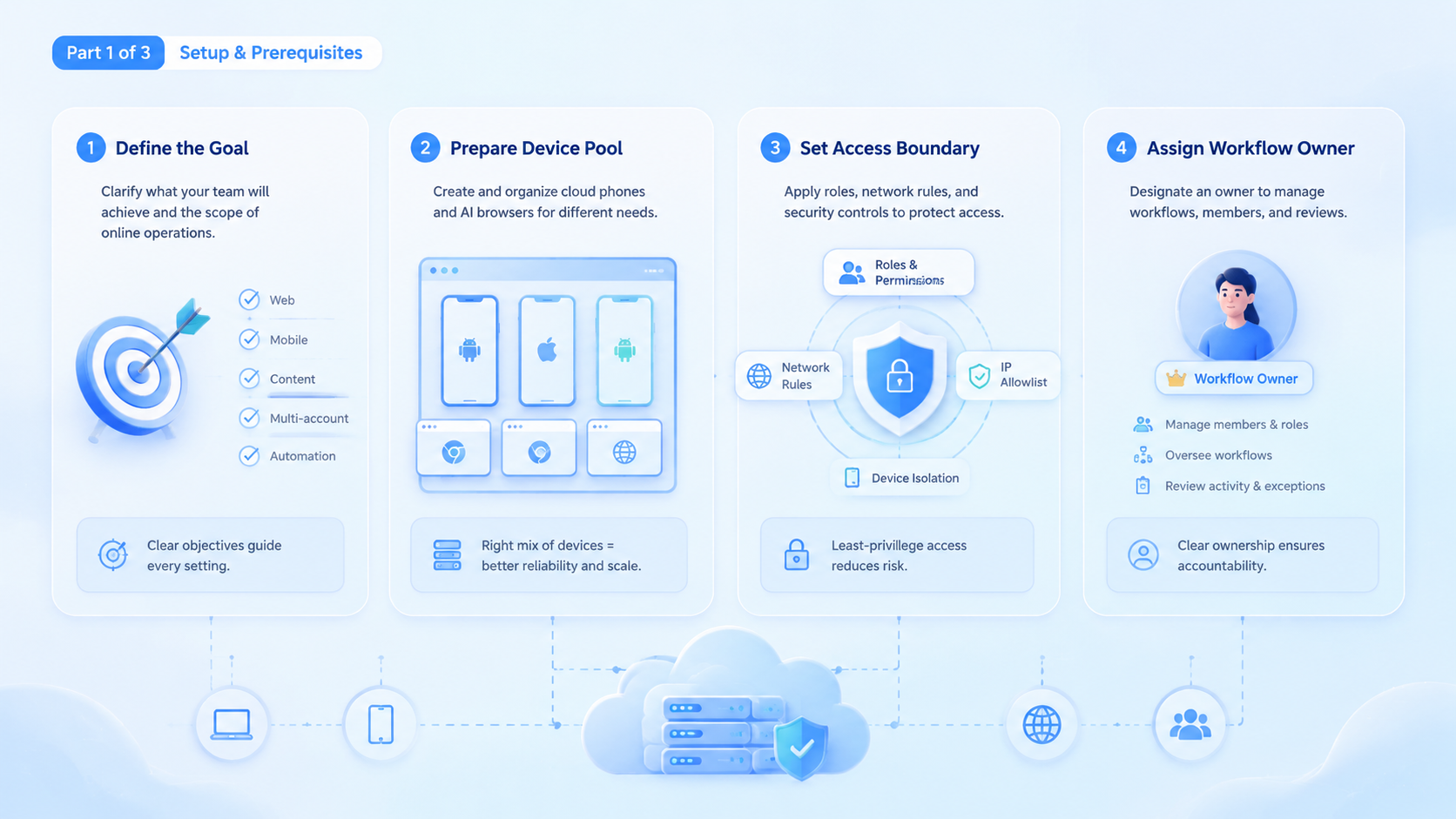
- Teams should separate global content assets, account workspaces, publish tasks, execution cache, review ownership, and recovery notes before scaling automation across accounts.
- Device isolation and proxy consistency matter.
- A pilot should measure completion rate, recovery time, handoff clarity, account-context accuracy, duplicate uploads, and recovery ownership instead of reporting only task volume.
- MoiMobi fits teams that need browser and mobile execution with reusable operating rules.
The Core Idea Behind a Cloud Phone Platform for Online Operations
A cloud phone platform gives teams remote Android execution capacity. The AI browser gives teams a controlled web execution surface. The useful model is to treat both as execution targets inside one operating system.
That matters because real online work moves between web and mobile. A social media team may find a signal in a browser, prepare content in a workspace, move a video to a mobile device, and review the post inside an app. A marketplace team may research competitor listings on the web, then verify mobile app behavior through a phone session.
The platform should make this flow inspectable:
| Layer | What It Handles | Why It Matters |
|---|---|---|
| AI browser | Web pages, browser sessions, form work, research, web account context | Keeps browser work controlled and observable |
| Cloud phone | Android app sessions, mobile upload paths, app-side review | Gives mobile workflows a dedicated device surface |
| Content library | Reusable videos, documents, tags, product files, drafts | Prevents repeated file copying across accounts |
| Publish task | Assignment from asset to account or workspace | Shows who should use what content |
| Execution cache | Prepared local path or pushed mobile file path | Keeps runtime files separate from source assets |
This split avoids a common mistake. Teams often treat automation as one giant script. That works until account context, device state, or content assignment becomes unclear.
Separation is the control layer. It keeps a content decision, an account decision, and a device decision from collapsing into one opaque automation run.
MoiMobi should be evaluated as execution infrastructure, not a single feature. The cloud phone product is one layer. The broader value comes from connecting it with account routing, task planning, content reuse, mobile automation, and review.
For SEO and public content workflows, the same principle applies. Google's guidance on helpful content emphasizes creating content for people, not search engines alone. Teams using AI execution should keep review, accuracy, and usefulness in the workflow, rather than pushing generated output directly to accounts without checks. See Google Search Central for that baseline.
Why Teams Search for AI Browser and Cloud Phone Platforms
Teams search for this topic when manual operations stop scaling. The issue is rarely one missing device. The deeper problem is that web tasks, app tasks, content files, and account ownership live in different places.
A small team can work from local folders and browser profiles. A larger team needs clearer boundaries. Messy folders do not scale.
Public assets should not be copied into every workspace by hand. Account-specific drafts should not be mixed into a global library. Mobile app execution should not depend on a person remembering which phone received which file.
This is where process breaks.
Three signals usually appear together:
- Parallel capacity: several accounts, devices, regions, campaigns, or client queues need work at the same time without losing context.
- Reusable workflow structure: the team wants repeatable steps.
- Visible recovery: failed tasks need an owner, a log, a reason, and a next action before the next run begins.
The browser side handles research, web login context, page navigation, account checks, and web publishing preparation. A cloud phone handles Android-side work such as mobile app review, media upload, app-based posting, and mobile session inspection.
The bridge between them is the task record. A task should say what content is assigned, which account owns the action, what device or browser should run, and whether the output has been reviewed. Without that record, automation can increase volume while reducing control.
This is where mobile automation becomes operational rather than flashy. The goal is not to click faster for its own sake. The goal is to make a repeatable task safe enough for a team to run, pause, inspect, and recover.
Who Benefits Most and In What Situations
The strongest fit is a team with both web and mobile work. If the workflow lives only in a single web app, a browser automation tool may be enough. If the workflow lives only in a single mobile app, a phone farm may be enough. The combined platform becomes valuable when the task crosses both surfaces.
Good-fit teams usually have these traits:
- They manage several accounts, brands, creators, stores, regions, client workspaces, or app-side operating contexts.
- They reuse media.
- They need mobile app execution, not only desktop web access.
- They require operators to review results before public action and keep review state visible.
- They want task status, ownership, recovery logs, runtime files, and device records in one operating trail.
Agencies are a common example. A team may prepare short videos once and assign them to specific client accounts. The platform can push files to mobile devices only when needed, while the posting action stays tied to the correct account workspace.
Growth teams can use a similar pattern. Web research can identify posts, leads, or creative angles. The mobile side can verify app experiences, inspect account state, or support social media workflows.
Approval stays separate.
The fit is weaker for one-off personal browsing. It is also weaker when a team wants automation without account discipline. A cloud phone platform can provide capacity and isolation, but it does not replace operating rules.
That boundary matters. Capacity helps only after the team knows which account, asset, device, and reviewer belong to the task.
- Multi-account social media operations
- Mobile app workflows with reusable content
- Teams that need browser and Android execution
- Workflows with review, logs, and recovery owners
- Single-user manual browsing
- One-time testing with no repeat workflow
- Public actions with no approval gate
- Teams that cannot define account ownership
How to Evaluate a Cloud Phone Platform Before Rollout
Start with the operating model, not the device count. A large pool of devices is only useful when the team can route work to the right account, prepare files cleanly, and understand failures.
Use these checkpoints before committing:
Checkpoint 1: Account identity is clear. Each browser environment or cloud phone should map to an account or operating context. The team should know which workspace stores drafts, logs, and private assets.
Checkpoint 2: Content is not duplicated blindly. A useful content library stores the source asset once. Assignments should record which account can use the asset. Execution should prepare a local path or device file path only when the task runs.
Checkpoint 3: Mobile files have a runtime path. Cloud Android execution needs a device-side file location when media must be uploaded. The platform should separate the source asset from the pushed runtime file.
Check this early.
Checkpoint 4: Proxy and region signals are consistent. Browser environments need clean proxy, IP, timezone, language, and WebRTC handling. A proxy network should support the operating context instead of being treated as an afterthought.
Region drift is expensive.
Checkpoint 5: Review is part of the workflow. AI can prepare drafts and summaries. Operators should still review account-specific actions, especially when the task touches public content, messaging, or profile state.
Checkpoint 6: Failures have owners. A failed task should not disappear into a generic error. The record should show whether the failure came from the device, proxy, file preparation, account state, selector, workflow step, or review rule.
This checklist is more useful than a feature list. It tests whether the platform can carry operational responsibility.
A tool that only launches devices may still leave the team with manual routing, unclear file copies, and poor recovery. The better tool makes each handoff visible before the workflow reaches an account.
Common Mistakes That Reduce Results
The first mistake is treating a cloud phone platform as a shortcut around process. More devices do not create better operations when account ownership, file routing, and review are unclear.
The second mistake is mixing global assets with account-specific work. A global content library should hold reusable source files, while an account workspace should hold private drafts, history, learning notes, and account-specific outputs.
The publish task connects the two.
Keep that line visible.
The third mistake is pushing AI output directly into public actions. AI can summarize, generate drafts, select next steps, prepare a task, and hand it to a reviewer with enough context to judge it. Public posting, messaging, and account changes should stay behind review until the workflow is proven.
The fourth mistake is ignoring device isolation. Browser profiles, cloud phones, proxies, and account sessions need a consistent boundary.
Device isolation helps teams keep execution contexts separated, but it still needs operating rules that decide who may use each account lane.
The fifth mistake is measuring only volume. A team may complete more tasks while increasing rework. Better measurements include completion rate, task recovery time, file assignment accuracy, review turnaround, and account-context errors.
Do not evaluate the platform by asking, "Can it automate this click?" Ask a harder question: "Can the team run this workflow repeatedly and understand what happened when it fails?"
That second question is the real test. It forces the buyer to examine observability, not only speed.
Pilot Rollout, Measurement, and Recovery Checks
A safe pilot should start with one workflow, a small account group, and one clear success measure. The first pilot should not automate every possible action. It should prove that the operating model works.
Choose a task that crosses browser and mobile execution. One pilot can collect source material in a browser, assign a video asset to three accounts, and prepare device file paths. The mobile step can inspect the app result, while human approval stays before posting.
Track these fields from day one:
| Field | Why It Matters |
|---|---|
| Account owner | Shows who is responsible for the action |
| Asset ID | Connects the source file to the task |
| Workspace ID | Keeps account-specific context separated |
| Runtime file path | Shows where the browser or cloud phone used the file |
| Device or browser ID | Identifies the execution surface |
| Review status | Prevents silent public action |
| Failure reason | Speeds up recovery |
The pilot should also include stop rules:
- Pause if the wrong account receives content.
- Pause if a task cannot show which device acted.
- Pause if review status is missing.
- Pause if operators cannot recover a failed item without asking the original creator.
Add a simple scorecard before expanding the workflow.
| Metric | Healthy Signal | Review Action |
|---|---|---|
| Asset assignment accuracy | Each task points to the intended source file | Audit duplicate uploads and wrong workspace links |
| Device readiness | Target cloud phones are online before runtime | Separate device failure from workflow failure |
| Review latency | Operators can approve or reject without hunting for context | Improve task notes and preview fields |
| Recovery time | Failed items have a clear owner and reason | Add missing error categories or handoff rules |
This scorecard keeps the pilot tied to operational quality. It also gives managers a cleaner reason to expand, pause, or redesign the workflow.
After one week or one campaign cycle, review the numbers. Compare planned tasks, completed tasks, manual recoveries, duplicate uploads, and review delays.
The best sign is not only higher throughput. The better sign is that the team can explain each task's path from asset to account to execution result.
For teams with social media workflows, multi-account management should be evaluated alongside the execution layer. The platform is strongest when routing, device context, and review are designed together.
Now answer the buying questions.
Frequently Asked Questions
What is a cloud phone platform?
A cloud phone platform provides remote Android device capacity for app-based workflows. In an AI operations stack, it should connect with browser sessions, task records, file preparation, and review.
The practical test is simple: the team should know which account owns the task, which device ran it, and which reviewer approved the result.
How is it different from a phone farm?
A phone farm focuses on device capacity. A cloud phone platform for operations should also handle routing, account context, workflow state, content preparation, and recovery.
That extra operating layer matters when a team runs repeatable tasks across many accounts instead of testing one phone manually.
Does an AI browser replace cloud phones?
No. AI browser workflows handle web pages and browser sessions. Cloud phones handle mobile app execution. Teams often need both when workflows cross web and Android surfaces.
For example, research may start in a browser, while final app-side verification happens inside a cloud Android session.
What should a team test first?
Test a workflow that includes content assignment, browser-side preparation, mobile-side inspection, and human approval. Avoid starting with high-volume public actions.
A slower pilot with clear records is easier to scale than a fast pilot that hides account or device context.
How many internal workflows should a pilot include?
One is enough for the first pilot. A narrow workflow makes failures easier to understand. Expand only after routing, logs, and review are stable.
The second workflow should reuse the same ownership model, otherwise the team is testing a new process rather than scaling the first one.
What role does content management play?
Content management prevents repeated uploads and unclear ownership. The better model stores one source asset, assigns it to accounts, then prepares runtime files only when needed.
This mirrors how operators already think: one approved asset, several account assignments, and separate runtime copies only when execution starts.
Is this useful for social media teams?
Yes, when the team manages multiple accounts, assets, and publishing paths. A platform should support social media marketing with review and account separation, not uncontrolled posting.
The right setup gives social teams a queue, device context, and review point instead of a loose folder of files and passwords.
What external rules should teams keep in mind?
Teams should follow each platform's own policies and keep quality review in place. For content quality, Google's SEO Starter Guide is a useful public reference for helpful, user-focused publishing.
Platform rules change, so the workflow should preserve human judgment and audit trails instead of turning policy-sensitive actions into blind automation.
Conclusion
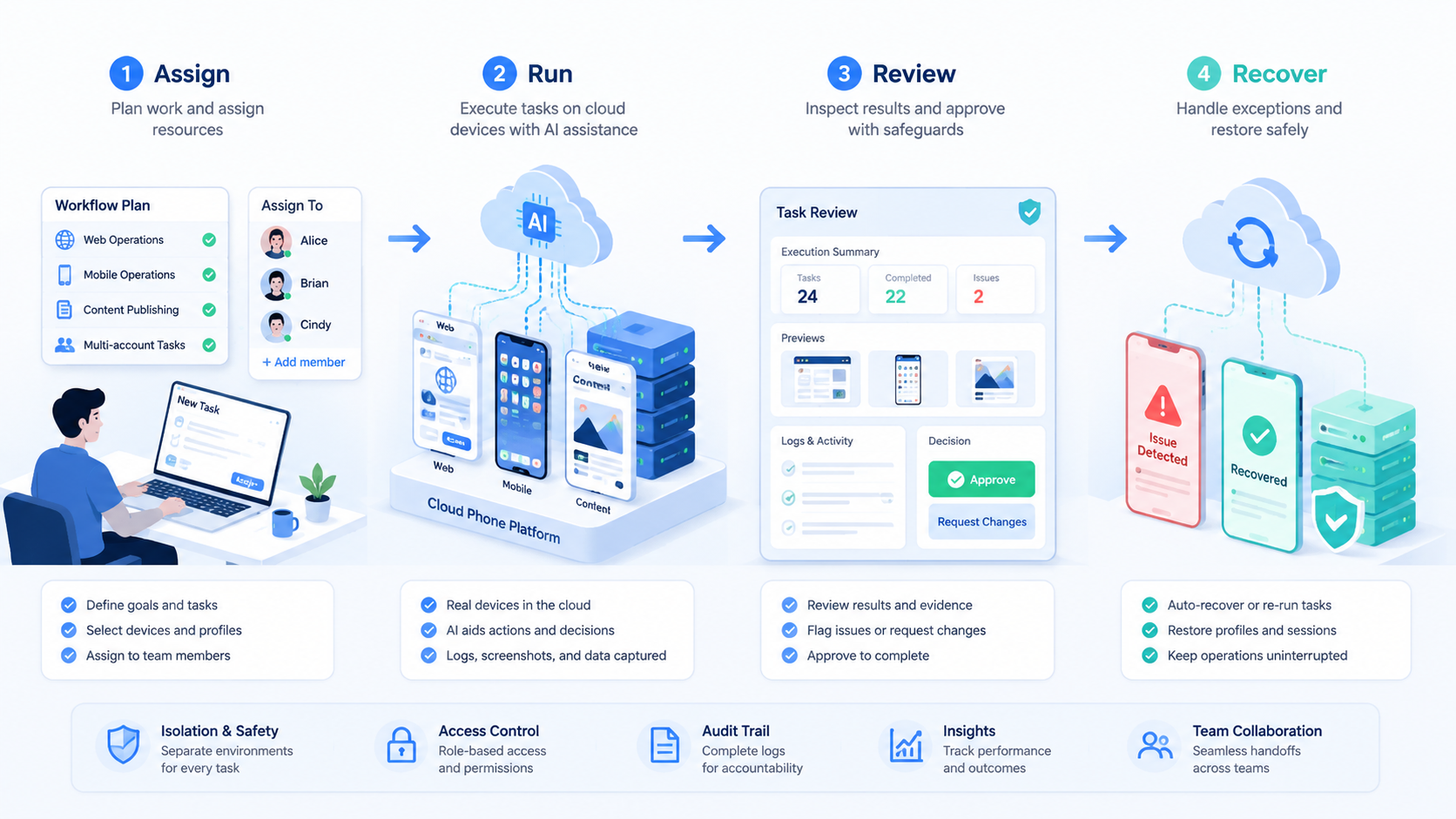
An AI browser and cloud phone platform for online operations is most useful when it becomes a controlled execution layer. The value is not only remote devices. The value is the connection between accounts, content, workflows, browser sessions, cloud Android devices, logs, and review.
Teams should start with one workflow that needs both browser and mobile execution. Map the source asset, account owner, workspace, device, review step, and recovery path. Then measure completion rate, recovery time, and account-context accuracy before expanding.
The practical next step is simple: choose one repeated task, define the account and content boundaries, and test whether the platform can show every step from preparation to review.



