

An AI browser agent helps a team run controlled online tasks through a web browser. It reads pages, follows instructions, uses approved tools, records evidence, and stops when the workflow reaches a defined boundary.
Online operations rarely stay simple for long. A task may start in a dashboard, move through a form, require a customer record, and end with a mobile app check. Web execution can handle the browser portion, but the team still needs rules for access, review, and recovery.
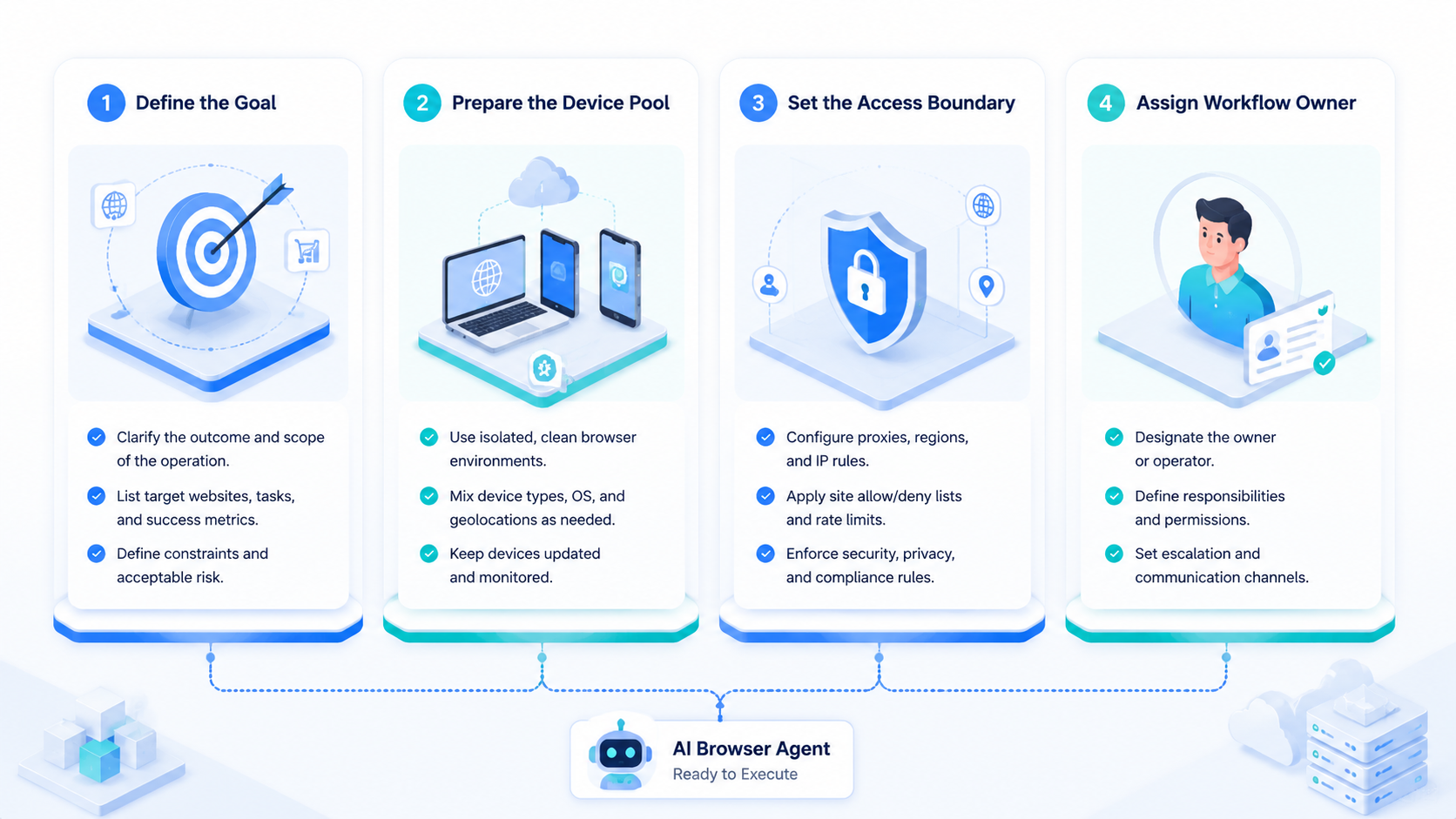
The useful model is not "let AI browse anything." It is narrower. Give the agent one job, one tool scope, one evidence standard, and one stop rule. Then inspect the result before expanding the workflow.
This guide explains where an AI browser agent fits, where it does not fit, and how operations teams can pilot it without losing control of accounts, data, or review quality.
Key Takeaways
- Browser agents turn web tasks into controlled execution runs
- Good systems define tool scope, account boundaries, review gates, and logs
- Mobile handoff matters when the final state lives in an app or cloud phone
- The first pilot should be narrow, measurable, and easy to stop
- Scale only after failures can be diagnosed from the run record
What an AI Browser Agent Does in Online Operations
The run happens inside a browser session. It can open approved pages, read visible information, click page elements, enter form data, collect evidence, and summarize the result. This browser becomes the work surface.
The platform around the run is just as important. It should hold the task definition, permissions, inputs, review rules, and final status. Without that layer, the agent becomes a clever user of a browser, not an operations system.
Browser automation has a technical base. Projects such as Playwright show how modern browser control can handle page actions, selectors, and test flows. The agent layer adds decision logic on top of that control layer. That extra judgment creates both value and risk.
Use browser agents for work with a known goal. Examples include checking records, filling routine forms, reviewing page states, collecting structured evidence, comparing dashboard values, or preparing a task for human approval. Keep final approval with people when the task affects customers, money, public content, or account settings.
Where an AI Browser Agent Fits Best
The strongest fit is repeatable work with variable screens. A fixed script may break when a page changes slightly. A person can adapt, but the person may lose time on low-value steps.
That gap matters. This browser agent model sits between those two models.
| Workflow | Agent role | Human role | Stop point |
|---|---|---|---|
| Dashboard review | Open records and collect fields | Approve exception handling | Missing or conflicting data |
| Account setup check | Verify required fields | Confirm sensitive changes | Unexpected prompt or policy screen |
| Campaign QA | Check links and visible states | Approve launch decision | Broken mobile path |
| Support triage | Gather status and evidence | Send customer-facing reply | Ambiguous account issue |
Teams that manage several accounts need extra care. MoiMobi's multi-account management context is relevant because account boundaries affect tool access, device assignment, and reviewer responsibility.
This model fits less well when the task has no stable goal. Open-ended judgment, policy interpretation, legal review, and high-impact customer decisions should stay with people. A browser run can gather facts and prepare the workspace.
Keep that boundary. It should not own the final call.
Browser Work, Mobile Handoff, and Cloud Phones
Browser work often needs a mobile finish. A web dashboard may show that a task is complete, while the mobile app shows the customer-facing state. Check the app. Ecommerce, social media, support, and mobile QA teams hit this gap often.
A cloud phone gives the workflow a remote Android environment for app checks. The operator can use the browser for admin work, then verify the mobile state through a controlled device. The handoff should be visible in one run record. Do not guess.
Mobile handoff changes the evaluation. The team needs to know which browser run triggered the app check, which device was used, which account was assigned, and which reviewer accepted the result. Otherwise, the mobile step becomes a screenshot hunt.
For repeated mobile tasks, mobile automation can help turn app checks into assigned runs. The agent does not need to do everything. A cleaner pattern splits the job: browser agent for web actions, mobile environment for app verification, human reviewer for sensitive decisions.
Keep the first bridge simple: one browser task, one cloud phone, one app path, and one owner. A small path with good evidence teaches more than a broad demo with unclear failures. Small wins count.
Control Rules for an AI Browser Agent
Control starts before the first run. The team should decide what the agent can see, what it can change, when it must stop, and who reviews the output. These are operating rules, not optional settings. Write them down.
OWASP's LLM Top 10 is useful because browser agents can be influenced by prompts, pages, tools, and external content. A web page is not always a neutral source. A task rule should tell the agent how to handle unexpected instructions.
Use these controls first.
- Scope the URLs and tools the agent may use
- Limit account access to the task owner or workflow group
- Require review for irreversible actions
- Capture screenshots and step logs
- Stop on unexpected prompts, payment screens, or policy warnings
- Label each failure with a reason, not a vague error
Good control
- The agent has a narrow task
- The reviewer sees the evidence
- Failures have clear labels
- Account access matches the workflow
Poor control
- The agent can browse any tool
- Review happens after live changes
- Errors are explained in chat only
- One credential powers unrelated tasks
The NIST AI Risk Management Framework frames AI risk as something teams should govern, map, measure, and manage. In browser operations, that means logs and review policy belong beside execution. Keep policy near work.
They should not live only in a separate document. That placement makes policy visible while the browser task is still running, not after a reviewer reconstructs the run from chat.
How to Pilot an AI Browser Agent
Choose a task that already has a manual checklist. A good pilot is boring enough to repeat and valuable enough to measure. Avoid the broad goal of "make the agent operate our tools."
Start with one input. Use one approved account, one browser path, one expected result, and one reviewer. Stay narrow.
Add a mobile handoff only if the task truly needs app verification. Then measure.
Define pass and fail states. A pass may mean the agent collected the right fields and prepared a review note. A fail may mean the page changed, the account expired, the data did not match, or the mobile state could not be verified.
Measure the run.
| Metric | What to record | Action after review |
|---|---|---|
| Completion | Finished, stopped, or escalated | Expand only after repeated clean runs |
| Exception quality | Reason for each stop | Add rules for repeated failures |
| Review time | Minutes spent approving output | Improve evidence if review is slow |
| Recovery | Steps needed to restart | Fix the runbook before scaling |
Do not hide failed runs. They show where the agent needs structure. A pilot with clear failures is more useful than a demo that only shows a successful path. Failures teach.
Common Mistakes to Avoid
The first mistake is giving the agent too much freedom. Broad access makes errors harder to contain and harder to explain. Containment matters.
Narrow access may feel slower at first, but it creates cleaner learning. Move slowly.
Another mistake is treating browser completion as business completion. A web form may finish, yet the mobile app may still show the wrong state. If the user experience is mobile, the run needs mobile proof.
Evidence design gets skipped too. A final summary is not enough when reviewers must approve real work from logs, screenshots, input values, and stop reasons. Evidence should map to the actual task, not to a loose folder.
Account boundaries need early design. Device isolation can support teams that separate accounts, devices, and mobile states. The account map should name the user role, device, mobile environment, routing rule, reviewer, and stop point before the workflow starts. Policy still matters, and platform rules still apply.
Scaling before review is ready creates quiet failure. More runs create more exceptions. If one reviewer cannot understand ten failures quickly, the workflow is not ready for a larger pool.
AI Browser Agent Operating Checklist
Use a checklist before the second pilot run. The first run shows whether the task is possible. The second run should show whether the team can repeat it with less explanation.
| Check | Pass condition | Fix when it fails |
|---|---|---|
| Task scope | One named workflow has one expected output | Split the job into smaller runs |
| Tool access | The agent can use only approved pages and accounts | Remove broad credentials |
| Evidence | Screenshots and logs map to each step | Add capture points before review |
| Mobile handoff | The device, app, and account are named | Assign a cloud phone before scale |
| Review gate | Sensitive steps pause before action | Move approval earlier in the run |
| Recovery | The stop reason tells the operator what to do next | Replace vague errors with labels |
The checklist also protects the team from false progress. A run can look successful because the agent reached the final screen. That does not mean the evidence is complete, the account boundary is clean, or the reviewer can trust the output.
Add one simple rule after each review. Keep the rule short enough for an operator to follow. For example, "stop when a payment page appears" is clearer than a broad warning about risk. Clear rules compound faster than long policy text.
When a run fails, do not ask only whether the agent was wrong. Ask whether the task was too broad, the page changed, the credential expired, the mobile state was missing, or the review point came too late. Each answer leads to a different fix.
Use a second table for team ownership. Most failed pilots do not fail because the browser cannot click. They fail because no one owns the next action.
| Owner | Decision they own | Evidence they need | Stop rule |
|---|---|---|---|
| Operator | Whether the run followed the SOP | Step log and visible page state | Stop when the page leaves scope |
| Reviewer | Whether the result can be approved | Screenshots, values, and change notes | Stop when evidence is missing |
| Account lead | Whether the right account was used | Device, profile, and account mapping | Stop when ownership is unclear |
| Automation lead | Whether the workflow should expand | Exception trend and recovery notes | Stop when failures repeat |
| Manager | Whether the process saves time | Review time and rework count | Stop when handoff gets worse |
Add roles before volume. A small team can combine roles, but the decisions still need names. Without names, each failed run turns into a meeting.
Use a decision matrix when stakeholders ask whether the agent is ready for broader work.
| Readiness area | Green signal | Yellow signal | Red signal |
|---|---|---|---|
| Scope | One repeatable task with clear pages, inputs, outputs, and stop rules | Task is known but exceptions are not grouped | Task changes each run and no owner can define done |
| Access | Approved accounts, tools, devices, and data fields are mapped before launch | Access is mostly known but reviewer roles are still vague | One shared credential can reach unrelated systems |
| Evidence | Each step has logs, screenshots, values, and final status in the run record | Screenshots exist but do not map cleanly to decisions | Reviewers need chat history to understand the result |
| Mobile handoff | Cloud phone, app state, account, and reviewer are linked to the browser run | Mobile check exists but ownership is manual | App verification happens outside the workflow |
| Recovery | The team can restart from a named failure reason | Operators know the fix but it is not written down | Every stop becomes a custom investigation |
| Scale | Review time drops as runs repeat | Completion improves but review time stays flat | More runs create more unclear exceptions |
This matrix gives managers a simple gate. Green signals mean the team can add a small amount of volume. Yellow signals mean the pilot needs repair.
Red signals mean the task is not ready for wider automation. Treat the colors as a release gate, not as a decorative report, because each color should change the next operational decision.
Frequently Asked Questions
What is an AI browser agent?
A browser agent is software that uses a browser to complete controlled web tasks. It reads pages, chooses actions within rules, records evidence, and returns a result for review. Use that narrow meaning.
How is it different from browser automation?
Browser automation may follow a fixed script. This agent type can adapt to page content and task context. That flexibility requires stronger permissions and review gates.
Can an AI browser agent operate mobile apps?
Not directly through the browser. It needs a mobile environment, such as a cloud phone, when the workflow requires app state, mobile verification, or device-level session checks.
Which teams benefit most?
Operations, support, ecommerce, social, QA, and account teams benefit when they run repeated web tasks with clear evidence needs. The best fit is a workflow that already has a checklist.
What should stay human?
Sensitive actions should stay human-reviewed. This includes customer messages, account settings, payments, refunds, public content, and decisions with unclear policy impact.
What should a pilot measure?
Measure completion rate, exception quality, review time, and recovery speed. Add mobile verification metrics if the workflow crosses into app screens.
What is the biggest implementation risk?
The biggest risk is unclear scope. If the agent can access too many tools or accounts, the team may not know why a run failed or how to contain mistakes.
How does MoiMobi fit this workflow?
MoiMobi supports the mobile execution side of online operations. Browser work can connect to cloud phones, mobile checks, account separation, and team review workflows.
Conclusion
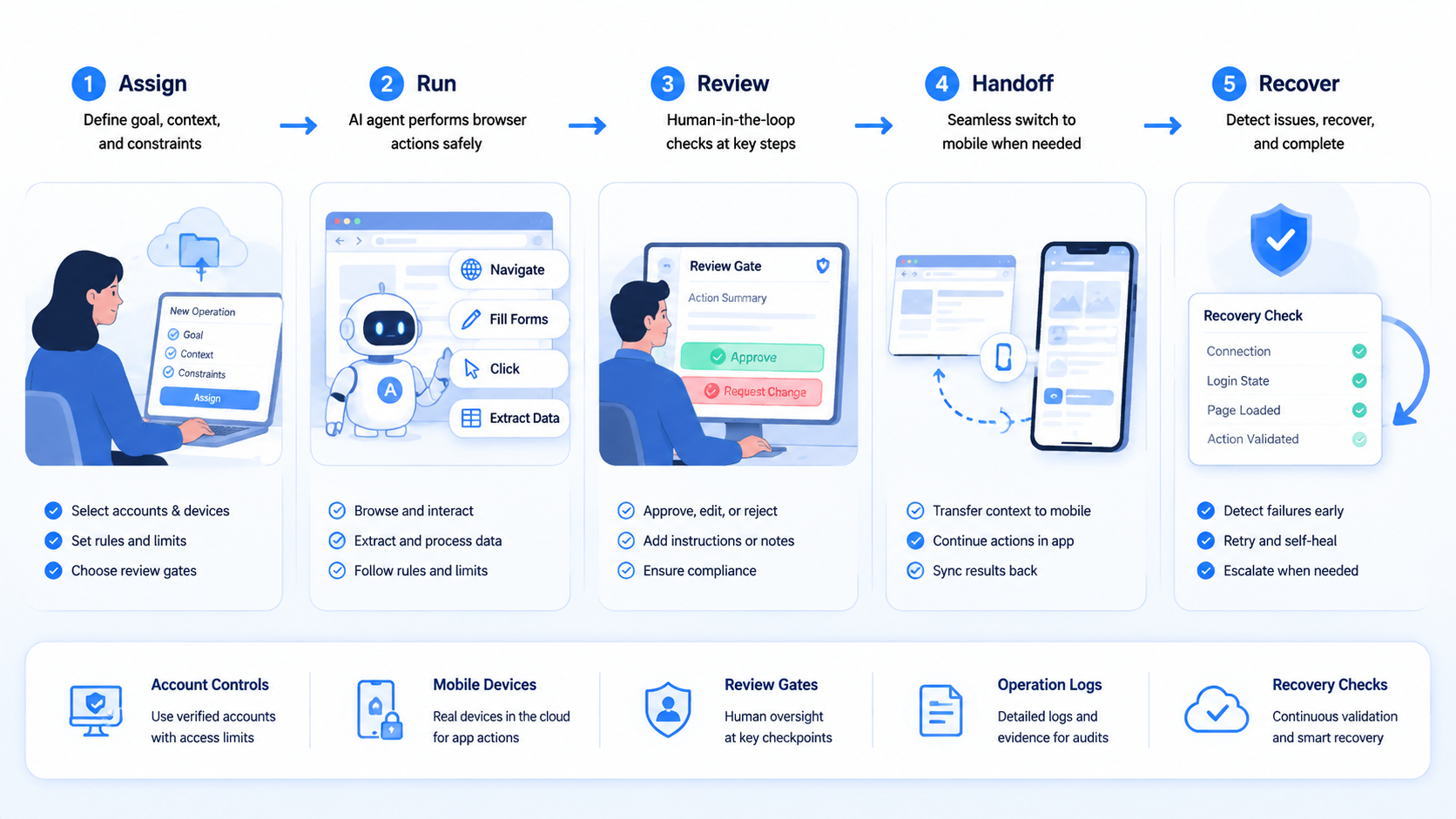
The priority order is scope, control, evidence, recovery, then scale. Start by defining the browser task and the account boundary.
Decide where mobile handoff belongs. Put human review at the sensitive point.
This kind of browser agent can reduce manual browser work when the task is repeatable and the stop rules are clear. It becomes much more useful when the platform around it captures evidence and connects web actions to mobile verification.
For the first step, choose one online operation that already wastes time. Run it through a narrow pilot. If the reviewer can understand the result without chat history, and failures lead to clear fixes, the workflow is ready for a broader test.



