
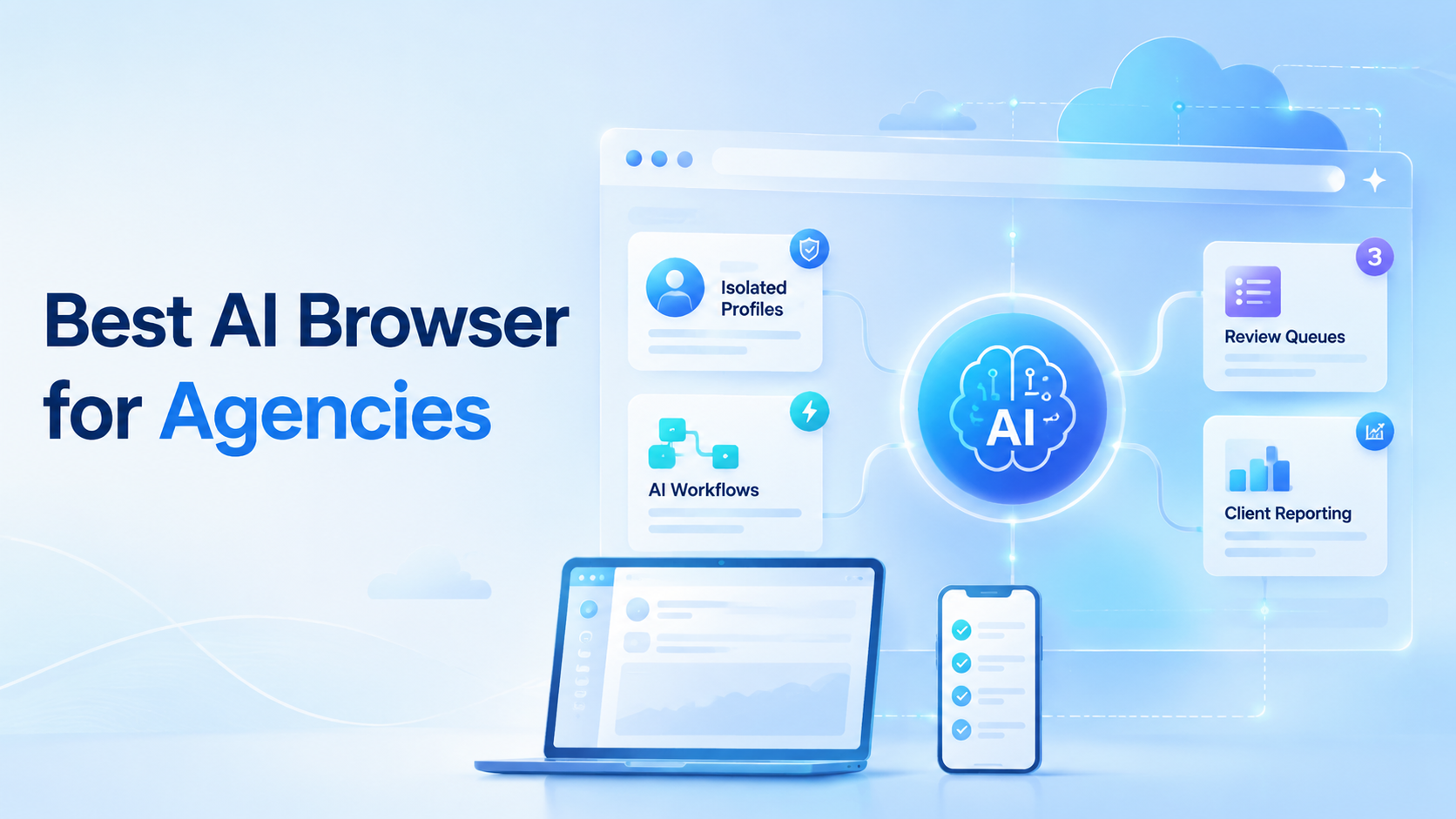
Key Takeaways
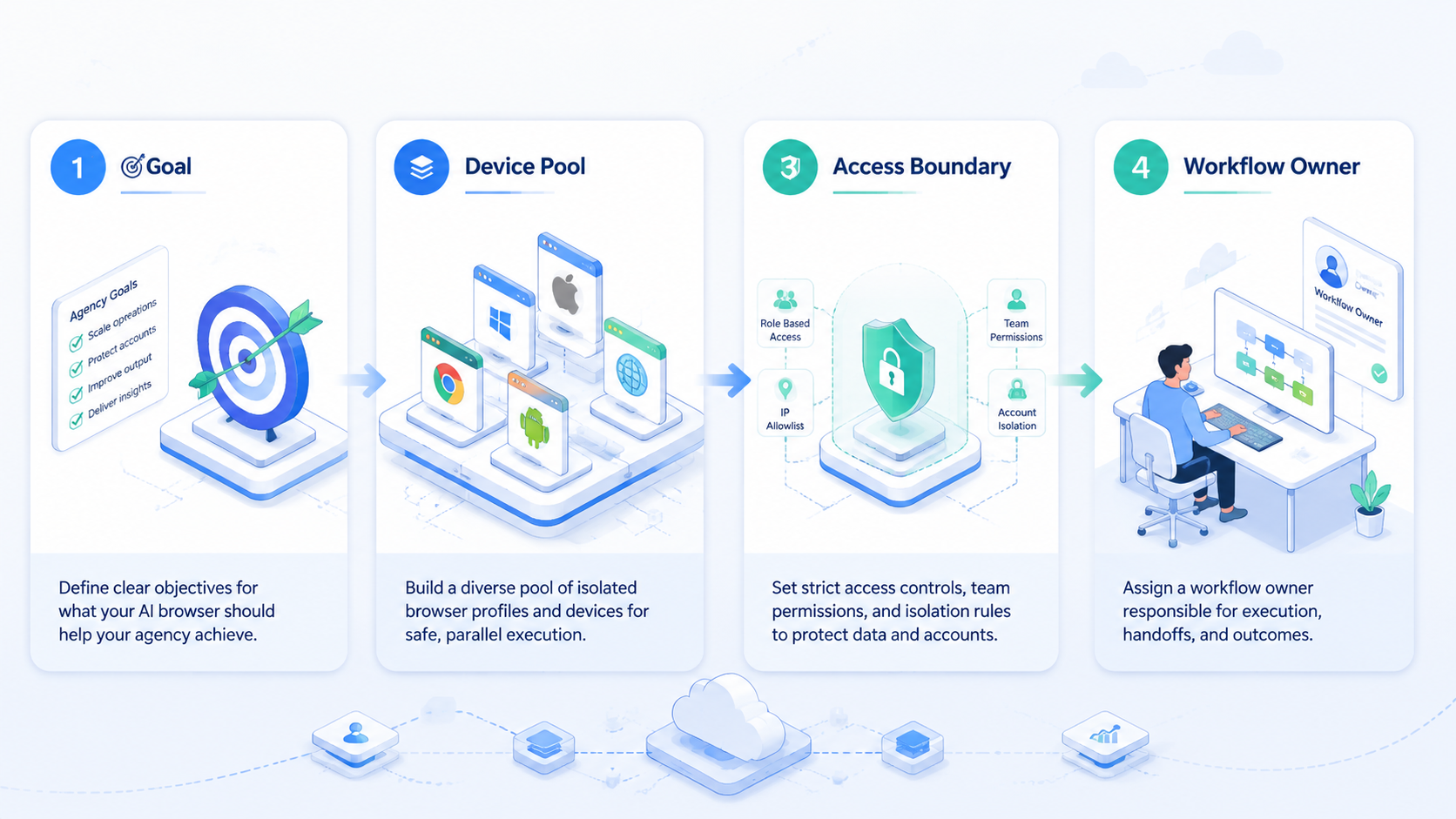
- The best AI browser for agencies is not just a browser with a chat panel.
- Agencies need isolated client workspaces, repeatable workflows, approval steps, and evidence.
- Browser automation should connect to content, inbox, reporting, research, and account operations.
- Mobile execution matters when client work happens inside app-only or mobile-first channels.
An AI browser is a browser workspace that lets agencies use AI to help with real web tasks inside controlled client environments. The goal is not casual browsing. The goal is to help teams research, draft, monitor, reply, publish, and report across client accounts without mixing sessions or losing review control.
That is the practical difference between a simple AI assistant and a real agency execution tool. A chat assistant can generate ideas. The browser workspace should help those ideas move into real work, account spaces, and human approval.
MoiMobi is built around that execution model. Agencies can connect AI work to browser automation, isolated profiles, cloud phones, and multi-account management.
Use care.
What Agencies Should Expect From an AI Browser.
An agency AI browser should give each client, account, and workflow a clear operating lane. It should not force every teammate into the same shared browser state.
Use this definition:
| Layer | What it means for agencies |
|---|---|
| AI assistance | Drafts, summaries, research, task plans, and reply suggestions |
| Browser execution | Logged-in web apps, dashboards, forms, and inboxes |
| Profile isolation | Separate workspaces for client accounts and platform roles |
| Review controls | Human approval before sensitive actions |
| Evidence | Screenshots, notes, status, and task output |
| Reporting | Client-ready summaries of what ran and what changed |
The best AI browser for agencies combines these layers. If one layer is missing, the tool may still be useful, but it will not handle serious client operations.
Why Agencies Need More Than AI Browser Writing.
Agencies already use AI for captions, briefs, scripts, and outlines. That helps with production, but it does not solve the operational work around those assets.
Client teams still need to:
- Check platform dashboards
- Review comments and messages
- Prepare reply drafts
- Collect competitor examples
- Update publishing calendars
- Track account activity
- Build reports
- Hand off exceptions
This work lives in browsers and mobile apps. A strong AI browser connects generation to execution, so the team does not keep copying output from one tool into another.
Keep the work close to the account.
AI Browser vs Traditional Agency Tools.
Traditional social media and marketing tools focus on scheduling, analytics, inbox management, and approval. Those capabilities still matter. This browser layer serves a different role: it helps an agency work inside the real web surfaces where client tasks happen.
| Category | Traditional tool | AI browser for agencies |
|---|---|---|
| Main value | Planning and platform management | Task execution inside web workspaces |
| AI use | Copy support or summaries | Role-based workflows and browser actions |
| Account state | Usually API-based | Browser profile and session based |
| Review | Calendar or inbox approval | Approval tied to task evidence |
| Best fit | Scheduled content and reporting | Repeated web work, research, inbox prep, and account operations |
The two categories can work together. Agency teams do not need to replace every tool at once. Use this workspace where the work still depends on logged-in dashboards, web forms, and manual research.
AI Browser Profile Isolation for Client Work.
Agencies often manage several brands, regions, or client teams. Mixing sessions creates confusion and operational risk. A teammate may use the wrong account, see the wrong dashboard, or publish from the wrong workspace.
Profile isolation helps prevent that mess. Each client lane should have its own browser profile, login state, task rules, and reviewer.
| Client lane | Browser profile | AI role | Reviewer |
|---|---|---|---|
| Client A social accounts | A-social-profile | Comment summary worker | Account manager |
| Client B ecommerce dashboard | B-store-profile | Store check worker | Operations lead |
| Client C research lane | C-research-profile | Competitor research worker | Strategist |
| Agency admin | Internal-profile | Report prep worker | Team lead |
This mapping gives the agency a practical operating model. It also makes the work easier to audit when a client asks what happened.
AI Browser Workflows an Agency Can Automate First.
The first workflows should be frequent, low-risk, and easy to review. Do not start with full posting authority or account setting changes.
Good starting workflows include:
- Competitor post collection
- Comment summary preparation
- Inbox triage
- Caption draft preparation
- Weekly dashboard checks
- Lead list research
- Content idea collection
- Client report notes
Each workflow should produce a small artifact. That artifact may be a table, a draft, a screenshot, a summary, or a review queue item.
Start with evidence. Scale later.
AI Browser Example: Client Inbox Workflow.
A client inbox workflow should not send replies automatically at the beginning. It should prepare the account manager's work.
| Step | Owner |
|---|---|
| Open assigned client profile | AI browser workflow |
| Check unread messages | AI worker |
| Group message types | AI worker |
| Draft suggested replies | AI worker |
| Flag sensitive messages | AI worker |
| Approve final replies | Human reviewer |
Sensitive messages include complaints, refunds, legal concerns, account access problems, or anything with personal data. Those cases should stop for human review.
This pattern saves time without turning the AI browser into an uncontrolled sender.
AI Browser Example: Competitor Research Workflow.
Competitor research is a strong agency use case because it repeats and has clear output.
The AI browser can:
- Visit competitor pages
- Record post themes
- Capture engagement signals
- Summarize repeated hooks
- Collect content angles
- Save screenshots
- Prepare a short insight memo
Google's guidance on creating helpful content is useful here because research should support people, not fill a spreadsheet with noise. The agency should ask whether the output helps the strategist make a better decision.
Useful competitor research has judgment. It does not just list URLs.
The best notes explain why a post, reply, offer, or comment pattern may matter to the client this week.
Example: Reporting Workflow.
Reporting work often becomes a Friday bottleneck. Account managers collect screenshots, dashboard notes, campaign changes, and next actions.
The workspace can prepare the first report layer:
| Report field | Example output |
|---|---|
| Account | Client A Instagram |
| Period | Last 7 days |
| Work completed | 3 content drafts, 18 comments reviewed |
| Exceptions | 2 messages need owner decision |
| Evidence | Screenshots and notes |
| Next action | Approve 2 replies and review 1 content angle |
The account manager still owns the client narrative. The AI browser handles collection and structure.
Browser Automation Under the Hood.
Browser automation is not new. Tools such as Playwright show how software can operate browser pages through reliable actions. The official Playwright documentation is a helpful reference for teams that want to understand browser-side automation.
Agencies need a layer above raw automation. They need roles, profiles, approvals, task memory, and reports. Without those layers, browser automation can become another technical project that only one person understands.
That is why the best AI browser for agencies should feel like an operations workspace, not a code runner.
When Mobile Execution Matters.
Some client work does not fit a desktop browser. TikTok, Instagram, WhatsApp, Telegram, and marketplace apps often include mobile-first screens, notifications, or app-specific states.
Mobile context changes the job.
An agency AI browser stack should therefore connect to mobile environments as well. MoiMobi's mobile automation and cloud phone support help teams run app-based tasks in controlled device workspaces.
Android Enterprise's management documentation shows how business mobile work depends on controlled device ownership and policy. Agency mobile automation needs the same mindset: clear ownership, review, and environment separation.
Browser plus mobile is the stronger model.
This matters when the same client work starts in a web dashboard but ends in a mobile app.
Client Handoff and Audit Trails.
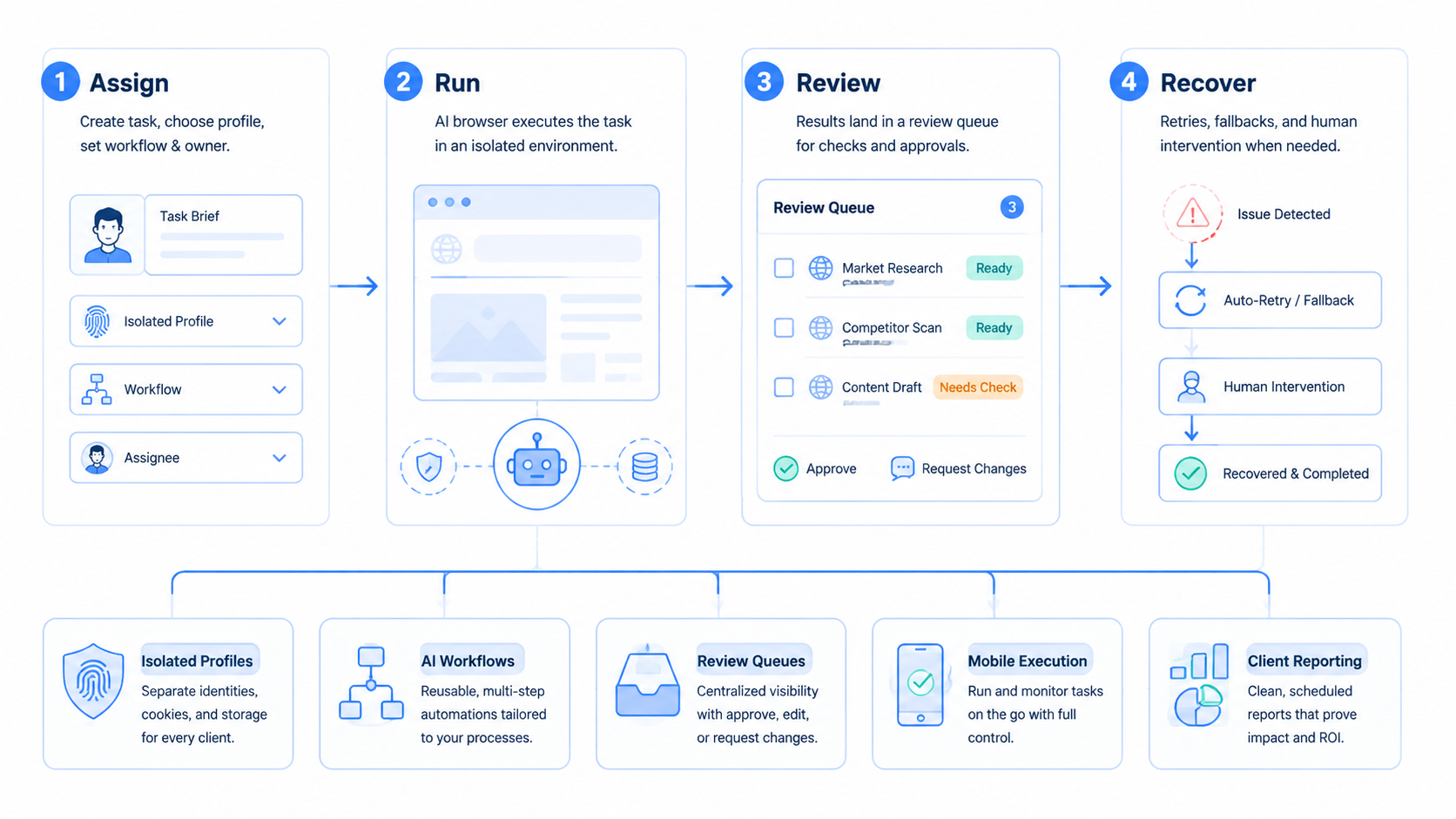
Agency work often moves between strategist, account manager, media buyer, support teammate, and client reviewer. A useful execution workspace should make that handoff visible.
Each task record should answer the basic audit points in one place:
| Audit point | Example |
|---|---|
| Client account | Client A Instagram |
| Workspace | ClientA-Social-Review |
| Checked item | Latest comments and inbox notes |
| Output | Draft replies and a short summary |
| Review item | 2 replies need approval |
| Evidence | Screenshot and task note |
This audit trail is useful even when no mistake happens. It lets account managers explain progress without asking the operator to reconstruct the work from memory.
For example, a weekly content review can show that 24 comments were checked, 6 needed response drafts, 2 were escalated, and 1 competitor post was saved for the strategist. The client does not need raw logs. The client needs a clear record of useful work.
Short records win.
A clear note can save more time than a large report that no one wants to read.
Team Permissions for Agency Operations.
Agencies should avoid one shared admin role. Different people need different levels of access.
| Role | Should access | Should avoid |
|---|---|---|
| Strategist | Research workspaces and reports | Final account actions |
| Account manager | Client dashboards and approval queues | System settings |
| Support teammate | Inbox drafts and message labels | Billing or profile changes |
| Operations lead | Workflow status and exceptions | Unreviewed client sends |
| Client reviewer | Final drafts and summaries | Internal workflow controls |
This permission model keeps work practical. It also supports training because new teammates can start with draft and review tasks before they handle account-sensitive actions.
The platform should make these roles visible. Hidden permissions create hidden risk.
Make roles plain before the team adds more accounts, more clients, or more daily tasks.
What a Strong Demo Should Show.
The fastest way to evaluate a tool is to test a real workflow. Do not rely only on a homepage claim or a clean sample account.
Ask the vendor to show:
- A client-specific browser profile
- A logged-in dashboard or inbox task
- A draft output
- A blocked case
- A human approval step
- A screenshot or evidence record
- A short report
The blocked case matters. Good tools are not judged only by what they can do when everything works. They are judged by how clearly they stop when the task becomes sensitive or unclear.
Teams should also test account switching. The workflow should not make it easy to confuse Client A with Client B.
Common Mistakes to Avoid.
Many agency teams over-automate too early. They give a workflow too many platforms, too many accounts, and too much authority before they know whether the outputs are reliable.
Avoid these mistakes:
- Starting with final publishing instead of draft review
- Letting one workspace hold several unrelated clients
- Treating screenshots as optional
- Using unclear names for account profiles
- Reviewing outputs outside the workflow
- Scaling before blocked cases are understood
- Measuring task count instead of approved output
A better rollout starts narrow. One client, one profile, one workflow, one reviewer. Once that path is stable, add another account or schedule.
Metrics Agencies Should Track.
The tool should improve work quality, not just increase activity.
Track:
- Drafts prepared
- Drafts approved
- Drafts heavily edited
- Messages triaged
- Comments reviewed
- Research items saved
- Reports used by the client team
- Blocked cases resolved
- Wrong-account incidents avoided
Approval rate is especially useful. A workflow that creates 100 drafts and requires 90 rewrites is not saving much time. Fewer drafts can be better. High approval and clear evidence matter more.
Measure the review burden too. If account managers spend more time checking the tool than doing the work manually, the workflow needs tighter rules.
Simple Day-One Setup.
Here is a plain way to start when the team wants proof before it adds more client work.
Pick one client, one account, and one task before the first run. Do not add more yet.
A good first task is comment review because the work is easy to see and easy to stop. The worker opens the right client profile, checks the latest comments, saves a short note, and marks any item that needs a reply. The account manager reads the note and approves the next step.
This is not hard to understand. That is the point.
The setup should look like this:
| Field | Day-one choice |
|---|---|
| Client | One brand |
| Account | One social account |
| Workspace | One named browser profile |
| Task | Comment review |
| Output | Short note and reply draft |
| Stop rule | Stop before posting |
| Reviewer | Account manager |
Run it 5 times before adding a second task. Each run should be easy to check in less than a minute. If the reviewer needs to ask what happened, the workflow needs better notes.
Keep names simple too, especially when several people touch the same client work. Use clear labels such as ClientA-Instagram-Review or ClientB-Store-Check so a busy team can see the client, platform, and task before it starts. A clear name prevents wrong-account work when the team is busy.
Names are part of the control system, not just labels in a menu.
This slow start is not a delay. It is how the agency builds trust in the workflow.
Field Test Script.
Test it live.
Ask one account manager to run the same task at the start of each workday for a week. Use the same client profile, the same task note, and the same review owner so the team can see what changes and what stays stable.
Keep the task small.
The manager should not ask the worker to plan a whole campaign, send replies, build a report, and update the client in one run. That kind of wide task hides the real source of any mistake.
Use one path.
A clean path may be as simple as opening the client profile, checking the last 20 comments, saving 3 reply drafts, marking 1 item for review, and leaving a short note for the account manager.
Then stop.
At the end of the week, read the notes with the person who owns the client. Look for plain signs: fewer missed comments, faster first drafts, fewer wrong tabs, and less time spent asking what happened.
Bad runs are useful.
If the worker opens the wrong page, misses a comment, or writes a weak draft, keep that example and update the rule. A real team learns more from 3 messy runs than from a perfect demo account that never shows a hard case.
This is also how training stays sane.
New teammates can watch the same workflow, see the same review notes, and learn why the agency stops before sending, posting, or changing anything that the client would notice.
Human Approval and Stop Rules.
Agencies need stop rules because client accounts are not test accounts. A bad send, wrong post, or account setting mistake can damage trust.
Use stop rules for:
- Publishing content
- Sending replies
- Changing profile settings
- Deleting records
- Touching billing screens
- Handling angry customers
- Working with private customer data
Approval should show context. The reviewer needs the account, task, draft, source screen, and reason for the recommendation.
No context, no approval.
AI Browser Buying Checklist.
Use this checklist when comparing AI browser tools for agency work. Look for separate client workspaces, a review queue before risky actions, task memory, mobile support, client-ready reports, and role-based access. Weak signs include shared sessions, chat-only approval, one-off prompts, raw logs, and a single operator model.
Ask for a demo using one real client workflow. A polished generic demo is less useful than seeing how the tool handles a blocked message, wrong account risk, and reviewer handoff.
Agency Rollout Plan.
Start with one client and one task. Keep the scope narrow.
| Week | Goal | Output |
|---|---|---|
| 1 | Map the workflow | Account lane, task rule, reviewer |
| 2 | Run draft-only mode | Summaries, screenshots, draft outputs |
| 3 | Tune labels and stop rules | Fewer unclear cases |
| 4 | Add a schedule or second account | Repeatable workflow report |
Do not add multiple clients, platforms, and permissions in the same week. Slow scaling makes failures easier to diagnose.
Frequently Asked Questions
What is an AI browser for agencies?
It is a browser-based execution workspace that helps agency teams run AI-assisted research, drafting, monitoring, inbox prep, reporting, and account workflows.
How is an AI browser different from a normal browser?
A normal browser gives access to web pages. The AI-powered version adds task workflows, profile control, review, and evidence.
Can an AI browser publish content automatically?
It can support publishing workflows, but agencies should require human approval before final publishing, especially for client accounts.
Do agencies need isolated browser profiles?
Yes. Separate profiles help keep client accounts, sessions, and work histories organized.
Should agencies use cloud phones too?
Cloud phones are useful when workflows depend on mobile apps, notifications, mobile inboxes, or app-only screens.
What should agencies automate first?
Start with competitor research, inbox triage, comment summaries, report collection, or draft preparation.
How does MoiMobi help agencies?
MoiMobi connects AI browser workflows with browser profiles, cloud phones, mobile automation, multi-account management, and human review.
Conclusion.
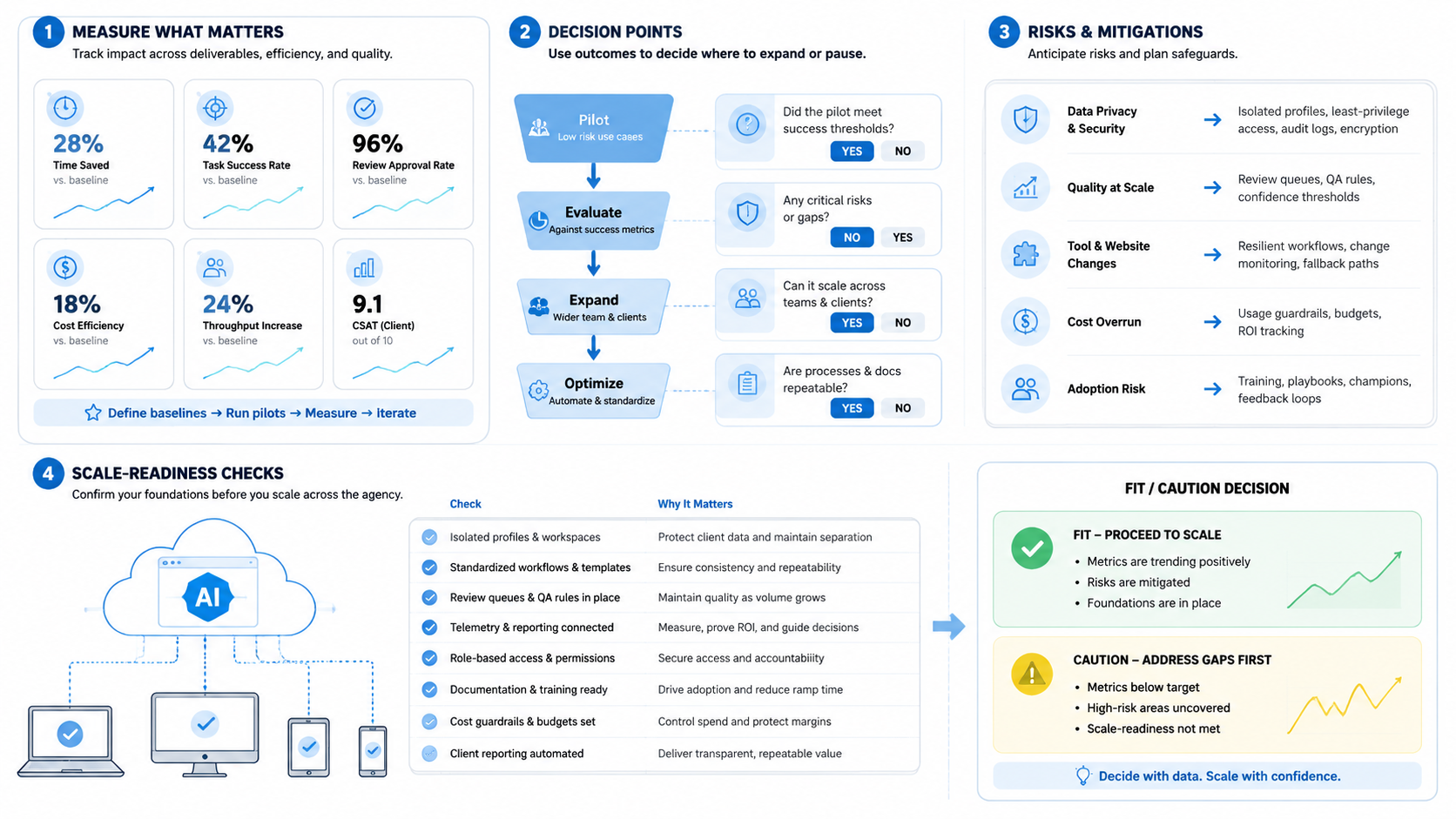
The best AI browser for agencies is an execution workspace. It helps teams move from AI-generated ideas to controlled work across client accounts, browser profiles, and mobile environments.
Agencies should look for profile isolation, review queues, evidence, workflow memory, and mobile support. These capabilities matter more than a flashy chat box.
MoiMobi gives agencies a practical way to run AI-assisted browser and mobile workflows for content, replies, research, monitoring, and reporting while keeping client work separated and reviewable.



