
Content Type: guide
A publishing queue is a controlled list of content tasks that moves posts from draft to review, account assignment, scheduled execution, verification, and reporting. If posting across many accounts is slow, the problem is usually not only writing content. The slower work is preparing assets, choosing accounts, checking approvals, avoiding duplicates, and proving what was posted.
Fast teams should build a queue before they add more accounts. A queue gives every post a state, owner, target account, platform, asset package, deadline, review status, and result. Without those fields, automation only moves confusion faster.
For social media operations, this is also a risk-control problem. Platforms define their own publishing surfaces, permissions, and policy boundaries. Meta documents content publishing through its Instagram Graph API, and TikTok documents post creation through its Content Posting API. Those official boundaries should shape the queue, not sit outside it.
Key Takeaways
- Posting across many accounts is slow when content, account ownership, approvals, and execution status live in different places.
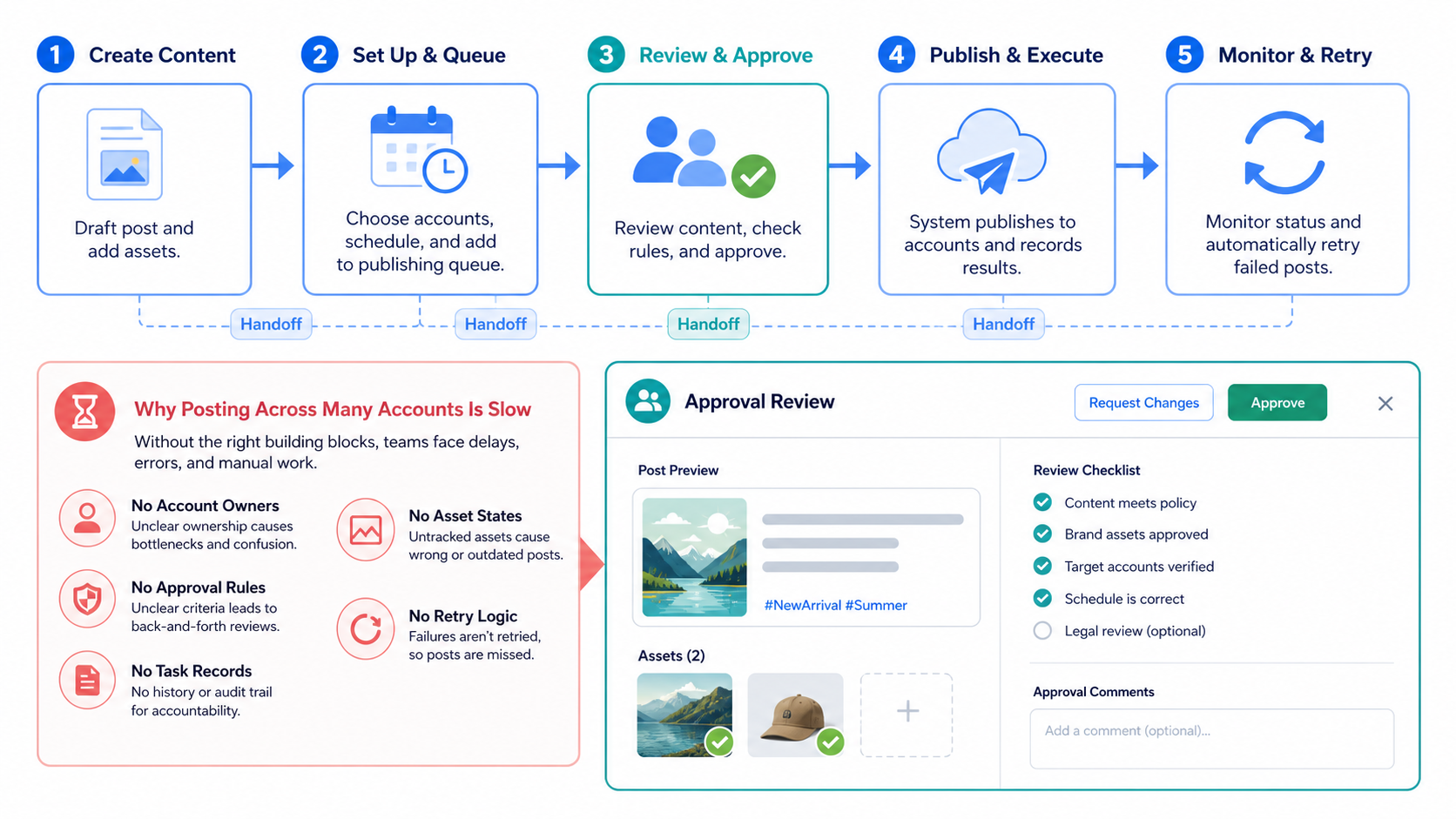
- A publishing queue should track draft, review, assigned, scheduled, running, posted, failed, and needs-human states.
- Account assignment matters as much as post scheduling because each account has its own context and limits.
- A good queue includes stop rules, retry rules, duplicate checks, and evidence after publishing.
- Start with one platform and one account group before scaling the queue across all channels.
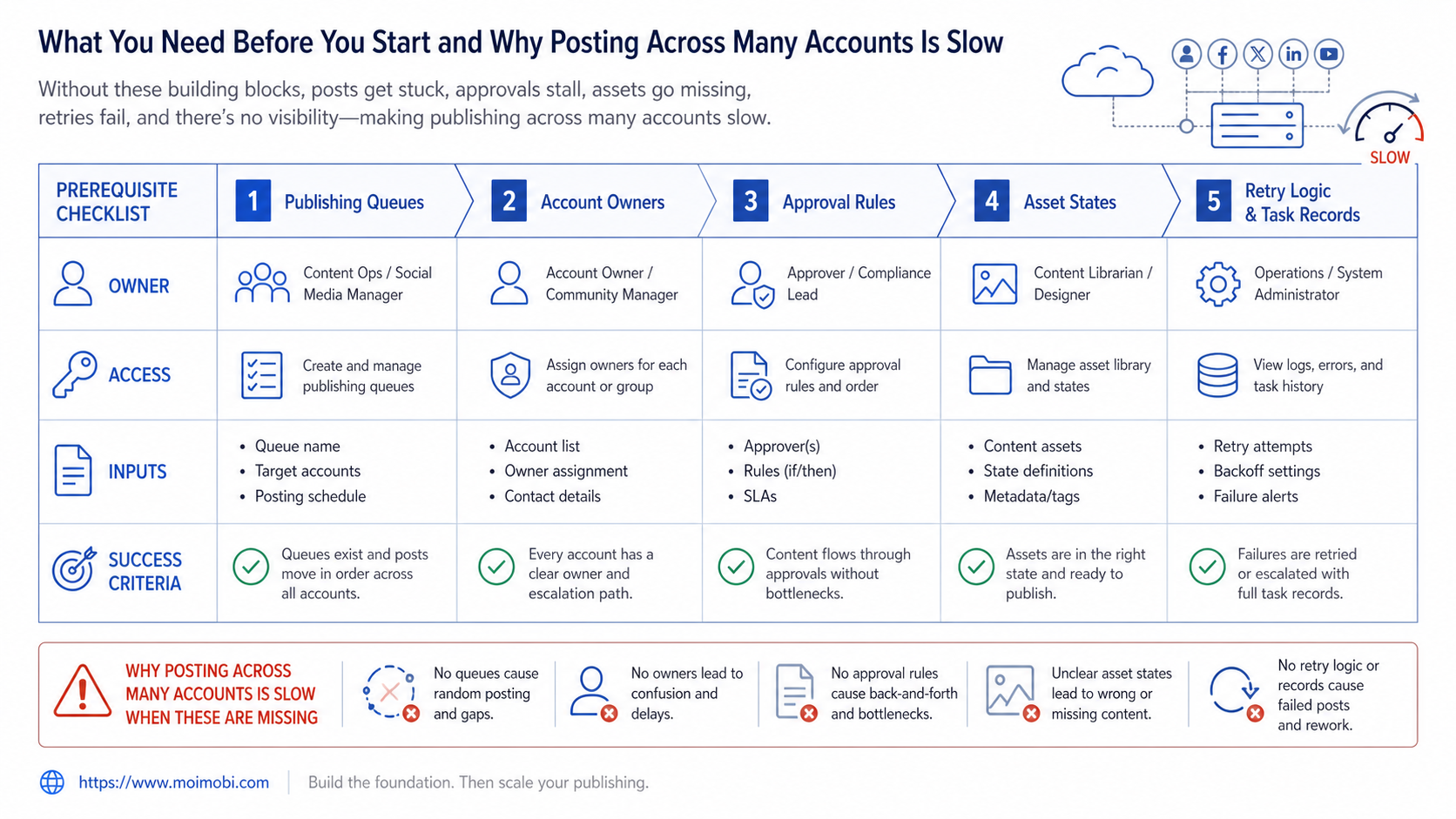
What You Need Before You Start and Why Posting Across Many Accounts Is Slow
The first requirement is a clean account map. List each account, platform, owner, language, audience, content type, and access method. A publishing queue cannot work if the same account is owned by three people or nobody.
The second requirement is a content package. Each queued item should contain caption, media, hashtags, link, campaign tag, reviewer, publish window, and fallback note. If the media is missing or the caption is still changing, the item is not ready for execution.
The third requirement is an environment rule. Some teams publish through APIs. Others need web sessions or mobile app sessions. For mobile-first workflows, a cloud phone can be part of the publishing environment because app state, account login, and execution context remain tied to the task.
Use this preparation table before building the queue:
| Queue field | Required value | Failure if missing |
|---|---|---|
| Account | Platform handle, owner, workspace, environment | Wrong account or duplicate posting |
| Content package | Caption, media, link, tags, campaign note | Last-minute manual search |
| Approval state | Draft, reviewed, approved, blocked | Unreviewed content goes live |
| Execution state | Queued, scheduled, running, posted, failed | No one knows what happened |
| Evidence | Post URL, screenshot, timestamp, account | Hard to audit or retry |
Meta's Instagram Platform documentation explains that the Instagram Graph API supports content publishing for eligible professional accounts through defined endpoints and permissions. Teams should review the official Instagram content publishing documentation before designing API-based publishing.
How to Get Started When Posting Across Many Accounts Is Slow
Build the queue in steps. Do not start by automating every platform. Start with one repeatable account group, one content type, and one review rule.
- Group accounts by role. Separate brand accounts, creator accounts, support accounts, test accounts, and region accounts. A single queue can manage them, but the rules should differ.
- Create a content-ready state. Do not let unfinished ideas enter the execution queue. Keep idea, draft, and approved content as separate states.
- Assign each post to one account owner. The owner does not need to click every button. The owner is responsible for accuracy, approvals, and recovery.
- Define execution method. Choose API publishing, browser workflow, mobile app workflow, or manual review. The method should be visible in the queue.
- Add approval gates. Sensitive posts, campaign launches, customer-facing replies, and new account tests should require human approval.
- Record the result. Save post URL, screenshot, time, account, status, and failure reason.
- Review failures daily. Fix the queue rule before adding more accounts.
TikTok's developer documentation describes a Content Posting API for uploading and posting content through official app integrations. The TikTok Content Posting API guide is a useful source when the queue includes TikTok publishing through authorized integrations.
Moimobi is useful when the queue must include browser and mobile execution, not only calendar planning. Teams can combine account mapping with a campaign-to-account publishing flow, then use execution environments for tasks that need a live session.
Queue States When Posting Across Many Accounts Is Slow
A publishing queue needs clear states because every state tells the team what can happen next. If the states are vague, people will keep asking the same questions: Is this approved? Is the media final? Did it already post? Who fixes the failed item?
Use these states as a starting point:
- Idea: The topic exists, but no final asset is ready.
- Draft: Caption, media, and campaign note are being prepared.
- Ready for review: The content package is complete enough for approval.
- Approved: The content is allowed to move into execution.
- Assigned: The account, owner, and environment are selected.
- Scheduled: The item has a target publish window.
- Running: The execution method is active.
- Posted: The queue has evidence of completion.
- Failed: The item needs retry, revision, or manual takeover.
Do not skip the assigned state. Many teams jump from approved to scheduled and then discover that the account owner, login state, or mobile environment was never checked. The queue should show assignment before execution begins.
Failure states should also be specific. "Failed" is too broad when many people share the queue. Use categories such as missing media, approval blocked, account unavailable, platform response unclear, duplicate risk, or manual takeover required. These labels make daily review faster.
Review Rules and Recovery Logic
Review rules decide which items can move without human approval and which items must stop. A routine post from an established account may need only standard content review. A new campaign post, product claim, customer reply, or sensitive topic should usually need a stronger approval gate.
The queue should not treat all accounts as equal. A test account, brand account, regional account, and customer-support account carry different context. Add account-level notes so the reviewer knows the purpose of the account before approving the task.
Recovery logic matters because failed posting is normal in real operations. An account may need login attention. A file may be too large. A caption may need a final edit. A platform may return a state that the automation cannot classify. The queue should show the recovery path instead of hiding the item.
Use a simple recovery rule:
- Retry only when the failure is clearly temporary.
- Revise when the content package is incomplete or invalid.
- Reassign when the owner or environment is wrong.
- Escalate when the account state is unclear.
- Stop when repeated failures point to a broken SOP.
This rule keeps the queue from becoming a loop of blind retries. It also helps managers see whether the bottleneck is content preparation, review, environment access, or platform execution.
Keep field ownership explicit as the queue grows. One person may own campaign planning, another may own content review, and another may own execution recovery. Put those names in the queue instead of relying on chat history. When a post fails two days later, the team should know who can revise the content, who can check the account environment, and who can decide whether the item should be retried or stopped.
Best Practices During Setup
Keep the queue state simple
Too many states make the queue hard to operate. Start with six: draft, ready, approved, scheduled, posted, failed. Add "needs human" only when the workflow has real review exceptions.
Separate content approval from execution approval
Content approval means the message is acceptable. Execution approval means the right account, environment, and publish window are selected. A post can pass content review and still fail execution review.
Use account groups instead of one long list
A long flat list hides ownership. Group accounts by brand, region, client, role, or platform. For operations teams, multi-account publishing coordination matters more than a larger calendar view.
Track platform-specific constraints
Each platform has its own account type, publishing method, media format, permission model, and review boundary. The queue should not pretend every platform works the same way.
Keep a manual takeover path
Automation should stop when the account session is unclear, the media is missing, the caption fails review, or the platform returns an unexpected state. A queue without a takeover path becomes a failure multiplier.
Use environment labels
Add browser profile, phone workspace, region, proxy route, or device label when those details affect execution. For TikTok-heavy teams, a TikTok account workflow may need its own environment rules.
Common Mistakes to Avoid
The first mistake is treating the queue as a calendar only. A calendar says when something should happen. A publishing queue says whether the content is ready, who approved it, which account will publish it, how it will run, and what evidence proves completion.
The second mistake is mixing content drafts with execution tasks. Drafts change often. Execution tasks should be stable. If the caption can still change, the item should not be in the ready-to-publish state.
The third mistake is using the same owner for every account. One person may manage the queue, but each account needs a responsible owner. Ownership becomes important when a post fails, duplicates appear, or a customer asks about a published message.
The fourth mistake is ignoring failed states. A failed item should not disappear from the queue. It should show failure type, retry owner, retry count, and next action.
The fifth mistake is pushing every action into automation. A queue should decide what automation can do and where humans must review. New campaigns, sensitive replies, and first posts from new accounts may need extra review.
Use this quick failure checklist:
- Was the content approved?
- Was the account assigned?
- Was the environment available?
- Did the media match platform requirements?
- Did the publish action return a usable result?
- Was evidence saved?
- Is the next action retry, revise, manual takeover, or stop?
What to Do Next
Start with a narrow pilot. Pick one account group, one platform, and one recurring content type. A weekly post sequence is a better pilot than a large cross-platform campaign.
Track five numbers during the pilot:
- Items entering ready state.
- Items rejected before approval.
- Items scheduled or executed.
- Items that failed.
- Items with complete evidence.
The pilot is working when fewer posts wait on missing assets, fewer owners ask for status, and failed items have clear next actions. It is not working if the queue becomes another spreadsheet that nobody trusts.
Moimobi can support this model when publishing requires controlled browsers, Android environments, or team execution. A mobile execution workspace helps teams move beyond content planning into real task completion, while still keeping approval and evidence visible.
For USA-focused TikTok account workflows, teams can also review the cloud phone setup for USA TikTok accounts when routing, account environment, and mobile execution need extra planning.
Frequently Asked Questions
Why is posting across many accounts slow?
It is slow because content, approvals, account ownership, platform rules, and execution records are often split across tools. The queue fixes the operating flow.
What is a publishing queue?
A publishing queue is a controlled task list that tracks each post from draft to review, account assignment, scheduled execution, completion, failure, and evidence.
Should the queue replace a social media calendar?
No. The calendar shows timing. The queue controls readiness, ownership, execution status, and recovery. Teams often need both.
How many accounts should a team start with?
Start with one account group. A small pilot exposes missing fields and approval problems before the workflow spreads across more accounts.
Should every post be automated?
No. Routine posts may be automated after review. Sensitive content, new campaigns, and uncertain account states should keep human approval.
What evidence should the queue save?
Save post URL, account, timestamp, screenshot when available, status, owner, and failure reason. This makes audit and retry easier.
Can Moimobi help with mobile-first publishing?
Yes. Moimobi is useful when publishing requires browser profiles, Android environments, account separation, and task records rather than a calendar alone.
What is the first queue rule to define?
Define "ready to publish." Without that rule, unfinished drafts and approved tasks mix together, and the queue becomes unreliable.
Conclusion
If posting across many accounts is slow, fix the queue before adding more tools. The priority order is account map, content-ready state, approval gate, execution method, evidence, and recovery rule.
Start with one platform and one account group. When every post has an owner, status, environment, result, and next action, the team can scale publishing without turning daily operations into manual chasing.



