Title: AI Worker Platform for Repeatable Business Workflows
An AI worker platform is software that helps teams turn repeated digital work into assigned, executable, and reviewable workflows. It connects instructions, account environments, task steps, human review, and results so work does not live only in chat prompts.
For operations teams, the useful question is not whether AI can draft a response or plan a task. The harder question is whether the task can run again tomorrow with the right account, the right environment, the right owner, and a clear record of what happened.
Key Takeaways
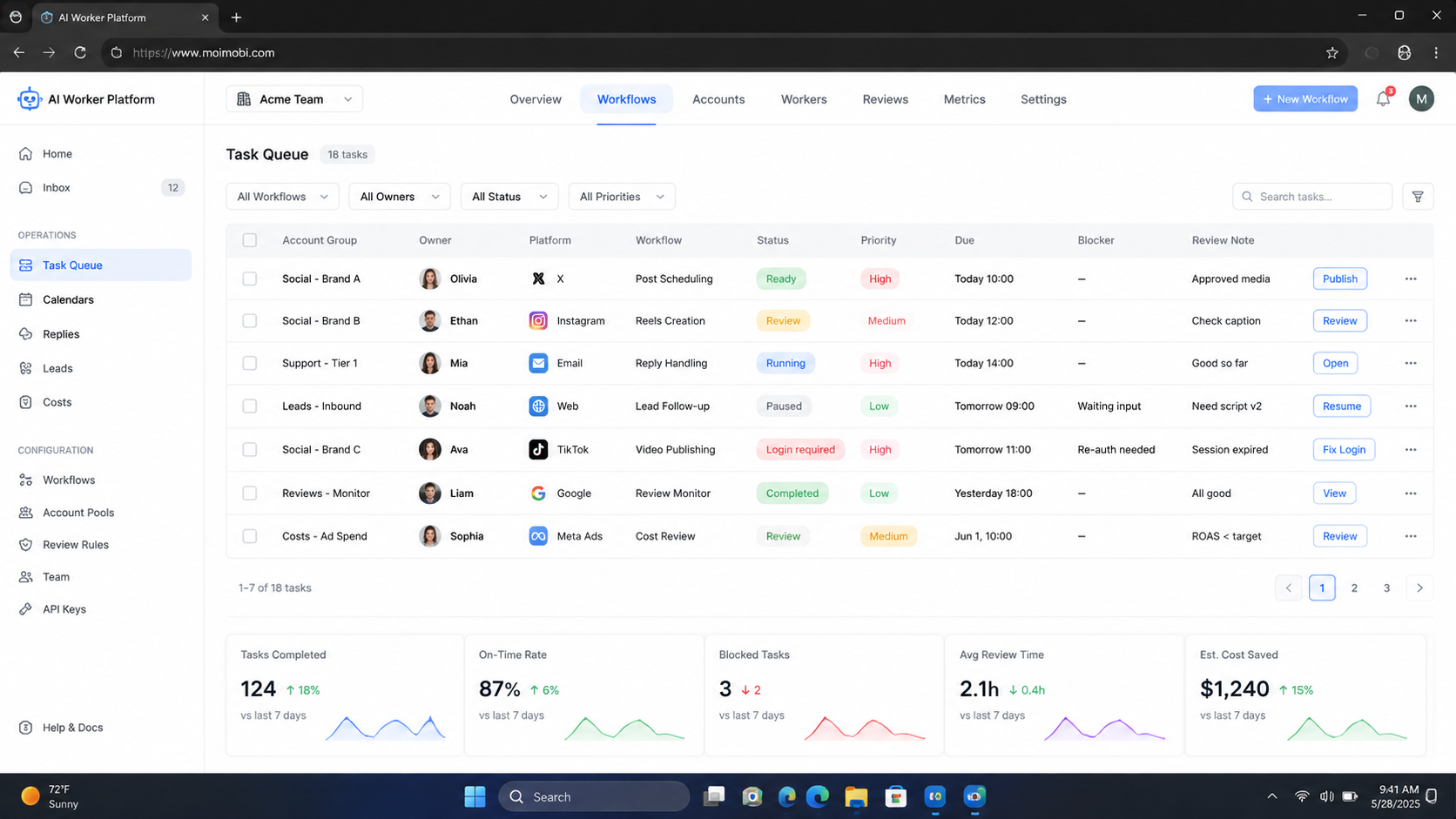
- An AI worker platform should connect planning, execution, and review.
- Repeatable work needs account assignment, task state, and recovery rules.
- Browser and mobile environments matter when workflows run inside logged-in tools.
- Human review is still needed for sensitive replies, failed tasks, and unusual account states.
- A pilot should measure reliability before scale, not only task volume.
What Is an AI Worker Platform for Repeatable Business Workflows?
Each recurring task needs a structured operating path. The path may include a prompt, a skill, a browser session, a cloud phone, an account workspace, a task queue, and a review status. This model is useful when the same job appears every day and needs consistent execution.
Think about a social media operations team. One role prepares content ideas. Another reviews comments. Another checks customer messages. A fourth person reviews weekly results. Without a shared system, the team depends on memory, screenshots, and chat threads.
The worker model changes that into assigned work. A worker can be linked to an account, a workflow, a device environment, and an approval rule. That makes an AI worker platform closer to execution infrastructure than a normal chatbot.
This also explains why browser and mobile environments matter. Web automation standards such as W3C WebDriver define browser control as a remote-control interface. Tools such as Playwright show how modern automation interacts with browser pages, contexts, and traces. Business teams need the same operational idea: repeatable actions must have a controlled environment.
Why Repeatable Workflows Need More Than AI Employees Software
The common mistake is treating AI employees software as a smarter inbox assistant. That may help with drafting, but it does not solve task ownership. A useful worker must know where to work, which account it is assigned to, what it is allowed to do, and when to stop.
For example, a customer reply workflow may start with AI draft generation. The real workflow also needs source context, account identity, channel rules, review status, and a final record. If those pieces are missing, the output may look efficient while the operation becomes harder to audit.
MoiMobi fits this category as an execution layer for browser and mobile workflows. Teams can connect work to mobile automation, multi-account management, and separated execution environments instead of treating every task as a one-off prompt.
The workable model is simple: AI prepares, environments execute, humans approve exceptions, and records support review.
AI Worker Platform Operating Model: Account, Skill, Environment, Review
Repeatable workflows become easier to manage when the team separates four layers. The account layer says who the work belongs to. The skill layer defines the task logic. The environment layer decides where the task runs. The review layer decides whether the result can move forward.
This model prevents a common failure pattern. Teams often begin with a strong prompt and a weak operating system around it. The output may look good for one task, but the workflow becomes fragile when more accounts, operators, or platforms are added.
Use this operating model before adding more automation:
| Layer | Question to answer | Operational record |
|---|---|---|
| Account | Which account owns this work? | Account ID, owner, channel, priority |
| Skill | What repeatable action should run? | Prompt, checklist, workflow version |
| Environment | Where should the action execute? | Browser profile, cloud phone, route, session state |
| Review | Who approves or pauses the result? | Status, reviewer, failure reason, next action |
The environment layer is where many AI worker projects become operational, not just conceptual. A browser task may need a persistent session and trace logs. A mobile task may need an Android environment, app state, and account mapping. A customer reply task may need a review queue before anything is sent.
Teams should also version the workflow. A small change in a reply rule, selector, app path, or approval threshold can change the result. Version records help managers compare what changed between a successful run and a failed run.
Scenario Map: Roles, Tasks, Environments, and Metrics
Use-case planning should start with the operating scenario. The table below shows a practical mapping for a team that runs repeated content and customer engagement workflows.
| Role | Repeatable task | Execution environment | Review metric |
|---|---|---|---|
| Content operator | Prepare post drafts and captions | Browser workspace or content queue | Draft acceptance rate |
| Account operator | Publish approved content | Cloud phone or assigned browser profile | Successful publish rate |
| Support reviewer | Review AI-assisted replies | Inbox workspace with approval state | Escalation rate |
| Growth manager | Check campaign output | Reporting and task history | Completed tasks and useful responses |
The value comes from the mapping, not the table itself. Each repeated task has a responsible role, an execution environment, and a review metric. That makes the system easier to inspect when something breaks.
For mobile-first workflows, a cloud phone can provide persistent Android execution capacity. When teams also need account separation, device isolation becomes part of the workflow design.
The same mapping also helps with staffing. A small team may have one person handling several roles. A larger team may split content, publishing, replies, and reporting across different operators. The platform should keep those assignments visible, so handoff does not depend on private notes.
How an AI Worker Platform Executes a Business Workflow
Set the workflow boundary first. Do not begin by asking AI to “handle everything.” Choose one task that has a clear input, clear output, and clear stop condition.
- Define the task. Name the repeated job, such as comment triage, content scheduling, or lead follow-up.
- Assign the account environment. Decide which account, browser profile, or mobile device should run the task.
- Add the AI step. Use AI for drafting, classification, planning, or summary generation.
- Set approval rules. Keep sensitive replies, payment questions, and unusual account states under human review.
- Run in a controlled lane. Execute the task through the assigned browser or mobile environment.
- Record the result. Store task status, owner, account, output, failure reason, and next action.
This workflow is intentionally conservative. It gives teams a way to use AI worker software without turning every task into uncontrolled automation. That matters when workflows involve customers, platform accounts, or public content.
NIST guidance on digital identity emphasizes the importance of session controls in authenticated systems. The exact requirements vary by application, but the principle is relevant to operations: logged-in work needs session awareness, not just text generation. See the NIST Digital Identity Guidelines for a formal session-management reference.
Execution records should be plain enough for a manager to read. A useful record names the account, environment, task version, start time, result, reviewer, and failure reason. If a worker fails, the next operator should know whether to retry, pause, escalate, or change the workflow.
Do not hide this information inside a long chat transcript. Chat is helpful for reasoning, but operations need structured fields. The record should survive handoff, shift changes, and weekly review.
Who It Fits and When It Is a Strong Match
The strongest fit is a team that already has repeated digital work and account-based execution. The task should be easy to describe in a simple operating sentence: “For this account group, do this task, using this environment, with this approval rule.”
Good-fit scenarios include:
- social media publishing and reply review
- e-commerce content updates and customer follow-up
- lead research and CRM preparation
- account workspace checks across browser and mobile tools
- campaign monitoring with weekly review loops
It is not a strong match when the work is rare, highly creative, or unclear. If every task requires a new strategic judgment, a worker workflow may add structure too early. A smaller AI assistant or manual process may be enough until the pattern repeats.
Teams using Android-based execution should also separate operational automation from device testing. Android and enterprise device documentation focuses on managed devices, policies, and application behavior in controlled environments. That does not replace an operations platform, but it reinforces the need to treat mobile environments as managed assets, not disposable windows. See Android Enterprise for the managed-device context.
Fit also depends on tolerance for review work. A team that refuses to review outputs will get less value from a worker platform. The stronger match is a team that wants AI to prepare and execute repeated steps while humans keep judgment, escalation, and policy-sensitive decisions under control.
For example, an e-commerce support team may use workers to classify messages and draft replies. The same team may still require a human to approve refunds, complaints, shipping disputes, or unusual requests. The platform should make that boundary visible.
Common Mistakes to Avoid
The first mistake is assigning workers without assigning environments. A worker that can act across every account quickly becomes hard to audit. One account, one owner, and one execution lane is usually easier to review.
Another mistake is skipping recovery design. A failed login, blocked action, broken selector, missing mobile app state, or unclear customer reply should create a pause condition. The worker should not simply retry forever.
Avoid these patterns:
- using one worker for unrelated accounts and platforms
- treating AI output as final without approval rules
- measuring only task count instead of successful outcomes
- hiding failure reasons inside chat history
- moving from pilot to scale before review records are clean
The operational goal is not maximum automation on day one. The better goal is a workflow that can be paused, inspected, fixed, and repeated.
Another failure mode appears when teams create too many worker types too quickly. Ten half-defined workers are harder to manage than two clear workflows. Start with the jobs that repeat most often and have the clearest stop rules.
Naming also matters. Use operational names such as “Instagram reply reviewer,” “TikTok publish checker,” or “CRM lead enrichment worker.” Avoid vague names such as “growth AI” or “support AI.” Clear names help operators understand what the worker can and cannot do.
Pilot Rollout, Measurement, and Recovery Checks
Scale should follow evidence. A pilot gives the team a controlled way to see whether the workflow is stable enough for more accounts, more operators, or more task types.
Use a small pilot with one workflow, one account group, and one review owner. Track a few practical metrics:
- task completion rate
- human approval rate
- failed or paused task count
- average time to review exceptions
- useful customer or lead responses
- account or environment changes during the run
Review the pilot every few days. If failures come from unclear instructions, refine the skill or prompt. If failures come from environment state, fix assignment, session, or device rules. If failures come from judgment-heavy replies, keep that task in human review.
For teams comparing execution options, cloud phone farm infrastructure can help frame device capacity, while social media marketing workflows show where repeated account work may need a broader operating system.
Use a stop rule before adding more accounts. A practical rule might say that the workflow must complete a fixed number of tasks with documented results, low exception volume, and clear reviewer agreement. The exact threshold depends on the team, but the rule should exist before scale begins.
Recovery checks need the same discipline. When a workflow fails, record whether the cause was instruction quality, environment state, account assignment, app behavior, or human review delay. Different causes need different fixes. Retrying every failure as if it were the same problem makes the system less reliable.
Building a Simple AI Worker Platform Rollout Plan
A rollout plan should be narrow enough to finish and broad enough to reveal real operational issues. Pick one workflow that already happens every week. Choose a task with visible inputs and outcomes, not a task that depends on private judgment.
Use a one-page plan:
- workflow name
- account group
- execution environment
- allowed actions
- blocked actions
- reviewer
- success metric
- pause condition
- recovery owner
The blocked-actions field is as important as the allowed-actions field. It tells the worker and the team where automation stops. Examples include sending sensitive replies, changing account settings, approving refunds, editing billing data, or contacting a user without review.
After the first week, review the records rather than the idea. Look at which tasks completed, which paused, which required human review, and which produced useful outcomes. A worker that produces fewer tasks but cleaner records may be better than one that attempts more actions without traceability.
This is also where an AI browser execution platform can fit a broader stack. Browser workflows, mobile workflows, and human review should not become separate islands. The rollout plan should show how task state moves across them.
Frequently Asked Questions
1. Is an AI worker platform the same as a chatbot?
No. A chatbot mainly answers or generates text. An AI worker platform connects instructions to workflows, environments, task records, and review states.
2. What is the first workflow to automate?
Choose a low-risk repeated task first. Good options include draft preparation, account checks, inbox triage, or weekly reporting.
3. Does an AI worker platform replace human operators?
Usually not. It reduces repeated preparation and execution work. Human review still matters for exceptions, sensitive replies, strategy, and recovery decisions.
4. Why do browser and mobile environments matter?
Many business workflows happen inside logged-in web apps or mobile apps. The environment affects session state, account assignment, and task traceability.
5. How should teams measure success?
Measure completed tasks, useful outputs, review time, paused tasks, and recovery quality. Do not measure only the number of actions attempted.
6. When should a team avoid this approach?
Avoid it when the process is not repeatable, the account model is unclear, or no one owns review decisions. Fix the process first.
7. How does MoiMobi fit into this workflow?
MoiMobi provides browser and mobile execution infrastructure for teams running account-based workflows. It is relevant when AI work needs real environments, account separation, and operational records.
8. Does every workflow need a cloud phone?
No. Browser-based workflows may run in browser profiles. Mobile-first app workflows may need cloud phones or Android environments.
Conclusion
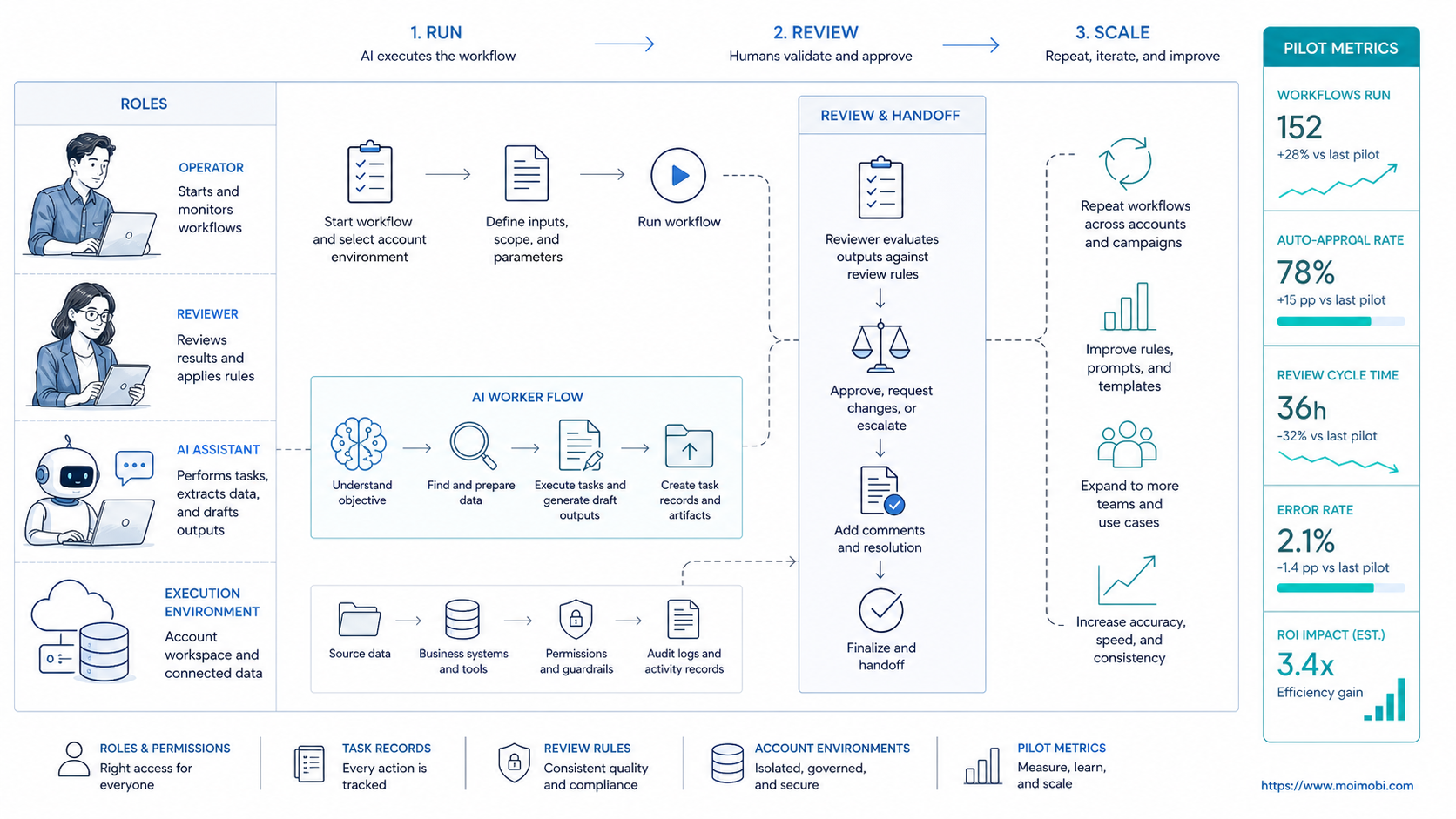
The platform becomes useful when repeated work needs more than a prompt. The stronger model links task instructions, account environments, workflow steps, approval rules, and review records.
Before scaling, run one pilot. Pick one repeated task, one account group, one execution lane, and one review owner. If the team can explain what ran, where it ran, who reviewed it, and what changed afterward, the workflow is ready for the next stage.