Threads posting automation moves approved content into a publishing process that checks the account, sends the post and confirms the result. Start with an authorized Threads account, final copy, accessible media and a named publisher. The expected output is a visible post on the intended profile, not merely a successful click or queued job.
Meta describes its API as a way for creators and businesses to share content through third-party applications. That establishes an API route, not proof that every automation tool supports it. Check the connector before using it. See Meta's Threads API announcement.
Key Takeaways
- Choose the publishing route before scheduling work; API jobs and browser actions have different failure signals.
- Keep prepared content separate from the action that makes it public.
- Check image accessibility before creating an API publishing job.
- Check uncertain results before retrying, so a lost response does not become a duplicate post.
Prepare the Inputs for Threads Posting Automation
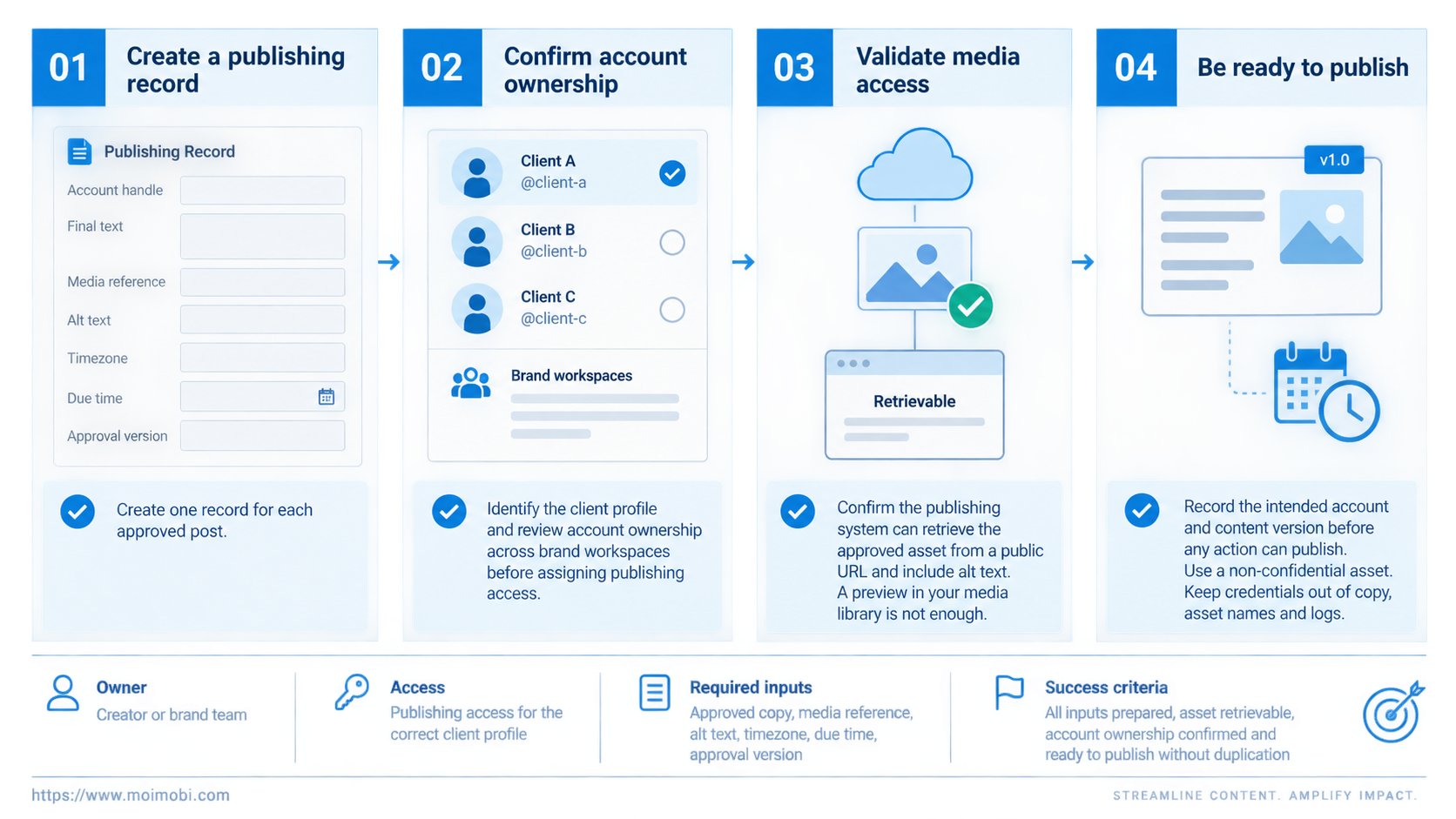
Create one publishing record for each approved post. Use fields such as account handle, final text, media reference, alt text, timezone, due time and approval version. These are suggested record fields, not a Threads API schema.
For an agency, the account field should identify the client profile rather than the operator's browser tab. Put that mapping beside the approval record. When several clients share a queue, review account ownership across brand workspaces before assigning publishing access.
Image delivery needs its own check. Meta's collection says it retrieves image assets from a public URL and accepts alt text. A preview visible inside your authenticated media library is insufficient. Confirm that the publishing system can retrieve the approved asset. The Threads API collection published by Meta documents those inputs.
Use a non-confidential asset for this check. Keep credentials out of copy, asset names and logs. Record the intended account and content version before any action can publish.
Run a Threads Posting Automation Workflow Step by Step
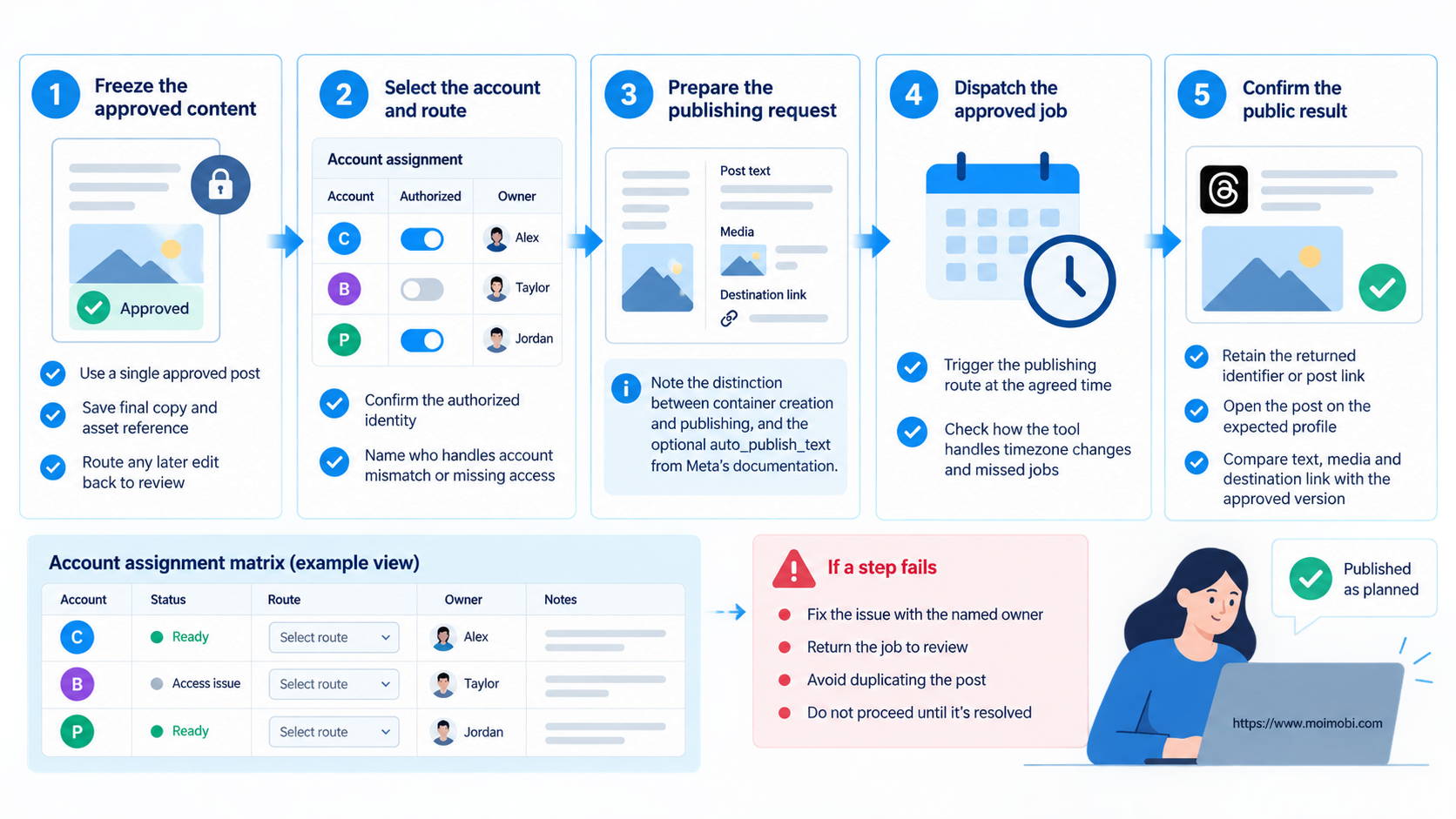
Begin with a single approved post. The following sequence is a recommended team process, not a claim that Moimobi already supplies a Threads connector.
- Freeze the approved content. Save the final copy and asset reference. Any later edit should return the job to review rather than silently change the approved version.
- Select the account and route. Confirm the authorized identity in the connected tool. Name who handles an account mismatch or missing access before the job becomes due.
- Prepare the publishing request. Meta's collection separates container creation at
/me/threadsfrom publishing at/me/threads_publishusingcreation_id. It also documents optionalauto_publish_text, which can publish text during creation. Account for that distinction before treating a preparation step as harmless. These details come from Meta's publishing collection. - Dispatch the approved job. Have your scheduler trigger the chosen publishing route at the agreed time. Check how that tool handles timezone changes and missed jobs; avoid assuming scheduling works identically across connectors.
- Confirm the public result. Retain the returned identifier or post link when available. Open the post on the expected profile and compare its text, media and destination link with the approved version.
For example, a creator's product announcement might have approved copy but an image that was replaced after review. The sequence should flag that changed asset before publishing, not accept the old approval as covering new content.
Check the Result Beyond the Publish Button
A completed browser action is a weak completion signal. Playwright checks whether a click target is visible, stable, enabled and able to receive events. Those checks concern the action, not the resulting public post. Its actionability documentation explains the distinction's technical basis.
Use a short acceptance checklist:
- The visible author matches the intended Threads handle.
- The copy and media match the approved version.
- The post opens from its saved identifier or link.
- The publishing record distinguishes the due time from the observed publication time.
Record a mismatch as an exception. Likes and impressions do not prove that the correct post was published. Review audience response later as part of campaign content evaluation, separate from delivery verification.
Recover From Failures Without Reposting Blindly
A timeout can leave the public outcome uncertain. Before sending the same content again, inspect the target profile and any saved post ID. If the post already exists, update the record instead of repeating the action. This is a suggested recovery process, not a promise that the tool will block duplicates.
Classify the failure before deciding what to do next:
- Access failure: pause the affected account's queue and have its owner restore authorization.
- Asset failure: repair the accessible media reference, then recheck that it still matches the approved content.
- Uncertain publication: look for the existing post and record what you found before authorizing another attempt.
- Wrong account or copy: stop related jobs and have the owner decide how to correct the public result.
Browser profiles and a cloud phone may support separate account inspection work. Neither is a substitute for connector authorization or evidence that a publish action succeeded. Moimobi's execution-environment positioning should be evaluated against that distinction, not treated as an unlimited Threads publishing claim.
Frequently Asked Questions
What is Threads posting automation?
It is a repeatable process for preparing approved posts, dispatching them through a chosen publishing route and checking the public result.
Can creators use it without several accounts?
Yes. A single creator can benefit from separating drafting, approval and delivery, especially when another person prepares content.
How should brands choose a connector?
Ask how it identifies the account, confirms publication and handles uncertain results. Test those behaviors with approved content before expanding.
Does container creation mean a post is live?
Not in every publishing mode. Follow the chosen connector's documented flow rather than interpreting all returned identifiers as published posts.
Can a browser click confirm success?
Not alone. Verify the visible post, author and approved content rather than relying only on the button action.
Should a failed job retry automatically?
Only after you identify the failure. Check an unknown outcome before another public action.
What should the budget include?
Check the tool's subscription, publishing access and recovery workload. No fixed price or current platform quota is assumed here.
Make the First Run Auditable
Choose an approved post and follow it from the content record to the visible Threads result. Verify the account, asset and copy, then inspect how exceptions are retained. Expand only when an operator can tell preparation, publication and uncertain outcomes apart. That is a practical foundation for Threads posting automation without turning a delivery queue into a source of duplicate brand posts.