
Warming up TikTok accounts safely with cloud phones means preparing account workspaces, profile details, content plans, review rules, and measured early tasks before scaling operations. It should not mean fake engagement, spam, or platform manipulation.
For teams, the word "safely" should mean operational control. Each account needs an owner, a cloud phone environment, routing notes, task limits, and a recovery process. No tool can control platform outcomes, but a structured workflow can reduce internal mistakes.
Moimobi supports this model through cloud phone environments, device isolation, multi-account management, and mobile automation. TikTok teams should also review the cloud phone for TikTok page when mapping account workflows.
Key Takeaways
- Account warm-up should mean readiness and controlled early operations.
- A cloud phone gives each account group a mobile execution workspace.
- TikTok workflows need profile checks, content plans, review rules, and logs.
- Avoid artificial activity and platform manipulation claims.
- A pilot should measure completion, review edits, failure reasons, and recovery time.
- Moimobi fits teams that need repeatable TikTok workflows across multiple accounts.
What You Need Before You Start and How to Warm Up TikTok Accounts Safely with Cloud Phones
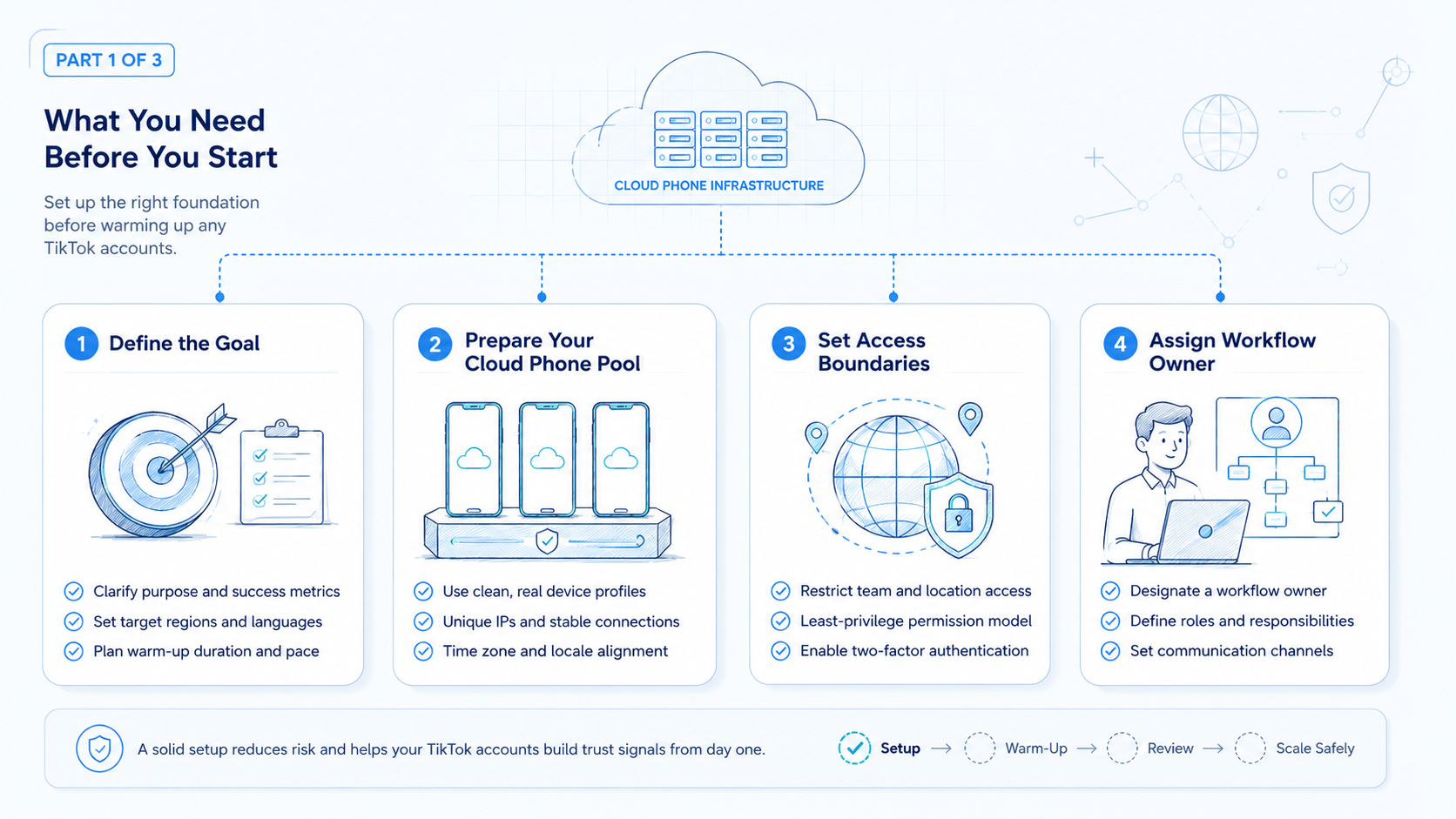
Start with prerequisites. A cloud phone is not a substitute for account planning.
TikTok's Community Guidelines cover authenticity, safety, and deceptive behavior. TikTok also documents approved developer routes such as the Content Posting API. Teams should build workflows around real account operations, not attempts to manipulate platform systems.
Prepare these items before the first task:
| Prerequisite | What to define | Why it matters |
|---|---|---|
| Account owner | One person responsible for the account | Prevents unclear handoff |
| Cloud phone workspace | Assigned mobile environment | Keeps account work separated |
| Profile checklist | Bio, avatar, region notes, and brand rules | Prevents incomplete setup |
| Content plan | Approved topics, captions, and review path | Prevents random posting |
| Task log | Action, owner, result, and failure reason | Makes recovery possible |
This turns warm-up into a readiness workflow. It is easier to manage, inspect, and improve.
How to Get Started with How to Warm Up TikTok Accounts Safely with Cloud Phones
Use a slow, observable rollout. The goal is to prove the operating lane before volume increases.
- Assign the account workspace. Put each account or account group into a named cloud phone environment.
- Complete profile readiness. Check profile fields, content themes, assets, and campaign notes.
- Set task boundaries. Define what operators can do without review and what needs approval.
- Start with observation tasks. Review account state, content queue, notifications, and comments.
- Add low-risk execution. Prepare drafts, organize content, and collect comments for review.
- Record every task. Capture status, owner, result, and failure reason.
- Review before scaling. Increase activity only after the team understands failures and handoffs.
This process keeps the first week focused. It gives managers enough evidence to decide whether the workflow is ready.
Best Practices During Setup
Cloud phones work best when they are treated as account workspaces, not disposable devices.
Use these practices:
- Keep one owner per account group.
- Keep profile and routing notes attached to the workspace.
- Separate client, region, or campaign accounts when the workflow differs.
- Use review queues for public replies and campaign posts.
- Store failure reasons in the task record.
- Avoid artificial activity and repeated low-quality actions.
- Review account activity before adding more tasks.
AWS describes Device Farm as a way to use cloud-hosted browsers and real mobile devices for testing. TikTok operations are different, but the infrastructure lesson is relevant: remote devices become valuable when they are controlled, observable, and repeatable.
For TikTok accounts, Moimobi can connect mobile execution with account workflows. Teams can pair social media marketing operations with separated mobile environments instead of sharing local devices.
Common Mistakes to Avoid
Avoid treating warm-up as activity volume. Activity without context can create more operational risk than value.
Common mistakes include:
- No account owner: nobody knows who approves the next action.
- Shared workspace: multiple accounts run through one unclear environment.
- No content plan: operators act before topics and assets are approved.
- No review rule: public replies or posts move without human review.
- No failure reason: the team cannot tell why a task failed.
- Artificial activity framing: the process drifts toward spam or manipulation.
- Scaling too early: more accounts are added before the first workflow is stable.
The strongest correction is simple. Reduce the workflow to one account group, one owner, one cloud phone workspace, and one measurable task type. Fix that lane before adding more.
Verification, Measurement, and Recovery Checks
Verification should happen before scale. A warm-up workflow is ready only when the team can see what happened.
Use this pass/fail checklist:
| Check | Pass condition | Repair action |
|---|---|---|
| Workspace | Account has an assigned cloud phone | Assign or split the workspace |
| Profile | Profile and content notes are complete | Finish readiness checklist |
| Review | Sensitive tasks have approval rules | Add reviewer and decision deadline |
| Task log | Each action has status and owner | Require result fields |
| Recovery | Failures have reasons and next steps | Classify failure type |
Track setup time, completed tasks, review edits, unresolved items, and recovery time. These metrics show whether the workflow is becoming easier to manage.
Recovery labels should stay simple: access issue, environment issue, instruction issue, content issue, or review delay. This keeps managers from guessing.
How to Warm Up TikTok Accounts Safely with Cloud Phones in a Team
Team workflows need stricter boundaries than solo workflows. A single person can remember what happened yesterday. A team needs records that survive handoff.
Use a three-role model:
- Account owner: decides when the account is ready for the next workflow stage.
- Operator: completes assigned tasks inside the cloud phone workspace.
- Reviewer: approves public-facing actions and checks failure notes.
This model prevents one common problem: operators moving too quickly because nobody owns the stop rule. The owner decides when the account can move from readiness checks to light execution. The reviewer decides when a draft, reply, or post is acceptable.
For TikTok operations, early tasks should be observable. Good early tasks include checking profile completeness, confirming content assets, reviewing notifications, organizing comments for review, and preparing drafts. Public engagement should not be treated as a volume target.
Managers should also create account stages. A simple stage model works well:
- Setup: workspace, owner, profile, and routing notes are ready.
- Observation: notifications, comments, and account state are reviewed.
- Preparation: content ideas, drafts, and response queues are prepared.
- Reviewed execution: approved tasks are completed and logged.
- Scale review: the account is evaluated before activity increases.
The stage model keeps the team from treating every account the same. An account with missing profile details should not receive the same task plan as an account with a completed content queue and clean review history.
Troubleshooting Failed Warm-Up Workflows
Failures are useful when the team records them clearly. A failed task should lead to a repair action, not a vague complaint.
Use these troubleshooting rules:
- Login fails: check owner, credential path, and workspace assignment.
- App state is unclear: capture the screen state and pause the task.
- Content is missing: return the task to the content owner.
- Reviewer is late: set a decision deadline and escalation owner.
- Operator is unsure: rewrite the task into smaller steps.
- Account stage is unclear: move the account back to the readiness checklist.
- Same failure repeats: stop expansion until the SOP is repaired.
This troubleshooting loop is where cloud phones become operational infrastructure. The phone gives the team a shared place to inspect the issue. The workflow gives the team a way to decide what happens next.
Fit Boundaries and Not-Fit Cases
Cloud phone warm-up fits teams with repeated TikTok account work. Agencies, social commerce teams, creator studios, and cross-border operators often need this structure.
It is a weaker fit for a solo creator with one account and a simple posting rhythm. A lightweight checklist may be enough until handoff or repeated failures appear.
The model is also not a fit for teams seeking artificial engagement. TikTok's official guidelines address deceptive behavior, so teams should define warm-up as readiness, review, and controlled operations.
Moimobi fits the middle ground: teams that need real mobile execution but also need account ownership, workflow records, and recovery checks.
What to Do Next
Do not scale by adding many accounts at once. Scale by proving one workflow and then copying it.
A practical next sequence is:
- Run one account group for one week.
- Review task logs and failure reasons.
- Tighten profile and content checklists.
- Add a second account group with the same structure.
- Compare recovery time between the first and second group.
- Add reporting only after the workflow is stable.
Teams comparing options can also review cloud phone for USA TikTok accounts if routing and account environment are part of the decision.
The final goal is not more activity. It is a repeatable operating system for TikTok accounts.
Frequently Asked Questions
What does warming up TikTok accounts mean?
It means preparing account readiness, environment assignment, content plans, review rules, and early task history.
Can cloud phones make TikTok accounts safe?
No tool controls platform outcomes. Cloud phones help teams manage mobile environments and internal workflow consistency.
What should teams do first?
Assign each account to an owner and cloud phone workspace. Then complete the profile and content checklist.
Should teams automate comments immediately?
No. Start with collection, classification, and review. Public replies should keep human approval.
How many accounts should a pilot include?
Use a small group first. The right number is the amount one owner can inspect and repair.
Is this only for agencies?
No. Creator teams, social commerce teams, and cross-border operators can use the same model.
How does Moimobi help?
Moimobi provides cloud phone environments, device isolation, and multi-account workflow control.
What is the biggest mistake?
The biggest mistake is scaling activity before the account workspace and review process are ready.
Conclusion
Warm up TikTok accounts in this order: assign the workspace, complete readiness checks, define review rules, start with low-risk tasks, record results, and repair failures before scaling.
Cloud phones are useful because they give teams a controlled mobile execution layer. Moimobi is a strong fit when that layer must support multiple accounts, operators, reviewers, and repeatable TikTok workflows.



