
Content Type: guide
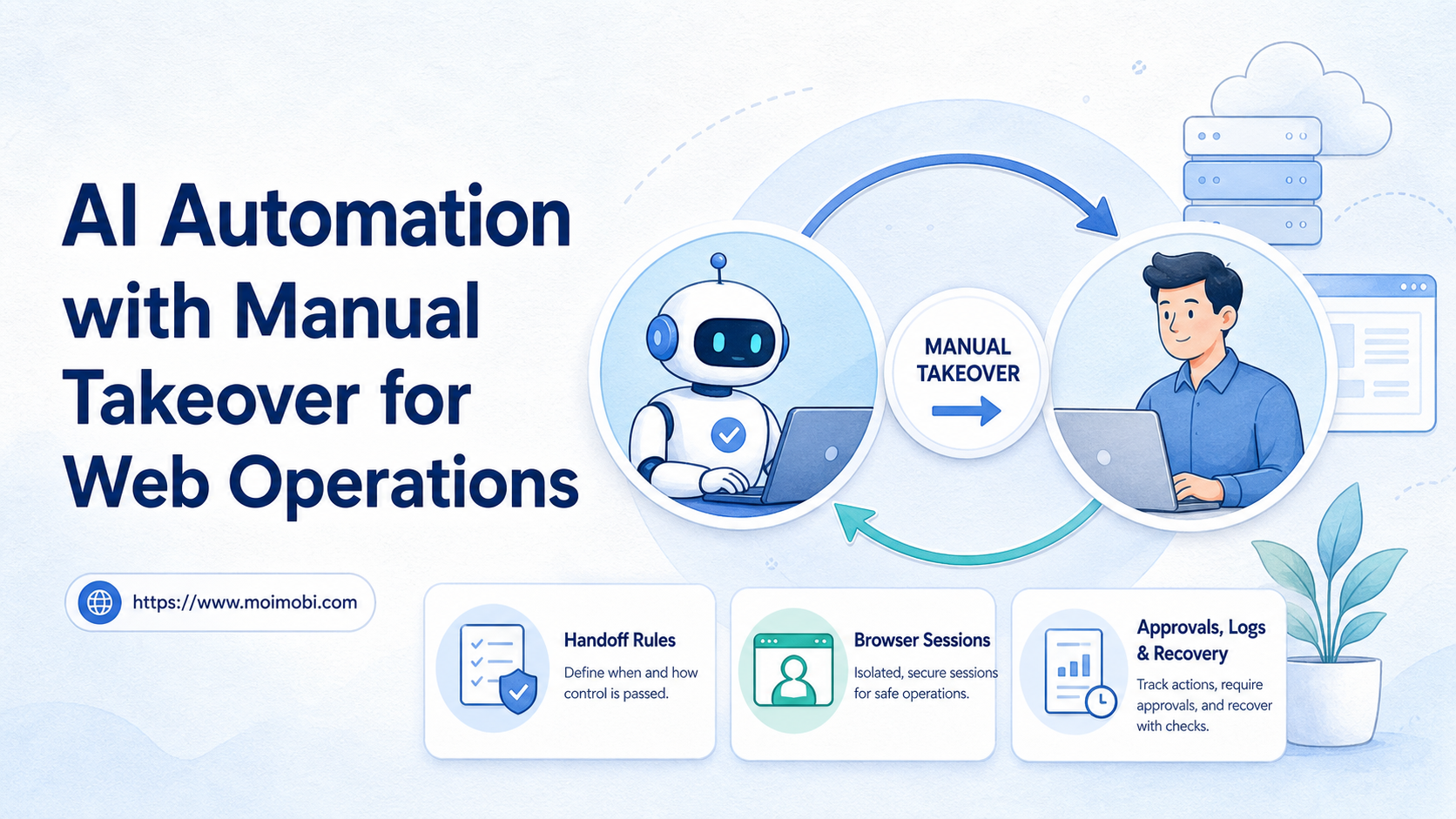
AI automation with manual takeover is a workflow model where software executes routine web tasks, but a human can pause, inspect, and continue the session when judgment is needed. It fits web operations because browser work often includes exceptions, approvals, sensitive customer data, and unclear page states.
The core value is control. A team should not let an agent click through every dashboard without checkpoints. It should define where the AI can act, where it must stop, and how an operator takes over without losing context.
For operations teams, this model turns automation into a supervised execution system. The AI handles repeatable steps. The human handles ambiguity, compliance-sensitive decisions, unusual account behavior, and final approvals. When web work later connects to mobile tasks, the same control pattern can extend into a cloud phone environment without changing the approval logic.
Key Takeaways
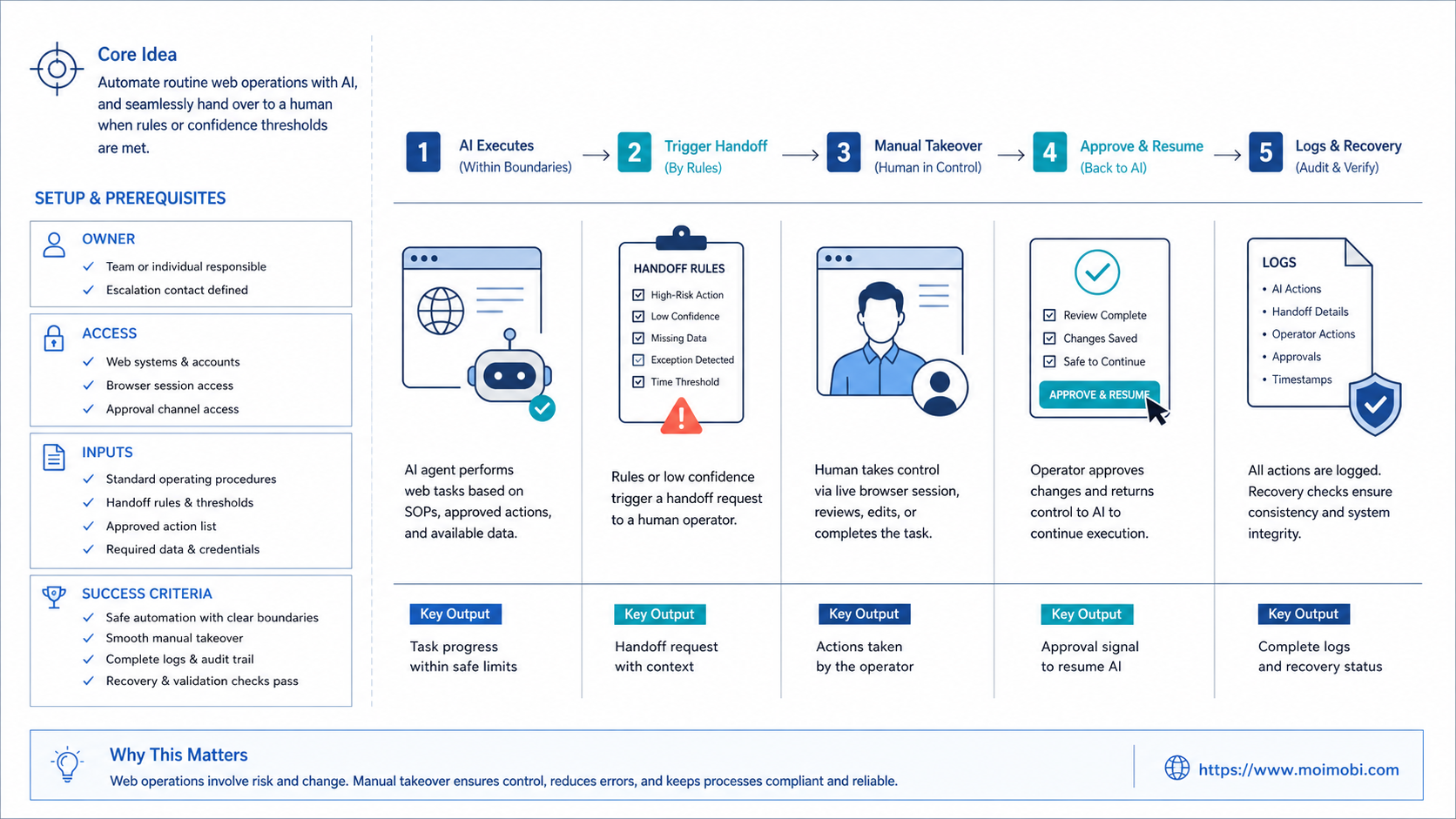
- AI automation with manual takeover works best when every handoff point is defined before the workflow starts.
- Manual takeover is not a failure mode. It is a control layer for judgment, approval, and recovery.
- Web operations need browser sessions, task logs, stop rules, and clear account ownership.
- Teams should pilot one workflow before expanding across accounts or platforms.
- The best setup records what the AI did before, during, and after human intervention.
The Core Idea Behind AI Automation with Manual Takeover
The main idea is simple: let automation do predictable browser work, but keep a human close enough to correct course. A task may start with an AI agent opening a dashboard, finding a record, filling a form, or checking a queue. The session then pauses when the task reaches a decision point.
This matters because real web operations rarely follow one clean path. A login page may ask for verification. A dashboard may load slowly. A customer message may need tone judgment. A publishing task may need approval before the final click.
Browser automation standards and tools already show why state and interaction details matter. The W3C WebDriver specification defines a remote-control model for browser interaction, while Playwright documents actionability checks before interactions such as clicks. Those references do not make AI decisions for the team, but they explain why browser actions need observable state and control. See W3C WebDriver and Playwright actionability.
| Workflow part | AI can handle | Human should review |
|---|---|---|
| Navigation | Open known dashboards and account pages | Unexpected login, verification, or access changes |
| Data entry | Fill fields from approved source data | Missing fields, conflicts, or sensitive changes |
| Publishing | Prepare drafts and schedule routine content | Final publish, campaign changes, or risky claims |
| Customer replies | Draft suggested responses from templates | Complaints, pricing, refunds, or legal language |
The decision is not whether AI replaces operators. The better question is which steps are safe enough to run automatically and which steps need human confirmation.
Why Web Operations Need Manual Takeover
Web teams search for this topic when scripts become brittle and chat-style AI is not enough. The work still happens inside real web apps, account dashboards, inboxes, forms, and content tools. A plan is only useful when it can be executed and reviewed.
Manual takeover solves three common gaps:
- Ambiguity: the page state does not match the expected workflow.
- Account sensitivity: the action affects a customer, profile, payment, post, or permission.
- Recovery: the AI reaches an error and needs an operator to decide the next step.
NIST describes AI risk management as a process that includes governing, mapping, measuring, and managing AI risks. That framework is broad, but it supports a practical operations rule: automated systems need governance and review, especially when actions affect real users or business records. See the NIST AI Risk Management Framework.
For a team using browser-based workflows, takeover should be designed into the task. It should not depend on someone noticing a problem after the AI already clicked the wrong button.
Fit and Not-Fit Scenarios
The model is not for every workflow. It works when the task has a repeatable path, visible checkpoints, and a human decision layer. It does not work well when every step is custom, undocumented, or based on private judgment that cannot be explained.
Good fit
- Account profile updates with approval rules
- Content drafts prepared before final publish
- Lead research with human validation
- Inbox triage with suggested replies
- Routine dashboard checks and reports
Poor fit
- Unclear tasks with no SOP
- High-stakes decisions without review
- Workflows where operators cannot inspect session state
- Actions that require undocumented customer judgment
- Teams with no audit or recovery process
MoiMobi is useful when the team needs an execution environment instead of a loose prompt flow. Browser and mobile tasks can be assigned to account workspaces, while operators keep visibility into task state. The practical question is whether the team can inspect the session before a sensitive action happens.
How to Start AI Automation with Manual Takeover
Begin with one workflow that operators already perform every day. Do not start with the most complex customer path. Choose a task with clear inputs, clear outputs, and a known point where human approval matters.
Preflight checklist
- The task has a written SOP.
- The browser account is assigned to one owner.
- Required credentials and permissions are known.
- The AI can stop before final submission.
- The operator can see the active browser state.
- The system records task status, error reason, and reviewer notes.
Then build the first workflow in a simple sequence:
- Define the starting state. Name the website, account, dashboard, and source data.
- List allowed actions. Separate navigation, data extraction, field filling, and draft preparation.
- Mark stop points. Pause before publish, payment, deletion, permission change, or customer-sensitive reply.
- Assign the takeover role. Decide who reviews the paused task.
- Record the resolution. Store whether the human approved, edited, rejected, or retried the task.
- Improve the SOP. Use failed runs to update the workflow.
Teams that also need mobile-side execution can connect the same operating logic to controlled mobile task workflows. The principle stays the same: automation acts inside a boundary, while people handle judgment.
Designing the Takeover Screen and Task Record
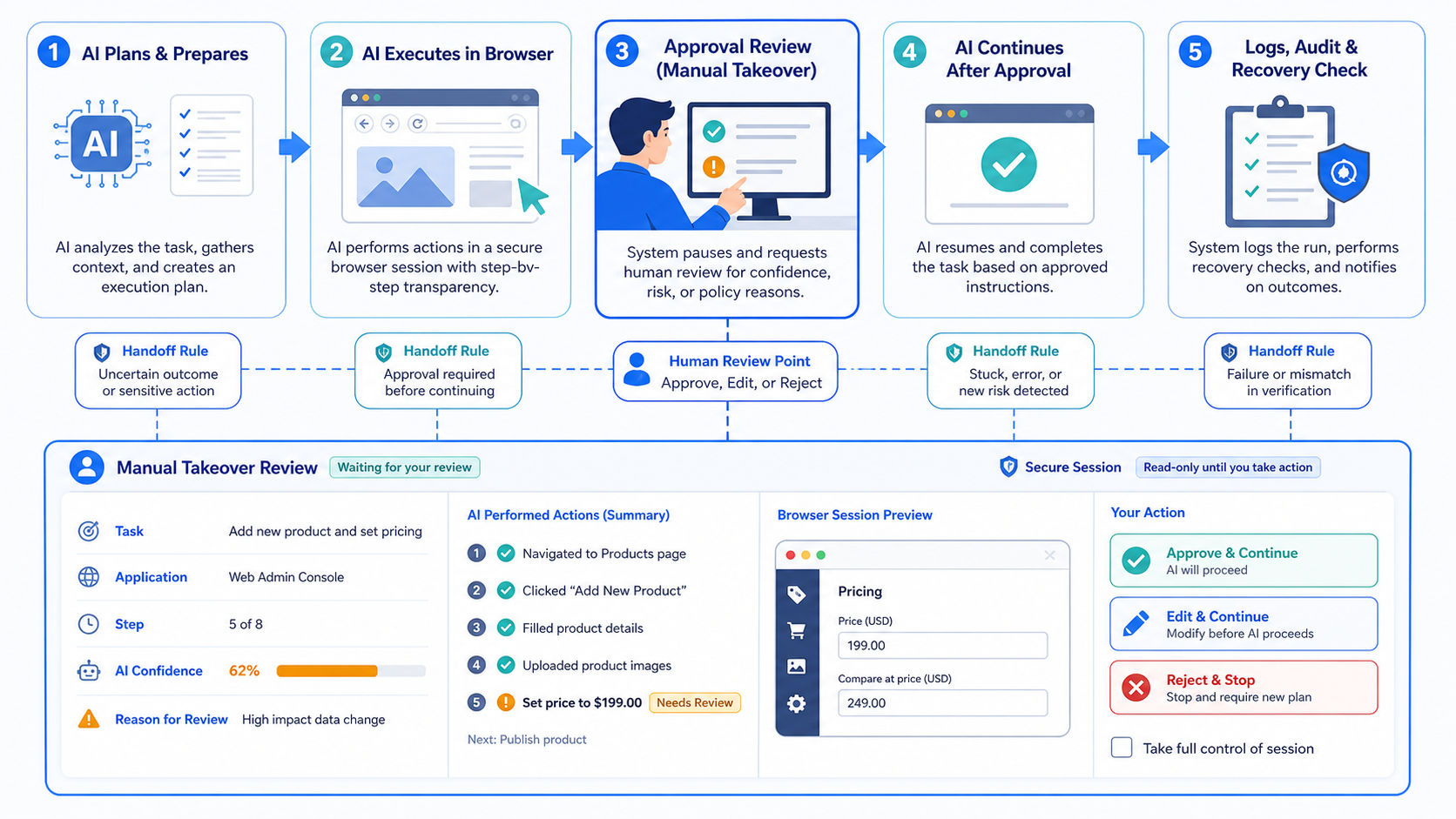
The takeover moment needs a simple interface. The reviewer should not hunt through logs, chat messages, and browser tabs to understand the paused task. Put the active account, current page, proposed action, source data, and reason for pause in one place.
The task record should answer five questions:
- What was the AI trying to complete?
- Which browser session and account were used?
- What action is waiting for review?
- What evidence or source data supports the action?
- What decision did the reviewer make?
This record also protects the team from silent manual work. If an operator edits a field, rewrites a reply, or changes a scheduled action, the reason should be saved. Otherwise the workflow improves only in the operator's memory.
| Takeover field | Good record | Weak record |
|---|---|---|
| Pause reason | Verification required before final publish | Needs human |
| Session state | Account, page, draft, and last action visible | Only a text summary |
| Decision | Approve, edit, reject, retry, or escalate | Done |
| Follow-up | SOP updated after repeated issue | No review after failure |
Good takeover design also reduces training time. A new operator can learn from the decision record, not only from shadowing a senior teammate. That matters when the same workflow runs across multiple customer accounts.
Where Manual Takeover Should Sit in the SOP
Manual takeover should be written into the SOP before the automation runs. Put stop points next to the exact step, not in a general safety note at the end. Operators need to know when the workflow should pause and what they are allowed to change.
A useful SOP separates three layers. The first layer is routine execution: navigation, copying approved data, opening records, and preparing drafts. The second layer is conditional review: missing data, conflicting fields, unusual messages, or changed page layouts. The third layer is mandatory approval: publishing, sending customer-facing replies, changing permissions, or deleting records.
That structure keeps the AI from guessing. It also keeps reviewers from over-checking every low-risk action. The team can move faster because each task already says where human judgment matters.
Teams should also define a timeout. If a paused task sits too long, it should move to a named queue, not disappear inside one person's browser session. A simple timeout rule keeps customer work from stalling when the first reviewer is unavailable.
Mistakes That Reduce Results
The first mistake is treating manual takeover as an emergency button. It should be a planned workflow state. If the operator enters only after something breaks, the team has already lost useful context.
The second mistake is hiding the browser session from the reviewer. A text summary is not enough for many web operations. The operator often needs to see the current page, account, draft, error, and proposed next action.
Another problem is unclear authority. If three people can approve the same task but nobody owns the result, takeover slows the workflow. The approval rule should name roles, not just departments.
What not to do
- Do not let AI submit customer-facing changes without review when the stakes are unclear.
- Do not use one shared account for many unrelated workflows.
- Do not allow manual edits without writing the reason.
- Do not retry the same failed task without classifying the failure.
- Do not expand automation before operators trust the takeover record.
For teams managing many accounts, account-level workflow control helps keep ownership visible. Without that layer, takeover can become a private manual workaround instead of a managed process.
Pilot Rollout, Measurement, and Recovery Checks
A pilot should measure workflow reliability before volume. The team needs to know whether the AI reaches the right checkpoint, whether reviewers can understand the state, and whether the final action is recorded clearly.
Use a small scorecard during the pilot:
| Metric | What to check | Why it matters |
|---|---|---|
| Takeover rate | How often the task pauses | Shows where automation needs clearer rules |
| Review time | How long humans need to decide | Reveals hidden complexity |
| Edit rate | How often reviewers change AI output | Shows quality of prompts, data, or SOP |
| Failure reason | Why tasks stop or retry | Guides workflow repair |
| Final status | Approved, rejected, retried, or escalated | Keeps reporting honest |
Recovery also needs a written path. When a task fails, the system should record the page, account, action, error, and next owner. A retry without diagnosis may repeat the same problem.
If the workflow includes social media, use a narrower pilot first. For example, a team may test TikTok mobile execution checks only for draft preparation, comment triage, or account checks before adding publishing tasks.
Frequently Asked Questions
What is AI automation with manual takeover?
It is an operating model where AI runs repeatable steps, then pauses for a human when judgment, approval, or recovery is needed.
Is manual takeover the same as human-in-the-loop?
They overlap. Manual takeover is more specific to execution sessions because the operator can continue the active workflow.
Which web tasks fit this model?
Dashboard checks, profile updates, lead research, draft preparation, content scheduling, and inbox triage can fit when the SOP is clear.
Which tasks should not run unattended?
Publishing, deletion, payments, permission changes, sensitive customer replies, and unusual account events usually need review.
How many takeover points should a workflow have?
Use only the points that change risk or require judgment. Too many pauses can make the workflow slower than manual work.
What should the system log?
Log account, browser session, task ID, action history, paused state, reviewer, decision, and final status.
How should a team start?
Start with one daily task, one account group, and one reviewer. Expand only after the records are easy to audit.
Conclusion
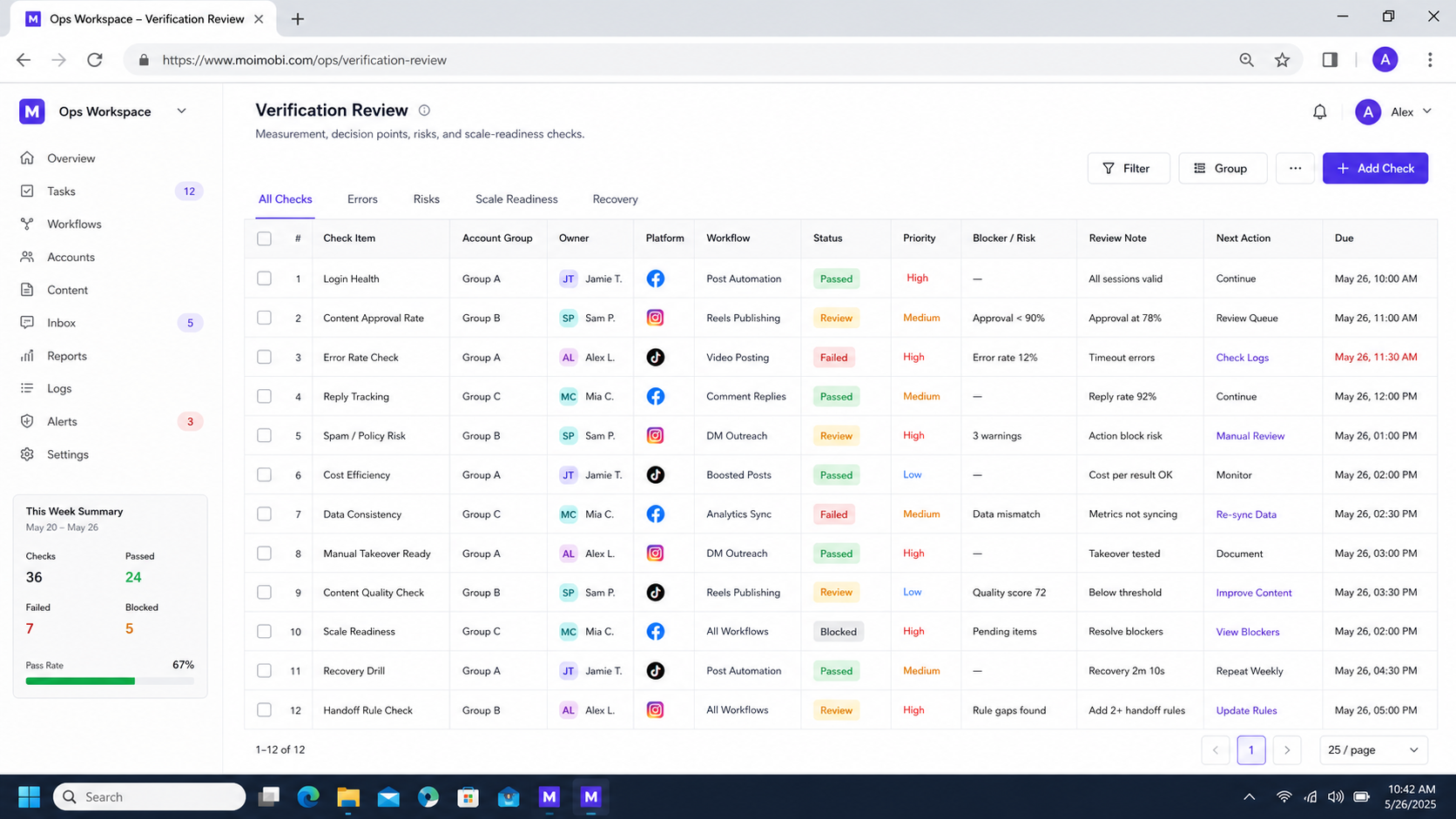
AI automation with manual takeover works when it is designed as controlled execution, not as a loose fallback. Start with the task boundary, then define stop points, takeover roles, logs, and recovery rules.
The practical priority is clear: choose one repeatable workflow, make the browser state visible, pause before sensitive actions, and review every failed run. Once the team can explain what happened during each handoff, automation becomes easier to scale without losing operational control.
Before expanding, run one final check: can a new reviewer open the paused task and understand the account, action, evidence, and next decision in under a minute? If not, improve the takeover record before adding more accounts.



