
Content Type: guide
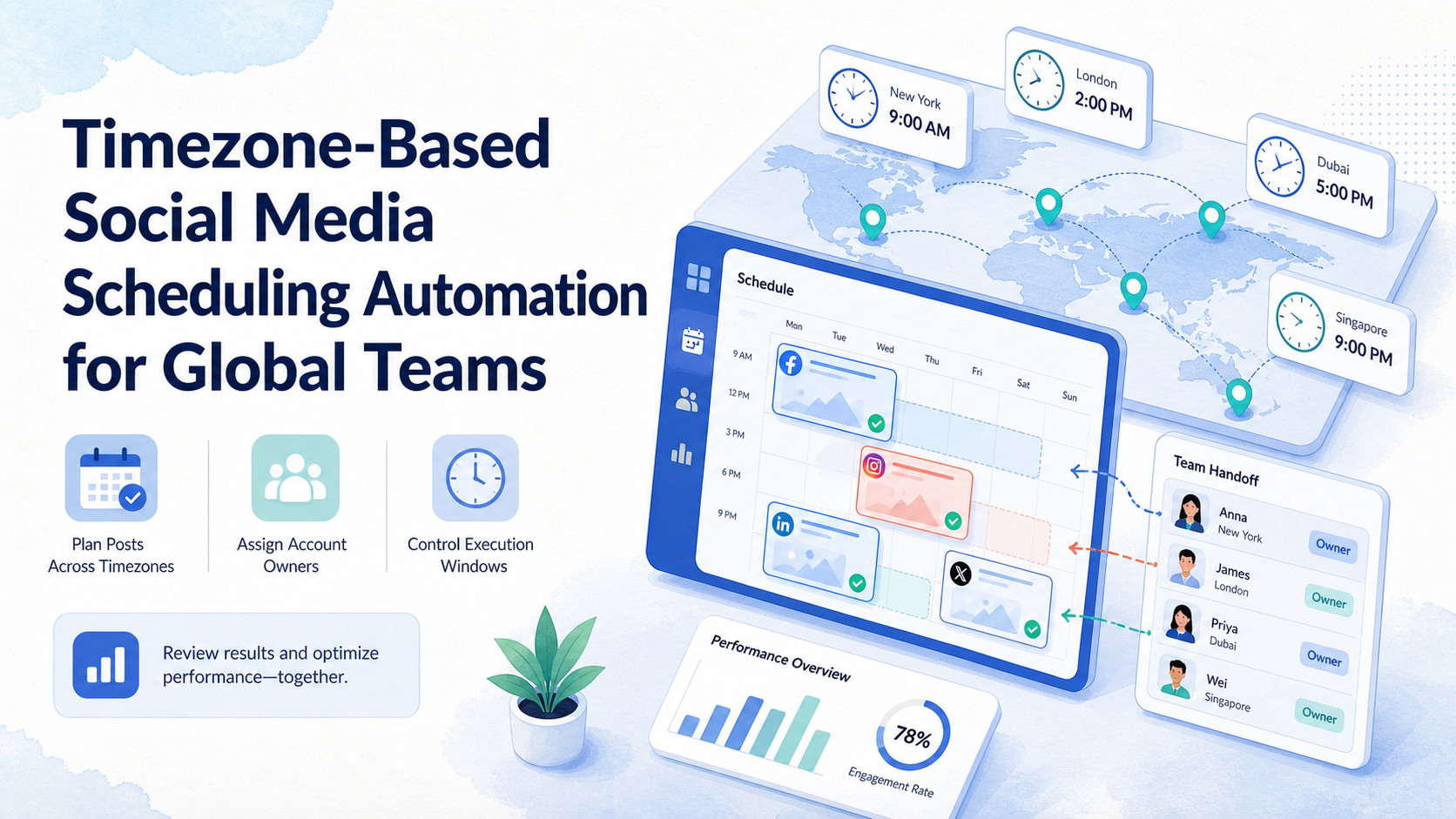
Timezone-based social media scheduling automation is the practice of planning, queueing, and executing social posts around each account's target region, local audience window, and team ownership rules. It helps global teams avoid one common problem: every account follows headquarters time, even when the audience lives somewhere else.
This topic is not only about choosing a posting time. It is about making scheduled work traceable across regions, accounts, devices, approvals, and recovery paths. If scheduling also touches app-side execution, a cloud phone can become part of the operating environment rather than a generic device rental.
The practical goal is simple. A team should know who owns each account, which timezone each account follows, what can run automatically, what needs approval, and how failed tasks are reviewed before the next campaign.
For a global team, the biggest risk is usually not one missed post. It is the slow drift that happens when regional queues, approval habits, and account environments stop matching the plan. Timezone-based social media scheduling automation should make that drift visible before it becomes a content, support, or account management problem.
Key Takeaways
- Timezone-based scheduling works best when each account has a region, owner, approval rule, and execution window.
- Automation should manage queue preparation, reminders, handoff, and logs, not remove every human decision.
- Global teams need recovery rules for missed posts, failed mobile tasks, duplicated replies, and stale content.
- Internal review should track account activity, not just published post counts.
- The safest rollout starts with a small pilot across a few regions and account types.
The Core Idea Behind Timezone-Based Social Media Scheduling Automation for Global Teams
The common mistake is treating timezone scheduling as a calendar feature. A calendar can place posts at 9 a.m. in Tokyo, Berlin, or New York. It does not automatically solve account ownership, mobile execution, approval timing, or regional handoff.
For operations teams, the better model is an account-based queue. Each account has its own timezone, content lane, reviewer, execution method, and escalation rule. The schedule is only one layer of that system.
This is why timezone-based social media scheduling automation should start from the account list, not the content calendar. The team first decides which accounts belong to which region, which accounts need local-language content, and which accounts need mobile app execution. Only after that should the team assign dates and posting windows.
Another useful distinction is planned time versus executable time. A content planner may want a post to go live at 8:30 a.m. local time. The operations team still needs to know whether the account is logged in, whether the mobile environment is available, whether the reviewer has approved the final text, and whether a backup operator can handle a failed run.
| Layer | What to define | Why it matters |
|---|---|---|
| Account timezone | Primary audience region and local posting window | Prevents headquarters-time publishing |
| Ownership | Account owner, reviewer, and backup operator | Reduces unclear handoff across regions |
| Execution | Browser, mobile app, API, or manual confirmation | Keeps task routing realistic |
| Recovery | Retry, pause, reschedule, or manual takeover | Stops failed tasks from silently disappearing |
Some platforms provide official developer or API routes for publishing and account workflows. Those routes should follow the provider terms, such as the Meta Platform Terms and TikTok for Developers Terms of Service. When an account workflow cannot be handled through an approved API, teams usually need a more controlled browser or mobile execution process.
Why Teams Search for This Topic
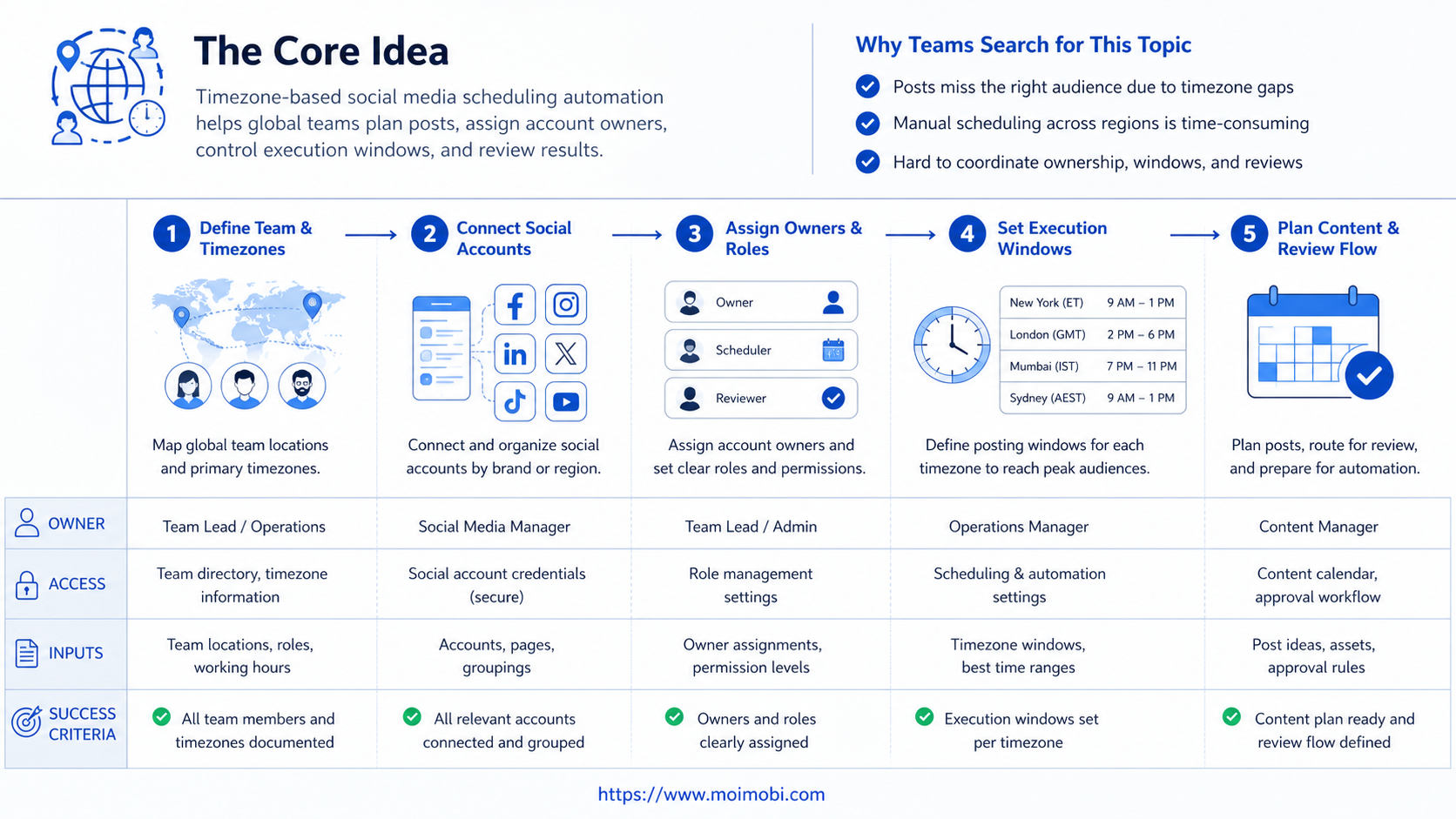
Teams search for timezone-based social media scheduling automation when manual scheduling starts to break. The symptoms are easy to recognize: posts go live at the wrong local hour, comments are answered too late, approvals arrive after the posting window, and regional teams cannot see what headquarters queued.
The problem gets worse when the same team manages multiple platforms. A TikTok content queue, Instagram reply workflow, and WhatsApp customer follow-up process may each require different execution environments. A simple scheduler does not show whether the right account, device, session, and operator were used.
For Moimobi, this connects directly to cross-timezone social media operations. Scheduling is not a standalone content task. It is part of a larger account operation where content, reply, monitoring, and follow-up need consistent ownership.
The official IANA Time Zone Database is a reminder that timezone handling is not just a text label. Software needs stable identifiers and update rules for regions and daylight-saving changes. See the IANA Time Zone Database for the underlying reference used across many systems.
Another search reason is reporting. A manager may see that thirty posts were scheduled, but that number does not explain whether the right regional accounts were used. It also does not explain whether comments were checked after publishing, whether inbox follow-up happened during local business hours, or whether a failed post was corrected.
In practice, the searcher is often looking for a way to turn local timing into an operating rule. The team wants fewer manual reminders, fewer spreadsheet handoffs, and clearer proof that each account followed the intended cadence.
Who Benefits Most and In What Situations
This workflow is useful for teams that operate across regions, not teams that post from one account into one market. It is especially relevant when the team has several local accounts, agency-managed accounts, or mobile-first customer channels.
It fits these situations:
- Global brands with regional social accounts.
- Agencies handling accounts in different markets.
- Cross-border sellers publishing by local buying windows.
- Support teams that route replies by customer timezone.
- Growth teams that test posting windows by region.
It is a weaker fit when a team has one account, one region, and one content owner. In that case, a normal social media scheduler may be enough. The added value appears when the workflow also needs account isolation, mobile task routing, reviewer handoff, and execution records.
For account-heavy teams, regional account queue ownership matters more than a large calendar view. The queue should show which account is ready, which task is waiting, and which operator owns the next action.
The best users are usually teams with enough process to define rules, but not enough headcount to manually police every account. They may already have content calendars, but the calendar does not connect cleanly to browser sessions, mobile devices, regional staff, and approval deadlines.
Here is a simple fit boundary:
- Several accounts publish into different regions.
- Posts need review before local windows.
- Mobile app actions are part of the workflow.
- Managers need task logs and missed-window records.
- One account serves one local market.
- A single owner handles planning and publishing.
- No regional language, offer, or timing variation exists.
- The team only needs a basic calendar reminder.
How to Evaluate or Start Using Timezone-Based Social Media Scheduling Automation for Global Teams
Start with a small operating map before buying more tools. The map should show how work moves from content planning to local execution.
- Group accounts by region. Assign each account one primary timezone and one backup owner.
- Define local posting windows. Use broad windows first, not exact minute-level rules.
- Separate content from execution. A draft may be ready before the account environment is ready.
- Set approval cutoffs. If approval misses the cutoff, the task should reschedule or pause.
- Choose the execution path. Use API scheduling where it is supported and compliant. Use scheduled mobile task execution when the workflow depends on app-side actions.
- Record outcomes. Track published, skipped, failed, rescheduled, and manually handled tasks.
Preflight checklist:
- Account timezone is documented.
- Reviewer and backup owner are assigned.
- Posting window has a local reason.
- Content has a regional variation rule.
- Execution environment is known.
- Manual takeover is available for exceptions.
After the preflight checklist, write one sample SOP. Keep it short enough for a new operator to follow. A good SOP names the account, timezone, source content, approval cutoff, execution method, reviewer, backup owner, and recovery path.
Example SOP outline:
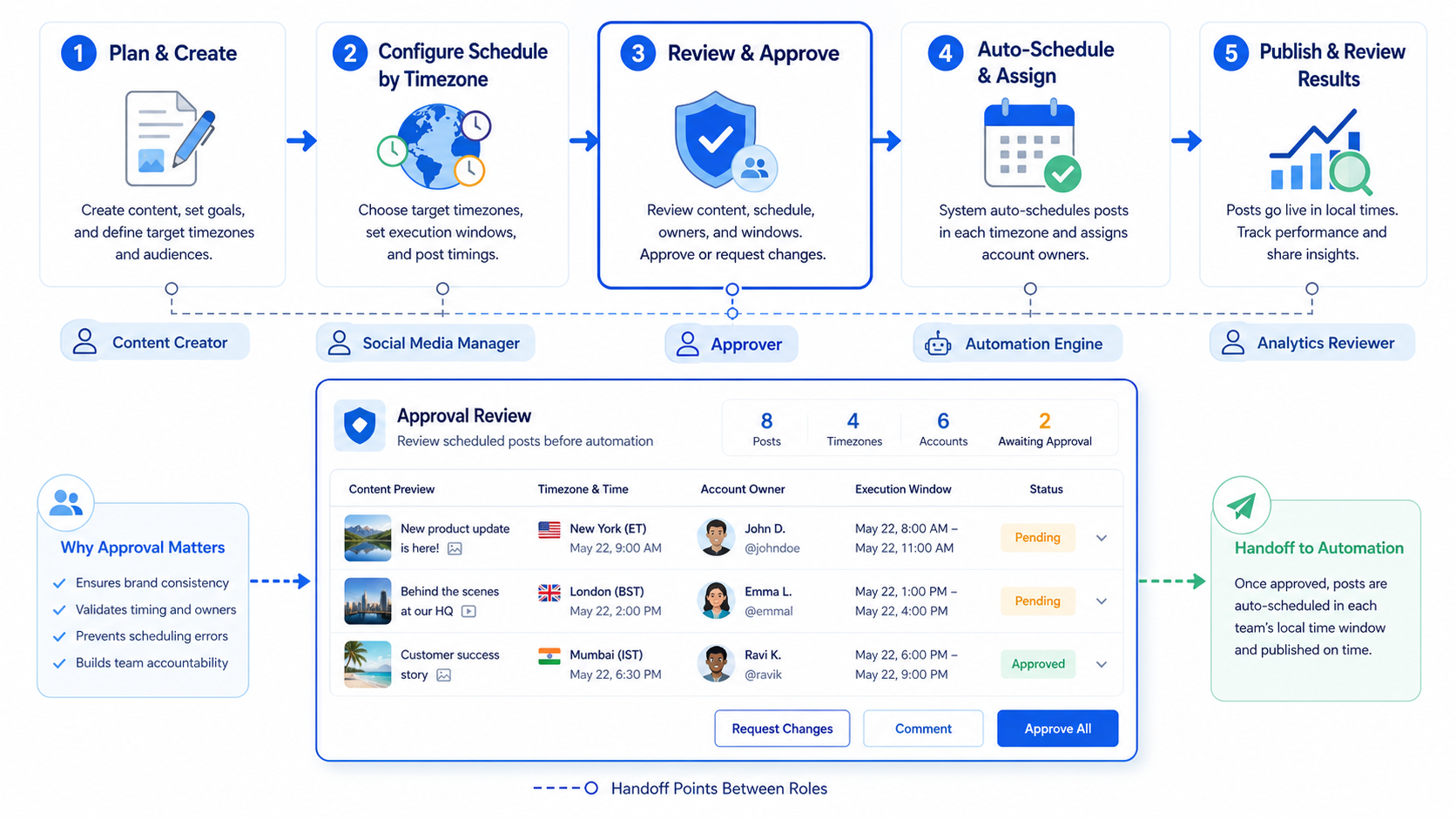
- Content owner prepares the post by 16:00 one business day before the local window.
- Regional reviewer approves or rejects by 18:00 local time.
- Scheduler places the task into the account queue.
- Execution system runs the task through the assigned method.
- Operator checks the result and records status.
- If the task fails, backup owner retries or reschedules.
This is where timezone-based social media scheduling automation becomes more than a calendar. It gives each region the same operating pattern while still allowing local content and timing.
Mistakes That Reduce Results
The first mistake is letting every region share the same queue. That creates confusion when one team edits content while another team expects the post to be ready.
The second mistake is using the same anchor content everywhere. Timezone scheduling does not fix weak localization. If the post, offer, or reply style does not fit the market, better timing will not solve the underlying issue.
The third mistake is missing environment boundaries. If several accounts rely on shared sessions, shared devices, or unclear operator access, scheduling can increase operational risk. Use per-account execution environments where account separation is part of the workflow.
The fourth mistake is measuring only published posts. A useful system should also show missed windows, approval delays, failed executions, repeated edits, and manual takeover reasons.
A fifth mistake is ignoring daylight-saving changes. Teams do not need to become timezone experts, but they should avoid storing local times as vague labels. Use stable timezone names in the system, then review regional calendars before seasonal campaigns.
A sixth mistake is placing every channel into the same automation rule. Instagram, TikTok, Facebook, X, WhatsApp, and Telegram may involve different content forms and reply expectations. The scheduling system should let teams separate publishing queues, reply queues, and monitoring queues.
A seventh mistake is treating automation as a permission bypass. The better approach is permission clarity. Decide who can create a task, who can approve a task, who can execute it, and who can recover it after failure. That makes the workflow easier to audit.
Pilot Rollout, Measurement, and Recovery Checks
Run the first pilot with three to five accounts across two or three timezones. Avoid a full rollout until the team can prove the queue is understandable.
Measure four things during the pilot:
- Readiness: how many posts were approved before the local cutoff?
- Execution: how many tasks ran in the correct account environment?
- Recovery: how many failed tasks were caught and repaired?
- Learning: which local windows produced better engagement or replies?
Recovery rules should be written before launch. If a post fails before the window closes, the operator can retry. If the window closes, the task should reschedule or move to manual review. If the same account fails repeatedly, pause that account's queue and inspect the environment, permissions, and content state.
The pilot should also test communication between teams. A queue may look perfect inside software, but fail because approvals arrive in a chat thread that nobody watches. Keep approvals, task notes, and final status in one place whenever possible.
Use a weekly review format:
- Which region had the highest number of missed windows?
- Which account had the most manual takeovers?
- Which content type needed the most edits?
- Which execution environment produced the most failures?
- Which timezone rule should change next week?
If the answers are visible without asking five people for screenshots, the system is moving in the right direction.
How Moimobi Supports Account-Based Scheduling Workflows
Moimobi is useful when scheduling is connected to real execution environments. Many teams do not only need a calendar. They need account workspaces, mobile devices, task queues, and review records tied to the same operation.
For browser-based tasks, teams can separate accounts into controlled browser environments. For app-side work, teams can route tasks to mobile environments and review execution records. For team workflows, owners can divide accounts by role, market, and task type.
This does not mean every action should run automatically. In a strong workflow, automation handles preparation, queueing, status tracking, and repeatable execution. Humans still handle creative judgment, sensitive replies, escalation, and market-specific decisions.
The practical Moimobi pattern is:
- Create account groups by market.
- Assign browser or mobile environments to those accounts.
- Attach publishing, reply, and monitoring tasks to each account queue.
- Keep approval and takeover rules visible.
- Review account activity after each campaign window.
This setup helps a global team understand not only when work should happen, but where and by whom it should happen.
Frequently Asked Questions
What is timezone-based social media scheduling automation?
It is a workflow for scheduling and executing social media tasks around each account's local audience window, owner, approval rule, and execution environment.
Is this only for posting content?
No. It can also support reply windows, monitoring, customer follow-up, and regional handoff tasks.
Do global teams still need human review?
Usually yes. Automation can prepare queues and execute approved tasks, but content judgment, sensitive replies, and escalation should stay reviewable.
Should every account use the same posting schedule?
No. Accounts should follow their target market, campaign type, and team capacity. Shared schedules often create weak local timing.
Can this work with mobile-first platforms?
Yes, but mobile-first workflows need mobile execution planning. The team should define whether the task runs through an API, browser session, cloud device, or manual operator.
What should the first pilot include?
Use a few accounts, two or three regions, clear posting windows, one backup owner, and simple tracking fields.
What should teams track after launch?
Track scheduled tasks, completed tasks, missed windows, approval delays, failed runs, manual takeovers, and account-level activity.
How is this different from a normal social media scheduler?
A normal scheduler mainly places content on a calendar. This workflow also connects timezone rules with account ownership, execution method, approval state, and recovery tracking.
Should every failed task be retried automatically?
No. Some failures can retry safely. Others should pause for review, especially when account state, content approval, or platform access is unclear.
Can timezone-based social media scheduling automation help support teams?
Yes. Support teams can use local reply windows, account handoff rules, and escalation paths to reduce late responses across regions.
Conclusion
Timezone-based social media scheduling automation is most useful when it turns global posting into a controlled operating system. The priority order is account ownership first, local windows second, execution environment third, and recovery rules fourth.
Before scaling, review one week of tasks. Check whether each account had a clear owner, each post had a local window, each failure had a record, and each manual takeover had a reason. If those basics are visible, the team is ready to expand the workflow across more regions.



