
Content Type: guide
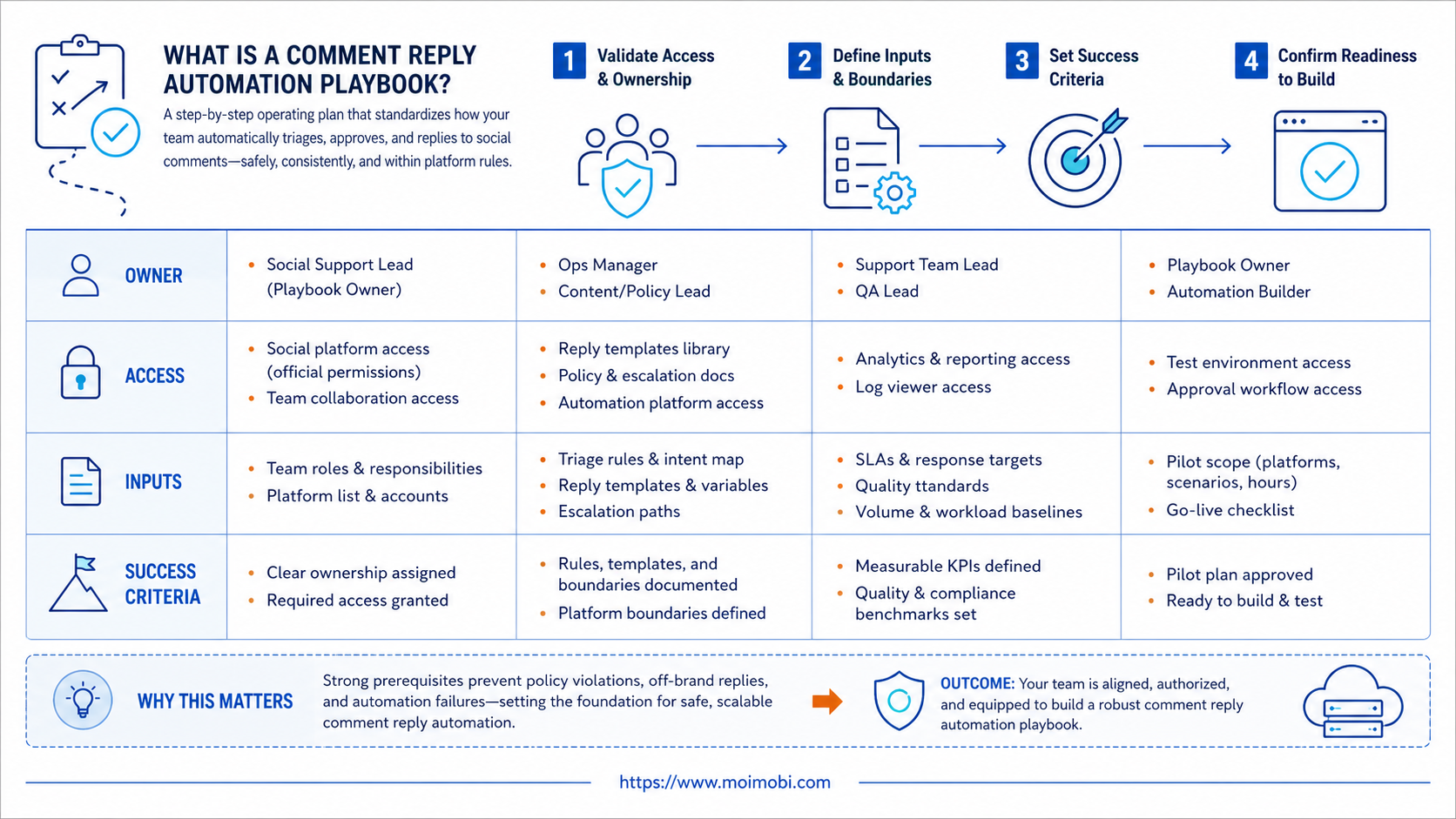
A comment reply automation playbook is a written operating system for classifying comments, drafting replies, routing edge cases, and recording human decisions. It helps social support teams move faster without turning every public comment into an unattended bot response.
The best starting point is not bulk replies. It is triage. Teams need to know which comments can receive a prepared response, which comments need a human, and which comments should never be answered automatically.
This matters because social comments are public. A weak reply can confuse customers, escalate a complaint, or make a brand look careless. Automation should prepare work and handle routine categories, while people review sensitive situations. For mobile-first teams, a cloud phone can provide the execution environment, but the reply rules still need human ownership.
Key Takeaways
- A comment reply automation playbook should start with triage, not mass replying.
- Public comments need stricter review than many internal support tasks.
- Teams should separate routine questions, complaints, pricing, policy issues, and spam.
- Manual approval should stay in the workflow for high-impact replies.
- Logs, owner records, and weekly review make automation safer to improve.
What Is a Comment Reply Automation Playbook?
The common misunderstanding is that comment automation means sending replies as quickly as possible. A better model treats automation as a support operations layer. It detects comment type, suggests a response, assigns an owner, and records the result.
Meta's developer terms set platform usage requirements for developers using Meta technologies. Instagram's Graph API documentation also exposes comment-related objects and fields for managed integrations. Those sources do not define a full support process, but they show why teams should treat platform access and comment handling as governed workflows. See Meta Platform Terms and Instagram Comment reference.
The operating document needs to describe who can reply, what the system may draft, what needs review, and how exceptions are recorded. It also needs to define what not to automate. Complaints, refunds, legal claims, harassment, and health or financial advice should usually move to a trained human.
| Comment type | Automation role | Human role |
|---|---|---|
| Routine product question | Suggest approved answer | Approve or adjust |
| Complaint | Flag and route | Reply with context |
| Spam or abusive comment | Classify and queue | Apply moderation rule |
| Pricing or refund issue | Collect context | Handle directly |
Why Comment Reply Automation Playbook Design Matters
Support teams usually feel pressure from volume. Comments arrive across posts, accounts, campaigns, and regions. A team may respond late because every comment waits for manual reading, even when many replies follow a known pattern.
Automation can reduce sorting work. It can identify repeat questions, surface urgent comments, group similar replies, and prepare drafts from an approved answer library. The operational gain comes from reducing repetitive preparation, not from removing judgment.
Use a three-part framework:
- Classification: what kind of comment is this?
- Authority: who is allowed to reply?
- Evidence: what source supports the reply?
When any part is missing, the reply should pause. For example, a customer asks about delivery delay. The automation can classify it as order support, but it should not invent a delivery answer. The workflow should route the comment to the right support owner.
For teams that run comments across multiple accounts, social media support workflows should include ownership, account separation, and review logs. A public reply is part of brand operations, not just a typing task.
Key Benefits and Use Cases
The useful benefits are operational. A playbook gives managers a way to scale response work without losing accountability. It also gives new support staff a clear rulebook for public replies.
Strong use cases include:
- Sorting comments by urgency and topic.
- Drafting approved answers for routine questions.
- Routing complaints to trained operators.
- Tracking unanswered comments across accounts.
- Building weekly reports on repeated issues.
- Keeping reply tone consistent across a support team.
TikTok's developer terms describe requirements for using TikTok developer products and data. Any team building comment workflows around platform access should review the current platform rules before designing automation. See TikTok Developer Terms of Service.
Good reply operations also help the business learn. When the same product question appears every week, the support team can send that signal to content, product, or sales. Comment automation becomes more valuable when it feeds back into operations.
Build the Queue Before You Automate Replies
The queue is the center of the playbook. It decides what the team sees first, what waits for review, and what can move through a routine path. Without a queue, automation becomes a hidden stream of suggested replies with no clear owner.
Use five queue states at the beginning:
- New: comments waiting for classification.
- Drafted: automation prepared a suggested reply.
- Needs review: a human must inspect context.
- Escalated: the comment belongs to support, sales, legal, or management.
- Closed: the reply, moderation action, or no-reply decision is recorded.
This queue design also helps managers see workload. A large "needs review" queue means the automation is not confident enough, the categories are unclear, or the brand receives many sensitive comments. A large "new" queue means staffing or routing is weak.
The reply library should connect to the queue. A routine question can pull from an approved answer block. A complaint should not. A pricing question may need a short public acknowledgement plus a private handoff. Each queue state should say which actions are allowed.
Team Roles for Comment Reply Automation Playbook Execution
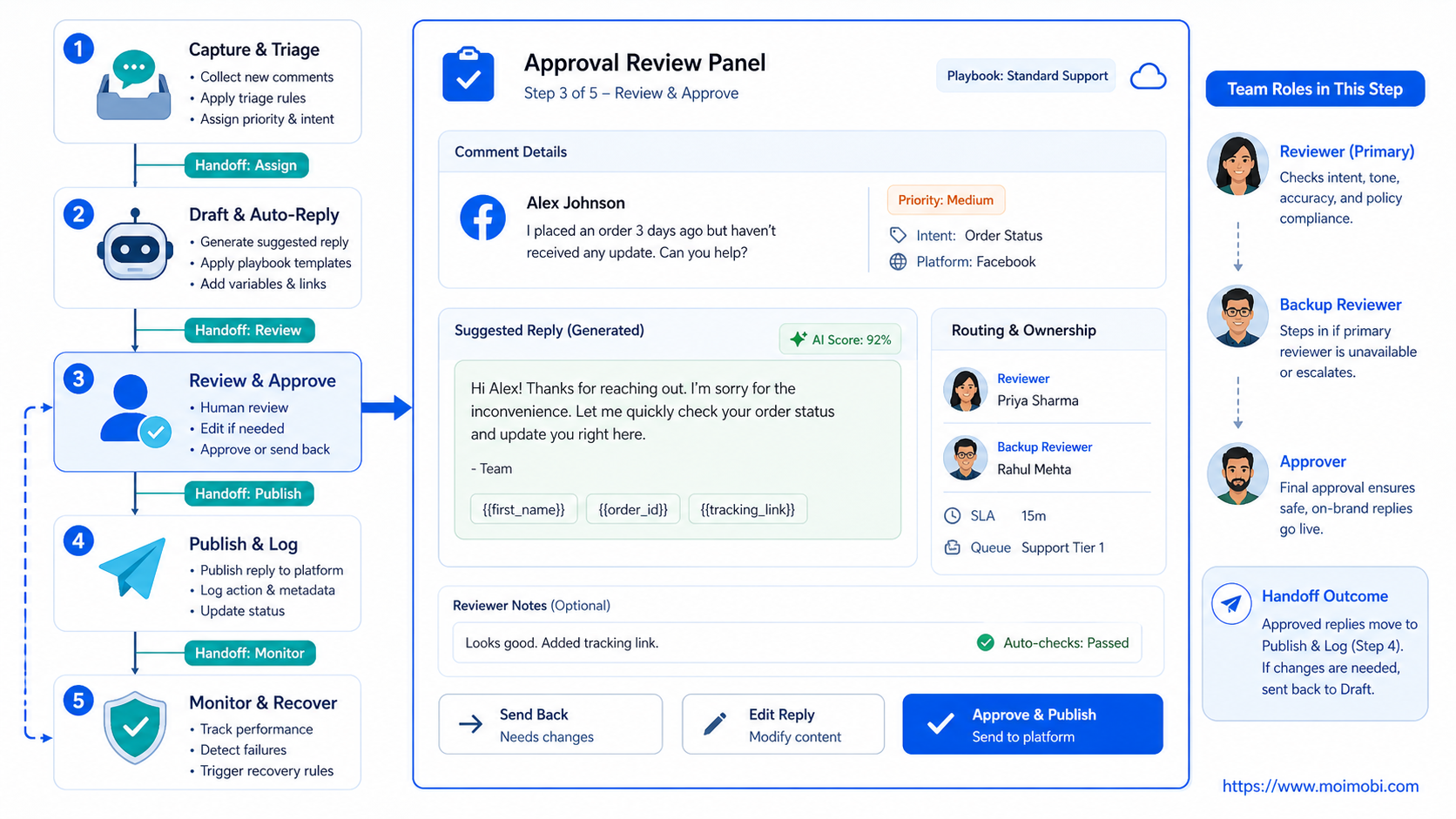
Role design keeps the workflow from becoming one shared inbox. A playbook should name the person who owns classification, the person who approves replies, and the person who updates templates after repeated issues.
Small teams can combine roles, but the responsibility still needs to be written down. One operator may classify and draft. A manager may approve sensitive replies. A customer support lead may handle escalations.
| Role | Main job | Should not own |
|---|---|---|
| Classifier | Sort comment type and urgency | Final sensitive replies |
| Reply reviewer | Approve, edit, or reject drafts | Template governance alone |
| Escalation owner | Handle complaints and account-specific issues | Bulk routine replies |
| Playbook owner | Update categories, templates, and stop rules | Every daily queue item |
This role split becomes more important in agencies. A client account may need a different tone, approval rule, and escalation path from another client. The playbook should support shared structure without forcing every brand into the same public voice.
Mobile and Browser Execution Boundaries
Comment workflows may happen in platform dashboards, mobile apps, or both. A support team should decide where each action is allowed. Drafting, classification, and reporting may happen in a browser workspace. Final app-side checks may need a mobile environment.
The boundary should be visible in the task record. If a comment was classified in one tool and replied to from another environment, the team should still keep one history. Separate screens are acceptable. Separate records are not.
For mobile-first accounts, define device ownership before launch. Which operator uses which account environment? Which comments can be handled in the browser? Which actions require app-side review? Those answers reduce confusion during busy campaign periods.
Unclear context needs a pause rule. When the operator cannot see the original post, product, customer history, or previous reply, the task should stop. A fast wrong reply is worse than a slower reviewed answer.
How to Get Started with a Comment Reply Automation Playbook
Choose one platform and one account group first. Do not automate every brand account on the first day. A narrow pilot makes errors easier to catch.
- Collect common comment types. Use real comments from recent posts. Group them by topic, intent, and sensitivity.
- Create reply categories. Keep categories simple: routine answer, needs context, complaint, spam, escalation, and no reply.
- Write approved answer blocks. Use short replies that do not overpromise. Link to support when details vary.
- Define approval rules. Decide which replies can be sent by an operator and which need manager review.
- Assign account owners. One person should own the queue for each account group.
- Log every decision. Record comment type, suggested answer, final reply, reviewer, and result.
- Review patterns weekly. Update the answer library and stop rules from real outcomes.
Teams that need account-level execution can connect this process to multi-account queue ownership. The point is to make every account's reply queue visible and reviewable.
Preflight checklist
- The team has approved reply templates.
- Sensitive categories are clearly marked.
- Account ownership is visible.
- Automation can pause before public replies.
- Operators can inspect the original comment.
- The system records edits and reviewer decisions.
- Escalation paths are written before launch.
Common Mistakes to Avoid
The first mistake is automating tone before automating routing. A friendly draft does not help when the comment belongs in a refund queue, legal queue, or complaint process. Classification should come before wording.
The second mistake is using one answer library for every account. Different brands, regions, and products need different approved language. A support team should keep shared rules, but account-specific details should stay separate.
Another failure mode is hiding edits. When a human changes an AI draft, the reason should be saved. Those edits are training signals for the playbook. Without them, the same weak draft may appear again.
What not to do
- Do not send the same public reply to every similar comment.
- Do not let automation answer complaints without human review.
- Do not mix customer support comments with engagement bait.
- Do not ignore platform terms for data access and automation.
- Do not measure only reply volume.
For workflows that include mobile apps and browser dashboards, mobile social execution controls help teams keep task state, account context, and review steps together.
Who It Fits and When It Is a Strong Match
This playbook fits teams that already receive recurring comments across multiple social accounts. It is especially useful when the same questions appear often, but the final answer still needs brand and customer context.
Strong match
- Support teams with multiple social accounts
- Brands with repeat product questions
- Agencies managing customer comment queues
- Teams that need reply records and review trails
Weak match
- Accounts with very low comment volume
- Teams with no approved answer library
- Workflows built around cold spam replies
- Brands that cannot assign comment ownership
The fit boundary is important. Comment reply automation should improve support quality and speed. It should not be used as a shortcut for low-value engagement tactics.
Pilot Rollout, Measurement, and Recovery Checks
A pilot should measure reply quality before volume. The first goal is to prove that comments are classified correctly, sensitive replies pause, and operators can review the original context.
Use a weekly scorecard:
| Metric | What to inspect | Action if weak |
|---|---|---|
| Classification accuracy | Wrong comment categories | Rewrite category rules |
| Review rate | Too many or too few pauses | Adjust approval thresholds |
| Edit rate | Humans rewrite most drafts | Improve answer library |
| Escalation time | Complaints wait too long | Assign owners earlier |
| Repeat issue count | Same question keeps returning | Update content or FAQ |
Recovery should be explicit. If a reply is wrong, the team should know who approved it, which template was used, and whether the rule needs repair. Do not only delete the reply and move on.
For creator or customer-facing teams, account-separated execution spaces can help keep customer accounts, operators, and reply history separated.
Frequently Asked Questions
What is a comment reply automation playbook?
It is a written workflow for classifying comments, drafting replies, routing exceptions, approving responses, and recording results.
Can comments be fully automated?
Some routine replies may be prepared automatically. Sensitive, public, or customer-specific replies should usually keep human review.
What should be automated first?
Begin with classification, queue routing, and draft suggestions. These steps reduce manual work without forcing unattended public replies.
Which comments need human review?
Complaints, refunds, pricing, policy issues, abusive comments, and unusual customer cases should route to a trained operator.
How should teams measure success?
Track response quality, edit rate, escalation time, unresolved comments, and repeated issue patterns. Volume alone is not enough.
Does this work for TikTok and Instagram?
It can, but the workflow depends on platform access, account setup, and current rules. Review official terms before implementation.
How does MoiMobi help?
MoiMobi helps teams manage account environments, task ownership, mobile execution, and review records for social support workflows.
Conclusion
A comment reply automation playbook is strongest when it protects support judgment. Define categories, owners, templates, stop rules, and logs first. Then let automation prepare routine work while humans handle sensitive public replies.
Before scaling, check one thing: can your team explain every reply decision after the fact? If not, improve the playbook before adding more accounts, platforms, or automated actions.



