
Content Type: comparison
A redfinger alternative is a cloud phone, Android environment, or managed execution platform that can replace Redfinger for a specific workflow. The best choice depends on what the team needs to control: account separation, mobile task execution, device stability, browser handoff, or reporting.
For business teams, the selection rule is direct. Do not compare only device price or Android version. Compare how each option handles accounts, sessions, operators, automation, failure recovery, and proof of work.
Redfinger is known as a cloud phone category option, but a team may search for alternatives when it needs more workflow control or a broader operating stack. A cloud phone can be one layer in that stack, especially when mobile app execution connects to publishing, replies, monitoring, or multi-account operations.
Key Takeaways
- Choose a Redfinger alternative by workflow control, not only by device rental cost.
- Cloud phone alternatives vary by account isolation, task logs, automation fit, and team visibility.
- Emulators, cloud testing tools, and cloud phone platforms solve different jobs.
- A pilot should test login stability, task execution, recovery, and operator handoff.
- Moimobi fits teams that need browser and mobile execution under one account-based workflow.
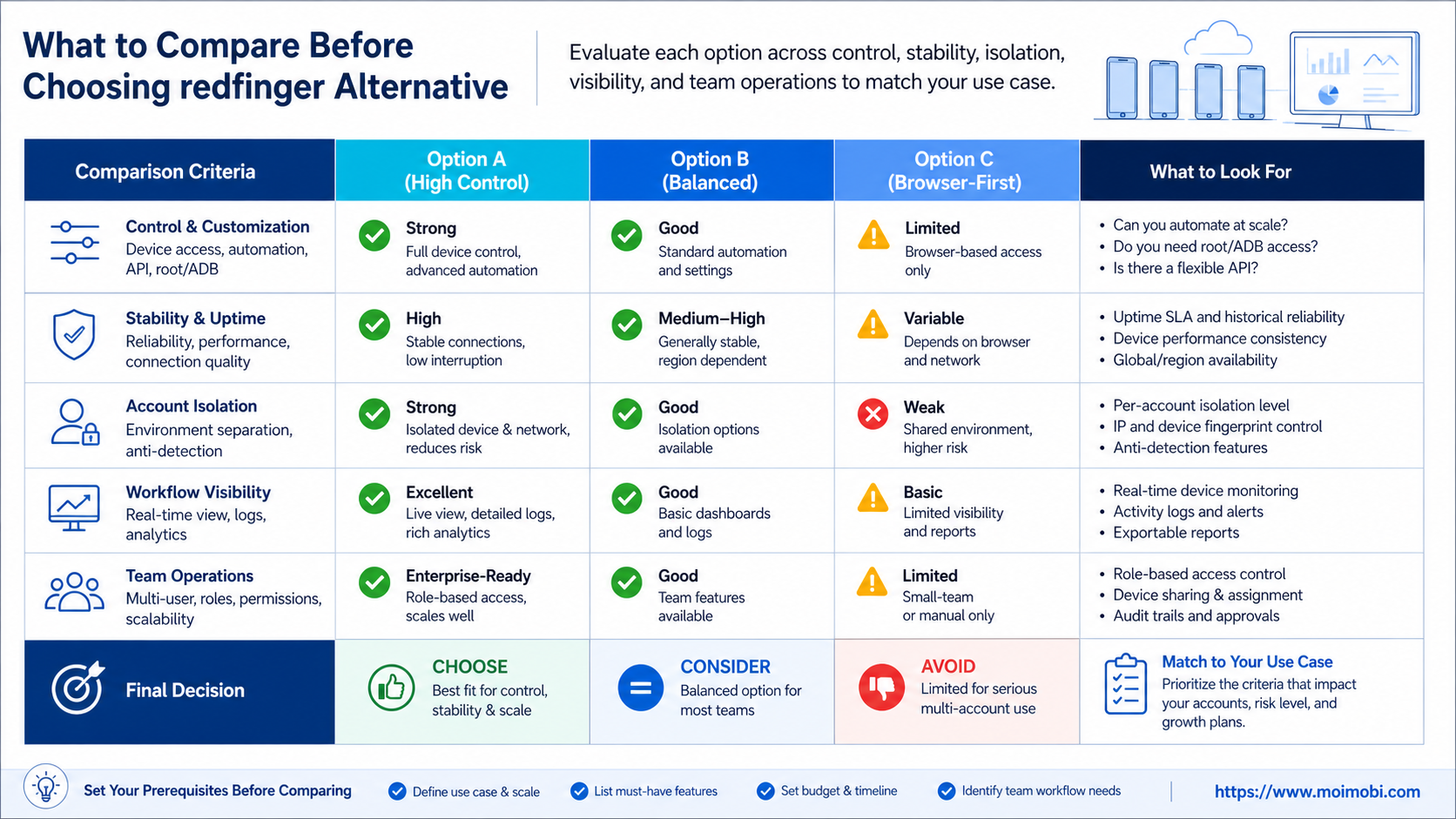
What to Compare Before Choosing redfinger alternative
The first comparison point is control. A solo user may only need a remote Android device that stays online. A team needs role permissions, account assignment, environment records, and task visibility.
The second point is stability. Stability does not mean a provider never has issues. It means the team can detect, recover, and document problems when they happen. A missed task, stuck session, or unclear account state should be visible.
The third point is workflow fit. Some alternatives focus on remote Android access. Others focus on app testing, emulator-style development, or managed account operations. These categories overlap, but they are not interchangeable.
| Comparison axis | What to ask | Why it matters |
|---|---|---|
| Account control | Can each account use a separated environment? | Reduces mixed sessions and unclear ownership |
| Execution visibility | Can the team see task status, failures, and handoff? | Turns device use into an auditable workflow |
| Automation support | Can repetitive tasks become repeatable workflows? | Reduces manual device-by-device operation |
| Team operations | Can owners, reviewers, and operators work separately? | Improves accountability across accounts |
| Recovery path | What happens when a task fails or a session is stale? | Makes silent failure easier to catch |
Use official documentation as a reality check. AWS Device Farm describes testing apps on hosted devices through AWS Device Farm. Android Developers describes the Android Emulator for simulating Android devices through the Android Emulator documentation. Meta also publishes platform terms for approved app and platform integrations in the Meta Platform Terms. These references show why cloud phones, emulators, testing clouds, and platform workflows should not be treated as the same purchase category.
Key Differences Between Best Redfinger Alternatives by Control and Stability
The main difference is whether the alternative is a device product, a testing product, or an execution platform. A device product gives the team remote Android access. A testing product helps QA teams validate app behavior. An execution platform connects devices, accounts, workflows, and records.
That distinction matters for social media, e-commerce, and customer engagement teams. Their work usually does not end after a device starts. They still need content queues, inbox checks, account separation, and team handoff.
Here is a practical comparison:
| Option category | Best for | Less ideal for |
|---|---|---|
| Cloud phone rental | Remote Android access and simple app availability | Complex team workflows without extra process |
| Android emulator | Development checks and repeatable local tests | Real account operations and mobile-first workflows |
| Real-device testing cloud | App QA, test automation, and compatibility review | Daily social or account operations |
| Execution platform | Multi-account mobile work, task queues, and review records | Teams that only need one personal device |
A good redfinger alternative should therefore be judged against the team's operating model. If the work is only personal app access, a simpler cloud phone may fit. If the work involves many accounts and people, control and stability become more important than a basic remote screen.
Moimobi positions the choice as an execution problem. Teams can evaluate a cloud phone alternative by asking whether it supports account-based workflows, not only whether it launches an Android session.
Features, Workflow, and Trade-Offs
The wrong question is, "Which provider has the most devices?" The better question is, "Which provider gives our team the right control over the work?"
For social media operations, the work may include logging into mobile apps, preparing posts, replying to comments, checking messages, and recording task outcomes. In that case, remote access alone is only one part of the stack. The team needs app-side task routing with task context and review paths.
For multi-account management, the workflow may require one account per environment. The team also needs clear owner assignment. If everyone shares the same device pool without rules, the system becomes harder to debug.
For app QA, a testing cloud may be better than a social operations platform. Testing teams usually care about device matrix coverage, automation scripts, logs, and reproducible app behavior. Operations teams care more about account queues, task state, and handoff.
The trade-off is scope. A simple cloud phone can be easier to start. A broader execution platform takes more setup, but it can reduce manual coordination once the team has repeatable workflows.
Pricing and Operational Considerations
Pricing should be reviewed as total operating cost, not only monthly device cost. A cheaper device can become expensive if operators spend hours checking status, moving accounts, or repairing failed tasks.
Start with five cost fields:
- Device or environment cost.
- Proxy, network, or region cost.
- Operator time for manual checks.
- Manager time for coordination and review.
- Cost of missed tasks, delayed replies, or duplicated work.
Avoid hard vendor pricing comparisons unless current plan details are verified from the provider. Prices, package limits, and available regions can change. The more reliable method is to run a controlled pilot with the same workload on each candidate.
Operational cost also depends on workflow volume. A team running ten accounts may tolerate manual checks. A team running hundreds of account tasks needs queue visibility, task history, and exception handling. That is where account assignment model becomes part of the buying decision.
Which Option Fits Different Teams
A cloud phone rental option fits users who need remote Android access and long-running app availability. This can be enough for personal use, lightweight app access, or small experiments.
An emulator fits development teams that need local debugging, repeatable test runs, and fast reset. It is less suitable when the workflow depends on real account operations, mobile app state, and long-running team tasks.
A testing cloud fits QA teams. It helps when the main job is validating app behavior across hosted devices. It may not be the best fit for social media operations because those teams need account ownership and execution records.
Moimobi fits teams that treat mobile environments as part of a broader workflow. The target user is a team managing social media, customer engagement, e-commerce, or account operations across browser and mobile environments.
- One person controls the workflow.
- The account count is low.
- Manual checks are acceptable.
- The team does not need task logs.
- Many accounts need separated environments.
- Several operators share responsibility.
- Tasks need approval, retry, and review.
- Browser and mobile workflows need one operating model.
This is also where separated mobile environments become relevant. The point is not to make broad safety claims. The point is to make account environments easier to separate, assign, and review.
Pilot Checklist for a Redfinger Alternative Comparison
Run a pilot before migrating accounts. Use the same task set across each option, then compare the results.
- Pick a small account sample. Use three to five accounts with different roles.
- Define the task set. Include login, app launch, posting prep, reply check, and status recording.
- Assign owners. One person runs the task, another reviews the output.
- Record failures. Capture stuck sessions, app errors, login issues, and missed steps.
- Check recovery. Test how quickly the team can retry or hand off.
- Review visibility. Confirm whether managers can see what happened without asking for screenshots.
The selected option is not always the one with the fastest setup. It is the one that gives the team the clearest operating loop for its workload.
Review Scorecard for Control and Stability
Use a scorecard after the pilot. Do not rate the tool from marketing pages alone. Rate the actual account workflow your team tested.
| Score area | Pass signal | Review question |
|---|---|---|
| Setup clarity | Operators can create or enter environments without extra explanation | Can a new team member repeat the setup? |
| Account separation | Each account has a clear environment and owner | Can the team tell which account ran which task? |
| Task visibility | Task status is visible after execution | Can managers see completed, failed, and pending work? |
| Recovery | Failed work has a retry or manual takeover path | Can the team recover without guessing? |
| Scale readiness | The same process works for more accounts | What breaks when the account count doubles? |
Give each area a simple rating: pass, watch, or fail. Avoid a false precision score if the pilot is small. The goal is to identify the weakest operating link before the team moves more accounts.
Control and stability usually show up in boring details. The better option is the one that makes task ownership, account state, and recovery clearer during a normal week. A platform that looks powerful in a demo may still be difficult to run if operators cannot see what happened yesterday.
Frequently Asked Questions
What is a redfinger alternative?
It is another cloud phone, Android environment, testing cloud, or execution platform that can serve a similar mobile access or workflow role.
Is every cloud phone alternative the same?
No. Some focus on remote Android access. Others add task queues, account separation, automation, or team management.
Should I choose the cheapest option?
Not by default. Compare total operating cost, including operator time, recovery work, failed tasks, and account management overhead.
Is an Android emulator a Redfinger replacement?
It can replace some development or testing workflows. It is usually a weaker match for long-running account operations and app-side team tasks.
Is a testing cloud the best Redfinger alternative?
It depends on the job. Testing clouds fit QA and device coverage. Social operations teams may need account workflow control instead.
What should a team test first?
Test login persistence, app launch, task execution, status visibility, owner handoff, and failure recovery.
How does Moimobi differ from a basic cloud phone rental?
Moimobi is positioned around execution workflows. It connects mobile environments with account assignment, task operations, and team review.
Can a Redfinger alternative improve account control?
It can support better separation and control. Teams still need clear rules, compliant behavior, and regular review.
Conclusion
The best Redfinger alternative is the option that matches your real workflow. A simple cloud phone may be enough for personal remote access. A testing cloud may fit QA. An execution platform fits teams that need account control, task visibility, and stable mobile operations.
Before choosing, run one pilot with the same accounts and tasks across your shortlist. Compare setup time, execution success, failure recovery, operator handoff, and reporting clarity. The result will show whether you need a device, a testing service, or a full execution layer.



