

Key Takeaways
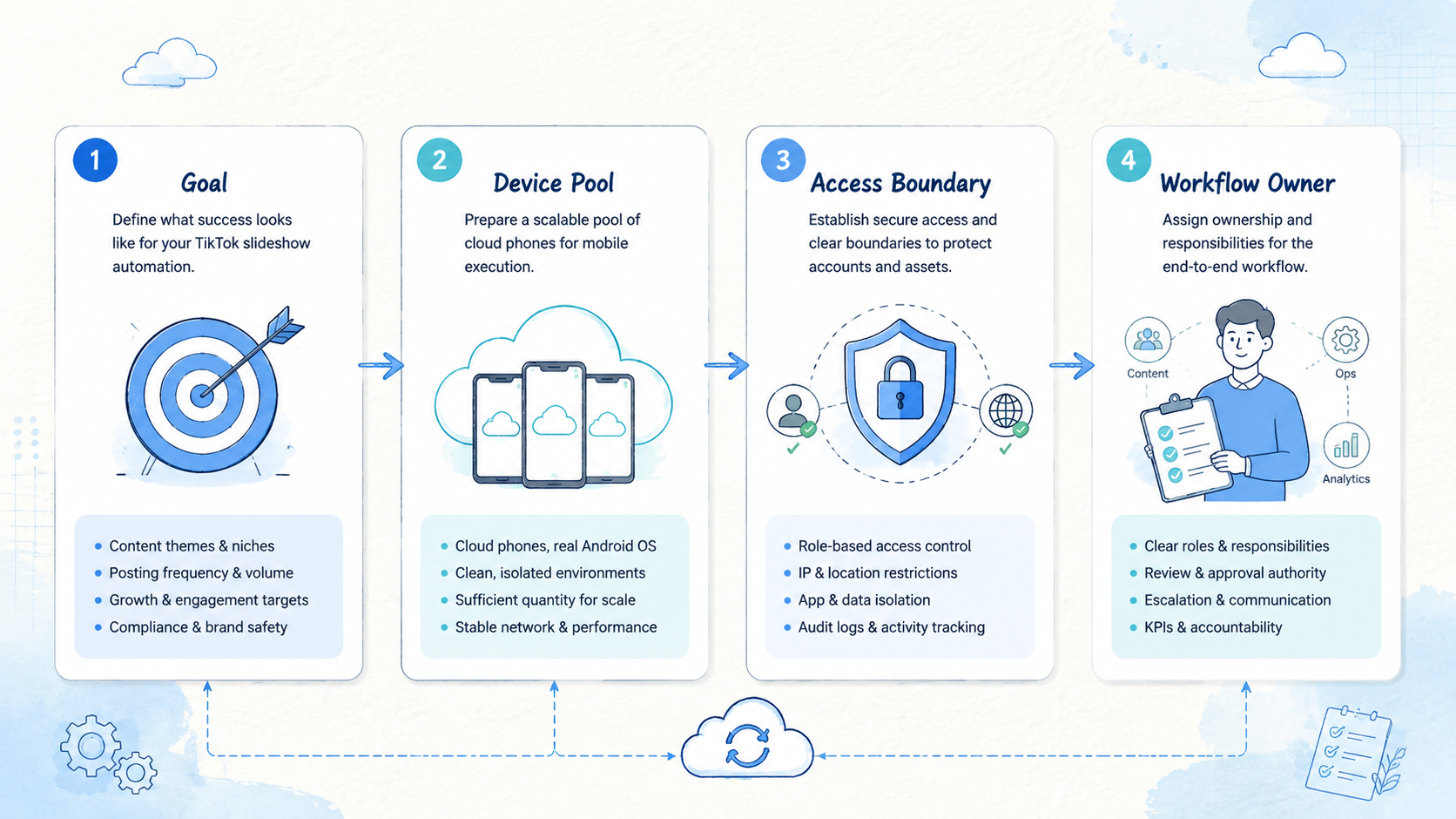
- TikTok slideshow content automation works when scripts, visuals, accounts, review, posting, and data are handled as one system
- More content only helps when each post creates usable performance data
- Teams should keep final publishing and risky account actions under human review
- Cloud phones, phone farms, device isolation, proxy routing, and mobile automation help teams execute mobile workflows without mixing account state
- Start with a small quality gate before scaling daily output
Introduction
TikTok slideshow content automation means turning idea selection, script writing, image production, account assignment, publishing review, and performance analysis into a repeatable operating system. The point is not to ask AI for more captions. A working workflow runs controlled content tests without losing account discipline.
The practical question is not only: how do we make better content? For ecommerce, affiliate, creator, and social operations teams, the harder question is: how do we make enough credible content to test formats, hooks, visuals, offers, and account types at useful speed?

TikTok does not reward only the single most polished asset. Each post enters a test path. Early viewer behavior influences whether the post receives more reach.
Many posts will fail. That is normal. The goal is to build a system where every post either produces revenue, lead data, or learning.
MoiMobi supports the execution layer behind this kind of system through cloud phone, phone farm, mobile automation, device isolation, and multi-account management. These layers matter when content moves from a production queue into real mobile accounts that need clean state, owner notes, route context, and human review.
Use automation carefully. Content generation should respect platform rules, copyright, claims, and user trust. Review the workflow against trusted references such as TikTok's Community Guidelines, TikTok's Branded Content Policy, and the FTC's Endorsement Guides.
Why TikTok Slideshow Content Automation Needs Learning Volume
Posting more content is not automatically a strategy. Controlled tests beat raw volume.
A team that posts three times per week has 156 tests per year. A portfolio that posts 100 pieces per day has 700 tests per week. The difference is not just output volume; it is the speed of learning across many small experiments.
Slideshow content is useful because the production loop is short. One product angle can become several formats:
| Format | What it tests | Example use |
|---|---|---|
| Problem first | Pain recognition | "Why this routine keeps failing" |
| Before and after | Visual contrast | Product setup, cleanup, result |
| Checklist | Decision criteria | "Check these 5 signs before buying" |
| Step guide | Execution clarity | How to use, install, compare, or fix |
| Mistake list | Risk awareness | Common errors and how to avoid them |
Each format can use a different first slide, image order, caption, and call to action. The performance result shows what the audience actually responds to.
The warning is simple. Without a quality gate, more content only creates more noise. When operators record variables, review output, and learn from results, volume becomes an intelligence system.
Layer 1: Build a TikTok Slideshow Content Automation Script Engine
Every slideshow starts with a script. The script decides the first slide, the sequence of claims, the product or offer entry point, and the final action.
Weak AI scripts sound like ads. They use words such as revolutionary, must-have, ultimate, and game-changing. Most viewers ignore that tone. TikTok content needs specific, casual, and credible language.
A useful script engine should draw from real language:
- Customer reviews
- Support tickets
- Comment sections
- Product questions
- Creator notes
- Competitor content patterns
- Search queries
The goal is not to copy users. The goal is to understand how they describe the problem. If real customers say "this takes forever to clean," the script should not say "optimize your household maintenance workflow." It should sound closer to the user.
A good script template has five parts:
| Part | Purpose | Quality check |
|---|---|---|
| Hook | Earn the first second | Recognition or curiosity |
| Problem | Name the user pain | Specific user pain |
| Insight | Add useful context | Useful teaching point |
| Resolution | Introduce product or action | Natural product entry |
| CTA | Move the user forward | Clear next step |
The script engine should produce variants, not one final answer. For one product, create 10 hooks, 5 slide structures, and 3 caption angles. The review queue can then select the best candidates before visual production.
Layer 2: Use Visual Templates Without Making Everything Look Identical
Slideshow content needs visual consistency, but it should not look mass-produced. The right balance is reusable structure with varied scenes.
Create a visual system before scaling output. Common templates include:
- First-slide hook with a simple product or lifestyle image
- Problem slide with one clear pain point
- Step slide with one action per frame
- Comparison slide with two visible choices
- Proof slide with a real review, metric, or use case
- Summary slide with the next action
Keep text light. Slideshow posts often fail because each frame carries too much copy. A good slide should be understood quickly on a phone.
Operators should also define negative rules:
- No fake screenshots
- No unsupported income, health, or performance claims
- No copied creator images without rights
- No unreadable text
- No product mismatch
- No AI artifacts that make the post feel synthetic
Visual templates make output faster. Quality rules keep the template from becoming spam.
Layer 3: Create Account Pools With Clear Roles
A slideshow automation workflow should not push all posts through one account. A single account has one audience, one history, and one creative direction. A larger system needs account pools.
A practical account structure can include:
| Account pool | Role | Posting style |
|---|---|---|
| Brand accounts | Trust and conversion | Lower volume, higher quality |
| Niche accounts | Audience education | Specific topics and repeated problems |
| Testing accounts | Hook and format discovery | Fast experiments with tracked variables |
| Creator-style accounts | Human tone | Stories, reviews, routines, and tips |
| Retargeting accounts | Warm audience support | Objection handling and proof |
Each account pool needs a different review rule. Brand accounts require stronger review. Testing accounts can move faster, but every post still needs variable tracking.
This is where cloud phones and phone farms become operationally useful. Operators need visible ownership, logged-in account context, route notes, content queue status, and phone state.
Without visible state, managers will push the system into private chat. That does not scale.
Layer 4: Keep TikTok Slideshow Content Automation Publishing Controlled
The generation side can be highly automated. The final publishing step should stay controlled.
A safe operating model looks like this:
- Generate scripts. Create multiple hook and slide variants from approved inputs.
- Build slideshow drafts. Apply templates and product-safe visual rules.
- Review claims. Check compliance, tone, product accuracy, and rights.
- Assign accounts. Match content to the correct account pool and phone.
- Publish from a reviewed mobile environment. Keep the final action visible to a human owner.
- Collect results. Pull views, watch signals, clicks, comments, saves, profile visits, and revenue events.
Automation should support the operator. It should not hide account state. A reviewer should know which phone, account, route, post, and owner are involved before approving the queue.
MoiMobi covers the execution layer. Cloud phones support access, while device isolation supports account separation across pools.
Proxy routing keeps route notes visible, and automation can handle repeatable steps that already have stop rules. That control matters because mobile workflows fail quickly when state is hidden.
Layer 5: Build a TikTok Slideshow Content Automation Feedback Loop
The feedback loop is the reason to automate. Without feedback, operators are only producing assets.
Track variables at the post level:
| Field | Why it matters |
|---|---|
| Account pool | Shows where the format works |
| Hook type | Finds opening patterns |
| Slide count | Measures pacing |
| Visual template | Identifies format fit |
| Product angle | Connects content to offer |
| CTA | Measures next action |
| Posting time | Shows audience timing |
| Comment themes | Feeds new scripts |
Review results every 48 to 72 hours. Do not rank only by views. For ecommerce and lead generation, stronger signals include product clicks, profile visits, saves, qualified comments, add-to-cart events, revenue per view, and repeatable conversion patterns.
Top formats should become new variants. Weak formats should be retired or rewritten. The point is not to make more content forever. The point is to make more of what works and less of what does not.
The TikTok Slideshow Content Automation Quality Gate Before Scaling
A high-output system needs quality gates before generation, before publishing, and after results come in.
Use a script gate before visuals:
- Hook sounds like a real person
- Post makes one clear point
- Banned marketing words are removed
- Product or action appears naturally
- Unsupported claims are removed
Use a visual gate before scheduling:
- First slide is readable
- Each slide has one job
- Images are rights-safe
- Product details are accurate
- Fake proof is removed
Use an account gate before publishing:
- Right account pool is selected
- Phone owner is visible
- Account state is clean enough for the action
- Route context is recorded when needed
- Stop rule exists for unclear state
Use a data gate after posting:
- Results are attached to the right post and account
- Comments are reviewed for new customer language
- Winners are tagged for variants
- Weak formats are retired with a reason
This system prevents automation from turning into uncontrolled noise.
Start With 10 Good Posts Before Scaling to 100
Do not rush. Teams often fail because they try to scale before they have a standard, especially when review rules are still vague. If the first 10 slideshow posts look fake, unclear, or repetitive, 100 versions will not solve the problem.
Start with 10 posts that must pass the human review standard before any larger queue is approved.
Then build 50 posts and test whether templates, account assignment, and review still work.
Then build 100 posts and test whether operators can track variables, publish safely, recover failed states, and learn from performance.
Only after that should leadership consider a larger daily output. Scale should be the result of a working system, not the starting target.
Operating Model for a Real Team
A real content automation team needs named roles.
| Role | Responsibility | Daily focus |
|---|---|---|
| Content owner | Defines themes and offers | Test plan |
| Script reviewer | Checks language and claims | Real and safe language |
| Visual reviewer | Checks slide quality | Mobile clarity |
| Account operator | Publishes from assigned phones | Account state |
| Data owner | Reviews performance | Scale or stop decision |
| Admin | Handles reset and quarantine | Clean-state return |
The phone record should show account, phone, owner, content queue, route note, review status, and next action. A second operator should be able to continue without private explanation.
That is the practical benefit of treating mobile content work as an operating system rather than a loose collection of accounts.
Common Mistakes
Mistake 1: Scaling generic AI copy
Generic copy does not become useful because there is more of it, so train prompts with real user language and strong negative constraints.
Mistake 2: Using one account as the whole system
One account cannot test every audience, product angle, and creative format; use account pools with clear roles.
Mistake 3: Automating publishing before review is stable
Generation can move fast, but publishing should follow state, ownership, and review rules.
Mistake 4: Optimizing for views only
High views with no qualified action may not help the business; track revenue, clicks, comments, saves, profile visits, and product interest.
Mistake 5: Ignoring recovery
At scale, some phones, accounts, routes, or posts will enter unclear state, so reset and quarantine rules need to exist before the queue grows.
Frequently Asked Questions
What is TikTok slideshow content automation?
The term describes a repeatable workflow for creating, reviewing, assigning, publishing, and analyzing TikTok slideshow posts across one or more accounts.
Is slideshow automation only about AI image generation?
No. Images are only one layer. The full system includes scripts, templates, accounts, review, mobile execution, and performance feedback.
Should teams publish automatically?
Not by default. The final publishing action should remain visible to a human owner, especially when account health and compliance matter.
How many posts should a team start with?
Start with 10 strong posts, then test 50, then test 100, and increase volume only after quality, review, and tracking work.
Where do cloud phones fit?
Cloud phones help teams operate mobile accounts in a controlled environment. They are useful when multiple operators need clean phone state, visible ownership, and repeatable review workflows.
How should winners be selected?
Use business signals, not only views. Look at product clicks, saves, qualified comments, profile visits, revenue per view, and repeatable performance across account pools.
Can automation remove platform risk?
No. Automation can make workflows more consistent, but teams still need platform rules, human review, account controls, and stop rules.
What is the next step?
Pick one product, one account pool, and 10 slideshow posts. Define hooks, templates, review checks, phone ownership, and performance fields before increasing volume, then document the handoff rule before the next batch starts.
Conclusion
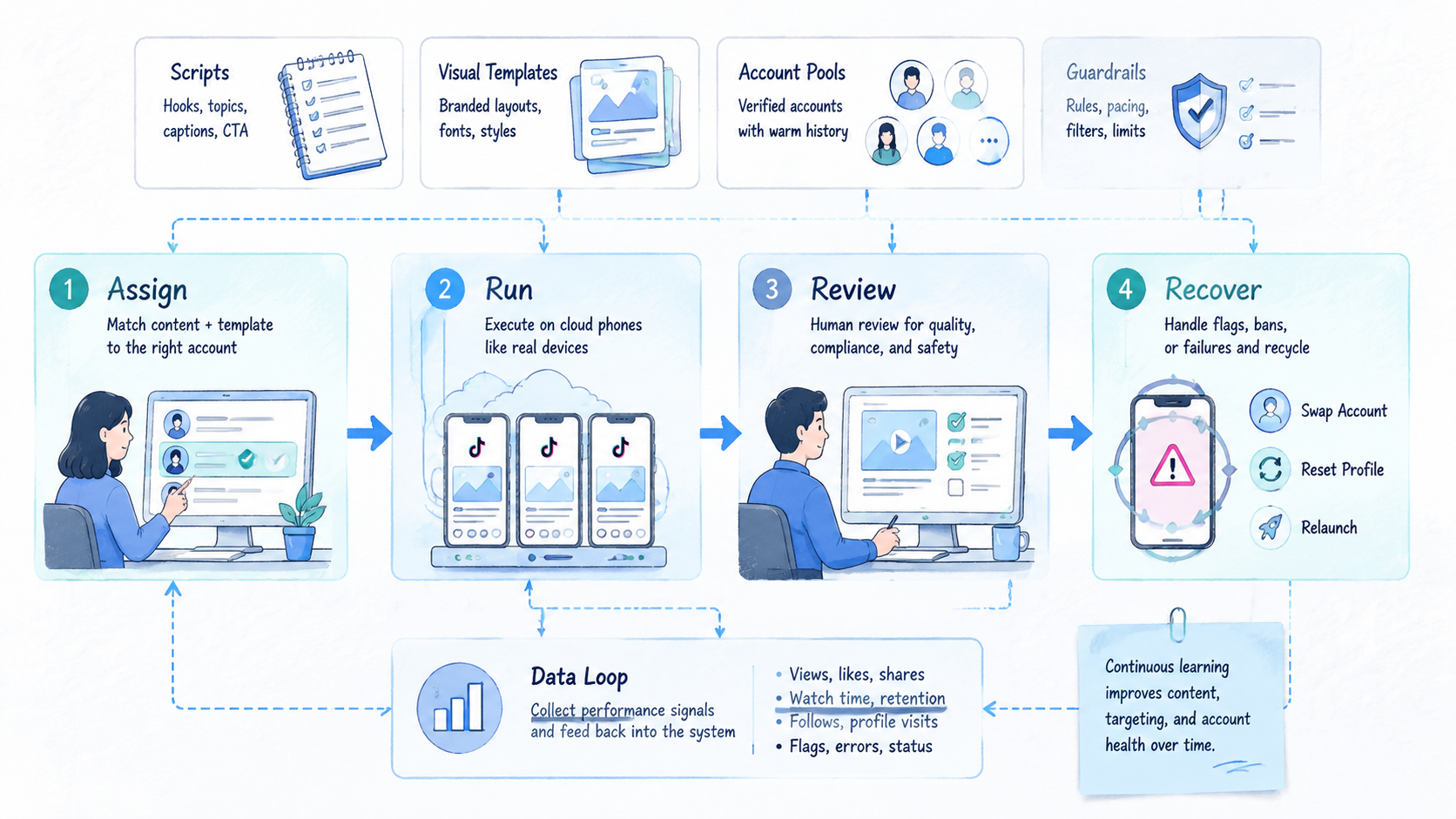
This workflow is not a shortcut to spam. It builds a learning system around content production. The system works when scripts, visuals, account pools, mobile execution, review, and data all reinforce each other.
Use one final check before scaling. Every batch should show the script owner, review owner, phone owner, account pool, stop rule, and performance fields. When those fields are visible, TikTok slideshow content automation becomes easier to manage across operators. When those fields live in private chat, the workflow will break as soon as volume grows.
The best starting point is small. Create 10 high-quality posts and publish them through a controlled account workflow.
Review the results, turn the winners into variants, retire the weak formats, and then scale the system one layer at a time.
This final check also creates a clean handoff record. A second operator can continue the work without asking for hidden context, and a manager can see whether the workflow is ready for more volume.
Campaigns end. Systems compound. A team that treats content as a measured operating process will learn faster than a team that treats every post as a one-off creative gamble today.



