
Key Takeaways
- An AI employee platform should be judged by execution, not only by chat output.
- Real AI employees need browser profiles, mobile environments, workflow memory, logs, and review rules.
- Teams should start with one repeated workflow before scaling to many accounts.
- The best fit is work that has clear inputs, owners, review points, and recovery paths.
An AI employee platform is software that gives AI workers the environment, workflow rules, and review path needed to complete real business tasks. The important word is "employee." A useful platform should help an AI worker do work inside browsers, cloud phones, dashboards, mobile apps, and account environments, not only answer questions in a chat box.
Teams usually start looking for this category after a simple automation tool stops being enough. They may have social accounts to manage, ecommerce dashboards to check, customer messages to triage, leads to collect, or daily reports to prepare. The problem is not only content generation. The harder problem is repeatable execution with clear ownership.
MoiMobi treats AI employees as execution workers. Browser environments support web tasks, cloud phones support mobile app tasks, and device isolation helps keep account work separated. That makes platform selection more practical: choose the system that helps your team run, review, and recover work.
What an AI Employee Platform Must Actually Do
The common mistake is treating an AI employee platform like a better chatbot. Chat is useful for planning, drafting, and analysis. It is not enough when the task needs a logged-in website, a mobile app, an account profile, or a repeatable approval path.
Look for five core jobs:
| Platform job | What it means |
|---|---|
| Execution environment | The AI worker has a browser, cloud phone, or app workspace |
| Account context | Work runs inside the correct profile or account group |
| Workflow control | The task has steps, pause points, and success criteria |
| Human review | Sensitive actions can wait for approval |
| Recovery path | Failed runs leave enough proof for the next operator |
These jobs matter because AI work breaks in ordinary places. A session expires, a dashboard changes, or a message needs approval before it can move forward.
The platform should make those problems visible. If a task finishes but no one knows what changed, the team has not gained a worker. It has gained another hidden process.
Google Search Central's guidance on helpful content focuses on usefulness, clear purpose, and people-first value. That principle matters for AI employees too: automation should help a team produce useful work, not hide weak process behind volume. See Google's helpful content guidance.
AI Employee Platform Workflow Fit
Model quality matters, but workflow fit matters first. A strong model inside the wrong environment still creates fragile work. A smaller model inside a well-defined workflow may create better results because the task is narrow, reviewable, and easy to repeat.
Define the first workflow in plain terms:
- What task will the AI employee run
- Which website, app, or dashboard is involved
- Which account or profile owns the task
- What input does the worker receive
- What output should come back
- Which steps require human approval
- What proof should be saved
- What happens if the task fails
Good first workflows are boring. Examples include daily dashboard checks, lead list preparation, draft replies, app notification review, competitor note collection, store status checks, and content upload preparation. These tasks have a visible start and end.
Avoid starting with tasks that are both sensitive and unclear. Sending live customer replies, changing account settings, publishing final content, or touching payment flows should usually begin with human review. An AI employee can prepare the work first. A person should approve the final step until the process is proven.
Use a task card before you choose the platform:
| Field | Example |
|---|---|
| Worker name | Support inbox triage worker |
| Environment | Browser profile plus one cloud phone group |
| Account group | Client A support accounts |
| Input | New messages, order status, customer notes |
| Output | Draft reply, source note, urgency label |
| Approval point | Human review before sending |
| Stop rule | Pause after three unclear cases |
This card does two things. It shows whether the AI employee platform can support the real work.
It also gives the vendor a concrete scenario to respond to instead of a vague feature request, which makes the buying conversation harder to fake.
Evaluate AI Employee Platform Execution Environments
An AI employee platform needs a place where work can happen. For web tasks, that may be an isolated browser profile. For app tasks, it may be a cloud phone or Android mobile environment. For mixed workflows, the platform may need both.
Use this environment map:
| Work type | Needed environment | Example |
|---|---|---|
| Web dashboard checks | Browser profile | Check campaign status or seller portal data |
| Multi-account web work | Isolated browser workspace | Keep client accounts separated |
| Mobile app replies | Cloud phone | Review messages inside a mobile app |
| Social media operations | Browser plus mobile | Prepare content on web, check app inbox on phone |
| Ecommerce operations | Browser plus mobile | Check marketplace dashboards and app notifications |
Playwright's official documentation shows how browser automation can control browsers for testing and scripting. That kind of browser control is useful, but business teams still need account ownership, profile rules, review, and logs around the browser. See the Playwright documentation.
Mobile execution adds another layer. A task may start in a web dashboard, then require a mobile app check or reply. MoiMobi's mobile automation layer matters when AI employees need to operate beyond browser-only workflows.
Check the handoff between environments. For example, a social media worker may prepare a caption in a browser, open a cloud phone to review the app view, then stop before publishing. A support worker may read a browser dashboard, check a mobile message thread, and return a draft response for approval.
The platform should make that path visible. A reviewer should know which browser profile opened, which phone environment was used, what the worker saw, and where the final decision sits.
Compare AI Employee Platform Fit by Team Type
Different teams need different platform shapes. A developer team may want APIs and low-level browser control. An operations team may care more about task ownership, queue status, and review. An agency may care most about account separation.
| Team type | Strong fit criteria |
|---|---|
| Marketing team | Content prep, publishing review, account separation |
| Customer support team | Inbox triage, draft replies, approval rules |
| Ecommerce team | Store checks, order updates, marketplace monitoring |
| Agency team | Client account mapping, role control, evidence |
| AI engineering team | Browser and mobile environments for agent testing |
| Growth team | Lead research, outreach prep, competitor monitoring |
The fit test should be practical. Ask whether a new operator could understand the workflow without the original builder. If the answer is no, the platform may still be too technical or too loose for team use.
MoiMobi is strongest when teams need several execution lanes. One AI worker might handle browser research, another might prepare mobile inbox notes, and a third might run account checks.
The value comes from separated environments, shared visibility, and reviewable work.
Use this scenario test during buying. Ask the vendor to explain how one AI employee would handle a real Monday workflow:
- 9:00 AM: check three account dashboards
- 9:20 AM: collect exceptions into a review queue
- 9:40 AM: prepare draft replies for low-risk messages
- 10:00 AM: pause for human approval
- 10:15 AM: save proof and mark the task complete
If the vendor can only describe model prompts, the product may be a planning tool. If it can show environments, account mapping, permissions, evidence, and recovery, it is closer to an execution platform.
Run the same test for a messy day, not only a clean demo. Add one expired login, one unclear customer message, and one account that should not be touched.
A real platform should show where the worker stopped, what it saw, and which person owns the next step. That small stress test reveals more than a polished feature tour.
Account Isolation and Permissions
Account isolation is not a decorative feature. It is a control layer. Teams that operate across clients, stores, social profiles, or support inboxes need to know which AI worker touched which account and where the work happened.
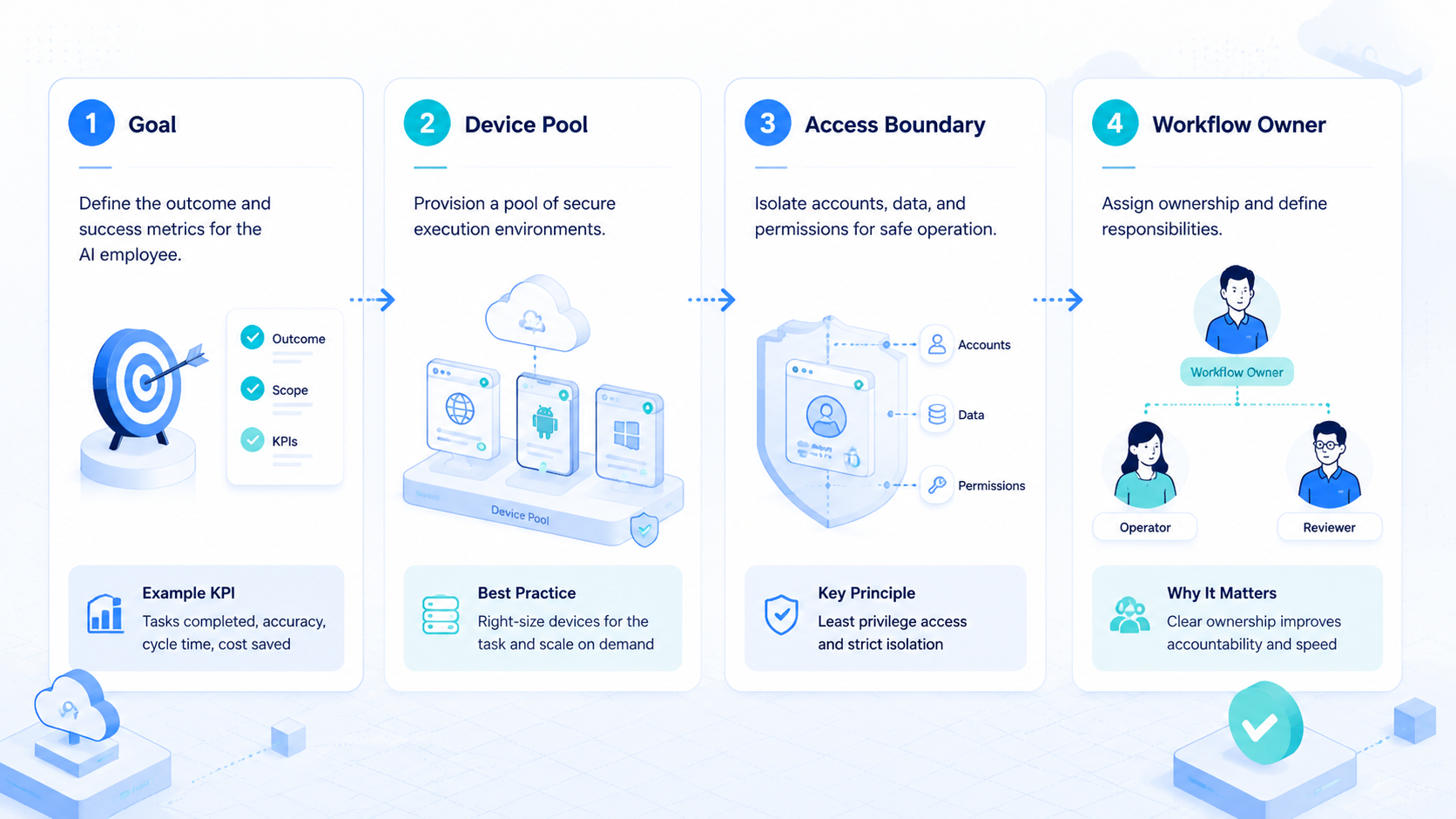
Use a simple rule: one account group should map to one environment group. That may be a browser profile, a cloud phone group, or a combined browser and mobile lane.
Permissions should also be explicit:
- Operators can run assigned tasks
- Reviewers can approve sensitive outputs
- Admins can change profile, routing, or device rules
- AI workers can only act inside the workflow scope
- Failed runs must create a note before rerun
Do not give every user access to every environment by default. That makes debugging harder. It also weakens the value of account separation because hidden changes become more likely.
For teams working across many accounts, multi-account management is often the real buying category. AI alone is not the decision.
The decision is whether the team can run many account workflows without losing control, context, or review quality.
AI Employee Platform Pilot Plan
The first pilot should be small enough to inspect. Pick one repeated workflow, one environment group, and one reviewer.
Give the AI employee a clear name and role so every operator knows what the worker is allowed to do.
Use this pilot checklist:
| Pilot item | Good answer |
|---|---|
| Worker role | "Daily dashboard checker" or "draft reply preparer" |
| Environment | Assigned browser profile or cloud phone group |
| Account scope | One account group or one client group |
| Output | Status note, draft response, lead list, or evidence |
| Review point | Human approval before sending, posting, or changing settings |
| Recovery rule | Stop after repeated failure and write next action |
Measure the pilot with simple signals:
- Task completed without manual rescue
- Review time went down or stayed reasonable
- Output saved useful effort
- Worker stayed inside the assigned environment
- Another operator could understand the result
Pause the pilot if the same failure appears three times, if reviewers cannot trust the output, or if the environment state becomes unclear. A smaller workflow is better than a broad AI employee that creates hidden cleanup work.
Write a simple daily pilot log:
| Log field | Why it matters |
|---|---|
| Run time | Shows whether the task is becoming predictable |
| Account group | Confirms the worker stayed in scope |
| Environment used | Tracks browser profile or cloud phone ownership |
| Output type | Separates notes, drafts, checks, and actions |
| Review result | Shows whether the output was accepted or rewritten |
| Failure reason | Helps improve the next run |
| Next action | Keeps handoff clear |
The log should be short enough to fill out every day. Long reports are ignored. A simple record gives the team evidence for whether the AI employee is saving time or just moving work into review.
Buying Scorecard
Use a scorecard before choosing an AI employee platform. This keeps the decision tied to operating value.
| Buying question | Strong answer | Weak answer |
|---|---|---|
| Where does work run | Browser, cloud phone, or app environment is defined | Work happens only in chat |
| How are accounts separated | Profiles or devices map to account groups | Accounts share loose sessions |
| How is review handled | Sensitive steps pause for approval | Review happens after action |
| What proof is saved | Logs, screenshots, result state, and next step | Only a summary is available |
| How does recovery work | Rerun and reset rules are clear | Operators guess from memory |
| Can teams scale | More workers follow proven workflows | More workers are added before process exists |
The strongest buying signal is operational clarity. A vendor should be able to explain how the first worker runs, who reviews it, what evidence is saved, and how the team recovers after failure.
Do not buy only for the most impressive demo. Buy for the workflow your team can run every day. A platform that supports fewer tasks with better review may outperform a broad tool that leaves every run unclear.
Frequently Asked Questions
What is an AI employee platform
An AI employee platform gives AI workers the environment, workflow rules, and review path needed to complete real tasks. It should support execution, not only conversation.
How is it different from an AI agent tool
An AI agent tool may plan or attempt tasks. An AI employee platform should add execution environments, account context, review, and team operations around that agent.
Who should use an AI employee platform
Teams with repeated web, mobile, account, support, ecommerce, or social workflows should consider it. The best fit is work with clear inputs, outputs, owners, and review points.
When is a chatbot enough
A chatbot may be enough for brainstorming, drafting, or analysis. It is not enough when work needs browser sessions, app access, account separation, or run history.
What should the first AI employee do
Start with a narrow task such as dashboard checks, lead list preparation, draft replies, or notification review. Avoid sensitive final actions until the workflow is proven.
Does an AI employee platform need cloud phones
It needs cloud phones when the workflow depends on mobile apps, Android state, notifications, or app-based accounts. Browser-only work may not need mobile execution.
How do teams reduce risk during rollout
Use small pilots, clear account mapping, approval steps, evidence logs, and stop rules. Do not scale workers until the first workflow can be reviewed and recovered.
How does MoiMobi fit this category
MoiMobi fits teams that need AI employees to execute across browser profiles, cloud phones, mobile apps, and account environments with clearer workflow control.
Conclusion
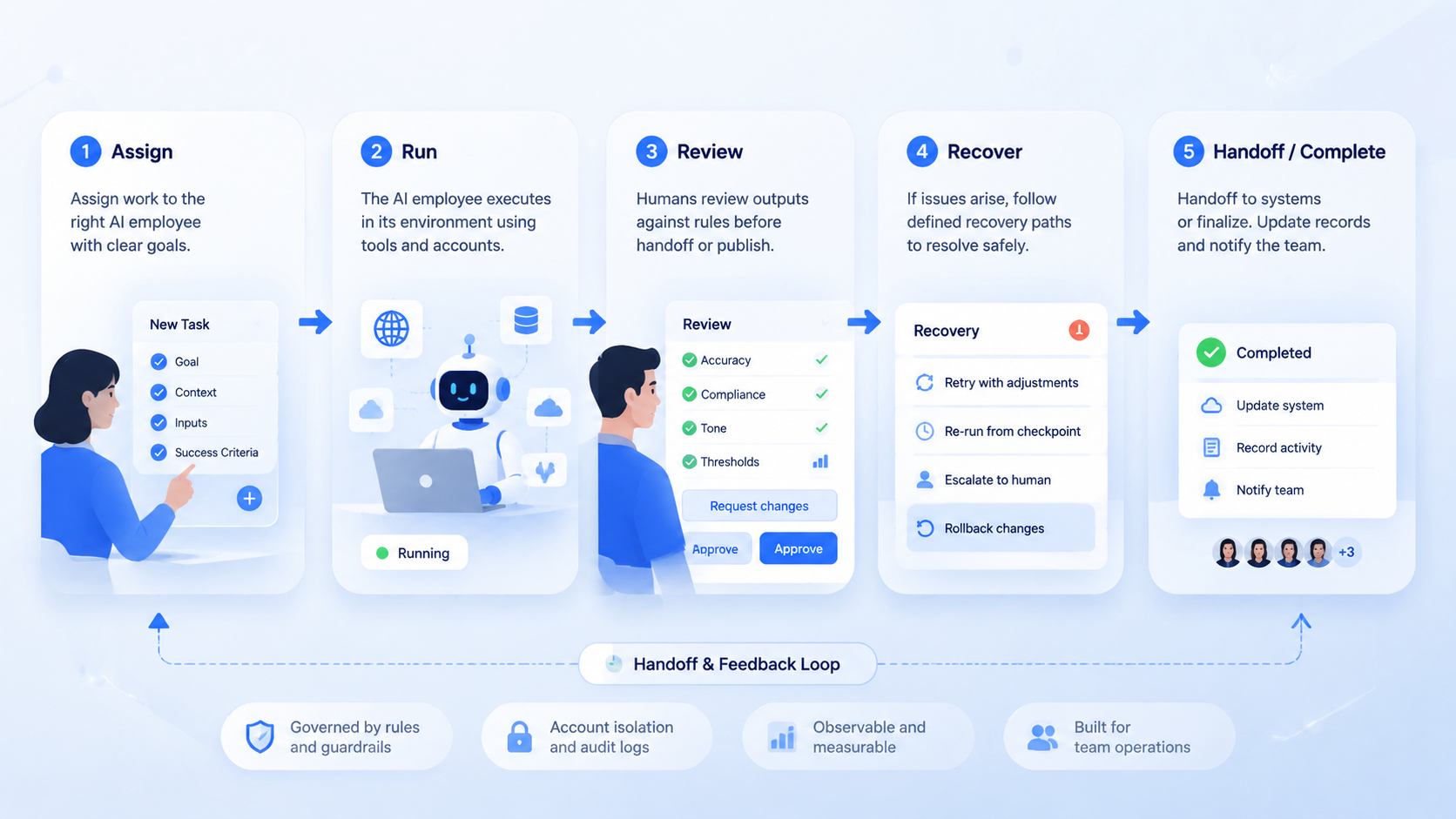
Choosing an AI employee platform is really about choosing an execution system. The platform should help AI workers run inside the right environment, keep account work separated, pause for review, and leave proof when the task is complete.
Start with one workflow. Assign one account group, one environment, one reviewer, and one recovery rule. Test whether the team can understand the result without asking the original operator what happened.
MoiMobi is a strong fit when the team needs browser and mobile execution together. Use it to turn repeated online work into controlled lanes, then add more AI employees only after the first lane is stable.



