
Key Takeaways
- Execution matters more than prompt output.
- Browser sessions, cloud phones, account isolation, approvals, and task logs should be evaluated together.
- Teams should choose by workflow fit, recovery quality, operator control, rollout evidence, and the boring ability to recover when a run stops midway.
- A narrow pilot is more reliable than launching many AI workers across unclear account workflows.
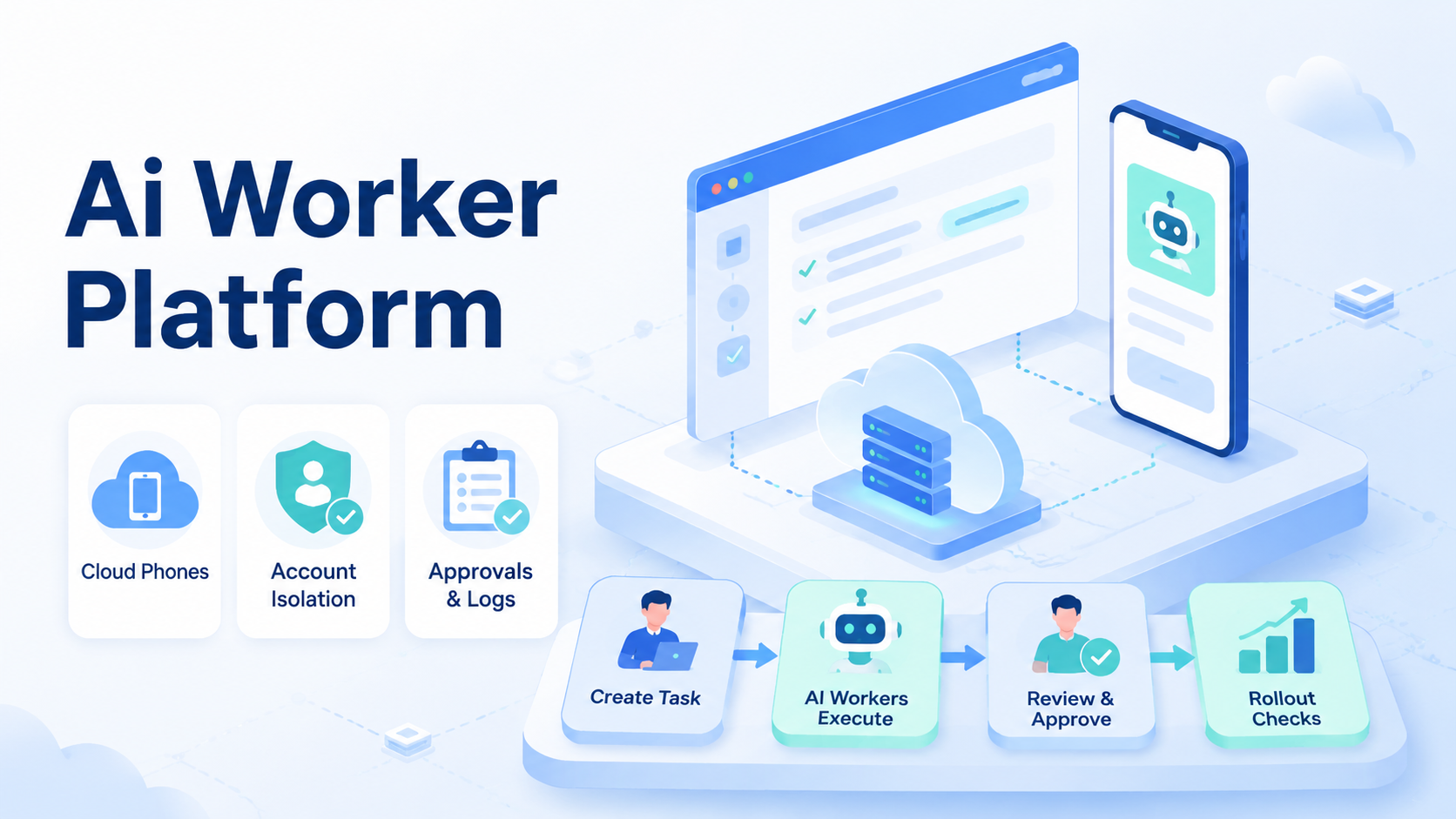
An AI worker platform is execution infrastructure that lets AI workers run tasks inside controlled browser, cloud phone, and mobile environments. For teams, the best AI worker platform is not the one with the loudest autonomy claim. The better choice makes real work assignable, reviewable, recoverable, and safe enough for daily operations.
Browser and mobile automation now meet in the same workflow. A growth operator may research leads in a browser, publish content in a mobile app, reply to customers, record evidence, and escalate exceptions.
A chat-only agent cannot complete that chain. A script-only system usually breaks when the page or app changes. The operating layer matters.
MoiMobi fits this category as browser and mobile execution infrastructure. Its cloud phone, mobile automation, and device isolation layers are designed for teams that need controlled execution environments.
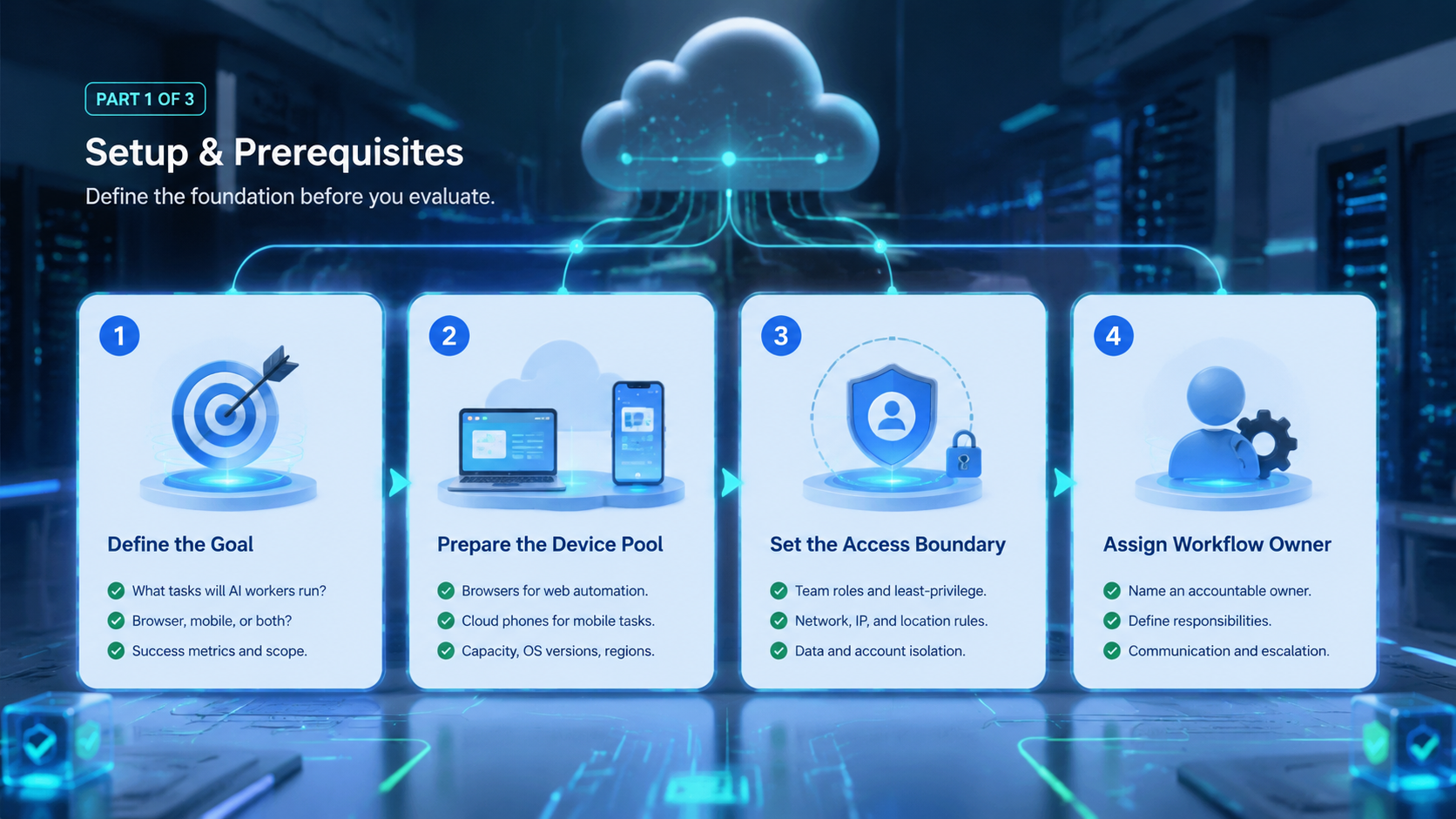
The selection work should still be practical. Decide which workflows need AI workers, which accounts need separation, and which actions require human approval.
How to Evaluate an AI Worker Platform
Start with the task, not the feature list. A platform that looks powerful in a demo may still fail a daily workflow. The useful test is whether the system can execute a narrow job repeatedly without hiding what happened.
Start there.
Use this selection matrix before comparing vendors:
| Decision area | Strong signal | Weak signal |
|---|---|---|
| Execution environment | Browser and mobile contexts are explicit | All tasks run as generic chat output |
| Account isolation | Each worker maps to a profile, device, or account group | Accounts share unclear sessions |
| Approval flow | High-impact actions can pause for review | The agent runs without stop points |
| Evidence capture | Runs produce logs, screenshots, or result records | Operators rely on summaries only |
| Recovery | Failed tasks show state, owner, and next step | Failures require guessing |
| Scale model | More workers mean more controlled environments | More workers mean more untracked sessions |
The first pass should answer three questions. Where does the worker execute? What can it touch?
Then ask one more question about review. A platform that cannot explain how the team checks the result may not be ready for real operations.
Security and quality sources support the same mindset. Google's helpful content guidance rewards content built for people, not mechanical output. In operations, the same principle applies to automation.
The work must serve a real user need. OWASP's ASVS project also reinforces the idea that systems should be evaluated through controls, verification, and clear requirements.
The Capabilities That Actually Change Outcomes for an AI Worker Platform
The most useful capabilities are not always the most visible. Teams do not only need an AI worker to click, type, or summarize. They need the worker to operate inside the right context and leave a reviewable trail.
Context wins.
Five capabilities usually change outcomes:
- Persistent browser sessions for logged-in web apps, dashboards, forms, and CRM tasks
- Cloud phone environments for mobile apps, social platforms, support inboxes, and app-only workflows
- Worker-to-account mapping so one account group does not drift across many environments
- Human approval gates before publishing, deleting, paying, changing settings, or messaging sensitive contacts
- Run logs and recovery state so failures can be diagnosed instead of repeated
A cloud phone for AI agents is especially useful when the work includes mobile-first apps. The worker may need to read notifications, prepare a reply, collect a screenshot, or hand off to a human. A cloud Android for AI agents should not be treated as a magic device. The practical value is a controlled place where the worker can perform app-based steps under rules.
Browser work has a different shape. It usually needs page state, selector resilience, credentials, and form review.
Tools such as Playwright show why browser execution needs structured control around pages, contexts, waits, and assertions. AI adds interpretation, but it does not remove the need for boundaries.
Adoption Cost, Setup Friction, and Team Fit
The real cost of an AI worker platform is not only subscription price. The larger cost is workflow design. A team needs to define tasks, owners, permissions, review points, and failure handling. Without that work, even a strong platform becomes noisy.
Plan first.
Fit depends on team shape. A solo founder with a few manual tasks may start with simple browser automation. A support team with shared inboxes, mobile apps, and account groups needs stronger environment control. An agency handling client accounts needs even clearer separation, because each client workflow may have different boundaries.
Strong fit
- Teams running repeated browser and mobile tasks
- Operations with several accounts or client workspaces
- Workflows that need logs, evidence, and review
- Teams assigning tasks across human and AI operators
Weak fit
- One-off tasks that do not repeat
- Workflows with no clear owner
- Teams expecting full autonomy before defining stop rules
- Processes that only need text generation
Setup friction is acceptable when it replaces recurring confusion. For example, mapping accounts to isolated environments may take time. It pays off when a manager can see which worker touched which account, what it attempted, and where it stopped.
Teams should also check routing and device policy. A platform with proxy network support may matter when account groups require consistent routing rules.
The aim is not to make platform-outcome promises. The aim is to reduce operational ambiguity.
Scenario Fit.
Different automation stacks solve different problems. A browser-only stack may work when the whole workflow happens in web apps. A mobile-only device pool may work when people operate apps manually. An AI worker platform becomes more relevant when the workflow crosses both sides and needs structured execution.
This is where device context, account ownership, action scope, and review evidence matter more than the label a vendor uses for automation.
Match the path.
Consider three scenarios:
- Lead research and CRM updates: browser execution may be the core layer. The worker reads sites, fills records, and creates review notes.
The review record matters more than the device count here, because the manager needs to know which source was checked and what changed.
-
Social commerce replies: mobile execution becomes more important. The worker may draft replies, check app notifications, and pause for approval.
-
Multi-account content operations: both layers matter. A browser may hold planning tools, while cloud phones handle app-based publishing and monitoring.
The selection rule is straightforward. Choose the platform that matches the hardest part of the workflow.
App-state problems need strong mobile execution. Web-dashboard problems need strong browser control. Account-handoff problems need isolation and evidence capture.
When two problems are equally painful, choose the platform that leaves better proof after each run, because proof makes review and repair faster.
MoiMobi's multi-account management use case is relevant when account separation is the central problem.
Its social media marketing use case fits teams running content, replies, monitoring, and customer engagement across multiple environments.
Final Selection Checklist
Before choosing an AI worker platform, run a simple internal review. The best shortlist is usually small, because each candidate must prove operational fit.
Keep it small.
Use this checklist:
- Does the platform support the actual environment your task needs
- Can each worker be tied to an account, browser profile, or cloud phone
- Are approval gates available for sensitive actions
- Can a manager review evidence after the run
- Can the team recover a failed task without repeating the whole workflow
- Does the platform integrate with your current task queue or SOP
- Can you start with one workflow before scaling
Reject any option that makes the first pilot vague. A vendor may offer many capabilities, but the first use case still needs a narrow boundary. The first AI worker should have one job, one environment type, and one review rule.
Google's SEO Starter Guide is about search, but its planning lesson transfers well.
Clear structure helps people and systems understand what belongs where. AI worker operations need the same clarity.
That same clarity should show up in procurement notes, pilot scripts, operator training, and the simple checklist used after a failed run.
Procurement should also ask who owns maintenance after launch. A platform may pass the first test, then create work later because prompts drift, app screens change, or operators skip review. Put one owner on the workflow, one owner on the environment, and one owner on final approval. This prevents the common failure where everyone likes the pilot but nobody maintains the system.
Teams with several departments should document the handoff contract. The contract can be short. It should name the task trigger, allowed action level, expected evidence, reviewer, escalation path, and reset rule. That small record turns a promising demo into an operating asset.
Pilot Rollout.
Pilot rollout should measure execution quality, not excitement. Choose one workflow that repeats several times per week. Good candidates include lead research, inbox triage, content draft preparation, dashboard checks, app notification review, or evidence collection.
Measure the run.
Track five signals:
- Task completion: Did the worker finish the assigned scope
- Review load: How much human time was needed to validate the result
- Exception clarity: Was the failure reason visible
- Environment discipline: Did the worker stay inside the assigned account context
- Repeatability: Could the same run be repeated with similar instructions
Recovery checks protect the rollout. Every failed run should record the task, account, environment, last successful step, failure state, and owner. The goal is not full autonomy. The goal is controlled progress.
Do not scale from one successful demo. Scale after repeated runs show that the team can assign, pause, review, and recover work. A platform that handles boring recovery well is usually more valuable than one that only performs well in clean demos.
AI Worker Platform Operating Scorecard
Use a scorecard before buying more capacity. A simple score keeps the decision tied to operating evidence.
| Area | Score 1 | Score 3 | Score 5 |
|---|---|---|---|
| Task clarity | Prompt only | Defined task | Defined task with stop rule |
| Environment fit | Unclear | Browser or mobile | Mapped to exact account context |
| Review | No evidence | Text summary | Logs, result, owner, and next step |
| Recovery | Restart manually | Known failure point | Repeatable recovery path |
A candidate should not need a perfect score. It should score high where the workflow is fragile. For example, a customer-reply workflow needs review and recovery more than broad tool access.
Score the painful part first, then score the nice-to-have features, because the painful part decides whether the team keeps using the system.
What Not to Automate First in an AI Worker Platform
Poor first workflows make good platforms look unreliable. Avoid starting with tasks that combine high account value, unclear policy, and weak review. These tasks create too many variables for the first pilot.
Do less first.
Better first workflows have limited blast radius. They collect information, prepare drafts, update internal records, or flag exceptions. A worker can complete useful work while a human keeps control over final actions.
Use this order when picking the first workflow:
- Start with observation: collect status, screenshots, or dashboard notes
- Add preparation: draft replies, organize leads, or build task summaries
- Add controlled execution: perform low-impact updates with reviewable evidence
- Add sensitive actions last: publishing, deleting, payment, account settings, and direct messages need stricter approval
This order gives the team a learning path. Operators can inspect how the worker reads context, where it hesitates, and which errors repeat. The platform evaluation becomes concrete because each run produces evidence.
One stop rule helps the pilot stay clean. Pause the workflow when the same exception appears three times, when review time exceeds manual time, or when the worker cannot explain the next action. The fix may be a clearer prompt, a better environment, a missing permission, or a task that should remain manual.
Another useful guardrail is an action ladder. Put every possible worker action into one of four levels before the pilot starts.
| Level | Action type | Approval rule |
|---|---|---|
| Level 1 | Read, collect, classify, summarize | No approval when scope is narrow |
| Level 2 | Draft, prepare, tag, organize | Review samples during the pilot |
| Level 3 | Update records, queue posts, create tickets | Require review until quality is proven |
| Level 4 | Publish, send, delete, pay, change settings | Require explicit approval and audit evidence |
This ladder keeps the conversation practical. Instead of arguing about whether AI workers are ready, the team decides which actions are ready. A Level 1 research worker may be useful quickly. A Level 4 publishing worker should wait until review, logs, and recovery are boringly clear.
The ladder also helps teams compare platforms. A lightweight tool may handle Level 1 and Level 2 well. A real AI worker platform for operations should make Level 3 and Level 4 controls visible, configurable, and reviewable.
A Simple Field Test for the First Week
Run the first week like a field test, not a launch. Pick one account group. Pick one browser flow or one phone flow. Give the worker a short task card with plain rules.
Write it down.
The card should be short enough for an operator to check in one minute, but specific enough to stop the worker before a sensitive action.
Day one should be read-only. Let the worker find data, capture proof, and stop. Day two can add draft work. Day three can add a small update that a reviewer checks before it goes live.
Keep the test notes simple:
- What was the task
- Which account was used
- Which device or profile was used
- What proof came back
- What confused the worker
- What the reviewer changed
Small notes beat long reports. They show whether the platform is helping real work or just adding a new screen. After one week, keep the workflow only if the team can name the gain, the failure point, and the next rule to improve.
Frequently Asked Questions
What is an AI worker platform
An AI worker platform is infrastructure for assigning tasks to AI workers and letting them execute inside controlled environments. It usually combines tools, sessions, permissions, logs, and review.
Does an AI worker platform need cloud phones
It depends on the workflow. Browser-only work may not need cloud phones. Mobile app work, app inboxes, social accounts, and mobile-first operations usually need a mobile execution layer.
Is browser automation enough for AI workers
Browser automation is enough when every task stays inside web apps. Mobile execution becomes necessary when the workflow depends on Android apps, mobile account state, or app-only actions.
How should teams compare platforms
Compare by environment fit, account isolation, approval gates, evidence capture, recovery state, and pilot quality. Avoid choosing only by feature count.
Can AI workers publish content automatically
They can prepare or execute publishing workflows when the platform supports it. Teams should still use review gates for brand, legal, or account-sensitive actions.
What is the role of a cloud phone for AI agents
A cloud phone gives an AI agent or human operator a remote Android environment. The fit is strongest when the work requires mobile apps, app state, or mobile account workflows.
How large should the first pilot be
Start with one workflow and a small account group. Add more workers only when assignment, review, and recovery are working consistently.
Where does MoiMobi fit
MoiMobi provides browser and mobile execution infrastructure for teams that need cloud phones, device isolation, mobile automation, routing, and multi-account workflows.
Conclusion
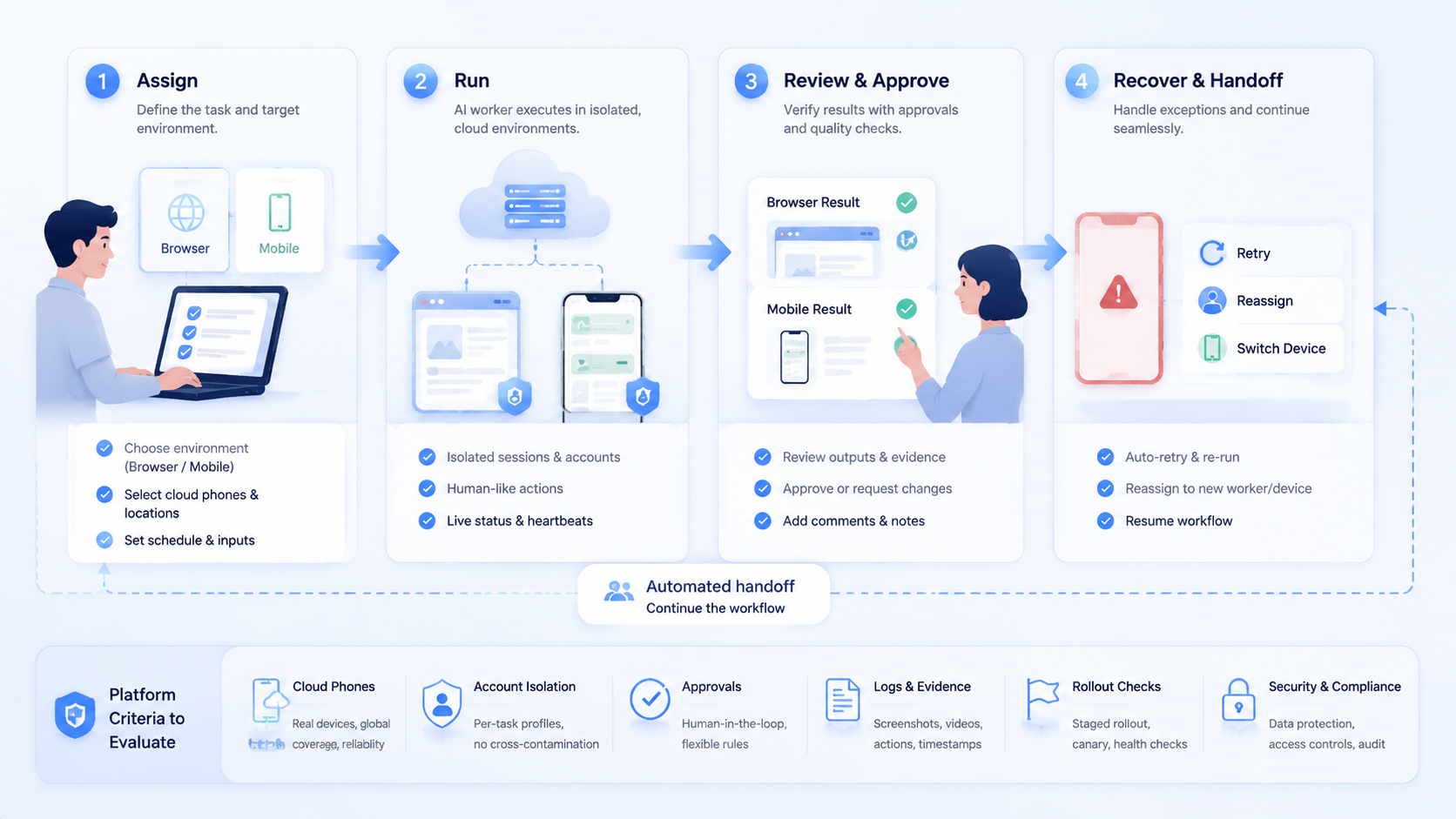
The best AI worker platform for browser and mobile automation is the one that fits the real operating path. Evaluate the task first, then the environment, then the approval and recovery model. Feature volume comes after those basics.
For teams with mobile workflows, cloud phones are not an extra accessory. They are the place where app-based work can run with more structure. For teams with browser workflows, persistent sessions and evidence capture matter more than polished demos. For multi-account teams, isolation and ownership rules decide whether scale stays manageable.
Across all three cases, the common requirement is the same: the team must see where work ran, what changed, and who reviewed the result.
The next step is a controlled pilot. Pick one workflow, assign one worker, bind it to one environment, and define a stop rule. A broader test makes sense only after the team can review the run and recover failures without confusion.



