Key Takeaways
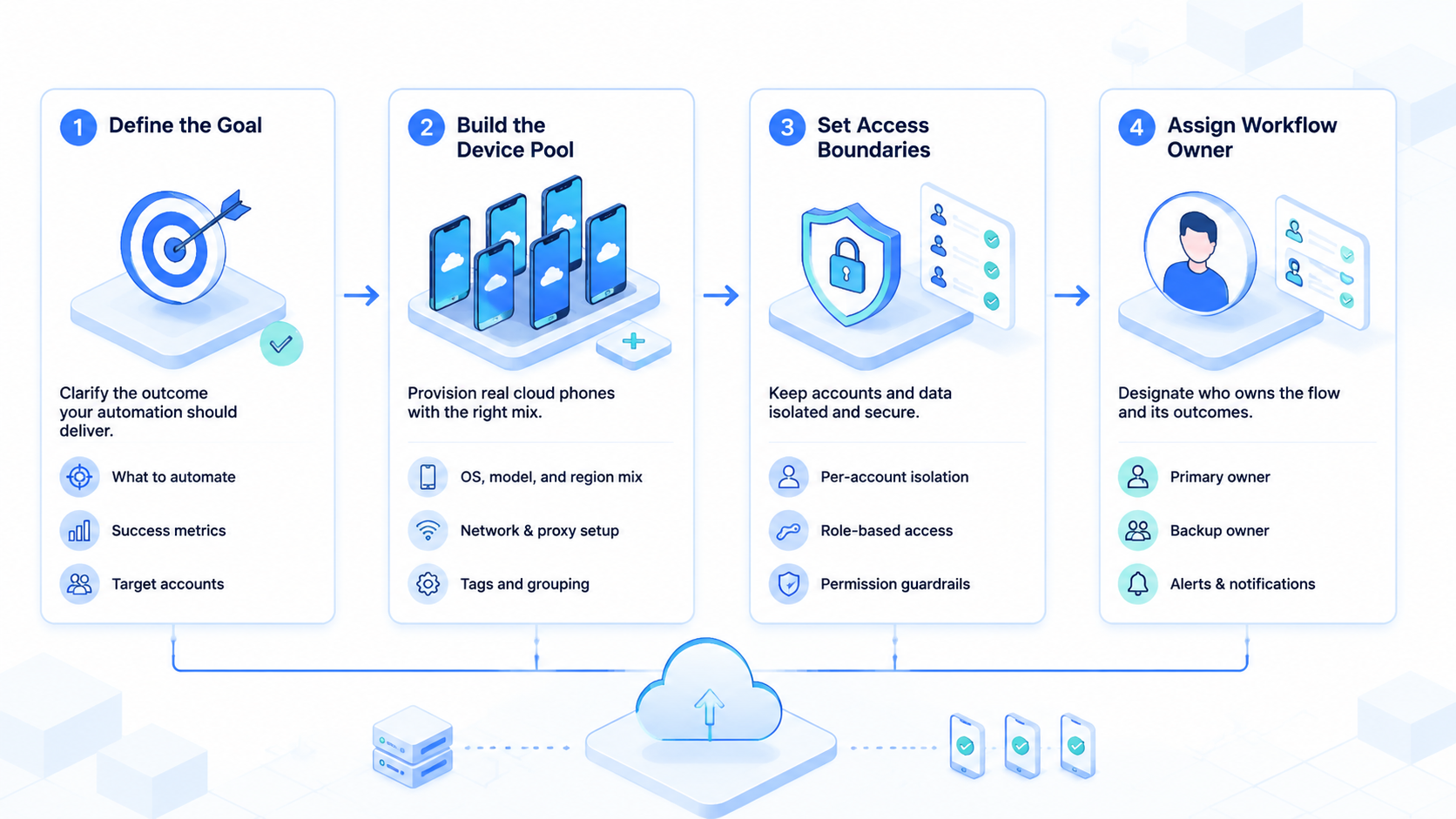
- Cloud phone automation should be judged by agency workflow control, not only device count.
- Separate mobile lanes matter.
- Start with one client group, one mobile task, and one reviewer.
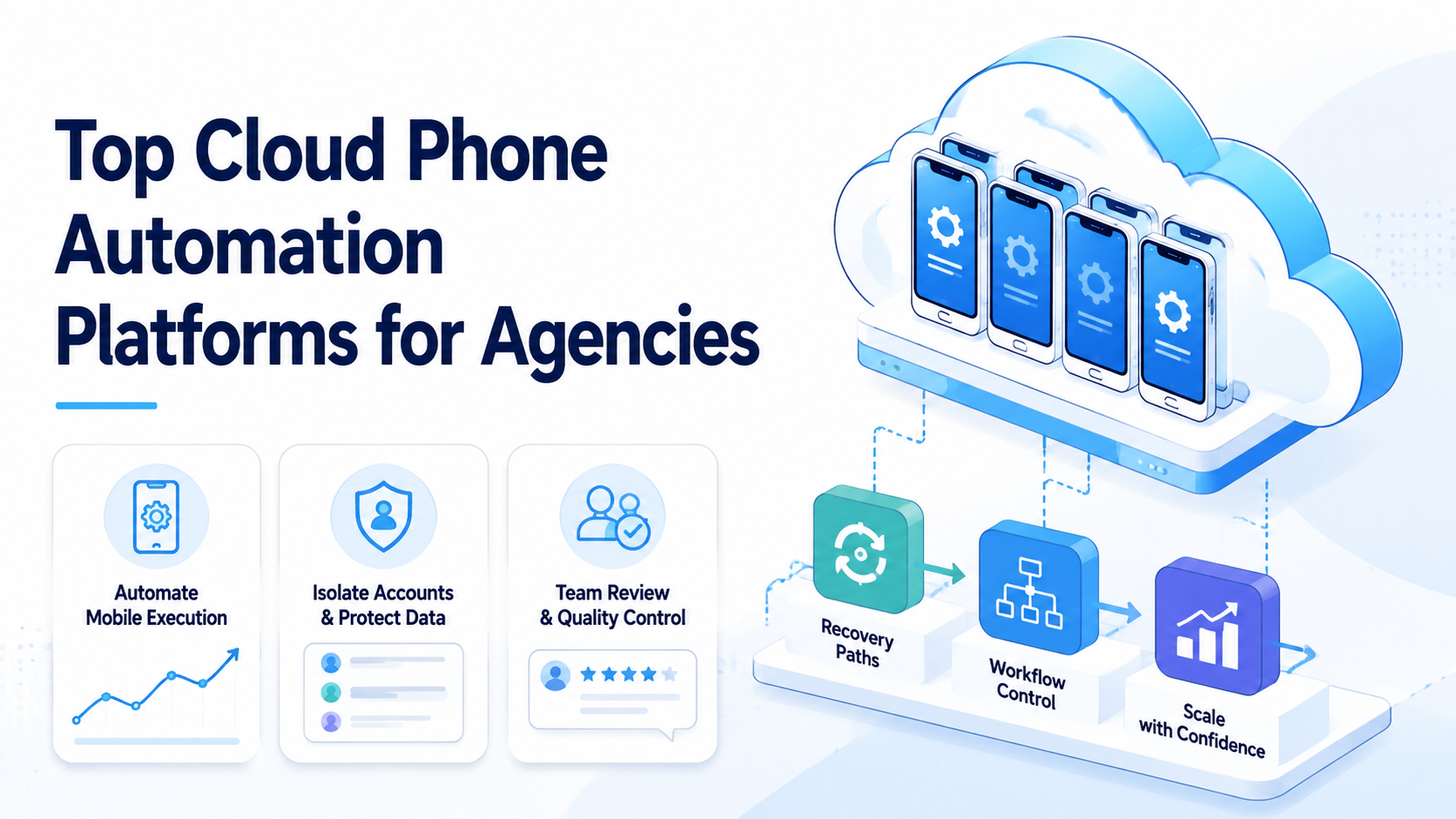
Cloud phone automation is the use of remote mobile environments to run repeated app-based workflows with controlled devices, account mapping, and review. For agencies, the best platform is not simply the one with the largest phone pool. It is the one that helps the team manage client accounts, assign work, inspect results, and recover failed runs without mixing environments.
Agencies face a different problem from solo operators. They may manage many client social accounts, marketplace accounts, support inboxes, messaging apps, and content workflows. A single shared phone or emulator setup becomes hard to control when multiple operators, clients, and approval rules enter the process.
MoiMobi treats cloud phones as part of a broader execution platform. The cloud phone layer gives agencies remote mobile environments, while mobile automation helps repeated app work become a workflow.
Device isolation helps each account group keep cleaner boundaries. That matters when one agency team serves several clients at the same time.
What Agencies Need from Cloud Phone Automation.
Agencies need operational clarity. A cloud phone automation platform should make it easy to answer who owns a phone, which client account it supports, what task ran, what evidence came back, and what the reviewer needs to approve.
Use this baseline:
| Agency need | Platform requirement |
|---|---|
| Client separation | Phone groups map to client or account groups |
| Operator control | Roles define who can operate, review, and reset |
| App access | Mobile environments support app-based workflows |
| Task history | Runs leave logs, screenshots, or result notes |
| Recovery | Failures show state, owner, and next action |
| Scaling | New phones follow proven workflows |
Google's Android Enterprise material on device management shows how business mobility depends on management, controls, and deployment. Agency cloud phone automation should use a similar mindset.
Remote access is only the start, because agencies also need ownership rules, review habits, client records, and a simple way to explain what happened.
The platform should also fit the agency's service model. A social media agency may need content upload prep, comment review, and app inbox triage.
An ecommerce agency may need marketplace app checks, order notes, and mobile campaign monitoring. A customer engagement agency may need WhatsApp, Telegram, or app-based reply preparation before a manager approves the response.
The service model should be visible inside the platform. Content teams need a review queue before posting, while support teams need draft replies and response labels.
Marketplace teams usually need daily app checks, issue notes, and screenshots for the client report.
Ask for a plain operating view. The team should see which phones are active, which accounts are assigned, which tasks are waiting, and which runs need review. If that view only exists in a spreadsheet, the agency will spend too much time reconciling work.
Cloud Phone Automation Platform Types.
Not every cloud phone platform is built for agency operations. Some products focus on device rental or app testing, while others focus on account operations. Agencies should separate those categories before comparing prices.
| Platform type | Best fit | Limit to check |
|---|---|---|
| Device rental cloud phone | Basic remote Android access | Weak workflow and review controls |
| App testing device cloud | QA and compatibility checks | May not fit client account operations |
| Phone farm style platform | Parallel mobile capacity | Needs strong ownership rules |
| Agency execution platform | Client workflows, account groups, review | Requires process design before scaling |
The agency execution platform is the better fit when the team sells outcomes, not device access. Clients care whether work is completed, reviewed, and documented. They do not care how many raw devices sit in the pool.
MoiMobi fits this category when agencies need mobile execution together with account structure. A team can use cloud phones for app workflows, browser profiles for web dashboards, and routing rules for account groups. That combination matters when campaigns cross multiple apps and websites.
Agency Cloud Phone Automation Example.
Consider an agency managing short-form video accounts for three clients across different markets, app routines, and approval habits. Each client has a different content calendar, inbox rule, and approval process.
This team does not need one giant automation task. It needs controlled mobile lanes.
Client A needs daily account checks and comment triage. Client B needs content upload preparation and app notification review. Client C needs draft replies for customer questions, but final sending stays with the account manager.
The workflow map can look like this:
| Client lane | Phone group | Task | Approval point |
|---|---|---|---|
| Client A | Lane A phones | Check comments and collect screenshots | Review before response |
| Client B | Lane B phones | Prepare upload assets and captions | Review before publishing |
| Client C | Lane C phones | Draft customer replies | Review before sending |
This structure keeps the work simple. Each lane has a phone group, account owner, task type, and review rule.
A new operator can understand the system without asking who used which phone yesterday.
The same model works for ecommerce agencies. One lane can check marketplace notifications, another can review mobile app order status, and a third can prepare customer reply drafts.
Scale only after one lane produces clean proof.
Fit and Not-Fit Guide for Agencies.
Cloud phone automation is a good fit when app-based work repeats across accounts. It is a weak fit when the process is still vague, sensitive, or mostly browser-based.
Good fit:
- Social media agencies handling multiple app accounts
- Cross-border ecommerce teams checking marketplace apps
- Support agencies preparing mobile message replies
- Growth teams reviewing app notifications or account status
- Agencies that need parallel mobile work lanes
- Teams that need proof after each run
Weak fit:
- One-off app testing with no repeated workflow
- Work that lives fully in a browser dashboard
- Client work with no account ownership rules
- Sensitive actions with no approval step
- Teams that expect automation to replace service quality
- Projects that cannot explain what a successful run means
The fit boundary is practical. Cloud phone automation should reduce repeated mobile work and make handoff clearer. It should not hide poor process or remove human judgment from risky actions.
For social teams, social media marketing workflows often need both speed and caution. Preparing content or collecting inbox context is a better first workflow than publishing directly without review.
Account Isolation and Client Boundaries.
Account isolation is central for agencies. Each client account group should map to a defined phone group, owner, workflow, and review path. Casual switching between clients weakens the whole operating model.
Use a client environment record:
| Field | Example |
|---|---|
| Client group | Client A Instagram and TikTok |
| Phone group | Mobile lane A |
| Operator | Agency operator 2 |
| Reviewer | Account manager |
| Workflow | App inbox triage and draft reply prep |
| Review rule | Human approval before sending |
| Recovery rule | Reset after repeated login issue |
| Evidence | Screenshot, result note, next step |
This record helps avoid hidden work. If a client asks what happened, the agency should not search through chat messages. The team should know which environment ran the task and what result came back.
Routing also needs discipline. The proxy network layer is relevant when agencies need account groups to follow consistent routes. Routing should be visible enough that a reviewer can understand the setup, not hidden inside one operator's memory.
Cloud Phone Automation Pilot Workflow for Agencies.
The first client pilot should be small. Choose one client, one app workflow, and one daily review point.
Avoid launching dozens of phones before the workflow has proof.
A useful first pilot might look like this:
| Day | Task | Review question |
|---|---|---|
| Day 1 | Check app login and account state | Is the environment assigned correctly |
| Day 2 | Collect notification screenshots | Is the evidence useful |
| Day 3 | Prepare draft replies | Does review save time |
| Day 4 | Run the same task again | Is the workflow repeatable |
| Day 5 | Review failures and handoff | Can another operator continue |
Measure five signals:
- Completion rate
- Review time
- Exception type
- Client account drift
- Recovery speed
Pause the pilot when the same failure appears three times or when the review takes longer than doing the task manually. A failed pilot is not wasted. It tells the agency whether the workflow needs a smaller scope, clearer ownership, or a different environment.
Add a daily agency note:
| Field | Example |
|---|---|
| Client | Client A |
| Phone lane | Lane A phones |
| Task | Comment check and screenshot collection |
| Result | 14 comments reviewed, 3 need reply drafts |
| Reviewer | Account manager |
| Exception | One login prompt appeared |
| Next action | Reset phone state and retry tomorrow |
This note should take less than a minute. It creates enough proof for the agency to explain work to the client and enough context for the next operator to continue.
Buying Scorecard for Agencies.
Agencies should compare platforms with a scorecard instead of a device count table. Device count matters only after the workflow is clear.
| Buying question | Strong answer | Weak answer |
|---|---|---|
| How are clients separated | Phone groups map to client groups | Operators share phones casually |
| How does automation run | Tasks run with logs and review | Work happens only through remote control |
| What can operators do | Roles define operate, approve, and reset | Everyone can touch every phone |
| What proof is saved | Screenshots, run result, and next step | Only a chat summary exists |
| How does the team recover | Reset and rerun rules are written | Operators guess from memory |
| How does scaling work | Add devices after workflow proof | Add devices before process design |
Ask the vendor to demonstrate one real agency scenario. The test should include a client account group, a mobile app task, an approval point, and one expected failure. A platform that handles the messy path is more useful than one that only completes a clean demo.
Playwright's documentation is useful for understanding browser automation, but mobile app workflows need a different execution layer. Agencies that work across browser dashboards and mobile apps may need both. See the Playwright documentation for the browser-side model.
Common Mistakes to Avoid.
These mistakes are ordinary, which is why they are worth naming before the agency expands the device pool.
The first mistake is buying too many phones too early. More devices increase capacity only when account ownership, workflow steps, and recovery rules already exist.
The second mistake is treating every client the same. Heavy inbox work needs different controls than light monitoring, so phone groups should reflect the service model.
The third mistake is skipping review. Publishing, replying, changing settings, or touching payment-related app screens should start with human approval. Automation can prepare the work first.
The fourth mistake is weak evidence. If the agency cannot show what ran and what changed, the workflow is hard to defend. A screenshot plus a short result note is often enough.
The fifth mistake is mixing browser and mobile tasks without a clear path. Some workflows begin in web dashboards and end in apps. Map the route before assigning phones.
Reporting and Client Visibility.
Reporting should make the work easy to explain without turning every phone event into a client-facing metric.
Agencies should connect cloud phone automation to client reporting. The client does not need to see every device event, but the service team needs enough evidence to show what was done.
A useful client-facing summary can include:
- Tasks completed
- Exceptions found
- Drafts prepared
- Items waiting for approval
- Screenshots or evidence links
- Next action for the account manager
Keep the report operational. Avoid turning it into a vanity dashboard. The purpose is to show completed work, blocked work, and decisions needed from the client or account manager.
This reporting loop also improves internal quality. If a workflow cannot produce a clear note, it may not be ready for automation. The fix might be a better task card, a smaller scope, or a stricter review rule.
Keep the report plain. A client should see what finished, what is blocked, and what needs approval. Internally, the team should see which lane created the result and which rule should change next.
Use simple words in the report. Labels such as done, blocked, needs review, and needs client input are easier to act on than a long activity log.
Keep the daily team note short too:
- Who ran the task
- Which phone was used
- Which account was checked
- What changed
- What is next
This is enough for most handoff work. It also helps a manager spot slow work before it becomes a client issue.
Keep the rule simple. If a lane is hard to explain, make it smaller. If a task needs too many fixes, split the job and test again. If a client asks for proof, show the note, the image, and the next step.
Small teams can start with a plain weekly check:
- Pick one lane
- Pick one task
- Pick one person to review the result
If the work is clear, keep it. If the work is hard to read, fix the note before adding more phones. This keeps the team calm and helps each client see real progress.
Frequently Asked Questions
These answers focus on agency selection, rollout, and review rather than raw device rental.
What is cloud phone automation?
Cloud phone automation uses remote mobile environments to run repeated app-based workflows. Teams use it for mobile account work, app checks, inbox review, content prep, and status monitoring.
Why do agencies need cloud phones?
Agencies need cloud phones when client work depends on mobile apps, app state, notifications, or mobile-only account workflows. Browser dashboards may not cover the whole job.
Is cloud phone automation the same as a phone farm?
Not exactly. A phone farm focuses on device capacity. Cloud phone automation for agencies should add workflow ownership, review, logs, and recovery.
What should agencies automate first?
Start with low-risk repeated tasks such as app status checks, notification review, screenshot evidence, draft reply preparation, or mobile campaign monitoring.
Can cloud phone automation manage multiple clients?
It can support multi-client work when each client account group has its own environment group, owner, review rule, and recovery path.
What should stay manual?
Final publishing, sensitive replies, account settings, payment actions, and unclear customer cases should usually require human review, especially during early rollout.
How should agencies measure success?
Measure completion rate, review time, failure type, client account drift, recovery speed, and whether another operator can continue the task.
How does MoiMobi fit agency workflows?
MoiMobi fits agencies that need cloud phone automation as part of a controlled execution system. It supports mobile environments, browser work, account isolation, routing, and reviewable workflows.
Conclusion.
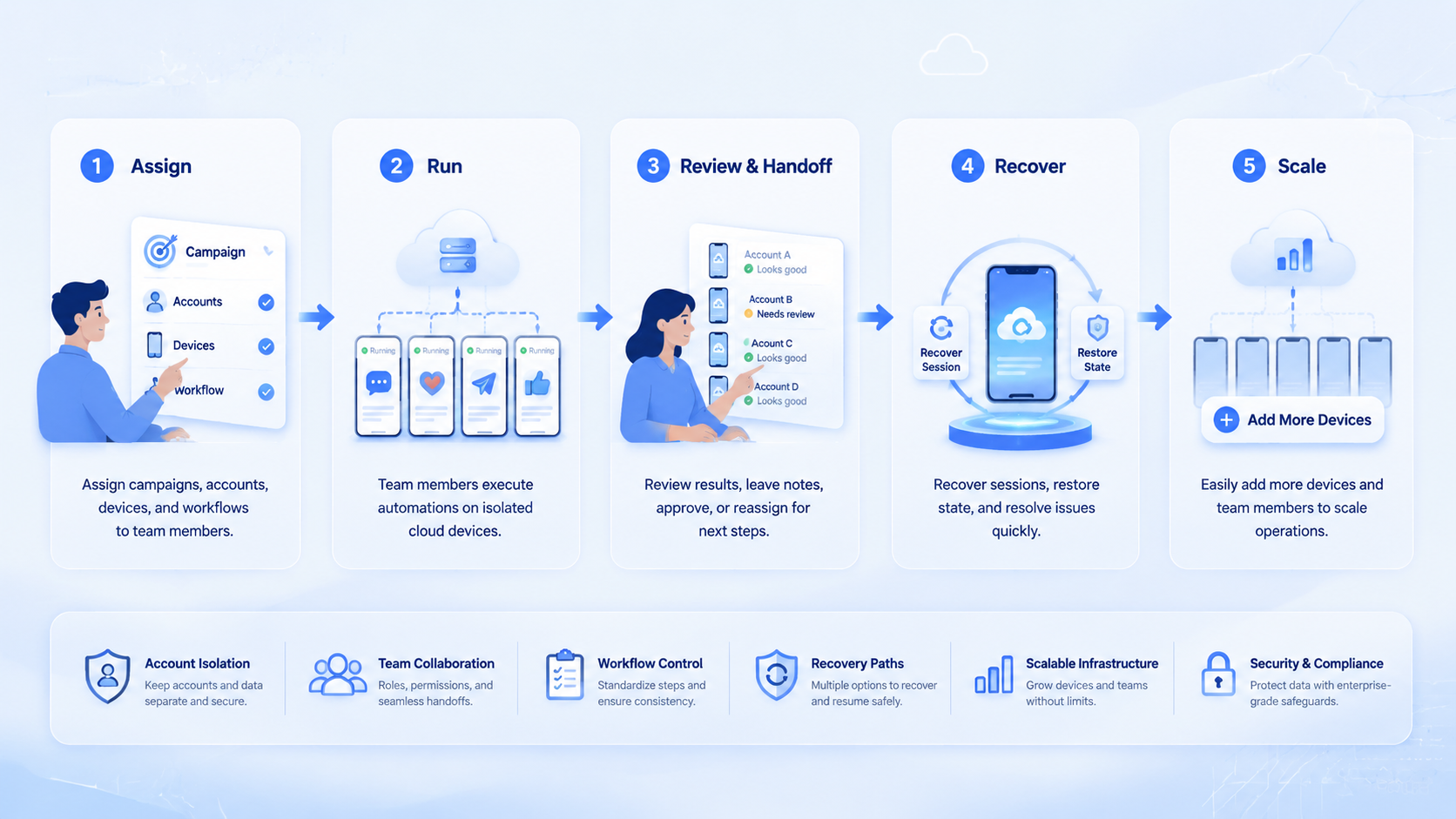
The top cloud phone automation platforms for agencies are not just device pools. They are operating systems for mobile account work. They help teams separate clients, assign operators, review sensitive steps, and recover from failed runs.
Choose from the first client workflow backward. Define the account group, assign the phone group, decide what the worker may do, and write the approval rule. Then run a small pilot before scaling.
MoiMobi is strongest when agencies need mobile execution connected to broader account operations. Use cloud phones for app tasks, browser environments for web dashboards, and review rules for client control. Scale only after the first workflow is clear, reviewable, and easy to recover.