
Key Takeaways
- A cloud phone is a remote mobile environment that teams can access, operate, and review without keeping every device on a desk.
- The right question is not only "cloud phone vs emulator." It is whether the workflow needs device isolation, routing discipline, handoff, and recovery.
- MoiMobi should be evaluated as mobile execution infrastructure, not as a quick rental shortcut.
- A small pilot should measure stability, recovery effort, account ownership, and team handoff before wider rollout.
Introduction.
A cloud phone is a remote mobile device environment that lets a team run mobile tasks through managed access instead of relying only on local handsets. For MoiMobi, the value is not just remote access. The stronger use case is giving operations teams a cleaner way to run repeatable mobile workflows with isolation, routing, and review built into the operating model.
Teams usually search for this topic when local phones, shared laptops, or ad hoc emulators stop scaling. One operator can keep a few tasks organized by memory. A team needs naming rules, ownership, access control, and a recovery path when a workflow breaks. Without that structure, every extra account or campaign can add support work.
MoiMobi frames the cloud phone as one layer inside a broader execution system. A team may also need mobile automation, device isolation, clean routing, and a review process. That broader view matters for social, messaging, marketplace, or app-based operations where the device lane must be understandable by more than one person.
This guide uses cautious language because provider details vary. It does not claim that any setup removes platform policy risk or makes automation acceptable everywhere. Teams still need to follow the rules of the platforms they use. Google publishes broad app quality and policy guidance through the Google Play Policy Center. Android platform behavior is also documented through Android Developers. Those sources do not validate a specific vendor. They are useful reminders that mobile workflows sit inside larger platform constraints.
The Core Idea Behind Cloud Phone | MoiMobi - Secure Mobile Automation Platform
The common mistake is treating a cloud phone like a magic replacement for every mobile device problem. A better model is simpler. A cloud phone gives the team a remote mobile lane that can be assigned, monitored, reset, and connected to a defined workflow.
That distinction changes the evaluation. A solo user may care most about access speed. An operations team usually cares about whether the environment can be explained to a second person. The setup should make it clear which account belongs to which lane, who can touch it, what network route it uses, and what happens when the lane needs recovery.
Cloud phones can also reduce the friction of physical inventory. Local phones need charging, storage, cable management, and location control. They also create handoff problems when one employee owns the only working setup. A managed remote environment can make those routines easier to standardize, but it still needs rules. Without rules, the cloud layer only moves the confusion somewhere else.
MoiMobi's positioning is strongest when it is viewed as execution infrastructure. The cloud phone is one layer. Android antidetect, routing discipline, device separation, and workflow automation may matter depending on the team. The practical goal is stable execution, not louder automation claims.
The cloud phone vs emulator question also needs care. A cloud emulator can be useful for development, testing, or light operational work. A cloud phone approach may fit better when the workflow needs a more mobile-centered operating lane. The right choice depends on app behavior, team process, recovery needs, and platform rules. It should be tested, not assumed.
There is also a management layer that teams sometimes overlook. A remote device is only useful when the surrounding process is visible. Someone must know why the lane exists, what account it supports, which operator owns it, and which changes require review. Those details sound basic, but they are often the difference between a stable operating system and a collection of remote screens.
The best implementation usually starts with a narrow promise. The team should not expect every campaign, app, and account pattern to move at once. A better first target is one workflow with known inputs and outputs. That target gives the team a fair way to judge whether the cloud phone improves execution or only adds another tool to manage.
Why Teams Search for Cloud Phone Infrastructure
Teams usually arrive at cloud phone research after a workflow becomes too fragile. A campaign may need many mobile sessions. A support team may need consistent access to app accounts. A marketing team may need controlled lanes for social media execution. At first, local phones or desktop emulators feel cheaper. Later, the hidden cost appears in handoffs, troubleshooting, and inconsistent routines.
Consider a social media team running short mobile tasks across multiple client accounts. One person uses a phone for posting, another checks messages, and a third reviews campaign status. If the team shares credentials casually, the process becomes difficult to audit. If every account sits on a different local device, the process becomes hard to recover. A cloud phone system can help only when the team maps each lane to ownership and review.
The decision is also operational. A buyer is not only choosing software. The buyer is choosing how mobile work will be assigned, observed, and restored. That means the evaluation should include people and process, not only device count. A good pilot asks whether the team can hand work from one operator to another without guessing.
Searches such as cloud phone for tiktok automation or cloud phones for whatsapp marketing often hide the same concern. Teams want capacity, but they also want control. For use cases like social media marketing, the safer question is workflow design. The team needs a compliant, reviewable process around each platform's own rules. No infrastructure layer should be treated as permission to ignore platform limits.
The same concern appears in agency work. An agency may need to run mobile tasks for several clients, but client work should not blur into one shared device routine. Each client lane needs a visible boundary. The operator should know which credentials, content calendar, routing notes, and review steps belong to that lane. That structure protects the team from accidental mixing and makes reporting easier.
Internal teams face a different pressure. They often need speed, but they also need continuity. When one operator is unavailable, another person should be able to continue the work without rebuilding the environment. Cloud phone infrastructure can support that handoff when access and documentation are designed together. It does not help much when every detail still lives in one person's memory.
Who Benefits Most from Cloud Phone Workflows
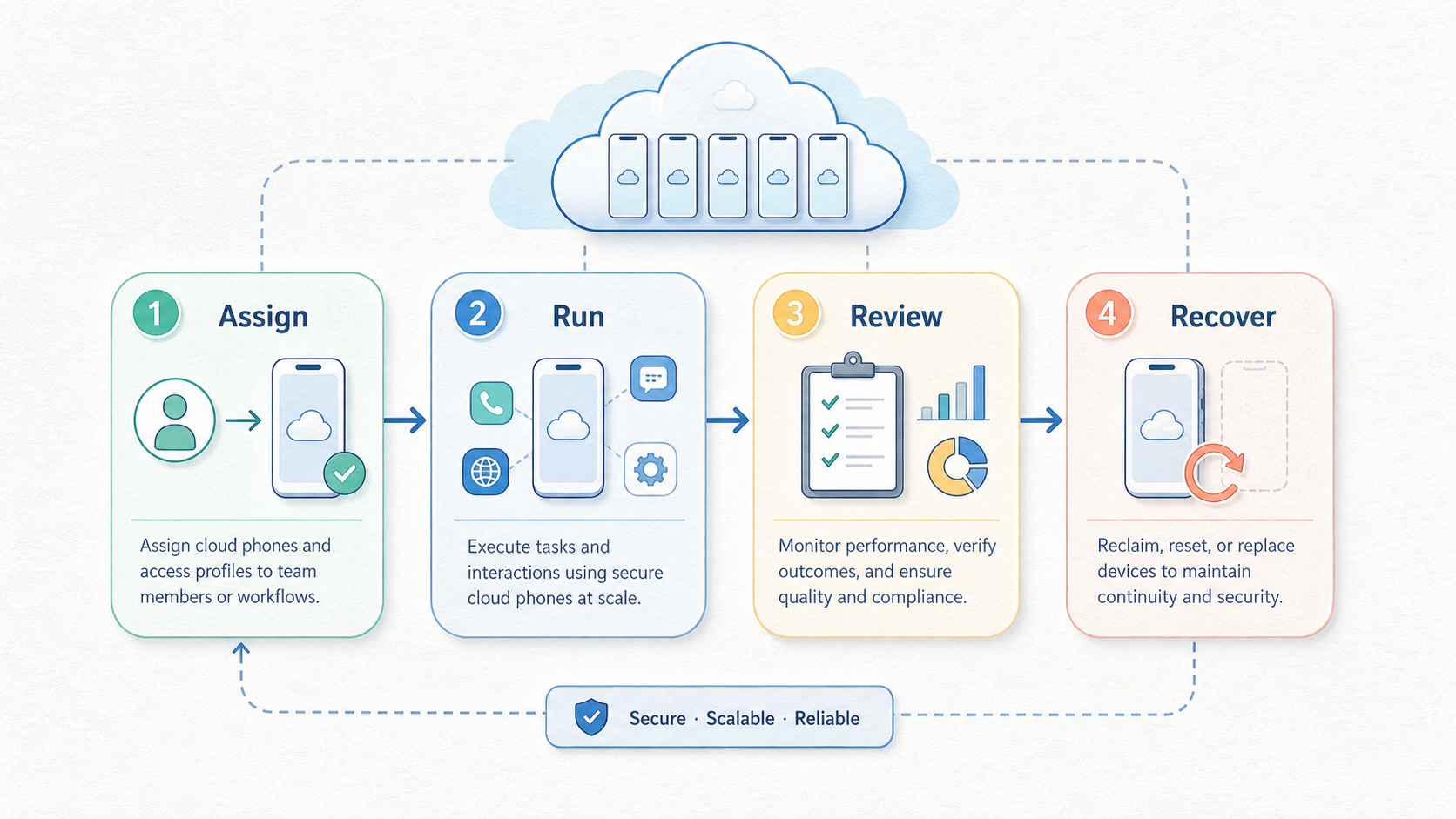
Remote mobile infrastructure tends to fit teams with repeated mobile work, shared accountability, and enough volume to make local handling painful. The clearest fit is not a hobby workflow. It is a team that already knows the job it needs to repeat.
Strong fit
- Teams running repeated mobile app workflows across many lanes.
- Agencies that need controlled client account handoff.
- Operations groups that need device separation and routing discipline.
- Support or marketing teams that need reviewable mobile execution.
Weak fit
- One-off tasks that a local phone can handle cleanly.
- Workflows with no owner, naming rules, or recovery plan.
- Teams trying to bypass platform rules instead of managing process.
- Projects where staff cannot document what each lane does.
Fit improves when parallel capacity becomes part of daily work. A single handset can serve one person well. Ten operators, multiple campaigns, and many mobile accounts create a different problem. Operators need a system where device lanes, account ownership, network routes, and logs can be reviewed without chasing screenshots across chat threads.
The fit also improves when device identity and session separation matter. Multi-account work should avoid casual mixing of account contexts. MoiMobi's multi-account management use case is relevant when the team wants clearer boundaries between accounts, operators, and workflows.
There are real limits. A cloud phone does not fix weak content, poor campaign strategy, unclear SOPs, or platform policy violations. It also does not remove the need for human review. Operations groups get the most value when they already have a repeatable process and need better infrastructure to run it.
A practical fit test is to ask what breaks today. When the answer is "we cannot keep devices organized," a cloud phone workflow may help. When the answer is "we do not know what to publish, who approves it, or which account owns the task," process design comes first. Infrastructure should make a known process easier to run. It should not hide an unknown process behind more capacity.
Budget fit should be judged through operating cost, not just subscription cost. Local phones have purchase, maintenance, storage, and handoff costs. Remote lanes have setup, training, review, and governance costs. The better option is the one the team can operate consistently. A cheaper tool can become expensive when recovery requires senior staff every week.
How to Evaluate or Start Using Cloud Phone | MoiMobi - Secure Mobile Automation Platform
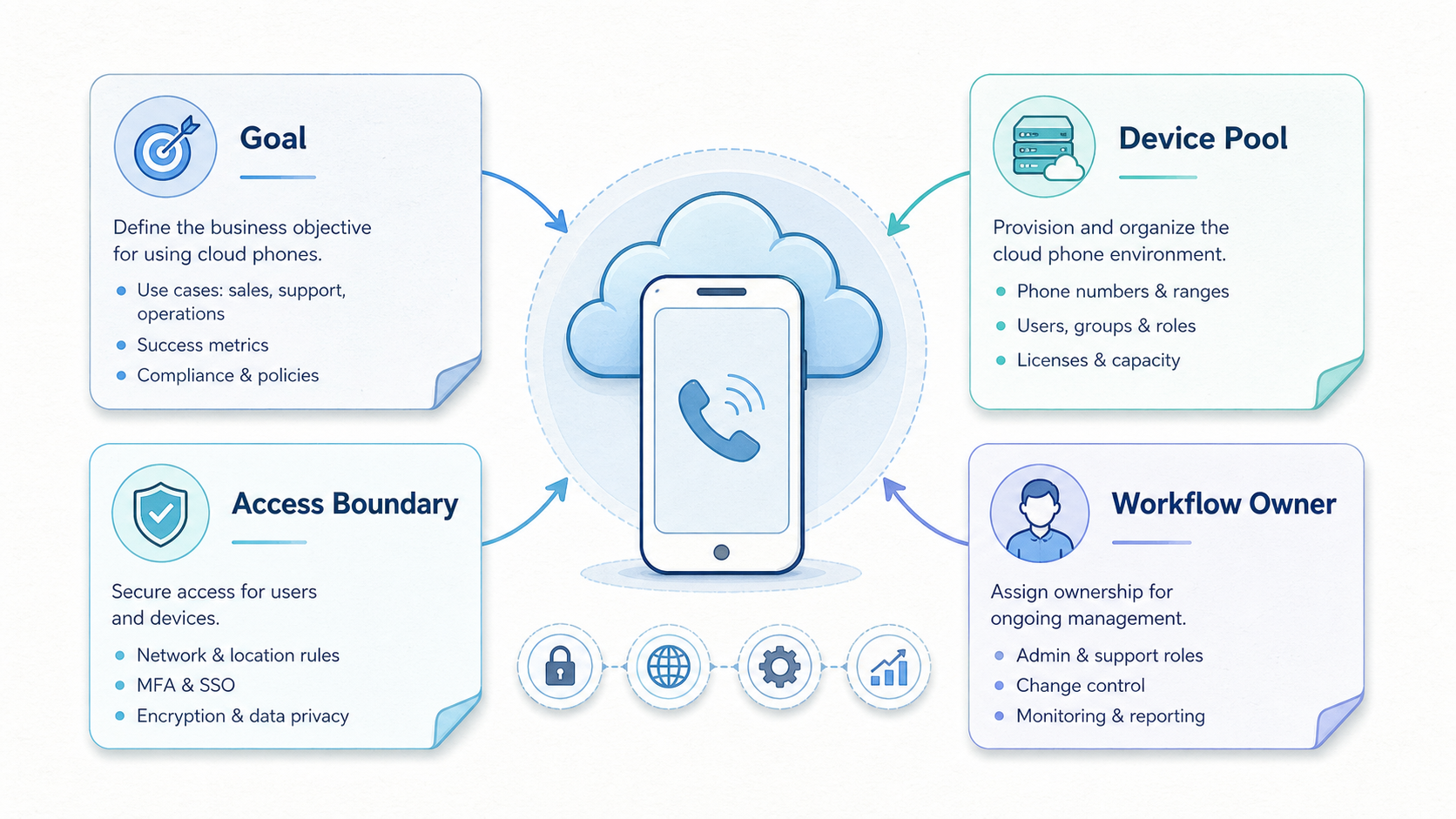
Start with the workflow, not the device count. A common buying error is asking how many remote phones the team can get before defining what each lane must do. The better path is to map the job first, then select the infrastructure needed to run it.
-
Define the mobile job. Write down the exact app task, account type, operator role, and expected output. A vague goal like "run more accounts" is not enough for a stable pilot.
-
Separate lanes by purpose. Decide whether each lane supports a client, campaign, region, app, or operator. This reduces confusion when the team reviews performance or investigates an issue.
-
Choose the access model. Confirm who can open each cloud phone, who can change settings, and who approves recovery. Shared access without ownership usually creates support debt.
-
Plan routing and isolation. Some workflows need stable routing and separated device contexts. Review whether proxy network and isolation features belong in the same pilot.
-
Test app behavior carefully. Mobile apps can respond differently across environments. Android behavior and compatibility details vary by app and OS version. Test the actual workflow before expansion. The Android Developers documentation is a useful starting point for understanding the platform layer.
-
Measure recovery effort. Break one test lane on purpose in a controlled way. Then document how the team restores it. Recovery time often reveals more than a successful demo.
-
Review compliance boundaries. Every team should map its workflow against the platform policies it depends on. The Google Play Policy Center is one official policy source for Android app ecosystems.
-
Scale only after review. Add lanes after the team can explain what worked, what failed, and which process changes are needed. Scaling a messy pilot usually multiplies the mess.
The same sequence applies to cloud phone vs emulator decisions. A cloud emulator may be enough when the task is simple and low-volume. A cloud phone setup may fit better when teams need operational lanes, mobile-centered access, and process control. The pilot should prove that difference with real work.
One useful evaluation exercise is a handoff drill. Ask the primary operator to document one lane. Then ask a backup operator to complete the same task without verbal help. Watch where the backup gets stuck. The issue may be permissions, missing account notes, unclear proxy rules, or app-specific behavior. Those findings are more valuable than a feature checklist because they show what will happen during daily operations.
Procurement should also include a failure question. What happens when a lane stops behaving as expected? The answer should include who investigates, what data they check, how they preserve account context, and when they retire the lane. A team that can answer those questions is ready for a broader test. A team that cannot answer them should keep the rollout small.
Mistakes That Reduce Results
The biggest mistake is buying infrastructure to compensate for an undefined process. A cloud phone can make a good workflow easier to run. It cannot turn a vague workflow into a reliable operation by itself.
Another mistake is mixing too many jobs into one lane. One remote environment should not become a bucket for unrelated accounts, apps, and campaigns. That habit makes review harder. It also makes recovery slower because no one knows which change caused the issue.
Teams also lose value when they treat automation as the main goal. Automation should serve a controlled workflow. For example, mobile automation can help repeat known steps, but weak rules will still create weak outcomes. Operators should know which steps are automated, which steps require review, and when a human must stop the flow.
Overclaiming safety is another risk. No provider should be evaluated through absolute promises. Platform behavior can change, account history matters, and workflow design matters. It is more useful to ask how the system supports separation, logging, access control, and recovery. Those are operational controls the team can inspect.
Content and user value still matter in marketing workflows. Google's guidance on creating helpful content is written for search quality, not mobile automation. Still, the principle is relevant: systems should support real user value instead of low-quality volume. Infrastructure helps execution, but it does not make poor campaigns useful.
A final mistake is skipping documentation. Every lane should have a short record: purpose, owner, account, routing notes, automation status, last review, and recovery steps. That record does not need to be heavy. It needs to be current enough that another operator can continue the work.
Another quiet mistake is measuring only output volume. A team may celebrate more completed actions while missing the support cost behind them. Better measurements include failed handoffs, repeated manual fixes, unclear ownership, and time spent explaining the same lane twice. Those signals show whether the system is getting stronger or simply busier.
Avoid copying one platform workflow into another app without review. A messaging workflow, a short-video workflow, and an app testing workflow can have different rules and friction points. Reusing the same lane pattern everywhere may look efficient, but it can make the system harder to debug. Start with the app's real behavior, then design the lane around that behavior.
Pilot Rollout, Measurement, and Recovery Checks
A cloud phone pilot should be small enough to understand and real enough to expose friction. Three to five lanes are often easier to study than a large launch. Pick one workflow that already matters and run it through a controlled review cycle.
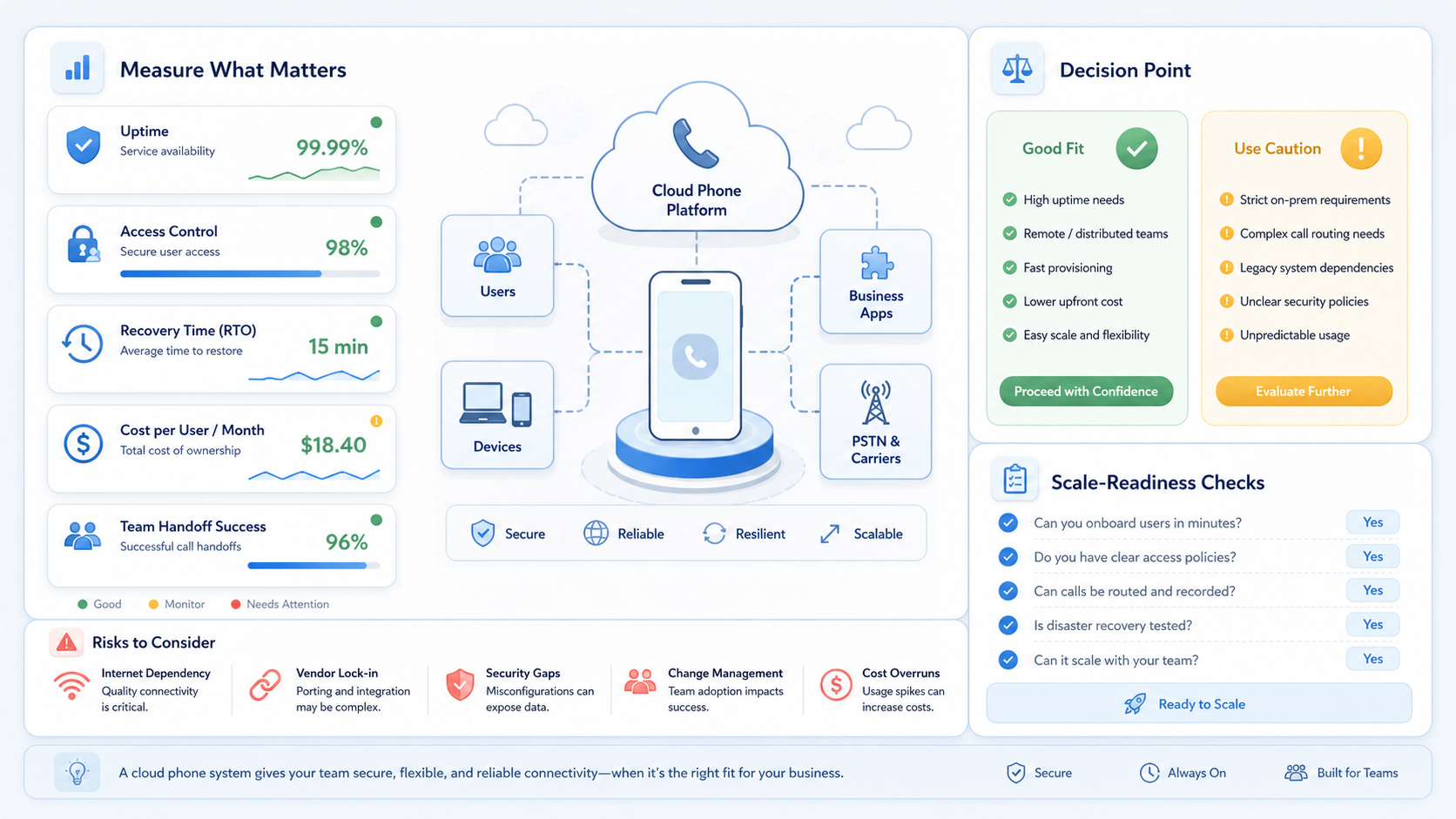
Use a simple scorecard before increasing volume:
| Check | What to measure | Why it matters |
|---|---|---|
| Access clarity | Every lane has one owner and clear backup access. | Reduces confusion during handoff. |
| Execution stability | The workflow completes without repeated manual rescue. | Shows whether the lane can support routine work. |
| Recovery time | A second operator can restore a known broken state from documentation. | Reveals hidden support cost. |
| Policy review | The workflow is checked against relevant platform rules. | Prevents infrastructure from hiding compliance questions. |
| Reporting quality | Operators can explain what happened during the pilot. | Makes scale decisions easier to defend. |
The recovery check deserves special attention. A system that looks stable during a demo may still fail under handoff pressure. Ask a second operator to restore a lane using only the documented process. When that person cannot do it, the issue is either documentation or tooling.
Measurement should include qualitative notes. Did operators know where to work? Did they understand which account belonged to which lane? Did review require screenshots, chat messages, or clean logs? These answers show whether the setup supports team execution.
Scale decisions should be conservative. Add more lanes when recovery is repeatable, ownership is clear, and the team can explain the pilot results. MoiMobi's cloud phone product page is the logical next stop. Use it when the team is ready to map those requirements to platform capabilities.
The weekly review can stay lightweight. A team lead can ask four questions: which lanes completed the assigned work, which lanes needed rescue, which notes were missing, and which process rule changed. Those answers create a feedback loop without turning the pilot into a reporting project. The goal is to make the next week easier to operate.
Retirement rules are part of recovery. Some lanes should be reset, some should be paused, and some should be removed from the workflow. Without a retirement rule, teams keep weak lanes alive because no one owns the decision. A clean end state protects the system from clutter and makes future audits easier.
Frequently Asked Questions
What is a cloud phone?
A cloud phone is a remote mobile environment that can be accessed and operated through managed infrastructure. Teams use it when they need mobile workflows without relying only on local devices.
Is a cloud phone the same as an emulator?
Not necessarily. A cloud emulator usually refers to a virtualized mobile environment. A cloud phone approach is often evaluated as an operational lane for mobile work. The better choice depends on the actual app, workflow, and recovery needs.
When should a team use a cloud phone for TikTok automation?
Use it only after defining the workflow, ownership, content process, and platform rules. A cloud phone for tiktok automation should support reviewable execution, not reckless volume.
Do cloud phones for WhatsApp marketing remove account risk?
No. Teams should avoid absolute safety claims. Cloud phones for whatsapp marketing can help structure access and workflow separation, but account outcomes still depend on platform rules, behavior, content, and process quality.
What should be tested in the first pilot?
Test one real workflow, a small number of lanes, access control, routing notes, recovery steps, and operator handoff. The pilot should reveal support effort before the team scales.
How many internal controls does a team need?
Start with ownership, lane naming, access rules, recovery steps, and weekly review. Add more controls only when the workflow needs them. Too much process can slow simple work.
What is the main cloud phone vs emulator decision point?
The decision point is operational fit. If the work is simple, temporary, and easy to recover, an emulator may be enough. If the work needs mobile-centered lanes, handoff, isolation, and review, a cloud phone setup may fit better.
Does MoiMobi replace team SOPs?
No. MoiMobi provides infrastructure for mobile execution. Teams still need SOPs for account ownership, app behavior, content review, support escalation, and recovery.
Conclusion
A cloud phone is most useful when it solves a team operations problem, not when it is treated as a shortcut. The practical value comes from cleaner mobile lanes, clearer ownership, better handoff, and repeatable recovery. MoiMobi fits that frame because it positions cloud phones as part of mobile execution infrastructure rather than a standalone rental tool.
The right evaluation starts with one workflow. Define the app task, account owner, route, isolation needs, review method, and recovery plan. Then test a small pilot and measure whether operators can work without guesswork. When the pilot creates clearer ownership and lower recovery friction, the team has a stronger case for scale.
The next step is a workflow map. List the mobile tasks that create the most coordination cost today. Mark which ones need cloud phone lanes, which ones need automation, and which ones only need better SOPs. That map will make the MoiMobi evaluation more concrete and prevent the team from buying capacity before it understands the operating model.



