
An AI Video Production Workflow helps teams turn repeated video work into a system. Instead of starting every short-form video from a blank editing timeline, teams can keep templates, scripts, captions, assets, render commands, account assignments, and publishing checks in one repeatable workflow.
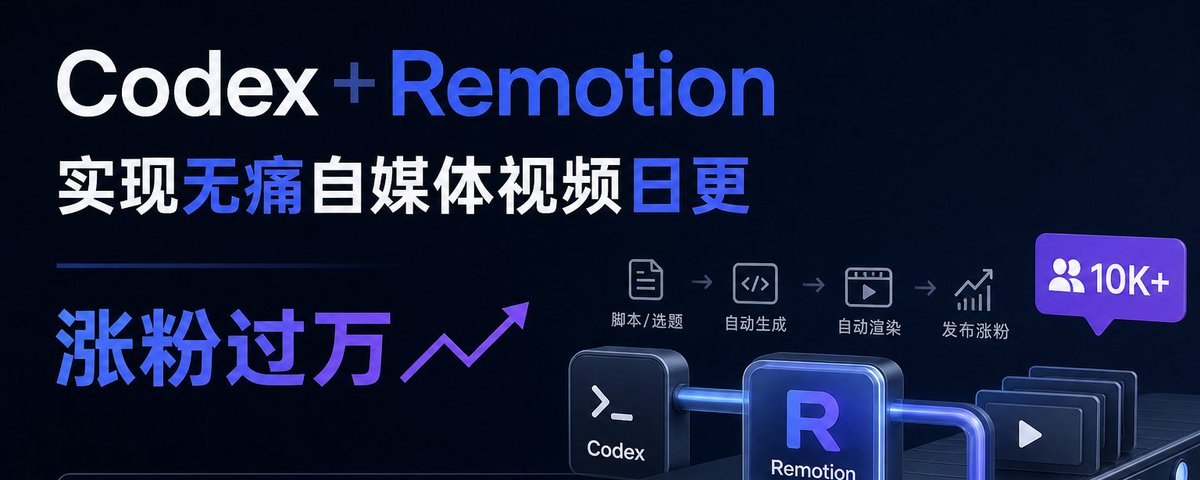
The source X Article explains how Codex and Remotion can turn daily creator videos into a maintainable production line. Codex works on the project structure, components, scripts, and errors. Remotion turns React components, JSON data, captions, images, and audio into video output. The deeper lesson for Moimobi is operational: content production only becomes useful when it connects to execution environments, account workflows, and review loops.
For teams using an AI execution platform, video production is only the first half. The second half is assigning content to the right accounts, running browser or mobile workflows, checking results, and feeding performance data back into the next run.
Key Takeaways
- Codex and Remotion are useful when video formats repeat across many posts.
- Remotion fits data-driven templates, captions, cards, tutorials, and product-update videos.
- Codex can maintain the project rules, components, render scripts, and checks.
- Multi-account teams also need account assignment, environment isolation, and publishing records.
- The goal is not full autopilot. The goal is a repeatable execution system with human judgment at the right points.
Source Context: From Editing Timeline To Production Line
The original article argues that daily video creation becomes painful when every post starts as a fresh editing project. Script writing, scene planning, subtitles, covers, animation, export sizes, typo checks, and timeline fixes create repeated low-value work.
The proposed shift is simple: treat repeated video formats as code. Remotion’s documentation describes video as a function of images over time and lets developers render React components frame by frame. Its CLI can render a video or audio output from an entry point and composition ID. OpenAI’s Codex documentation describes Codex as a coding agent that can write code, understand codebases, review code, debug problems, and automate repetitive development tasks.
That combination makes sense for creator teams that produce similar videos every day.
The source article included one cover image, preserved below as source context.
Where An AI Video Production Workflow Fits
Not every video should become a code-based workflow. If a creator relies on live footage, emotional pacing, field recording, or heavy manual editing, a traditional editor may still be the better tool.
An AI Video Production Workflow is strongest when the format repeats:
| Video Type | Why It Fits | Reusable System Asset |
|---|---|---|
| Explainer shorts | The structure repeats: hook, problem, method, example, takeaway. | Scene template and script schema. |
| AI tool tutorials | Only the tool, steps, and screenshots change. | Step cards, caption rules, screenshot layout. |
| Product updates | Each update needs a similar launch format. | Feature cards, comparison blocks, CTA end screen. |
| Data or news explainers | The data changes, but the visual grammar can stay stable. | Chart components and source notes. |
| Multi-account social posts | The same asset may need different platform versions. | Export presets, account assignment, task records. |
The decision is not “AI video versus manual editing.” The real question is whether the team repeats the same video structure often enough to justify a maintainable workflow.
What Codex Does In The Workflow
Codex should not be treated as a magic title generator. In this workflow, it acts more like a project operator.
It can help:
- Create or adjust the Remotion project.
- Turn a repeatable format into React components.
- Convert a raw script into structured JSON.
- Keep caption, cover, color, and spacing rules consistent.
- Write render commands and npm scripts.
- Check whether text overflows the safe area.
- Debug rendering errors.
- Save workflow instructions in
AGENTS.mdor a Codex Skill.
OpenAI’s Agent Skills documentation describes skills as reusable workflows that package instructions, resources, and optional scripts so Codex can follow a task reliably. For video operations, that matters. The team should not explain its visual rules from scratch every day. The rules should live in the project.
What Remotion Does In The Workflow
Remotion turns video into a programmable output. A composition can define width, height, duration, frames per second, and the component to render. The content can then be driven by props, JSON files, captions, local assets, or remote resources.
That lets a team build a minimal production setup:
video-project/
  src/
    compositions/DailyExplainer.tsx
    components/HookCard.tsx
    components/Caption.tsx
    components/StepScene.tsx
    styles/theme.ts
  content/2026-07-03-topic.json
  public/screenshots/
  package.json
  AGENTS.md
The daily input becomes a content file, not a new timeline. Codex can convert a topic into structured data. Remotion can preview a key frame, render the video, and export platform versions. The team can review the result before it reaches an account.
The Missing Layer: Execution After Rendering
The source article focuses on producing the video. Teams running social media operations need the next layer: execution.
A rendered video still needs to be assigned, checked, uploaded, published, monitored, and reviewed. That is where browser and mobile environments matter. Some platforms are managed through web dashboards. Others require mobile apps. Some accounts need separate sessions and routing. Some workflows need a human approval step before publishing.
Moimobi connects AI workflows to real browser and mobile execution environments. If a video needs mobile-first publishing, the team may need a cloud phone execution environment rather than a simple scheduler. If the work spans multiple social accounts, the team also needs multi-account management to keep account ownership, roles, and task status clear.
Production and execution should not be separate islands.
A Practical Workflow For Teams
A complete AI Video Production Workflow can follow this sequence:
| Stage | System Output | Control Point |
|---|---|---|
| Idea | Topic, angle, platform goal. | Human decides whether the idea fits the account. |
| Script | Hook, scenes, captions, CTA. | Reviewer checks claim quality and tone. |
| Template | Remotion components and JSON data. | Codex updates code only inside the project rules. |
| Render | Still preview, MP4, platform formats. | Check overflow, subtitles, safe area, and timing. |
| Assign | Account, environment, schedule, owner. | Use account role and approval rules. |
| Execute | Upload, publish, monitor, reply. | Run in the correct browser or mobile workspace. |
| Review | Metrics, failures, lessons. | Update the workflow for the next run. |
For mobile-first platforms, mobile automation can help teams run app-based steps with clearer task records. For web dashboards, browser profiles and page checks matter more. The workflow should choose the environment based on the platform, not based on convenience.
Guardrails For Multi-Account Video Work
Teams should avoid turning video automation into blind mass posting. A repeatable workflow still needs account boundaries.
Useful guardrails include:
- Keep one account role per workspace.
- Separate draft generation from publishing approval.
- Store platform-specific caption and safe-area rules.
- Track which account received which video.
- Avoid sending the same asset to every account without review.
- Save failure reasons, not only success status.
- Use device isolation when mobile workflows involve separate account environments.
The same video may need different captions, formats, or timing across accounts. A good workflow makes those differences explicit.
Frequently Asked Questions
1. What is an AI Video Production Workflow?
It is a repeatable system for turning ideas into scripts, structured data, templates, rendered videos, account assignments, execution tasks, and review records.
2. Is Codex a video editor?
No. Codex is a coding agent. In this workflow, it helps maintain the code, project rules, data structure, render scripts, and debugging process behind the video production system.
3. Is Remotion a replacement for traditional editing tools?
Not always. Remotion is strongest when the video format repeats and can be represented as components, data, captions, and render settings.
4. Why does this matter for social media teams?
Social teams do not only need one video. They need repeatable production, platform versions, account assignment, publishing checks, and result tracking.
5. Where do cloud phones fit?
Cloud phones help when the workflow must run inside mobile apps or mobile-first account environments. They are part of execution, not the rendering step.
6. Should publishing be fully automatic?
Not at first. Sensitive workflows should keep human approval before posting, replying, or changing account state. Automation should reduce repeated preparation and execution work.
7. How does Moimobi fit this workflow?
Moimobi helps connect AI-generated content workflows with browser profiles, cloud phones, Android devices, account isolation, and multi-account task execution.
Conclusion
Codex and Remotion can turn repeated video formats into a maintainable production line. That is useful, but teams still need the execution layer after the render finishes.
For real operations, the workflow should connect video assets to accounts, environments, approvals, publishing tasks, monitoring, and feedback. That is how AI-assisted video production becomes part of a broader social media automation system instead of another isolated content tool.



