

TikTok account setup and X account setup are not only registration tasks. They are operating systems. A beginner has to think about the phone, network, IP location, SIM card, app permissions, account behavior, content rhythm, and review process before scaling posts.
The post frames this as a long beginner FAQ for X and TikTok. This rewrite turns the same topic into an operations guide for teams. The goal is simple: make the account environment stable before asking why content does or does not perform.
For teams using an AI browser and mobile execution stack, the practical question is not “which trick works today?” The better question is “can we document each account, environment, device, task, post, and result well enough to repeat the work safely?”
Platform rules still matter. TikTok publishes account and content safety guidance in its Community Guidelines. X publishes its rules in X Rules and Policies. Account operations should stay inside those boundaries, especially when a team runs more than one account.

Key Takeaways
- Account setup starts with environment consistency, not posting volume
- TikTok is more sensitive to mobile environment signals; X depends more on interaction quality and social graph
- Proxy, SIM, device, permissions, time zone, and language should be checked before registration
- Warm-up is a behavior rhythm, not a magic waiting period
- Teams need asset records, review states, and account ownership before scaling social media marketing
What Beginner X and TikTok Account Setup Really Means
Account setup means creating a stable operating context for a social account. It includes the device, network, IP location, SIM card, phone settings, app permissions, account profile, first interactions, first posts, and ongoing review state.
Many beginners treat setup as a one-time sign-up step, and that is why problems appear later. The account can register, but videos may still get no views or the next verification step may fail.
Sometimes the content is weak. Sometimes the phone, network, or account behavior is the real issue. Often both are true, so the team needs a simple way to check each cause before it starts over.
A useful setup process answers seven questions before the first serious post:
| Setup area | Why it matters |
|---|---|
| Market choice | Market decides language, timing, content angle, and network location |
| Device owner | Device history and repeated login behavior affect troubleshooting |
| Network path | IP location and proxy quality change how the account is seen |
| SIM or phone number | Phone verification and region signals must be planned |
| App permissions | Location, local network, notifications, camera, and microphone change behavior |
| Warm-up plan | New accounts need normal usage before aggressive posting |
| Issue record | Teams need a record before they can diagnose failures |
That is the difference between casual account creation and operational account setup.
Why TikTok Account Setup Starts With Environment Consistency
Content strategy matters, but unstable environments create false signals. A weak video and a broken environment can look the same from the outside: low reach, limited interaction, or repeated verification friction. Without records, the team guesses.
Environment consistency does not mean every signal must be perfect. It means the account should not constantly jump between countries, devices, SIM contexts, browsers, and app states without explanation. The more random the environment looks, the harder it becomes to know whether the content is performing.
For TikTok, the mobile environment is especially important. The FAQ covers IP location, SIM card, location services, app language, time zone, and phone choice. These are not isolated tips. Together they describe the operational identity of the account.
For X, the environment still matters, but the platform is also shaped strongly by who the account follows, what it comments on, how it posts, and whether its actions look like a real participant. A clean device cannot compensate for robotic behavior.
Teams should not treat setup as a secret hack. Treat it as a QA checklist.
TikTok Account Setup: Proxy, VPN, and IP Quality
Beginners often confuse a VPN app with the actual exit node. The app is only the client. The exit node is the network identity. A team may use tools such as Shadowrocket, Stash, Clash Meta, or similar clients, but the operational quality depends on the node, not the logo of the app.
The guide separates several practical questions: paid versus free nodes, global mode versus rule mode, target country, connection failure, blocked IPs, power usage, and router-level proxying. These are useful because they force beginners to think in systems.
A simple setup principle is this:
| Area | Beginner mistake | Better operating rule |
|---|---|---|
| Node cost | Using free shared IPs for account work | Use stable, known, renewable access |
| Market match | Using any country that connects | Match account market when possible |
| Registration mode | Split routing without knowing what is routed | Keep the environment consistent during registration |
| Daily use | Running everything through the same proxy | Use rule-based routing for normal device life |
| Multi-account use | Sharing one exit across many accounts | Separate by account or account group |
Proxy quality is not only about speed. It is about reputation, reuse, geography, DNS behavior, and operational consistency.
Keep the first version simple. Pick one market, use one stable phone, keep one stable network path, and record what changed.
Do not change five things at once, because that makes every later result hard to read.
Residential IP, Datacenter IP, and Streaming IP
The original post includes a section about residential IP, datacenter IP, and streaming-unlocked IP. The practical takeaway is not that every beginner needs the most expensive network. The takeaway is that IP type changes risk and cost.

Residential IPs may look more like normal consumer traffic, but they can be expensive. Datacenter IPs are cheaper and easier to scale, but can be more obviously proxy-like. Streaming-unlocked IPs can be a practical middle ground for beginners because they are easier to test and often more stable than random free nodes.
Teams should define tiers:
| Tier | Use case | Notes |
|---|---|---|
| Test tier | Learning, browsing, non-critical accounts | Lower cost, more tolerance for failure |
| Working tier | Active content accounts | Stable country and cleaner reputation |
| High-value tier | Mature accounts, commerce accounts, creator accounts | Stronger separation and stricter recordkeeping |
This tiering prevents teams from overpaying for every experiment while still protecting valuable accounts.
TikTok Account Setup: Device, SIM, Location, Time Zone, and Language
TikTok account setup is tightly connected to the phone. The setup questions include whether to remove a domestic SIM, whether to use an overseas SIM, whether to disable location, whether to adjust time zone, and whether to change language.
A practical way to interpret those questions is through consistency. If the account targets the US, the phone environment should not look like it jumps between unrelated countries and usage patterns every day. If the account targets Japan, the content, posting time, language, and interaction targets should make sense for Japan.
Here is a practical checklist:
| Signal | What to decide |
|---|---|
| SIM card | Which phone number or region supports registration and recovery |
| Location services | Which apps need location and which do not |
| Time zone | Which market schedule the operator follows |
| App language | Which recommendation and content context the account should use |
| Installed apps | Whether the device is clean enough for the account purpose |
| Notifications | Whether the operator can respond to comments or verification prompts |
The key is repeatability. If an operator changes one of these settings, the change should be recorded. Otherwise, future troubleshooting becomes guesswork.
Why a Dedicated Device Often Helps
One practical suggestion is a dedicated secondhand iPhone for serious work. The reason is not superstition. It is operational clarity.
A dedicated device gives one account or one account group a stable home, reduces mixed signals from unrelated apps, repeated login changes, personal use, and random setting changes, and makes responsibility clearer inside a team.
This is not glamorous, but it saves review time when an account starts to fail.
For a solo beginner, one main phone can be enough to learn. For a team, the cost of confusion grows quickly. If three operators touch the same phone, use different proxies, and log in to different accounts, later diagnosis becomes almost impossible.
The clean device does not make content good. It only gives the content a fair test. That is still useful, because bad data leads teams to fix the wrong thing.
This is where a cloud phone can become relevant. A cloud phone gives teams a remote mobile environment that can be assigned, reviewed, and operated more consistently than a pile of unmanaged physical devices.
TikTok Account Setup and X Setup Need Different Operating Models
TikTok and X should not be run with the same mental model.
TikTok is heavily shaped by short-form video performance, viewing behavior, market targeting, app context, and mobile environment. A new TikTok account needs careful setup, normal usage, content testing, and review before scaling.
X is more network-driven. The account builds reach through follows, replies, reposts, quote posts, topic participation, and original content. Environment still matters, but a clean phone will not help if the account acts like a bot.
| Dimension | TikTok | X |
|---|---|---|
| Main format | Short video, live, commerce content | Posts, threads, images, videos, replies |
| Early growth | Recommendation and content testing | Social graph and visible participation |
| Setup risk | Mobile environment inconsistency | Robotic following, spam replies, link-heavy behavior |
| Warm-up focus | Watch, interact, then post carefully | Follow relevant accounts, reply well, post original thoughts |
| Team workflow | Video asset production and posting | Comment strategy, topic research, content calendar |
This is why a team may run one TikTok account and one X account from the same general operation, but it should not blindly reuse the same schedule, content, or risk checks.
Warm-Up Is Behavior Rhythm, Not Magic
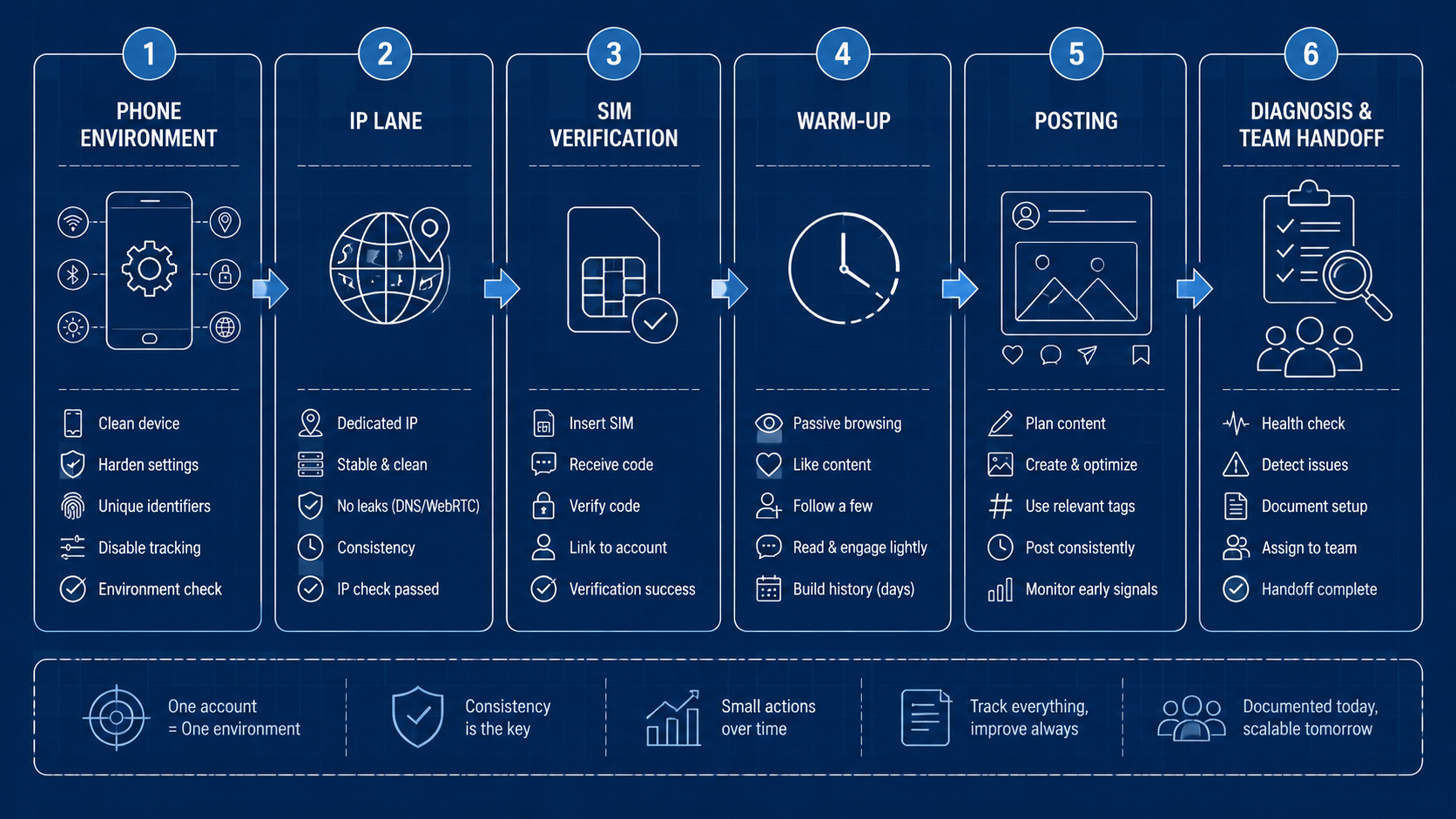
The warm-up section describes a 3-7 day period. That range is useful, but the logic matters more than the number. Warm-up means the account behaves like a normal user before it behaves like a publisher.

A better warm-up plan is staged:
| Stage | Goal | Example actions |
|---|---|---|
| Day 1 | Complete identity and observe content | Set profile, browse relevant accounts, avoid heavy actions |
| Days 2-3 | Build interest signals | Like, save, follow lightly, watch full videos |
| Days 4-5 | Test low-risk content | Post one or two original pieces, monitor response |
| Days 6-7 | Start pattern testing | Try timing, caption, topic, and creative variations |
Warm-up should not be treated as a reach promise. It reduces obvious new-account friction and creates cleaner data for future testing.
Zero Views, Limits, and Suspensions: Diagnose Before Rebuilding
When a TikTok video gets zero views or an X account gets restricted, beginners often delete everything and restart. That can waste time. Diagnose first.
Most issues fall into three categories:
| Category | Examples | First response |
|---|---|---|
| Content issue | Reused clips, low quality, misleading captions, policy risk | Review the asset and platform rules |
| Environment issue | Dirty IP, inconsistent market, unstable device setup | Check proxy, SIM, location, device state |
| Behavior issue | Too many follows, rapid likes, link spam, immediate posting | Pause and reduce action intensity |
Do not keep repeating the same failed action. If verification fails, record the condition. If reach drops, record the post, time, account age, network, and previous actions. If a restriction appears, stop and review before escalating.
For teams, these states should be tracked in a dashboard or content operations log. Guessing is not a workflow.
Pause first, check facts, and change one documented variable before the next test.
Multi-Account Operations Need Isolation
The multi-account section warns against using one phone, one IP, and one environment for many accounts on the same platform. The operational version is simple: define account ownership.
One account should have an assigned environment, operator, purpose, market, and content lane. If multiple accounts share everything, the team cannot isolate failures. Spillover becomes real. Even when nothing is technically “linked,” the workflow becomes impossible to audit because nobody can prove which action caused the problem.
This is where device isolation matters. Isolation is not only about avoiding platform risk. It also creates cleaner operations:
| Isolation layer | Operational benefit |
|---|---|
| Device or cloud phone | Clear account home |
| Proxy or network lane | Easier issue diagnosis |
| Operator assignment | Better responsibility tracking |
| Content folder | Cleaner creative history |
| Review state | Less accidental publishing |
If a team runs dozens of accounts, isolation becomes the foundation of reliable social media operations.
It also makes training easier. New operators can see which account they own, which phone or cloud phone they use, and which task is due next.
Own the lane before you scale the lane.
How to Turn the 50 Questions Into a Team SOP
The FAQ format is useful for beginners. A team needs a standard operating procedure.
Start with account intake:
- Define platform, market, language, and goal
- Assign device or cloud phone
- Assign network or proxy lane
- Record phone number or verification method
- Set app permissions and time zone
- Complete profile and content category
- Start warm-up and record daily state
Then create a content workflow:
- Prepare original posts or videos
- Review for platform fit
- Schedule a small test batch
- Record publishing conditions
- Track views, replies, saves, comments, shares, and restrictions
- Decide whether the issue is content, environment, or behavior
Finally, create a scaling rule:
| Signal | Action |
|---|---|
| Stable account and normal reach | Increase posting slowly |
| Repeated verification friction | Audit environment |
| Low reach with clean environment | Improve content angle |
| Good content but weak conversion | Improve profile and CTA |
| Mature account with stable results | Assign stronger review and protection |
This is how a beginner FAQ becomes a system.
Where Mobile Automation Fits
Automation should not come before workflow clarity. If a manual process is chaotic, automation only repeats the chaos faster.
The right sequence is:
- Stabilize the account environment
- Document manual steps
- Identify repetitive actions
- Add review checkpoints
- Automate only the safe and repeatable parts
Mobile automation is useful when teams already know what they want to repeat: opening apps, checking states, preparing drafts, routing content, collecting status, or assigning follow-up tasks. It should not be used to spam actions or bypass platform rules.
Monetization Starts After Stable Operations
The monetization section ends with TikTok Shop, live streaming, affiliate offers, brand deals, X ads revenue, consulting, community, and private traffic. Beginners often jump to this step too early.
Monetization works better after three things exist:
- Stable account access
- Repeatable content production
- Clear audience response data
For TikTok, monetization may come from shop, live, creator partnerships, affiliate content, or traffic to an external store. For X, it may come from consulting, audience building, newsletters, communities, affiliate links, or product funnels.
The operational lesson is the same: do not treat monetization as a feature toggle. Treat it as the result of a stable account, a defined audience, and a repeatable content loop.
Practical Checklist for Beginners and Teams
Use this checklist before scaling X or TikTok accounts:
| Step | Beginner action | Team action |
|---|---|---|
| Market | Pick one target country or audience | Map account to campaign goal |
| Device | Use a stable phone | Assign cloud phone or isolated device |
| Network | Use a consistent exit | Record proxy or network lane |
| Permissions | Check location, notifications, camera, microphone | Save setup state |
| Registration | Avoid repeated failed attempts | Record verification method |
| Warm-up | Browse and interact normally | Track warm-up status |
| Posting | Start with original content | Route through review |
| Diagnosis | Separate content, behavior, and environment issues | Use status logs and dashboards |
| Scaling | Increase slowly | Protect mature accounts with stronger isolation |
Frequently Asked Questions
Is TikTok account setup only about VPN?
No. Network access is only one part. Device, SIM, location permissions, app language, time zone, behavior rhythm, and content quality all matter.
Can one phone run both X and TikTok during beginner testing?
For one beginner account on each platform, it can work. For multi-account operations, teams should separate environments by account or account group because the cost of mixed signals rises quickly. This keeps the test clean.
Do new TikTok accounts need a short warm-up period before posting?
Yes, but warm-up should be understood as normal behavior, not as a fixed timer. Browse first, follow lightly, interact naturally, and post slowly before scaling.
Why does a new TikTok video sometimes get zero views after setup?
It may be a content issue, an environment issue, a behavior issue, or a review delay. Diagnose before rebuilding the account. Keep notes on what changed.
Is X easier?
It can be less mobile-environment-heavy, but X still needs clean behavior. Rapid following, repeated links, and low-value replies can create risk, especially when a new account has not built a real social graph yet.
When should a team use cloud phones for social account work?
Use cloud phones when accounts need assigned mobile environments, operator handoff, review visibility, and repeatable mobile workflows across more than one person.
Where does social media marketing fit into this setup?
Account setup is the foundation. Once accounts are stable, social media marketing can focus on content angles, audience testing, posting rhythm, and conversion paths.



