Key Takeaways
- A SocialPilot alternative should be chosen by workflow boundary, not by the number of channels shown in a pricing table.
- Calendar scheduling and approvals fit many content teams; account-specific browser and mobile execution solves a different operating problem.
- Test a replacement with a small account group, explicit approval gates, and a recoverable record of every publish attempt.
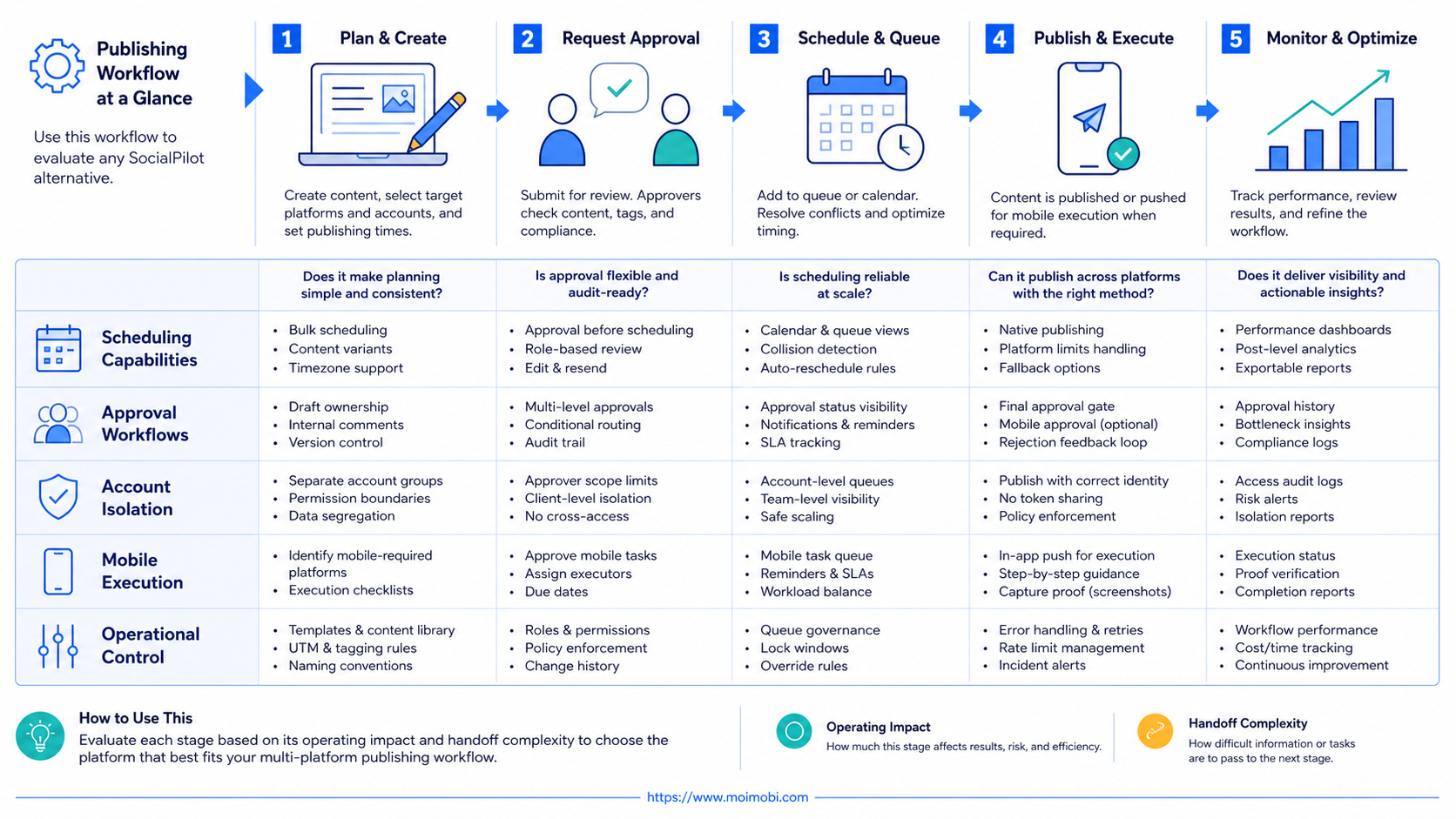
A SocialPilot alternative is a publishing system that matches the way a team actually prepares, approves, and executes content across platforms. For a calendar-led marketing team, the right alternative may still be another API-connected scheduler. For a team that must work in logged-in web apps or mobile-first workflows, the better fit can be an execution layer with isolated account workspaces.
SocialPilot itself is built around connected social accounts, schedules, a calendar, analytics, and team roles. Its help center describes approval-aware roles for administrators, managers, and content schedulers, while its product documentation highlights scheduling, bulk publishing, inbox, analytics, and collaboration. Those are useful capabilities when the work is primarily content planning and authorized publishing. SocialPilot's getting-started guide is a useful baseline for evaluating that operating model.
The comparison changes when publishing depends on account-specific context. A creator may need a final mobile edit. A regional team may need a dedicated operator. A workflow may include checking comments, routing replies, or recording an exception after a post fails. In those cases, a scheduler alone can leave a gap between “content is ready” and “the right account completed the action.”
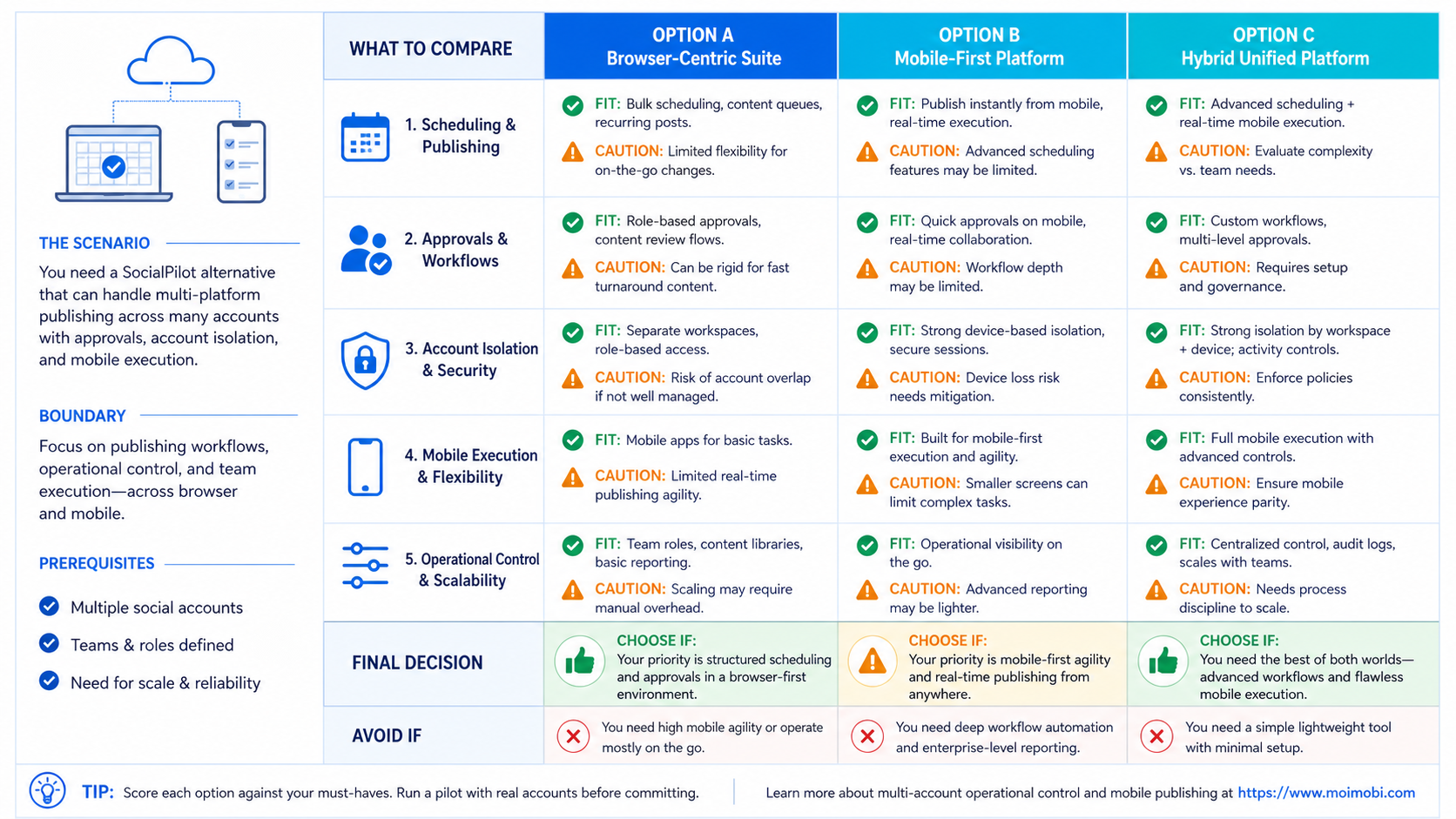
What to Compare Before Choosing a SocialPilot Alternative
Start with the point where work currently breaks. Do not begin with a feature checklist. A tool can support many networks and still be the wrong choice if it cannot represent your approval path, account ownership, or recovery process.
The first question is publishing method. API-first schedulers are efficient when the target platform, account permissions, and post format are supported through the provider's approved connection. TikTok's official Content Posting API, for example, supports direct publishing or upload-for-editing flows for authorized creators, and its availability comes with app, user, and posting constraints. That makes API coverage a real decision factor, rather than a badge on a comparison page. TikTok's Content Posting API documentation explains the direct-post and upload paths.
The second question is execution context. A campaign may need a calendar queue, a browser session, a mobile device, or several of these in sequence. If a team has to finish work inside a mobile app, a cloud phone can provide a dedicated mobile workspace rather than forcing every task through a browser dashboard. That does not make a mobile environment universally better. It simply gives the team another controlled path when the platform workflow is mobile-first.
The third question is accountability. Ask whether each step can be assigned to a person or an account workspace, paused before publication, and reviewed after an exception. A publishing tool should make it possible to answer four practical questions:
- Which account was used for the task?
- Who approved the content and the final publish action?
- What happened when the platform rejected, delayed, or changed the action?
- Can the next operator resume without reconstructing the context from chat messages?
Key Differences Between a SocialPilot Alternative and a Scheduler-Only Stack
The category label can hide meaningful differences. A scheduler manages a planned content queue. An execution platform manages the work required to complete a task in the correct environment. Teams often need both, but they should not judge them by the same criteria.
| Decision area | Scheduler-led model | Execution-environment model | What to validate |
|---|---|---|---|
| Content planning | Calendar, queue, draft review | Task plan connected to an account workspace | Whether teams can see ownership and next action |
| Publishing path | Approved API connection where available | Browser or mobile task when the workflow requires it | Which platforms and formats use each path |
| Account context | Connected profile and role permissions | Dedicated browser profile or device environment | Whether sessions and responsibilities stay separated |
| Exceptions | Failed post notice or manual reschedule | Task log, pause, handoff, and retry decision | How the team recovers without duplicate posting |
| Operational review | Content and engagement reporting | Task, account, and workflow outcome review | Whether failures are visible with enough context |
The comparison is not “automation versus manual work.” It is whether the tool represents the full operating unit. For a small brand with a predictable content calendar, a scheduler may be the cleanest system. For an agency with multiple clients, regional handoffs, browser work, and mobile verification, the unit of work may be an account-specific task instead of a scheduled post.
Account separation deserves special attention. Assigning people to accounts in a dashboard is helpful, but it does not automatically create a separate technical workspace for the session. Teams that need distinct browser contexts can evaluate device isolation alongside their publishing software. The goal is not to create friction. It is to reduce accidental context mixing when several operators and accounts are active.
Features, Workflow, and Trade-Offs
The common mistake is treating every SocialPilot alternative as a like-for-like scheduling replacement. That leads to an expensive stack with overlapping calendars and no clear owner for the final action. A better model separates content operations from account execution.
Use a scheduler-led layer when the team needs these jobs:
- Drafting, approving, and placing posts in a predictable calendar.
- Reviewing content coverage by brand, campaign, or channel.
- Giving clients a controlled approval step before a post enters the queue.
- Reporting on the output of connected social profiles.
Use an execution-environment layer when the work includes these jobs:
- Opening a specific logged-in browser workspace to complete a web task.
- Completing a mobile-first action that cannot be reduced to a calendar event.
- Assigning one account's work to a clear operator, task queue, and review record.
- Pausing a workflow when a platform prompt, a missing asset, or an approval issue needs human judgment.
Moimobi is relevant to the second group because it connects AI-generated content and task instructions with browser and Android execution environments. A team can use multi-account management to organize account work, then keep normal content approval separate from the action that uses the account environment. This is a different choice from choosing a faster social calendar.
There are trade-offs. An execution layer requires clearer SOPs. It needs a named owner for approval, account access, failure review, and handoff. A team that only schedules approved posts may not need that overhead. On the other hand, a team with recurring browser and mobile tasks often pays for the lack of structure through duplicated work, unclear ownership, and hard-to-explain publishing failures.
SocialPilot Alternative Pricing and Operational Considerations
Do not compare plans using the headline subscription price alone. Cost changes with the number of accounts, user seats, approval needs, and work that falls outside the scheduler. SocialPilot's published pricing separates plans by connected accounts, users, collaboration, analytics, and client approval features. Its pricing page is a useful source for checking the current plan boundary before making a replacement decision.
For an alternative, calculate four cost layers:
- Planning capacity. Count calendars, content approvers, client reviewers, and reporting needs.
- Execution capacity. Count the web and mobile tasks that need an account-specific workspace.
- Control cost. Include reviews, exception handling, task records, and training time.
- Recovery cost. Estimate the effort required when a post is delayed, rejected, duplicated, or handed to another operator.
This framework prevents a false economy. A low-cost scheduler can be a strong choice when it covers the workflow. It becomes costly when staff create manual workarounds around missing platform actions. Conversely, an execution platform should not be bought simply because it has more controls. It needs a real operational job to justify the added process.
One practical boundary is platform policy. TikTok's developer guidance says that Direct Post clients have review and posting constraints, including limits that can apply to unaudited integrations and per-creator activity. TikTok's sharing guidelines are a reminder to test the approved path for each platform, rather than assuming a single automation pattern applies everywhere.
Which Option Fits Different Teams
Best fit: calendar-first brand team
Use a scheduler-first alternative when the work is planned publishing, review, and reporting across supported connected accounts. Keep the stack simple and validate approval roles.
Best fit: client-service agency
Use a scheduler plus account-workflow layer when client approvals, several account owners, and recurring exception handling create handoff risk.
Best fit: mobile-first operations team
Use controlled browser and mobile workspaces when the final task must happen in a platform interface or Android app, not only through an API queue.
Not a strong fit
Do not add execution infrastructure for a single account with a simple weekly calendar and no repeatable account-specific steps. The process cost can exceed the benefit.
An agency is often the clearest mixed case. It may use a calendar to collect drafts and approvals, while a separate queue manages account-specific tasks. The publishing record should connect the campaign, the account, the operator, and the recovery note. That structure makes client communication more credible than a generic “posted” status.
For social teams that spend meaningful time in app-based workflows, mobile automation can be assessed as an execution capability rather than a replacement for editorial planning. The selection question is simple: does the team need to operate a real environment after the content is approved? If not, a traditional scheduler may remain the better answer.
Pilot Rollout, Measurement, and Recovery Checks
Avoid replacing a publishing stack across every account at once. Run a controlled pilot with one workflow that is frequent enough to reveal problems but small enough to recover quickly. The pilot should test a real content path from approval through completed publication or documented exception.
- Choose one account group. Select a small set of accounts with similar content formats and clear owners.
- Write the handoff rule. Define who prepares content, who approves it, who performs the action, and who owns a failed run.
- Set the stop conditions. Pause when the required approval is missing, the content asset is incomplete, or the platform response is unclear.
- Record outcomes. Log completed, delayed, blocked, and manually recovered tasks with the reason and next action.
- Review after two cycles. Compare preparation time, exception rate, duplicate-work incidents, and operator handoff quality before expanding.
Measure more than publish volume. A team should track time from approval to completion, the number of manual workarounds, the share of tasks with a clear owner, and the time needed to resolve an exception. Those metrics reveal whether a SocialPilot alternative is reducing operational friction or merely moving it into another dashboard.
Recovery rules matter as much as the happy path. Do not automatically retry a task when the system cannot confirm its outcome. First inspect the account workspace, record the evidence, and decide whether a human should complete, cancel, or reschedule the step. That approach protects teams from duplicate actions and gives the next operator usable context.
Frequently Asked Questions
Is SocialPilot a good fit for multi-platform publishing?
It can be a strong fit when a team mainly needs connected-account scheduling, approvals, calendar planning, inbox work, and reporting. Confirm current platform coverage and role controls against your own workflow before committing.
What is the main reason to choose a SocialPilot alternative?
Choose an alternative when the work requires a different operating model, such as deeper account isolation, a specific mobile execution path, or task-level recovery and handoff. Do not switch solely for a longer feature list.
Can one tool handle planning and account execution?
Sometimes. The practical question is whether it handles both jobs with clear ownership and a documented failure path. Many teams intentionally keep editorial planning and account execution as connected but separate layers.
Does a cloud phone replace a social media scheduler?
No. A cloud phone is a mobile execution environment. It can support app-based work, while a scheduler handles planning and queueing. Teams may use one, the other, or both depending on the workflow.
How should an agency evaluate client approvals?
Test the real approval chain: draft owner, client reviewer, account operator, and final record. The system should show who can approve, what was approved, and what happens when a client changes a post late.
What should a pilot measure?
Measure approval-to-publish time, exception rate, manual handoffs, duplicate-work incidents, and recovery time. These measures are more useful than total scheduled posts alone.
Is direct API publishing always available?
No. Platform support, app configuration, user authorization, audit status, content formats, and policy limits can affect the available path. Review the official documentation for each target platform before designing the workflow.
When should a team avoid adding another platform?
Avoid another tool when it does not remove a specific bottleneck. A simple content calendar with clear approvals does not need a complex execution layer unless the team repeatedly works inside account-specific browser or mobile environments.
Conclusion
The best SocialPilot alternative is the one that matches the operating unit of your team. Choose a scheduler-led system when the core job is planning and approved publishing. Add browser or mobile execution capacity only when real account-specific work, handoffs, and recovery checks make it necessary.
Before choosing, run one controlled workflow. Verify the publishing path, approval boundaries, account ownership, and recovery record. If those four elements are clear, the team can expand with evidence instead of adding another dashboard on hope.
Sources