
Title: How to Replace Manual Device Fleet Control with Software
Device fleet software is a system for assigning devices, accounts, tasks, and operating evidence in one controlled workflow. It replaces the spreadsheet, chat-message, and remote-desktop approach that breaks down when several people operate several mobile environments.
Manual control usually fails at the handoff. A teammate cannot tell which device owns an account, whether a task finished, or why a session was paused. The right replacement is not a bigger screen full of phones. It is a repeatable operating model with ownership, access controls, a task queue, and a review loop.
Key Takeaways
- Start by mapping account ownership and recurring tasks, not by adding more devices.
- Treat each device environment as a named workspace with an owner and a recovery path.
- Give operators only the access needed for their assigned work.
- Prove the workflow on one account group before expanding capacity.
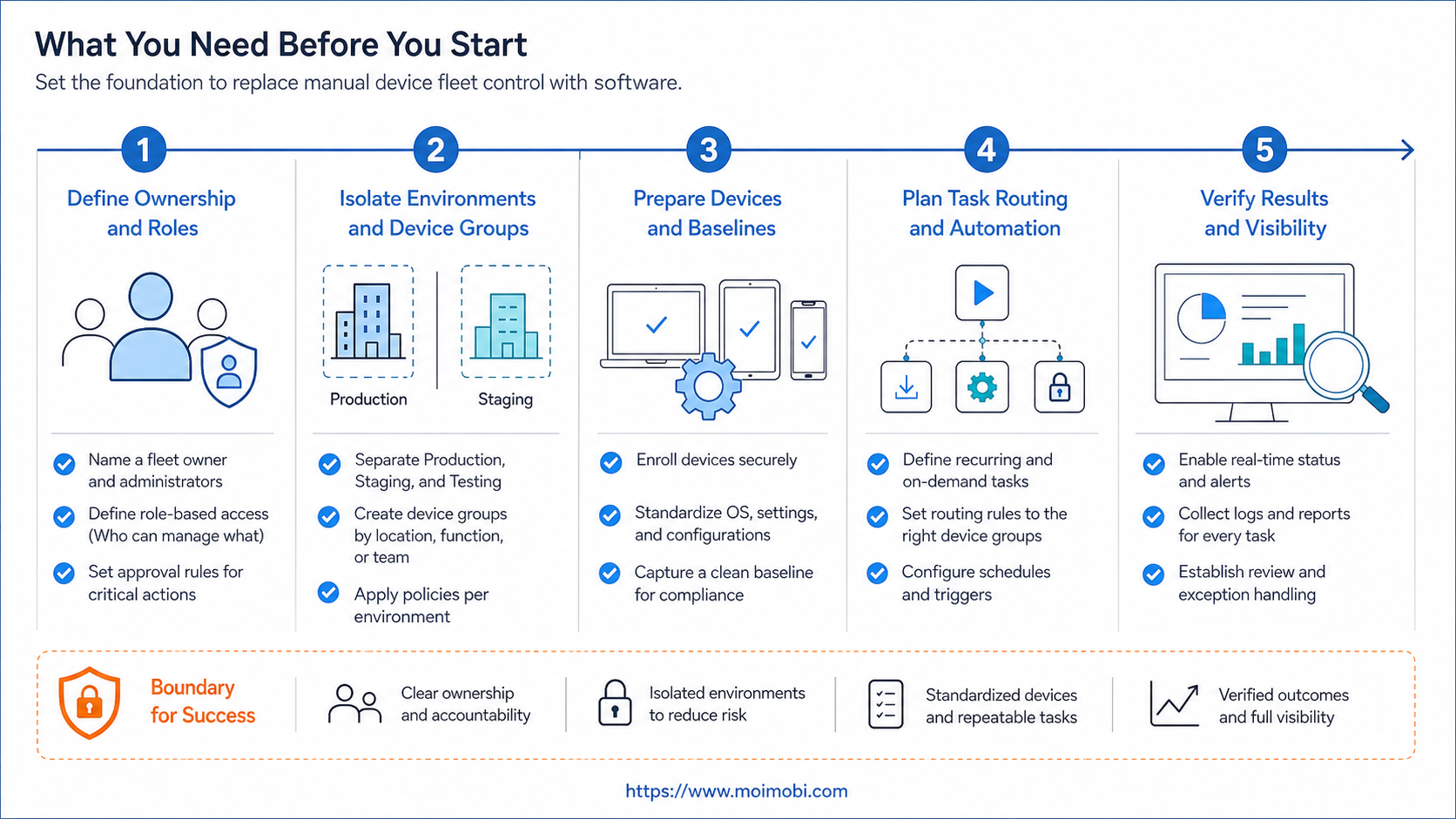
What you need before you start with device fleet software
Begin with a clean inventory. For every active account, record the platform, market, device environment, owner, backup owner, and last review date. Add the tasks that recur every week, such as content checks, customer replies, or app-based reporting. This turns an unstructured device list into an operating inventory.
Also decide which actions require review. An operator may prepare a post or classify a message, while a manager approves an external response or a change to account settings. This reflects the least-privilege principle: permissions should be limited to what a person or process needs for an assigned task, as defined by NIST.
| Manual control problem | Software control to add | Pass condition |
|---|---|---|
| Shared device names | Named device and account ownership | Every environment has one accountable owner |
| Tasks sent in chat | Queued tasks with a status and due time | Work is visible without asking the operator |
| Broad team access | Role-based permissions and approval steps | Only assigned roles can execute sensitive actions |
| Unexplained failures | Event log and recovery state | Failed work has a reason and next action |
For mobile-first work, a cloud phone can be the execution environment. For a broader comparison of fleet capacity and management, use cloud phone farm infrastructure as the next evaluation step.
How to get started with device fleet software
Do not migrate every device at once. The fastest route to a usable system is a contained pilot with one account group and one repeatable task. Choose work that is observable and easy to pause, rather than a sensitive customer or payment workflow.
- Define the pilot. Pick one platform, a small account group, and one outcome such as “all assigned messages are reviewed by 3 PM.”
- Create device workspaces. Link each account to one device environment, its routing details, an owner, and a backup owner.
- Build a task template. Include the input, allowed action, approval requirement, completion evidence, and stop condition.
- Route work through a queue. Use statuses such as Ready, In Review, Running, Paused, and Completed instead of informal updates.
- Run a weekly review. Compare completed tasks, blocked tasks, handoff time, and recurring failure reasons before adding accounts.
Cloud testing services provide a useful operating reference: AWS Device Farm documents remote access and test execution as managed sessions rather than unmanaged device sharing. See the AWS Device Farm documentation for the service model. Your production workflow should apply the same discipline to ownership and session records.
Best practices during setup
Separate mobile execution from browser work. A mobile app task belongs in a persistent Android environment; a web dashboard task may belong in an isolated browser profile. This prevents teams from using one tool as a poor substitute for the other. Where both are needed, connect the task record, not the sessions themselves.
Use consistent state labels. “Done” is too vague. A task should say whether it was completed, completed with review, paused for login, waiting for approval, or failed with a recoverable reason. Clear states make shift handoffs and incident review far easier.
Keep environment data minimal but sufficient. Android Enterprise describes managed devices and work profiles as ways to separate work management from broader device use; its management overview is useful background when defining device ownership. In an operations team, the equivalent is a clear boundary between the account workspace, the task, and the person who can change either.
When the workload includes different platforms, use mobile automation workflows for repeatable mobile steps and multi-account management for account-level ownership and coordination.
Build a migration record, not just a device list
Before moving a live account, capture the minimum recovery record. Include the assigned environment, operator, approved work type, current task state, support owner, and a dated checkpoint. Do not copy session secrets, customer conversations, or unneeded personal data into the inventory. The goal is to make ownership visible without creating another uncontrolled data store.
Then move one account at a time. Confirm that the operator can open the designated environment, see the right task template, complete the approved action, and leave an evidence note. Only after that sequence works should the next account group move. This order is slower than bulk migration on day one, but it exposes unclear roles before they become a fleet-wide problem.
Keep the task record independent from the device session
A device session may disconnect, expire, or require a human check. The task record should survive those events. Use a stable task ID, a plain status, a short failure reason, and an owner for the next action. When the environment returns, the team resumes from the record instead of trying to reconstruct intent from a remote desktop view.
This distinction also improves handoffs. A shift lead can review tasks that are waiting for approval without gaining access to every device. An operator can work within an assigned environment without editing the account inventory. The system stays understandable as roles and capacity change.
Common mistakes to avoid with device fleet software
- Migrating without an inventory. New software cannot repair unknown account ownership.
- Giving every operator the same permission. This makes approvals and incident response hard to reconstruct.
- Treating “online” as success. A live device does not prove the assigned task was completed correctly.
- Leaving recovery outside the workflow. Login issues, expired sessions, and missing approvals need explicit paused states.
- Scaling after one good day. Review a full operating cycle before adding more account groups.
Avoid measuring the pilot only by task volume. A better signal is whether the team can answer four questions quickly: who owns the account, where the task ran, what happened, and what must happen next.
Skipping routing and environment checks
Teams sometimes treat the device as the only operational boundary. In practice, the device, account, routing configuration, and task role form one workspace. A change in any one of those elements can require a review. Keep configuration changes in the same activity trail as task events, so a support owner can distinguish an application failure from an environment change.
For teams evaluating a dedicated device layer, the relevant question is whether the environment can remain identifiable and recoverable over repeated work. A phone farm can provide capacity, but capacity alone does not create accountable operations. Ownership and task controls need to be designed around it.
Verify the replacement before you scale
Use a short verification checklist at the end of the pilot:
- Can a manager find the current device, account, owner, and task status without asking in chat?
- Can an operator pause a task without losing its history?
- Does each completed task have evidence or a concise result note?
- Can the team identify the most frequent blocker and assign a recovery owner?
- Can a new team member follow the task template without relying on private knowledge?
If any answer is no, refine the template or permission model before adding devices. This is also the right time to assess a cloud phone platform for the specific execution capacity the pilot requires.
Review the pilot with operational metrics
Use a weekly review that measures workflow quality rather than raw activity. Count tasks that needed a handoff, tasks paused for missing information, tasks reopened after review, and tasks that had no clear owner. Those counts show whether the operating model is becoming clearer.
Also sample the evidence trail. Pick several completed tasks and ask whether a different team member can identify the account workspace, operator, result, and follow-up action in under a few minutes. If not, the workflow needs better states or better task templates. Do this before expanding to a new platform or market.
Set a recovery rule before the first incident
Every pilot should define who can stop a task, who can resume it, and when escalation is required. A simple rule works well: pause when the account environment changes unexpectedly, when the task input is incomplete, or when an external action needs approval. Do not let an operator improvise a workaround that leaves no record.
Recovery should return work to a known state. The next owner reviews the failure reason, confirms the required environment, and either resumes from the task record or closes it with a documented outcome. This creates a repeatable response path without promising that every issue can be solved automatically.
FAQ
Is device fleet software only for large teams?
No. A small team benefits once account ownership and repeated mobile tasks are difficult to track manually.
What is the first process to move from manual control?
Choose a repeatable, low-risk task with a clear result, such as an account check or a content review step.
Do I need a phone farm for every workflow?
No. A phone farm is relevant when mobile capacity and parallel execution are the constraint. Browser-only work may need a different environment.
How do I prevent duplicate work?
Assign one owner, one task state, and one next action for each account-task pair.
What should trigger a pause?
Pause on missing approvals, unexpected login requirements, unclear inputs, or any result that needs human judgment.
How should teams handle access?
Use role-based permissions and give each role only the access needed for its assigned task.
What should I measure in the first month?
Track handoff time, task completion quality, recurring blockers, recovery time, and whether account ownership stays clear.
Can device fleet software support both browser and mobile work?
Yes, but the task record should coordinate the two environments. Keep browser sessions and Android sessions separate, then connect them through the assigned task and its evidence.
When is a manual process still acceptable?
Manual work is reasonable when the task is rare, a single accountable person handles it, and no repeated handoff is required. Move it into the fleet workflow once that pattern changes.
How do I choose a pilot size?
Choose the smallest account group that still includes real handoffs and one realistic failure path. A pilot without a handoff or recovery event does not test the operating model.
Should every device have a backup owner?
For active business workflows, yes. A backup owner does not need full access by default, but the recovery responsibility should be named before an absence or incident occurs.
What evidence should a completed task include?
Use a concise result note, timestamp, account workspace reference, and any approval or exception that affected the outcome. Avoid retaining unnecessary sensitive content.
What is the practical next step after the pilot?
Standardize the task template that passed review, train the next account group on the same states, and expand only one operating variable at a time.
Conclusion
Replacing manual device fleet control is a workflow change, not a device purchase. Start with a named account inventory, scoped permissions, visible task states, and a pilot that produces evidence. Scale only after the team can reliably see ownership, progress, and recovery paths.
For the next evaluation, map the pilot task to its required mobile environment, review capacity needs, and decide whether a dedicated device fleet is justified.



