Content Type: guide
Replace cloud phone device means moving an account or workflow from one remote Android environment to another while preserving ownership, app state, routing rules, task records, and recovery visibility. The task is not just opening a new phone and logging in again.
Teams should replace devices with a migration checklist when an old environment is unstable, a device group is being reorganized, an account needs a cleaner workspace, or an operation is moving from testing into production. The safest practical rule is to migrate one account group at a time and keep a rollback path until the new environment is verified.
For Moimobi users, a cloud phone is part of the execution layer. The migration succeeds only when the team can still answer four questions: which account moved, which device owns it now, what task ran last, and what must happen if the next task fails.
Key Takeaways
- Replace a cloud phone device with a migration plan, not a casual login change.
- Record account, app, routing, owner, task, and recovery fields before moving.
- Keep the old environment available until the new environment passes checks.
- Device isolation matters only when account ownership and logs remain clear.
- Run a small pilot before replacing devices for a whole account pool.
The Core Idea Behind Replace Cloud Phone Device: Migration Checklist for Ongoing Operations
The common misunderstanding is that a device replacement is only a technical action. In ongoing operations, it is also an account governance change. The team is changing where the account runs, who owns the device, which app state applies, and how future tasks will be checked.
Android Enterprise documentation frames Android devices as managed business environments. That is useful context for operations teams because device work should include ownership, management, and policy thinking. A remote Android screen alone is not enough for a reliable migration.
Use this migration object before any move:
| Field | Before Migration | After Migration |
|---|---|---|
| Account owner | Current operator and backup owner | Confirmed owner for the new device |
| App state | Installed app, login state, version, permissions | Same app capability verified on the new environment |
| Routing | Region, proxy, network rule, account group | New routing recorded and checked |
| Task history | Last successful task and known failures | First successful task and recovery note |
This table gives the migration a working record. Without it, a replaced device can look successful while the team loses the old context.
Why Teams Search for This Topic
Teams usually search this topic after a device starts creating operational noise. The phone may be slow, disconnected, misrouted, assigned to the wrong operator, or tied to an account group that has changed. Sometimes the account itself is fine, but the environment no longer matches the workflow.
Another reason is scaling. A small test may use a few shared environments. A larger operation needs account-level ownership, clean device groups, and reusable task queues. Replacing devices becomes part of normal fleet hygiene.
Device isolation on cloud phones also drives the search. Isolation is not only about technical separation. It also means the team knows which account belongs to which device, which route belongs to which account, and which operator is responsible for changes.
Teams should avoid language or workflows that imply device spoofing for rule evasion. The safer framing is operational separation: clear environments, clean records, and controlled recovery. Public platform behavior still needs to respect each platform's rules.
Who Benefits Most and In What Situations
This checklist fits teams that run ongoing mobile workflows across multiple accounts. Examples include social media operations, creator publishing, customer replies, marketplace app checks, and mobile account review.
It is especially useful when an account has value and history. A casual test account can be recreated if needed. A production account needs a migration record because a wrong environment, missed notification, or lost login state can create real operating work.
It also fits teams moving from a physical phone farm or emulator stack toward remote Android environments. The migration should include a fleet replacement planning review when the device pool, account pool, and task pool are changing together.
Good Fit
- Multi-account social teams
- Account groups with assigned owners
- Repeated app-side workflows
- Teams with task logs and recovery rules
Needs Caution
- Shared accounts without owners
- Unknown route or proxy history
- Unclear app permission state
- No rollback device available
The wrong time to migrate is during an active campaign without a rollback plan. Move the device before or after heavy execution windows, not in the middle of them.
How to Evaluate or Start Using Replace Cloud Phone Device: Migration Checklist for Ongoing Operations
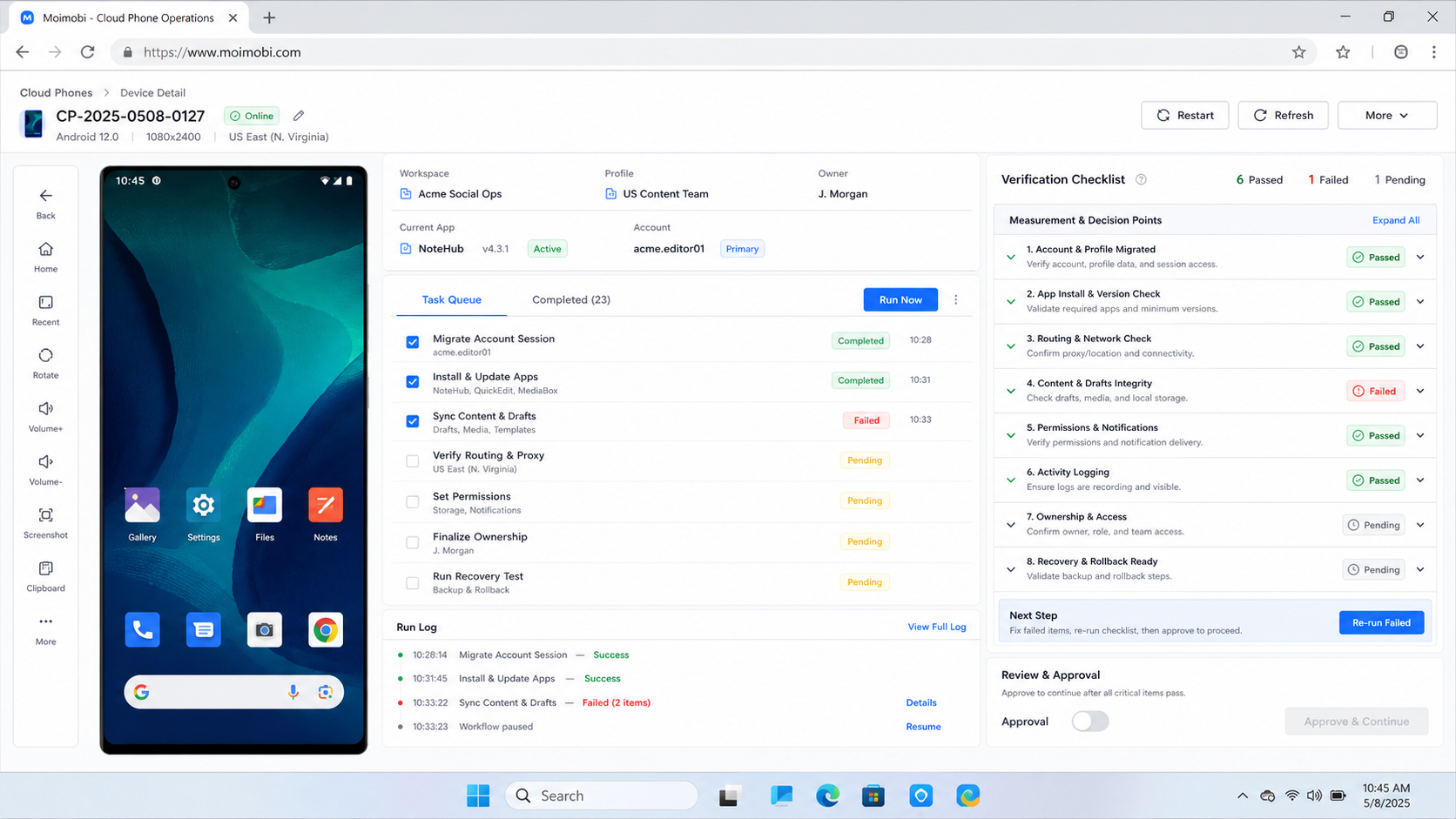
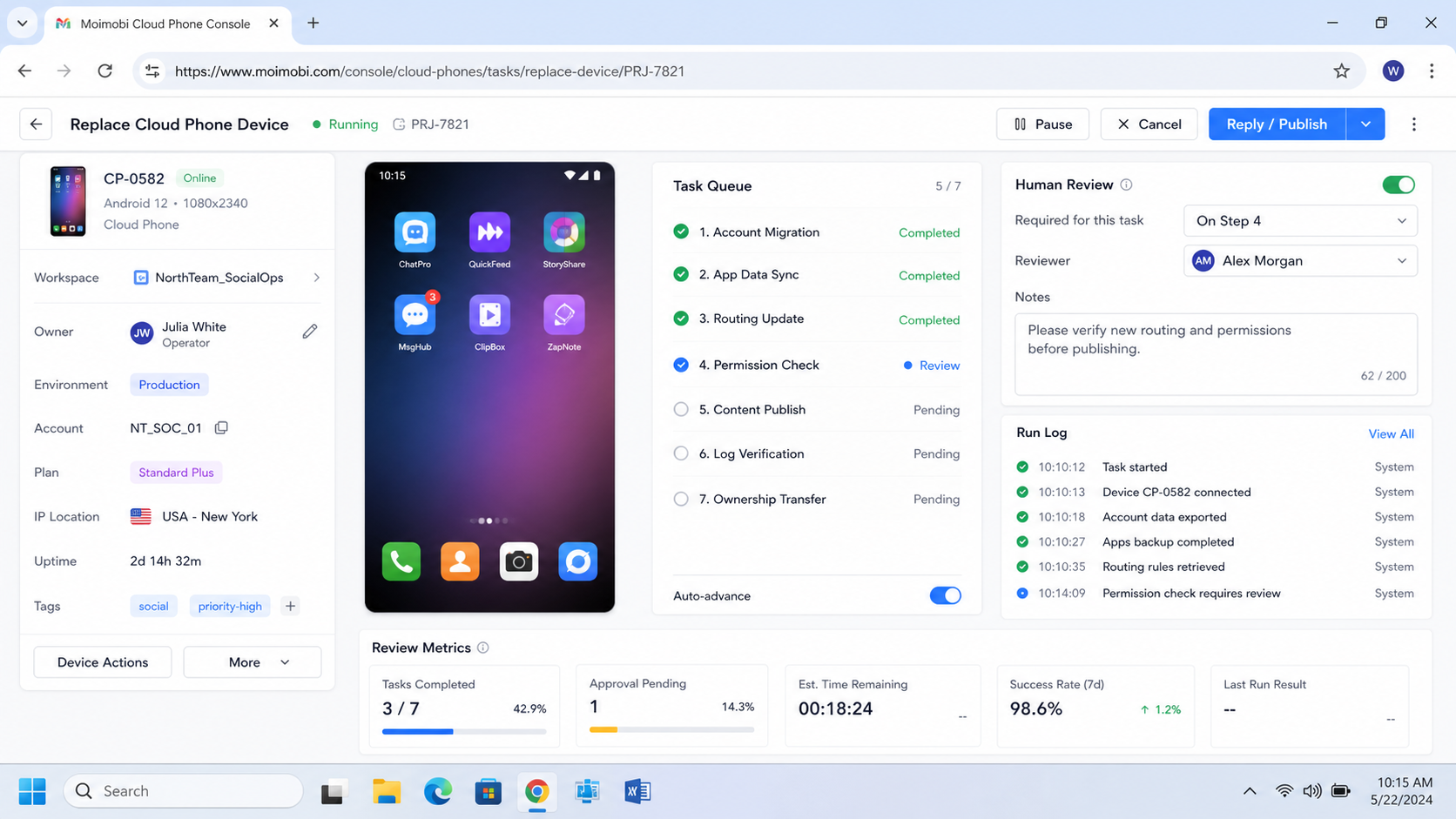
Use a step sequence, not a memory-based handoff. The process should be visible enough that another operator can inspect it later.
- Freeze new tasks. Stop scheduled tasks for the account before moving it.
- Export the account record. Save owner, platform, app, route, last task, and open issues.
- Check the old device. Record app version, login state, permissions, files, and notifications.
- Prepare the new device. Install required apps and confirm route, region, and group assignment.
- Move the account carefully. Log in only after the new environment record is complete.
- Run a low-risk task. Use a status check or inbox check before public posting.
- Verify task logs. Confirm completed, failed, skipped, and manual actions are visible.
- Keep rollback open. Do not retire the old device until the new one passes the verification window.
If workflows use ADB or API-based controls, document those dependencies. The Android Debug Bridge documentation is useful because ADB is a real control surface for Android development and device operations. For cloud-phone operations, teams should treat cloud phone ADB access as an operational dependency, not as an afterthought.
Mistakes That Reduce Results
The first mistake is replacing the device before freezing tasks. A scheduled task can run during the move and leave the team unsure which environment performed the action.
The second mistake is copying only login credentials. Account state includes app permissions, notification state, route, files, app version, and owner records. A login alone does not prove the environment is ready.
The third mistake is deleting the old device too soon. Keep it available until the new device completes at least one low-risk task and one normal operating task. The old environment may still hold context needed for repair.
The fourth mistake is treating "secure cloud phone" as a magic label. Security and reliability come from access control, device isolation, account ownership, logs, and repeatable recovery. A label without process is not enough.
The fifth mistake is hiding exceptions in chat. Failed migrations should become records. The record should state what failed, who fixed it, and whether the old or new device needs more checks.
Pilot Rollout, Measurement, and Recovery Checks
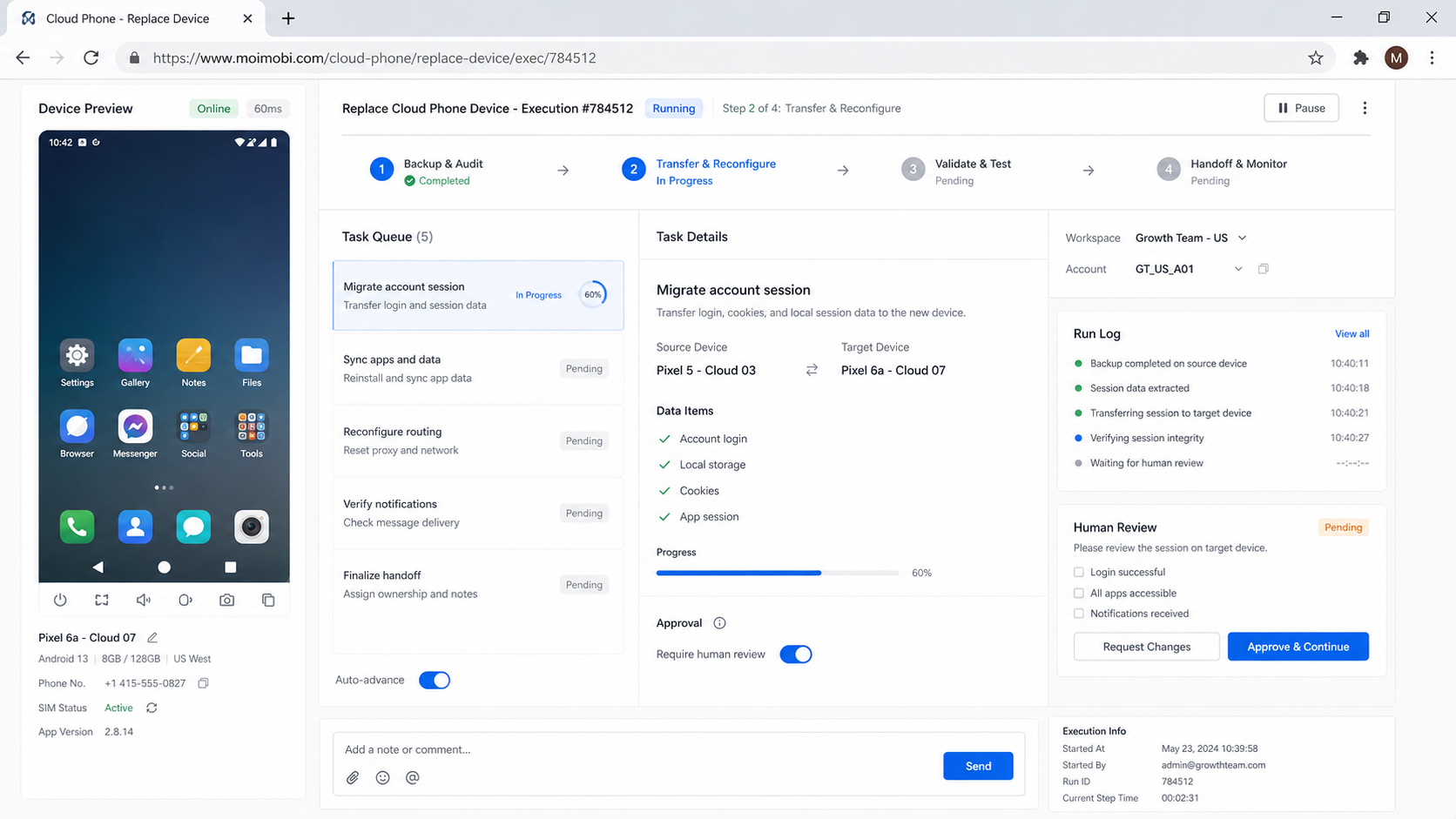
A migration pilot should use a small account group. Pick accounts that matter enough to test properly but are not the highest-risk production accounts.
Measure these fields:
- Migration time: how long the account is paused.
- Login quality: whether the new environment keeps the expected app state.
- Route match: whether the device uses the intended region and network rule.
- Task success: whether the first low-risk task completes.
- Recovery clarity: whether a second operator can diagnose a failure.
- Rollback readiness: whether the old device remains available long enough.
Firebase Test Lab documentation is a reminder that device environments can vary. It is used for app testing, not social operations, but the lesson applies: device state and environment details matter when behavior changes.
Run one recovery drill. Create or simulate a failed task and ask the owner to find the account record, device record, error, and next action. If the owner needs chat history or memory, the migration record is too weak.
After the pilot, decide whether the checklist needs more fields. Add only fields that help future operators. Too many unused fields slow the process, while too few fields make recovery difficult.
Add one final sign-off field. The owner should confirm that the account, new device, route, app state, task queue, and rollback deadline are all visible. This turns the replacement from a technical action into an auditable operating change for future review.
Migration Runbook Fields to Preserve
The migration runbook should be short enough to use during a busy week. It should still contain enough detail for another operator to audit the move later. Treat the runbook as the source of truth for the replacement.
Record these fields before the move:
- Account name, platform, owner, and backup owner.
- Old device ID, new device ID, and account group.
- App name, app version, login state, and permission state.
- Route, proxy rule, region, and network note.
- Last successful task and next scheduled task.
- Known failures, blocked steps, and manual fixes.
- Rollback device, rollback owner, and rollback deadline.
After the move, add the first successful task, first failed task if any, live verification note, and final owner sign-off. This gives the team a clean before-and-after record.
Do not store sensitive secrets in the runbook. Store references to the correct credential system instead. The operational record should explain what moved and who owns it, not expose passwords or private recovery data.
Rollback Boundaries and Stop Rules
A replacement plan needs stop rules. Without them, a team may keep retrying the new device while the account sits in an unclear state.
Pause the migration when login fails repeatedly, routing does not match the account group, app permissions differ from the old device, task logs do not update, or the owner cannot verify the last action. These are not small details. They are signs that the new environment is not ready.
Rollback should be time-boxed. Keep the old device available for a defined window, then either complete the migration or document why the account needs more review. Leaving two active environments open for the same account creates confusion.
Frequently Asked Questions
When should I replace cloud phone device environments?
Replace them when the current environment no longer fits account ownership, routing, app state, or task reliability.
Is device isolation enough by itself?
No. Device isolation helps only when the team also maintains account records, owners, route rules, and task logs.
Should the old device be deleted immediately?
No. Keep it available until the new environment passes verification and the account can run normal tasks.
What should be checked before migration?
Check owner, account, app version, login state, permissions, routing, last task, known failures, and rollback plan.
Can this apply to TikTok account operations?
Yes. For TikTok workflows, connect device replacement to the existing cloud phone for TikTok account environment plan.
What is the safest first task after migration?
Use a low-risk status or inbox check. Avoid public posting until the new environment is verified.
What if the new device fails?
Pause the account, record the failed step, use the rollback device if needed, and fix the environment before retrying.
How often should teams review device assignments?
Review them after campaigns, staffing changes, routing changes, repeated failures, or account group reorganizations.
Conclusion
Replacing a cloud phone device is an operations migration. The team is not only changing hardware or a remote screen. It is moving account context, task ownership, app state, route history, and recovery responsibility.
Before replacing production devices, prepare the migration object, freeze tasks, verify the new environment, run a low-risk task, and keep rollback available. If the team can still trace account, device, owner, last task, and recovery note, the migration is ready to scale.
References