

A Redfinger alternative for device fleet teams is a remote Android platform evaluated for shared operations, not merely a substitute virtual phone. The right choice depends on whether the team needs a few persistent devices, a governed fleet, app testing, or repeatable mobile workflows.
Redfinger can suit individual remote Android sessions and multi-device access. A fleet team should look further: device ownership, roles, batch actions, network assignment, task evidence, recovery, and automation boundaries determine whether daily operations remain manageable.
Start with the workload, then compare platforms. A gaming-oriented remote device, a real-device testing service, an enterprise mobility system, and a cloud phone execution platform solve different problems. Choosing by device count alone usually hides the operational cost.
Key Takeaways
- Define the fleet job before comparing device specifications or subscription tiers.
- Separate persistent app operations, software testing, and enterprise device policy management.
- Evaluate ownership, access, network routing, task evidence, recovery, and automation as one system.
- Pilot the busiest workflow on a small device group before migrating the full fleet.
How to Evaluate a Redfinger Alternative for Device Fleet Teams
The common mistake is to compare only Android version, RAM, storage, and hourly availability. Those fields matter, but they do not show how a team assigns devices, controls access, or proves that work finished.
Redfinger's official site describes cloud-hosted Android access, cross-device clients, multiple accounts under one service, 24/7 availability, and several subscription configurations. These claims establish what Redfinger presents publicly; they do not prove how a particular team workflow will perform. Review the current Redfinger product description before comparing any alternative because plans, regions, and supported versions can change.
Use six operational questions instead:
- Environment: Does the workload need a persistent Android instance, a physical phone, or a managed company device?
- Ownership: Can every device be assigned to a client, account, operator, and task lane?
- Control: Which actions are manual, batch-controlled, scripted, or AI-assisted?
- Network: Can routing and proxy assignments be reviewed per device without sharing credentials broadly?
- Evidence: Are status, task history, errors, and operator actions available for review?
- Recovery: What happens when an app freezes, a session disconnects, or a task result is uncertain?
| Decision area | Minimum evidence to request | Warning sign |
|---|---|---|
| Device lifecycle | Create, assign, renew, pause, replace, and retire states | Devices exist without a named owner or retirement process |
| Team access | Roles, permissions, activity records, and revocation | Everyone shares one administrator login |
| Network assignment | Device-to-route mapping and controlled change history | Routing changes cannot be tied to a task or operator |
| Automation | Defined inputs, stop rules, retries, and result states | A batch action is treated as proof of business completion |
| Recovery | Health checks, restart policy, failure record, and escalation | Failed work silently restarts with unknown side effects |
This framework also prevents a category error. Teams that primarily test mobile apps may need a device lab. Teams that operate persistent accounts may need fleet operations infrastructure. The device surface can look similar while the operating model is very different.
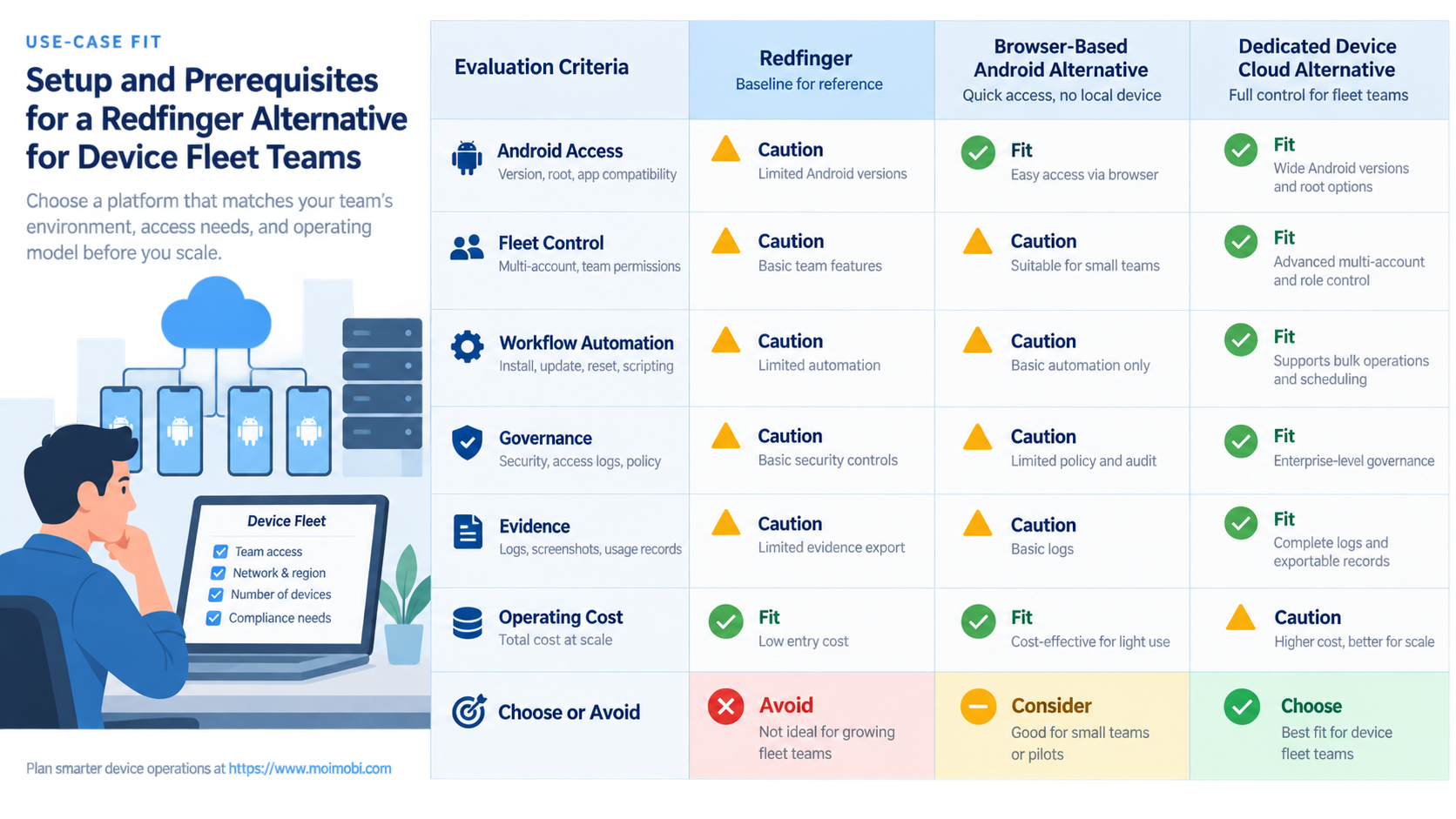
Use-Case Fit for a Redfinger Alternative for Device Fleet Teams
Use-case fit should come before feature fit. Write down the task, duration, required Android surface, operator count, and completion evidence for the workload. That short record often removes half the options before a feature comparison begins.
AWS Device Farm illustrates the testing category clearly. Its official documentation defines remote access as a real-time session with a selected physical device and exposes testing-oriented capabilities such as app upload, Appium access, screenshots, video, and logs. It also limits simultaneous sessions through device slots. That makes AWS Device Farm remote access relevant to testing and issue reproduction, but not automatically a replacement for persistent account operations.
Enterprise mobility management is another category. Android's device-management documentation distinguishes profile-owner and device-owner modes and explains controls available on managed devices. A fleet that must enforce corporate policies should evaluate those management requirements through the Android Enterprise device-control model, rather than assuming a remote Android subscription provides the same authority.
Redfinger may fit when
- The workload centers on individual persistent Android sessions.
- Operators need access from several client devices.
- The team can manage ownership and task records outside the device service.
- A small number of instances does not require complex fleet governance.
Evaluate a fleet-oriented alternative when
- Devices must map to clients, accounts, roles, and repeatable tasks.
- Operations require controlled batch work and centralized recovery.
- Network routes, approvals, and task outcomes need audit records.
- The team needs a reusable [governed app execution system](https://www.moimobi.com/en/products/mobile-automation), not only remote access.
Compare Operational Trade-Offs, Not Marketing Labels
The word "fleet" changes the decision. Ten separately purchased devices may still behave like ten isolated subscriptions. A fleet system should reduce coordination work as the number of devices, operators, and workflows increases.
First, inspect identity and ownership. Each device should have a clear business owner, permitted operator group, intended application set, and lifecycle state. Without those fields, a team cannot distinguish unused capacity from a missing task or an abandoned client environment.
Next, inspect control boundaries. Bulk installation, synchronized input, scheduled restarts, or scripted actions may save time, but they also expand the impact of a mistake. A useful system lets operators target a defined device group, preview scope, stop execution, and inspect partial results.
Finally, inspect result semantics. "Command sent" is not the same as "task completed." If a workflow opens an app or submits an action, the platform should distinguish applied, failed, needs review, and result unknown states. Teams should avoid automatic retries when an external action may already have happened.
For multi-account operations, connect these controls to separated device workspaces. Isolation is most useful when the assignment, route, operator, and task history remain attached to the same environment.
Setup Cost, Ongoing Cost, and Management Overhead
Subscription price is only one part of fleet cost. The more useful comparison is total operating effort per completed workflow.
| Cost layer | What to measure | How to test it |
|---|---|---|
| Capacity | Device hours, concurrent devices, storage, and regional availability | Run the expected peak schedule for one week |
| Setup | Provisioning, app installation, login, routing, and naming | Time a clean device from request to ready state |
| Operations | Task assignment, switching, monitoring, and review | Measure operator minutes per completed task |
| Failure handling | Restarts, reconnects, rework, and uncertain outcomes | Inject a disconnect and document the recovery path |
| Governance | Permission changes, offboarding, records, and client separation | Remove one operator and verify access is revoked |
A low device rate can become expensive if staff repeatedly rebuild environments or reconcile incomplete work. A higher-capability platform can also be wasteful if the team only needs occasional manual access. Compare costs against the actual task volume and review burden.
Do not estimate savings from a product demo alone. Capture a baseline first: average setup time, tasks per device, operator touch time, failure rate, and recovery time. The pilot should improve a defined measure without hiding new approval or maintenance work.
Which Option Fits Different Teams Best?
Different teams need different alternatives. Use the following selection rules as a shortlist, not as a universal ranking.
- Individual operators and small remote-access workloads: Redfinger may remain adequate when a few persistent Android sessions are the main need and governance stays simple.
- Mobile app QA teams: Compare real-device labs when model coverage, Appium, screenshots, video, logs, and reproducible test sessions matter more than persistent account state.
- Enterprise-owned device programs: Evaluate Android Enterprise and EMM capabilities when device-owner policies, managed configurations, compliance, and corporate provisioning are central.
- Social media or customer-operations teams: Look for device assignment, routing control, reusable workflows, approval states, and outcome records. A managed Android workspace should be judged as part of the operating system, not as an isolated screen.
- Agencies with multiple clients: Prioritize tenant boundaries, role-based access, named task lanes, and client-specific evidence. A generic shared device list creates handoff risk.
- Teams comparing regional providers: Review the current UGPhone alternative criteria alongside Redfinger, then validate availability and latency from the team's real operating locations.
Avoid a shortlist built only from advertised Android versions or maximum instance counts. Those numbers do not establish whether operators can maintain clear ownership, consistent routing, or recoverable task state.
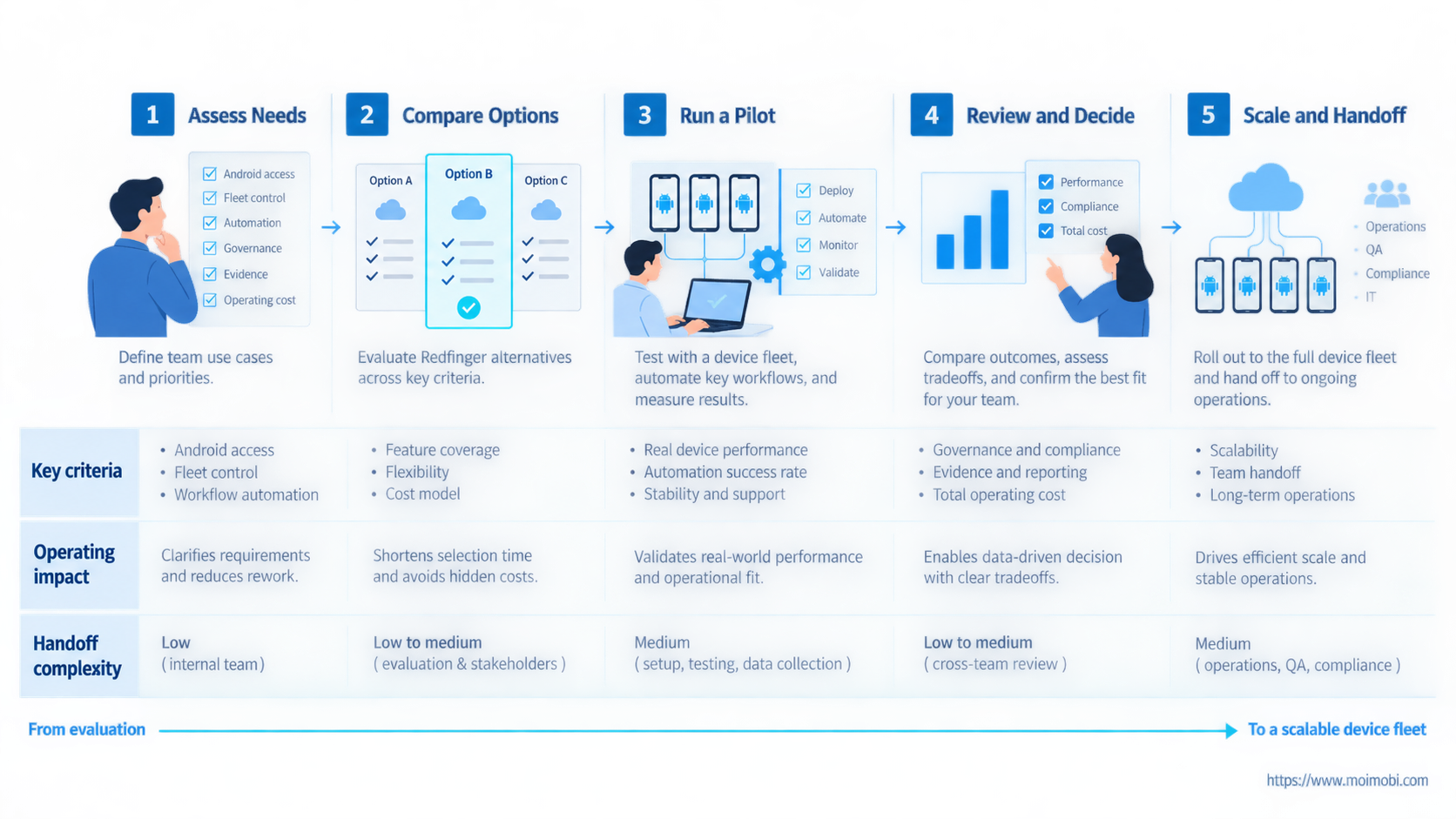
Pilot a Redfinger Alternative for Device Fleet Teams
Run a controlled pilot with five to ten representative devices or the smallest practical group. Include one normal workflow, one high-load period, one access change, and one failure scenario.
- Freeze the workflow. Record the app, device type, route, task steps, owner, approval point, and expected evidence.
- Create a baseline. Measure setup time, operator touch time, task completion, and recovery effort on the current platform.
- Provision the pilot group. Use consistent names and map each device to one business purpose.
- Test permissions. Confirm that operators can access only their assigned devices and that removal takes effect.
- Exercise failure paths. Disconnect a session, stop a task, restart a device, and verify that the outcome is recorded accurately.
- Review total effort. Compare completed work, manual interventions, uncertain results, and support time.
- Expand gradually. Move another group only after the first group meets the agreed pass criteria.
Keep the original platform available during the pilot. Do not migrate every account or device before rollback, credential ownership, and data-transfer boundaries are understood. Any workflow with an unconfirmed external action should stop for review rather than replay automatically.
Frequently Asked Questions
Is Redfinger designed for device fleet teams?
Redfinger publicly supports multiple cloud phones and multi-device access. Whether it fits a fleet team depends on the required ownership, permissions, network controls, workflow records, and recovery process.
What is the main difference between a cloud phone and a device lab?
A persistent remote Android environment supports ongoing app operations. A device lab is usually optimized for testing across devices, versions, and controlled sessions with test evidence.
Should a team choose the provider with the most Android versions?
No. Version availability matters only after the team confirms application compatibility, region, performance, lifecycle, access control, and workflow requirements.
How many devices should be included in a pilot?
Use the smallest group that still represents normal load, peak load, operator handoffs, and one failure scenario. Five to ten devices is a practical starting range, not a universal rule.
Can a Redfinger alternative remove account risk?
No platform removes account risk. Teams should follow platform rules, control access, separate legitimate work contexts, and monitor operational changes without making bypass claims.
What cost metric is more useful than device price?
Measure total operating effort per completed workflow. Include setup, monitoring, manual intervention, failed work, recovery, support, and unused capacity.
When is an enterprise device-management platform a better fit?
It is a better category when company-owned devices require enforced policies, managed applications, provisioning, compliance controls, and administrator authority over the device.
What should a team export before switching providers?
Export device ownership, application inventory, task records, route assignments, operator permissions, renewal dates, and any evidence required to verify completed work. Do not assume credentials or app data can be transferred automatically.
Conclusion
The best Redfinger alternative for device fleet teams is the option that matches the operating model. Remote access may be enough for a small persistent workload. Testing teams, managed-device programs, agencies, and multi-account operators need different control and evidence layers.
Build a decision matrix from the real workflow, then run a limited pilot. Measure ownership clarity, setup time, operator effort, completed tasks, uncertain outcomes, and recovery. Expand only when the alternative improves those measures without creating a new governance gap.


