

Content Type: comparison
Page Role: comparison
Intent Type: commercial_comparison
Mobile farm automation is the use of managed mobile environments, task controls, and operating workflows to run repeatable app-based work. Social media teams do not always need a room of physical phones. The better alternative depends on whether the work needs hardware ownership, remote Android capacity, browser execution, or a combination.
Choose a physical phone farm when the team must own specific hardware, peripherals, or local network conditions. Choose managed mobile environments when remote access, elastic capacity, and centralized operations matter more. Choose an execution platform when device access must connect to account assignment, queues, approvals, logs, and human takeover.
The decision should start with task shape and operating responsibility. A device is only one layer. Content review, account ownership, session control, task evidence, incident recovery, and team permissions determine whether the system can support daily operations.
Key Takeaways
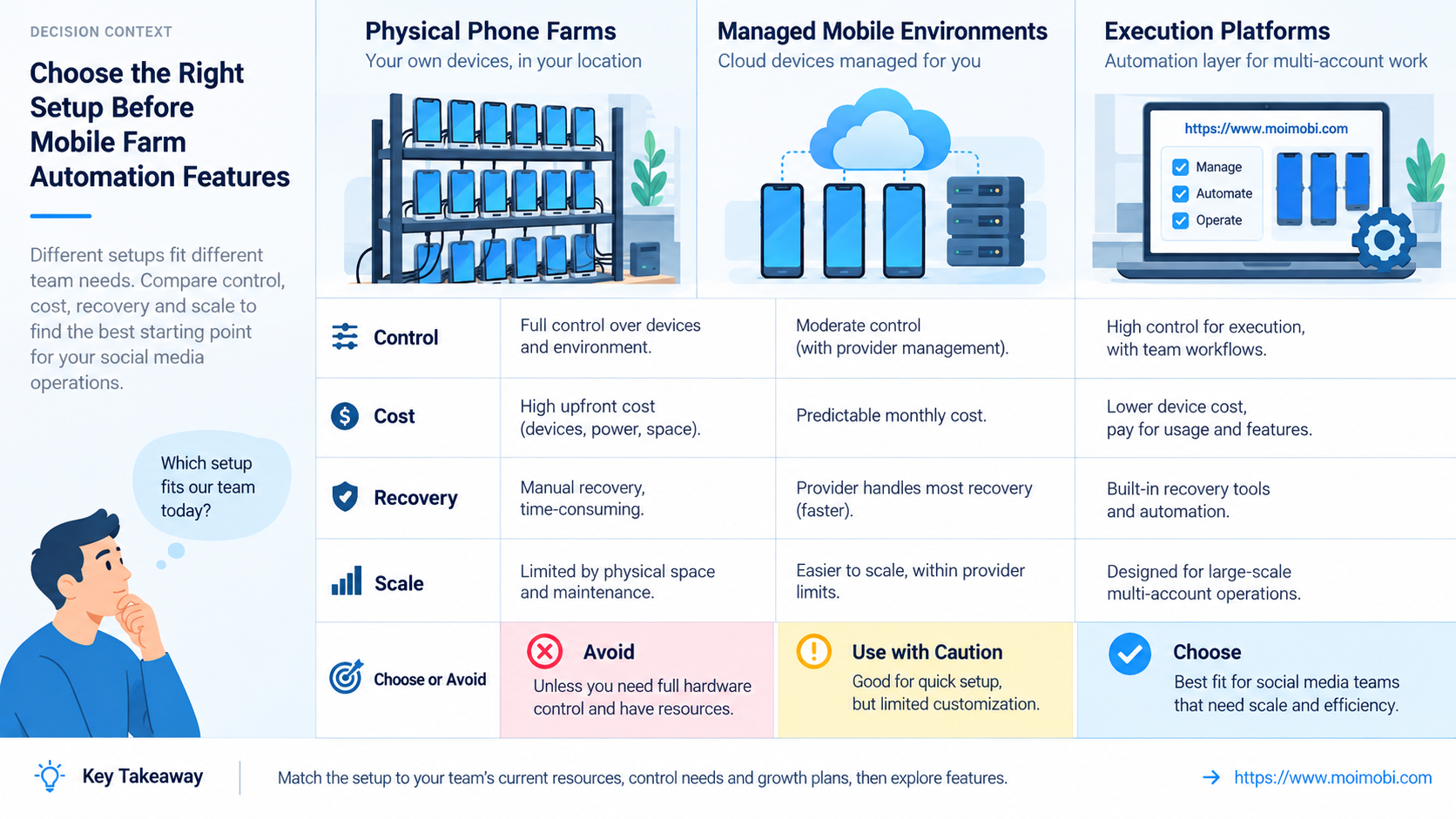
- Physical device farms offer direct hardware control but create local maintenance and capacity work.
- Managed mobile environments reduce local infrastructure, yet the team still owns account policy, task validation, and incident response.
- Browser-only tools fit web workflows; they do not replace native-app execution when the task depends on Android apps.
- Compare completed, verified tasks rather than device count or remote screens.
- Pilot one social workflow and test takeover, duplicate prevention, and recovery before expanding.
A Practical Comparison Framework for Mobile Farm Automation
The first comparison is not vendor versus vendor. It is execution model versus workflow requirement. Social media work may include content preparation, web research, native-app publishing, inbox review, comment moderation, approval, and reporting. Those steps do not all belong on the same device or in the same automation layer.
Use five decision axes:
- Execution surface: Does the task require a native mobile app, mobile browser, desktop browser, or API?
- Environment ownership: Must the team own hardware, or can it use hosted environments?
- Workflow control: Who assigns accounts, approves actions, and verifies results?
- Recovery: Can a person take over the same session without repeating work?
- Evidence: Does the run preserve inputs, actions, outputs, and failure reasons?
AWS describes Device Farm as a hosted physical-device service for app testing and remote interaction. It demonstrates an important distinction: remote device access can include real devices, sessions, logs, and recordings, but its documented purpose is testing. A social media operations platform needs additional account and workflow controls.
| Option | Strongest fit | Team responsibility | Main limitation |
|---|---|---|---|
| Physical phone farm | Specific hardware and local network requirements | Procurement, power, cabling, repair, updates, remote access | Capacity and maintenance stay local |
| Hosted mobile environments | Remote Android work and distributed teams | Assignment, account policy, validation, provider governance | Hardware and platform controls depend on the service |
| Browser profile system | Web login, research, dashboards, browser publishing | Profile ownership, proxy policy, web automation | Cannot perform every native-app workflow |
| Execution platform | Mixed browser and mobile tasks with team controls | Workflow design, permissions, reviews, recovery | Requires process definition before scale |
Compare Physical Farms and Managed Mobile Environments
A physical farm gives the team direct possession of devices. That can matter for hardware-specific testing, peripheral access, SIM handling under applicable rules, or a controlled local lab. The trade-off is operational load: charging, thermal management, connectivity, replacement, OS maintenance, secure storage, and remote access all become internal responsibilities.
Managed environments shift part of that burden to a provider. They can make distributed access and capacity planning simpler. However, hosted does not mean unmanaged. The customer still needs an asset register, account assignments, access roles, approved apps, lifecycle rules, and a response plan for unavailable environments.
Android Enterprise's management overview separates work profiles, fully managed devices, and dedicated-device deployments. It also describes provisioning and policy assignment to managed device identities. This supports a useful buying rule: ask how environments are provisioned, identified, updated, assigned, and retired, not merely how many can be opened.
The phone farm infrastructure reference explains the local capacity side. Use it when comparing racks, networking, remote control, and maintenance with hosted capacity. Keep the business workflow comparison separate from raw hardware economics.
Use Case Fit Before Mobile Farm Automation Features
Social publishing is not one workflow. A team may prepare content on the web, transfer approved assets, open a native app, select the intended account, publish, verify the post, and record the result. The choice of environment should follow the step with the strictest execution requirement.
Native-app publishing: A managed Android environment or physical device may be required. The workflow should bind the account and approved asset to one execution task, then verify the resulting post.
Inbox and comment work: The correct surface depends on platform capabilities and team policy. Some work may stay in approved web tools; app-only actions need a mobile environment and explicit review boundaries.
Research and content preparation: Browser automation is often sufficient. An Android fingerprint and browser-profile comparison helps distinguish web profile isolation from mobile app execution. These are related layers, not interchangeable products.
Multi-account coordination: The deciding need is usually assignment and conflict prevention. A role-based account operations model should show which environment, operator, task, and approval belong together.
Avoid selecting a platform because it can display many screens. Screen count says little about whether tasks are authorized, traceable, recoverable, or completed correctly.
Mobile Farm Automation Trade-Offs and Team Workflow
Centralization changes the work more than virtualization does. A distributed team needs one source of truth for environment state, account assignment, queued work, approvals, and incidents. Otherwise, hosted devices simply move a fragmented process into the cloud.
Microsoft's Intune device-management documentation groups inventory, status, actions, diagnostics, remediation, and reporting. Social operations require different application logic, but the control categories remain useful. A device list without diagnostics and action history cannot support accountable operations.
Define states before building automation. A practical task may move through pending, assigned, ready, running, awaiting approval, verifying, completed, failed, paused, and cancelled. Each transition should name the service or person allowed to trigger it.
Session takeover also needs design. The operator should enter the same environment, see the task instruction and recent actions, resolve the issue, and return control without launching a duplicate run. Starting a fresh device may lose state and increase account confusion.
Use a mobile workflow checkpoint system when app work needs queues, evidence, and human handoff. The automation layer should expose bounded task functions rather than unrestricted remote commands.
Setup Cost, Ongoing Cost, and Management Overhead
Compare total operating effort, not only monthly service fees or phone purchase price. Physical farms concentrate cost in devices, racks, network, power, remote-control tooling, space, replacement, and local staff. Hosted options concentrate cost in environment time, storage, transfer, support, and provider limits.
Execution platforms add workflow implementation and governance. That work is not waste. Clear task definitions, approval rules, evidence, and recovery reduce ambiguity regardless of the underlying device model.
Build a cost worksheet around operational units:
- environment hours per verified task;
- operator minutes for setup, review, and recovery;
- engineering time for workflow changes;
- failed runs that leave partial state;
- device or environment replacement effort;
- evidence storage and incident investigation;
- idle capacity required for peak periods.
Do not publish a single cost-per-device comparison without workload context. A lightly used owned phone, a shared hosted environment, and a dedicated always-on session have different utilization and responsibility models.
Migration cost matters too. Existing scripts, app versions, profiles, account records, and operating procedures may not transfer directly. Test migration with disposable or approved test accounts before moving production work.
Which Option Fits Different Social Media Teams Best?
- Hardware ownership is mandatory.
- Local peripherals or networks are part of the task.
- The team can operate and secure the lab.
- Capacity changes slowly.
- Operators work across locations.
- Remote Android access is central.
- Capacity changes by campaign or region.
- The provider's controls meet the workflow.
- The work stays in web applications.
- Browser sessions need separate ownership.
- Native-app behavior is not required.
- Existing web automation is mature.
- One process crosses browser and mobile apps.
- Accounts need task-level assignment.
- Approvals and audit trails are required.
- Human takeover must preserve state.
A small content team may need only a few assigned environments and a review queue. An agency with client-separated operations needs stronger tenant, permission, and evidence boundaries. A global team may prioritize availability windows and handoff across time zones.
Poor fit is equally important. Do not automate a workflow when account ownership is unclear, the platform rules prohibit the intended behavior, success cannot be verified, or no one owns incident recovery.
Record the Selection Decision
Document why one model was chosen before implementation starts. A short decision record should name the task family, required execution surfaces, environment owner, account owner, expected capacity, approval points, evidence fields, recovery owner, and review date.
List rejected options with their decisive mismatch. For example, a browser-only design may be rejected because a required step exists only in the native app. A physical farm may be rejected because the distributed team cannot support local maintenance. A hosted environment may be rejected when a required hardware or network condition is unavailable.
This record prevents later confusion between product limitations and changed requirements. Revisit it after the pilot with actual completion, intervention, recovery, and maintenance evidence. If the chosen system works only because operators use undocumented side channels, the architecture has not passed the evaluation.
Pilot Rollout, Measurement, and Recovery Checks
Run the pilot around one task family, not one technology demo. Choose a workflow with clear inputs, a reversible setup, an observable result, and a named owner.
- Map every step to browser, mobile, API, or human review.
- Assign one account and environment to each test run.
- Define approval points and actions that automation cannot perform alone.
- Record start state, checkpoints, result, and failure category.
- Interrupt sessions to test takeover and continuation.
- Retry partial failures and verify duplicate prevention.
- Review evidence with an operator who did not run the task.
Measure verified completion, not action volume. Separate environment failure, authentication failure, invalid input, application state, policy rejection, operator rejection, and result-verification failure. Each category has a different fix.
When the workflow requires remote Android execution, an assigned cloud phone may provide the environment. Its presence does not prove workflow quality. The task still needs ownership, bounded permissions, validation, and a recovery path.
Pause expansion if sessions cross account boundaries, task evidence is incomplete, takeover loses state, or retries repeat external actions. Resolve the control failure before adding more devices.
Frequently Asked Questions
What is a mobile farm automation alternative?
It is another way to deliver mobile execution without relying only on a locally maintained phone farm. Options include hosted mobile environments, browser profiles for web work, and platforms combining mobile and browser workflows.
Is a cloud phone the same as a physical phone farm?
No. A physical farm uses devices the team owns and operates. A cloud service provides remotely managed environments under the provider's infrastructure and control model.
Can browser automation replace mobile environments?
Only when the required workflow is available on the web. Native-app interfaces, app-specific state, and mobile-only actions still require an appropriate mobile execution path.
Which option is best for a small social team?
Choose the smallest model that supports the real workflow. A few managed environments with clear assignment and review may be enough; avoid building infrastructure before demand is proven.
How should agencies separate client work?
Use client-specific accounts, environments, permissions, assets, queues, and evidence. Prevent operators from selecting an unrelated client environment during task execution.
Does automation remove the need for operators?
No. Operators still review content, resolve sessions, handle exceptions, approve sensitive actions, and investigate failures. Automation should make those responsibilities clearer.
What should a pilot measure?
Measure verified completion, intervention time, recovery time, duplicate prevention, maintenance effort, and evidence quality. Use the same definitions for every candidate option.
When should a team keep its physical devices?
Keep them when hardware ownership, local connectivity, peripherals, or controlled lab conditions are genuine requirements. Do not migrate only to follow a tooling trend.
Conclusion
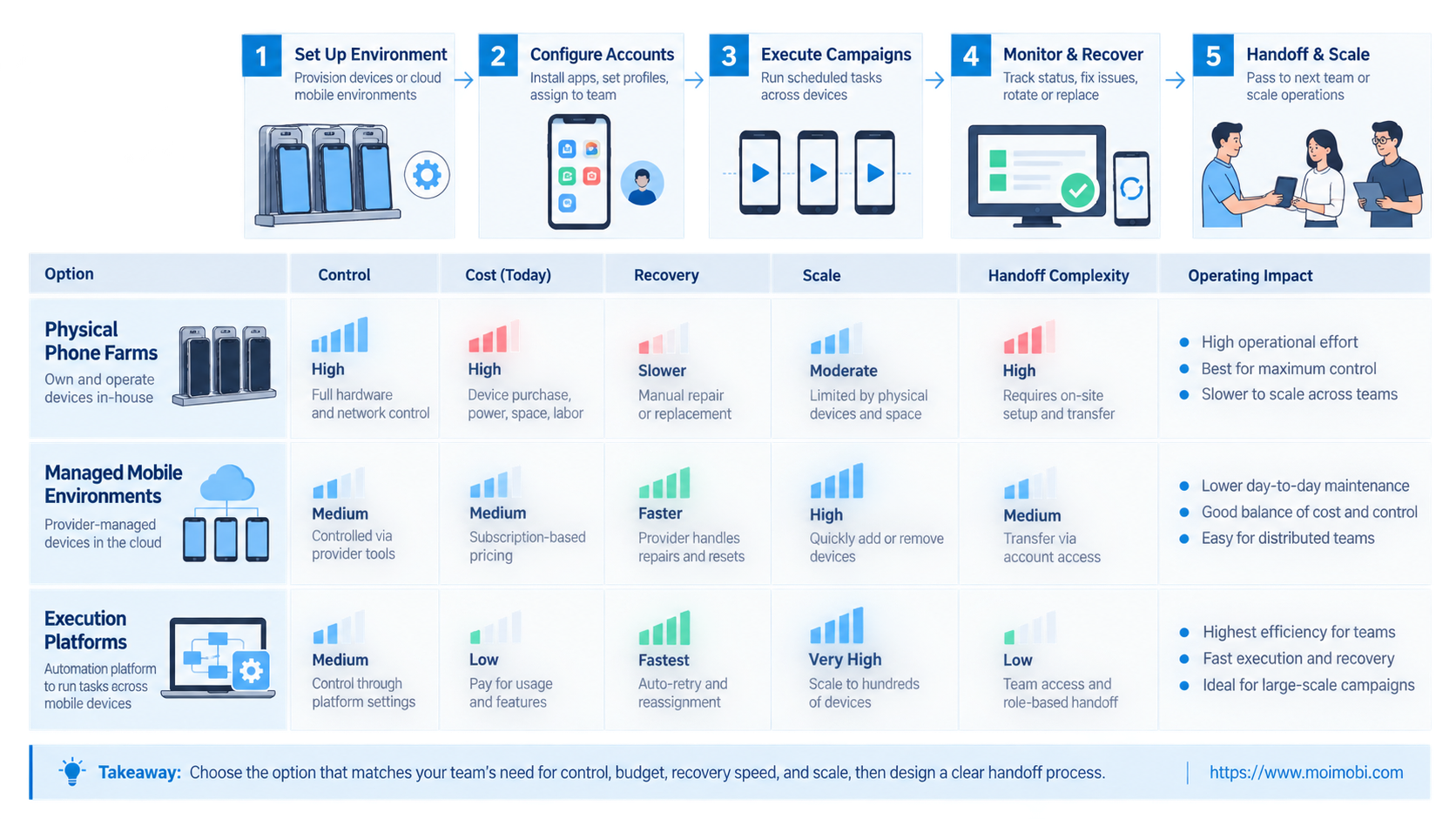
The right mobile farm automation alternative is the operating model that matches the task. Physical farms provide direct hardware control. Hosted environments reduce local infrastructure. Browser profiles handle web sessions. Combined execution platforms connect multiple surfaces to assignments, approvals, evidence, and recovery.
Select by workflow boundaries, not screen count. Pilot one task, measure completed and verified outcomes, test takeover and duplicate prevention, and confirm that an independent reviewer can reconstruct the run. Expand only after the operating controls remain clear under failure.


