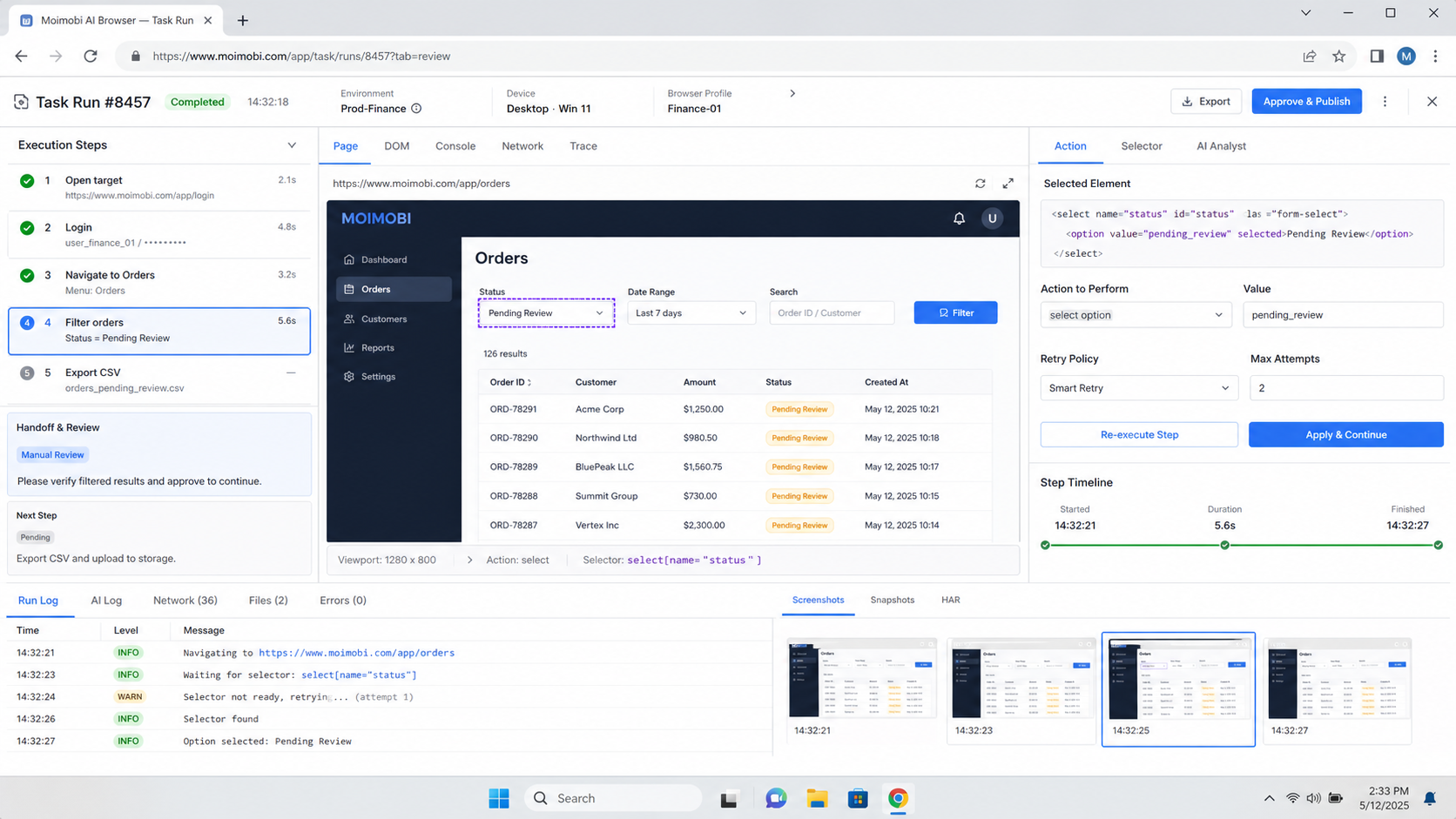
Choosing an AI browser platform means checking whether AI agents can work inside controlled browser sessions, account environments, approval rules, and recovery records. The best choice is not the tool with the most demos. It is the platform that fits your accounts, tasks, security model, and team workflow.
Teams usually start this search after browser automation becomes too fragile or manual account work becomes too slow. A growth team may need research, publishing, replies, monitoring, and reporting across several accounts. MoiMobi addresses this as an AI browser and cloud phone execution platform, where browser work can connect to mobile environments and multi-account operations.
Key Takeaways
- Start with the work your team needs to execute, not with a feature checklist.
- Check whether the platform supports persistent sessions, account workspaces, review rules, and task records.
- Browser profiles fit web dashboards; cloud phones fit mobile-first workflows.
- A useful AI browser should expose failures clearly instead of retrying silently.
- Test one account group and one workflow before expanding to more platforms.
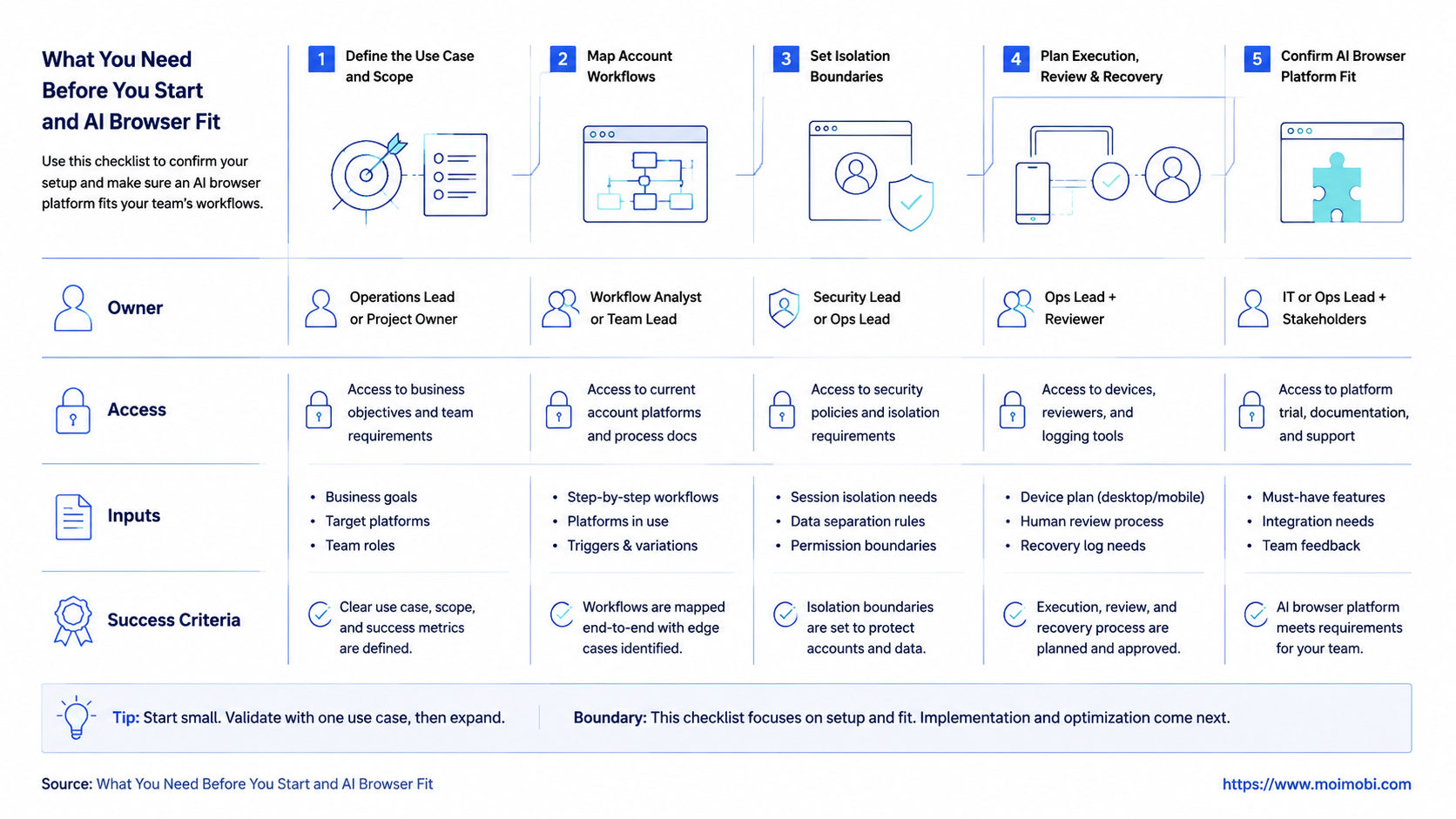
What You Need Before You Start and AI Browser Fit
A workflow inventory should come first. List the web apps, dashboards, inboxes, social platforms, and internal tools that the team touches each week. Then separate tasks by risk: research, data collection, draft preparation, public posting, customer replies, settings changes, and account recovery.
The platform is a better fit when the task needs a real browser session. Examples include logged-in dashboards, form-based workflows, internal tools, account-specific content checks, and browser-based inboxes. It is a weaker fit when the work happens only in a clean API or only inside a mobile app.
Use a preflight checklist before comparing vendors:
- Accounts: Which accounts are involved, and who owns them?
- Sessions: Does each account need a persistent browser profile?
- Controls: Which actions require human approval?
- Data: What task result must be saved?
- Recovery: What happens when login state changes or a page no longer matches?
- Mobile overlap: Which tasks require a phone, app, or Android environment?
This checklist prevents a common mistake. Teams often ask, “Can the AI use a browser?” The better question is, “Can the platform keep account work controlled after the AI starts using the browser?”
Step-by-Step: How to Evaluate an AI Browser Platform
Do not start with a full migration. Run a small evaluation against one real workflow. The goal is to learn whether the platform can complete work with enough control for your team.
- Choose one repeatable workflow. Pick a task such as lead research, comment review, dashboard updates, or content status checks.
- Map the account environment. Decide whether the task needs one browser profile, several profiles, or a browser plus mobile device.
- Define allowed actions. Separate observe-only steps, draft steps, approved execution, and human-only decisions.
- Run a test queue. Use a small group of tasks from real account work, not invented examples.
- Review failure records. Check whether the platform explains failed login, missing element, blocked approval, or wrong environment.
- Measure reviewer effort. Track whether people edit every output or only inspect edge cases.
- Decide expansion rules. Add more accounts only after the team trusts completion, review, and recovery behavior.
This sequence keeps the evaluation grounded. It also stops a flashy demo from hiding the operational details that matter after deployment.
Comparison Criteria for AI Browser Automation
Judge AI browser automation by execution quality, not only model quality. A strong model can still fail if account state, browser sessions, and handoff rules are unclear.
| Selection area | What to check | Why it matters |
|---|---|---|
| Session model | Persistent profiles, isolated contexts, account assignment | Helps separate account work |
| Execution surface | Browser, cloud browser, cloud phone, Android device | Matches web and mobile workflows |
| Human review | Approval queues, pause rules, audit fields | Keeps sensitive actions controlled |
| Failure handling | Error type, retry limit, recovery owner | Prevents silent looping |
| Team operations | Roles, task queues, logs, workspace ownership | Supports more than one operator |
| Evidence trail | Output, timestamp, environment, reviewer | Makes task results auditable |
Browser automation standards give useful background here. The W3C WebDriver specification defines browser automation as session-based commands. Playwright documents browser contexts as isolated browser environments. Chrome DevTools Protocol exposes browser control and inspection capabilities. These references are technical, but the operating lesson is simple: execution needs a known context.
For teams that also run mobile workflows, a browser-only system may not be enough. Some accounts depend on app-side state, mobile notifications, or Android-only screens. In that case, cloud phones and mobile automation should be part of the evaluation.
Best Practices During Setup
Use environment assignment as the foundation. A task should not choose a random session at runtime. The team should know which browser profile, cloud phone, proxy route, or account workspace belongs to the task.
Follow these setup practices:
- One account, one primary workspace. Keep account history, login state, and task records tied together.
- Separate browser and mobile work. Use browser profiles for dashboards and cloud phones for app-side workflows.
- Make approval explicit. Public replies, customer issues, account settings, and payment-related actions should pause.
- Keep task records small but complete. Save account, environment, action, status, failure reason, and next owner.
- Avoid unlimited retries. Repeated failure should create a recovery task for a person.
For multi-account teams, device isolation is not a decorative feature. It is an operating boundary. It helps teams avoid mixing account sessions, device state, and task history.
The same logic applies to network setup. If teams use proxies, routing should be visible and assigned by account policy. A proxy network can support that layer, but the platform still needs clear ownership and logs.
Handoff and Ownership Rules
Good AI browser projects fail less often when ownership is explicit. The platform should show who owns the account, who owns the workflow, who reviews outputs, and who handles recovery. Without those fields, teams may only discover responsibility gaps after a task fails.
Use a simple ownership model:
- Account owner: responsible for login state, access policy, and account readiness.
- Workflow owner: responsible for task design, allowed actions, and expected outputs.
- Reviewer: responsible for approving drafts, public replies, or sensitive steps.
- Recovery owner: responsible for blocked tasks and failed runs.
This model also helps separate AI execution from team judgment. The AI can gather data, fill forms, prepare drafts, and update task status. A person still owns the decision when the action affects a customer, account setting, public channel, or business policy.
Handoff should be visible inside the task record. A useful record includes account, browser profile, assigned worker, action attempted, approval status, failure reason, and next owner. When that information is missing, managers cannot tell whether the platform problem is technical, operational, or human-review related.
Common Mistakes to Avoid
The first mistake is buying for “AI capability” without checking execution state. A model may understand the task, but the browser can still be logged out, on the wrong account, or missing the expected page.
The second mistake is skipping review design. If every action needs approval, the system may become slow. If no action needs approval, the team may lose control. A practical setup uses tiers: observe, draft, approved execution, and human-only.
The third mistake is ignoring mobile overlap. Many social and commerce workflows cross web and app surfaces. A team may review a dashboard in a browser but need a phone environment for app-side checks. This is why multi-account management should include both account assignment and execution environment planning.
The fourth mistake is accepting weak logs. “Task failed” is not enough. A useful record says whether the issue was login state, selector mismatch, missing permission, page change, review delay, device offline, or blocked account.
NIST’s AI Risk Management Framework is useful as a review lens. It encourages teams to map, measure, manage, and govern AI risks. For AI browser work, that means mapping the workflow, measuring failures, managing review rules, and governing who can approve higher-risk actions.
Fit and Not-Fit Boundaries for an AI Browser Platform
A strong fit usually has three traits. The task needs a logged-in browser session, repeats often enough to justify setup, and produces an output that a reviewer can inspect. Examples include account research, dashboard updates, inbox triage, lead enrichment, report collection, and draft preparation.
A weak fit usually lacks one of those traits. If the task is fully API-based, a browser platform may add unnecessary overhead. If the task happens only inside a mobile app, a cloud phone or Android workflow may be a better primary surface. If the task depends on judgment that cannot be reviewed later, it should stay human-led.
Use this boundary table before buying or migrating:
| Workflow type | Good fit for AI browser? | Better next step |
|---|---|---|
| Logged-in web dashboards | Yes | Test persistent profile behavior |
| Research across websites | Yes | Check source capture and task records |
| Social app-only workflow | Partial | Evaluate cloud phone support |
| Payment or account recovery | Usually no | Keep human-led with context gathering |
| Public customer replies | Conditional | Require approval before posting |
This boundary does not make browser automation less useful. It makes the deployment cleaner. Teams get better results when each execution surface has a clear job.
Verification Checklist Before You Scale
Do not scale after one successful run. Scale after the workflow is repeatable and recoverable. A reliable pilot should pass several checks.
Use this pass/fail list:
- The task finishes from a real account environment.
- The same workflow works across more than one account.
- The system records which account and environment were used.
- A reviewer can see what the AI did and why.
- Sensitive actions pause before execution.
- Failures create a clear reason and next owner.
- The team can compare completion rate and edit rate over time.
If the workflow fails one of these checks, fix the operating model before adding more accounts. More accounts will usually make weak session control and weak recovery more visible.
For social teams, the next expansion path may be social media marketing workflows. Start with monitoring or draft preparation before moving into public posting or customer replies.
Pilot Scoring for AI Browser Platform Selection
A pilot needs a simple scorecard. Without one, teams may choose the platform that produced the best demo rather than the platform that survived real work.
Score the pilot in five areas:
| Area | Pass condition | Warning sign |
|---|---|---|
| Session control | Correct account opens consistently | Wrong profile or lost login state |
| Task completion | Workflow finishes with clear output | Partial runs without reason |
| Review quality | Reviewer edits are predictable | Reviewer rewrites most outputs |
| Recovery | Failures name the next owner | Errors only say “failed” |
| Expansion fit | Same model works for another account | Each new account needs manual redesign |
Run the scorecard after several real tasks, not one clean example. A platform that fails once but explains the failure may be easier to operate than a platform that appears smooth until it hides the reason for a blocked task.
Frequently Asked Questions
What is an AI browser?
An AI browser is a browser execution environment that AI agents can use to navigate, inspect pages, and perform controlled web tasks.
How is an AI browser platform different from browser automation?
Browser automation may run scripts. An AI browser platform usually adds task reasoning, session management, review rules, and operational records.
When does a team need persistent browser sessions?
Persistent sessions matter when work depends on logged-in accounts, dashboards, saved state, or repeatable account-specific workflows.
When should a team choose cloud phones instead?
Choose cloud phones when the workflow depends on mobile apps, Android state, mobile notifications, or app-only screens.
Can an AI browser replace human reviewers?
It should not replace all review. Human approval remains important for public replies, customer issues, policy decisions, and account changes.
What is the first workflow to test?
Begin with a low-risk task such as research, monitoring, draft preparation, or status checking. Avoid sensitive execution at first.
What metrics matter during evaluation?
Track completion rate, human edit rate, exception reason, recovery time, and whether outputs are useful for the next operator.
How does MoiMobi fit this decision?
MoiMobi combines browser execution, cloud phones, account isolation, task records, and review-oriented workflows for multi-account teams.
Conclusion
Choosing an AI browser platform is an operations decision. The right platform should give your team controlled sessions, account workspaces, review gates, and recovery records. It should also fit the surfaces where work happens: browser, cloud phone, Android device, or a mix.
Choose one workflow and one account group. If the platform can finish real tasks, explain failures, support review, and keep account history clear, it is ready for a broader pilot. If those checks fail, fix the operating model before scaling.
References