
Mobile RPA templates are reusable automation patterns for mobile app workflows, while one-off automation scripts are custom instructions built for a single task or narrow case. The difference matters when teams repeat the same app work across accounts, regions, reviewers, and recovery states.
A script can be fast. A template can be safer to reuse. The right choice depends on how often the task repeats, how much review it needs, and how costly a failed run would be.
For teams managing app-based operations, the decision is not only technical. It affects account ownership, media handling, proof collection, and the way people recover failed tasks. That is why template design should be judged by operations quality, not by code speed alone.
Key Takeaways
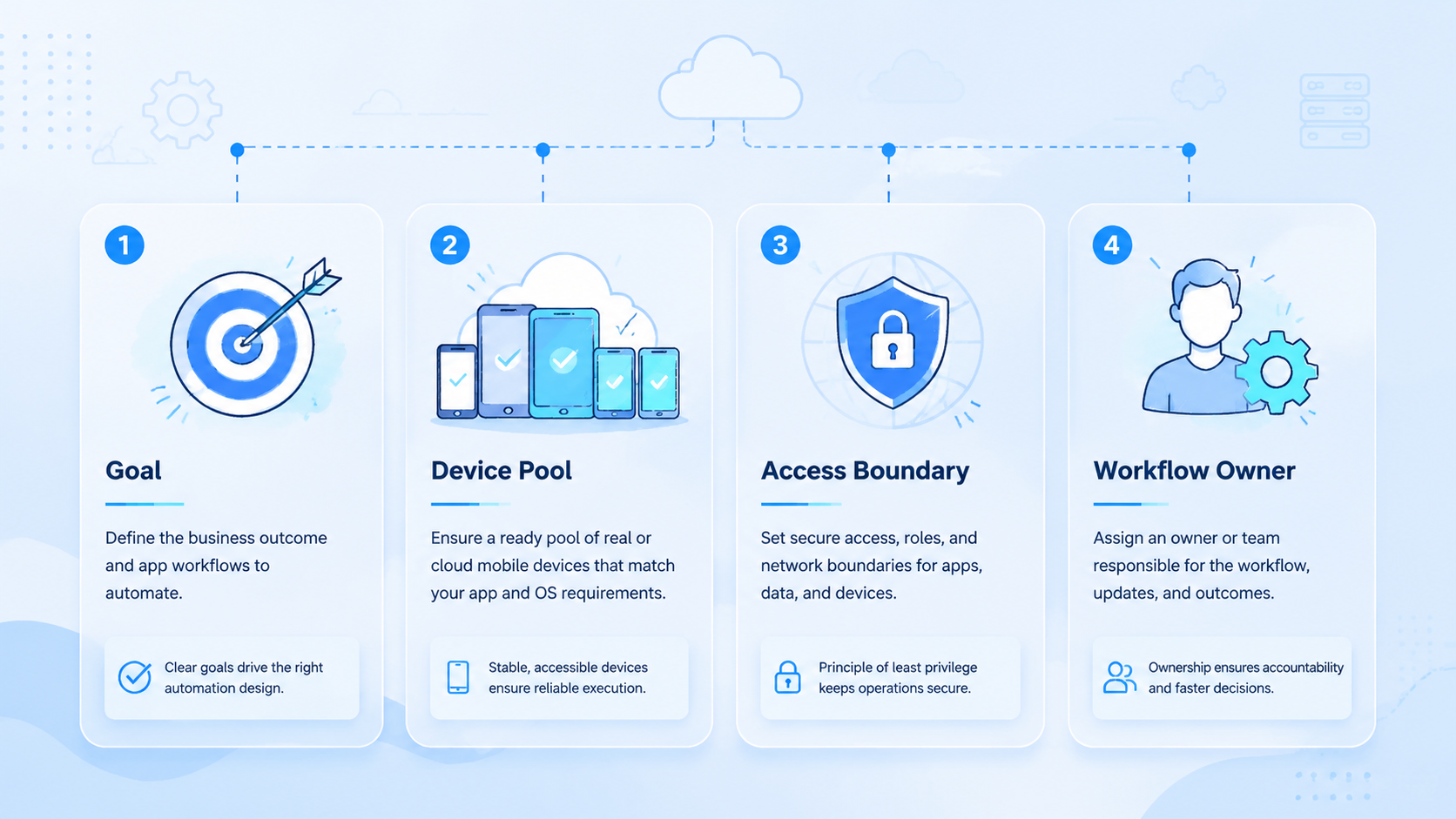
- Mobile RPA templates fit recurring app workflows that need repeatable proof and review
- One-off scripts fit experiments, rare tasks, and tightly scoped internal checks
- Teams should compare reuse, route control, failure recovery, and human approval before scaling
Mobile RPA Templates vs Scripts: Reuse and Control
Mobile RPA templates are structured workflow patterns that can be reused across similar mobile tasks. A template may define the app, account route, device lane, input fields, screenshot requirements, review gate, and recovery rule. The worker follows the same structure each time.
That repeatability is the point. A team can improve one template and then apply the improvement across many runs. A reviewer can also learn the shape of the evidence, because each run uses the same proof pattern.
Templates work best when the mobile app workflow has stable stages. A reusable flow can open the app, confirm account state, select approved media, capture a before screen, prepare the action, ask for review, save the result, and close the run.
Do not confuse a template with blind repetition. Good templates include stop rules. A layout change, login challenge, unknown media file, or policy warning should pause the run.
Mobile RPA Templates vs Scripts: Script Scope
One-off automation scripts are built for a specific task. They can be useful when a team needs to test a new idea, inspect a rare app state, or solve a short-lived workflow. A script may be faster to create than a full template.
The trade-off is maintainability. A script often carries hidden assumptions. It may know one account, one app version, one device state, or one operator habit. When the workflow changes, the script can fail in a way that is hard to review.
Use scripts for discovery. Use templates for repeatable operations. That boundary keeps the team from turning every experiment into production automation.
Small scripts are not bad. They become risky when people keep reusing them after the task has become a recurring workflow.
Mobile RPA Templates vs Scripts: Decision Table
The table below gives a practical comparison for operations teams.
| Decision Area | Mobile RPA Templates | One-Off Scripts |
|---|---|---|
| Best use | Repeatable app workflows | Experiments or rare tasks |
| Review | Built into the workflow | Often added later |
| Evidence | Consistent screenshots and logs | Varies by script |
| Recovery | Defined checkpoints | Depends on the author |
| Scaling | Easier across accounts | Risk grows with reuse |
| Maintenance | One template improves many runs | Each script needs separate care |
| Account routing | Usually explicit | Often implicit |
| Fit signal | Same workflow repeats weekly | Task may not repeat |
Choose the template when a task becomes part of daily operations. Choose scripts while the workflow shape is still unknown.
Where Mobile RPA Templates Fit Best
Mobile RPA templates fit workflows that happen often and need similar evidence each time. Examples include app screen checks, account health checks, marketplace listing checks, media upload preparation, notification review, and mobile campaign QA.
They also fit teams that need review consistency across shifts, reviewers, and account owners. A manager can inspect the same evidence layout across many accounts. That shared shape makes approvals faster because reviewers do not need to rediscover the workflow, interpret a custom output format, or ask the operator what happened every time.
The value appears during the fifth, tenth, and twentieth run. Repetition makes small evidence gaps easier to see.
A cloud phone lane is useful when the workflow depends on app state, phone display, or mobile-only behavior. The template should record the phone ID, account owner, app state, and screenshots in one task log.
For more complex app work, mobile automation can support repeatable execution. The important design choice is still the template: what it allows, what it records, and when it stops.
Mobile RPA Templates vs One-Off Scripts: When Scripts Still Make Sense
One-off scripts make sense during exploration. A team may need to test whether a screen can be read, whether a button is stable, or whether a new app flow is worth automating. A script can answer that question quickly without forcing the team to design a full operating model first.
Scripts also help with temporary jobs. If a task happens once, a reusable template may be overkill. A narrow script with clear limits can be enough.
Keep the boundary visible in the ticket, file name, owner note, and weekly review.
Keep scripts labelled as experiments until they have a named owner, a review rule, and a retirement date. The label matters because it tells the next operator not to treat exploratory code as production automation. If a script starts running every week, review it as a template candidate.
Reuse hides. A script written for one account becomes a hidden production tool for many accounts. That is when routing, proof, and recovery problems appear.
When reuse starts, the script should be reviewed as a template candidate before more account volume is added.
Mobile RPA Templates vs Scripts: Review and Recovery Controls
Templates should include review and recovery from the start. Scripts often skip these steps because the first goal is speed. That is acceptable for exploration, but not for recurring account work.
Use a small recovery model:
| Failure Type | Template Response | Script Risk |
|---|---|---|
| Login challenge | Pause and ask owner | Script may retry blindly |
| App layout change | Stop and capture screen | Script may click wrong area |
| Unknown media | Block upload | Script may use old file |
| Public action | Require approval | Script may repeat action |
| Route mismatch | Stop before action | Script may ignore account context |
| Missing screenshot | Keep task open | Script may mark done |
Recovery rules protect the team from duplicate actions. They also make failed runs useful. A failed run can teach the template what to check next time.
Pilot Plan for Mobile Workflow Automation
Start with one mobile workflow and a small account group. Ten accounts are enough for a first pilot because the team can still inspect every failed run by hand. Use one reviewer and one owner so decisions do not spread across a loose group. Keep the task type narrow.
Small pilots are easier to inspect.
Measure proof coverage, first-pass approval, retry count, duplicate actions, and manual fallback. These metrics decide readiness.
Read the numbers together because a fast task with weak proof is not ready for production.
Use a weekly review that compares completed runs, failed runs, and rejected runs in the same meeting. Look for missing screenshots, unclear account routes, and repeated pauses.
Scale slowly. Add accounts after the template is stable. Add a second workflow only after the first one has clean evidence.
Mobile RPA Templates vs Scripts: 7 Decision Rules
A comparison only helps when the team can turn it into a decision. Use these 7 rules before building the next workflow.
| Rule | Choose Mobile RPA Templates When | Choose One-Off Scripts When |
|---|---|---|
| Repeat rate | The task runs every day or every week | The task may run once |
| Account count | More than 5 accounts use the same pattern | 1 account needs a special check |
| Review need | A person must approve the final action | No public action happens |
| Failure cost | A retry can duplicate a post or upload | Failure only produces a test note |
| Media control | Approved assets must be tracked | No media is used |
| Recovery | The task needs checkpoints | Manual restart is acceptable |
| Ownership | Several operators share the workflow | One operator owns the whole task |
This table gives the team a clean boundary. If 4 or more rows point to the template side, build a template. If most rows point to the script side, keep the script narrow and label it as an experiment.
The decision should be reviewed again after 2 weeks. A script that runs 20 times is no longer a one-off script. It has become an undocumented workflow.
Scenario Example: App Listing QA
Consider a team that checks app-based marketplace listings for 30 accounts. The task has 6 repeated steps: open the app, confirm account route, search the listing, capture a screen, compare visible price or stock, and send the result to review.
This is a template candidate. The steps repeat, the account route matters, screenshots matter, and a reviewer needs the same evidence each time.
A failed run should resume from the last safe screen instead of starting over.
A one-off script could still help during discovery. The team might write a short script to test whether the listing screen is readable. That script should not become the production workflow until it has account routing, proof, and recovery.
The practical rule is simple. Use the script to learn the screen. Use the template to run the operation.
Scenario Example: Temporary App Research
Now consider a one-time research task. A product manager wants to inspect 3 screens inside a new app flow and decide whether it is worth deeper automation. There is no public action, no account pool, and no repeated weekly task that would justify template governance.
This is a script candidate for research rather than operations. The team can write a short script, capture the screens, and close the task. A reusable template would add overhead before the workflow is proven.
Still, the script needs a boundary. Name the account, phone, app version, and output folder so the result can be audited later. Save the screenshots with the research note.
Mark the script as research. If someone asks to run it again next week, review whether it should become a template.
Small boundaries prevent quiet reuse.
Fields Every Reusable Template Should Store
A reusable mobile template should store enough context for review and recovery. Keep the fields visible, boring, and easy for a new operator to verify without reading code.
| Field | Example Value | Why It Matters |
|---|---|---|
| Template ID | app-listing-check-v1 | Shows which workflow ran |
| Account ID | account-024 | Connects action to owner |
| Cloud phone ID | phone-12 | Identifies the mobile lane |
| App version | 5.8.2 | Explains layout differences |
| Media folder | approved-campaign-a | Blocks unknown assets |
| Reviewer | ops-reviewer-1 | Creates a human gate |
| Before screen | screenshot link | Shows starting state |
| After screen | screenshot link | Shows result |
| Retry count | 0, 1, or 2 | Detects loops |
| Final state | approved, paused, rejected, closed | Keeps the queue clear |
These fields make templates slower to design but faster to operate. A reviewer can inspect the run without asking the script author what happened.
Maintenance Cost Over 30 Days
Maintenance is where templates and scripts separate after the first week, because the team starts seeing repeated fixes, stale assumptions, and hidden ownership problems. A script may take 30 minutes to build and 3 hours to debug later. A template may take longer to design, but the same fix can improve every future run.
Use a 30-day review window that includes both successful runs and messy recovery cases. Count how many times the workflow ran across accounts. Count every manual fix, even when the operator solved it quickly.
Count how often the reviewer asked for missing proof. Count duplicate actions, failed recovery attempts, and any run where the operator had to guess the next safe step.
After 10 runs in 30 days, treat the script as a template candidate. If a template still needs manual rescue every week, it is not ready for scale.
The goal is not to remove scripts. The goal is to stop scripts from becoming invisible production systems.
Comparison Checklist Before Scaling
Use this checklist before giving any mobile workflow more account volume.
| Check | Pass Condition |
|---|---|
| Repeat pattern | The task has the same main steps across accounts |
| Account route | Each run names account, owner, phone, and region |
| Evidence | Before and after screenshots are saved |
| Review | Public actions wait for human approval |
| Recovery | Failed steps have a last safe checkpoint |
| Metrics | Proof coverage and duplicate actions are tracked |
| Ownership | One person owns template changes |
| Retirement | Old scripts are disabled or labelled as research |
Scale only after the checklist is boring. Boring means the team can explain the workflow without opening the automation code.
How Moimobi Supports the Template Approach
Moimobi is useful when teams need mobile workflows to connect with account routing, device state, review, and evidence. A cloud phone product gives the mobile lane where those repeated checks can run.
Device isolation keeps account environments easier to separate when the same template serves different owners, regions, or campaigns.
Templates make those lanes easier to manage. The team can define which device, account, media folder, and reviewer belong to each workflow. That turns mobile RPA software from a collection of scripts into a managed process with visible ownership.
Teams should still respect app and platform rules. Google Play's policy center and Android quality guidance are useful references when automation touches app behavior, testing, or distribution.
Which Option Fits Better for Team Workflows
Choose mobile RPA templates when the task repeats, touches multiple accounts, needs the same evidence, or can create visible damage after a retry.
Choose one-off scripts when the task is exploratory, short-lived, owned by one operator, and produces no public action.
A useful decision test is simple. If the team needs the same run to work across 5 accounts, 2 reviewers, and 2 weeks of repeated checks, use a template. If the team only needs 1 screen capture from 1 account, use a script.
The boundary should be reviewed weekly. A script that keeps returning to the schedule is a template candidate, even if the code still looks small.
Frequently Asked Questions
What are mobile RPA templates?
They are reusable workflow patterns for mobile app tasks. A template defines the route, device, steps, proof, review gate, and recovery behavior.
When should a team use a one-off script?
Use a one-off script for experiments, rare tasks, or short-lived checks where a reusable workflow would be unnecessary.
Are templates slower to build?
They can take longer at first because they include routing, proof, and recovery, but that design work prevents repeated explanations later. They become easier to manage when the task repeats across accounts.
What is the main risk of scripts?
The main risk is hidden reuse. A script built for one case may become a production tool without review, evidence, or account routing.
Do templates remove the need for human review?
No. Templates make review easier by showing consistent proof, but people should still approve public actions and sensitive changes.
What should be measured in a pilot?
Measure proof coverage, first-pass approval, retry count, duplicate actions, recovery time, and manual fallback rate.
How do cloud phones fit this decision?
Cloud phones provide the mobile environment for app-specific work where screen state, app version, and account route all matter. Templates define how the team uses that environment safely and repeatedly.
What is the simplest decision rule?
Use scripts to learn during discovery. Use templates to repeat operational work with proof, review, and recovery. Move a script into a template when the task becomes part of weekly operations.
Final Thoughts
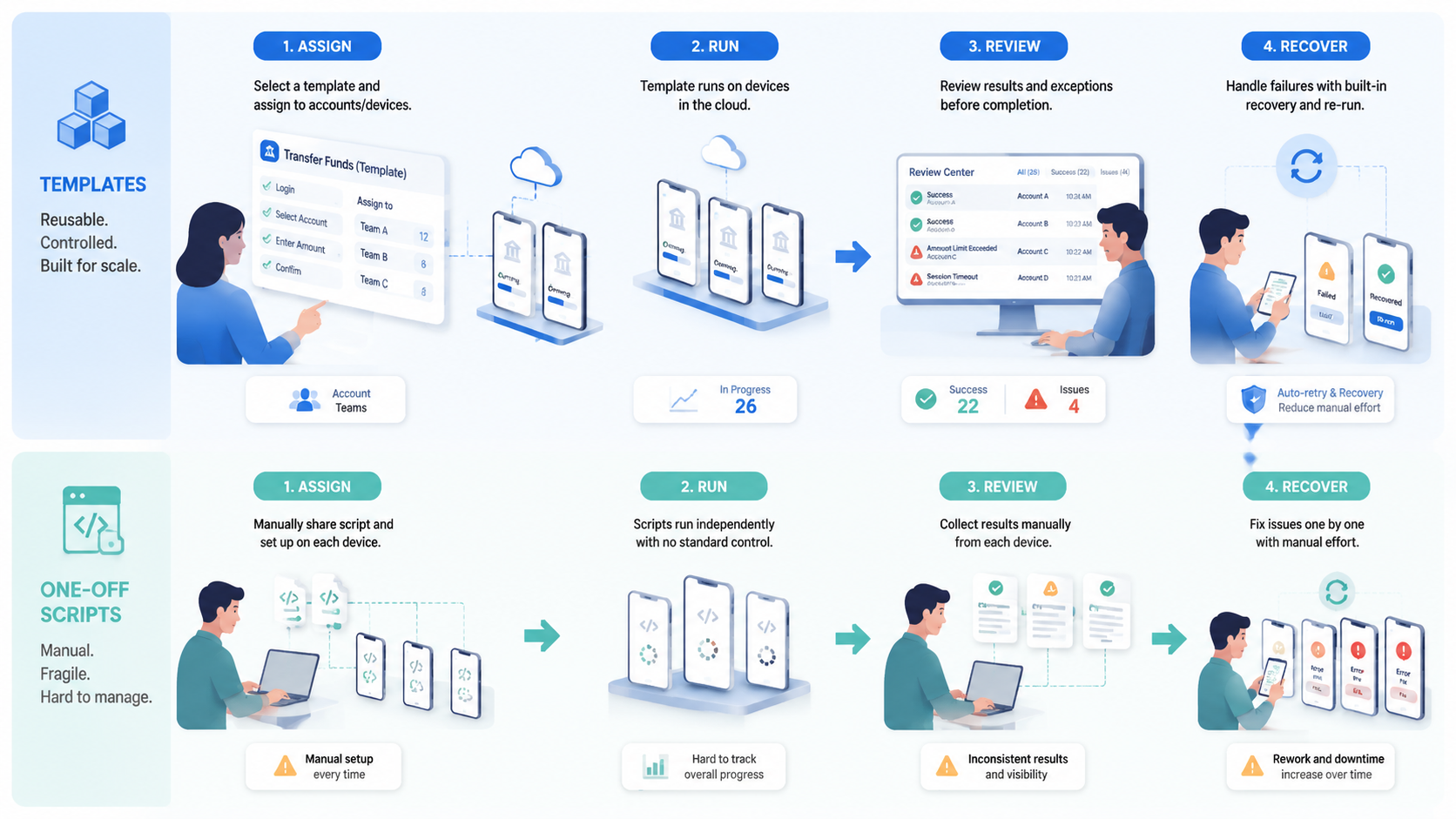
Mobile RPA Templates vs One-Off Automation Scripts is not a debate about which method is always better. Scripts teach. Templates are better for recurring work that needs account routing, proof, review, and recovery.
Start with the workflow, not the tool. When the task repeats and affects accounts, build a template. For temporary work, keep the script narrow and labelled as an experiment.
The practical next step is to list your mobile workflows, mark which ones repeat weekly, and convert the highest-risk recurring task into a reviewed template first.



