
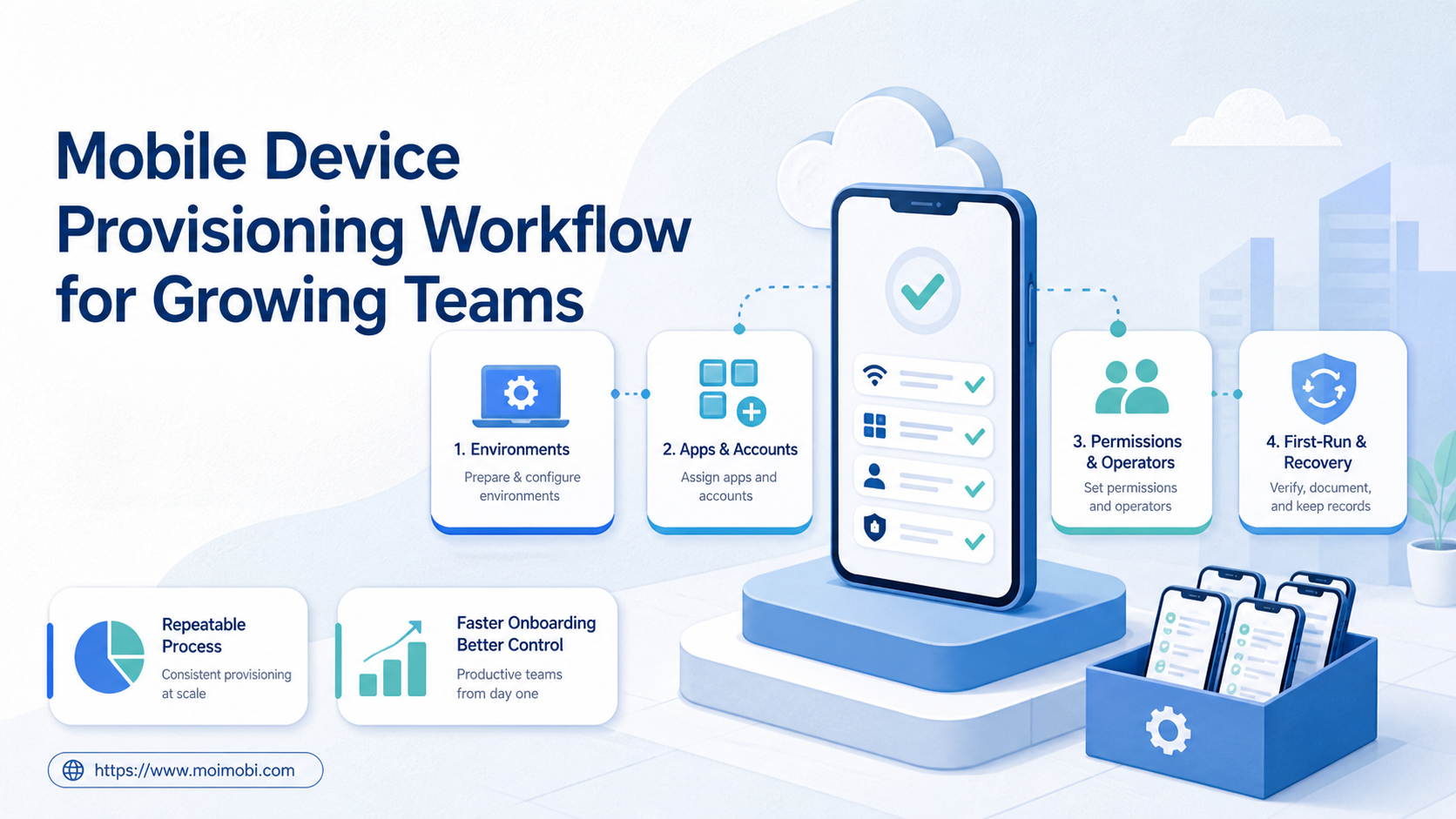
A mobile device provisioning workflow is the controlled sequence for preparing a device or cloud environment, installing the required app set, assigning the right account lane, granting permissions, and verifying readiness before work begins. It turns onboarding from a series of manual guesses into a repeatable operating process.
Provisioning becomes harder as a team adds environments, clients, operators, platforms, or task types. A device can be connected but missing an app. An app can be installed but assigned to the wrong account lane. A login can work while the operator lacks approval to perform the next task.
A cloud phone can be provisioned as one mobile execution environment. The provisioning record still needs an owner, policy, account mapping, first-run evidence, and recovery route. The goal is a verified handoff, not simply a device that opens.
Key Takeaways
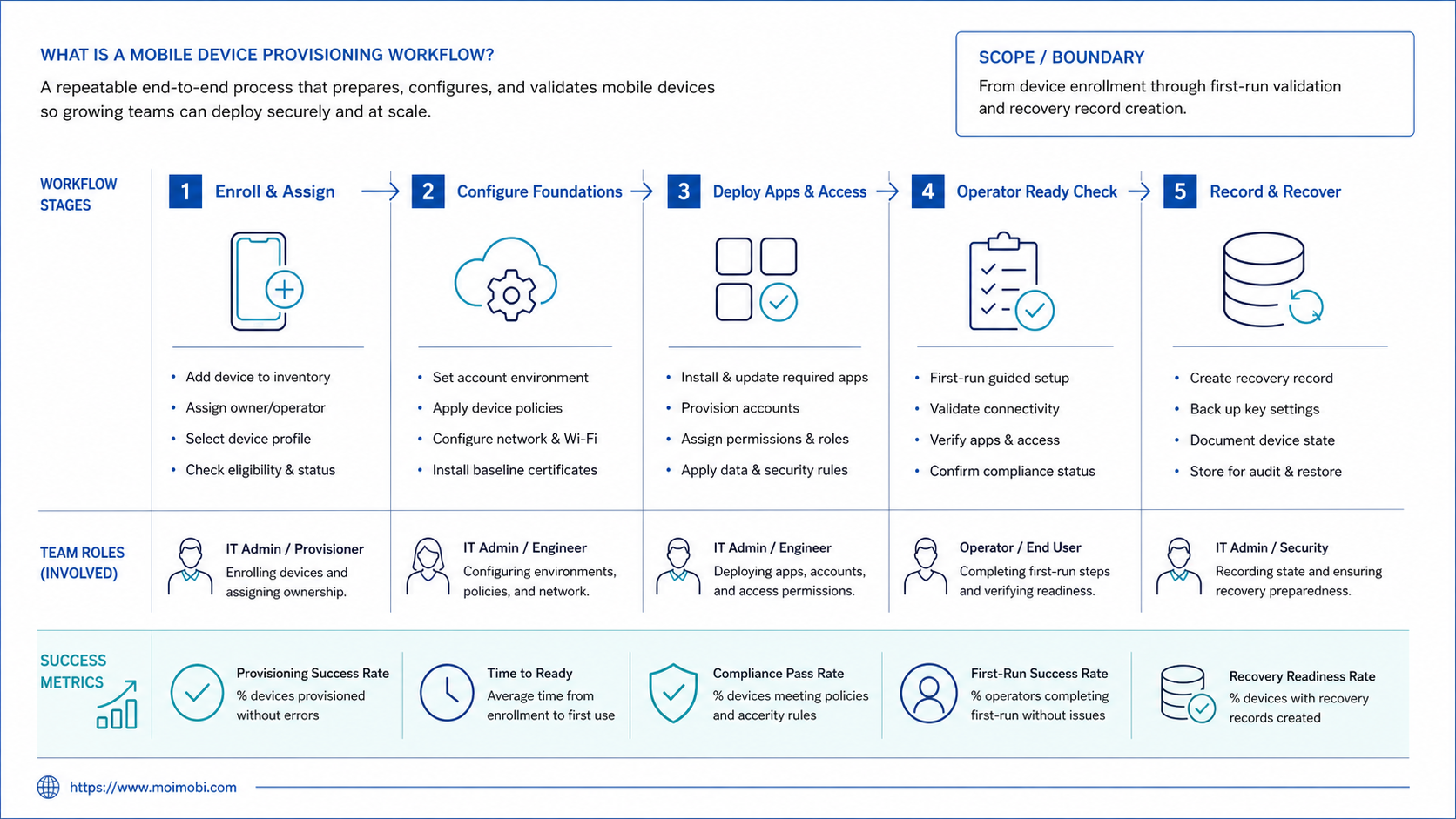
- Provisioning covers environment preparation, app state, account mapping, permissions, ownership, and validation.
- A connected device is not automatically ready for an assigned workflow.
- Provisioning records should preserve the first-run result and failed checks.
- Start with one environment type and one task lane before scaling the process.
What Is a Mobile Device Provisioning Workflow?
In system terms, the mobile device provisioning workflow takes a new or reset environment from inventory to task-ready status. It normally includes registration, baseline configuration, app preparation, account assignment, role setup, preflight validation, and handoff.
The account and the environment should be treated as separate objects. The environment describes the device, cloud phone, or managed Android endpoint. The account describes the client, platform, market, or workflow lane. Provisioning creates a controlled relationship between them without turning the inventory record into a password store.
The workflow should answer these questions:
- Which environment is being prepared?
- Which task lane is it intended to support?
- Which apps, permissions, policies, and network settings are required?
- Which operator owns the first-run check?
- What evidence proves that the environment is ready?
- What happens if an app, account, or permission check fails?
Why Provisioning Needs More Than Installation
Installation is only one step. A team can install an app and still fail the actual handoff because the environment is assigned to the wrong client, the app is in an unexpected state, or the task queue has no owner.
Provisioning should therefore create an operational baseline. The baseline records the environment identity, permitted task lanes, app set, account mapping, permission state, health check, and first task result. It gives the next operator a reference point when the environment changes.
Official device-management systems reflect this resource separation. Android Management API exposes enterprises, devices, policies, enrollment tokens, and operations as distinct resources. This is a useful design pattern for a provisioning system: keep device registration, policy application, account mapping, and task readiness as linked records rather than one editable status field. See the Android Management API reference.
| Provisioning layer | What to record | Readiness question |
|---|---|---|
| Environment | ID, platform, type, owner, availability | Is this the intended endpoint? |
| Baseline | Version, policy, timezone, language, storage state | Is the runtime prepared? |
| App set | Required apps, version, launch result, permissions | Can the workflow open correctly? |
| Account lane | Client, platform, market, task class | Is the account relationship correct? |
| Operator | Primary owner, backup, reviewer | Who handles the first task? |
| Validation | Check results, evidence, time, task ID | What proves readiness? |
| Recovery | Failure category, next action, owner | What happens when setup fails? |
Mobile Device Provisioning Workflow for Growing Teams
The workflow below is designed for teams that need repeatable onboarding. Keep each stage visible so a failed setup can stop without contaminating the next stage.
1. Create the environment record
Register the physical device, cloud phone, or managed Android environment. Add platform, environment type, identifier, client lane, permitted tasks, current owner, and availability. Do not assign production work before the environment has an identity.
2. Apply the baseline configuration
Set the required operating parameters, policy scope, timezone, language, app permissions, connection route, and storage expectation. Record the baseline version or configuration reference so a later reset can be compared with the original setup.
3. Install and check the app set
Install only the applications required for the task lane. Verify that each app launches, reaches the expected initial state, and has the permissions required by the workflow. If an app is missing or behaves differently, mark the environment as blocked instead of assigning a task.
4. Assign the account lane
Map the environment to the client, account group, platform, market, and task type it is allowed to handle. The account-isolated device workspace model is useful when the team needs a visible boundary between environments.
Keep assignment separate from credentials. Store the account reference and ownership fields in the workspace. Use the project’s controlled account boundary for sensitive login material.
5. Add operators and permissions
Assign a primary operator, backup operator, and reviewer where needed. Separate execution access from reassignment and policy-change access. The first operator should know which actions are allowed and which conditions require a stop.
6. Run the first-task validation
Use a low-impact, clearly defined task to validate the environment. Check the account, app state, expected navigation, task input, evidence capture, and result record. A passing first task is stronger evidence than an online badge.
7. Approve the handoff
The reviewer or designated operations owner confirms the baseline, account mapping, permissions, and first result. Record the handoff time and the next scheduled task. If a check fails, keep the environment in recovery rather than hiding the failure inside a note.
Apple Business documentation provides another useful assignment pattern. Devices can be assigned, reassigned, or unassigned from a device management service. The broader lesson is that assignment changes should be explicit events with a reason and history. See Apple’s device assignment guidance.
Provisioning for Device Pools and Mobile Operations
Growing teams need to distinguish inventory from usable capacity. A pool may contain environments that are available, reserved, paused, degraded, or under recovery. Provisioning should make those states visible before the scheduler assigns work.
The device fleet operations model is relevant when the team manages a larger environment pool. It should be paired with an account-to-environment map and a task contract. A fleet page alone does not tell an operator which account may run on which environment.
Use a staged release process:
- Prepared: baseline and app set applied.
- Checked: first-run validation completed.
- Assigned: account lane and owner recorded.
- Approved: reviewer accepted the handoff.
- Available: environment may receive an eligible task.
- Paused: environment is intentionally withheld.
- Recovery: a failed or uncertain check needs action.
This state model also helps capacity reviews. If many environments are prepared but few are approved, the bottleneck is validation or ownership. If many are approved but unavailable, the bottleneck may be capacity or recovery.
The process also needs a reset path. A device may be replaced, an app may be reinstalled, or an account lane may change. Record which baseline was applied, which checks were repeated, and whether the previous assignment was closed. A reset without a new validation result should not silently return to the available pool.
For growing teams, this history prevents two opposite mistakes. Operators do not waste time rebuilding a known-good environment from memory, and they do not assume that a changed environment still has the old readiness state. The baseline and the validation result must move together.
What the Provisioning Workflow Should Not Automate Blindly
Treat account assignment as a reviewable change, not a bulk spreadsheet edit. A wrong mapping can route a valid task into the wrong client or market lane. Record changes to account, owner, environment, or policy.
An app launch is not proof that the workflow is ready. The first task should verify the expected account, task input, permissions, result, and evidence. Stop after an unexpected account or unresolved exception.
Keep secrets outside the provisioning record. The record should identify the account and owner, not expose credentials to all people who can inspect fleet status.
Do not recycle a failed environment into the available pool until a recovery check passes. A device that reconnects may still have the wrong app state, stale task, or unresolved assignment.
Fit and Non-Fit Boundaries
This workflow fits teams adding devices, cloud environments, clients, operators, or repeated app-native tasks. It is especially useful when onboarding quality affects later scheduling and recovery.
It may be excessive for one person using one device irregularly. It is also premature when the team has not defined the task lane or expected result. Adding more provisioning fields cannot repair an undefined operating process.
| Team situation | Recommended starting point |
|---|---|
| One operator, one device | Manual checklist and handoff note |
| Several environments, one task lane | Environment registry and first-task validation |
| Multiple clients or account groups | Account mapping and role separation |
| Frequent resets or replacements | Baseline version and recovery history |
| Distributed operators | Owner, backup, reviewer, and evidence fields |
| Mixed browser and mobile workflows | Explicit environment type and task eligibility |
Pilot Measurement and Recovery Checks
Run the pilot with one environment type and one workflow lane. Provision a small group, use the same checklist, and keep the first-run task consistent. The purpose is to find missing fields and unclear handoffs before more environments enter the pool.
Track:
- time from registration to approved handoff;
- percentage of environments passing first-run validation;
- app or permission failures by category;
- account-assignment corrections;
- time from failed check to named recovery owner;
- percentage of environments with complete evidence;
- number of tasks rejected because the environment was not eligible;
- replacement or reset events that required a new baseline.
Review failed setups by stage. App failures belong to the app or baseline stage. Wrong account failures belong to mapping and ownership. Missing approval belongs to the handoff gate. This makes the process easier to improve than a single “provisioning failed” count.
AWS Device Farm’s remote-access documentation is a useful example of treating device sessions and their screenshots, video, and logs as separate outputs. It is a testing platform, not an account-operations guide. The evidence model still supports a practical rule: a first-run validation should retain enough context for another operator to review it. See AWS Device Farm remote access.
Common Provisioning Mistakes
Using one generic profile for every lane
Different client or platform lanes may need different apps, permissions, and reviewers. Define the minimum profile for each lane.
Skipping the first-run task
Setup can look complete until the first real action. Use a controlled validation task before the environment enters the available pool.
Overwriting assignment history
Reassignments, resets, and replacements need a timestamp, reason, and reviewer. Preserve the old relationship for later recovery and review.
Releasing an uncertain environment
If the app, account, or permission state is unclear, keep the environment paused. Availability without eligibility creates false capacity.
Measuring only setup speed
Fast setup is not enough if first-task failures and correction work rise. Measure handoff quality and recovery time as well.
Frequently Asked Questions
What does a mobile device provisioning workflow include?
It includes environment registration, baseline setup, app preparation, account mapping, permissions, ownership, first-run validation, and handoff approval.
Is provisioning the same as installing apps?
No. Installation is one stage. Provisioning also verifies identity, task eligibility, ownership, permissions, evidence, and recovery.
Can cloud phones be provisioned in the same process?
Yes. Treat each cloud phone as an environment with an ID, baseline, account lane, owner, health state, and validation result.
Who should approve a new environment?
Use a role with authority over the task lane or client relationship. The operator may perform checks, while a reviewer confirms the handoff when the workflow needs it.
What happens when the first task fails?
Keep the environment out of the available pool, classify the failure, assign a recovery owner, and rerun the relevant check after the fix.
Should credentials be stored in the provisioning record?
No. Keep references and ownership fields in the workspace, while sensitive login material stays in the controlled account boundary.
How should a team handle device replacement?
Record the old environment, new environment, reason, account mapping, baseline check, and first-task result before resuming normal work.
What is the best first metric?
Start with first-run validation pass rate and the time needed to correct a failed setup.
When should a team scale the workflow?
Scale after another operator can complete provisioning from the record and review the first task without private instructions.
Conclusion: Provision for a Verified Handoff
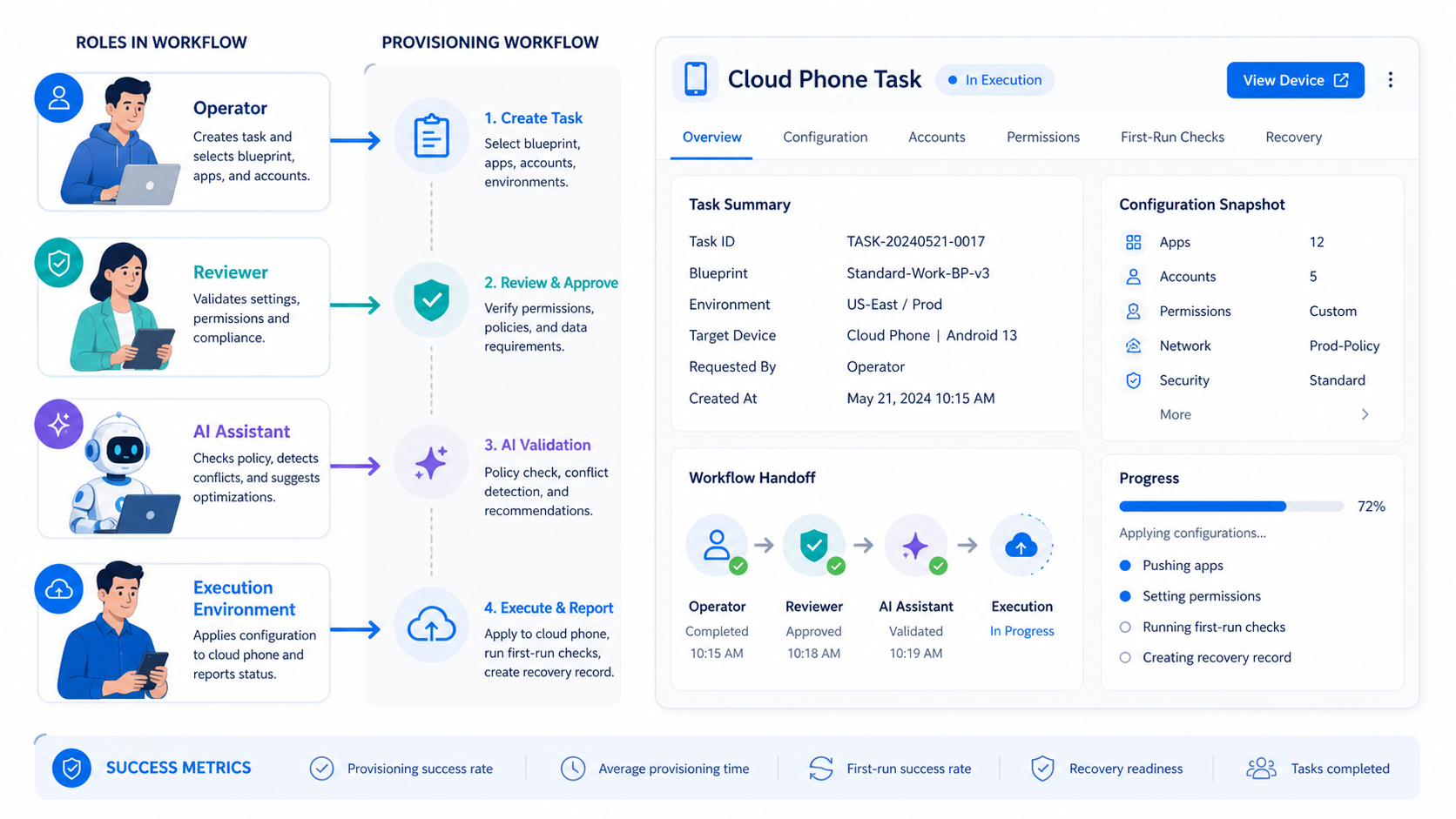
A mobile device provisioning workflow is complete when an environment has an identity, baseline, app set, account lane, owner, permissions, first-task evidence, and recovery path. An installed app is only one part of that result.
Start with one lane. Register the environment, apply the baseline, validate the app and account, run a controlled first task, and review the handoff. Once that path is repeatable, the team can add capacity without losing the context that makes the environment usable.



