Title: Mobile AI Worker Platform for App-Based Operations
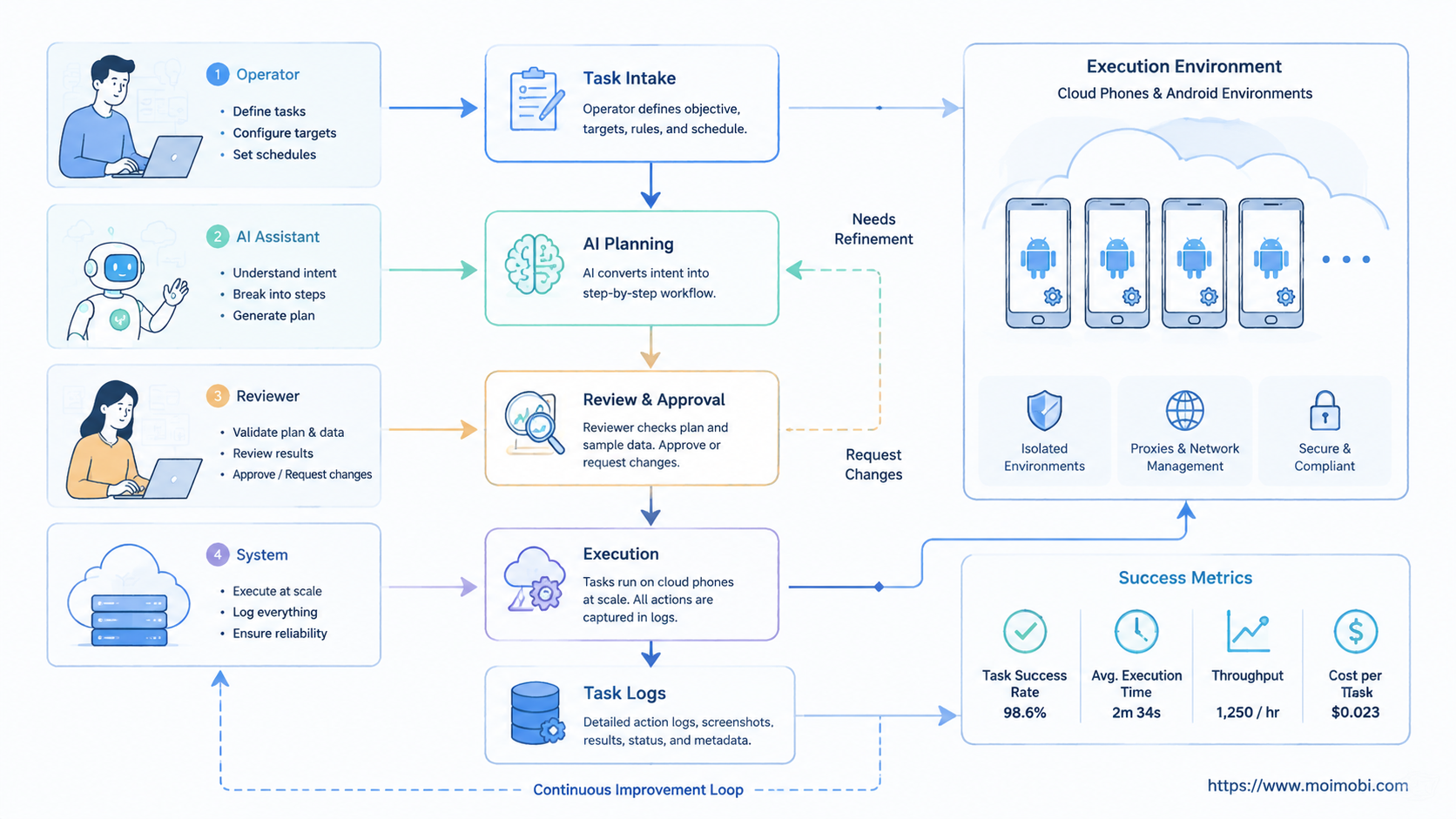
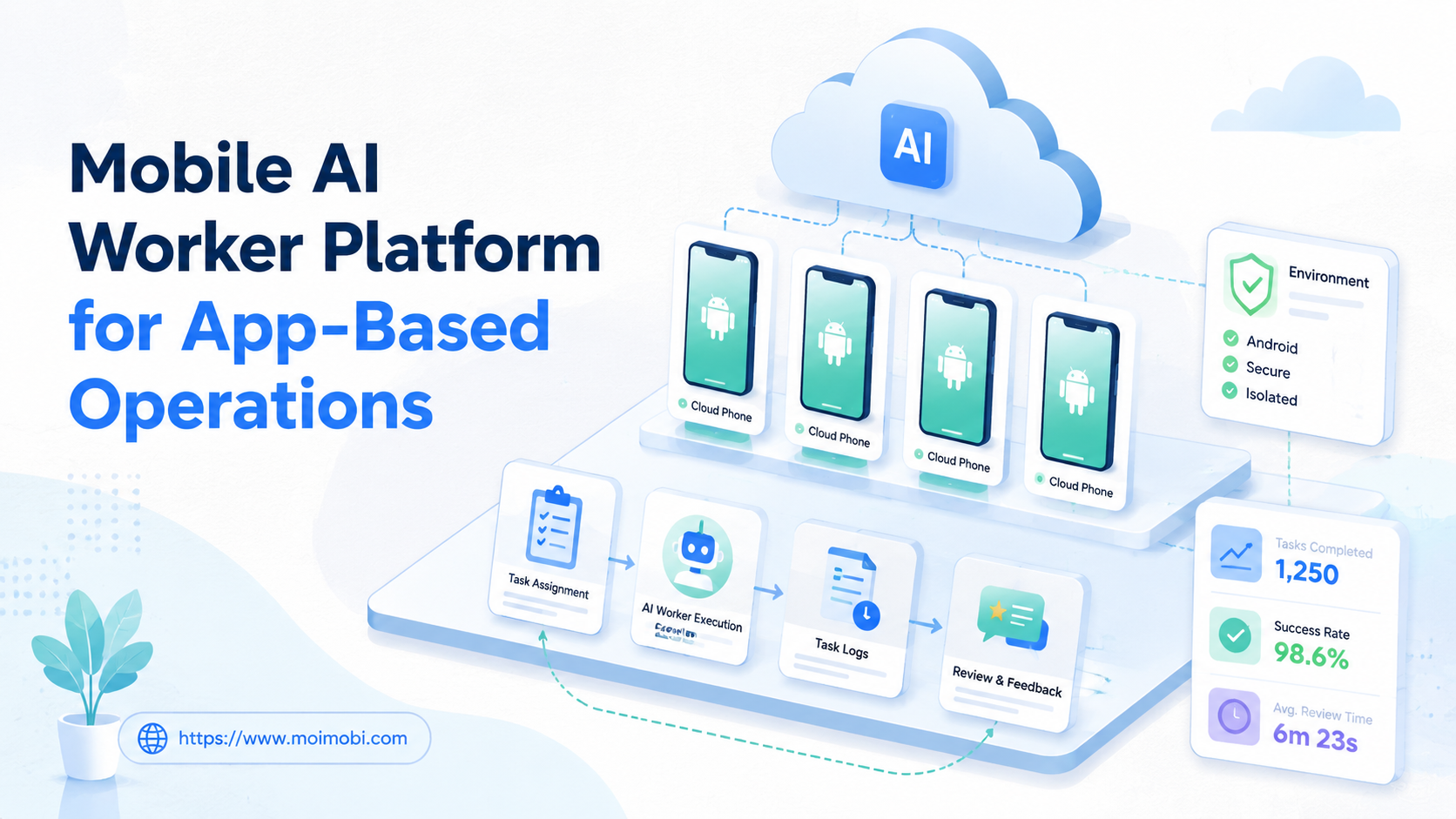
A mobile AI worker platform is an AI worker platform that runs repeatable app-based tasks through controlled Android, cloud phone, and mobile execution environments. It matters when teams need AI to work inside mobile apps, not only write instructions for a human operator.
App-based operations are common in social media, messaging, e-commerce, marketplace, and customer engagement teams. The work may include publishing, replying, monitoring, collecting leads, checking account status, or preparing follow-up actions. Those tasks often happen inside mobile-first apps, so a browser-only workflow is not enough.
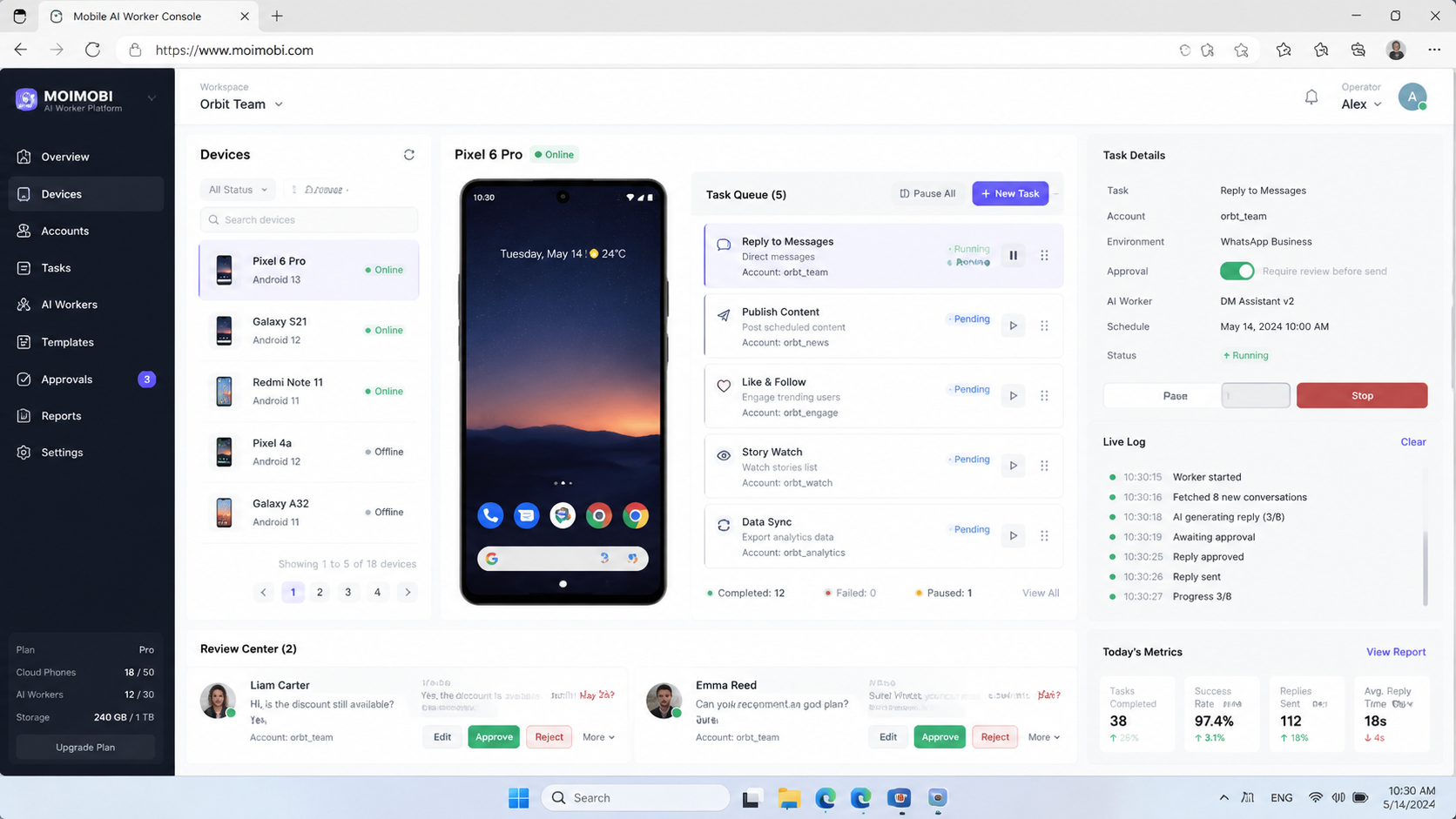
Moimobi is built around this execution problem. It connects AI-assisted workflows with real operating surfaces, including browser profiles, Android devices, and a cloud phone and AI execution platform. The goal is not to make every action autonomous. The goal is to make mobile execution assignable, reviewable, and repeatable.
Key Takeaways:
- Mobile AI workers need real app environments, not only prompt-based planning.
- A useful platform separates task planning, mobile execution, account ownership, and human review.
- Cloud phones and Android devices should be assigned by account role, channel, and workflow type.
- Teams should start with narrow app-based workflows before scaling across accounts.
- Success depends on task completion, account accuracy, recovery logs, and review quality.
The Core Idea Behind Mobile AI Worker Platform for App-Based Operations
The core idea is simple: some digital work only makes sense inside a mobile app. A web dashboard can plan the task, but the actual action may require an Android environment, app session, media library, notification state, or mobile inbox.
An AI worker platform gives that work a structure. The AI worker can understand the task, prepare the next step, use a defined execution environment, and report the result. The human team can decide which steps need approval and which steps can repeat under a fixed workflow.
This is different from a generic chatbot. A chatbot may suggest a reply to a WhatsApp customer. A mobile AI worker can help open the right app environment, pull the relevant context, prepare the response, and leave a record for review. The final send action can still require a human owner.
Execution boundaries matter. Android Enterprise documentation treats managed Android work through devices, work profiles, and policy controls. Device testing platforms such as AWS Device Farm and Firebase Test Lab also frame app workflows around real or virtual devices, app state, and repeatable runs. These official models support the same operational point: mobile execution depends on device context, not only text output.
For Moimobi, the mobile worker is part of a broader operating system. The cloud phone layer provides persistent Android environments. Browser profiles handle web dashboards and account settings. Task records connect what happened back to the team workflow.
| App-based scenario | AI worker role | Mobile environment | Review signal |
|---|---|---|---|
| Social app publishing | Prepare caption, verify asset, open publishing checklist | Cloud Android device assigned to the account | Correct asset, correct account, approved post record |
| Messaging app replies | Classify message, draft response, route sensitive cases | Mobile inbox with account-specific session | Edit rate, escalation accuracy, response completion |
| Marketplace monitoring | Check app alerts, collect repeated questions, summarize issues | Android app workspace with saved account context | Useful findings, source notes, follow-up owner |
| Multi-account engagement | Assign app actions by account group and task type | Separated cloud phones or device workspaces | Wrong-account prevention and clean execution logs |
Why Teams Search for This Topic
Teams search for mobile AI workers when app-based work becomes too fragmented. Operators move between content tools, mobile apps, support inboxes, spreadsheets, and account dashboards. AI can help with planning, but the team still needs a place to execute the work.
Three questions usually drive the search:
- Can AI handle repeated app tasks without losing account context?
- Can one team manage several mobile accounts without mixing sessions?
- Can task results be reviewed before the workflow expands?
The answer depends on execution design. A mobile AI worker should not be a loose script running through every account. It should have a role, an assigned environment, a task boundary, and a review path.
Moimobi's mobile automation layer is relevant because app workflows need more than content generation. Teams need repeatable steps, mobile state, task logs, and a way to recover when an app screen, network state, or account status changes.
This is also why app-based operations connect to multi-account management. A team may run many accounts, but each account needs a clear workspace. Without that mapping, mobile automation can create confusion faster than it creates capacity.
Account mapping should be concrete before the first pilot. Each account group needs a named mobile environment, an owner, an allowed task list, and a review path. The record should also show which app, asset, source message, or alert triggered the task.
Who Benefits Most and In What Situations
The strongest fit is a team that already has repeated mobile app work. Social media teams, marketplace operators, customer support teams, and cross-border sellers often run the same app actions every day. They need more structure, not a larger pile of prompts.
Agencies also benefit when they manage client accounts across app-first platforms. A worker can be assigned to one client group, one platform, or one task lane. That separation helps supervisors review work without guessing which account was used.
Customer engagement teams have another use case. A mobile inbox may hold customer questions, comments, or follow-up messages. A worker can classify the conversation, prepare a suggested reply, and route the task to the right human owner. Sensitive replies should stay reviewed.
E-commerce teams can use mobile workers for repeated operational checks. That may include app alerts, message queues, product update confirmations, or order-related follow-up. The worker's job is not to make business judgments. It should collect context and prepare the next action.
App-based work also requires account environment planning. The device isolation layer helps teams separate app sessions by account, region, or client. This reduces mixed-workspace mistakes and makes task evidence easier to inspect.
Team shape matters as much as tooling. A small team may start with one mobile operator and one reviewer. An agency may need separate owners for client accounts, app channels, and escalation rules. A support team may need one worker for message triage and another for follow-up preparation.
How to Evaluate or Start Using Mobile AI Worker Platform for App-Based Operations
Start with one app workflow, not a full account fleet. A narrow pilot lets the team inspect every action and understand where the process fails.
- Pick one app lane: choose publishing, reply preparation, monitoring, or follow-up.
- Assign account ownership: map each worker to an account group, reviewer, and mobile environment.
- Define allowed actions: separate draft, inspect, collect, click, send, publish, and delete permissions.
- Prepare the device state: confirm app login, media access, network route, and task source before the run.
- Run a small batch: test on a limited set of tasks and keep human review close.
- Record the outcome: store account, app, source input, worker action, reviewer, status, and failure reason.
The highest-risk step is final execution. Publishing, sending, changing settings, and deleting content should usually need stronger review than drafting or collecting information. That boundary should be written before the worker runs.
Teams should also decide whether they need direct device actions or API-supported workflows. For developer-heavy teams, Moimobi's cloud phone API guide is a useful next reference. For operations teams, the first decision is simpler: which app task needs a repeatable execution path?
Mistakes That Reduce Results
The first mistake is treating a mobile AI worker as a general app bot. A broad bot becomes hard to review. A defined worker, tied to one app lane and one account group, is easier to measure.
Another mistake is ignoring app state. Mobile apps may show different screens based on login status, notifications, permissions, region, app version, or account history. The worker should capture failure reasons instead of pretending every run is identical.
Shared devices create a third problem. Several accounts on one mobile environment can make operations look efficient at first. Later, the team may struggle to explain which account took which action. Separated workspaces make recovery easier.
Teams also over-focus on speed. Faster app execution is not useful if the task uses the wrong account, wrong asset, or wrong reply. Review accuracy matters more than raw action count during the pilot.
Fit boundaries are necessary:
Good fit
- Repeated app workflows with clear inputs and expected outcomes.
- Accounts that can be mapped to specific cloud phones or device workspaces.
- Tasks where logs, screenshots, or status fields can prove completion.
- Teams with reviewers for sensitive app actions.
Poor first fit
- Unclear app tasks with no owner or review path.
- High-risk actions that need judgment at every step.
- Workflows that depend on unsupported or unstable app behavior.
- Large account fleets with no environment naming rules.
Pilot Rollout, Measurement, and Recovery Checks
A mobile AI worker pilot should prove control before scale. The first review should answer one question: can the team see what happened, why it happened, and what to do when it fails?
Measure five areas:
- Completion rate: how many app tasks reach a reviewed outcome.
- Account accuracy: whether each task uses the correct mobile environment.
- Human edit rate: how often the AI-prepared content needs changes.
- Failure category: app state, permission, network, login, source data, or workflow issue.
- Recovery time: how quickly a failed task can be diagnosed and rerun or closed.
Recovery checks are essential because mobile apps change state. A worker may meet a login screen, permission prompt, missing media file, or unexpected app update. The workflow should stop and report the condition instead of pushing forward blindly.
Run the first pilot in a small account group. Keep all final customer-facing or public actions under review. Expand only after the task log shows consistent account mapping, useful failure categories, and a clear recovery process.
The review meeting should inspect both successful and failed runs. Successful runs show whether the worker followed the intended path. Failed runs show whether the platform recorded enough evidence to diagnose the problem. A useful pilot improves both outcomes.
Teams should also keep a simple stop rule. Stop the workflow when the app account is unclear, the expected screen is missing, the media asset is unavailable, or the task asks for an action outside the worker's scope. A clean stop is better than an unreviewed action.
Each stop should leave a short note, owner, and next review time.
Frequently Asked Questions
What is a mobile AI worker platform?
It is a platform that lets AI workers run repeatable mobile app tasks through controlled Android, cloud phone, or device environments.
How is it different from a normal AI worker platform?
A normal AI worker may focus on web or text workflows. A mobile worker also needs app sessions, device state, media access, and mobile task logs.
When do teams need a cloud phone for AI agents?
Teams need it when the workflow depends on mobile apps, persistent Android sessions, or account-specific app environments.
Can one mobile worker run every app task?
That is usually a weak design. Separate workers by app, account group, and task type so review and recovery stay clear.
What should be automated first?
Start with preparation and collection tasks. Examples include checking app alerts, drafting replies, preparing publishing assets, and logging monitoring notes.
Which actions should stay reviewed?
Public publishing, customer replies, account settings, deletion, payments, refunds, and dispute handling should usually stay under human review.
How do cloud Android environments help?
They give teams remote Android workspaces that can be assigned to accounts and workflows. That makes execution easier to track.
What metrics matter most?
Account accuracy, completion quality, human edit rate, failure category, and recovery time matter more than raw action volume.
Conclusion
A mobile AI worker platform is most useful when app-based operations are already repetitive but hard to coordinate. The team needs more than generated text. It needs assigned environments, account boundaries, task records, and review loops.
Before scaling, check three gates: one clear app workflow, one mapped account group, and one recovery process. If those gates are missing, build the operating model first.
For Moimobi users, the next step is to decide which mobile task should run through cloud phones, which tasks stay in browser profiles, and which actions require human review. Once that map exists, app-based AI workers become easier to govern.
References