
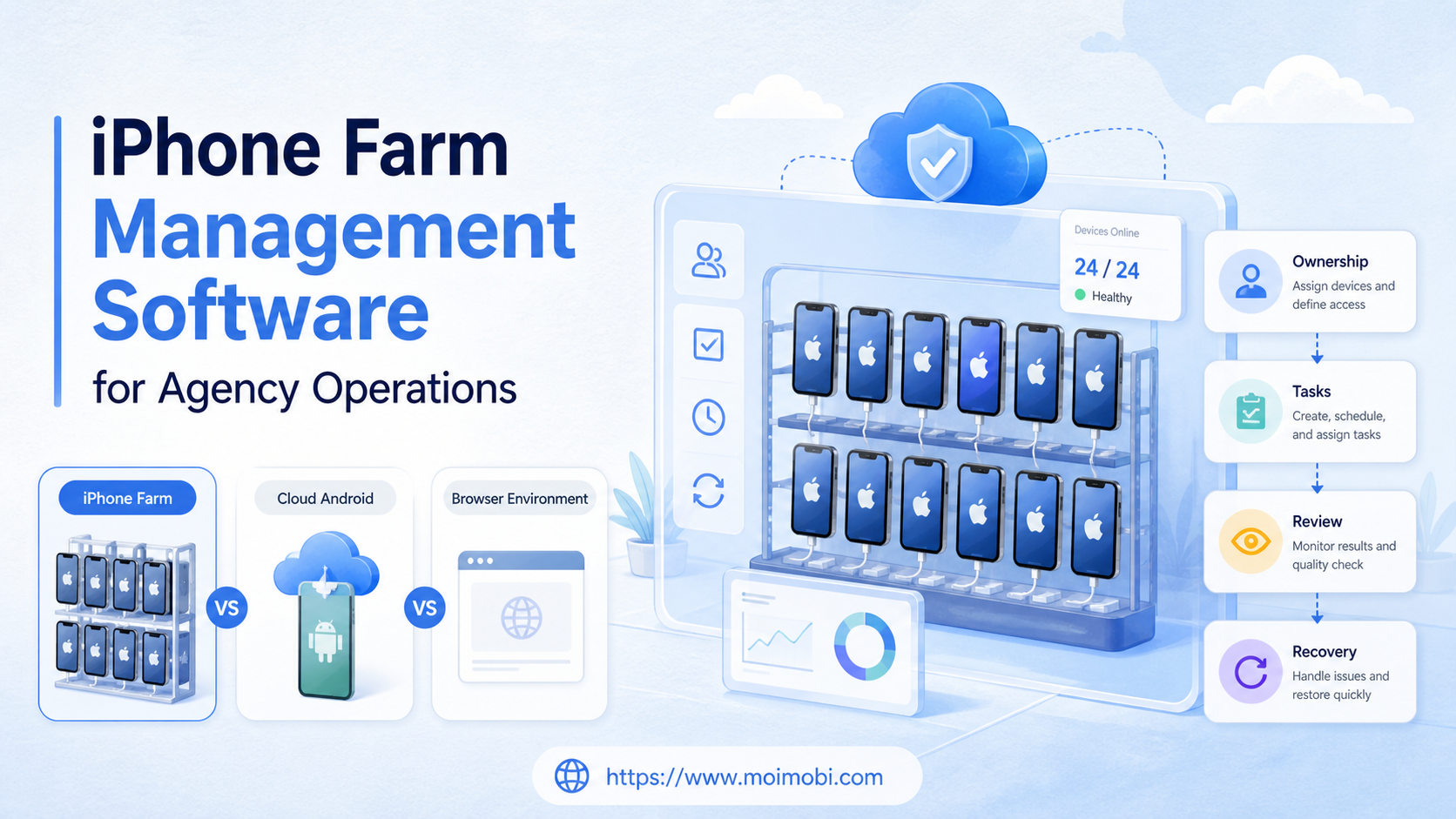
iPhone farm management software is a control and operations layer for coordinating multiple iPhone environments, accounts, tasks, owners, evidence, and recovery actions. For an agency, the important question is not how many devices can be opened. It is whether each device has a clear client lane, an approved workflow, and a traceable handoff.
The phrase “iPhone farm” can describe several different setups. It may mean a rack of physical iPhones, a device lab, remote iOS testing hardware, or a broader multi-device operations system. Those models have different capabilities. A tool that manages Android cloud devices should not be presented as native iPhone management without verifying the actual device and control path.
A cloud phone can be one part of an agency execution stack, but it is not automatically an iPhone replacement. The right architecture depends on the app, account, device signal, human review, and workflow evidence the client requires.
Key Takeaways
- Define whether the agency needs physical iPhones, remote iOS devices, Android cloud phones, or browser workspaces.
- Track device ownership, account lane, task state, access role, and review evidence separately.
- Do not assume device count equals operational capacity.
- Use a pilot to validate assignment, workflow fit, client separation, and recovery.
- Select a platform that makes exceptions visible instead of hiding them behind an online status.
What Is iPhone Farm Management Software for Agency Operations?
In agency operations, iPhone farm management software is a way to organize a distributed set of mobile environments around clients and repeatable work. The software may include inventory, remote access, task assignment, app or profile checks, screenshots, logs, permissions, and reporting. The exact feature set varies by product and device model.
The term should be separated into three layers:
| Layer | Operational question | Example record |
|---|---|---|
| Device layer | Which physical or remote environment is available? | Device ID, model, status, location, owner |
| Account layer | Which client or account lane may use it? | Client, account, role, assignment window |
| Workflow layer | What work is allowed and what proves completion? | Task, approval, output, evidence, next action |
An agency needs all three layers because a device can be available while its account assignment is wrong. A task can be assigned while the required app is not ready. A visible completion screen can exist while the downstream result is missing. Management software should make those differences explicit.
Apple Business documentation treats device assignment as a distinct operation: devices can be assigned, reassigned, or unassigned from a device management service. That is a useful reference point for agencies building ownership history. The practical implication is simple: keep assignment changes beside task history instead of relying on a device name or an operator’s memory. See Apple Business device assignment guidance.
How iPhone Farm Management Software Differs from a Cloud Phone Farm
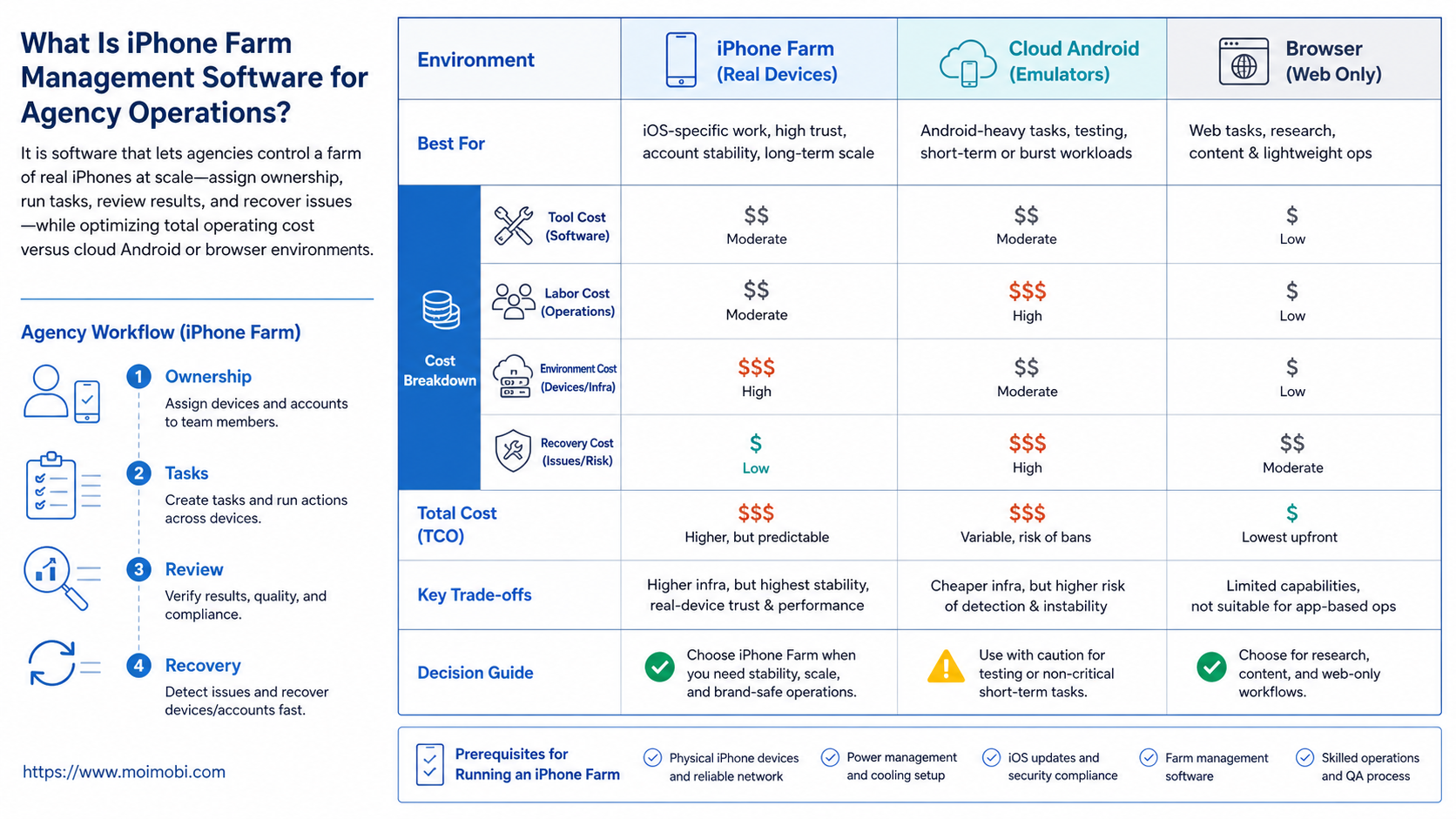
An iPhone farm and a cloud phone farm can solve related coordination problems, but they are not interchangeable. Physical iPhones provide a real iOS hardware environment. Cloud Android environments provide remote mobile execution without the agency storing and maintaining the same physical fleet. Browser profiles provide a web execution surface, not a mobile app environment.
| Environment | Strong fit | Main limitation to validate |
|---|---|---|
| Physical iPhone fleet | iOS-specific app flows, hardware checks, controlled device testing | Hardware ownership, charging, updates, network, and hands-on recovery |
| Remote iOS device lab | Remote testing and review of supported iOS environments | Availability, session rules, device reservation, and app installation path |
| Android cloud phone | Repeatable Android app operations and remote team execution | It does not reproduce every iOS-specific behavior |
| Browser profile workspace | Web dashboards, browser accounts, and web-based operations | It cannot replace an app-only workflow |
| Combined stack | Agencies with separate web, Android, and iOS lanes | More governance is required across environments |
AWS Device Farm is a useful example of remote device testing as a separate workflow. Its documentation describes remote access sessions with screenshots, video, logs, Appium connectivity, and device interaction. That does not make it an agency account management platform, but it shows why session artifacts and device access should be treated as separate operational records. See AWS Device Farm remote access.
The decision is therefore not “physical device or software.” It is “which execution environment should handle which client workflow?” An agency may use physical iPhones for iOS-specific review, browser environments for web administration, and cloud Android devices for repeatable mobile work. A phone farm execution layer can be evaluated as part of that broader allocation model.
Why Agencies Need More Than a Device List
A spreadsheet can list devices, but it rarely explains whether a device is ready for a particular task. Agency work adds client permissions, deadlines, handoffs, evidence requests, and separation between teams. A useful management system connects those concerns without making every operator edit the same inventory row.
The first requirement is assignment clarity. Each environment needs a client or account lane, a responsible team, and an allowed task class. When an environment changes clients, the old assignment should close before the new task begins.
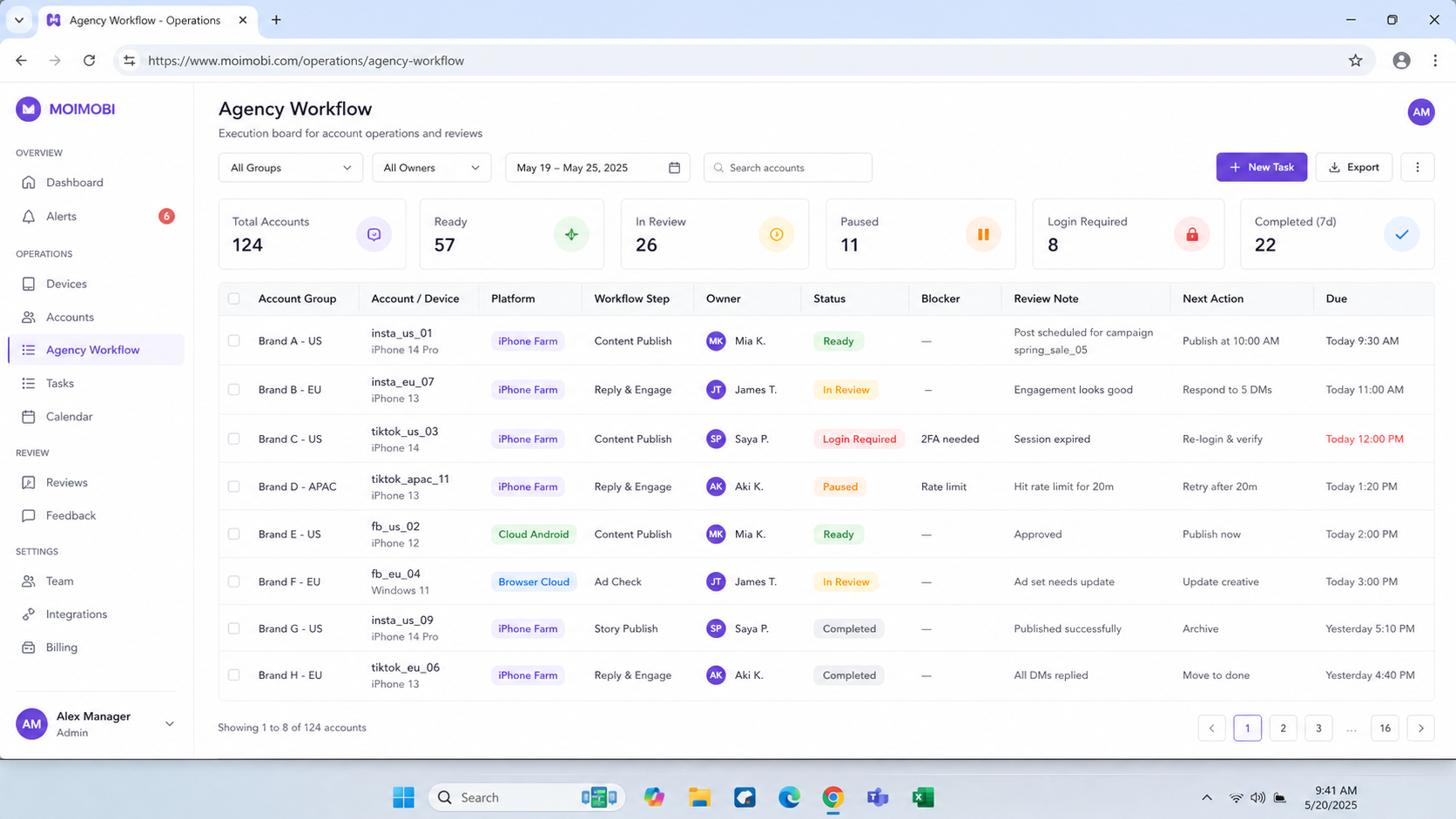
The second requirement is task visibility. A manager should see pending, running, waiting for approval, completed, failed, and blocked states. “Online” is a device state, not a workflow state.
The third requirement is evidence. Remote device work may need a screenshot, a session reference, a result record, or a human approval note. Screenshots are useful for visible state, but they do not prove backend persistence or downstream delivery by themselves. An agency multi-account control surface can keep the assignment and task view together when several client lanes share an operating team.
The fourth requirement is controlled access. An agency may have operators, reviewers, account managers, and clients. Those roles do not need the same control surface. A device management system should make the permitted action clear before a task is launched. For environments that carry separate client sessions, account-isolated agency workspaces make the boundary easier to review.
For Android environments, Android Management API documentation provides a useful model for separating enterprise, device, policy, application, enrollment, and operation resources. It is not a specification for every agency platform, but it demonstrates why identity and policy should not be collapsed into one status field. See the Android Management API reference.
iPhone Farm Management Software Selection Checklist
Use this checklist before comparing products or building an internal tool. Mark each item as confirmed, needs validation, or not applicable.
Environment and ownership
- Are the devices physical iPhones, remote iOS devices, Android cloud phones, or a mixed fleet?
- Can the team identify each environment with an immutable ID?
- Can a device be assigned and reassigned without losing history?
- Can the system show the current client, account lane, and owner?
- Can test, staging, and client production lanes be separated?
Workflow control
- Can a task be paused before a human decision?
- Can an operator see why a task failed?
- Can a reviewer approve, reject, or return a task with a reason?
- Can duplicate tasks be detected before they run?
- Can the system show the next action after an exception?
Evidence and reporting
- Can screenshots, logs, or result references be linked to a task?
- Can sensitive evidence be restricted or redacted?
- Can an agency export a client-facing activity summary without exposing unrelated accounts?
- Can the team distinguish a device event from a business result?
- Can retention and deletion rules be applied to evidence?
Recovery and capacity
- Can a blocked device be removed from the queue without deleting its history?
- Can tasks be reassigned when an environment is unavailable?
- Can the team see reservation, queue, and review backlog states?
- Can a failed configuration change be rolled back or isolated to a pilot lane?
- Can capacity be measured by ready environments rather than raw device count?
The last question is usually the most revealing. Ten devices with unclear ownership may produce less dependable output than fewer environments with clear assignment and recovery.
iPhone Farm Management Software Cost Breakdown
Agencies should compare the full operating cost, not only a device or software line item. Public pricing is not assumed here because hardware, remote access, storage, routing, support, and client requirements vary. Ask each provider to separate the following cost areas.
| Cost area | What to include | Decision question |
|---|---|---|
| Device or environment access | Physical device ownership, remote reservation, or cloud environment access | Does the workflow need iOS hardware, Android execution, or browser access? |
| Management software | Inventory, assignment, task queues, roles, evidence, and reporting | Which controls are included instead of being handled manually? |
| Account operations | Setup, login review, client separation, and reassignment work | Who owns the environment when a client changes? |
| Connectivity and routing | Network, proxy, carrier, or regional requirements | Which parts need monitoring and support? |
| Human review | Approval, customer response, exception handling, and handoff | How much operator time is required per task lane? |
| Evidence and retention | Screenshots, logs, storage, redaction, and export | What must be retained, and who can access it? |
| Recovery and exit | Reconfiguration, replacement, data export, and unassignment | Can the agency change the model without losing history? |
This breakdown is intentionally non-numeric. It prevents a low device quote from hiding labor, review, or recovery work. A buying decision is stronger when the agency can explain the expected cost per ready task lane and the cost of an exception, even before it chooses a provider.
How to Set Up an Agency Workflow
The setup should start with client boundaries, not with bulk device enrollment. Use the following sequence for a first implementation.
1. Map client workflows
List the tasks the agency actually performs. Separate iOS-only work, Android app work, browser work, content review, customer replies, and internal testing. Do not place every task in one generic “automation” category.
2. Select the environment per task
Choose the smallest environment that can perform the task with the required review and evidence. If the workflow needs an iOS-only app behavior, an Android cloud phone is not an equivalent. If the workflow uses a web dashboard, a physical phone may add unnecessary operational work.
3. Define assignment and access
Create the fields for client, account, device, operator, reviewer, task class, and assignment period. Separate the person who runs the task from the person who approves an exception when the client process requires review.
4. Create a standard task state model
Use a limited set of states such as queued, ready, running, waiting for review, completed, failed, blocked, and handed off. Add a reason code for failed and blocked tasks. Avoid free-text status labels that each operator interprets differently.
5. Run a small verification task
Before a client workflow goes live, run a limited action. Verify environment selection, app or browser state, account lane, task result, evidence, and handoff. A successful device connection alone is not enough.
6. Review and expand by lane
Review the pilot with the client team. Fix assignment or evidence gaps before adding more devices. Expansion should follow a repeatable lane model, not a one-time manual success.
Common Mistakes to Avoid
Treating “iPhone farm” as a universal product category
The term may refer to physical hardware, remote testing devices, or a multi-device operations system. Ask what device, OS, control path, app, and ownership model are actually included.
Promising iOS behavior from an Android environment
An Android cloud phone can support Android workflows, but it does not reproduce every iOS-specific behavior. Label the environment clearly in the proposal and in the task system.
Counting devices instead of ready task lanes
Capacity depends on ownership, access, app readiness, queue state, and review bandwidth. A device that is reserved, blocked, or waiting for approval is not equivalent to a ready lane.
Mixing client data in shared evidence
Screenshots and logs can reveal account names, customer messages, and private task context. Use client-scoped access and retain only what the workflow needs.
Using one administrator account for the agency
Shared credentials make handoff and review difficult. Use named roles where the platform supports them and record who approved an exception.
Replacing diagnosis with resets
A reset may clear a symptom while hiding the cause. Preserve the failure state first when the incident requires evidence, then use the approved recovery path.
Who It Fits and When It Is Not a Strong Match
This category fits agencies that manage repeated mobile or web workflows for several clients, need assignment history, and have enough review structure to act on exceptions. It can also fit internal device labs where test sessions, screenshots, and logs need a shared record.
It is not a strong match when the team has one occasional device task, no account separation requirement, or no owner for failed work. A full device fleet creates operational overhead. In that case, a smaller remote device service or a browser workflow may be easier to control.
The correct fit also depends on app requirements. App-only work needs a mobile environment. Web-only work may fit a browser workspace. Mixed operations often need a combination. Moimobi should be evaluated as an execution infrastructure layer for supported browser and mobile workflows, not as a blanket claim that every iPhone task can move to one environment.
Pilot Rollout, Measurement, and Recovery Checks
Start with one client lane and a limited task type. Define the expected owner, environment, evidence, and recovery path before the first run. Include at least one paused or failed case in the pilot so the team tests the operating model, not only the happy path.
Track these measures during the pilot:
| Measure | What it reveals | Action if weak |
|---|---|---|
| Assignment accuracy | Whether the right client lane receives the task | Tighten naming and assignment review |
| Ready-lane rate | Whether environments are usable at task time | Investigate access, app, and queue blockers |
| Review completion | Whether human decisions keep pace | Simplify evidence and assign reviewers |
| Handoff completeness | Whether another operator can continue | Add required owner and next-action fields |
| Repeat failure categories | Whether the same issue returns | Create a targeted recovery runbook |
| Recovery time | How long blocked work stays unresolved | Separate diagnosis from queue management |
At the end of the pilot, decide one of three ways forward: keep the current lane, change the environment, or stop the workflow. Do not expand simply because the first task completed.
Frequently Asked Questions
What does iPhone farm management software normally manage?
It may manage inventory, remote access, assignment, tasks, evidence, permissions, and reporting. The exact scope depends on whether the fleet is physical, remote iOS, Android cloud, or mixed.
Is an iPhone farm the same as a cloud phone farm?
No. A physical iPhone fleet and a cloud Android fleet provide different operating environments. Compare the app, OS, device, account, and evidence requirements first.
Can an agency use one platform for iPhone and Android work?
Sometimes. The platform must support the required environments and make their differences visible. Do not treat cross-platform task labels as proof of equivalent behavior.
What is more important than device count?
Ready task lanes, clear ownership, review capacity, evidence quality, and recovery time. Raw inventory is only one capacity input.
Should agencies keep screenshots of every task?
Usually not. Capture images when they support approval, exception review, completion context, or handoff. Apply access and retention rules to sensitive evidence.
How should a team handle a reassigned device?
Close the previous assignment, record the change, verify the new account lane, and run a limited readiness check before client work starts.
Does Moimobi replace native iPhone management?
Do not assume that. Evaluate the specific device and workflow support. Moimobi is positioned as execution infrastructure across supported browser and mobile environments.
What should the first pilot include?
One client lane, one repeatable task, a named operator, a reviewer, a failure path, and a handoff record. That is enough to expose most ownership and workflow gaps.
Conclusion
iPhone farm management software is useful only when it connects device state to agency ownership and client workflow. Start by separating physical iPhone needs from Android cloud and browser needs. Then compare assignment history, task control, evidence, access, and recovery rather than device count alone.
The next practical step is a small lane-based pilot. Choose one client workflow, define the ready state, record the first exception, and measure whether another operator can continue without private context. That evidence will tell the agency whether to expand a phone farm, add cloud execution, or simplify the workflow.



