

Key Takeaways
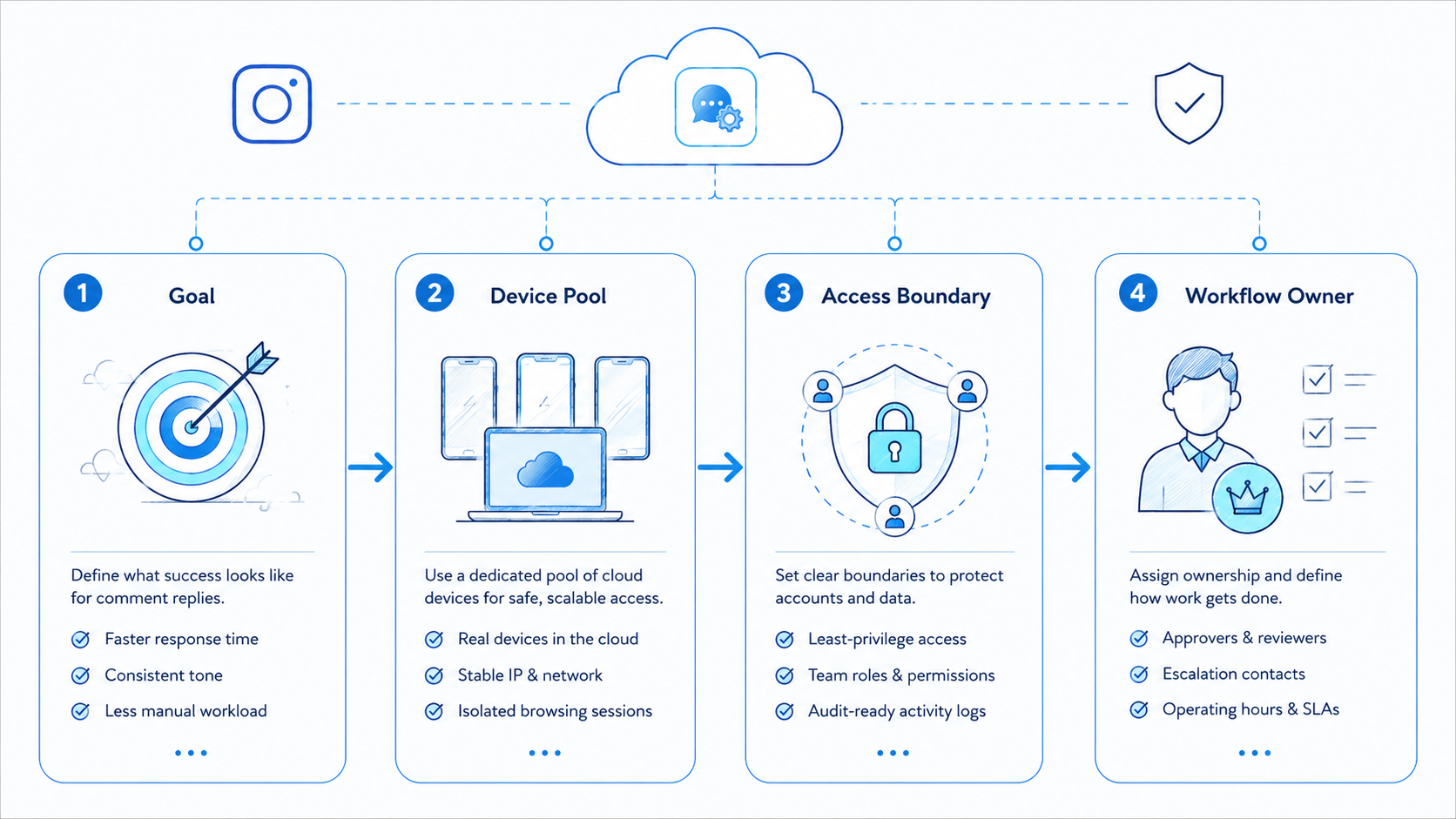
- Instagram comment reply automation is a repeatable comment-handling workflow for creators and agencies.
- A good setup separates moderation, routine replies, and high-value escalation.
- Instagram provides comment visibility and filtering controls that shape the workflow.
- Agencies should validate queue ownership and recovery before they try to increase reply speed.
Instagram comment reply automation is a structured way to sort, answer, and review Instagram comments at scale. For creators and agencies, the real value is not only faster replies. It is cleaner queue ownership, more predictable moderation, and fewer dropped conversations when many accounts are active at once.
That distinction matters because creators and agencies usually face a mixed queue. Some comments need short engagement replies. Some need moderation. Some lead into DMs, lead capture, or brand support. Once many accounts and many operators are involved, a simple inbox habit stops being enough.
Instagram controls already show that comment handling includes moderation decisions. Hiding unwanted comments, turning comments on or off, and managing comments inside Meta Business Suite all affect how a team should design the workflow.1 2 3 Playwright browser contexts remain a useful reference for keeping account state separated across repeat work.5
The Core Idea Behind Instagram Comment Reply Automation for Creators and Agencies
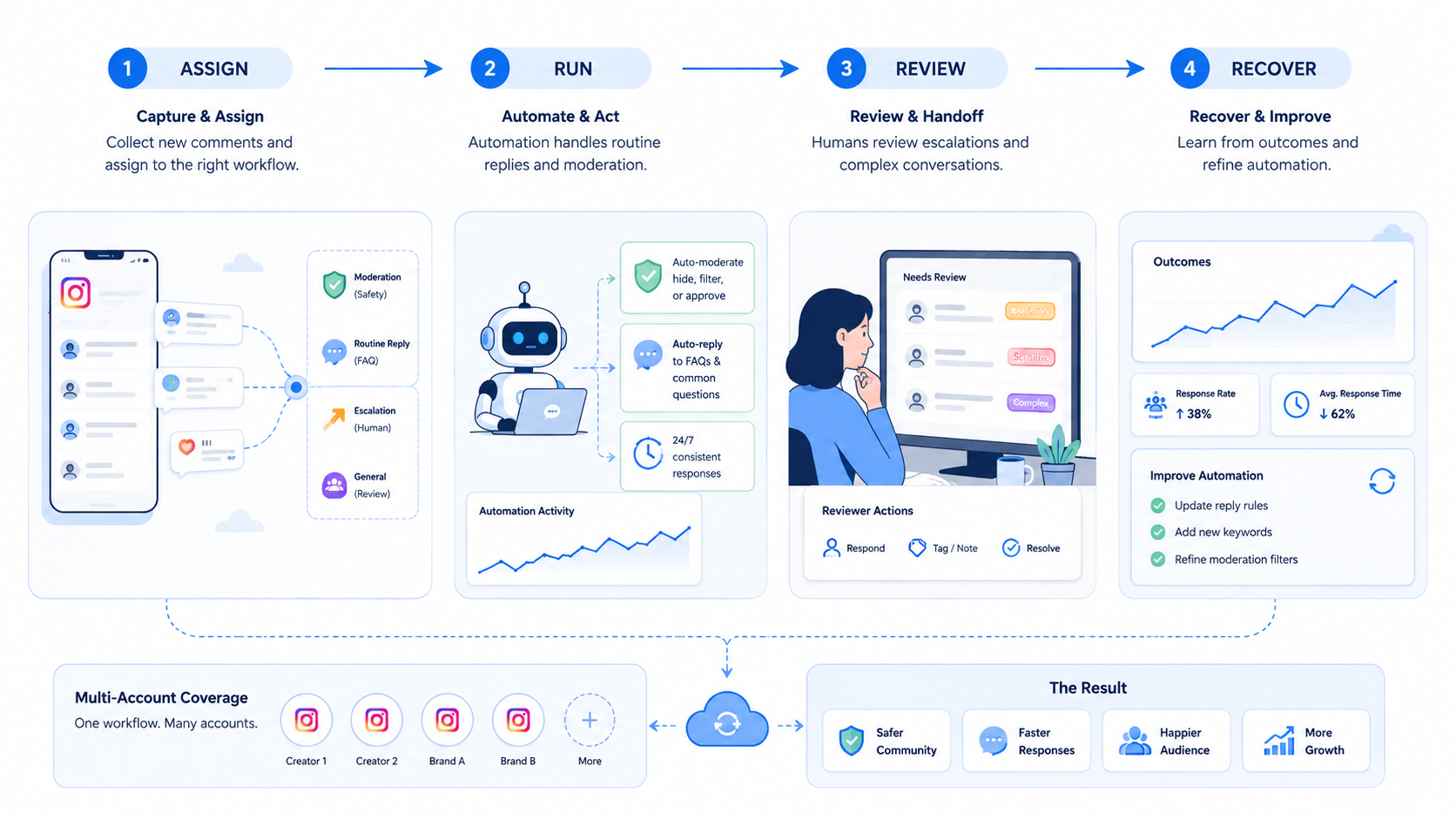
Instagram comment reply automation is not one feature. It is a system of rules around who sees comments first, which replies can be standardized, and when a human should take over.
Three layers usually matter:
| Layer | Job | Operational effect |
|---|---|---|
| Moderation | Hide, filter, or block unwanted comment patterns | Reduces noise before reply work begins |
| Reply handling | Route routine comments into repeatable workflows | Improves response consistency |
| Escalation | Move sensitive or high-value comments to a person | Protects brand and conversion quality |
For some teams, this lives inside social media marketing. For others, it belongs inside a broader multi-account management setup with account-level task ownership.
Why Teams Search for Instagram Comment Reply Automation
Creators and agencies usually search for this topic after volume stops fitting inside one inbox habit. A creator may want to keep response quality high while keeping time under control. An agency may need shared coverage across many client accounts and posting windows.
The pressure is not just volume. It is inconsistency. One operator replies quickly. Another ignores low-priority threads. A third starts handling moderation inside the same queue. That is when comment reply automation stops sounding optional.
Instagram also ties comment handling to broader visibility and interaction settings. Controlling your visibility on Instagram makes clear that who can interact, comment, or see content depends on account settings and moderation controls.4 A workflow has to account for those settings when teams build a shared reply process.
Who Benefits Most and In What Situations
The strongest fit is not "anyone with comments." It is teams with repeatable comment operations.
Best fit
- Agencies with shared engagement coverage for multiple brands.
- Creator teams that split publishing, moderation, and follow-up.
- Commerce or lead-gen accounts where comments can become inbound intent.
- Teams that already use shared review or handoff processes.
Weak fit
- Single accounts with low comment volume.
- Teams that still work from one shared login path.
- Workflows with no distinction between moderation and reply handling.
- Operators who do not review queue failures or escalations.
How to Evaluate or Start Using Instagram Comment Reply Automation for Creators and Agencies
Use checkpoint logic before you automate more volume.
- Checkpoint 1: define comment classes such as routine engagement, moderation review, support request, and sales intent.
- Checkpoint 2: assign one owner model for each account or account group.
- Checkpoint 3: separate moderation controls from routine reply actions.
- Checkpoint 4: log escalations into a shared queue instead of private chat.
- Checkpoint 5: review queue completion, duplicates, and exception count daily.
Pass / fail checks
- Pass: the team knows which comments can be handled fast and which must be escalated.
- Fail: every comment enters the same reply path with no moderation or escalation layer.
For teams that need separate account contexts, device isolation and Android antidetect are often the next infrastructure pages worth checking.
Mistakes That Reduce Results
The biggest mistake is optimizing only for reply speed. A fast queue with weak escalation logic can create more cleanup than it saves.
The second mistake is letting moderation and reply ownership blur together. Instagram provides comment hiding, filtering, and on/off controls for a reason. Those controls should inform the queue design, not sit outside it.
A third mistake is centralizing everything without clean handoff. Agencies often want one shared engagement layer, but without a clean environment and task log, the queue turns into shared memory instead of shared operations.
What not to do
- Do not mix moderation, routine engagement, and support replies in one flat queue.
- Do not let multiple operators answer from the same account state without logging ownership.
- Do not measure "comments answered" without also measuring duplicate replies and unresolved escalations.
Pilot Rollout, Measurement, and Recovery Checks
Start with a short pilot across a small account group.
| Check | What to inspect | Recovery trigger |
|---|---|---|
| Queue completion | How many comments reach a final status | Backlog keeps growing |
| Duplicate handling | Whether two operators touched the same thread | Ownership model is weak |
| Escalation quality | Whether important comments reach the right person | Important threads stay in routine queues |
| Moderation fit | Whether hidden or filtered comments match the intended policy | Too much noise enters the queue |
| Environment continuity | Whether account context stays stable across shifts | Operators must rebuild context often |
If the team needs device-backed capacity for the engagement layer, phone farm and cloud phone farm infrastructure are the more relevant next reads than generic automation pages.
A Practical Operating Model for Creators and Agencies
Creators and agencies rarely need the same queue design. A creator team may care most about keeping voice consistent while staying responsive during a launch window. An agency may care more about coverage, escalation rules, and proof that the team handled the right comments at the right time.
That difference is easier to manage when the workflow uses explicit roles:
| Role | Main responsibility | Why it matters |
|---|---|---|
| Moderator | Review filtered comments and unwanted patterns | Prevents noise from entering the main reply lane |
| Responder | Handle routine comments and keep queue pace steady | Improves consistency across posts and accounts |
| Escalation owner | Handle sensitive, support, or sales-intent comments | Keeps important threads from being buried |
| Reviewer | Check duplicates, unresolved threads, and queue health | Shows whether the workflow still holds at scale |
This model does not require a large team. Small teams often assign one person to two roles during a pilot. The point is to keep the decision path visible, so the team knows when it is doing moderation, when it is doing routine engagement, and when it is moving a comment into a higher-touch lane.
Instagram Comment Reply Automation Review Metrics
Reply count is easy to track, but it rarely explains whether the workflow is healthy. Better review signals are tied to ownership and recovery.
- Check whether important comments reached the correct escalation owner.
- Check whether the same thread was touched by more than one operator.
- Check whether filtered or hidden comments matched the intended moderation policy.
- Check whether unresolved threads are grouped by a known cause.
- Check whether the next shift can resume work without asking for missing context.
These checks map better to real operations than a raw reply total. They show whether the workflow will hold when a campaign, launch, or client queue gets busier.
How to Expand Instagram Comment Reply Automation Without Losing Control
Expansion should follow the same order every time:
- confirm the queue design works on a small account batch,
- confirm moderation and reply ownership stay separate,
- confirm the team can explain unresolved or escalated items,
- then add more accounts or longer coverage windows.
For agencies, this often means grouping accounts by client or campaign. For creator teams, it often means grouping by content stream or launch period. In both cases, the workflow becomes more reliable when device isolation and multi-account management support the account structure instead of fighting it.
One more expansion check is worth adding. Agencies should confirm that each client queue still has a clear escalation owner after shift changes, and creator teams should confirm that reply tone stays consistent when another operator takes over. Those two checks reveal whether the workflow is truly repeatable or only works when one experienced person is online.
Frequently Asked Questions
Is Instagram comment reply automation only for agencies?
No. Creator teams also use it when replies, moderation, and follow-up are split across roles.
Does every comment need automation?
No. Teams usually automate routine handling and escalate sensitive or high-value threads.
Should moderation and replying use the same queue?
They can connect, but they should not be treated as the same task type.
What should a team measure first?
Start with queue completion, duplicate replies, and escalation quality.
Is one inbox enough for many accounts?
Usually not if different operators and different account groups are involved.
What breaks the workflow most often?
Shared ownership, weak escalation rules, and mixed account context.
What should the team do next?
Run a small pilot with defined comment classes, one owner model, and one recovery review.
Conclusion
Instagram comment reply automation for creators and agencies works when the queue design is clear before volume rises. A stable setup separates moderation from routine replies, routes important comments to the right owner, and preserves clean account context during handoff.
Before you scale, confirm three things: comment classes are defined, ownership is explicit, and your team can explain every failed or escalated thread. That is the difference between a fast-looking workflow and a durable one.
Sources
- Instagram Help Center: Hide unwanted comments and message requests on Instagram
- Instagram Help Center: Turn comments on or off for Instagram posts
- Meta Help Center: Meta Business Suite inbox for Instagram messages and comments
- Instagram Help Center: Controlling your visibility on Instagram
- Playwright Docs: Browser contexts



