
Content Type: comparison
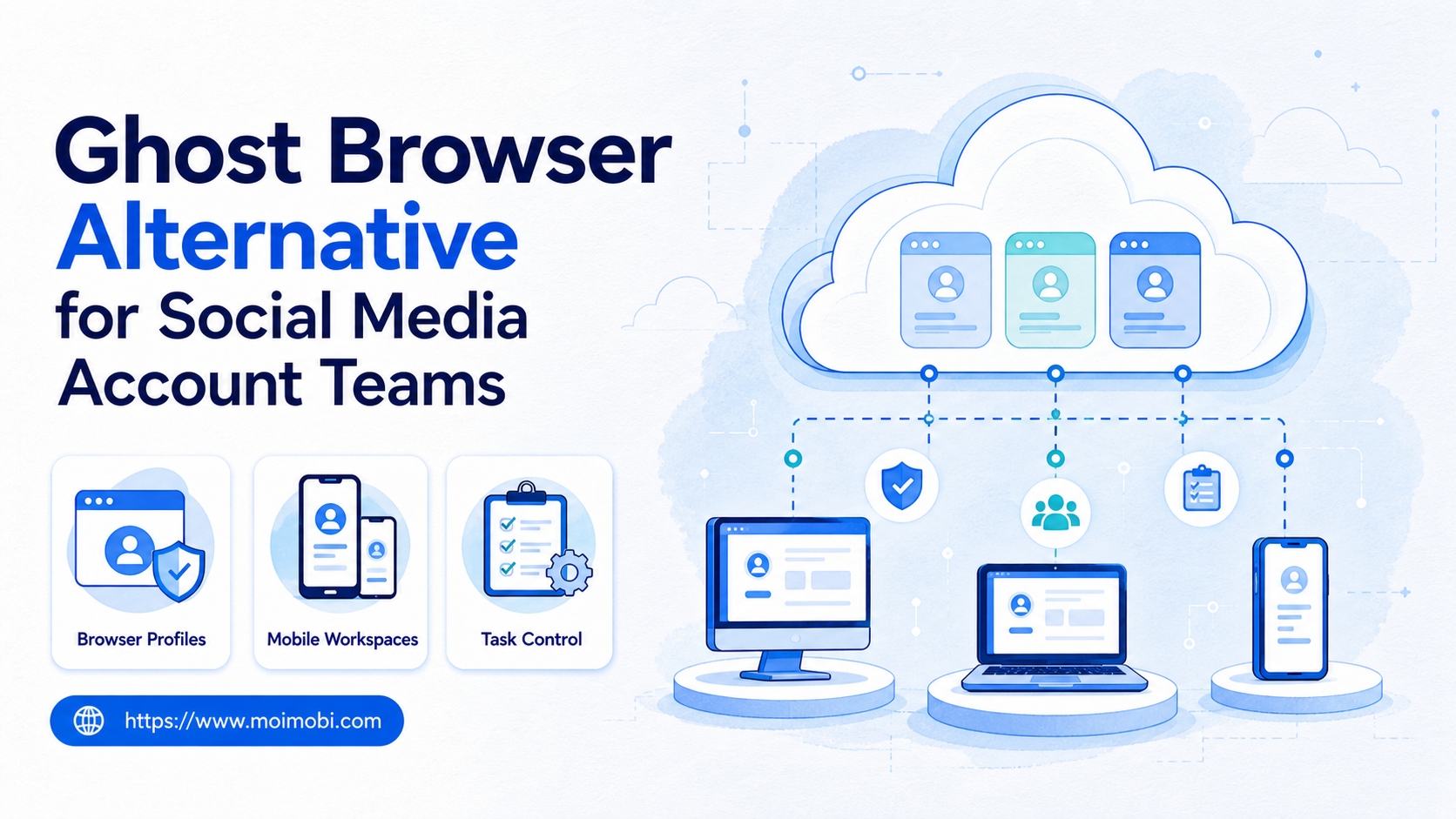
A Ghost Browser alternative is a better fit when your team needs more than multi-session browsing inside one desktop browser. Ghost Browser can be useful for separated identities and browser workspaces. Social media account teams may need a wider execution setup that also covers mobile app work, account assignment, approvals, and task records.
The selection rule is simple. Use Ghost Browser when the main job is switching between web sessions. Consider Moimobi when the job includes browser profiles, mobile environments, account ownership, workflow queues, and repeatable team operations.
This does not make one tool universally better. It makes the buying question more precise. A social media team should compare account isolation, mobile execution, proxy routing, task handoff, and review logs before choosing a Ghost Browser alternative.
Key Takeaways
- Ghost Browser is strongest when the work centers on browser identities and workspace switching.
- A social media operations team may need browser and mobile execution in the same workflow.
- The right alternative depends on account roles, platform mix, review rules, and handoff needs.
- Do not compare only profile count or price; compare daily operating control.
- Run a pilot with real account tasks before moving production accounts.
What to Compare Before Choosing a Ghost Browser alternative
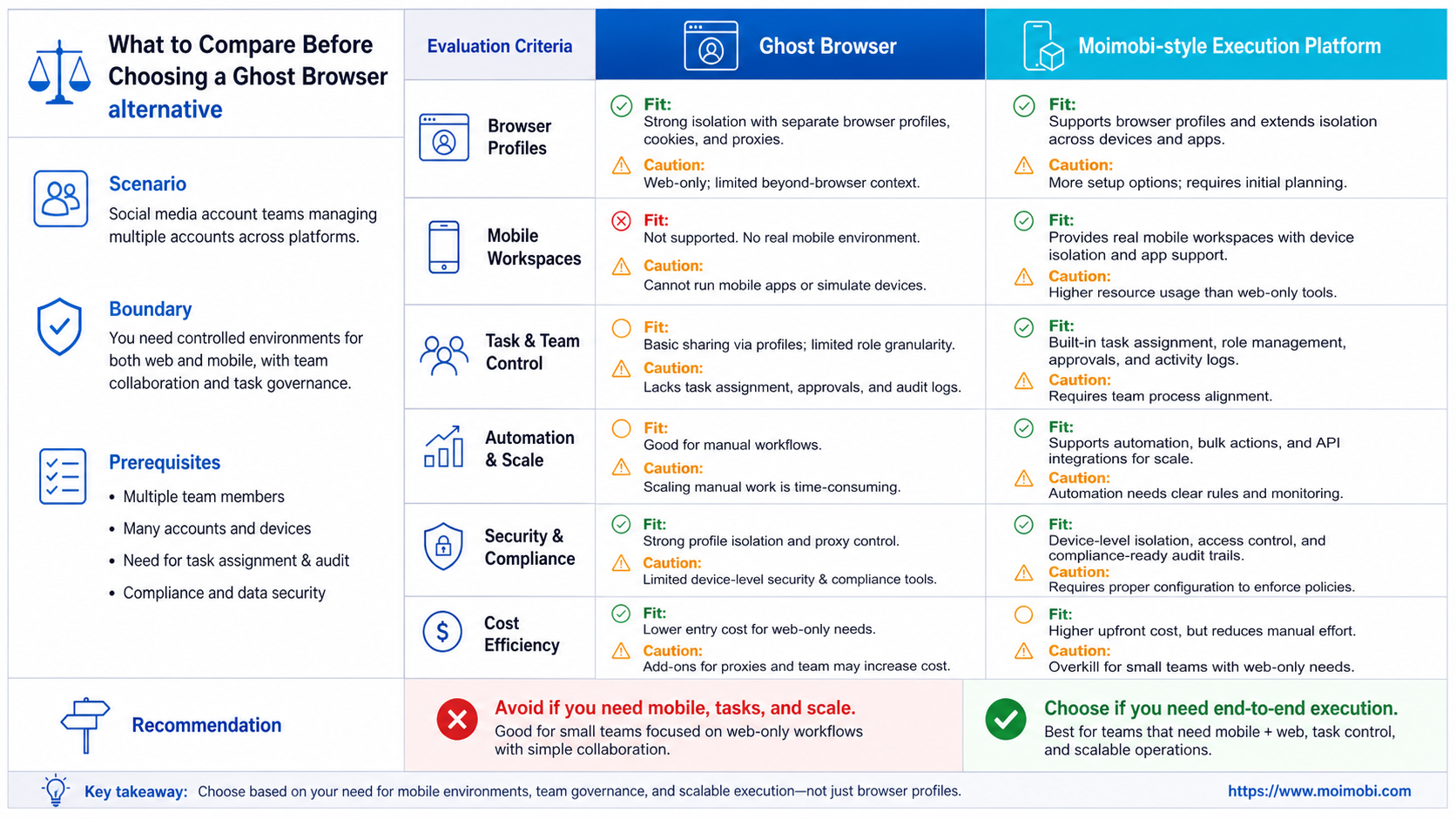
Start with the work your team repeats every week. A browser-only team may need identity separation, workspaces, and proxy assignment. A social media operations team may also need mobile app checks, comment queues, content approval, and account-level logs.
Ghost Browser's own materials describe Workspaces and Identities as core concepts. Its support documentation explains persistent Identities, temporary Identities, and proxy assignment. See the official Ghost Browser documentation on Identities when comparing browser-side account separation.
Those capabilities matter for web account work. They do not automatically answer mobile execution, team workflow, or account review needs. If a team manages TikTok, Instagram, Facebook, X, YouTube, and customer replies, the question expands beyond browser tabs.
| Criteria | Browser-centric setup | Execution-platform setup |
|---|---|---|
| Web session separation | Main focus | Included as one layer |
| Mobile app execution | Usually outside the browser model | Part of the operating model |
| Account ownership | Team must define separately | Can be tied to workflow records |
| Task review | Often external to the browser | Can be designed into the queue |
| Social media scale | Depends on manual discipline | Depends on environment and workflow design |
If your team only needs web login separation, a browser-focused tool may be enough. If it also needs mobile tasks and repeatable account operations, compare against a broader execution stack.
Key Differences Between Ghost Browser Alternative for Social Media Account Teams
The first difference is the unit of work. In a browser-centric tool, the unit is usually a tab, identity, profile, or workspace. In a social media operations system, the unit should be the account task: publish, reply, monitor, collect lead, review comment, or escalate customer issue.
The second difference is the environment boundary. Social media teams often switch between web dashboards and mobile apps. A browser identity cannot handle every mobile-only workflow. A cloud phone environment gives the team a mobile execution space when the task belongs inside an Android app.
The third difference is handoff. A browser may separate sessions, but the team still needs to know who owns each account, who approved a post, and what happened after the action. That needs records beyond the browser window.
Scenario 1: agency managing client profiles
An agency may keep one client account group per workspace. Ghost Browser can help with browser-side separation. The agency still needs client approvals, mobile app access, and task history. Moimobi fits better when those approvals and mobile checks are part of daily delivery.
Scenario 2: ecommerce team handling replies
An ecommerce team may answer comments and DMs across several platforms. Some work happens in web dashboards. Some happens in mobile apps. The better alternative is the one that keeps account role, environment, queue, and result visible.
Scenario 3: growth team testing workflows
A growth team may test new posting and monitoring workflows. The right setup should support small pilots, rollback rules, and review notes. Session separation alone is not enough when the workflow changes weekly.
Features, Workflow, and Trade-Offs
Feature comparison should focus on operating constraints. Profile count, workspace count, and proxy options matter. They are not the whole decision. Teams also need to know how work is assigned, tracked, reviewed, and paused.
Ghost Browser's pricing and plan packaging should be checked directly before purchase because commercial details can change. Do not quote old plan limits from a comparison article without checking the vendor page.
For Moimobi-style evaluation, compare these workflow layers:
- Account workspace: where each account runs.
- Environment type: browser profile, mobile workspace, or both.
- Owner: who is responsible for the account state.
- Task queue: what work is scheduled or waiting.
- Approval: which actions require human review.
- Record: what evidence exists after the task.
- Pause rule: who can stop a workflow when it becomes unclear.
This is where an Android fingerprint browser alternative can help frame the decision. The question is not only whether profiles exist. The question is whether each account has a usable environment and a clear workflow around it.
The trade-off is complexity. A broader execution platform requires more setup discipline. The team must define account roles, device or browser assignment, and review rules. That effort pays off only if the team truly needs cross-environment operations.
Pricing and Operational Considerations
Do not compare pricing as a simple monthly number. Compare total operating cost. A cheaper browser tool can become expensive if operators spend hours fixing mixed sessions, mobile handoffs, or unclear approvals.
A broader platform can also be overkill. If one person manages a few web-only accounts, a lighter browser-based setup may be more efficient. The right Ghost Browser alternative should match the workflow, not the largest possible feature list.
Use this cost lens:
| Cost area | What to inspect | Why it matters |
|---|---|---|
| Tool subscription | Browser plans, profile limits, proxy features | Direct monthly cost |
| Setup time | Account map, workspace creation, role design | One-time operational cost |
| Review time | Approvals, failure review, handoff notes | Ongoing team cost |
| Mobile work | App tasks, device access, Android environments | Often missed in browser-only comparisons |
| Error recovery | Pause rules, owner records, rollback path | Determines support load |
Teams should also consider platform rules. If social media workflows include automated posts, replies, DMs, or API-connected actions, official platform policies matter. X's Developer Policy is one example of how write actions and automation boundaries can affect workflow design. X also publishes Developer Guidelines that discuss automation, transparency, credentials, and prohibited patterns.
The practical test is simple. If the team cannot explain how an account moved from plan to action to review, the tool is not solving the real problem.
Which Option Fits Different Teams
Ghost Browser fits teams that mainly need multi-session web browsing. This includes research teams, customer support users working inside web apps, or operators who need quick session separation from one desktop environment.
Moimobi fits teams that treat accounts as operating units. These teams need browser profiles, mobile environments, task queues, account owners, and review logs. They may manage TikTok, Instagram, X, Facebook, YouTube, marketplaces, and customer channels together.
Ghost Browser may fit when:
- Work happens mostly in web dashboards.
- The team needs multiple identities in one browser window.
- Mobile app execution is not central.
- Approval and task tracking already happen elsewhere.
- The team wants a lighter desktop browser workflow.
Moimobi may fit when:
- Accounts need both browser and mobile execution.
- Teams assign accounts to owners and backups.
- Social media workflows include publishing, replies, monitoring, and follow-up.
- The team needs structured records for tasks and handoffs.
- Mobile environments need to be part of account operations.
If mobile work is central, evaluate a mobile account execution layer instead of treating mobile tasks as side work. Social media teams often discover that the browser is only one part of the actual workflow.
Pilot Checklist Before Switching
Do not switch the whole team based on a feature table. Run a small pilot with real account work. Pick three to five accounts that represent different jobs: one publishing account, one reply account, one monitoring account, and one test account.
Track these fields during the pilot:
- Account role and owner.
- Browser workspace or profile used.
- Mobile workspace used, if any.
- Task type and approval rule.
- Time from assignment to completion.
- Any mixed-session event.
- Any missed approval.
- Any handoff confusion.
The pilot should answer one question: does the new setup reduce operational ambiguity? If it only adds more places to click, it is not ready for production.
Use a pass/fail rule:
| Pilot question | Pass | Fail |
|---|---|---|
| Can each account be tied to one owner? | Owner is visible | Ownership is guessed |
| Can each task be reviewed? | Task has result and notes | Result is unclear |
| Can mobile tasks run cleanly? | Assigned mobile workspace exists | Operators improvise |
| Can exceptions be paused? | Stop rule exists | Errors keep repeating |
For broader account teams, connect the pilot to multi-account role mapping. The pilot should test team behavior, not only software features.
Migration Notes for Social Media Account Teams
Migration should be staged, not rushed. Start by exporting the account map from the current workflow. Include account role, owner, backup owner, default workspace, proxy rule, mobile requirement, and active tasks. This record becomes the baseline for the new setup.
Move low-risk accounts first. A test account, monitoring account, or internal demo account is better than a revenue-critical account. The goal is to check whether the new environment model is understandable before it handles sensitive replies or campaign posts.
Keep the old workflow readable during the pilot. Do not delete old workspaces, notes, or assignment records immediately. If the pilot fails, the team should be able to roll back without rebuilding everything from memory.
Use a migration table:
| Migration item | Move first | Hold back |
|---|---|---|
| Browser identities | Test and monitoring accounts | Critical client accounts |
| Proxy rules | Non-sensitive review flows | Accounts with unresolved routing notes |
| Mobile workspaces | Low-risk app checks | Live customer reply queues |
| Automation tasks | Manual-review tasks | Unreviewed bulk actions |
| Team access | Backup owner testing | Broad team-wide access |
The handoff rule matters most. Each moved account should have one owner, one default environment, one task queue, and one review note. If any of those fields is missing, the migration is not ready.
Decision Scorecard for a Ghost Browser alternative
Use a scorecard before the buying decision. A scorecard keeps the team from choosing only the tool that looks familiar or has the longest feature list.
Score each area from 1 to 5:
- Browser session separation.
- Mobile app execution.
- Account owner visibility.
- Approval workflow.
- Proxy and routing control.
- Task record quality.
- Team handoff clarity.
- Exception pause and recovery.
A browser-centric team should weight session separation and ease of use higher. A social media operations team should weight mobile execution, account ownership, and task records higher. This makes the decision tied to the job, not to a generic tool category.
The scorecard should be reviewed by the people who use the system daily. Managers may value reporting. Operators may value speed. Reviewers may value clear approvals. The selected setup needs to work for all three groups.
Frequently Asked Questions
What is a Ghost Browser alternative?
A Ghost Browser alternative is another way to manage separated account work. It may be a browser profile tool, antidetect browser, cloud browser, or broader execution platform.
Is Moimobi only a browser alternative?
No. Moimobi is positioned as execution infrastructure. It includes browser and mobile workflow thinking rather than only desktop browser sessions.
When is Ghost Browser enough?
Ghost Browser may be enough when your workflow is web-only and your team already has approval, ownership, and review systems elsewhere.
When should teams consider Moimobi?
Consider Moimobi when social media work spans web dashboards, Android apps, account owners, queues, and repeated team handoffs.
Should pricing decide the tool?
Pricing matters, but it should not be the only factor. Review time, setup effort, and error recovery also affect cost.
Does a multi-session browser replace account management?
No. A browser can separate sessions, but account management still needs owners, permissions, tasks, and review records.
What should agencies test first?
Agencies should test one client group, one account owner, one backup owner, and one repeatable review workflow before expanding.
Can teams use both approaches?
Yes. Some teams use browser sessions for web work and a separate execution layer for mobile or high-control workflows.
Conclusion
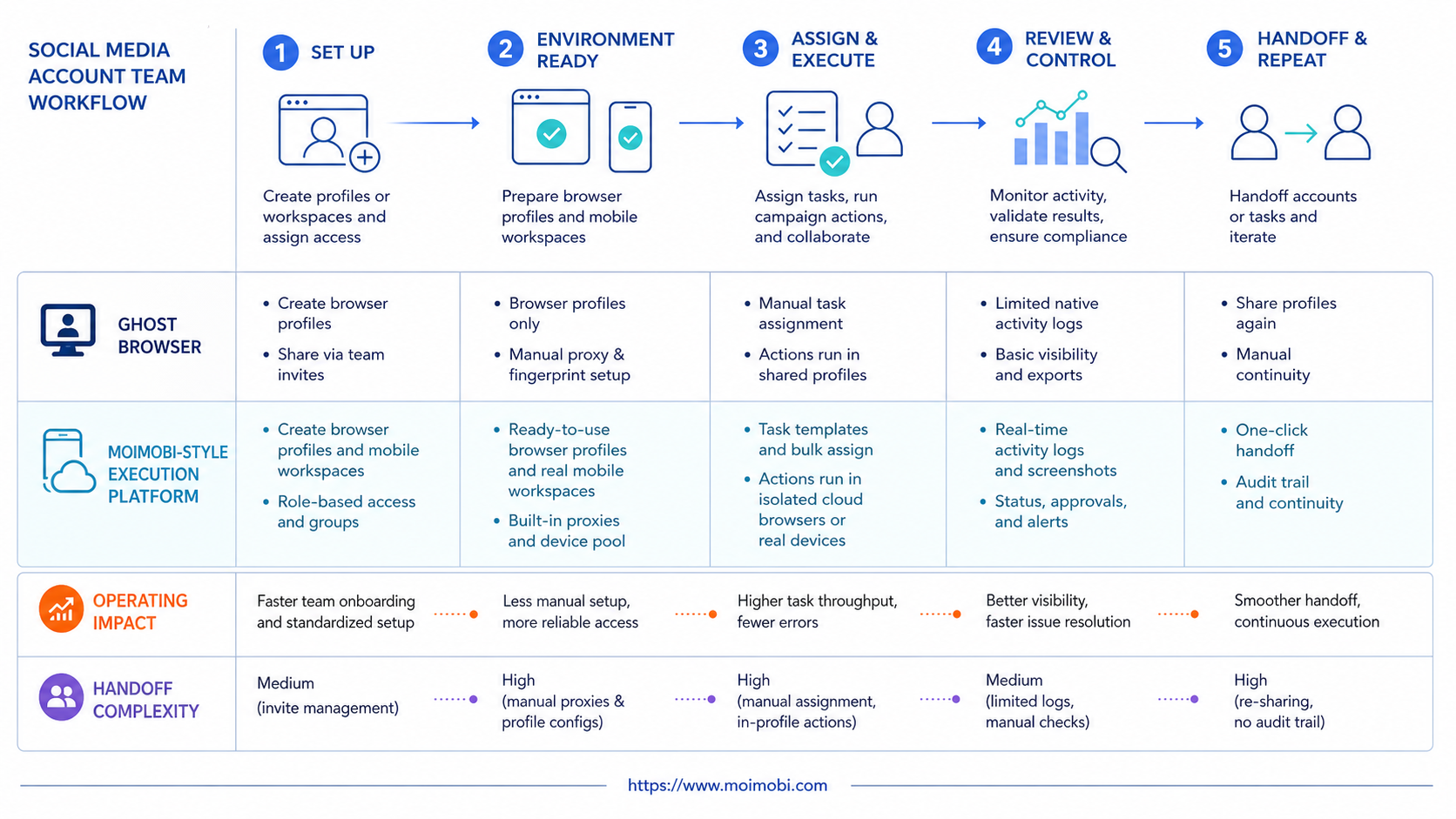
The best Ghost Browser alternative depends on the shape of the work. Browser-only teams should compare identities, workspaces, proxy handling, and ease of use. Social media account teams should also compare mobile execution, account ownership, approvals, and task records.
Before switching, run a small pilot. If the pilot shows cleaner ownership, fewer mixed sessions, and clearer review notes, the alternative is worth deeper evaluation. If not, fix the workflow map before changing tools.



