
Key Takeaways
- A real Instagram automatic posting service does more than send a file to Instagram.
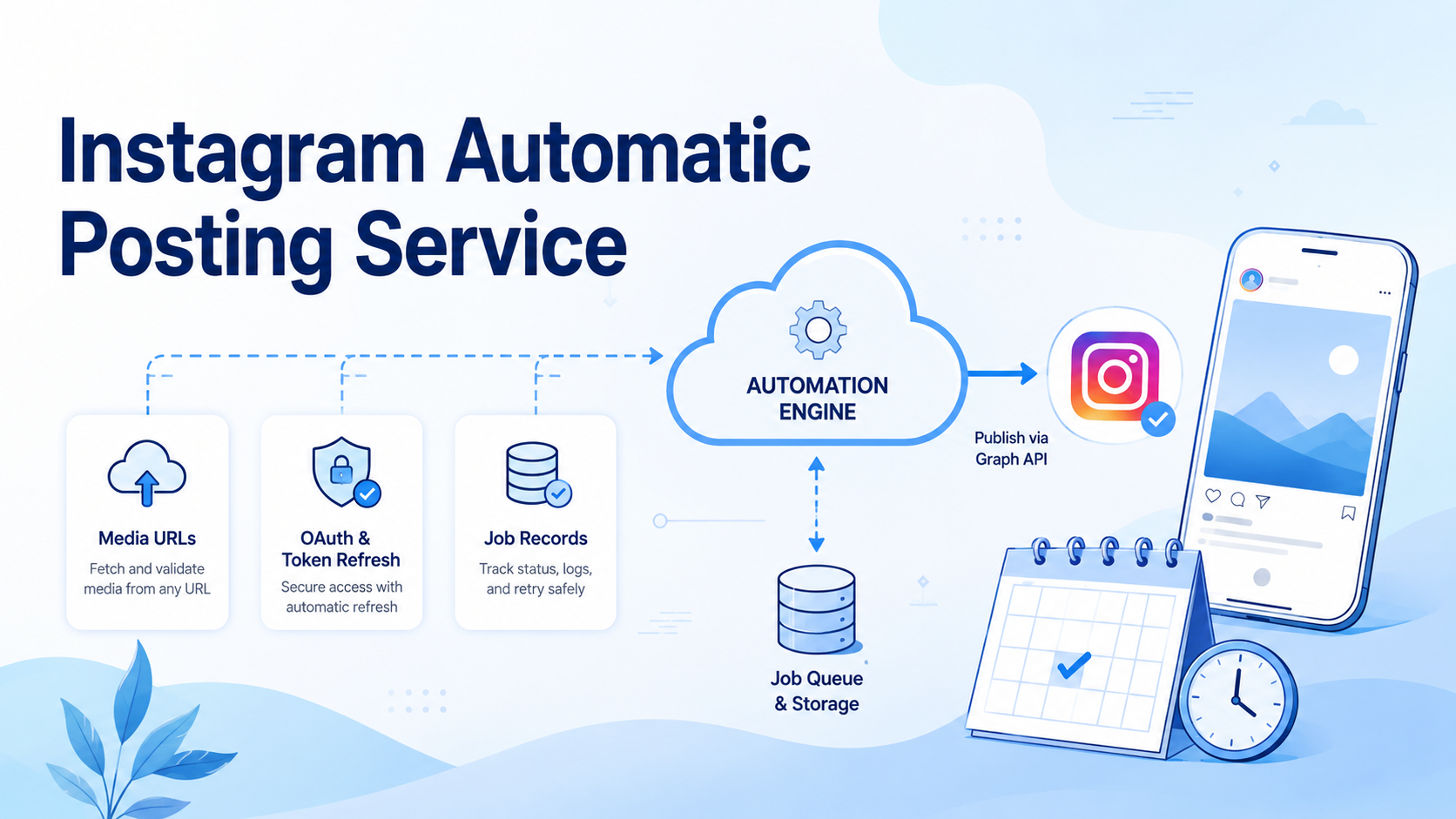
- The reliable flow needs public media hosting, media containers, video processing checks, publishing confirmation, and job records.
- OAuth and token refresh are part of the product surface, not a side setup task.
- For teams, posting belongs inside a broader execution system with account environments, review rules, and recovery paths.
An Instagram automatic posting service works only when it controls the full path from content creation to confirmed publishing. The hard part is not pressing a publish button. The hard part is keeping the media, caption, account, token, job state, and final result in one reliable workflow.
The source article describes a practical build: a short-form content pipeline could already select source media, assemble a clip, add music, generate a caption, and prepare a package. The weak point was the final publishing bridge. The author replaced that bridge with a small local service built around the Instagram Graph API, OAuth commands, token refresh, video container polling, and local job records.

That lesson matters for social media teams. A posting tool cannot cover the full job when the work spans many accounts, reviewers, mobile apps, browser sessions, and customer replies. MoiMobi approaches this from the execution side: a cloud phone or browser environment gives each account a workspace where workflow, operator, and task record can stay together.
Why an Instagram Automatic Posting Service Needs Control
Many teams think Instagram publishing automation starts with uploading a local video. In practice, the flow is more specific.
Instagram does not work like a simple local file upload in the standard publishing path. The media file needs to be reachable from a public URL that Meta can fetch. The service then creates a media container, waits for video processing when needed, and publishes the container after it is ready.
That difference changes the design.
A reliable service needs separate states:
- file generated
- file uploaded to public storage
- media container created
- video processing complete
- post published
- job recorded
If those states collapse into one vague "done" flag, the team cannot tell whether the system rendered, hosted, accepted, processed, or actually published the content.
Meta's Instagram Platform documentation is the best starting point for the official API surface. The operational lesson is simple: treat publishing as a workflow, not as a one-off API call.
What an Instagram Automatic Posting Service Should Contain
The service can be small, but it needs a clean contract.
A practical service can expose an HTTP endpoint and a CLI command. The endpoint receives the media type, public media URL, caption, account context, and publishing options. The CLI makes the same workflow easy to call from a content pipeline or scheduled job.
The useful parts happen behind that contract:
- Read the config
- Test the token
- Create the media container
- Check video status
- Publish the container
- Save the job record
- Return the final status and media ID
The job record is not optional. It tells the team what the system tried to publish, when it happened, which caption it used, which account it touched, and where the run failed. Without that record, the team depends on loose logs or memory.
A useful job record can stay simple, with 11 fields: job_id, account_id, workspace_id, media_url, caption_hash, container_id, ig_media_id, status, error_code, started_at, and finished_at. If container_id exists but ig_media_id is empty, the post did not finish. If error_code repeats 2 times on the same account, the next run should stop and ask for review.
OAuth Is Part of the Instagram Automatic Posting Service
OAuth is often treated as setup work. For an automation service, it is part of the workflow.
The account must fit the publishing path. The team must set up the Meta app. Permissions must be correct. The redirect URI, client ID, client secret, code exchange, long-lived token, refresh path, and test command all need to be clear.
A stable service should provide admin actions for authorization URL generation, code exchange, long-lived token conversion, token refresh, token verification, and account publishability checks.
Meta's access token documentation is useful background for token handling. A team workflow also needs secret storage, redacted logs, permission checks, and a handoff when a token fails.
When token expiry becomes a manual debugging session, the workflow is not ready for team use.
Public Media URLs Are an Infrastructure Boundary
The content pipeline may render the video locally. Instagram needs a public URL.
That does not mean the team needs another posting platform. It needs a storage boundary. The storage layer hosts the media so Meta can read it. It should not decide which account posts, which caption the post uses, or whether the job is complete.
The clean flow is: generate the video, write a manifest, upload the final MP4 to public storage, verify the token, create the media container, wait for processing, publish, and store delivery metadata.
This order prevents stale files and false success states.
For teams running social workflows across devices, the same boundary applies elsewhere. MoiMobi's mobile automation layer is built around controlled execution environments. The file, account, device, and task should all have a traceable relationship.
Why This Matters More for Multi-Account Teams
For a solo creator, the benefit may be saving money or avoiding a posting bridge.
For a team, the benefit is operational control.
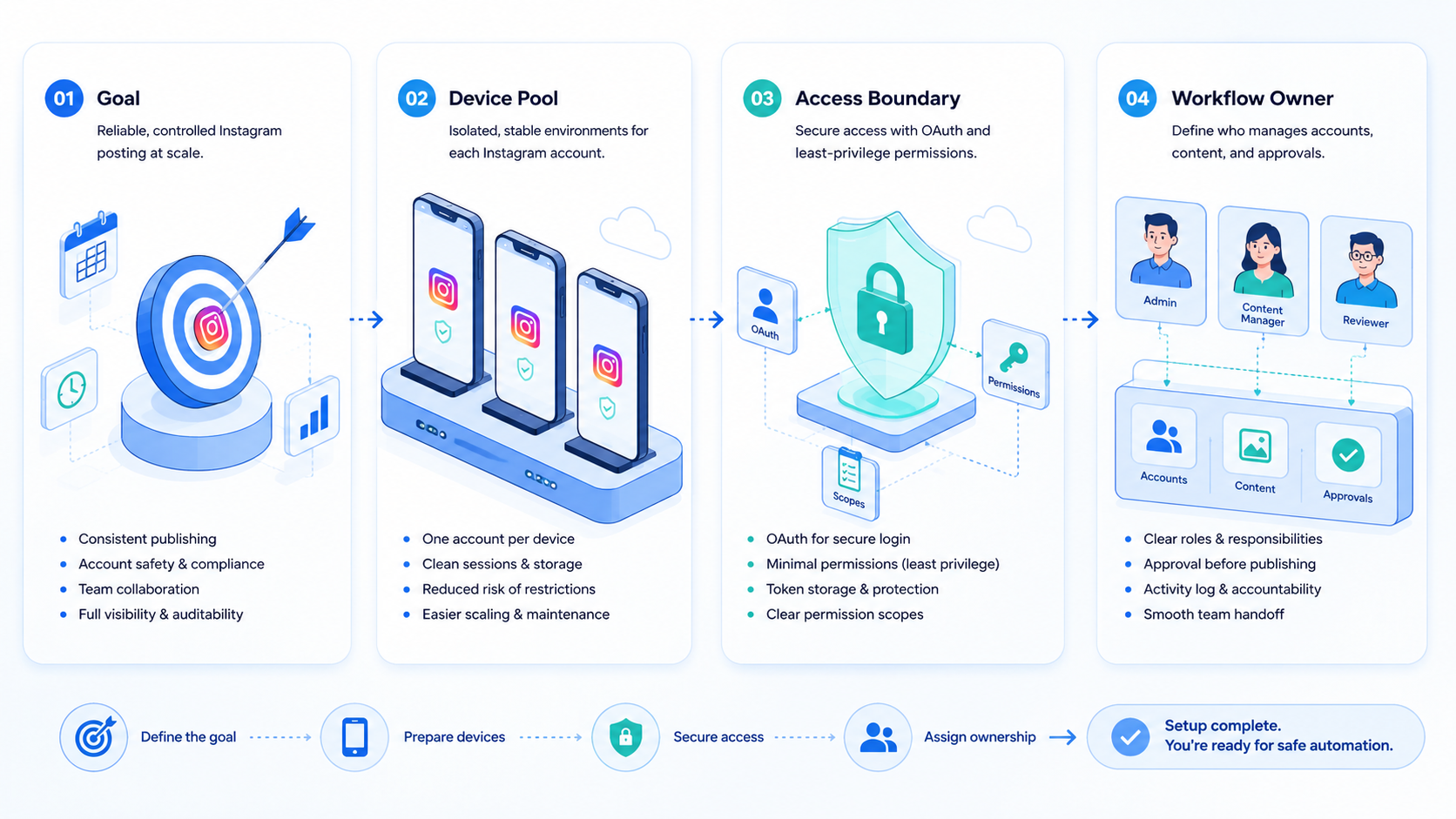
Multi-account teams need to know which account published the content, which workspace held the account state, which asset the job used, whether approval happened, whether the task failed, and who should handle recovery.
That is why a posting service should not live alone. It should connect to account lanes, task ownership, content status, and review rules.
MoiMobi's multi-account management use case fits this model. Each account can have a separated workspace, a workflow role, and a visible task history. For mobile-first work, cloud phones provide remote Android environments. Device isolation keeps lanes clearer.
The goal is repeatable execution with account ownership and recovery.
Remove Old Publishing Paths from the Workflow
One of the strongest lessons from the source article is about old paths.
The author did not merely prefer the new local service. He removed the old third-party bridge as a valid publishing route. Historical metadata stayed available for audit, but the workflow contract changed so the old bridge could not run by accident.
This is important for AI-assisted workflows.
Automated systems follow available paths. If an old delivery mode still exists in a script, prompt, config, or SOP, a future task may use it. A team should turn the preferred path into an executable contract:
- only publish through the approved service
- fail if required account context is missing
- fail if the media URL belongs to an old output folder
- fail if the team cannot verify the token
- fail if the video container is not ready
- fail if the job record cannot be written
That is how a workflow becomes reliable. The rule is not just guidance. The rule becomes a runtime boundary.
How AI Changes Posting Workflows
AI can generate captions, hooks, content ideas, scripts, and task plans. That does not remove the need for execution infrastructure. It makes execution boundaries more important.
When AI prepares content, the system should preserve the campaign idea, source asset, generated hook, edited caption, target account, approval status, final media URL, and delivery result.
If a disconnected bridge owns the posting step, the team loses or copies context. When posting sits inside the same execution system, the team can enforce rules before touching Instagram.
For example:
- do not reuse a source video unless allowed
- do not reuse a hook unless allowed
- do not publish if render validation fails
- do not send a caption from a previous run
- do not treat ambiguous processing states as success
- do not mix files from different output folders
That is the bridge between AI content generation and real execution.
Keep the first rollout small. Pick one account, one post type, one review rule, and one clear stop point.
Run a few safe test jobs before a live campaign. Ask the team to write down what failed, who fixed it, and what should stop the next run. This simple loop helps the service become a real work tool, not a hidden script.
Quick pass/fail scan
| Check | Pass | Fail |
|---|---|---|
| Media | The file has a live URL | The file stays on a local disk |
| Token | The team can test it now | No one knows when it expires |
| Job log | Each run has a clear state | The team checks by hand |
| Account lane | One account has one workspace | Staff share the same session |
| Stop rule | A human can pause the run | The flow keeps going after errors |
Frequently Asked Questions
What is an Instagram automatic posting service?
A service that takes prepared media and caption data, verifies authorization, creates the publishing container, waits for processing, publishes the post, and records the result.
Can Instagram publish a local video file directly?
The common Graph API flow expects media to be available through a URL Meta can access.
Why is OAuth so important for posting automation?
Because tokens, permissions, refresh, and checks must be clear. A pasted token is not enough for team work.
Why do teams need job records?
Job records show what went live, which account posted, which caption went out, and where a failure happened.
Is a posting service the same as social media automation?
No. Posting is one workflow. Social media automation can also include content planning, review, inbox handling, comment triage, lead follow-up, and performance tracking.
Where do cloud phones fit into this workflow?
Cloud phones help when the workflow requires mobile app state, mobile-first account work, review, or handoff.
Should teams build their own service or buy a platform?
Build when the workflow is highly specific and engineering resources are available. Use an execution platform when the team needs account environments, workflow control, review, and recovery.
Conclusion
Building an Instagram automatic posting service is not mainly about writing more code. The real goal is to remove doubt from the process.
The durable model is simple: generate content, publish only from a valid media URL, verify authorization, wait for container readiness, record the result, and keep the account tied to a controlled environment.
That turns an Instagram posting script into workflow execution infrastructure.



