

An AI employee platform assigns repeatable account work to AI-run workflows. The system still needs identity, device, browser, and review boundaries. For account pool management, the goal is not to let an agent click everywhere. The goal is to give every account a controlled workspace, a known owner, a known task path, and a recovery trail.
The practical sequence is simple. Define the account pool and group accounts by risk. Bind each group to the right environment, then assign AI employees only to allowed actions. Review outputs before accounts move into higher-value work.
Key Takeaways
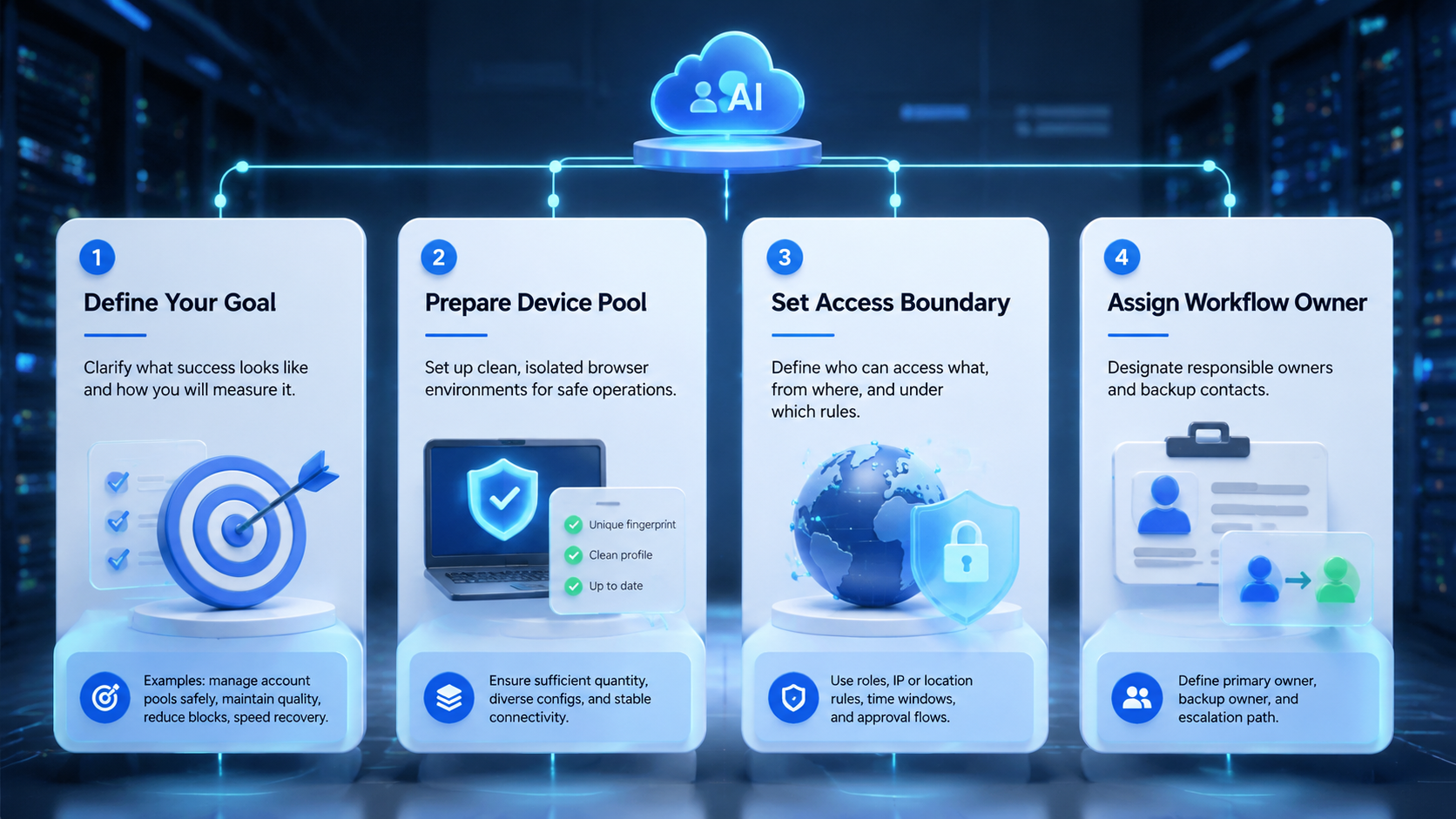
Use an AI employee platform only after account groups, roles, and browser environments are clear. Keep each account tied to one trusted execution context instead of moving it between random devices.
Start with low-impact tasks before letting AI workers handle production workflows. Track assignment history, error states, and recovery actions for every account group.
Treat AI employees software as an operations layer, not as a replacement for team judgment.
Keep it boring.
What You Need Before You Start with an AI employee platform
Account pool management starts with inventory. List every account, platform, region, owner, and current status before any AI workflow begins. A spreadsheet is enough for the first pass, but the fields need to be consistent.
Map it first.
The second requirement is an execution boundary. Each account needs a browser profile, device layer, proxy route, or device isolation rule. That rule tells the team where work is allowed to happen. Random handoff creates review gaps and makes troubleshooting slower.
Keep that line clear.
The third requirement is a task policy. Decide which tasks the AI employee may perform, which tasks need a human approval step, and which tasks are blocked. For example, content collection and dashboard checks may be low-risk, while account recovery or payment changes should stay under human control.
Write the rules down.
How to Get Started with AI Employee Platform Account Pools
Follow one controlled path before expanding the pool.
- Create account groups by platform, region, and business purpose.
- Assign each group to a stable browser or mobile execution environment.
- Set one rule.
- Run a small sample, record every failure, then expand only after repeated clean sessions.
This sequence matters because AI worker software inherits whatever structure the team gives it. A weak pool design creates noisy automation. A clear pool design gives the AI a narrower path and gives the operator a better audit trail.
Small pilots expose bad assumptions.
Best Practices During AI employee platform Setup
Use account groups as the main control surface. A group can represent a country, campaign, brand, client, or platform. The right grouping depends on how your team reviews work and assigns responsibility.
| Setup Area | Better Practice | Why It Matters |
|---|---|---|
| Account grouping | Group by workflow and risk | Reduces mixed permissions |
| Environment binding | Keep one account in one context | Simplifies review |
| Task scope | Start with read and prepare actions | Lowers early damage |
| Human review | Approve changes before execution | Keeps accountability |
| Recovery logging | Track failed sessions and owners | Speeds repair |
Use multi-account management pages or internal dashboards as the source of truth. The AI employee platform should read from the same operational model your team already uses, not a separate shadow list.
One source beats two.
Common Mistakes to Avoid
The biggest mistake is treating an AI employee like a person with full judgment. It is better to treat it as an execution worker with a narrow job, known inputs, and a review checkpoint.
Avoid these failure patterns:
- Moving one account through several unrelated browser profiles.
- Touching every account at once.
- Skipping rules.
- Mixing recovery accounts with active campaign accounts.
- Hiding exceptions in chat messages instead of logging them in the account record and assigning a repair owner.
Policy and platform rules vary by site. Google recommends creating helpful, people-first content rather than content built mainly for search manipulation in its Search Central guidance. That principle applies operationally too: do not use automation to create low-quality output that your team would not approve manually.
Quality still matters.
AI employee platform Verification Checks Before Scaling
A pilot is successful only when the team can explain what happened. Do not measure success by task count alone. Measure the quality of handoff, exception handling, and account state after each run.
Use this pass/fail checklist:
- Pass: ownership is clear.
- Pass: failed actions name a recovery owner.
- Fail: work continues after login, proxy, or device mismatch errors.
- Fail: operators cannot tell which action changed an account state or which workspace created the change.
Security teams often use control logs to reconstruct events after incidents. The same idea appears in the OWASP logging guidance, which emphasizes event records that support monitoring and investigation.
Audit trails matter.
Who It Fits and When It Is a Strong Match
An AI employee platform fits teams that already have repeatable account operations. The strongest use cases include queue review, account status checks, content preparation, campaign setup, browser task execution, and structured reporting.
It is a weaker fit when the work is rare, sensitive, or mostly judgment-based. A team that cannot describe the workflow in steps will struggle to delegate it to AI employees software. A team that already runs documented operations can usually test a narrow workflow faster.
Fit is practical.
MoiMobi is relevant when the account pool depends on controlled browser and mobile work. Teams can combine mobile automation, cloud phone capacity, and browser infrastructure. The account should still stay tied to a known workspace.
Context comes first.
Pilot Rollout, Measurement, and Recovery Checks
Start with one account group and one workflow. Pick a task that matters but does not create high-impact changes. Good first workflows include status review, inbox classification, dashboard checks, or draft preparation.
Choose one.
Track four numbers during the pilot: completed tasks, blocked tasks, human approvals, and recovery actions. A high blocked-task rate is not automatically bad. It may show that your stop rules are working.
Blocks teach.
Recovery needs an owner before the first run. Decide who handles login failures, browser environment mismatch, account lock warnings, and incomplete outputs. The NIST Cybersecurity Framework uses identify, protect, detect, respond, and recover as core functions; account operations benefit from the same recovery mindset.
Name the owner early.
Frequently Asked Questions
What is an AI employee platform for account pools?
It is a system for assigning repeatable account work to AI-run workflows while keeping account, environment, and review boundaries visible.
Is AI employee software the same as RPA?
Not exactly. RPA usually follows fixed scripts. AI employee software can adapt within a defined task path, but it still needs guardrails.
How many accounts should I test first?
Use a small group that represents one workflow. Ten accounts is usually easier to review than a full pool.
Should every account get a separate browser profile?
For multi-account work, separate profiles and clean routing are usually easier to audit than shared sessions.
Can an AI employee platform manage mobile accounts too?
It can support mobile workflows when the platform connects to controlled mobile execution layers and clear assignment rules.
What should humans review?
Humans should review approvals, account state changes, recovery decisions, and outputs that affect customers or public channels.
When should I stop a pilot?
Stop when errors repeat without a clear cause, accounts lose ownership, or operators cannot reconstruct what happened.
Conclusion
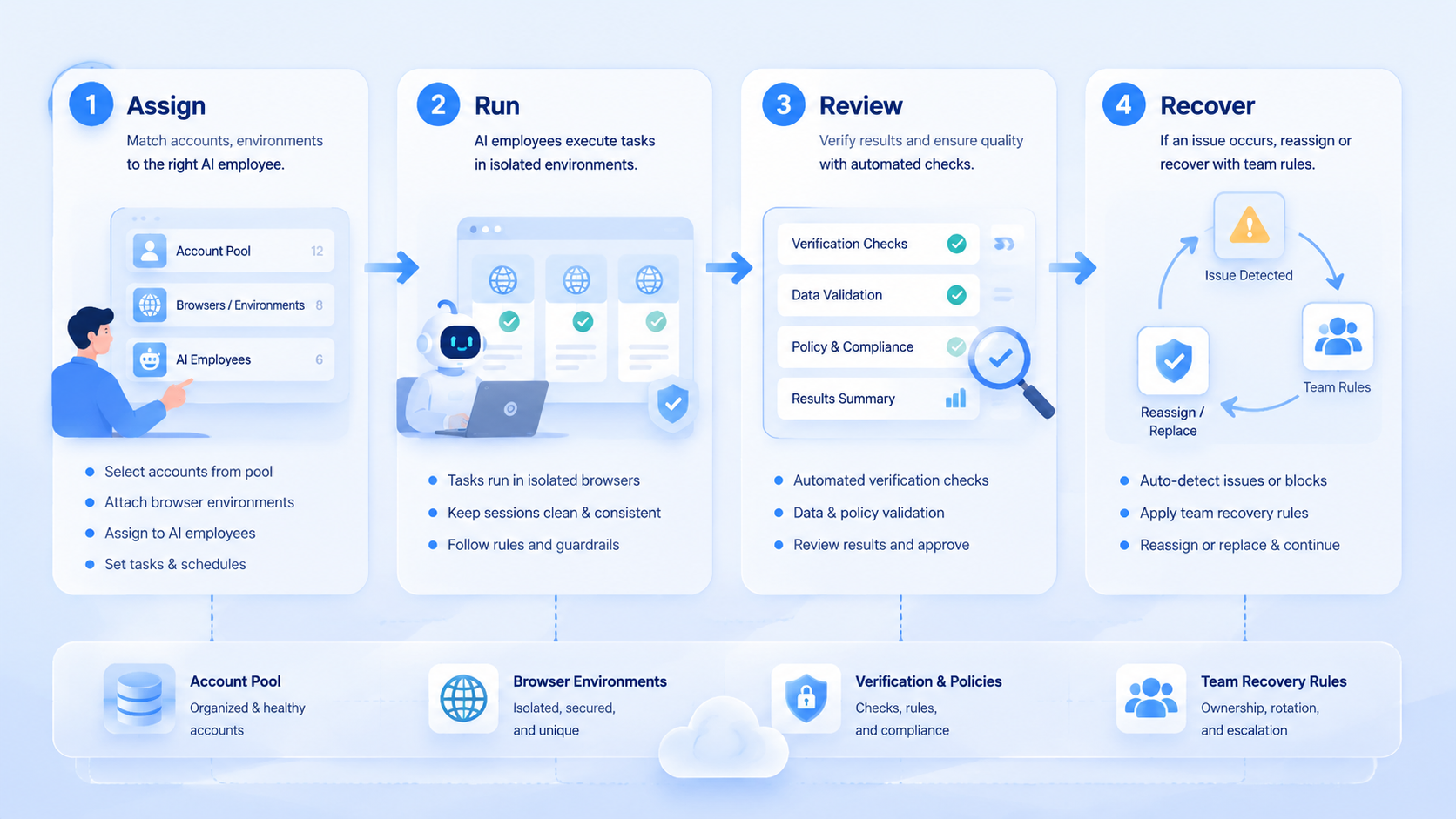
Use an AI employee platform for account pool management only after the operating model is clear. Begin with account groups, environment binding, task boundaries, and recovery ownership. Then run one narrow pilot and review the audit trail before scaling.
The best next step is a simple account pool map. List each account, owner, environment, allowed workflow, blocked workflow, and recovery owner. If those fields are unclear, fix the pool before adding AI execution.
Map first.



