
Content Type: guide
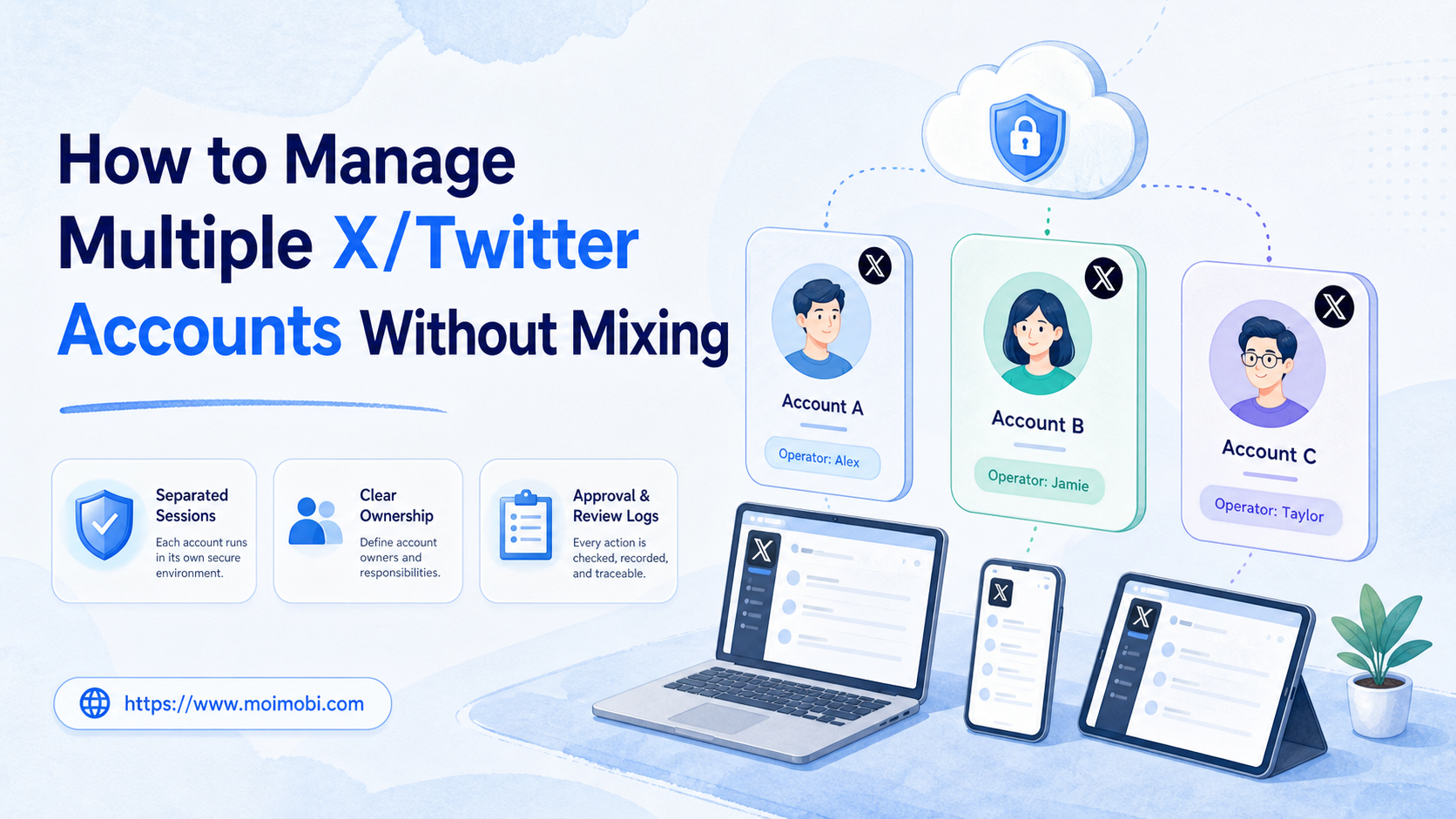
How to manage multiple X Twitter accounts safely means keeping each account in a separated session, assigning a clear owner, and recording every workflow that touches it. The goal is not to push more actions through more accounts. The goal is to avoid session confusion, duplicate work, and unmanaged account behavior.
The right setup starts with account roles. A brand account, support account, founder account, regional account, and test account should not share the same browser state, mobile environment, credentials, or review queue. Each one needs a known workspace and a known operator.
Treat every later tool choice as secondary to that map. If the map is unclear, adding software only moves the confusion into a faster system.
X also has rules for automated actions and multiple accounts. Its developer guidance covers automation, user consent, transparent account behavior, spam boundaries, and credential handling. The official X Developer Guidelines should be treated as a boundary document, not a footnote.
Key Takeaways
- Manage X/Twitter accounts by account role, not by who happens to be online.
- Keep each account in its own browser or mobile environment.
- Do not mix cookies, credentials, proxies, approval queues, or publishing logs.
- Use automation only inside consent, policy, and review boundaries.
- Verify the setup with session checks, owner checks, and activity logs.
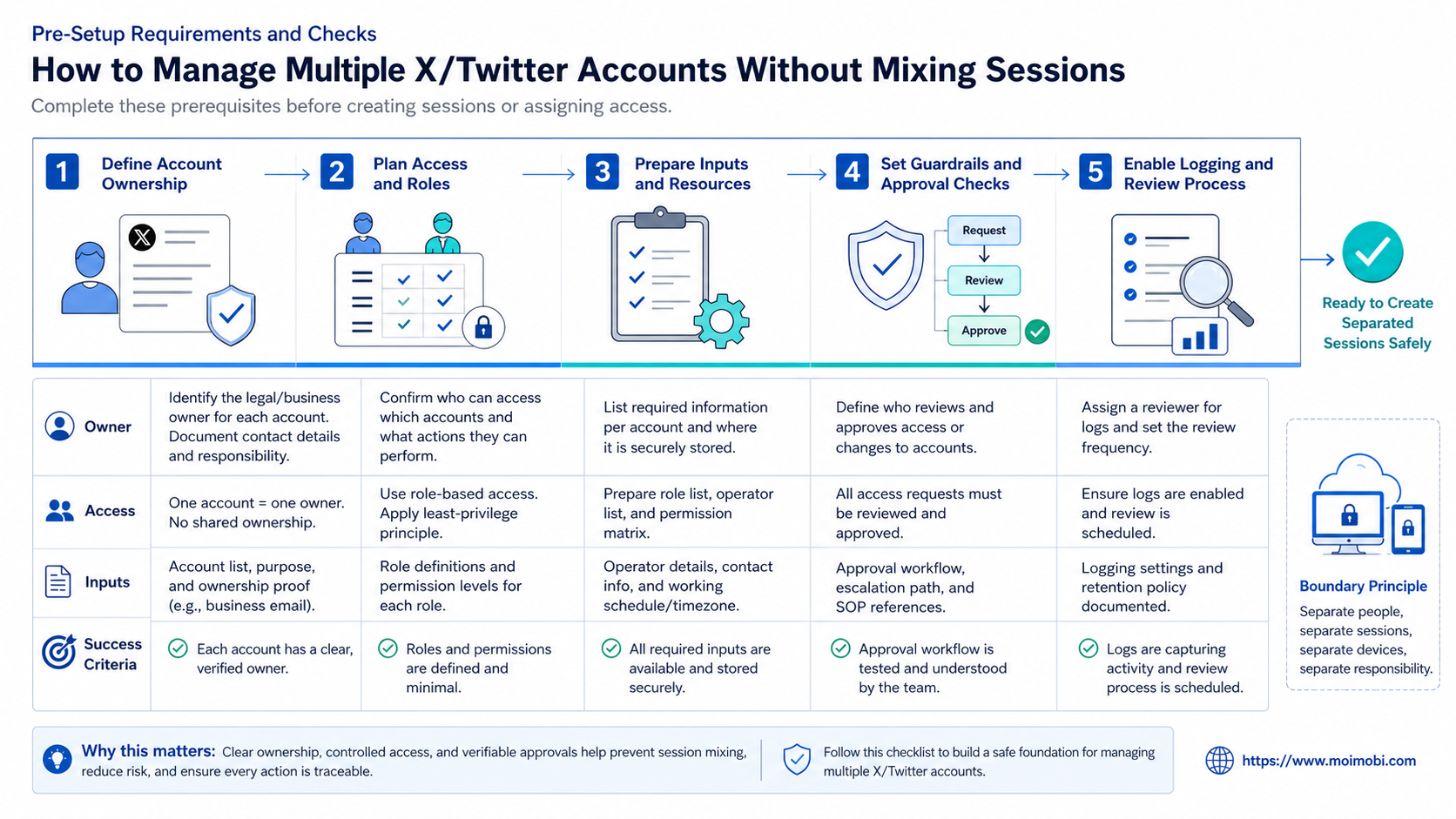
Pre-Setup Requirements and Checks for how to manage multiple X Twitter accounts safely
Start by writing down why each account exists. This sounds basic, but it prevents most session problems. One account may answer customer questions. Another may post product updates. A third may monitor mentions. If the roles are vague, the operating environment will also become vague.
The second check is ownership. Each account needs a primary owner, backup owner, access rule, and escalation path. Shared passwords in a team chat are not an operating system. They create confusion when a post, reply, or login issue needs review.
The third check is environment separation. A team can use isolated browser profiles for web work and mobile workspaces for app-based tasks. When an account requires Android app access, the first natural use of a cloud phone should be tied to a named account, not shared casually across the team.
| Preflight item | What to define | Why it matters |
|---|---|---|
| Account role | Brand, support, regional, test, founder | Prevents duplicate tasks |
| Owner | Primary and backup operator | Makes review possible |
| Environment | Browser profile or mobile workspace | Reduces mixed-session work |
| Permissions | Who can post, reply, approve, or pause | Limits accidental actions |
| Activity log | Task, time, operator, account, result | Helps audits and handoff |
Moimobi fits this setup when a team needs separated execution spaces. Browser-based account work can use a profile isolation option for X accounts. App-based work can use a dedicated mobile execution environment.
The Core Workflow for How to Manage Multiple X/Twitter Accounts Without Mixing Sessions
Build the workflow in a fixed order. Do not start by adding accounts to tools. Start by creating the map that the team will follow every day.
- Create an account inventory. List handle, purpose, region, owner, backup owner, and allowed task types.
- Assign one environment per account. Use one browser profile or mobile workspace as the account's default home.
- Separate credentials and recovery details. Store access data in a controlled system, not inside task notes.
- Create a task queue. Split publishing, replies, monitoring, lead review, and escalation work.
- Add approval rules. Decide which actions need human approval before they go live.
- Record every account touch. Log login, publish, reply, pause, exception, and handoff events.
- Review abnormal patterns. Pause the account workflow when ownership, session state, or policy boundary is unclear.
This sequence keeps the system understandable. The team can see which account belongs to which environment. It can also see whether an action came from a person, a scheduled workflow, or a reviewed task.
For X multi-account management, avoid running the same content or reply pattern across all accounts. X's developer policy says use of API and developer products to create spam or platform manipulation is prohibited. The official X Developer Policy is a useful reference when your workflow includes API-connected tools.
Account field map
Create a record for every account before the team begins daily work. The record does not need to be complex. It needs to be consistent.
Use these fields:
- Account handle and internal account ID.
- Business role, such as support, product, region, or founder.
- Primary owner and backup owner.
- Default environment ID.
- Allowed task types.
- Approval rule for posts, replies, DMs, and profile edits.
- Last session check.
- Last abnormal event.
This field map gives the team a shared truth. When a task fails, the team does not need to ask who used the account last. It can check the record first.
Session Boundaries for X Multi-Account Management
Session boundaries are practical rules, not abstract security language. They tell the team where each account is allowed to run. They also tell the team what to do when an account appears in the wrong place.
Use a one-account, one-default-workspace policy for production accounts. A brand account should not move between five browser profiles. A support account should not be opened casually on a personal laptop. A regional account should not share the same mobile workspace as a test account.
For daily operations, define three layers:
| Layer | Session rule | Review question |
|---|---|---|
| Browser profile | One default profile per account | Did this account open in the right profile? |
| Mobile workspace | One default mobile space when app access is needed | Did the mobile task run in the assigned workspace? |
| Team queue | One owner per active task | Who approved or paused the action? |
This model does not require every account to use the same infrastructure. Some accounts may only need a browser profile. Others may need a mobile environment because the workflow includes app-only checks. The key is that every account has a defined home.
Do not let the team treat session boundaries as optional. Optional boundaries disappear during busy periods. Write them into the account inventory, task queue, and review process.
How to Verify the Setup Is Working
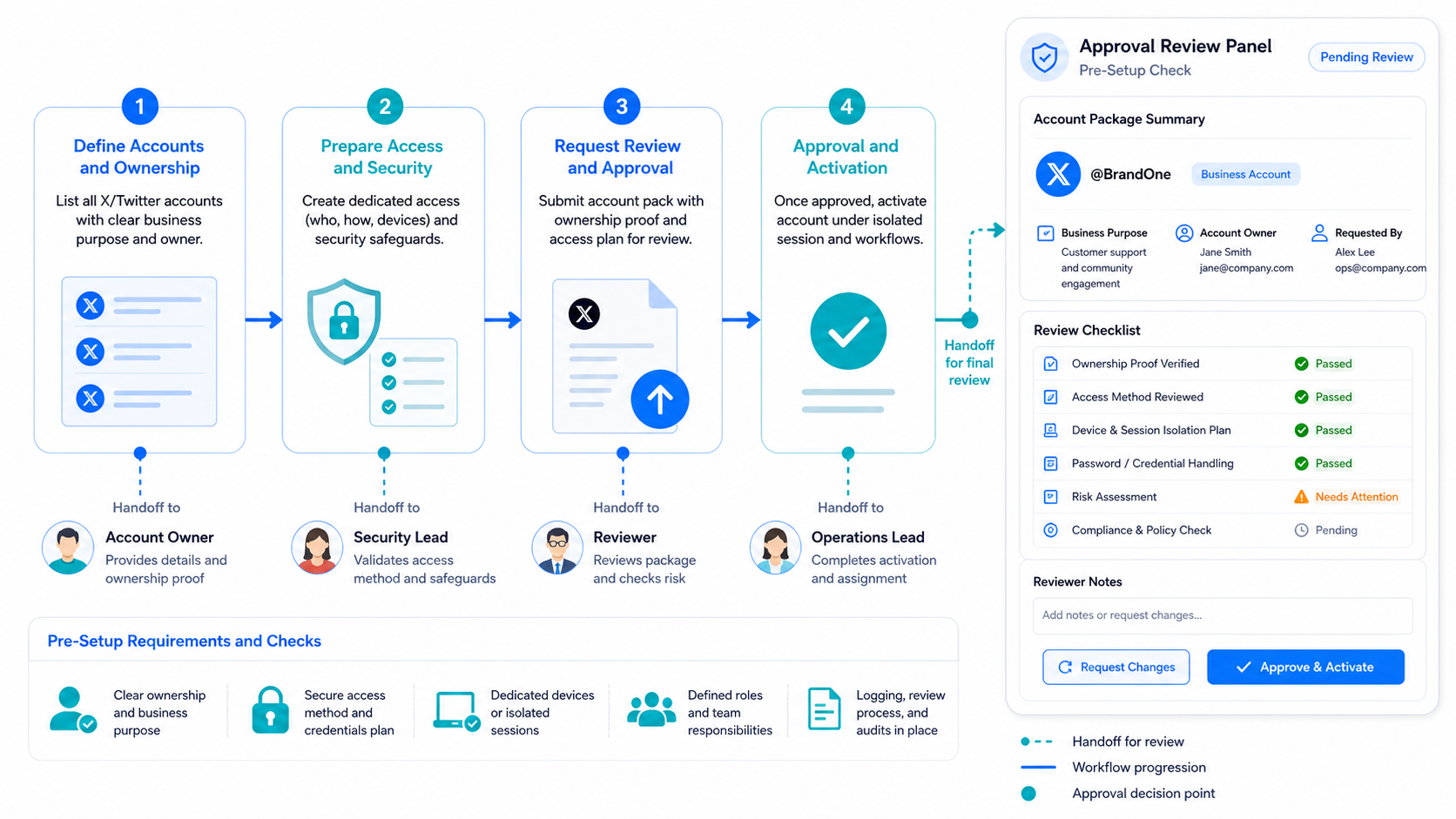
Verification is the difference between a clean setup and a nice diagram. After the first pass, test the workflow with low-risk tasks. Do not start with high-volume posting, aggressive replies, or broad DM campaigns.
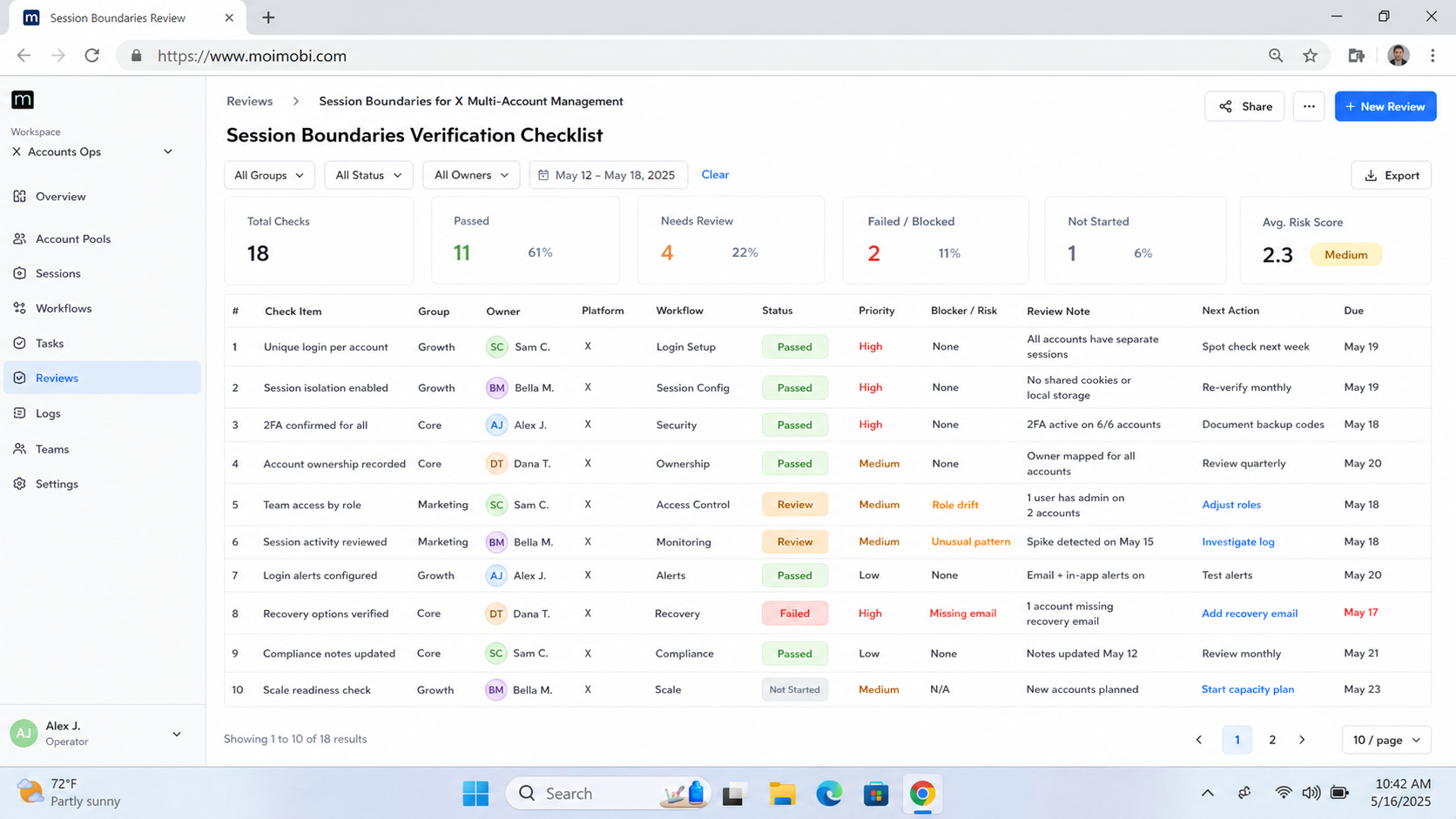
Use a pass/fail checklist:
- Session check: each account opens in the expected browser profile or mobile workspace.
- Owner check: the dashboard shows who is responsible for the next task.
- Permission check: operators cannot publish or reply outside their role.
- Queue check: no task is assigned to two accounts by accident.
- Content check: similar posts are reviewed before scheduling.
- Audit check: every action has time, account, owner, and result fields.
- Pause check: the team knows how to stop a workflow before it repeats an error.
The strongest signal is not speed. It is traceability. A manager should be able to answer: which account acted, which environment was used, who approved it, and what happened next?
Teams that also handle social workflows across mobile apps can connect the X account map with a broader cross-account assignment system. This keeps account ownership consistent when work moves from X to other channels.
Where Teams Usually Get Stuck and how to manage multiple X Twitter accounts safely
The first failure mode is shared sessions. One operator logs into several accounts in the same browser, then another operator continues from a different device. The team may still get the task done, but review becomes hard. Mixed state makes it unclear which account, device, or person caused the issue.
The second failure mode is duplicate account behavior. Teams sometimes publish similar posts across multiple accounts because the content calendar is easier that way. X's automation rules specifically warn against duplicative or substantially similar posts across accounts. Keep a content review step before cross-account publishing.
The third failure mode is confusing automation with permission. OAuth access or tool access does not mean every automated action is appropriate. X's automation rules say automated actions through another user's account require clear description, express consent, and opt-out handling. Treat that as a workflow requirement.
Use these stop rules:
- Stop when an account is logged into the wrong workspace.
- Stop when two accounts are assigned the same reply task.
- Stop when content is substantially similar across accounts.
- Stop when a task touches DMs without explicit review.
- Stop when the operator cannot explain the source of an action.
For teams that run mobile-first account work, per-account mobile environments can support cleaner assignment. The product layer helps only when the operating rules are clear.
Fit and Not-Fit Guidance for Team Use
This workflow fits teams that manage several legitimate account roles. Examples include support accounts by region, product update accounts, event accounts, or founder-led accounts that need review before posting. It also fits agencies that must show clients a clean record of tasks and approvals.
It is not a fit for mass account creation, duplicate messaging, engagement manipulation, or hidden automated behavior. Those use cases create policy and brand risk. They also make the workflow harder to audit because the operating goal is unclear.
Use this fit filter before setup:
- Fit: different account roles, different audiences, different task queues.
- Fit: human review before sensitive replies or DMs.
- Fit: clear owner, workspace, and activity log for every account.
- Not fit: repeated posts across accounts with minimal changes.
- Not fit: unsolicited automated replies or DMs.
- Not fit: operators cannot explain why each account exists.
This filter keeps the system aligned with business operations. It also prevents the tool decision from hiding a weak account strategy.
Next Steps After the First Pass
Do not scale the account count until the first account group is easy to review. A messy five-account system becomes a much harder fifty-account system. Fix ownership and records before adding more execution capacity.
Use this rollout sequence:
- Start with three account roles: brand, support, and test.
- Assign one owner and one environment to each account.
- Run one week of low-risk publishing and monitoring tasks.
- Review session mix-ups, duplicate content, missed replies, and unclear approvals.
- Add more accounts only after the review process stays clean.
If mobile workflows are part of the plan, evaluate an Android workflow queue before adding more manual operators. The goal is to standardize task handling, not to make every operator improvise inside live accounts.
Also create a weekly review ritual. Pick a small sample of accounts and inspect the last ten actions for each one. Look for repeated content, missing approvals, owner mismatch, session mismatch, and unclear task notes. The goal is to find process drift before it becomes normal.
Weekly review checklist
- Are account roles still accurate?
- Did any account open outside its assigned workspace?
- Did any operator perform an action outside their role?
- Were DMs or replies reviewed when required?
- Were similar posts sent across multiple accounts?
- Were abnormal events recorded in a way another person can understand?
- Does the next week's queue match the account strategy?
When the answer is unclear, shrink the workflow before expanding it. Add more accounts only after the review stays clean for the current group.
Frequently Asked Questions
Can one person manage multiple X/Twitter accounts?
Yes, but each account still needs a separate role, session, and record. One person should not treat every account as the same workspace.
Is using an X automation tool allowed?
It depends on the action and setup. Read X's automation rules, use official APIs where required, get proper consent, and avoid unsolicited or duplicate behavior.
Should every account use a different device?
Not always. The key is separation and traceability. Some teams use browser profiles, while mobile workflows may need dedicated Android environments.
What is the safest way to handle replies?
Use a queue and review rule. Sensitive replies, customer complaints, and DMs should usually require human approval.
How do teams avoid duplicate posts?
Create a content review step before publishing. Compare post text, link targets, account role, and timing.
What should be logged for each account?
Log account handle, operator, environment ID, task type, approval state, result, and any exception notes.
When should a workflow be paused?
Pause when the session is wrong, the owner is unclear, the task repeats unexpectedly, or the action may cross a platform rule boundary.
Can Moimobi replace X policy review?
No. Moimobi helps structure execution environments and workflows. Teams still need to follow X rules and review their own use cases.
Conclusion
The priority order is simple: define account roles, separate sessions, assign owners, log actions, and review platform boundaries. Only then should a team add automation or more accounts.
A workable X/Twitter multi-account setup is measured by clarity. If the team can identify the account, environment, owner, action, and result without digging through chats, the workflow is ready for cautious scaling.



