
Key Takeaways
- Cloud phone cost is more than the monthly device fee
- Real cost depends on device count, workflow scope, account setup, and recovery work
- Teams should compare cost per successful workflow, not only cost per device
- A pricing review should include support, isolation, proxies, and mobile automation fit
Cloud phone cost means the total expense of using remote Android devices for real mobile workflows, including device access, setup time, account operations, support, and automation overhead. The lowest monthly device price is not always the lowest operating cost.
Teams usually want one clear number. That number depends on what the phones must do. A simple app check costs less to operate than a multi-account publishing, reply, and monitoring workflow.
The Core Idea Behind Cloud Phone Cost
Do not price a cloud phone like a passive screen. Price it like an execution environment.
A cloud phone may need app installation, account login, file movement, task scheduling, operator review, and recovery when an app state changes. Those parts create cost even when the device subscription looks simple.
Use this breakdown when comparing vendors:
| Cost layer | What to check |
|---|---|
| Device access | Monthly phone, Android version, storage, and performance limits |
| Workflow setup | Time needed to configure apps, accounts, files, and tasks |
| Account separation | Whether each account has a clear mobile workspace |
| Network routing | Proxy, region, or routing needs for the workflow |
| Support | Response time when devices, apps, or transfers fail |
| Automation | Whether repeated work can move from manual steps into workflows |
MoiMobi positions the cloud phone as part of execution infrastructure. The price review should reflect that broader role.
Why Teams Search for This Topic
Teams search for pricing because cloud phones can look similar at the device level. The real difference appears during operations.
A team testing cloud phone for TikTok automation may care about content transfer, account workspaces, app access, and repeatable publishing steps. A team using cloud phones for WhatsApp marketing or customer replies may care more about message review, notifications, and handoff.
Cost also changes when teams compare cloud phone vs emulator. A cloud emulator may be enough for testing basic app behavior. A cloud phone setup may fit better when the workflow depends on persistent mobile accounts, team access, and device-level operations.
Google's SEO starter guide is not a cloud phone pricing source, but it gives a useful principle: structure information so users can evaluate it clearly. Pricing pages and internal cost reviews should do the same.
Who Benefits Most from a Cloud Phone Cost Breakdown
The best fit is a team that already knows the workflow it wants to run. Without that, pricing turns into guesswork.
Cost breakdowns are especially useful for:
- Agencies managing mobile-first client accounts
- Social teams running publishing, replies, or monitoring
- Support teams operating app-based inboxes
- E-commerce teams checking mobile app account activity
- Growth teams comparing device capacity against operator time
This is less useful for a one-time app test. A single manual task does not need a full operating model. For larger teams, multi-account management should be part of the cost discussion.
How to Evaluate Cloud Phone Cost
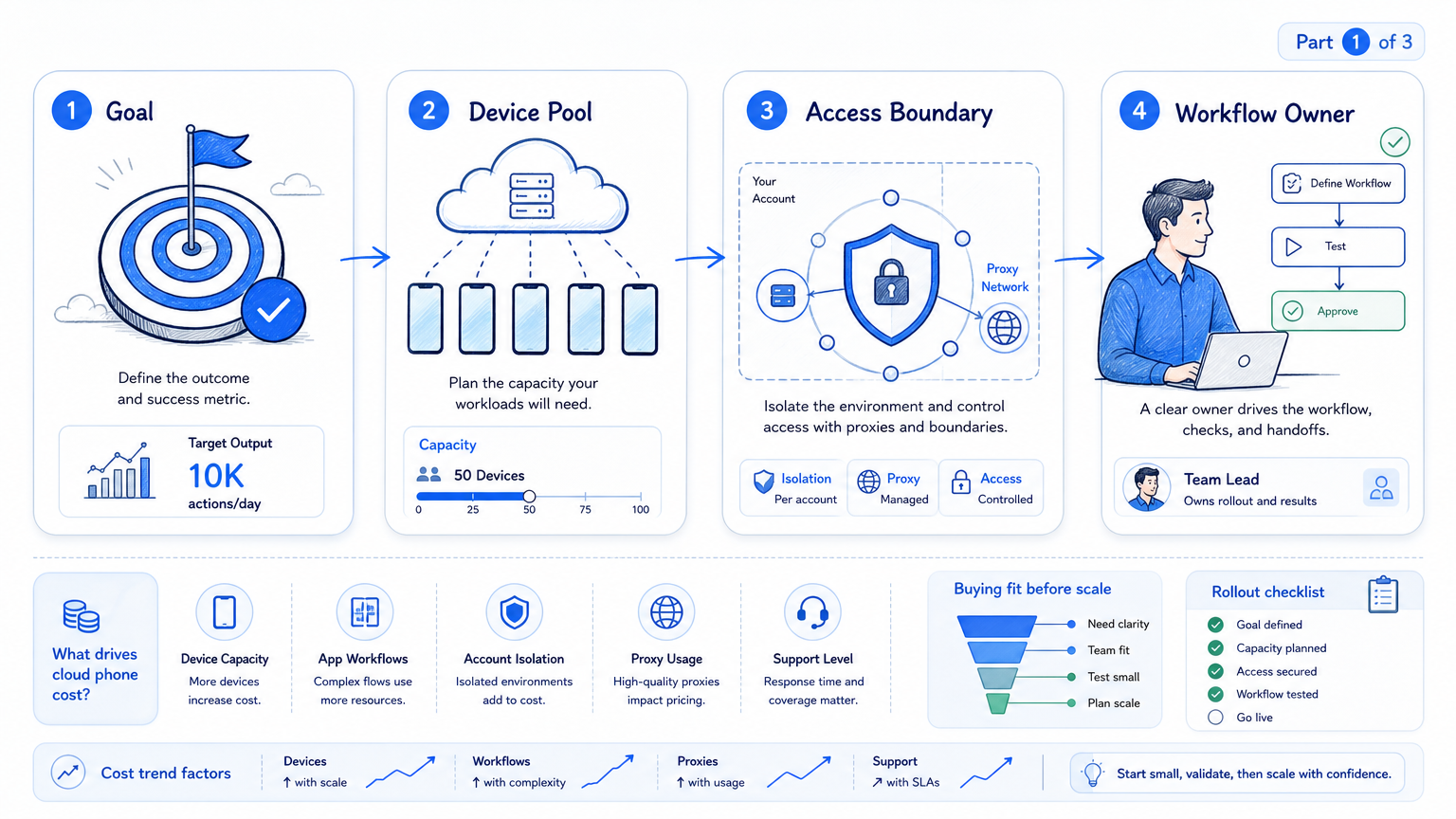
Start with a pass/fail cost model, not a spreadsheet full of guesses.
| Checkpoint | Pass condition |
|---|---|
| Device fit | The phone can run the required apps without repeated operator fixes |
| Account fit | Each account has a clear owner, device, and review path |
| Workflow fit | The task can repeat without rebuilding setup every time |
| Support fit | Problems can be diagnosed without waiting days |
| Scale fit | Adding devices does not create account confusion |
Then calculate cost per useful result. For example, measure expense per completed publishing run, reviewed inbox cycle, or monitored account group. That view is more practical than raw device count.
A practical review should name the fields before the test starts:
| Field | Example entry |
|---|---|
| Workflow | Upload approved video, publish draft, confirm result |
| Account lane | TikTok account group A, five accounts |
| Operator role | Reviewer approves copy and checks failed runs |
| Device need | One remote Android environment per active account |
| Failure rule | Pause when login, upload, or publish state changes |
| Decision metric | Completed runs per operator hour |
Scenario: a 7-day, five-account publishing test
Use one concrete scenario before buying capacity. A team selects 5 accounts, 1 approved video, 1 reviewer, and a 7-day test window. The decision rule is simple: keep the setup only if the team can publish, verify, and document exceptions without rebuilding every account workspace.
This scenario exposes hidden costs quickly. If 2 of 5 runs fail because files are hard to move, account state is unclear, or support cannot explain device issues, the monthly price is not the real number. Add a 30-minute operator log to each failed run so the review includes labor, not only subscription spend.
Mistakes That Distort Pricing
The first mistake is ignoring setup labor. A cheap device becomes expensive when operators keep reinstalling apps or moving the same file.
The second mistake is buying too many devices before proving the workflow. Start small. Run the task several times, then expand only after logs show reliable completion.
The third mistake is treating platform rules as someone else's problem during a pricing review. Teams should understand acceptable use before increasing volume. The Google Play policy center is a useful reminder that mobile ecosystems have rules and review expectations.
For AI-assisted workflows, review controls matter as much as price. The NIST AI Risk Management Framework can help teams discuss measurement and oversight before automation expands across more accounts.
Frequently Asked Questions
What is included in cloud phone cost?
Include device access, setup, account operations, network routing, workflow review, support, and any automation layer. For a team, labor usually matters as much as the subscription line.
Is the cheapest cloud phone plan the best choice?
Not usually. The best choice is the plan that completes the target workflow with the least rework, because failed runs create support and labor costs.
How should teams compare cloud phone vs emulator pricing?
Compare task results. If an emulator cannot run the workflow reliably, its lower price may not matter.
Does AI automation increase cloud phone cost?
It can add setup and review needs during the first pilot, especially when prompts, task rules, and human approval paths are still changing. It can also reduce repeated manual effort later.
How many phones should a team start with?
Start small. Increase device count only after task logs show repeatable results across the same workflow.
Are proxies part of the cost?
They may be, depending on routing needs and account geography. Review proxy setup before scaling, especially when account work crosses regions.
What should a pricing pilot measure?
Measure completed tasks, operator time, failed runs, support issues, and account clarity.
Conclusion
Remote Android pricing should be judged by workflow economics, not only device rental, because a low subscription can still produce expensive manual cleanup. A fair review includes devices, setup, support, and recovery work.
Before choosing a plan, test one repeated workflow and calculate cost per successful result. If the workflow needs automation, review MoiMobi's mobile automation, device isolation, and phone farm capabilities together.



