
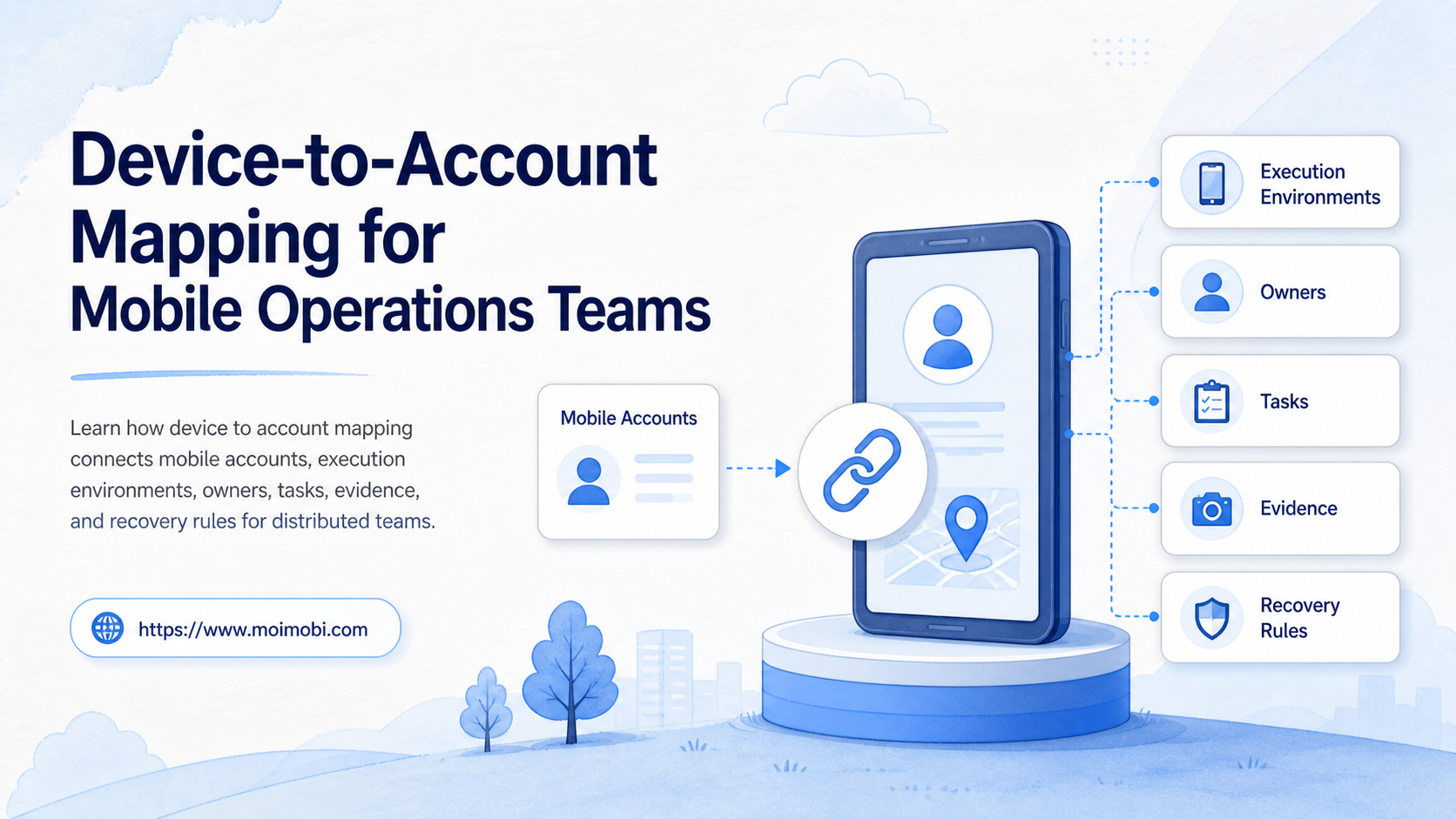
Device to account mapping is the operating record that connects each mobile account to an execution environment, owner, task lane, and recovery path. It tells a team where work runs, who can operate it, what state it is in, and what happens when the normal path fails.
The map is more than a spreadsheet of usernames and device names. It should connect account identity, device or cloud environment, operator permissions, task status, evidence, and assignment history. That context becomes important when several people work across different locations, clients, platforms, or time zones.
A cloud phone can provide one execution environment in this model. It does not replace the operating record around the account. The value comes from keeping the environment, responsibility, workflow, and review state aligned.
Key Takeaways
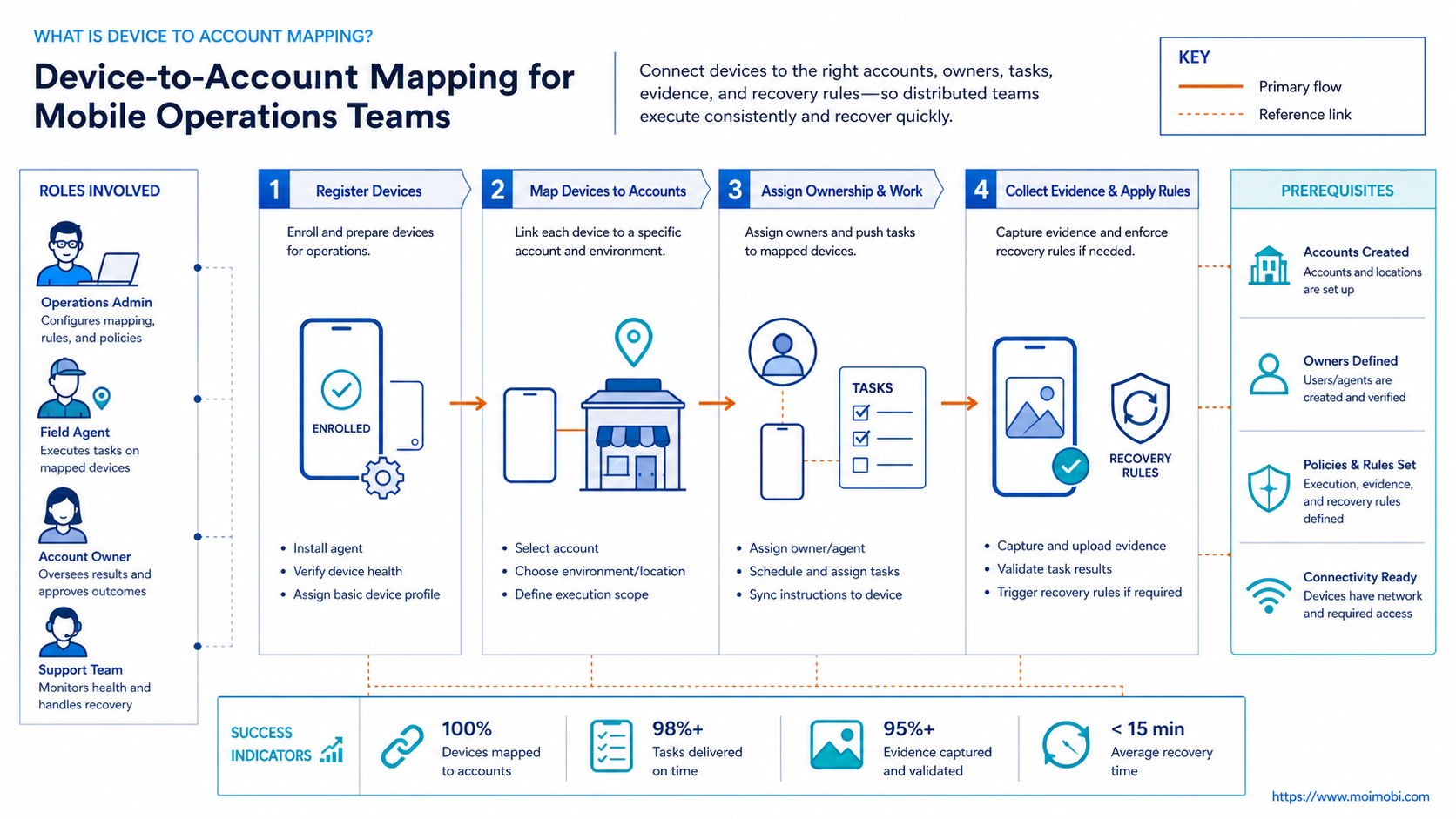
- Device to account mapping links an account to a defined mobile environment and accountable owner.
- A useful record includes assignment history, task state, permissions, app state, and recovery instructions.
- One account should not move between environments without a documented reason and handoff.
- Start with one workflow lane, test the mapping, and measure assignment accuracy before expanding.
What Is Device to Account Mapping for Mobile Operations Teams?
Device-to-account mapping is not simply assigning a login to the next available phone. It is a controlled relationship between an account, a device environment, a person, and a type of work.
The distinction matters because an account can be technically reachable while operationally unclear. The app may be signed out. A previous task may still be open. The device may belong to a different client lane. The current operator may have permission to execute a task but not to change ownership or approve the result.
An effective map therefore answers these questions:
- Which account or account lane is this environment assigned to?
- Which device, cloud phone, or Android environment is the assigned endpoint?
- Who is the primary operator and who is the backup owner?
- Which task types are allowed in this environment?
- What evidence proves the last meaningful state?
- Which person owns recovery if the state is abnormal?
The account is the business object. The device environment is the execution boundary. The owner is the accountability boundary. The task record is the current work boundary. Keeping those boundaries visible prevents a remote screen from being mistaken for a complete operating system. Account-isolated mobile workspaces make that boundary easier to represent when several environments are active.
Why Device to Account Mapping Matters for Mobile Operations Teams
Mobile operations become harder when account volume grows faster than team context. A small team can remember which phone belongs to which account. That memory breaks when operators rotate, clients share a device pool, or several tasks run in the same work window.
The first problem is collision. Two operators may open the same account, or one operator may start a task in an environment assigned to another client. The second problem is recovery. After a failed task, nobody knows whether to retry, pause, reassign, or escalate. The third problem is reporting. A manager sees a completed action but cannot connect it to the environment, operator, or review decision.
Device to account mapping creates a stable reference for those decisions. The record should be readable without a private chat or a verbal explanation. It should also preserve changes instead of silently replacing the previous owner. A device fleet operating model can help when the same mapping must cover a larger pool.
Apple Business documentation provides a useful example of explicit assignment management. Organizations can assign, reassign, or unassign devices to a device management service, and the activity is recorded. The same principle applies to broader mobile operations: assignment changes should be visible events, not invisible edits. See Apple's device assignment documentation for the underlying device-management pattern.
The minimum record
| Record area | What to store | Why it matters |
|---|---|---|
| Account | Account label, platform, client, market, workflow lane | Identifies the business context |
| Environment | Device name, environment type, platform, connection state | Shows where work is executed |
| Ownership | Primary operator, backup operator, reviewer, change time | Makes responsibility explicit |
| Task | Action, priority, approval state, expected result | Defines current work |
| Runtime | App state, session state, last health check, open exception | Prevents false “ready” status |
| Evidence | Screenshot or log reference, timestamp, task ID | Makes review possible |
| Recovery | Failure reason, stop rule, next action, recovery owner | Gives the next person a safe handoff |
Do not record sensitive credentials in a general mapping table. The mapping should point to a controlled account record or secret-management boundary, not become a second password store.
A Device-to-Account Mapping Scenario
Consider an agency running content and customer-support workflows for several clients. Each client has a group of mobile accounts. One operator handles scheduled publishing. Another handles message review. A manager approves exceptions and moves capacity when someone is unavailable.
Without a map, the team may use a shared spreadsheet with account names and device numbers. The spreadsheet does not show whether a device is signed in, whether a task is waiting for approval, or whether the account was moved after a staff change. A replacement operator opens the wrong environment, repeats a completed action, or starts work before the previous exception is reviewed.
With a map, the account record points to one environment, one primary owner, one backup owner, and one active task lane. The device view shows the current state. The task queue shows what is approved. The handoff record explains what changed and when. The manager can move the owner without losing the previous assignment or the open recovery note.
This is the practical difference between “we have remote access” and “we have a controlled mobile workflow.” The first gives someone a screen. The second gives the team enough context to execute, review, and recover.
Device to Account Mapping Workflow for Mobile Teams
The following workflow works for a small pilot or a larger device pool. Keep the first version narrow. Map one platform, one account lane, and one task family before adding every possible workflow.
Step 1: Define the account lanes
Separate accounts by client, platform, market, and operational purpose. A publishing lane, support lane, research lane, and recovery lane may need different permissions and review rules.
Do not use an account label such as “active” as the only classification. Add the business owner, task type, and current stage. A clear lane makes later routing and reporting more useful.
Step 2: Register the execution environments
Create one environment record for each physical device, cloud phone, or managed Android endpoint. Record the environment type explicitly. A real device, virtual Android environment, browser profile, and shared workstation are not interchangeable execution boundaries.
Store the device name, platform, app set, connection state, last check, and allowed task classes. If an environment is reserved for a client or account group, record that constraint before the first task is assigned.
Android Management API documentation shows the value of treating enrollment and device state as managed resources. The API exposes enterprise, device, policy, enrollment-token, and operation resources rather than treating enrollment as an informal one-time action. See the Android Management API reference for the resource model.
Step 3: Assign ownership and permissions
Give every active mapping a primary owner and a backup owner. Add the reviewer or manager role separately. An operator may execute an approved action without being allowed to reassign the account or erase its history.
Use an explicit change event when ownership changes. Record the old owner, new owner, reason, open tasks, and review state. The new owner should inherit the operating context, not just the login destination.
Step 4: Attach the task lane
Map each account to the task classes it can receive. A task should include an input, priority, scheduled time, approval state, expected result, and stop condition. This allows the queue to distinguish ready work from work that is blocked by an environment or human decision.
For larger teams, the account-to-environment operating model can serve as the broader layer around account assignment, environment separation, and task ownership. The exact interface can vary, but the data relationships should remain explicit.
Step 5: Add preflight checks
Before execution, verify:
- the environment matches the account record;
- the required app is available and in the expected state;
- the assigned operator has the required permission;
- no conflicting task is active;
- the previous exception is closed or intentionally carried forward;
- the task has a reviewer or recovery route when one is required.
Do not treat an online indicator as proof that the environment is ready. Reachability, app state, account state, and task eligibility are separate checks. A state-aware mobile operations layer can expose those states as workflow inputs instead of leaving them in operator memory.
Step 6: Record the result and handoff
When the task ends, record the result, evidence reference, timestamp, and next action. If the task fails, use a clear state such as paused, needs review, or recovery assigned. Avoid a generic “failed” label with no owner.
Remote-access systems commonly expose session evidence as a first-class result. AWS Device Farm, for example, documents browser-based interaction with a selected physical device and provides screenshots, video, and logs for the session. It also models concurrent devices as a capacity constraint. This is a testing service, not a recommendation for account operations, but it demonstrates why session evidence and capacity need explicit records. See AWS Device Farm remote access.
Account and Environment Isolation Rules
Mapping is only useful when the assignment has boundaries. A team should define what may move and what must remain fixed.
| Change | Record required | Default handling |
|---|---|---|
| Operator changes | New owner, old owner, reason, time | Allow with handoff record |
| Task changes | Old task, new task, approval state | Pause if approval is unclear |
| Environment replacement | Old environment, new environment, validation result | Require a recheck before execution |
| Account reassignment | Account, destination, reviewer, open exceptions | Require explicit approval |
| App or policy change | Version, scope, affected accounts | Pilot before broad rollout |
| Recovery action | Failure evidence, action, outcome, next owner | Keep open until verified |
The aim is not to freeze every environment forever. The aim is to make movement deliberate and reviewable. A mapping that can change without a record is not a control layer; it is a list that becomes stale.
Common Mistakes in Device-to-Account Mapping
Mapping only the username
A username does not explain the device state, operator, task, or recovery path. Add the environment and ownership fields beside the account identity.
Reusing one environment without a policy
Shared environments may be appropriate for a defined low-risk workflow. They become confusing when accounts, clients, or operators are mixed without an assignment rule.
Letting everyone edit the map
Uncontrolled edits destroy history and make incident review difficult. Separate execution permissions from assignment and approval permissions.
Reassigning during an active task
Moving an account while a task is running can create duplicate work or leave the new operator without context. Pause, record the current state, then hand off.
Treating screenshots as the entire audit trail
A screenshot without an account, device, task, and timestamp is difficult to interpret. Keep evidence attached to a structured event.
Retrying before checking state
A repeated failure may indicate a wrong environment, missing permission, or incomplete handoff. Check the mapping before adding another retry.
Who Device-to-Account Mapping Fits
This model fits teams with multiple operators, repeated mobile tasks, client separation, account ownership changes, or a need to review work after execution. It is especially useful when one manager must understand the state of many environments without opening each one.
It may be unnecessary for one person operating one device with irregular work. It is also premature when the team has not defined the account owner, task outcome, or stop condition. Adding more environments before defining those fields increases inventory without improving control.
Use this fit check:
| Situation | Recommended starting point |
|---|---|
| One operator and one device | A short manual checklist |
| Several operators and repeated tasks | Shared account and environment map |
| Agency clients with separate owners | Account lanes, permissions, and handoff events |
| Native app work across many devices | Device mapping plus task and state checks |
| Browser-only work | Browser workspace mapping may be enough |
| Unclear success criteria | Define the expected result before adding automation |
The right system is the smallest one that makes ownership, execution state, and recovery visible.
Success Metrics for a Device-to-Account Mapping Pilot
Run a pilot with one account lane and a limited group of environments. Keep owners stable during the first cycle so the team can observe the process rather than constantly changing variables.
Track these signals:
- mapping accuracy before a task starts;
- percentage of tasks with a recorded owner and environment;
- number of conflicting assignments;
- time required to complete a handoff;
- time from failure detection to a named recovery owner;
- percentage of tasks with usable evidence;
- review delay after execution;
- number of retries caused by missing context.
These measurements do not prove that a platform is universally better. They show whether the team’s own operating model is becoming clearer. If assignment errors dominate, improve the map. If app-state errors dominate, improve preflight checks. If handoffs stall, improve ownership and recovery fields.
Expand only when a backup operator can complete the workflow without asking for missing context. That is a stronger readiness test than counting devices or accounts.
Frequently Asked Questions
What does device to account mapping mean?
It means recording which mobile environment executes an account, who owns the work, what tasks are allowed, and how state changes are reviewed.
Is device-to-account mapping the same as account isolation?
No. Mapping records the relationship and ownership. Isolation defines the boundary between environments. A team may need both.
Should one account always use one device?
Not universally. The right relationship depends on the platform, workflow, recovery needs, and operational risk. The important point is to define and record the rule.
Can cloud phones be included in the mapping?
Yes. Treat each cloud phone or managed mobile environment as an explicit endpoint with its own state, owner, task lane, and recovery path.
Who should be allowed to change an assignment?
Usually a manager or designated operations role. Operators can request a change, but the change should preserve the old assignment and its reason.
What should happen when a device becomes unavailable?
Pause or reroute the task according to a written rule. Record the exception and name the recovery owner before assigning replacement capacity.
How much history should the map keep?
Keep enough history to explain ownership, environment, task, and recovery changes. Do not overwrite the previous state when a reassignment occurs.
Does mapping replace a task queue?
No. Mapping explains where work belongs. A task queue explains what work is ready, running, paused, failed, or complete. They work together.
How do we know the pilot worked?
Check assignment accuracy, handoff time, evidence completeness, recovery ownership, and review delay. A successful pilot reduces ambiguity before it increases volume.
Conclusion: Make Account Ownership Traceable
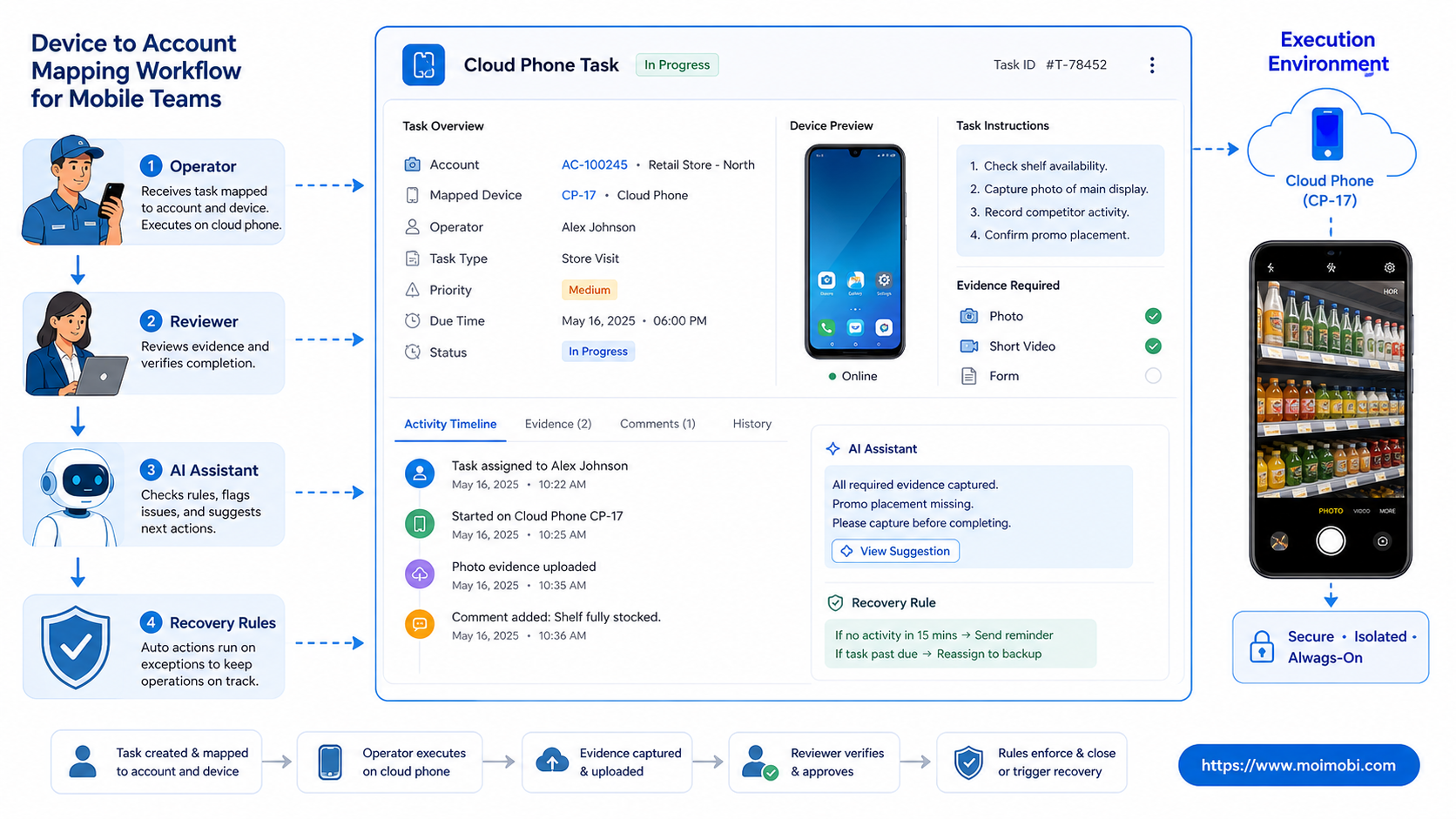
Device-to-account mapping gives mobile operations teams a durable relationship between accounts, environments, people, tasks, and recovery decisions. It turns an informal device list into an operating record that another person can understand and continue.
Start with one workflow lane. Register the environments, map the accounts, define permissions, add preflight checks, record evidence, and test a real handoff. Expand only after the team can execute and recover without losing the context behind the assignment.



