
Key Takeaways
- Cloud phones for WhatsApp marketing give teams controlled Android workspaces for mobile messaging operations.
- The main value is not device rental. It is account separation, workflow repeatability, and review control.
- Teams should keep opt-in, message quality, account ownership, and manual approval visible before scaling.
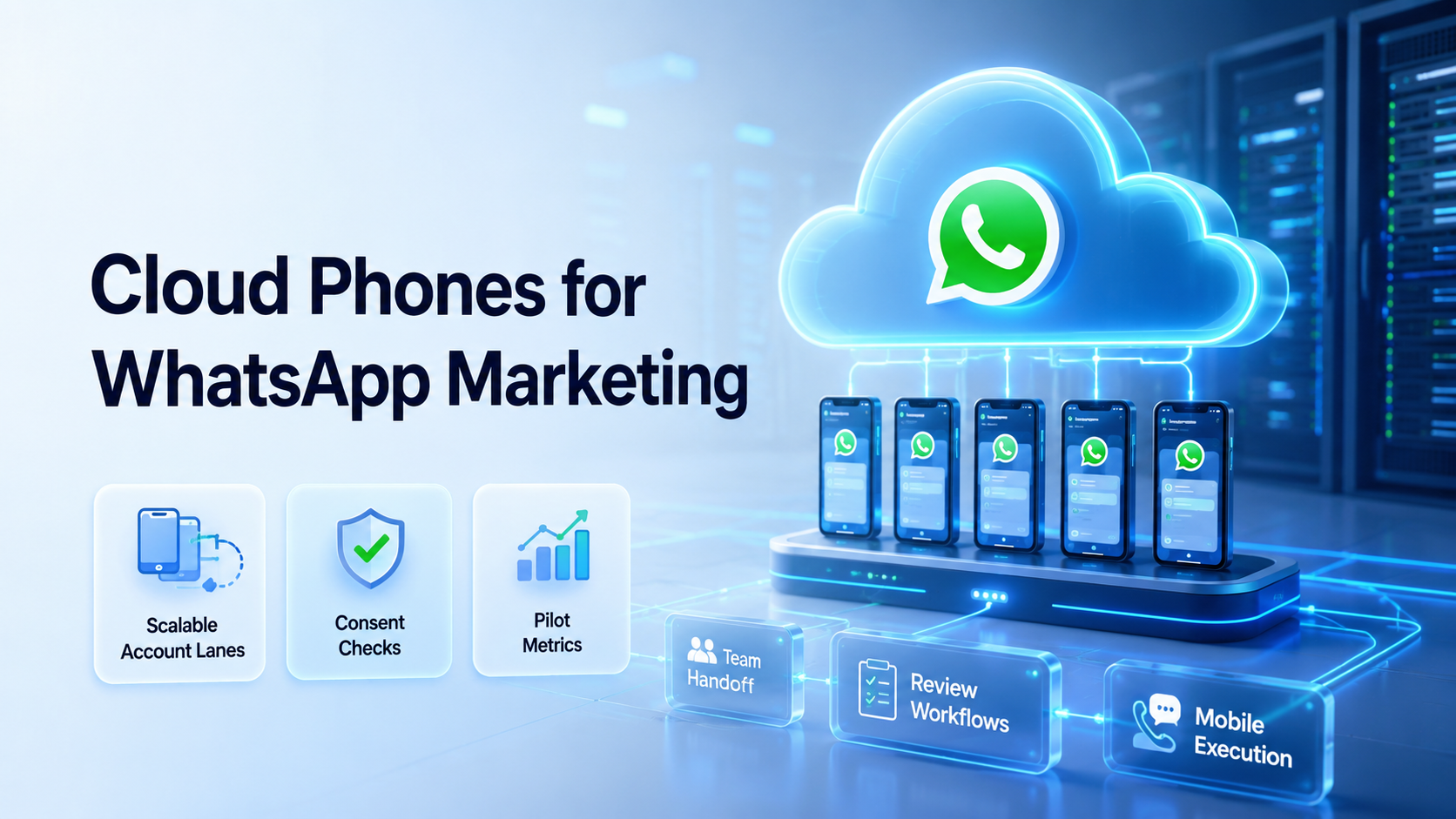
Cloud phones for WhatsApp marketing are remote Android workspaces that let teams run account work, mobile review tasks, and handoff flows without relying on a pile of physical phones. They give each account a clearer place to operate.
Start small.
For marketing teams, the real problem is rarely one phone. The harder work is running accounts, campaigns, inboxes, follow-ups, and review steps without losing control of who did what.
A cloud phone becomes useful when the team treats it as a work lane. It should not be treated as a shortcut around platform rules.
Keep records.
WhatsApp business messaging also has policy and customer-experience constraints. Meta's WhatsApp Business Policy describes requirements around business messaging behavior, user experience, and opt-in review. Any workflow should be designed around consent, relevance, and clean records.
Respect the inbox.
What Are Cloud Phones for WhatsApp Marketing?
For a team lead, the working definition should include device name, account role, contact source, review owner, and stop rules before messages start.
These cloud-hosted Android devices can be accessed remotely by approved operators. Each device can hold its own app state, account session, files, and task history. That makes it easier to separate work by account, market, customer segment, or campaign.
The useful unit is the workspace. One workspace may support one WhatsApp Business account, one operator, or one campaign lane. The team can open the device, review messages, prepare replies, check status, and hand work to another person when needed.
This is different from running everything from one shared phone. A shared phone can work for a very small team. It becomes messy when several people need access, when accounts serve different regions, or when a manager needs to know which task already happened.
The same logic applies to multi-account management. A clean account lane should have a clear owner and review path.
Remote devices make that structure visible. The team can see which account belongs to which lane.
No guessing.
Why Cloud Phones for WhatsApp Marketing Matter
The common misunderstanding is that cloud phones are only about having more devices. More devices are not useful if the team still has unclear workflows. The stronger reason to use cloud phones is to control mobile execution.
Control comes first.
WhatsApp marketing work often includes message preparation, customer follow-up, status checks, list hygiene, campaign review, and response triage. These tasks are operational. They need consistency, records, and a way to pause before sensitive actions.
Meta has explained that businesses using the WhatsApp Business Platform can initiate messages through approved templates and that user feedback can affect enforcement behavior in some cases. The practical takeaway is simple: teams should not treat WhatsApp as a blind outbound channel. They should keep consent, message purpose, and review steps clear.
A useful setup names the campaign, the permitted message type, the customer source, and the person who must approve edge-case replies.
This gives each operator a practical map of where the conversation came from, what may be sent, and when the task must stop.
A cloud phone setup helps teams assign responsibility. One device can be used for post-purchase follow-up. Another device can be used for inbound lead review.
This split lets support staff, campaign staff, and managers see different work queues without asking who last touched the phone.
A third device can be reserved for manager checks. That structure reduces confusion when several people work on the same channel.
Fewer handoff gaps.
Key Benefits and Use Cases for WhatsApp Teams
The first benefit is environment separation. Each WhatsApp account can run in a dedicated Android workspace. This helps the team avoid mixed sessions, unclear ownership, and accidental switching between accounts.
The second benefit is operational handoff. A manager can open the same remote device, review task progress, and take over if a message needs approval. That is harder when the phone sits with one employee or depends on a local SIM drawer.
The third benefit is repeatable workflow design. A team can create steps for preparing messages, checking customer context, saving notes, and escalating edge cases. Over time, the workflow becomes more consistent than ad hoc phone handling.
Repeat the clean path.
Common use cases include:
- inbound lead follow-up after a form or ad click
- customer support handoff from social media to WhatsApp
- order update review for e-commerce customers
- regional account operations for local teams
- campaign response monitoring
- quality review before sending prepared replies
A realistic workflow might look like this. A cross-border store receives leads from a product page, a click-to-message ad, and an after-sales support form. The team assigns one cloud phone to pre-sale questions, one to shipping updates, and one to manager-reviewed follow-up. Each lane has its own saved reply library, owner, and escalation rule.
That structure gives managers a cleaner review path. They can check whether the pre-sale lane is answering product fit questions, whether the shipping lane is only handling order updates, and whether sensitive complaints are being moved to a senior operator. The device is not the strategy. The device makes the strategy easier to enforce.
Process still wins.
Google's SEO Starter Guide is not a messaging guide, but its emphasis on helping users find useful information is a good operating lens. Message workflows should be designed for customer usefulness, not only for internal volume.
How to Get Started with Cloud Phones for WhatsApp Marketing
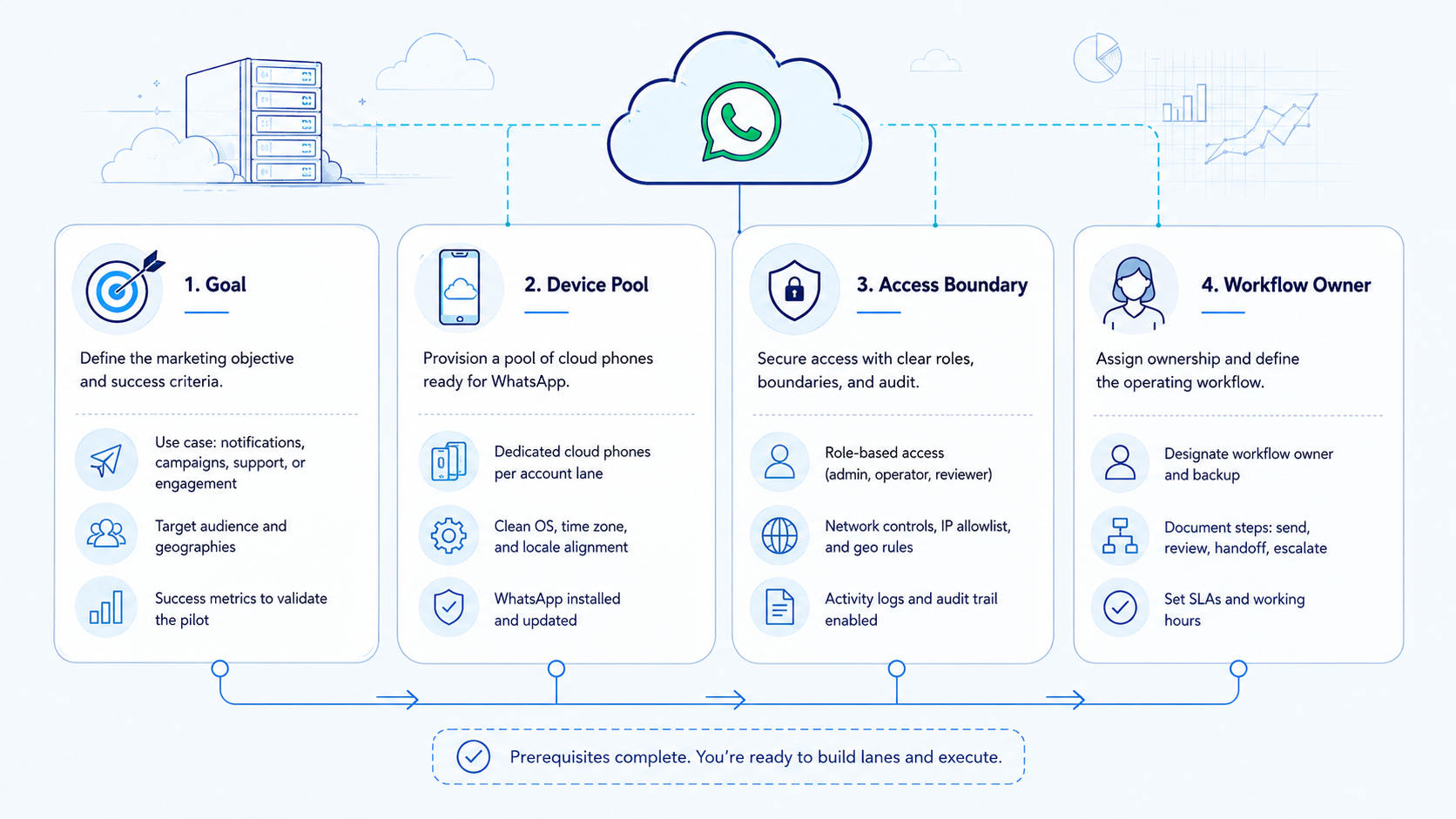
Start with one account and one workflow. Do not begin by moving every account into a device fleet. A small pilot exposes setup problems before they spread.
Your first setup should feel almost too narrow: one account, one device, one message type, one owner, one review rule, and one weekly report.
Use these setup checkpoints:
- Account assignment: Name the account, owner, campaign, region, backup operator, and customer source before the first live run.
- Device lane: One account, one workstream.
- Access control: Decide who can open the device, draft replies, approve messages, change settings, export notes, and close unresolved conversations.
- Content source: Keep approved message copy in one place.
- Stop rule: Pause on sensitive replies, angry customers, payment requests, unclear consent, account mismatch, or negative feedback.
- Review log: Track completed tasks, review notes, unresolved reasons, and the person responsible for the next action.
Add a simple naming convention before the second account is added. For example, use wa-us-pre-sale-01, wa-eu-shipping-01, or wa-manager-review-01. The name should reveal the channel, region, role, and lane number. Clear labels prevent operators from opening the wrong workspace during busy periods.
Names matter.
MoiMobi's cloud phone product supports the execution layer for this model. Teams can combine remote Android access with device isolation and task management.
The goal is not to remove people from the loop. The goal is to keep people in control while reducing repeated manual handling.
People still decide.
Example Operating Model for a Three-Lane Setup
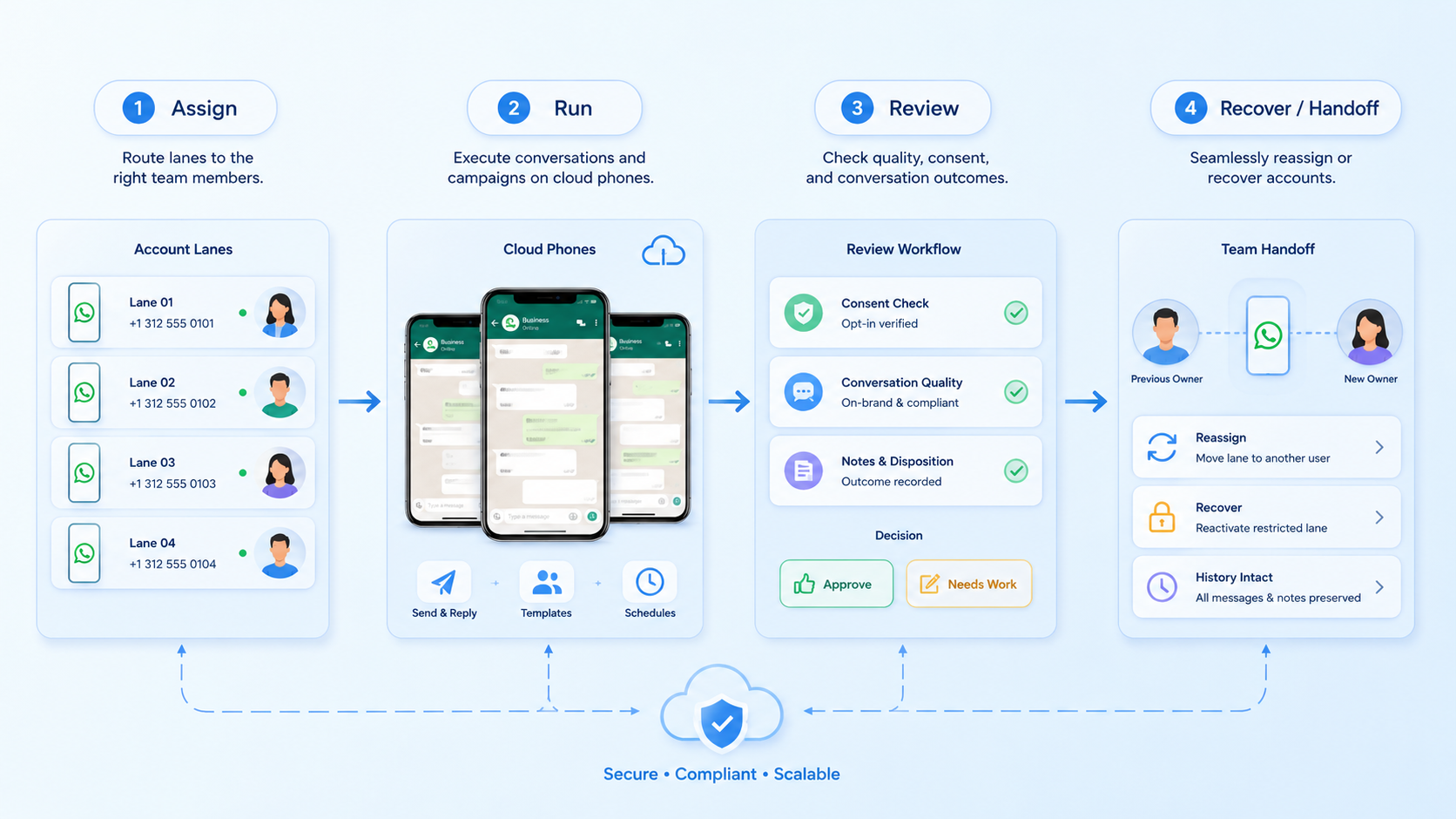
A three-lane setup is enough for many early pilots. It keeps the workflow concrete while still testing handoff between roles.
| Lane | Cloud Phone Role | Operator Rule | Review Trigger |
|---|---|---|---|
| Lead intake | Receives new inquiries and tags intent | No pricing exception without approval | Customer asks for discount or custom terms |
| Order support | Checks shipping and order status messages | Use approved update language only | Refund, complaint, or missing package |
| Campaign follow-up | Reviews warm replies after a campaign | Send only to contacts with known source | Unclear opt-in or negative feedback |
The team should record five fields after each shift: account lane, operator, conversations reviewed, conversations escalated, and unresolved reason. This small log is usually more useful than a long dashboard during the first pilot.
Keep it readable.
Decision rules should be visible inside the workflow notes. A message can be drafted when the customer intent is clear. A message should pause when consent source is unknown, when the customer asks for money handling, or when the reply could affect trust. These rules reduce guesswork for junior operators.
Write them down.
Cloud Phone vs Emulator for WhatsApp Workflows
A cloud emulator may be enough for testing simple Android behavior. It is usually less convincing as an operations workspace when a team needs persistent app state, account ownership, and mobile task handoff.
Cloud phones are better framed as operational devices. They should persist sessions, support repeated access, and give teams a place to manage mobile work over time. The decision is not only technical. It is about whether the environment matches the team's daily workflow.
Fit beats novelty.
| Decision Point | Cloud Phone Workspace | Basic Emulator |
|---|---|---|
| Team access | Designed for shared remote operations | Often built for local testing |
| Account ownership | Can map one account to one device lane | May need extra process controls |
| Workflow review | Works well with handoff and oversight | Usually needs separate logging |
| Operational fit | Better for repeated mobile work | Better for development checks |
For teams comparing cloud phone vs emulator, the key question is not which option is cheaper in isolation. Ask which option keeps account state, review, and team handoff clearer.
Choose clarity.
Common Mistakes to Avoid
The first mistake is treating cloud phones as a volume machine. More workspaces do not fix weak message quality, missing consent, or unclear campaign ownership.
Volume can wait.
The second mistake is sharing one device across unrelated accounts. Shared devices may look efficient at first. They become harder to review when customer history, drafts, files, and settings begin to mix.
When the device holds several unrelated jobs, the team has to reconstruct context from memory, which is slow and easy to dispute.
The third mistake is skipping escalation rules. WhatsApp conversations can become sensitive quickly. A customer may ask about payment, privacy, refunds, or complaints. The operator should know when to pause and hand the conversation to a manager.
Pause early.
The fourth mistake is ignoring opt-out and consent records. The WhatsApp Business Policy states that businesses may be evaluated on opt-in flows and user feedback. Teams should keep records of how contacts entered the workflow and how customers can stop receiving messages.
Make consent visible.
Use a simple control model:
- one account lane per cloud phone when possible
- one owner for each campaign workflow
- one source of approved message copy
- one review path for sensitive conversations
- one weekly check of failed and escalated tasks
Pilot Checks for Cloud Phones for WhatsApp Marketing
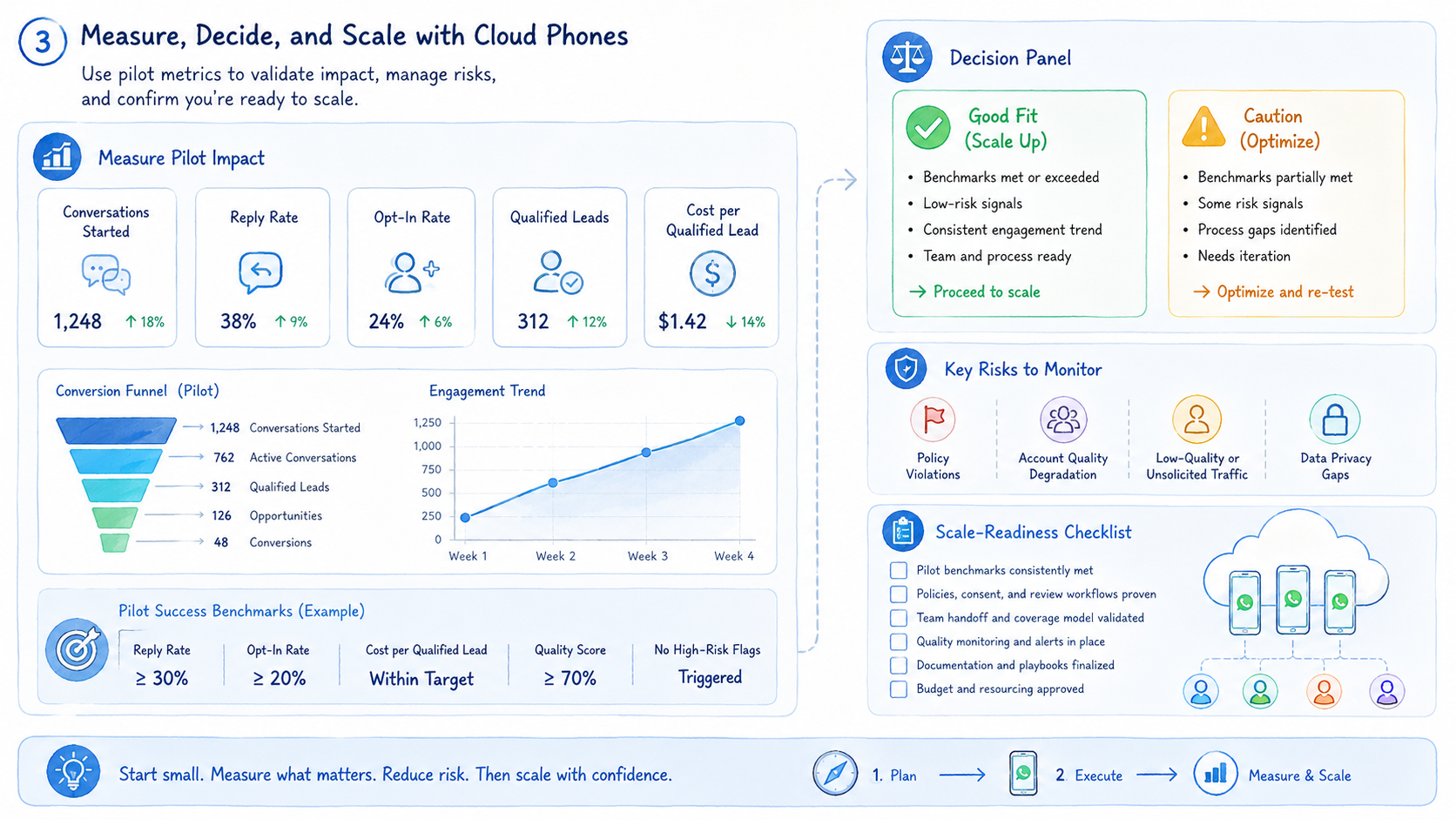
A good pilot lasts long enough to expose real friction. Seven days is usually enough to see whether account access, message review, task handoff, and recovery notes are workable.
Track these fields:
- account name
- cloud phone ID
- workflow owner
- campaign or customer segment
- completed conversations
- replies prepared for approval
- messages held for review
- opt-out or complaint events
- unresolved handoffs
- repeated failure reason
Use this quick scorecard before adding more accounts:
- Green: owner, device, customer source, and next step are clear
- Yellow: message copy is ready, but approval or consent source needs review
- Red: account lane is unclear, customer history is missing, or the reply affects money, trust, or privacy
Green tasks can continue through the normal workflow. Yellow tasks should pause for a manager or senior operator. Red tasks should not be treated as automation work until the team fixes the missing context.
The most useful metric is not raw message count. A better early signal is review clarity. Can a manager open the device, understand the last task, and decide the next action within a few minutes?
That is the test.
Device isolation matters when the team expands the pilot. Each new account should inherit the same owner and review structure.
Before adding a second region or brand, copy the full lane record so the new device starts with the same labels, stop rules, and review fields.
Scaling should copy a working lane. It should not multiply a messy one.
Scale clean lanes.
Frequently Asked Questions
What are cloud phones for WhatsApp marketing?
They are remote Android workspaces used to manage WhatsApp marketing and customer engagement tasks with clearer account separation.
Simple answer.
Are cloud phones the same as a phone farm?
Not exactly. A phone farm focuses on device volume. A cloud phone workspace focuses on remote access, account lanes, task control, handoff, and review history.
Can teams use cloud phones for customer replies?
Yes. Use them when replies are reviewed, relevant, tied to a known customer source, and aligned with business messaging rules.
Do cloud phones replace WhatsApp Business Platform tools?
No. They support mobile execution workflows. API, template, consent, and customer data systems may still be needed.
Use the right layer.
For example, API systems may handle approved templates, while cloud phones help operators review mobile state and account context.
What should be automated first?
Start with message preparation and customer context checks. Leave account settings, complaints, refunds, and unusual customer requests for human review.
What is the biggest operational risk?
The biggest risk is unclear ownership. Teams should know which account, device, operator, and workflow handled each task.
Ownership is evidence.
How many cloud phones should a team start with?
Start with one or two account lanes. Expand only after the workflow has clear review and recovery rules.
The better limit is the number of lanes a manager can still inspect without rushing.
Where does MoiMobi fit?
MoiMobi provides cloud phone and mobile execution infrastructure for teams managing account-based workflows.
Conclusion
Prioritize structure before scale. First, map one WhatsApp workflow and define the customer source, message type, owner, and stop rule. Second, assign one account to one cloud phone lane.
Third, define review and stop rules. Fourth, track results for a full pilot cycle and mark every handoff that required manager judgment.
Cloud phones for WhatsApp marketing work best when they support clean operations. They should help teams separate accounts, review messages, hand off work, and recover from failed tasks. Once that lane is clear, the same model can expand across more accounts and mobile workflows.
Keep the model plain.



