
Key Takeaways
- Choose a cloud phone when the work needs scalable Android app access, fast provisioning, or repeatable mobile execution.
- Choose real iPhone infrastructure when the workflow depends on iOS behavior, physical hardware, or a device-specific validation step.
- Compare the execution surface, account model, operator controls, recovery path, and total operating work before comparing monthly prices.
- A mixed model can work when browser preparation, Android execution, and physical-device validation have one task record and one owner.
A cloud phone vs real iPhone decision for mobile operations teams compares two different execution environments, not two versions of the same device. A cloud phone usually provides a remotely accessible Android environment. A real iPhone provides physical iOS hardware that is accessed and operated remotely.
The practical choice depends on the workflow. Use a cloud phone when the team needs Android app execution, repeatable environments, or parallel capacity. Use real iPhone infrastructure when the task depends on iOS behavior, physical-device features, or a final check on Apple hardware.
The important distinction is not which device sounds more authentic. It is which environment matches the action, account, and evidence the team must manage. The wrong choice creates rework: accounts need to be remapped, operators need new instructions, and failures become harder to explain.
What to Compare in a Cloud Phone vs Real iPhone Decision
Start with the action that must happen. A content team uploading through an Android app has a different requirement from an agency validating an iOS-only feature. A comparison based only on device labels will miss the actual operating constraint.
Use five questions before reviewing providers:
- Which operating system does the workflow require? Check whether the app, permission, notification, camera, gallery, or recovery step behaves differently on Android and iOS.
- Does the team need physical-device behavior? A simulated environment can be useful, but it does not automatically reproduce every hardware-dependent feature.
- How many environments must run at once? Capacity affects task scheduling, operator handoff, review queues, and the time needed to recover failures.
- What must be recorded after each run? Account, device, operator, task status, screenshot, approval, and output should be defined before scale.
- What happens when the normal path fails? A usable system needs a stop rule, an owner, and a recovery path rather than an endless retry loop.
This decision frame also prevents a common mistake. Teams sometimes choose a real device for every task when only one validation step needs it. Other teams choose a low-cost virtual environment for a workflow that ultimately depends on iOS behavior. Both decisions can increase operating work.
Cloud Phone vs Real iPhone Comparison: Architecture and Device Behavior
The first architectural difference is where the operating system runs. A cloud phone normally exposes Android through a hosted virtual device, emulator-based instance, or another managed Android environment. A real iPhone setup exposes a physical iPhone running iOS.
Android Developers describes the Android Emulator as software that simulates Android devices on a computer. An Android Virtual Device defines characteristics such as the hardware profile, system image, and storage. That makes the emulator useful for repeatable Android testing and app workflows, but it also makes the virtual boundary explicit: it is a model of a device, not a physical handset. See the Android Emulator documentation for the underlying model.
The same boundary applies when a team compares Android virtual execution with physical iOS validation. A simulated environment can speed up repeatable checks, while a physical device is still needed when acceptance depends on actual hardware behavior. Android's AVD management documentation explains how a virtual device is defined by a hardware profile, system image, storage area, and other simulated properties. That distinction helps teams describe what their test proves and what it does not prove.
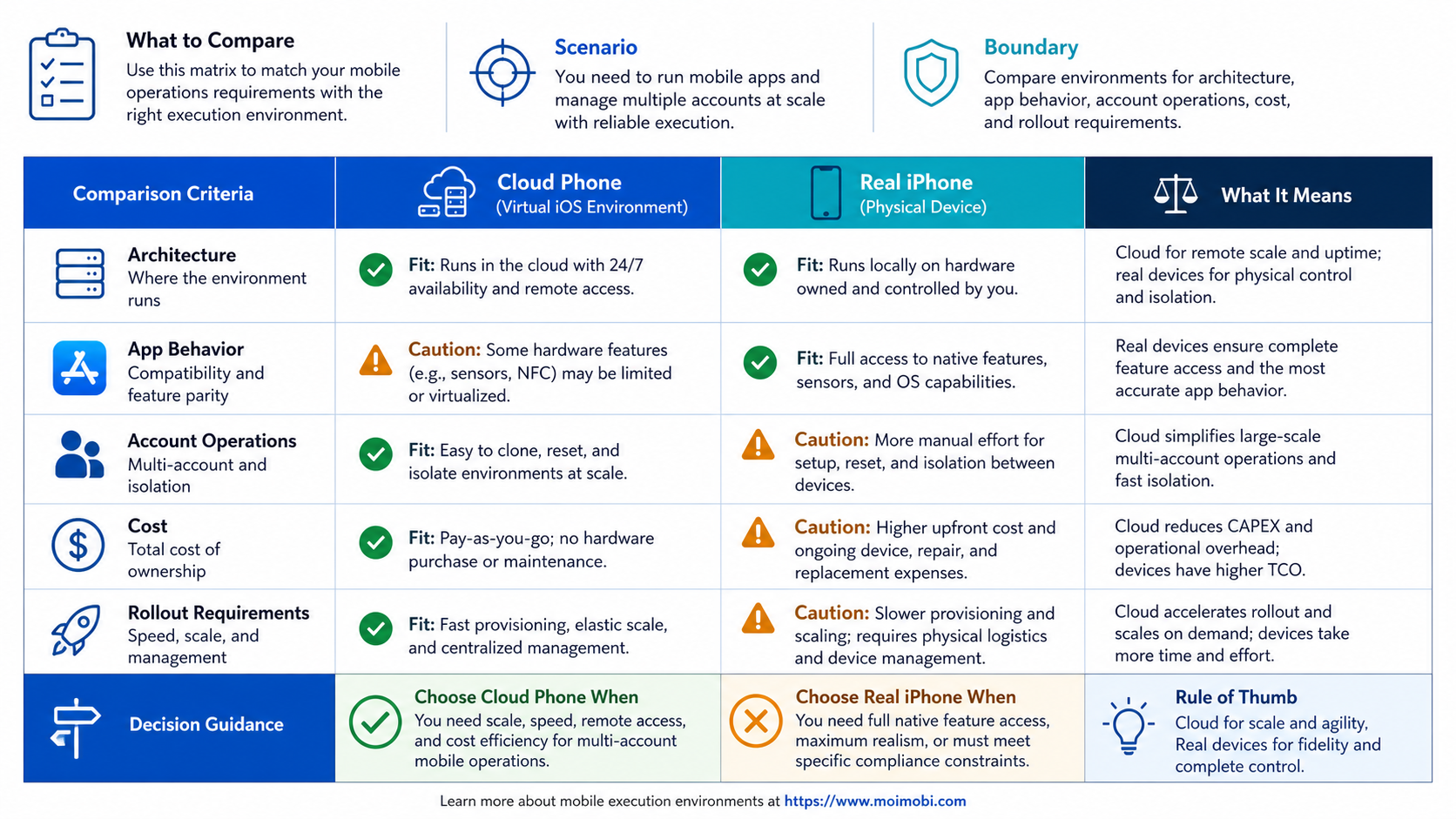
| Decision dimension | Cloud phone | Real iPhone infrastructure |
|---|---|---|
| Core environment | Hosted Android, often virtualized or managed remotely | Physical iPhone hardware hosted or accessed remotely |
| Operating system | Android | iOS |
| Provisioning pattern | Usually fast to create, duplicate, or assign | Usually tied to available physical inventory and device setup |
| App fit | Android-first workflows and mobile automation | iOS-specific workflows and hardware-dependent checks |
| Parallel capacity | Often suited to repeatable environment pools | Depends on device inventory, access model, and concurrency |
| Maintenance focus | Android images, app state, sessions, routing, and tasks | Hardware, iOS version, battery/connection state, app state, and access |
| Best proof point | Can the team repeat the Android task and recover it? | Does the workflow behave correctly on the target iPhone? |
The table is a starting point, not a product promise. A provider can implement a cloud phone in different ways, and a real-device service can expose different controls. Verify the environment with a small workflow before treating a category label as a technical specification.
Cloud Phone vs Real iPhone Workflow Design
The screen is only one part of the execution model. The team also has to manage account assignment, operator access, app state, review, and recovery.
Cloud phone workflow
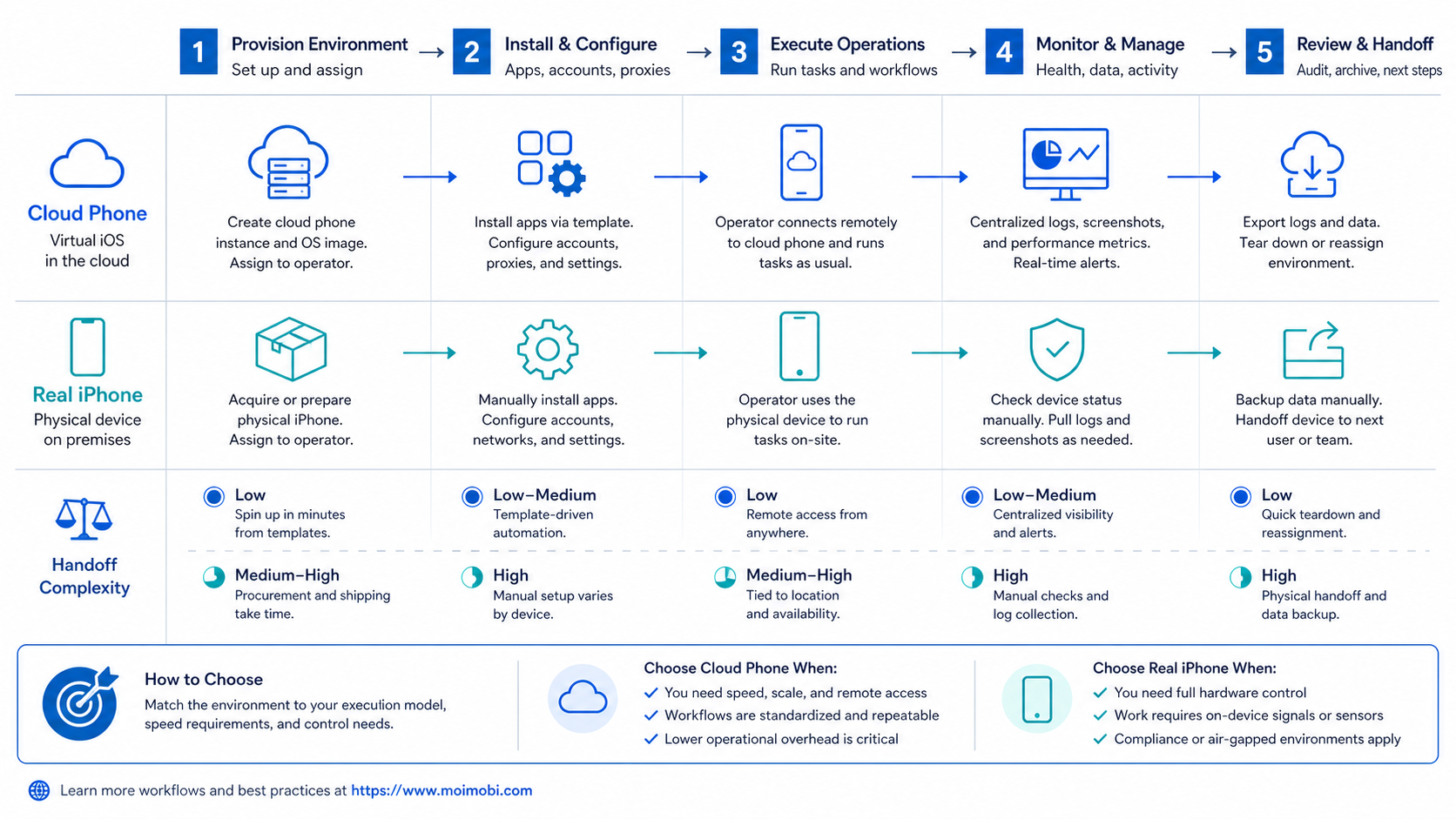
A cloud phone is usually the better first option when the task is Android-first and the team needs repeatable capacity. A typical run looks like this:
- Assign an account to a separated mobile environment.
- Check the app version, session state, routing, and required permissions.
- Load approved content or task instructions.
- Run the mobile action through an operator or automation workflow.
- Capture the output and mark the task as complete, blocked, or requiring review.
This model is useful for teams that run repeated app work across many accounts. A managed Android execution layer can provide the environment, but the team still needs clear ownership and a review rule. The environment does not decide whether the content is approved or whether an account was selected correctly.
Real iPhone workflow
A real iPhone workflow starts with a physical-device inventory and a more specific device assignment. The team may need to reserve a model, an operating-system version, a dedicated operator lane, or a device-specific validation step.
The workflow usually includes:
- pairing or authorizing the device;
- confirming the app, OS, network, and hardware state;
- running the task on the physical iPhone;
- capturing a screenshot, result, or diagnostic record;
- returning the device to an available or review state.
AWS Device Farm is a useful first-party example of managed physical-device access. Its documentation describes remote access and automated testing on real Android and iOS phones and tablets, and explains that device slots control concurrent sessions. That reinforces an operational point: real-device work still needs capacity planning and queue control. See AWS Device Farm's real-device model.
Mixed workflow
Some teams need both environments, but the handoff must be explicit. Browser research can prepare a task, a cloud phone can handle Android execution, and a real iPhone can validate an iOS-specific outcome. The task record should carry the account, source material, approval, environment, operator, output, and next action through every handoff.
Without that shared record, a mixed setup becomes three disconnected tools. The team then loses time asking which environment was used, who approved the action, and whether the output was final.
Cost and Operational Trade-Offs
The cheapest monthly device is not automatically the cheapest operating model. Compare the full work required to provision, operate, monitor, recover, and replace each environment.
For a cloud phone, include environment runtime, app setup, account assignment, routing, content handling, task review, and recovery. For real iPhones, include hardware access, device reservation, physical inventory, connectivity, operating-system maintenance, operator access, and the time needed to diagnose device-specific failures.
Use this worksheet before requesting a larger plan:
| Cost area | Questions for a cloud phone | Questions for real iPhones |
|---|---|---|
| Setup | How quickly can an Android environment be assigned and checked? | How long does device pairing, authorization, and preparation take? |
| Capacity | How many environments can run concurrently? | How many physical devices and remote sessions are available? |
| Daily operations | Who owns accounts, tasks, routing, and review? | Who owns reservations, device state, charging, and recovery? |
| Failure handling | Can the team reset app state without losing the task record? | Can the team replace or service a device without losing context? |
| Evidence | Can the system retain task status and screenshots? | Can the team connect physical-device evidence to the account and operator? |
| Migration | Can accounts and workflows move to another environment? | What happens if a model, OS version, or device supply changes? |
Do not use a single accounts-per-device figure as the purchasing decision. Capacity is useful only after the normal task, the review step, and the recovery path are repeatable. A larger pool can increase confusion when account ownership and task records are weak.
Which Option Fits Different Teams?
Choose a cloud phone first when
- the required action exists in an Android app;
- the team needs multiple repeatable mobile environments;
- operators work remotely and need shared task ownership;
- the workflow benefits from fast provisioning and reusable runbooks;
- the team wants mobile automation with account and task records;
- an Android environment is sufficient for the required output.
MoiMobi is most relevant in this lane because it treats the cloud phone as part of a wider execution system. Teams can evaluate separated mobile workspaces alongside mobile execution, routing, account assignment, and workflow review instead of treating the device as a standalone rental.
Choose real iPhone infrastructure first when
- the app or service requires iOS behavior;
- the workflow depends on hardware-specific features;
- the final output must be validated on a physical iPhone;
- device model or iOS version is part of the acceptance criteria;
- the cost of discovering an iOS mismatch late is high.
Real iPhone infrastructure is not automatically better for every team. It can add inventory, access, and maintenance requirements. It is the correct direction when those requirements are part of the work, not merely because physical hardware sounds more credible. Teams comparing the browser layer alongside mobile execution can use an account-separated browser workspace to keep web preparation and mobile execution as separate decisions.
Use both when
- research and preparation happen in a browser but execution happens in an app;
- Android is used for repeatable operations and iPhone is used for final validation;
- different operators own preparation, execution, and review;
- one task ID connects the account, environment, approval, and result.
Physical inventory questions also benefit from reviewing a managed device fleet model as a separate operating model.
Fit, Not-Fit, and Stop Rules
Both options are a poor fit when the task has no owner, no approved input, or no useful output definition. Adding another device does not repair an undefined process.
| Situation | Better direction | Stop or review rule |
|---|---|---|
| Android-only publishing or inbox work | Cloud phone | Pause when app state or permissions are unknown |
| iOS-only feature validation | Real iPhone | Stop when the device model or OS does not meet acceptance criteria |
| Browser preparation plus mobile execution | Combined workflow | Require one task record across the handoff |
| Unclear account ownership | Neither yet | Resolve access and approval before execution |
| Repeated unexplained failures | Pause the rollout | Record state, cause, retry decision, and recovery owner |
| High-value account with no recovery plan | Neither yet | Define replacement and escalation before scale |
Avoid treating environment separation as a substitute for governance. A separated environment can reduce accidental session mixing, but it cannot approve content, identify the right account, or explain why a task was repeated.
Pilot Plan for a Mobile Execution Environment
Run a controlled pilot before moving a large account set. Use one account group, one operator, one reviewer, and one defined output. If the workflow is genuinely cross-platform, test the handoff rather than testing each tool in isolation. For an Android-first pilot, the cloud phone vs emulator comparison provides a second checkpoint for the virtual-device boundary.
- Write the task in observable steps.
- Record the required OS, app, permissions, and account.
- Assign one cloud phone or one real iPhone to the task.
- Run a normal case with approved input.
- Run one controlled exception, such as an expired session or missing permission.
- Record the output, screenshot, failure reason, and reviewer decision.
- Ask a second operator to continue from the record.
- Compare recovery time, duplicate actions, review rate, and unresolved exceptions.
- Decide whether to continue, change the runbook, or stop.
The pilot should answer operational questions, not just demonstrate that a screen can be opened. Can another operator understand what happened? Can a manager identify the account and environment? Can the team separate a normal failure from an unknown outcome? Can the workflow be paused without losing the next action?
Frequently Asked Questions
What is the main difference between a cloud phone and a real iPhone?
A cloud phone usually exposes a remotely managed Android environment. A real iPhone exposes physical iOS hardware. They differ in operating system, device behavior, provisioning, and maintenance.
Is a cloud phone the same as an Android emulator?
Not always. An Android emulator is a software simulation. A cloud phone may use an emulator, a virtual Android device, or another hosted Android implementation. Check the provider's architecture and controls.
Which option is better for TikTok automation?
It depends on the required app and operating system. A cloud phone can fit Android-first TikTok workflows that need repeatable mobile execution. Test the exact account, content, review, and recovery flow before expanding.
Can real iPhones be managed remotely?
Yes, managed services can provide remote access to physical iPhones. The team still needs device assignment, session limits, access control, and a recovery process.
Which option is easier for multi-account operations?
Neither is automatically easier. Compare environment separation, account mapping, operator roles, review, task history, and recovery for the actual workflow.
Is a real iPhone always more reliable?
No. Physical hardware can better match an iOS-dependent requirement, but it still has connectivity, app, OS, access, and maintenance failure modes. Reliability comes from environment fit plus operational control.
Should a team use a cloud phone and a real iPhone together?
Use both when the workflow has a real cross-platform requirement. Keep one task record and one accountable owner across the handoff.
How should teams compare total cost?
Include setup, runtime, maintenance, operator time, recovery, device replacement, capacity, and migration. Avoid comparing only the advertised monthly environment fee.
What should be tested before buying at scale?
Test the main task, one exception, account assignment, review, evidence capture, and recovery. Ask a second operator to repeat the run from the recorded workflow.
Does device isolation remove the need for human review?
No. Isolation can separate environments, but it does not decide whether an action is approved or correct. Consequential actions still need ownership and review.
Conclusion
The cloud phone vs real iPhone choice starts with the execution surface. Select a cloud phone when Android app access, repeatable environments, and parallel mobile workflows matter. Select real iPhone infrastructure when the work depends on physical iOS behavior or device-specific validation.
Before scaling, run one controlled pilot and record the account, environment, operator, approval, output, and recovery result. If Android is enough, a cloud phone can provide a practical execution layer. If iOS hardware is part of the acceptance criteria, validate on a real iPhone. If both surfaces are required, connect them through one accountable workflow instead of adding disconnected tools.


