
Key Takeaways
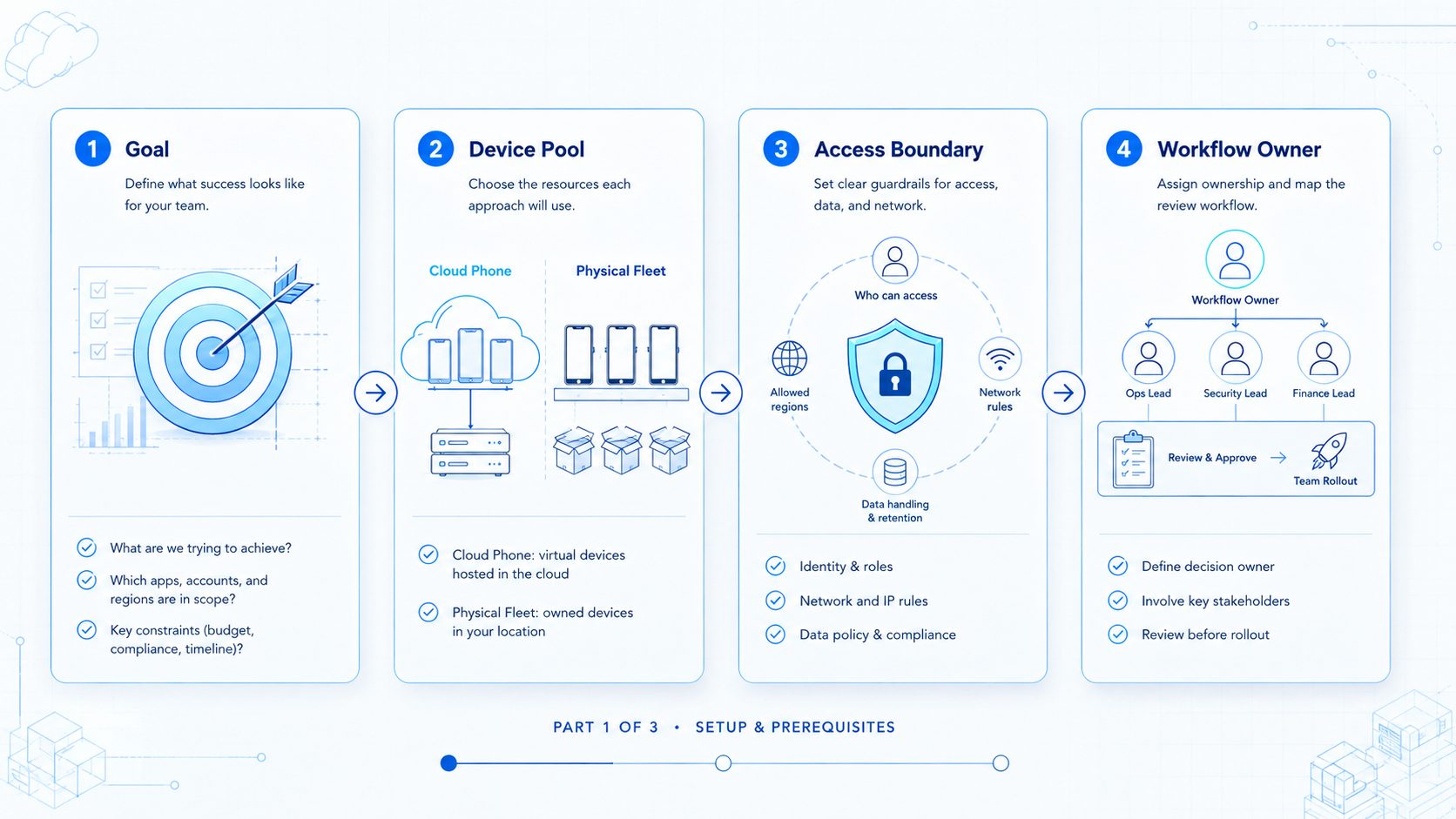
- Cloud phone vs physical device fleet decisions should include labor, access, scale, and recovery
- Physical devices give direct hardware control, but they add storage, setup, and upkeep work
- Cloud phones are easier to assign across remote teams and repeated mobile workflows
- A pilot should compare the same workflow in both spaces before a full rollout
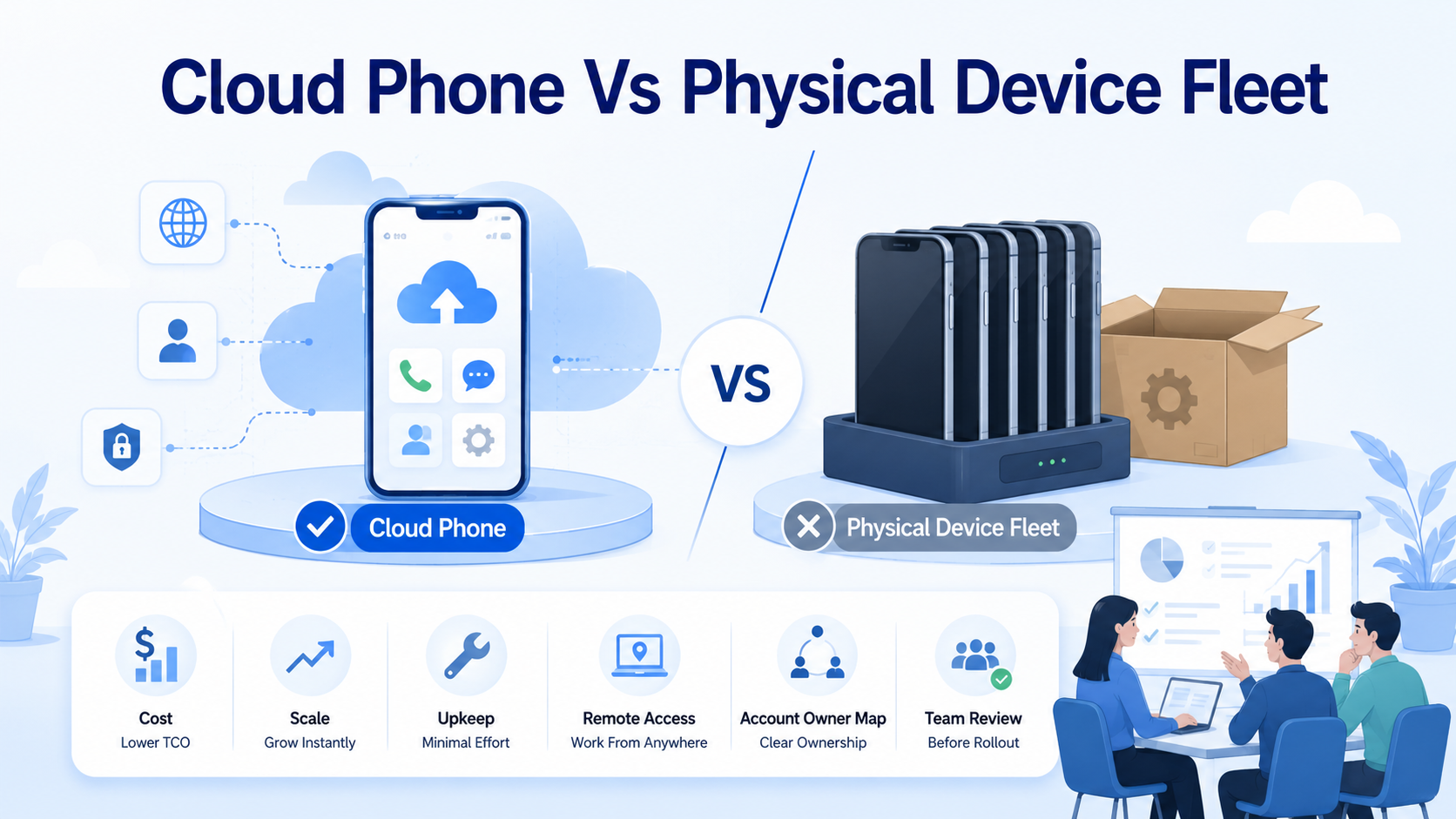
Cloud phone vs physical device fleet is a cost and scale decision between managed remote mobile workspaces and owned local hardware. Cloud Phone vs Physical Device Fleet: Cost and Scale means choosing which option fits the team's access model, review process, and mobile workload.
A physical fleet may look cheaper if the team only counts phone purchase cost. The total picture includes setup, charging, repairs, network handling, device handoff, notes, and supervision. A cloud phone setup shifts more of that work into software and vendor setup.
Moimobi helps teams organize mobile work through cloud phone spaces, device isolation, workflow, and multi-account workflows. That makes the comparison practical for social media, support, e-commerce, and app-based work.
Quick recommendation: choose physical devices when exact hardware, local network behavior, or direct inspection is required; choose cloud phones when remote owner map, repeated mobile workflows, and manager review are more important. Some teams need a hybrid model.
Cloud Phone vs Physical Device Fleet: What You Are Really Comparing
The comparison is not hardware versus software in the abstract; it is local handling versus managed remote work.
Physical fleets put the phones in your hands; teams can control the model, location, accessory setup, SIM choice, and local network; that can be useful for specific testing or review needs.
Remote mobile workspaces put the operating surface in a managed system; teams assign access, run workflows, check results, and coordinate operators through software.
| Question | Physical device fleet | Cloud phone |
|---|---|---|
| Where is the device | Office, lab, or operator location | Remote space |
| Who handles setup | Internal staff | Vendor plus team rules |
| How does access scale | Physical handoff or remote control tool | Workspace owner map |
| How are tasks reviewed | Manual notes unless built | Central logs and review flow |
| What breaks first | Logistics | Vendor fit or process design |
Both models can work; the wrong model is the one your team cannot manage well.
Cloud Phone vs Physical Device Fleet Cost Categories
Cost does not stop at hardware or plan; it includes the operating work around each mobile space.
Physical fleets often create hidden costs:
- device purchase and replacement
- storage and charging setup
- cable and accessory management
- SIM or network handling
- local staff time
- repair and loss handling
- notes and labeling
- remote teammate access
Cloud phones create a different cost profile:
- workspace plan
- vendor evaluation
- access control setup
- account mapping
- workflow rules
- review and reporting
- recovery process design
The better choice becomes clearer when labor is counted. If a team spends too much time locating devices, checking status, or clarifying ownership, the fleet is already costing more than the hardware line suggests.
Android's official emulator guide is a useful reminder that mobile workflows depend on platform behavior, app permissions, and device conditions (Android Developers).
Teams that also automate browser-side steps should understand controlled session models such as WebDriver (W3C WebDriver).
For content teams using AI during work, Google recommends helpful, people-first content as the quality baseline (Google Search Central).
Cloud device services are not only a Moimobi category. AWS Device Farm documents remote access to real phones through a browser, managed Appium endpoints, logs, video capture, and managed test runs (AWS Device Farm). Firebase Test Lab also describes cloud-based app testing on real and virtual devices (Firebase Test Lab).
Cloud Phone vs Physical Device Fleet Scale Planning
Scale exposes weak process; a physical fleet can be fine at five devices; it can become messy at fifty if there is no ownership model.
Cloud phone workspaces usually make remote scaling easier. New workspaces can be assigned to accounts, campaigns, regions, or teammates. Managers can review work without being near the hardware.
Scale still needs discipline. More workspaces can create more confusion if account mapping is poor.
| Scale signal | What it means | Recommended response |
|---|---|---|
| Operators share devices | Ownership is unclear | Assign device or workspace owners |
| Notes live in chat | Review is weak | Add task records |
| Login issues repeat | Recovery is missing | Add stop rules |
| Remote staff wait for devices | Access model is broken | Consider cloud workspaces |
| Managers cannot audit results | Scale is ahead of control | Add review dashboards |
For teams exploring larger mobile work, cloud phone farm infrastructure is a useful next comparison; it explains the shift from device pools to managed work.
Which Option Fits Your Team
Run a 7-day pilot before buying more capacity; use one workflow, two operators, and one account group. Record setup minutes, review notes, failed screens, recovery steps, and the person who owns each workspace.
Use fields such as device ID, workspace ID, account group, task type, app name, last action, next review, and stop reason. These fields make the comparison concrete.
For a 2026 buying review, score access, setup, recovery, review, and cost from 1 to 5; a scorecard forces the team to compare the same workflow in both models.
Team Access and Handoff
Access is where physical fleets often slow down; a phone can sit in one office while the person who needs it works somewhere else. Remote access tools can help, but they add another layer to manage.
Remote workspaces fit remote teams better; a workspace can be assigned to a worker, reviewed by a manager, and connected to a workflow without shipping hardware.
Handoff should be written down; use a simple record:
- workspace name
- account group
- assigned operator
- current task
- last completed step
- pending review
- recovery notes
Short records reduce confusion. They also make it easier to train new team members.
Account Isolation and Workspace Control
Multi-account teams need clean boundaries; the issue is not only device count; it is whether each account has a clear space and owner.
A physical fleet can support isolation if the team labels devices, documents account mapping, and controls access; that works when the process is mature.
Cloud phone workspaces can make the same model easier to administer; a remote workspace can be assigned to one account group, one client, or one campaign.
Moimobi's device isolation and multi-account management pages are relevant for this operating model.
Do not promise that any setup removes all account risk. Better wording is more accurate: separated workspaces make ownership, review, and recovery easier.
When Physical Devices Are the Better Choice
Physical devices are stronger when exact hardware control matters. A testing team may need a specific model. A QA process may need local network conditions. A review may require direct possession.
Choose a physical fleet when:
- exact device models matter
- local network conditions are part of the test
- devices stay in one controlled location
- the team has staff to maintain them
- the workflow volume is still small
Physical devices can also be useful for edge cases. Keep them where they clearly serve the workflow.
When Cloud Phones Are the Better Choice
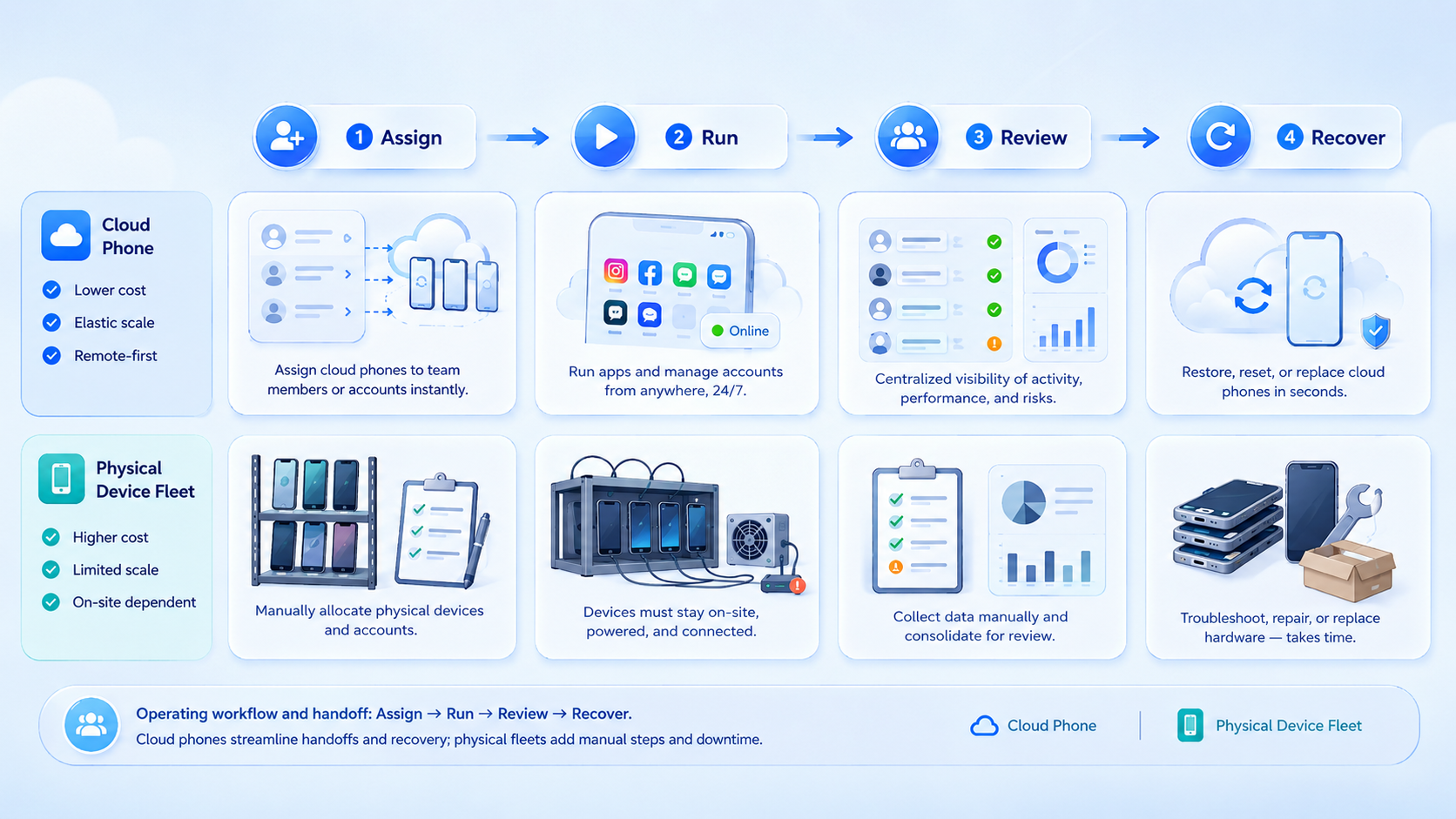
Cloud phone setups are stronger when teams need remote work, repeated account workflows, and easier review. They are useful for app-based social media work, customer replies, mobile checks, and multi-account work.
Choose cloud phones when:
- operators are remote
- mobile tasks repeat daily
- account workspaces need clear ownership
- managers need remote review
- campaign workflows need many capacity
- physical handling has become a bottleneck
Moimobi's mobile automation layer adds another reason to consider remote mobile spaces. When repeated steps can become workflows, the device becomes part of a larger work system.
Cloud Phone vs Physical Device Fleet Cost Model
Use a practical model before deciding; it does not need complex finance work.
| Cost line | Physical fleet | Cloud phone |
|---|---|---|
| Setup time | Unbox, label, configure | Provision, assign, verify |
| Access | In-person or remote-control layer | Workspace login |
| Upkeep | Team owns repairs and updates | Vendor plus team review |
| Scaling | Buy and configure more devices | Add managed workspaces |
| Review | Build process manually | Use workspace/task records |
Add a labor estimate for each line. Ten minutes per device per day becomes significant when the team grows.
Cloud Phone vs Physical Device Fleet Decision Table
| Choose this option | Best fit | Check before rollout |
|---|---|---|
| Physical device fleet | Exact model testing, local network checks, and direct inspection | Repair path, labeling, access rules |
| Cloud phone | Remote mobile work, account workspaces, and repeated team tasks | Vendor fit, workspace ownership, review logs |
| Hybrid | Engineering tests plus work workflows | Clear boundary between test devices and operating workspaces |
Do the math twice. Count invoices once, then count labor.
Pilot Plan
Run the same workflow in both models; that is the cleanest test.
- Choose one mobile task
- Define success and stop rules
- Run it on a physical phone
- Run it on a cloud phone
- Compare setup time, completion, errors, and review work
- Decide which model fits the next scale stage
Use a real workflow, not a demo; a real workflow includes login state, app screens, unclear data, and handoff.
Plain Rollout Checks
Use this simple list before the team adds more seats, phones, accounts, or workspaces:
- owner name for each account group
- workspace name that matches the account group
- app name and task name written in plain words
- start rule for the task
- stop rule for unclear screens
- review owner for the daily log
- handoff note for the next worker
- retry rule for failed runs
- support note for app updates
- weekly check for unused workspaces
- simple pass or fail mark for each run
- next action written before the shift ends
Keep the list short and visible. A small team can run it in a sheet; a larger team can move the same fields into an internal dashboard.
Cloud Phone vs Physical Device Fleet Team Runbook
Use this plain runbook during the pilot:
- one owner name
- one account group
- one app name
- one task name
- one start rule
- one stop rule
- one review note
- one handoff note
- one retry note
- one daily check
- one weekly clean up
- one cost note
- one support note
- one access note
- one next step
- one pass mark
- one fail mark
- one reason for each fail mark
- one manager review before the team adds more seats
- one written rule for who can change the workspace
- one written rule for what happens when an app screen changes
Keep the words plain. The goal is not a large policy file. The goal is a small record that any operator can read before work starts.
Cloud Phone vs Physical Device Fleet Daily Checks
Add these plain checks to the same runbook:
- who has the phone today
- who can open the work area
- who can stop the task
- who checks the note
- what app is open
- what screen is shown
- what account is in use
- what work was done
- what work is next
- what went wrong
- what was fixed
- what still needs help
- what should wait
- what should run again
- what should not run again
- what has no owner
- what has no note
- what has no next step
- what needs a manager
- what can be closed
These checks use plain words so a new team member can read the sheet and act without asking for a long handoff.
Use plain team words in every note:
- who owns it
- who checks it
- who stops it
- who starts it
- what app is open
- what work is done
- what comes next
- what needs help
- what waits
- what closes
Frequently Asked Questions
What is the main difference?
Physical fleets use owned hardware; cloud phones use managed remote mobile workspaces.
Which model scales faster?
Cloud phones usually scale access faster, but only when workflow rules are clear.
Are physical devices more reliable?
They offer direct control. Reliability still depends on upkeep, staff, and process.
Can cloud phones support multi-account teams?
Yes, when each account group is mapped to a separated workspace and owner.
Do teams still need physical phones?
Sometimes. Keep physical devices for exact hardware testing or local-network workflows.
What should the first pilot measure?
Measure setup time, task completion, manual review, error recovery, and operator workload.
Is cloud phone the same as phone farm software?
Not exactly. Phone farm software often manages many devices; cloud phones provide remote mobile spaces.
Conclusion
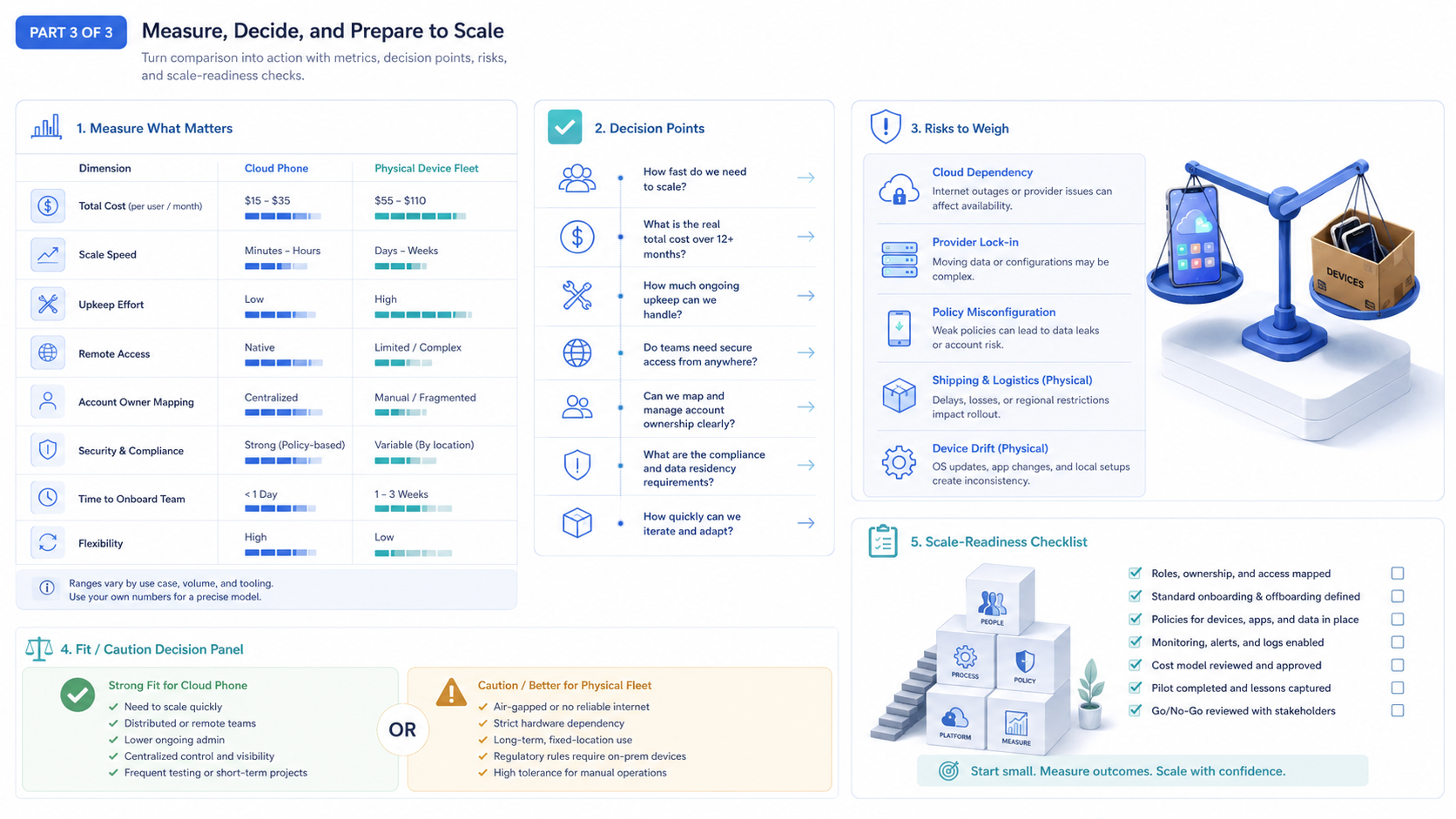
Cloud phone vs physical device fleet decisions should be based on operating reality. Count access time, upkeep, ownership, scale, and recovery.
Use physical devices when hardware control is required; use cloud phones when the team needs remote mobile work, cleaner owner map, and more scalable review.



