
Cloud phone pricing is the cost of running remote Android environments with the capacity, persistence, isolation, bandwidth, and controls a team needs. It is not only the sticker price per device.
The real cost depends on what the team expects each Android cloud device to do. A short testing session has a different cost shape from always-on social media operations, customer engagement, or multi-account mobile execution.
MoiMobi positions cloud phones as one layer in an execution system. The buying decision should include device runtime, workflow control, account isolation, operator access, and recovery support.
Key Takeaways
- Cloud phone pricing is shaped by runtime, concurrency, persistence, bandwidth, storage, and support.
- Low monthly device cost can be misleading if workflows need more slots, routing, or recovery.
- Testing platforms and operations platforms price capacity differently.
- Device isolation and account workflow needs can change the real cost.
- A pilot should measure cost per completed workflow, not only cost per device.
What Cloud Phone Pricing Really Includes
The price includes the remote Android device plus the infrastructure around it. That can include CPU and memory allocation, Android version, storage, bandwidth, session persistence, proxy routing, file transfer, team access, automation, and support.
Public cloud testing providers show why a single price is not enough. AWS Device Farm pricing lists pay-as-you-go real mobile device pricing by device minute and also offers unmetered device slots, where slots map to concurrency. That means time and parallel capacity both affect cost.
Cloud phone operations have a similar logic, even when the packaging is monthly. A team paying for 20 devices may still be constrained if only five can run the required workflow at once. Another team may need fewer devices but higher persistence, cleaner routing, and stronger account separation.
For direct product evaluation, start with the cloud phone page and map features to the workflows you actually need.
Why Cloud Phone Pricing Matters for Teams
Pricing matters because cloud phones are rarely used as idle devices. They are used to execute work.
A social media team may need Android app access for TikTok, Instagram, WhatsApp, or Telegram. An e-commerce team may need account checks, listing updates, customer replies, and campaign monitoring. An agency may need client separation and operator handoff.
The wrong pricing model creates hidden costs:
- Operators wait because not enough devices can run in parallel.
- Accounts share environments and create operational confusion.
- Storage fills up and forces manual cleanup.
- Routing is not aligned with account geography.
- Support response is too slow for production workflows.
- Automation runs but nobody can audit what happened.
Mobile automation should therefore be part of the cost discussion. A cheaper device is not cheaper if the team spends more hours coordinating it.
Main Cost Drivers in Android Cloud Devices
Most teams should evaluate pricing through cost drivers, not plan names.
| Cost Driver | What It Changes | Question to Ask |
|---|---|---|
| Runtime | How long devices stay active | Do workflows run occasionally or every day? |
| Concurrency | How many devices run at the same time | Do operators need parallel capacity? |
| Persistence | Whether sessions and app state remain available | Does each account need a stable workspace? |
| Isolation | How cleanly accounts are separated | Can one account affect another account? |
| Routing | Network alignment and proxy control | Does each account need consistent routing? |
| Automation | Repeatable actions and scheduling | Can routine work run without manual setup? |
| Support | Recovery speed when workflows fail | Who helps when production work is blocked? |
Android's official Android Emulator documentation describes a local development tool for testing apps on a computer. That is useful for developers, but it is different from managed remote Android environments for team operations. When pricing cloud phones, compare against the job to be done, not only the device type.
Cloud Phone Pricing vs Physical Phone Farm
A physical phone farm can look cheaper when a team only counts hardware. The full cost is broader.
Physical devices need purchase, charging, storage, maintenance, network setup, remote access, SIM or proxy planning, monitoring, and staff time. They also require a way to assign devices to operators and recover failed sessions.
Cloud phones shift much of that work into a managed environment. The trade-off is recurring platform cost. The benefit is faster provisioning, remote access, and easier parallel operations.
Use this decision rule:
- Choose a physical phone farm when the team needs full hardware control and has staff to maintain it.
- Choose cloud phones when the team needs remote access, faster scaling, and managed account workspaces.
- Use a hybrid model when some accounts need physical devices and routine workflows can run remotely.
For teams comparing infrastructure options, cloud phone farm infrastructure is a useful next read.
How to Estimate Cloud Phone Pricing Before Buying
Estimate cost from workflows, not from device count alone.
- List account groups. Separate TikTok, Instagram, WhatsApp, marketplace, or support accounts.
- List required actions. Include publishing, browsing, replying, monitoring, reporting, and file transfer.
- Estimate active time. Decide whether each device is always-on, scheduled, or on demand.
- Estimate concurrency. Count how many workflows must run at the same time.
- Map isolation needs. Decide which accounts need dedicated environments.
- Add routing requirements. Include proxy, region, or network consistency needs.
- Add recovery support. Price the cost of downtime and manual repair.
This creates a more useful number: cost per completed workflow. A plan that costs more per device may cost less per outcome if it reduces waiting, mistakes, or recovery work.
Device isolation should be evaluated early when accounts represent different clients, regions, or business units.
Pricing Scenarios Teams Should Model
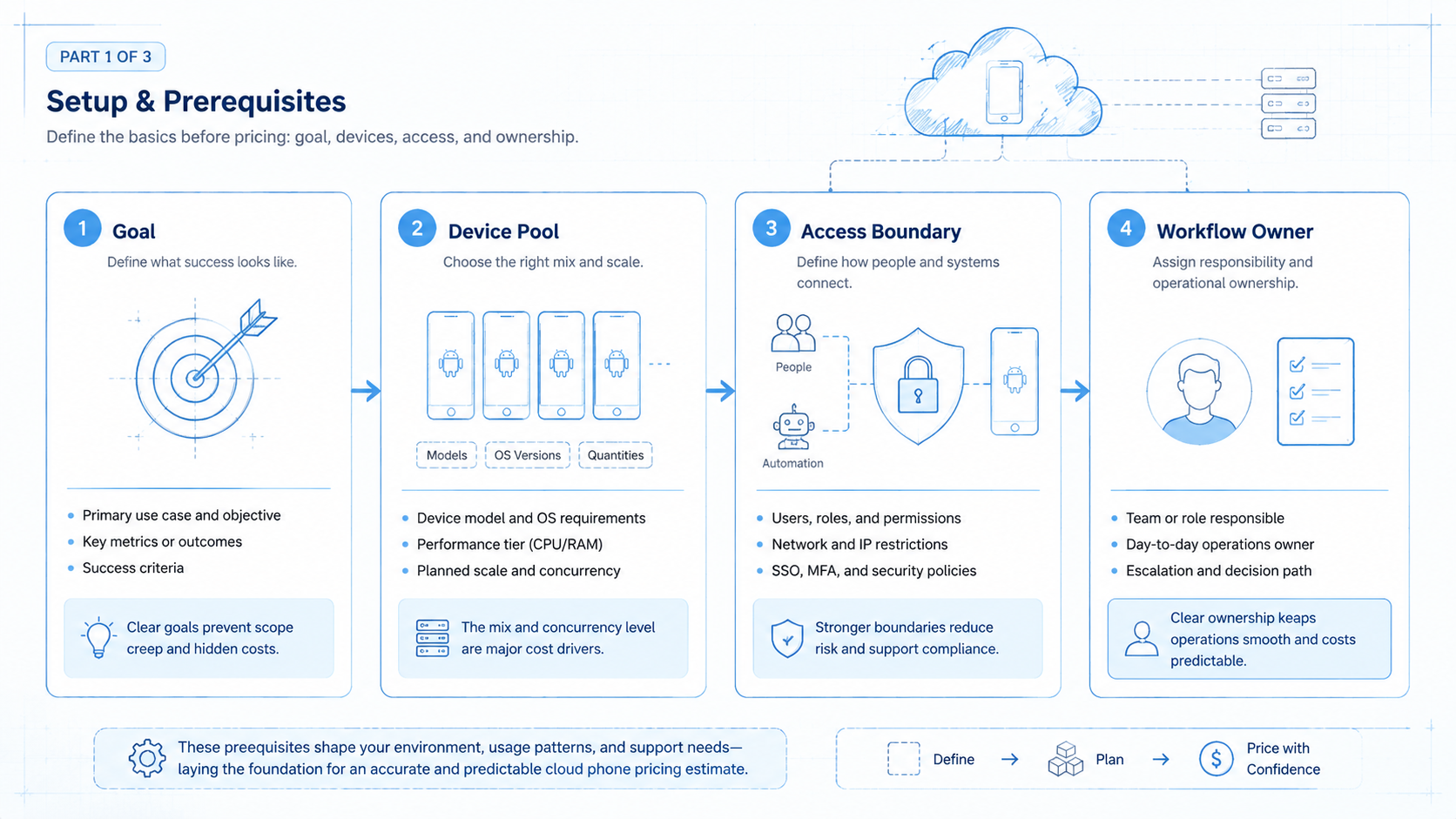
Different teams can buy the same number of devices and still have different costs. The workflow pattern decides the real load.
Consider three simple scenarios.
The first scenario is scheduled social review. Ten accounts need two short checks per day. The team cares about persistence, login state, and basic routing. Concurrency may be modest because checks can be staggered.
The second scenario is campaign launch support. Thirty accounts need monitoring, replies, and content checks during the same launch window. Concurrency becomes more important because delayed actions reduce the value of the workflow.
The third scenario is customer engagement. Operators use mobile apps throughout the day for replies, follow-up, and reporting. Support access, logs, and recovery speed now affect cost as much as device count.
These scenarios explain why plan comparison should include:
- Active hours per device.
- Peak concurrent devices.
- Number of operators.
- Required account isolation level.
- Media upload and download volume.
- Recovery expectations.
- Reporting and audit needs.
A spreadsheet with these fields is often better than a generic vendor checklist. It turns cloud phone pricing into an operations plan.
Common Mistakes to Avoid
The first mistake is comparing cloud phone pricing like commodity hosting. Android execution includes session state, user access, network behavior, and workflow recovery.
Avoid these mistakes:
- Buying the lowest device count. The team may need concurrency, not just inventory.
- Ignoring storage. Media-heavy workflows can increase storage and transfer needs.
- Skipping routing plans. Account operations may require consistent network paths.
- Mixing accounts. Shared environments can create confusion and recovery work.
- Ignoring support hours. A cheap plan can be costly when production work is blocked.
- Comparing against emulators only. Local emulators and managed cloud devices solve different jobs.
BrowserStack pricing and Sauce Labs pricing both package mobile testing around access model, parallel capacity, or plan tiers. Their public packaging reinforces the same lesson: concurrency and access model are core cost variables in device infrastructure.
Who It Fits and When It Is a Strong Match
This category makes sense for teams that treat Android devices as production workspaces. The fit is strongest when mobile accounts need persistent environments and repeatable execution.
It fits:
- Social media teams running many mobile-first accounts.
- Agencies that need client separation.
- E-commerce teams checking mobile apps and messages.
- Customer engagement teams handling WhatsApp, Telegram, or Instagram workflows.
- Operations teams that need remote Android access across roles.
The fit is weaker when a user only needs occasional app testing on a local computer. In that case, Android Emulator or a short testing platform session may be enough.
For broader mobile execution planning, review phone farm options alongside cloud phones.
How to Compare GeeLark, MoreLogin, BitBrowser, and Cloud Phones
Competitor comparisons should start with category fit. Some tools focus on browser profiles. Some focus on cloud Android environments. Some combine account workspaces with automation.
Use this comparison frame:
- Browser-first tools fit workflows that mainly happen on websites.
- Cloud phone tools fit workflows that need Android apps, persistent mobile sessions, or mobile-first accounts.
- Hybrid execution platforms fit teams that move between browser work and mobile app work.
Do not choose only by brand name. Ask whether the workflow needs Android app execution, separated account environments, proxy routing, file transfer, team permissions, and recovery logs.
For example, a browser profile may be enough for dashboard checks. A cloud phone may be better when Instagram, TikTok, WhatsApp, or Telegram work must happen inside mobile apps. A broader platform may be better when the team also needs scheduling, handoff, and workflow records.
Pilot Rollout, Measurement, and Recovery Checks
A pilot should answer whether the platform reduces operational cost, not only whether the device launches.
Track these numbers:
- Cost per active account.
- Cost per completed workflow.
- Operator waiting time.
- Failed session count.
- Manual recovery time.
- Storage and bandwidth growth.
- Number of workflows completed per device.
- Number of account mix-up incidents.
Run the pilot with a small account group and a real workflow. For example, test 10 Instagram accounts with daily login checks, comment review, and reporting. Compare the total operator time against the platform cost.
When the pilot reduces waiting and improves traceability, expand. When the devices work but coordination stays messy, fix the workflow design before adding more capacity.
Frequently Asked Questions
What is cloud phone pricing based on?
Cost is usually shaped by device count, runtime, concurrency, storage, routing, automation, and support.
Is a cloud phone cheaper than a physical phone?
It depends on maintenance, staffing, scale, and workflow needs. Compare total operating cost, not only device price.
Why does concurrency affect cost?
Concurrency controls how many devices or workflows can run at the same time. It directly affects team throughput.
Does every account need its own cloud phone?
Not always. High-value, client, or sensitive accounts often need stronger separation than low-risk test accounts.
Should pricing include proxy costs?
Yes. Routing can be part of the real operating cost for account-based workflows.
How should teams compare providers?
Compare device persistence, isolation, access control, automation, routing, support, and reporting.
Is an Android emulator enough?
It may be enough for development testing. It is usually not the same as persistent remote mobile execution for teams.
What is the best pilot size?
Use enough accounts to test concurrency and recovery. A small but real workflow is better than an idle device trial.
Conclusion
Cloud phone pricing is a workflow cost question. The right plan depends on how many accounts run, how long they stay active, how much parallel capacity is needed, and how cleanly the team can recover from issues.
Before buying, calculate cost per completed workflow. Include devices, routing, support, operator time, and recovery. That number gives a better buying signal than device price alone.



