
Key Takeaways
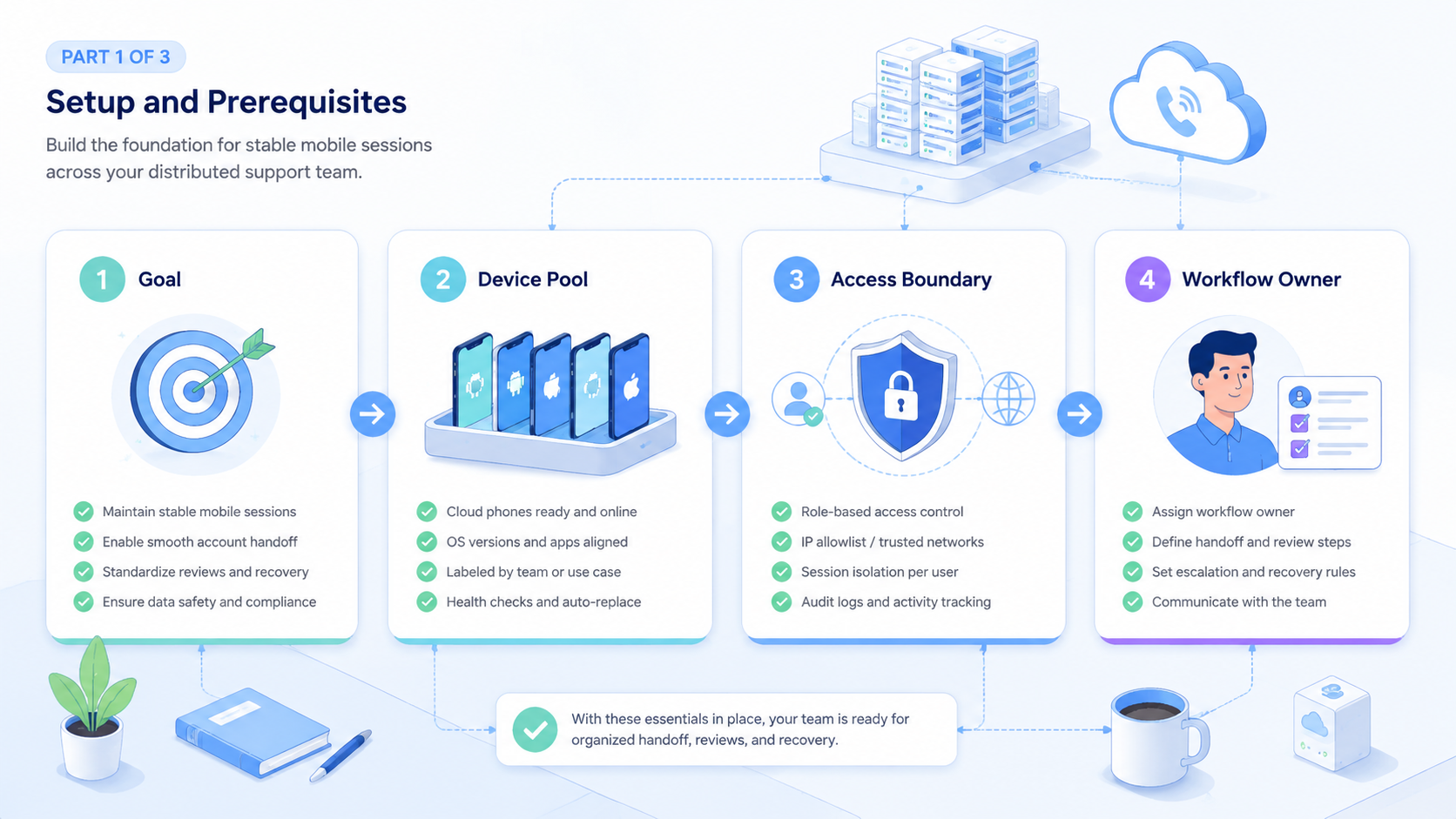
- A cloud phone for customer support gives distributed teams a shared mobile workspace without sharing a personal phone
- The best fit is support work that depends on app sessions, inbox checks, or mobile-only account views
- Role rules, handoff notes, and recovery steps matter more than raw device count
- Start with a 7-day pilot, 3 support accounts, and 1 daily review before scaling
This setup gives support teams a remote mobile device workspace for app-based customer messages, account checks, and support handoff. It helps distributed teams keep mobile sessions available without moving a physical phone between agents.
The core decision is simple. Use a cloud phone when the support workflow depends on a mobile app, an account-specific session, or a device state that must remain available for the next teammate.
What Is Cloud Phone for Customer Support?
A cloud phone for customer support is not just a rented Android screen. It is a controlled mobile workspace where a team can assign an account, open support apps, review messages, and record what happened.
That model matters when support does not live in one web dashboard. Some teams answer customers through messaging apps, social inboxes, marketplace apps, creator tools, or mobile-first commerce tools. The support task may start with a customer reply and end with a screenshot, order check, or account prompt.
AWS Device Farm describes remote access as a browser-based way to interact with hosted devices (AWS Device Farm). The support use case is different from QA testing, but the device access pattern is related: a remote device can be opened, inspected, and operated without being in the agent’s hand.
Short version: the phone becomes a team workspace.
Why Cloud Phone for Customer Support Sessions Matter
The mistake is assuming support agents only need passwords. In mobile-first support, the session itself can be part of the work.
An agent may need to keep an app logged in, check a customer thread, review a profile, or confirm a status inside a mobile app. If every shift starts from a fresh setup, the team loses time before it can answer the customer.
Meta Business Help separates business access and task permissions for team work (Meta Business Help). That is a useful operating rule here. Access should be tied to role and task, not to one person’s personal device.
For Moimobi users, a cloud phone can become the mobile side of the support desk. It sits beside mobile automation, review steps, and team handoff notes.
Key Benefits and Use Cases
Cloud phones help when customer support crosses device, account, and shift boundaries. The value is not magic automation. The value is a cleaner place to work.
Common support use cases include:
| Use case | Why a cloud phone helps |
|---|---|
| Messaging app replies | Agents can work from a named mobile session instead of a personal phone |
| Social inbox review | The team can separate accounts by workspace and role |
| Marketplace support | Operators can check app-only screens during customer follow-up |
| Shift handoff | The next agent can continue from the same device state |
| Escalation review | Managers can inspect notes, screenshots, and task status |
WhatsApp Business Platform documentation describes business messaging through platform tools and managed access models (WhatsApp Business Platform). That reinforces a practical point: support teams need a controlled way to handle message workflows, not informal phone sharing.
How to Start a Cloud Phone for Customer Support Pilot
Start small. A support pilot should prove that the team can answer, hand off, and recover work before adding more accounts.
- Choose 1 support channel, such as a social inbox or messaging app
- Assign 3 accounts or fewer to named device workspaces
- Give each account 1 owner and 1 backup agent
- Track 5 fields: account, task, agent, result, and recovery note
- Review the pilot after 7 days before adding more agents
This is also the right time to connect account work to multi-account management. If the support team cannot explain who owns each account, adding devices will only add more confusion.
Keep the first setup boring. Boring is easier to audit.
Common Mistakes to Avoid
One mistake is sharing a single account workspace across too many agents. The result is usually poor handoff, weak notes, and unclear ownership.
Another mistake is treating every reply as safe for automation. Customer support includes refunds, complaints, policy questions, and private data. Those tasks need review rules.
Messenger Platform documentation includes handover patterns for passing thread control between apps in supported setups (Messenger Platform). Even outside that exact toolset, the principle is useful: support work needs clear control transfer.
Use a stop rule:
- Pause when an account shows an unusual prompt
- Escalate when the customer mentions payment, identity, or legal issues
- Record failed steps before retrying
- Do not let an agent guess from another person’s old session
Who Fits Cloud Phone for Customer Support Workflows
This model fits teams with distributed agents, mobile-first channels, and account-specific support tasks. It is less useful for teams that answer all messages from one mature help desk tool.
Good fit:
- Cross-border teams running support across time zones
- Social commerce teams using mobile inboxes
- Agencies managing client support accounts
- Marketplace teams checking app-only order screens
- Growth teams that combine replies, monitoring, and follow-up
Weak fit:
- One support account with one agent
- Only email-based support
- No owner for account rules or review steps
- No written support SOP
For teams that also run social work, connect the same device model to social media marketing instead of building a separate stack for every channel.
Pilot Rollout, Measurement, and Recovery Checks
Do not judge the pilot by message volume alone. A support workflow should be measured by response flow, handoff quality, and recovery speed.
Use this simple scorecard:
| Check | Target signal |
|---|---|
| Session continuity | The next agent can open the same workspace and understand the state |
| Handoff quality | Each task has a result note and a next action |
| Recovery time | Failed steps are logged and reviewed within 24 hours |
| Escalation control | Sensitive replies move to a reviewer before the customer receives them |
| Account ownership | Each account has one owner, one backup, and one manager |
The recovery review should stay practical. Ask what failed, who saw it, what the customer needed, and whether the workflow needs a rule change.
Frequently Asked Questions
Is a cloud phone for customer support the same as a help desk?
No. A help desk manages tickets. A cloud phone gives the team a remote mobile workspace for app-based support tasks.
When should a support team use cloud phones?
Use them when support depends on mobile apps, account sessions, app-only screens, or shift handoff across agents.
Can cloud phones replace support agents?
No. They can organize the mobile workspace, but customer judgment, sensitive replies, and escalation still need people.
What should the first pilot include?
Use 1 channel, 3 accounts or fewer, 2 agents, 1 reviewer, and a 7-day review cycle.
What should managers track?
Track response time, unresolved tasks, failed login prompts, recovery notes, and escalation count.
Is this useful for social media support?
Yes, if customer messages happen inside mobile-first social apps or account-specific inboxes.
What is the main risk?
The main risk is poor process design. Device access cannot fix weak ownership, missing notes, or unclear review rules.
Conclusion
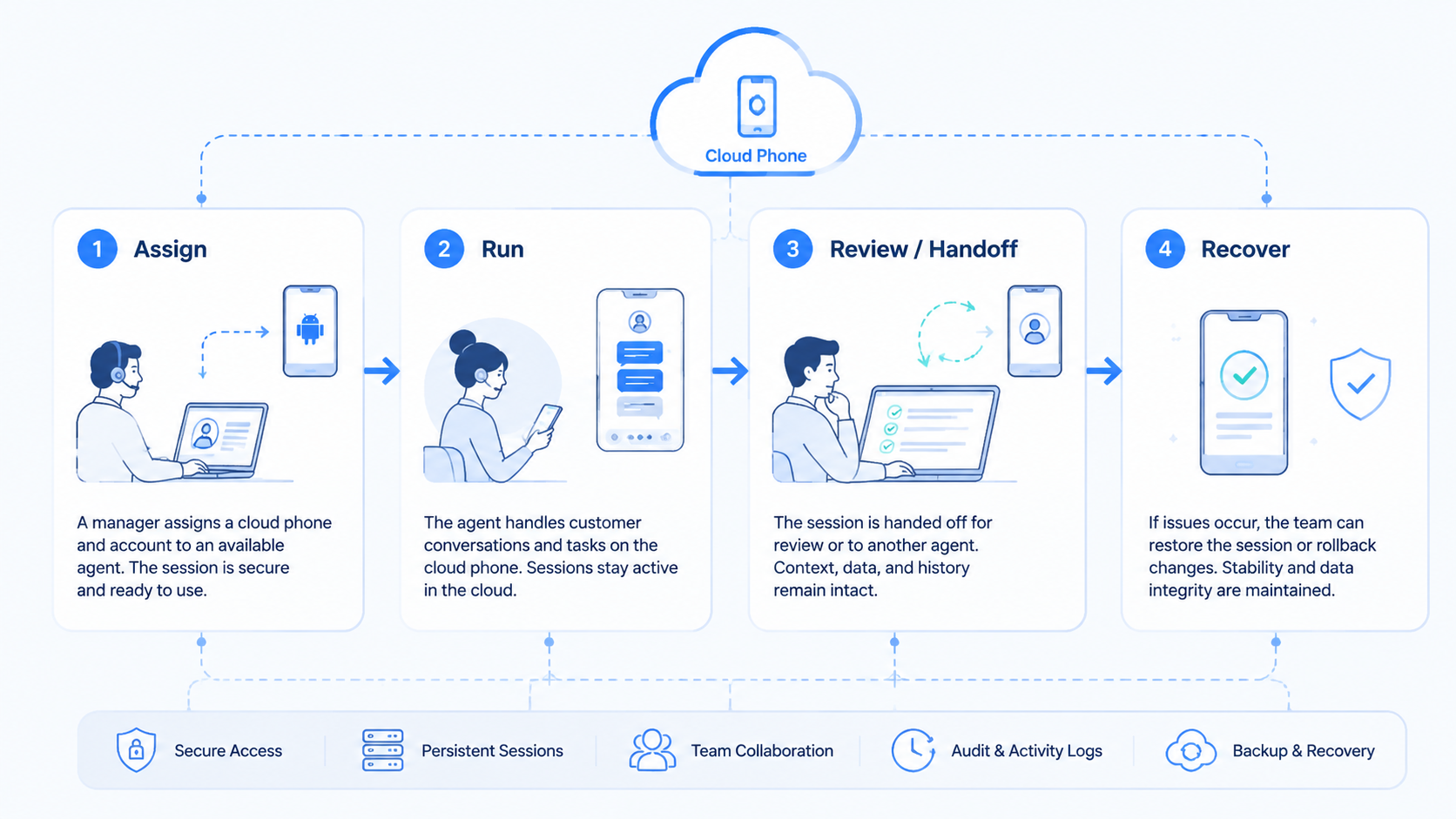
The strongest setup gives distributed agents a clean mobile workspace, not just another screen. It also gives managers account owners, clear handoff notes, and recovery checks.
Before scaling, confirm 3 things: agents can find the right session, managers can review sensitive work, and failed steps create a better rule for the next shift.



