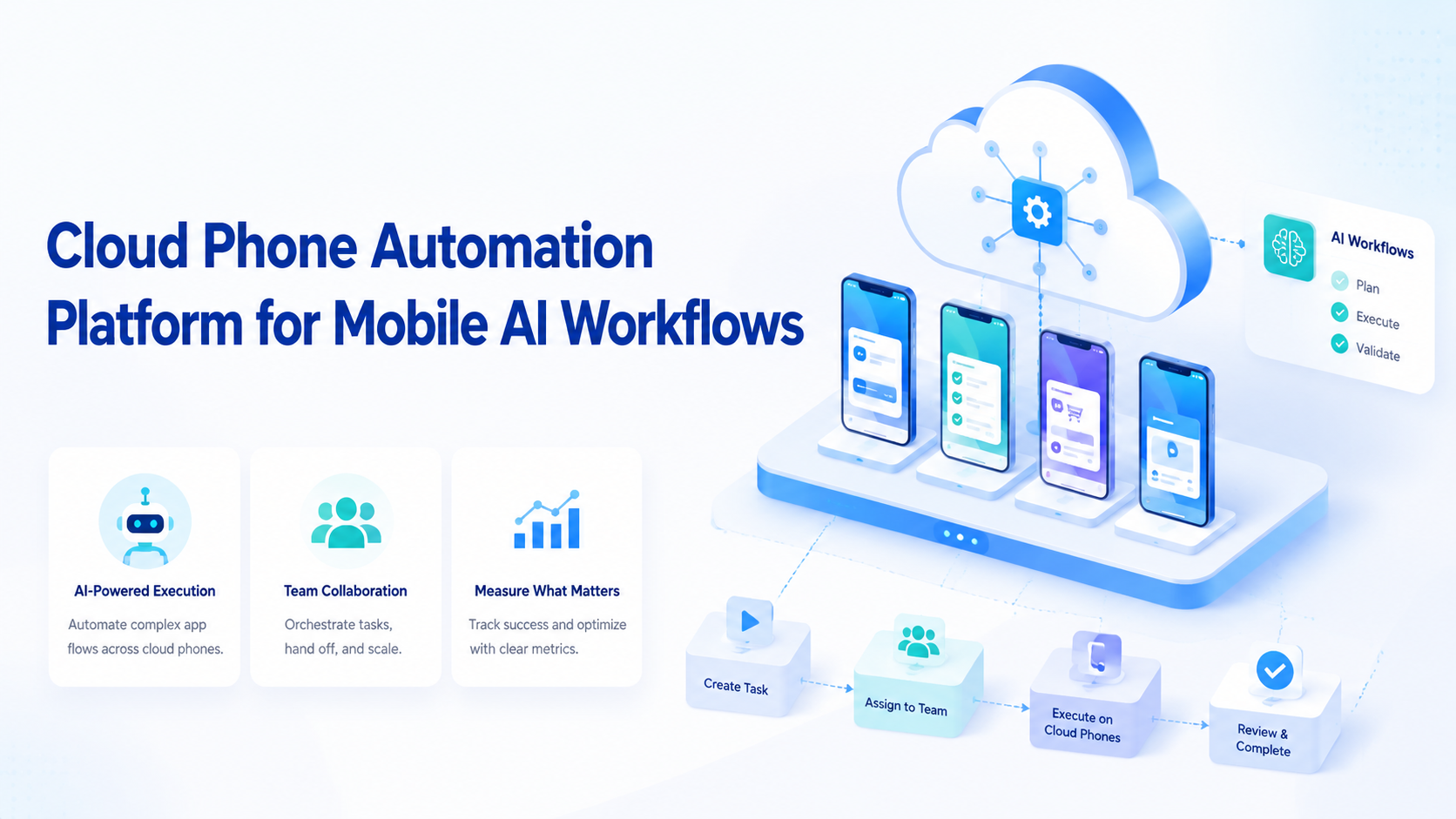
Mobile execution automation uses remote phone environments to run repeatable app-based workflows with controlled task assignment, device context, and review logs. It matters when AI workers need to operate inside Android apps, mobile sessions, or app-first account flows instead of only using web dashboards.
The core issue is execution fit. A browser can handle many online tasks, but mobile work often depends on screens, app sessions, touch flows, notifications, and device state. Teams that ignore this boundary may push app workflows into the wrong tool and lose context during review.
For operations teams, success is not automating every tap. The practical goal is a mobile execution lane that can be assigned, observed, recovered, and audited. That lane may sit beside browser profiles, account workspaces, and human review queues.
Key Takeaways
- Cloud phone automation fits app-based AI workflows that need mobile execution context
- Browser profiles still fit web dashboards, forms, and account portals
- Teams should pilot one mobile workflow before scaling many accounts
- Recovery checks matter because app state changes often break automation
- Review logs should show account, device, task, result, and exception
What Cloud Phone Automation Means for AI Workflows
This approach means running mobile tasks on controlled remote phones instead of relying on local handsets or desktop-only automation. The phone becomes an execution environment. The AI worker becomes a task actor inside that environment.
This model is useful when the workflow depends on a mobile app. A team may need to check an app inbox, verify a mobile account state, repeat a test flow, or complete an app-based operations step. In those cases, a browser profile may not represent the same experience.
Remote mobile execution should still be managed. The team needs to know which account belongs to which phone, which task ran, what result appeared, and what happened when the app did not match the expected state. Without that trail, automation becomes hard to trust.
Context is the control layer.
Why Mobile AI Workflows Need a Dedicated Execution Layer
The mistake is treating mobile workflows as browser workflows with a smaller screen. App work has different failure modes: sessions expire, screens change, touch targets shift, and network or device state may affect the run.
A dedicated cloud phone layer gives teams a cleaner way to isolate mobile work. It does not remove the need for rules. It gives the team a place to attach those rules: account assignment, device ownership, allowed actions, stop states, and review steps.
Google Play's Policy Center is a useful reference when app-related workflows touch Android app rules or distribution concerns. It is not a replacement for internal review, but it reminds teams that mobile execution should not be treated as policy-free automation.
Mobile work needs a lane.
Google Search Central's helpful content guidance is also relevant when AI workflows support publishing, content review, or web-facing operations. It reinforces a simple operating idea: output should serve a real user need, not only increase activity count.
Key Benefits and Use Cases
The main benefit is matching the workflow to the right environment. A mobile app task should run where the app actually runs, because login state, notifications, touch flow, and device context are part of the operational evidence. Web dashboards belong in browser profiles. Mixed workflows should define the handoff.
Common use cases include app flow testing, mobile account checks, app inbox triage, social app operations, marketplace app tasks, and Android workflow monitoring. These tasks are often repetitive, but they still need account context and review.
| Workflow | Better execution layer | Review evidence |
|---|---|---|
| App inbox triage | Cloud phone | Account, message type, action |
| Android flow testing | Cloud phone | Device state, screen state, result |
| Web dashboard review | Browser profile | Page, fields, report output |
| Cross-platform account check | Browser plus phone | Handoff, state, exception |
| Mobile social operations | Cloud phone | Account, app state, reviewer |
For teams that need a dedicated mobile layer, the cloud phone product is the closest place to evaluate execution capacity. Teams that need many parallel devices may also compare a phone farm style setup.
Fit comes before scale.
How to Start a Cloud Phone Automation Pilot
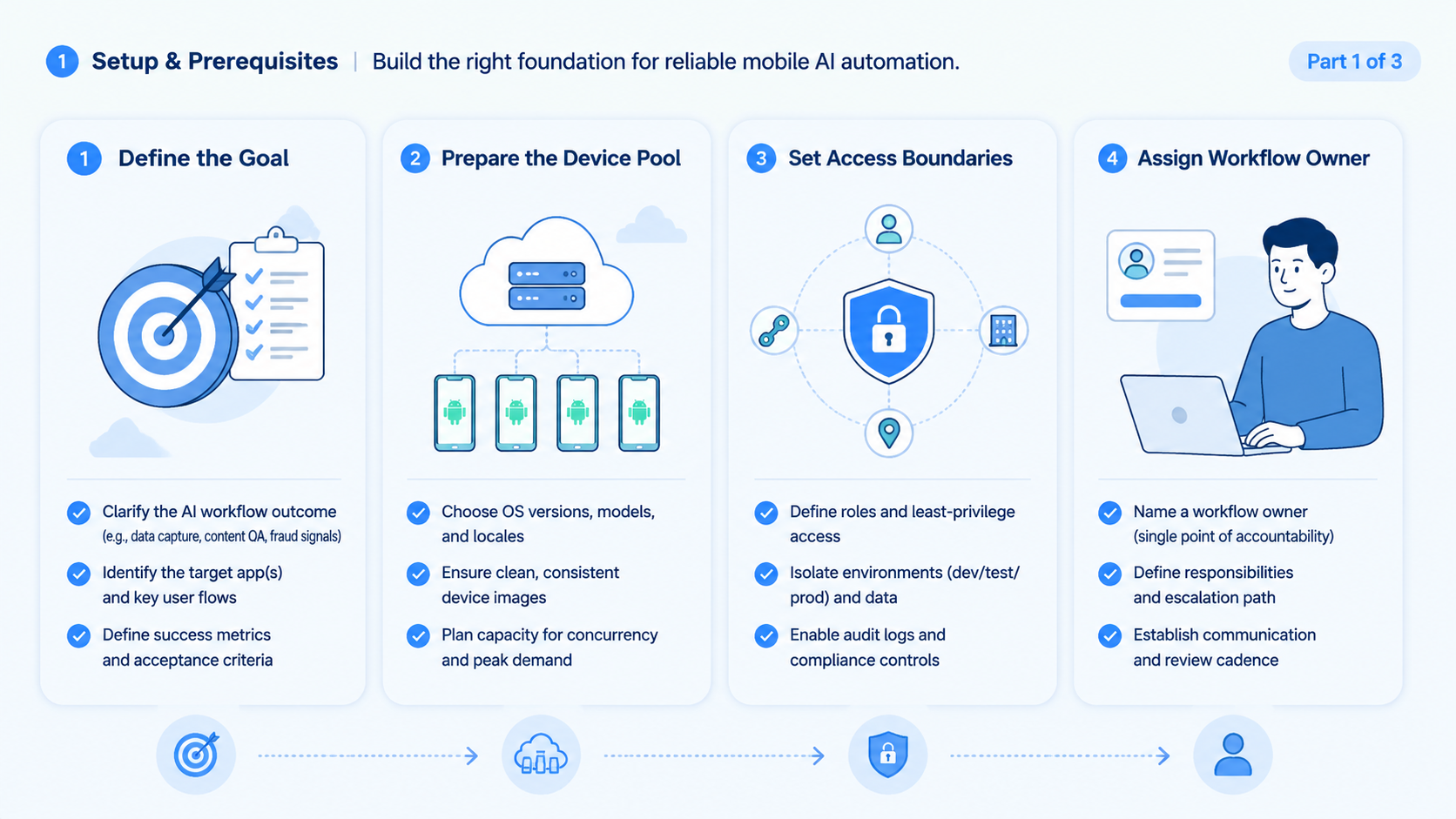
Start with one app workflow. Do not connect every account and every phone at once. The pilot should prove that one mobile task can run in the right account context and produce a reviewable result.
Use this pilot path:
- Pick one app-based workflow
- Assign one account group
- Choose one cloud phone lane
- Define allowed actions
- Define stop states
- Record output and exceptions
- Review every run
- Expand only after repeated success
The pilot should include boring failures. Test login expiry, wrong screen, slow app loading, missing button, duplicate record, and unclear account state. Some failures should retry, while others should stop or move to a human reviewer.
Small pilots protect attention.
Cloud Phone Automation Rollout Sequence
The safest rollout sequence is narrow, observable, and reversible. Start with one phone lane and one workflow. Add accounts only after the team can review successful and failed runs without replaying everything by hand.
A rollout can use four phases:
- Phase 1: one app workflow, one account group, one reviewer
- Phase 2: the same workflow across a few more accounts
- Phase 3: one browser-to-mobile handoff
- Phase 4: more phone lanes after recovery rules are stable
Each phase should answer one question. Can the worker choose the right phone, and can the reviewer trust the evidence?
Can the run stop cleanly when the app state changes? Those answers matter more than the number of actions completed.
Teams should avoid changing too many variables at once. Adding more phones, more accounts, and new task types in the same week makes failures hard to diagnose. One change per phase keeps the pilot readable.
Readability is operational.
Cloud Phone Automation Fit Boundaries: Who Should Use It and Who Should Wait
Strong-fit teams have repeated mobile workflows. They know which app, which account, which output, and which review step matter. They may run social apps, app-based support queues, mobile QA flows, or marketplace operations.
Weak-fit teams are still defining the work. A broad goal such as “automate mobile growth” is not enough. The team needs a specific workflow with a start state, allowed actions, expected output, and stop rule.
Use this fit guide:
- Strong fit: repeated Android app checks with known screens
- Strong fit: mobile account operations with assigned owners
- Strong fit: app workflows that need parallel capacity
- Weak fit: one-off app tasks
- Weak fit: workflows without review owners
- Weak fit: high-risk actions without approval gates
The boundary should be written before scale. Otherwise, each new phone adds another place where the worker can act without enough context.
What a Cloud Phone Automation Platform Should Track
Tracking is the difference between a tool demo and an operating system. A mobile run should leave a clear trail. The reviewer should see what was assigned, what was opened, what changed, and why the run stopped.
Useful fields include:
- Workflow name
- Account group
- Phone lane
- App name
- Start state
- Allowed actions
- Output fields
- Exception reason
- Reviewer decision
- Next action
This does not need to be complex. Even a small pilot should record enough information for a second person to understand the run. Documentation is useful only when it speeds review and recovery.
Android developer documentation on app quality is useful background for teams that test or operate app workflows. Mobile execution quality depends on state, behavior, and repeatability. Automation should respect that reality.
Common Mistakes to Avoid
One mistake is measuring only completed tasks. Completion does not prove that the worker used the right account, device, or app state. Evidence matters.
A second mistake is sharing devices loosely across teams, accounts, and reviewers without making ownership visible in the run log. Multi-account teams need clean separation between account groups. Device isolation helps teams manage that boundary when account context matters.
Routing is also easy to overlook. The platform should know which account maps to which phone, which workflow maps to which execution lane, and when the worker must stop. Guessing should not be part of the run.
Network context may matter for some account workflows. A proxy network can be part of the environment plan when routing needs to match the operating context.
Control is cheaper than cleanup.
Team Roles and Handoff Rules
Mobile AI workflows need named owners. A phone lane without an owner becomes a shared device. A workflow without a reviewer becomes a hidden automation path.
A simple team model has three roles. The workflow owner defines the task and stop rules, the environment owner manages phone lane readiness, and the reviewer checks the run after repeated failures. Ownership matters.
Handoff rules should be short. Show the account, the phone lane, the last completed step, the exception, and the recommended next action. That is enough for most pilots.
No hidden state.
Measurement and Recovery Checks
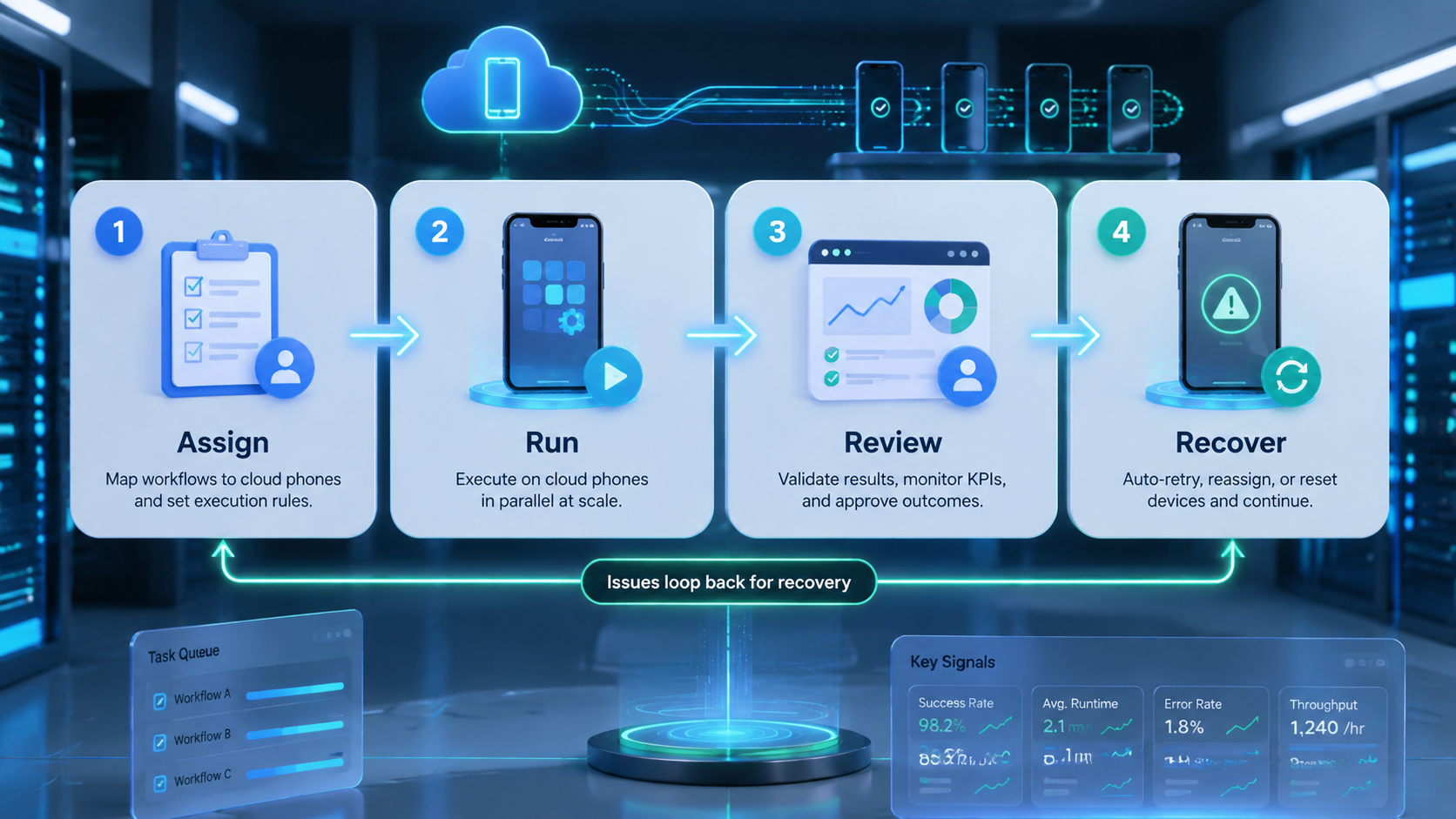
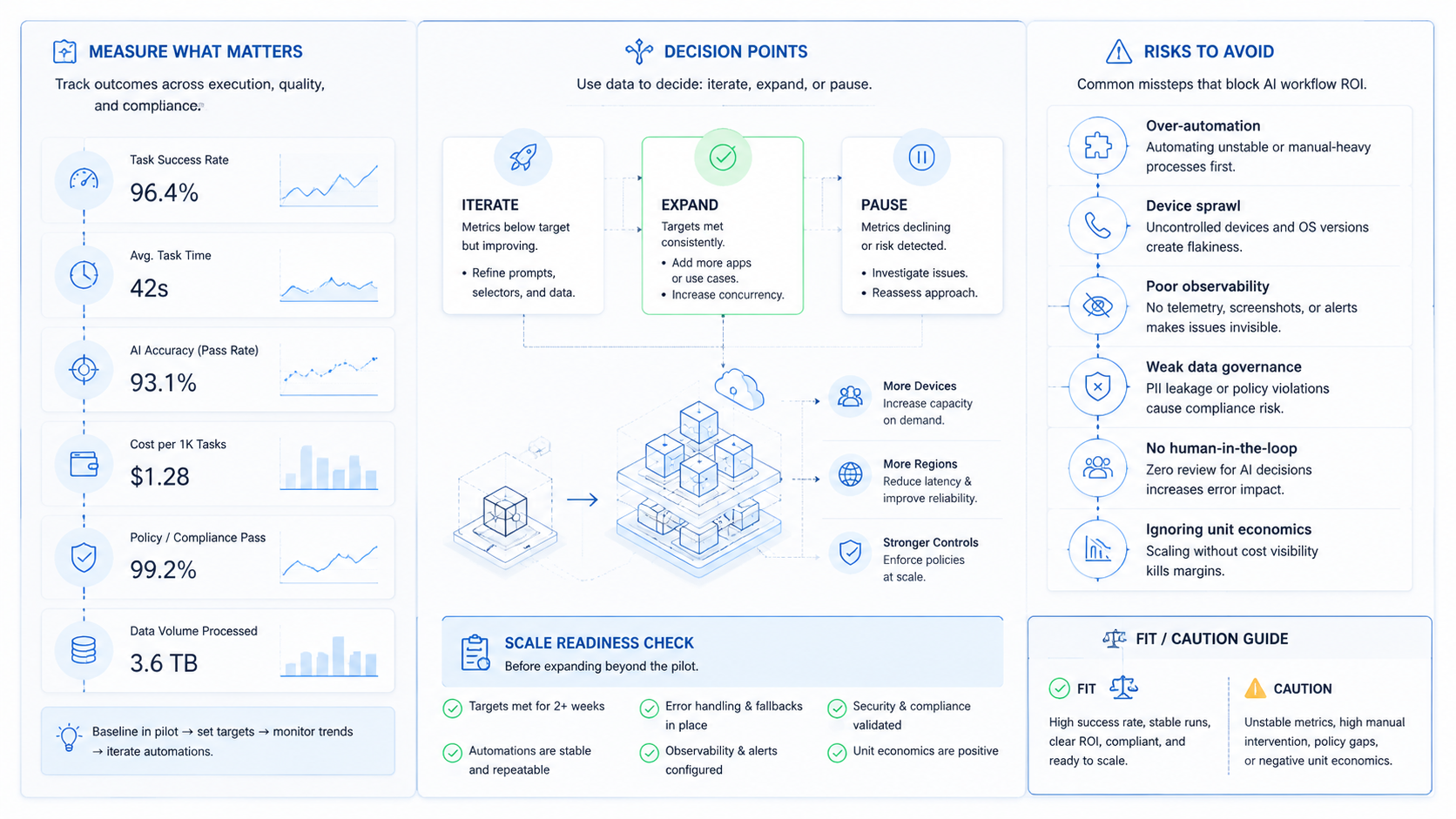
Measurement should focus on trust. Did the worker use the assigned phone? Did it open the right account?
Did it stop when the app state changed? Did the result include enough evidence for review?
| Check | Good signal | Stop signal |
|---|---|---|
| Phone assignment | Correct phone lane used | Worker chooses loosely |
| Account context | Assigned account visible | Account state unclear |
| App state | Expected screen appears | Screen mismatch ignored |
| Evidence | Result includes fields or screenshot | Result only says done |
| Recovery | Retry, stop, or handoff follows rule | Worker keeps tapping blindly |
Recovery checks should be part of platform evaluation. A good system should make failure states visible. It should not hide them behind a success label.
Proof beats activity.
Browser Profiles, Cloud Phones, and Handoff
Mobile workflows rarely live alone. A team may prepare data in a browser, run a task in an app, then review the result in a dashboard. That requires handoff between execution layers.
Browser profiles are useful for web context. A mobile lane is useful for app context. The handoff should record which step happened where, which account was used, and what evidence connects the steps.
Teams using mobile automation should define the handoff before adding more accounts. A clear handoff reduces rework and makes exceptions easier to understand.
No hidden jumps.
Cost, Capacity, and Scheduling Considerations
Capacity planning should start from workload shape. A team does not need the same number of phone lanes for a daily check, an hourly queue, and a high-volume app test. Each has a different scheduling pattern.
The practical question is utilization. Are phones idle most of the day, or are tasks waiting for capacity? Are failures blocking the queue, or can they hand off to a reviewer? These questions help teams decide whether to add more phones or improve the workflow first.
Do not buy capacity to hide process gaps. A weak workflow will consume more phones without producing better control, especially when failures wait in the queue without a clear owner. A clear workflow can often scale gradually because every added lane follows the same rules.
Capacity follows process.
Cloud Phone Automation Governance Checklist
Governance turns mobile execution into a team workflow instead of a loose device pool. The checklist does not need to be heavy. It needs to make ownership, permission, evidence, and recovery visible before more phone lanes are added.
Use this checklist before expanding beyond the pilot:
- Account owner: one person or team owns the account group
- Phone lane owner: one person checks device readiness and routing
- Workflow owner: one person defines the task, expected output, and stop states
- Reviewer: one person accepts, rejects, or escalates each run
- Recovery owner: one person updates the workflow after repeated failures
The platform should make these roles easy to see. If the reviewer cannot tell which account, phone, and workflow produced the result, the run is not ready for scale. A small team can combine roles, but it should not remove them.
Permission rules should be written in plain language. Some actions can run automatically, some need approval, and some should pause until a reviewer checks the account state.
Some actions should never be attempted by the worker. That distinction protects the team when app screens change or account state becomes unclear.
Evidence rules should be equally simple. A good run should show the assigned phone lane, the active account, the app state, the action taken, and the result field. A failed run should show the stop reason and the next recommended step.
Change control should also be visible. When the app, account policy, proxy route, or phone lane changes, the workflow should be rechecked before it runs at normal volume. Small environment changes can create large review gaps.
Review cadence matters. During the pilot, every run should be reviewed. After the workflow stabilizes, teams can sample routine runs and focus human attention on exceptions, ambiguous account states, and repeated recovery patterns. That shift should happen only after the evidence trail is reliable.
The workflow becomes safer when governance is built into it. The goal is not to slow every action.
Instead, governance keeps mobile execution understandable when more AI workers, accounts, and app tasks join the same operating system.
Governance keeps scale readable.
Frequently Asked Questions
1. What is cloud phone automation?
It is the use of remote mobile environments to run repeatable app-based workflows with account context, task rules, and review logs.
2. When does a team need it?
Use it when workflows depend on Android apps, mobile sessions, app screens, or device-specific execution that a browser cannot represent.
3. Is it only for AI agents?
No. It can support AI workers, human operators, QA teams, and operations teams that need repeatable mobile execution.
4. What should a pilot measure?
Measure phone assignment, account accuracy, app state, evidence quality, exception clarity, and reviewer confidence; if one of those signals is missing, the pilot is not ready for more accounts.
5. Does every mobile workflow need automation?
No. A workflow should be repeated, reviewable, and bounded before it becomes a good automation candidate.
6. What is the biggest rollout risk?
The biggest risk is scaling phones before routing and stop rules are clear. More capacity can create more confusion.
7. How does it connect to browser automation?
Browser automation handles web tasks. The mobile lane handles app tasks. A managed workflow may use both with a defined handoff that records the account, execution layer, result evidence, and reviewer decision.
8. What should teams avoid first?
Avoid shared device pools without ownership. Every phone lane should have an account purpose, owner, and review path.
Conclusion
This model is useful when AI workflows need real mobile execution context. It gives teams a mobile lane for app-based work, but that lane still needs account ownership, stop rules, and review evidence.
The practical next step is small. Choose one app workflow, one account group, and one phone lane. Run the pilot, test failure states, and review every result. When the team can prove context accuracy and recovery quality, it can add more phones, accounts, and workflows with better control.