
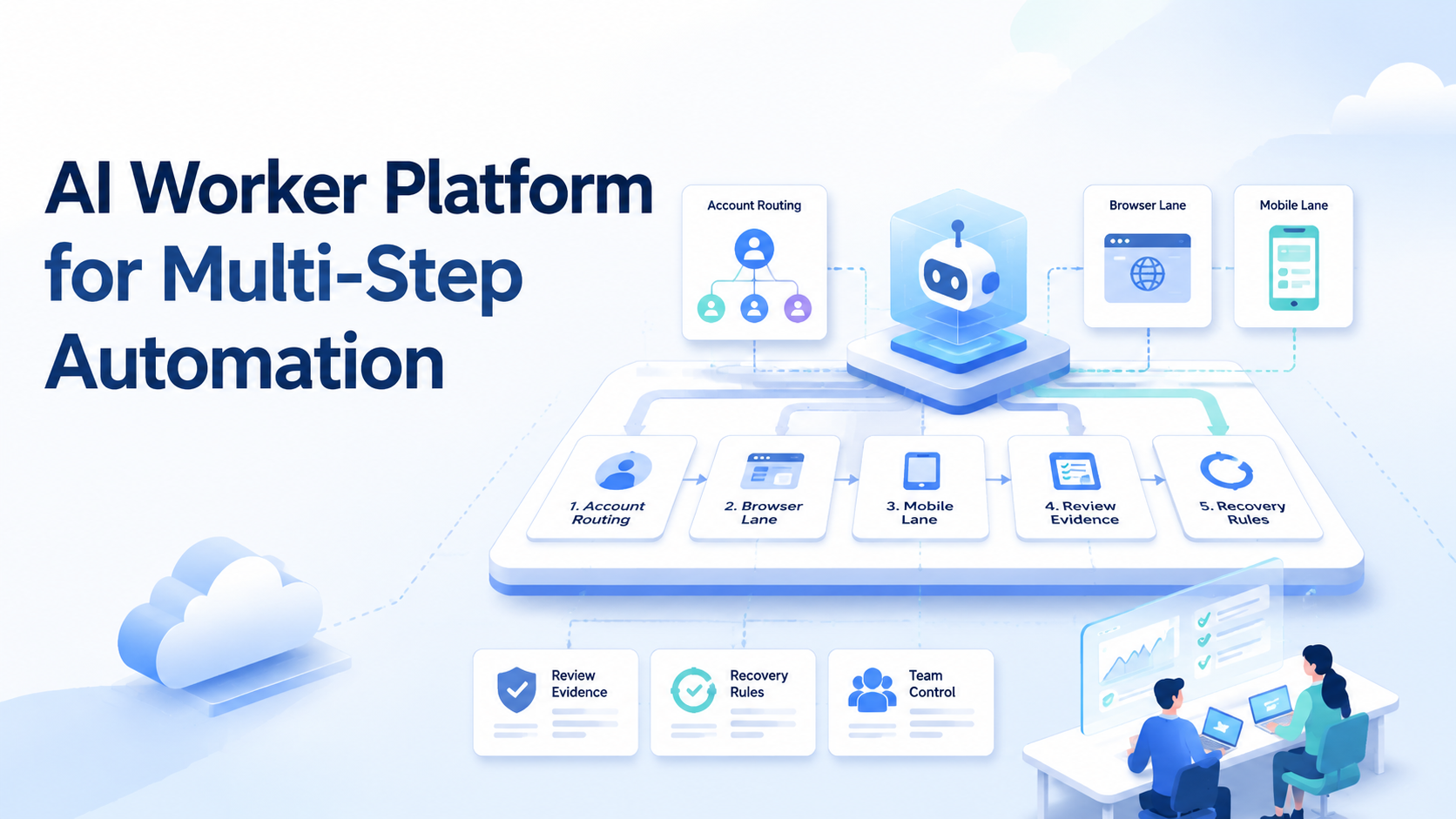
An AI worker platform is the control layer that lets software workers plan, act, pause, show proof, and recover across real business systems.
It is not just a prompt box.
The platform has to pick the right account, open the right browser or mobile lane, save evidence, and ask for review before risky work goes live.
That is why multi-step automation needs more than a model.
A useful worker may research a product, open a logged-in profile, prepare a draft, check a mobile app, collect screenshots, and send the result to a reviewer.
Each step must stay tied to one task ID.
Otherwise the team gets speed without trust.
A route review can use one short screen and one full evidence trail, which breaks guesswork before the worker touches public work.
Key Takeaways
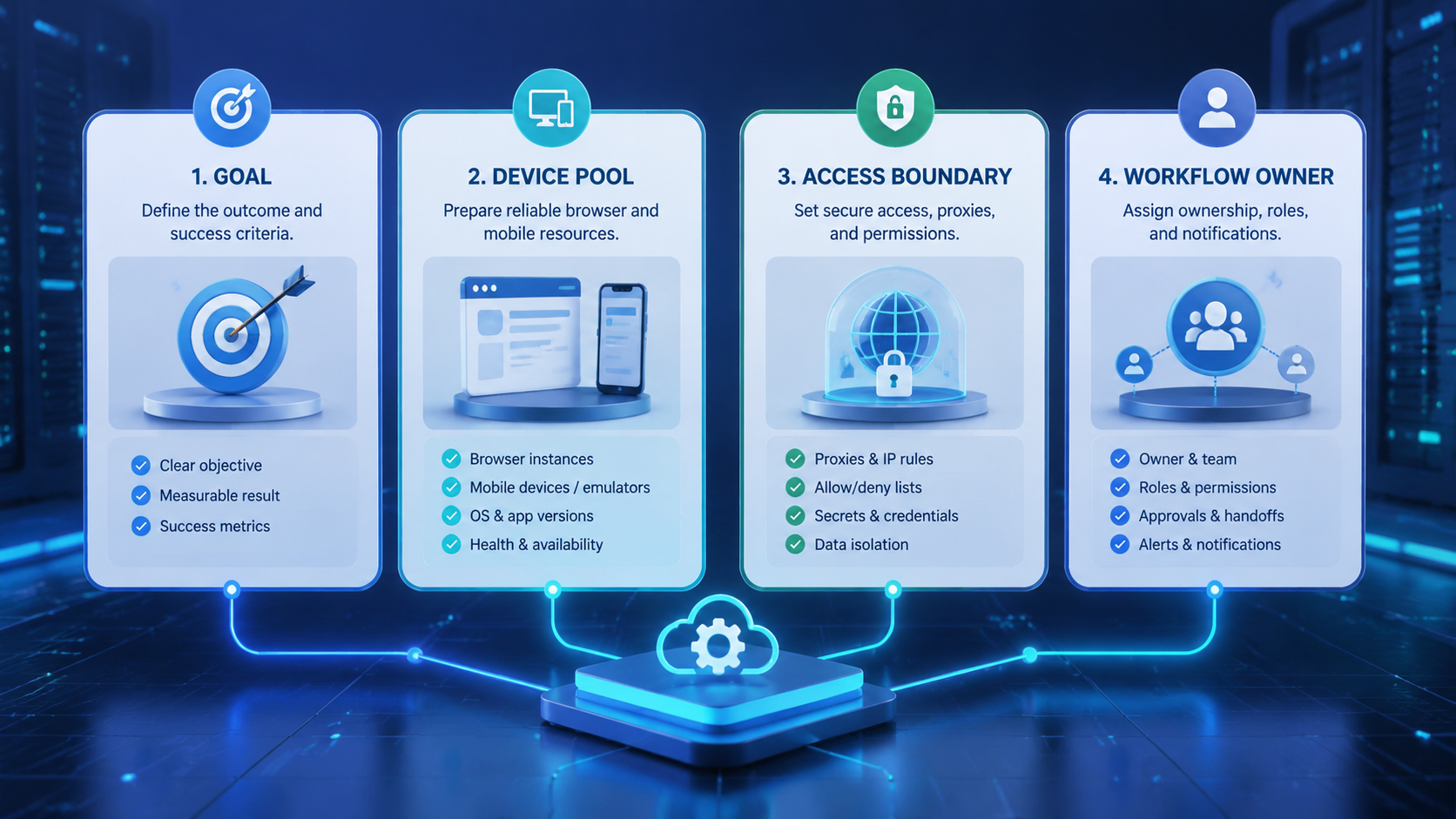
- Start with routing, proof, and review before assigning live account work
- Use browser and mobile lanes only where they fit the job
- Test the first 30 days with small account groups before scaling
What an AI Worker Platform Should Control
A practical AI worker platform should control four things: the task plan, the account route, the execution lane, and the review record.
The model can help decide the next step, but the platform decides where that step is allowed to run.
That split keeps the system useful when workflows move from demo to daily work.
A real route record changes the work from a vague instruction into a controlled task with proof, owner, and recovery.
The account route is the first control point.
Assigned routes should include the account owner, profile label, phone lane, network region, and proof folder before any worker action begins.
A worker should not choose any account in a shared pool.
The task should pause when route data is thin, because guessing across profiles creates cleanup work for every later reviewer.
The run needs an assigned profile, region, cloud phone, proxy rule, and asset folder.
That route record gives the worker a fixed lane, and it gives the reviewer a simple way to reject a wrong start.
If those fields are missing, the run should pause.rnrnA missing field is a signal, not a small detail, because the next step may touch a live account or app screen.
The execution lane is the second control point.
Browser work fits dashboards, CRMs, listing pages, ad tools, and content systems.
Mobile work fits app checks, uploads, push messages, and flows that look different on a phone.
A strong AI browser execution platform can link both lanes without mixing sessions.
The review record is the third control point.
A worker should save the task brief, the account used, the screen before action, the screen after action, the output, and the final status.
This proof makes the result easy to accept or reject.
Why an AI Worker Platform Fails Without Routing
Most failed automation work does not fail because the model cannot write.
It fails because the worker acts through the wrong identity or loses state.
Route proof matters more than model fluency when the task touches live accounts, app screens, uploads, messages, or public content.
One task may use the wrong account.
Early pause rules catch this before a bad run turns into a posted action, edited profile, or confusing account record.
Another may reuse a session from a past customer.
A third may publish before the reviewer sees the final screen.
Keep the route plain.
A run should show account ID, profile ID, phone ID, region, owner, and reviewer.
The team should also see whether the task is queued, running, paused, approved, rejected, recovered, or closed.
Those states give managers a shared language for rescue work, weekly review, and safe expansion into the next account group.
Seven states are enough for a first version.
This is where multi-account management becomes part of the automation design.
It should not sit in a side spreadsheet.
If account ownership is outside the workflow, the worker cannot prove that it used the right lane.
AI Worker Platform Browser and Cloud Phone Lanes
Browser automation is usually the first lane because web tools are easy to inspect.
A worker can open a dashboard, read a table, fill a form, save a screenshot, and leave a trace.
That works well for research, account checks, content review, and internal reports.
A cloud phone workflow adds a second lane when the real task lives in an app.
Some teams need mobile upload checks.
Others need app-only alerts, phone-based login steps, or regional views that differ from desktop pages.
A browser-only system will miss those cases.
Do not merge the lanes blindly.
Use browser steps for research and admin work.
Use cloud phone steps for app-native proof.
Then write both steps into one task log so the reviewer can see the full route.
One log.
AI Worker Platform Pilot Model for the First 30 Days
Start with a small pilot.
A clear first test can use 20 accounts, 2 reviewers, 3 workflow types, and 1 shared evidence folder.
Set a 95% evidence-complete target before public actions are allowed.
Set a 0% duplicate-submit target for posts, uploads, messages, and setting changes.
The pilot needs simple fields.
Use task ID, account ID, device ID, profile ID, reviewer name, approval time, failed step, retry count, and final state.
These fields are plain, but they stop confusion.
They also make failed runs easier to compare each Friday.rnrnFriday review should focus on route mistakes, proof gaps, recovery loops, and tasks that needed manual rescue.
Add stop rules before scale.
Pause the run after 2 login challenges.
Stop again after 3 page changes inside one task.
Pause after 15 minutes without a clean screenshot.
Send the task to a person when the worker changes copy, uploads media, touches payment data, or sees a policy warning.
This small pilot gives the team a real signal.
If first-pass approval is below 80%, the workflow is not ready to scale.rnrnThat number tells the owner whether the worker is saving time or simply moving review debt to another queue.
If screenshot coverage is below 90%, reviewers do not have enough proof.
Fix that before adding more accounts.
AI Worker Platform Operating Table
Use an operating table to keep the first version simple.
The table below is not a product spec.
It is a team contract that tells the worker when to act, when to wait, and what proof to save.
| Workflow Area | Required Field | Pass Rule | Stop Rule |
|---|---|---|---|
| Account route | Account ID and owner | One task uses one account only | Pause when the owner is blank |
| Browser lane | Profile ID and page URL | Screenshot before and after the action | Pause after 3 page layout changes |
| Cloud phone lane | Phone ID and app name | Final app screen is saved | Pause after 2 login challenges |
| Review gate | Reviewer and approval state | Public action waits for approval | Reject when proof is missing |
| Recovery | Last safe checkpoint | Resume from saved state | Never repeat a post without approval |
| Media handling | File ID and source | Upload only approved assets | Pause when source is unknown |
| Network route | Region and proxy label | Match the account rule | Pause when region changes |
| Closeout | Final status and note | The owner can read the result in 30 seconds | Reopen when status and evidence conflict |
This table also helps during training.
A new operator can inspect one failed run and see whether the problem was route, lane, proof, review, or recovery.
That is faster than reading a long chat log.
For the first month, keep the table close to the workflow screen.
Do not hide it in a policy file.
Clear signal keeps the run readable when reviewers compare task proof, account route, screen state, fallback owner, stop reason, saved artifact, and next safe action.
Workers and reviewers need the same map.
AI Worker Platform Fit and No-Fit Cases
A good fit has repeatable steps, visible proof, and a clear owner.
Daily account checks fit.
Clear checkpoint keeps the run readable when reviewers compare task proof, account route, screen state, fallback owner, stop reason, saved artifact, and next safe action.
Listing review fits.
Mobile app screen checks fit.
Screenshot collection fits.
Clear boundary keeps the run readable when reviewers compare task proof, account route, screen state, fallback owner, stop reason, saved artifact, and next safe action.
A weekly competitor report also fits when the source list is stable.
A poor fit has unclear goals or high risk.
Price changes, payment changes, account recovery, legal claims, and sensitive customer replies should not be early worker tasks.
Clear record keeps the run readable when reviewers compare task proof, account route, screen state, fallback owner, stop reason, saved artifact, and next safe action.
Use people first.
Add automation after the decision rule is stable.
The middle zone is the best place to start.
Clear screen keeps the run readable when reviewers compare task proof, account route, screen state, fallback owner, stop reason, saved artifact, and next safe action.
These workflows are too varied for a simple script, yet clear enough for a worker to follow.
That is where an AI worker platform can save time without hiding risk.
Evidence Makes AI Employees Software Usable
AI employees software sounds like a digital teammate.
Clear route keeps the run readable when reviewers compare task proof, account route, screen state, fallback owner, stop reason, saved artifact, and next safe action.
The idea is useful, but it needs proof.
A human teammate can explain what happened.
A software teammate must show it.
For each run, save the input, the route, the actions, the output, and the decision.
Screenshots matter.
Status fields matter.
Reviewer notes matter.
A final message that says 闂傚倸鍊搁崐鎼佸磹閹间礁纾归柟闂寸绾惧綊鏌熼梻瀵割槮缁炬儳缍婇弻鐔兼⒒鐎靛壊妲紒鐐劤缂嶅﹪寮婚悢鍏尖拻閻庨潧澹婂Σ顔剧磼閻愵剙鍔ょ紓宥咃躬瀵鎮㈤崗灏栨嫽闁诲酣娼ф竟濠偽i鍓х<闁绘劦鍓欓崝銈囩磽瀹ュ拑韬€殿喖顭烽弫鎰緞婵犲嫷鍚呴梻浣瑰缁诲倿骞夊☉銏犵缂備焦顭囬崢閬嶆⒑闂堟稓澧曢柟鍐查叄椤㈡棃顢橀姀锛勫幐闁诲繒鍋涙晶钘壝虹€涙ǜ浜滈柕蹇婂墲缁€瀣煛娴g懓濮嶇€规洖宕埢搴∥熼幁宥嗘皑缁辨捇宕掑▎鎺戝帯闂佺顑嗛幑鍥х暦閺囥垹绠悷娆欑岛閸嬫捇鏁冮崒娑樷偓濠氭煢濡警妲奸柟鑺ユ礋濮婃椽宕崟顒€绐涢梺鍝ュУ閹稿墽鍒掔紒妯稿亝闁告劏鏅濋崢浠嬫⒑闁稑宓嗘繛浣冲嫭娅犳い鏍仦閻撶喐绻濋棃娑欏闁抽攱甯炵槐鎺撴綇閵娿儲璇為梺璇″枟閻熲晠銆佸Δ鍛劦妞ゆ帒瀚粈澶愭煏閸繃顥犵紒鐘插⒔閻ヮ亪顢橀姀鈺傤棖缂備讲妾ч崑鎾绘煟鎼淬埄鍟忛柛鐘崇墵閳ワ箓鏌ㄧ€b晝绠氶梺鍓插亝濞叉牠鎮欐繝鍕枑閹兼番鍔嶉崐鐢告煙閹澘袚闁抽攱鍨块弻娑樷槈濮楀棛鍙曞┑鐐茬墛閿曘垽寮诲☉姘e亾閿濆骸浜炴繛鍙夋尦閺屻劌鈹戦崼婵呮濡炪們鍨哄ú鐔煎极閸屾粍鍠嗛柨婵嗘椤忓綊姊婚崒娆戭槮闁硅绱曠划娆撳箣閿斿厜鍋撻敃鍌ゆ晢闁逞屽墴閸┿垽骞樼拠鎻掑祮闂佺粯姊婚…鍫濐嚕閸喒鏀介柍钘夋閻忥絾銇勯鐐靛濞e洤锕獮鎰償濠靛牏鐣鹃梻浣告啞閻熴儵藝椤栨稒鍙忕€广儱妫▓浠嬫煟閹邦厽缍戠紒妤佸浮閹藉爼寮介鐔哄帗閻熸粍绮撳畷婊冣槈閵忊€充粡闂佽鍨庣仦鑺ュ€┑鐘灱濞夋盯顢栭崶顒€鍌ㄩ柟鍓х帛閸嬧剝绻濇繝鍌氼伀闁活厽甯為埀顒冾潐濞叉鍒掑畝鍕叀濠㈣泛顭鈺傘亜閹哄棗浜鹃梺璇茬箰閿曘倝鈥旈崘顔嘉ч柛鈩兠弳妤呮⒑缁嬫鍎愰柛銊ユ健瀹曟椽鍩€椤掍降浜滈柟鍝勭Ф椤︼附绻涢幖顓炴灓闁逞屽墲椤煤閺嵮呮殾妞ゆ帒瀚悡鈥愁熆鐠哄彿鍫ュ几鎼淬劍鍊堕柣鎰綑閸斻倖銇?is not enough for customer work, account work, or public content.
This approach also matches the spirit of Google闂傚倸鍊搁崐鎼佸磹閹间礁纾归柟闂寸绾惧綊鏌熼梻瀵割槮缁炬儳缍婇弻鐔兼⒒鐎靛壊妲紒鐐劤缂嶅﹪寮婚悢鍏尖拻閻庨潧澹婂Σ顔剧磼閻愵剙鍔ょ紓宥咃躬瀵鎮㈤崗灏栨嫽闁诲酣娼ф竟濠偽i鍓х<闁绘劦鍓欓崝銈囩磽瀹ュ拑韬€殿喖顭烽弫鎰緞婵犲嫷鍚呴梻浣瑰缁诲倿骞夊☉銏犵缂備焦顭囬崢閬嶆⒑闂堟稓澧曢柟鍐查叄椤㈡棃顢橀姀锛勫幐闁诲繒鍋涙晶钘壝虹€涙ǜ浜滈柕蹇婂墲缁€瀣煛娴g懓濮嶇€规洖宕埢搴∥熼幁宥嗘皑缁辨捇宕掑▎鎺戝帯闂佺顑嗛幑鍥х暦閺囥垹绠悷娆欑岛閸嬫捇鏁冮崒娑樷偓濠氭煢濡警妲奸柟鑺ユ礋濮婃椽宕崟顒€绐涢梺鍝ュУ閹稿墽鍒掔紒妯稿亝闁告劏鏅濋崢浠嬫⒑闁稑宓嗘繛浣冲嫭娅犳い鏍仦閻撶喐绻濋棃娑欏闁抽攱甯炵槐鎺撴綇閵娿儲璇為梺璇″枟閻熲晠銆佸Δ鍛劦妞ゆ帒瀚粈澶愭煏閸繃顥犵紒鐘插⒔閻ヮ亪顢橀姀鈺傤棖缂備讲妾ч崑鎾绘煟鎼淬埄鍟忛柛鐘崇墵閳ワ箓鎮滈挊澶嬬€悗骞垮劚椤︻垳绮堢€n偁浜滈煫鍥ㄦ尰閸g懓鈹戦娆忓祮婵﹥妞介幊锟犲Χ閸涘懌鍨虹换娑氭嫚瑜忛悾鎶芥煏閸ャ劌濮嶇€规洘锕㈤崺锟犲磼濮橆兛绱熼梻鍌欑閹碱偄煤閵忋倕鍨傛繛宸簻閻?guidance on helpful content.
The output should serve a real user and be easy to verify.
Internally, that means a reviewer can inspect the evidence without asking an engineer to replay the run.
Review Gates That Do Not Slow the Team Down
Review gates should be normal, not rare.
Low-risk checks can move fast.
Public content, customer messages, payments, account settings, and policy warnings need a pause.
The system should tell the reviewer what it plans to do, which account it will use, and what will change after approval.
No delay.
No guessing.
A good review gate is short.
Review context should sit beside the approval control, because switching screens often makes reviewers miss the account route, the mobile proof, or the actual change.
Place the task brief first.
Approval design works better when the page shows a narrow before state, a narrow after state, and the exact field that will change.
Put the account route second.
The review page should make the wrong account easy to spot before the worker posts, uploads, edits, or confirms anything.
Keep screenshots close to the proposed action.
That placement lets the reviewer compare plan and proof without hunting through a browser tab, phone screen, or separate asset folder.
End with the change that approval will allow.
The reviewer can approve, reject, edit, pause, or reassign the run.
A visible owner keeps the queue clean when one task needs manual rescue and another task can continue safely.
This keeps people in charge without forcing them to repeat every click.
Reviewers spend time on judgment.
The software handles the dull steps.
Recovery Rules for Real Work
Every AI worker software system needs recovery rules.
Pages time out.
Recovery design should name the last safe checkpoint before any retry begins, since a duplicate post or repeated setting change can damage the account.
Apps update.
Recovery notes should name the screen where work stopped, because a vague error makes the next operator repeat unsafe steps.
Login checks appear.
The platform should stop at that point and show the owner which route, phone, profile, and screen caused the pause.
A proxy route can fail.
The retry rule should explain whether to switch the route, keep the current account paused, or ask the owner for manual help.
A reviewer can reject the output.
Rejected proof should stay in the record, because those examples become the fastest way to improve prompts, routes, and stop rules.
Treat these events as normal states, not surprises.
A clear pause state keeps the team from guessing whether the worker failed, waited, retried, or finished without enough proof.
A safe recovery design answers three questions.
Which steps can repeat?
The answer should be written before the pilot starts, because retry rules are much harder to agree on after a mistake.
Which steps must never repeat?rnrnPublic actions should appear in this group unless a person approves a second attempt with the route and proof visible.
Which person decides when a run leaves the paused state?
These rules stop duplicate posts, duplicate messages, and unclear account changes.
After a research step, save the source and screenshot.
After a draft step, save the text and file path.
After a mobile step, save the device ID and final screen.
If the run fails, resume from the last safe point instead of starting over.
How Moimobi Fits the Execution Layer
Moimobi fits teams that need browser, cloud phone, account, and device work under one operating model.
The value is not only remote devices.
The value is controlled execution with clear routes, clean sessions, and reviewable proof.
A team can use device isolation to keep sessions apart.
It can use mobile automation when app-native steps matter.
It can link those actions back to one task record so the worker does not become a black box.
Network and policy checks still matter.
For app-related work, teams should read platform rules such as the Google Play policy center and Android quality guidance.
The goal is not to bypass rules.
The goal is to run clean work with clear proof.
Choosing the First Workflow
Pick a workflow that repeats every day, has clear inputs, and benefits from screenshots.
Account health checks are a good start.
Listing checks also work.
Competitor content monitoring, app flow review, and campaign asset QA can work after the team has review gates in place.
Avoid tasks where the goal is vague.
Avoid high-risk changes at the start.
Also avoid workflows that are already solved by a simple script.
The best early use case sits in the middle: too varied for a script, but clear enough for a worker to follow.
The first workflow should have one owner.
One reviewer is enough.
One success metric is enough.
The first owner should defend that metric for the full pilot, even when the team wants to add more dashboards or new account lanes.
Keep the first month narrow.
A narrow month gives the owner enough failed runs to improve rules without letting weak routes spread across the account pool.
AI Worker Platform Metrics That Show Readiness
Track numbers that reveal control.
A useful dashboard separates speed from safety so the team can see whether higher volume is creating more review debt.
Completion rate is useful, but it is not enough.
First-pass approval rate shows whether the worker is producing reviewable work.
Duplicate action count shows whether recovery rules are safe.
Average reviewer time shows whether the proof is clear.
Use five metrics for the first pilot: first-pass approval rate, screenshot coverage, duplicate action count, average recovery time, and manual fallback rate.
Review them once a week.
If one metric moves in the wrong direction for 2 weeks, pause scale and fix the workflow.
This keeps the team honest.
More tasks are not proof of better work.
Better proof, fewer retries, and cleaner review are the signs that the platform is ready for more volume.
Frequently Asked Questions
What is an AI worker platform?
It is software that lets AI workers plan tasks, act through approved browser or mobile lanes, save proof, ask for review, and recover from failed steps.
How is it different from a normal AI agent?
An agent may reason or act.
The platform controls the account route, environment, permission, review gate, and task record around that agent.
When does a team need cloud phones?
A team needs cloud phones when the task depends on mobile app behavior, app uploads, push alerts, app-only login steps, or phone-specific regional views.
Can AI employees software publish directly?
It can, but direct publishing should come after review gates are tested.
A direct publish workflow should still keep screenshots, account route, reviewer rule, and rollback note visible before the worker receives broader permission.
Public actions should start with human approval and clear screenshots.
Teams can loosen that gate only after the proof format, stop rule, and recovery note stay stable across repeated runs.
What should be automated first?
Start with low-risk monitoring, QA, research, and evidence collection.
Move to public actions only after routing and recovery rules are stable.
How many accounts should be used in a pilot?
A small pilot with about 20 accounts is enough to test routing, proof, review, and recovery without making mistakes hard to contain.
What is the biggest risk?
The biggest risk is acting through the wrong account or repeating an action after a failed run.
Routing and checkpoints reduce that risk.
How should success be measured?
Measure first-pass approval, screenshot coverage, duplicate action count, recovery time, and manual fallback rate.
These numbers show whether the workflow is controlled.
Final Thoughts
An AI worker platform for multi-step automation should make work easier to control, not only faster to run.
The system needs a plan, a route, an execution lane, proof, review, and recovery.
If one part is missing, scale creates noise.
Start small.
Use a narrow pilot.
Watch the evidence.
When the worker can show what it did, why it did it, which account it used, and where it stopped, the team can trust the workflow enough to expand it.
AI Worker Platform Scan Matrix
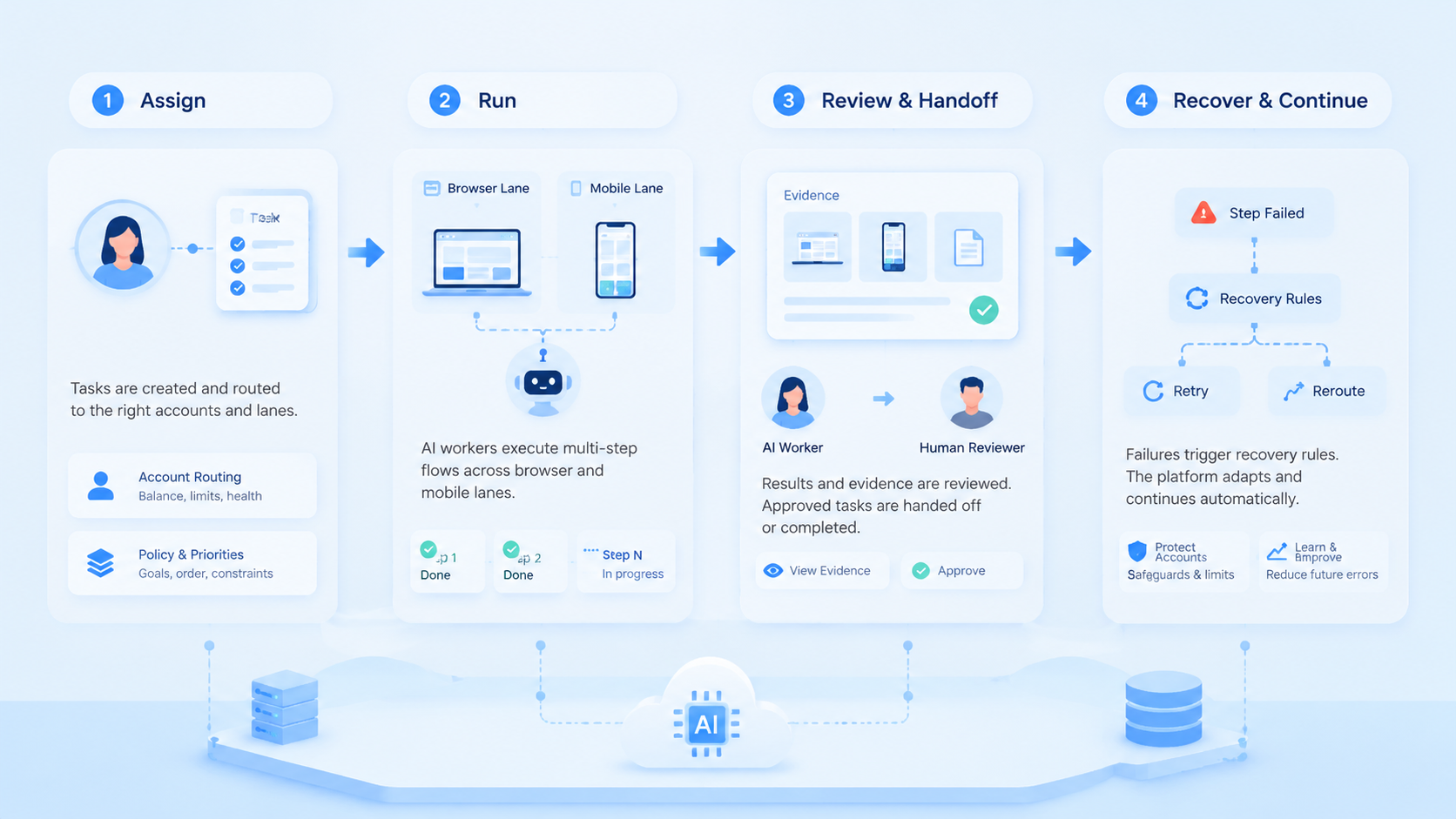
| Check Area | Reviewer Sees | Safe Signal | Unsafe Signal |
|---|---|---|---|
| Route | Account owner profile and region | one task one account one owner | shared route or blank owner |
| Session | Browser profile cloud phone and app | clean lane with saved screen | mixed session or missing screen |
| Proof | Before screen after screen and output | reviewer can read result fast | final answer with no proof |
| Pause | Stop reason and failed step | clear reason with next action | vague failure or silent retry |
| Recovery | Last safe checkpoint and retry count | resumes from saved state | starts over and repeats action |
| Review | Approver edit note and status | approval links to exact change | approval is separate from proof |
| Media | File name source and asset owner | source matches task folder | unknown source or old file |
| Policy | Warning text and review note | human checks policy warning | worker ignores warning text |
| Mobile | Phone ID app screen and upload path | mobile proof matches task | app step has no device record |
| Browser | URL profile ID and saved page | page state is visible | page changed with no note |
| Team | Owner reviewer and fallback person | one clear handoff | no one owns the exception |
| Scale | Pilot size scorecard and period | 20 accounts before expansion | large rollout before review |
| Quality | first pass approval screenshot coverage | 80 percent approval and 90 percent proof | low proof or repeated rework |
| Duplicate | post message upload and setting changes | zero repeated public actions | retry repeats public action |
| Closeout | final state and next action | closed task has proof | closed task conflicts with evidence |
| Assets | approved folder and file ID | task uses current assets | task uses unknown old media |



