
Key Takeaways
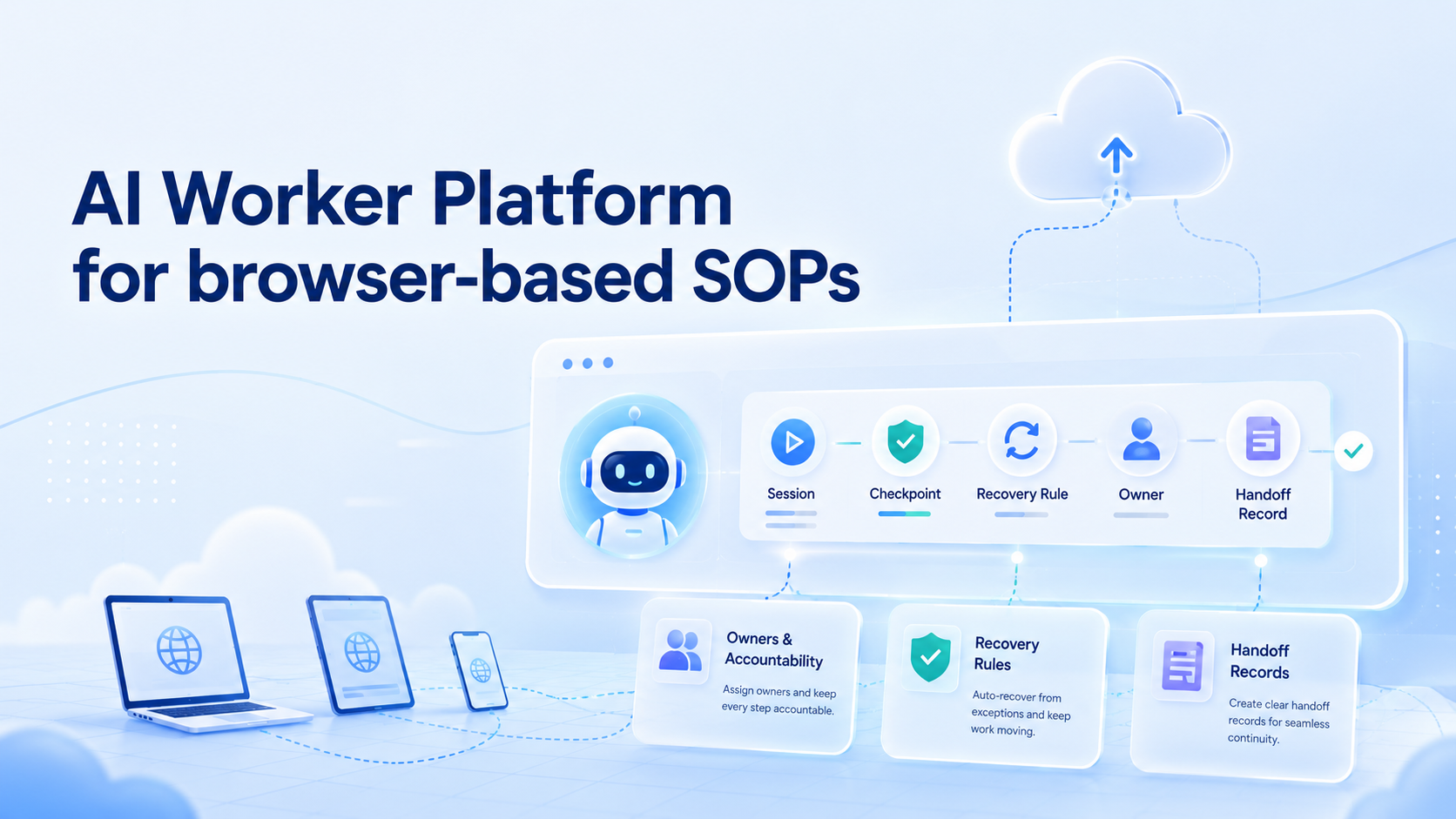
- An AI worker platform for browser SOPs needs accounts, sessions, checkpoints, and review rules
- Browser automation is not enough unless the workflow leaves a usable task record
- SOPs should start narrow, with clear pass/fail steps and human takeover points
- Moimobi fits when browser work connects to isolated profiles, cloud phones, and multi-account operations
Teams use an AI worker platform to assign repeatable browser-based SOPs to AI workers inside controlled execution environments. It is not only a prompt box. Each worker needs a browser session, task context, account boundaries, a review path, and a record of what happened.
Browser SOPs are common because daily operations still happen inside web apps. Teams check dashboards, update forms, publish content, collect leads, review inboxes, and move data between tools. A useful platform turns those steps into work that can be executed, paused, inspected, and improved.
What Is an AI Worker Platform for Browser-Based SOPs?
For browser-based SOPs, the platform connects task instructions to a real browser workspace. The SOP says what to do. The system decides where the work runs, which account is used, what evidence is recorded, and when the worker must stop.
Browser automation already has formal roots. W3C WebDriver defines browser sessions, commands, elements, navigation, and user prompts as protocol-level concepts (W3C WebDriver). That matters because AI workers also need session discipline. A task without a session boundary is hard to audit.
For operations teams, the simple model is:
- Instruction: the SOP step or task goal
- Workspace: the browser profile, account, and login state
- Checkpoint: the visible proof that a step was completed
- Review rule: the condition that triggers human takeover
Moimobi connects this model with AI browser and mobile execution infrastructure, so browser SOPs can become part of broader account workflows.
Why an AI Worker Platform Needs an Execution Layer
Written SOPs fail when the browser state changes. A login expires, a modal appears, a field label moves, or a permission screen interrupts the step. The worker must either recover safely or stop with enough context for a human to continue.
Playwright's official documentation highlights auto-waiting and actionability checks before actions such as clicks and inputs (Playwright). The operational lesson is clear: a browser step should not be treated as done until the page is actually ready for that action.
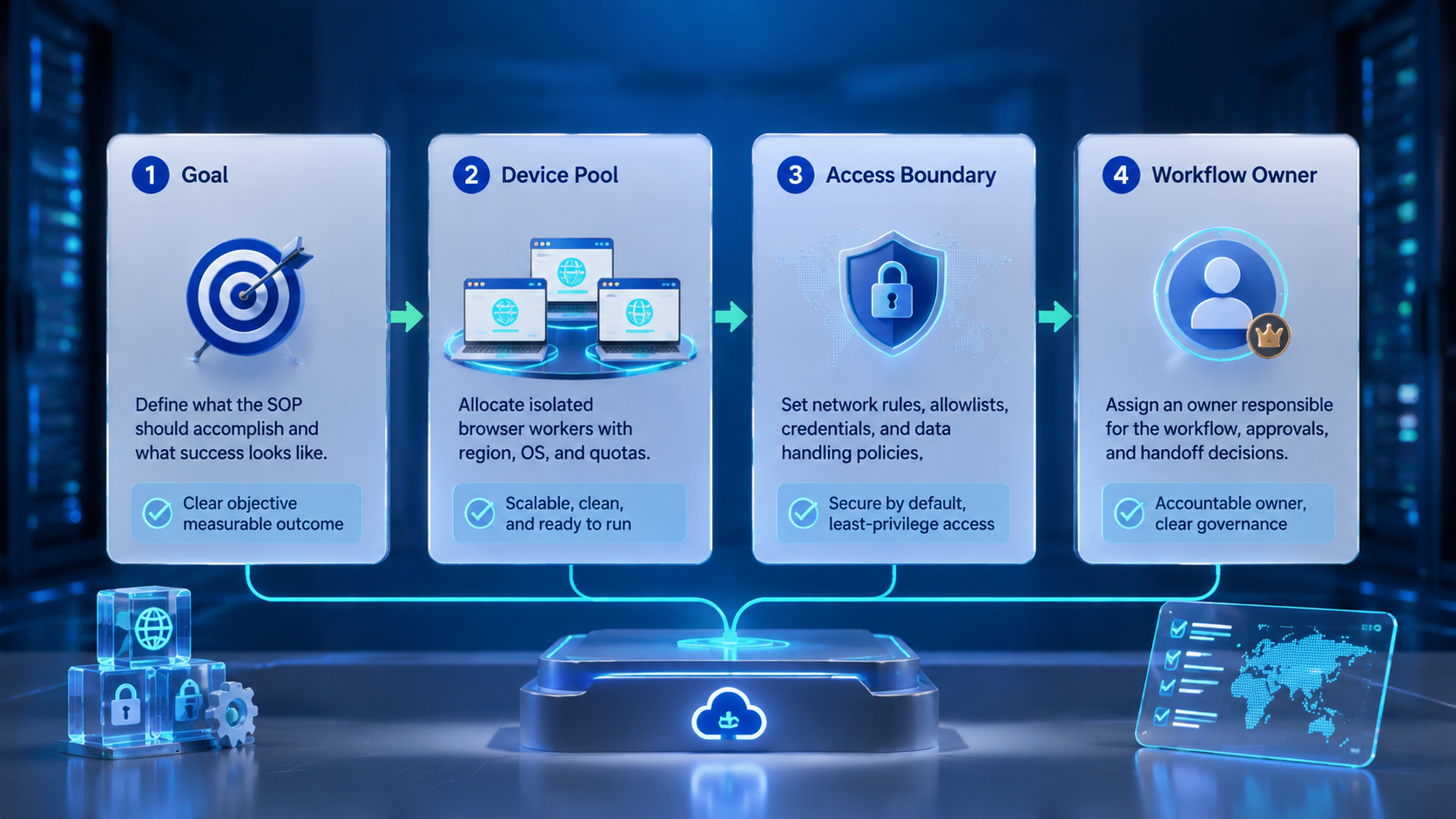
The team layer sits around those browser actions. Use these fields before the first run:
| Field | Decision to make |
|---|---|
| Account scope | Allowed account group and permissions |
| Browser profile | Workspace, login state, and routing |
| Task evidence | Screenshot, field value, URL, or note |
| Pause condition | Missing data, unusual prompt, or uncertain action |
| Recovery owner | Person or role that handles failed steps |
Without those answers, automation becomes a loose script. With them, it becomes a repeatable browser operation.
Key Use Cases for an AI Worker Platform
Browser SOPs work best when the task is repetitive, visible, and easy to verify. The goal is not to automate every decision. The goal is to move repeated execution into a controlled workflow.
| SOP type | Good first task | Stop rule |
|---|---|---|
| Dashboard monitoring | Check a status page and record changes | Metric is missing or abnormal |
| CRM update | Fill a known field after lead review | Required field is ambiguous |
| Content publishing | Open draft, verify assets, publish to queue | Asset or account context is missing |
| Inbox triage | Label messages by known category | Message needs judgment or escalation |
For teams managing multiple accounts, multi-account management becomes part of the SOP design. One worker should not have open-ended access to every account. Account groups, browser profiles, and review permissions should be mapped before the workflow runs.
How to Start with an AI Worker Platform for SOPs
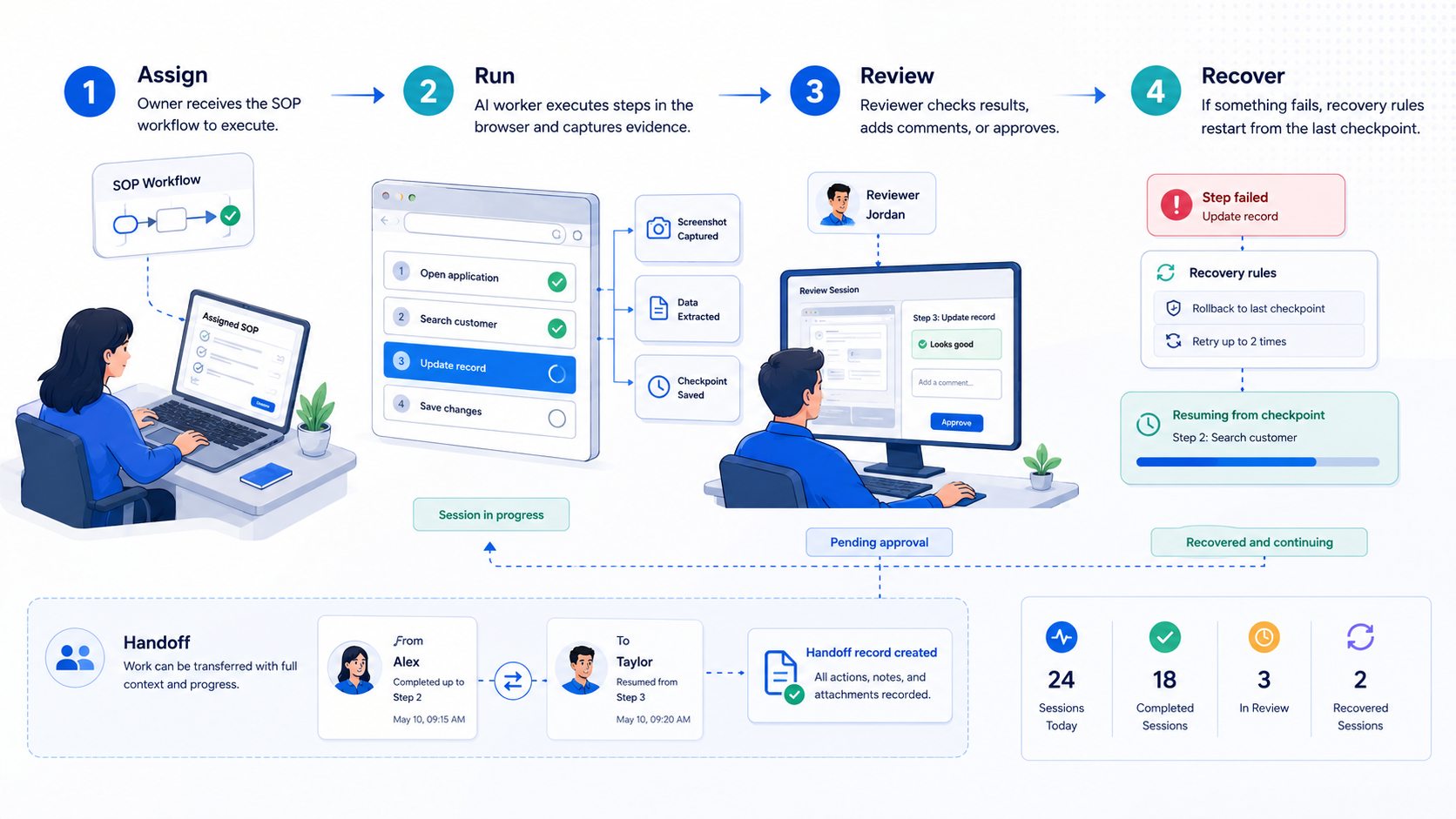
Start with one SOP that operators already run every day. Do not begin with the hardest workflow. Pick a task where success can be checked from the screen or from a clear output record.
Use this pilot path:
- Write the current human SOP. Keep the steps literal.
- Mark account boundaries. Decide which profile, workspace, and permissions apply.
- Define completion evidence. Use a screenshot, log entry, field value, or task note.
- Add pause conditions. Stop on missing data, unusual account state, or uncertain action.
- Review the first runs. Compare AI output against the human SOP before scaling.
NIST SP 800-53 includes audit and accountability controls for organizational systems (NIST). A small team does not need enterprise paperwork for every task, but it does need owners, timestamps, and recoverable records.
Fit Boundaries and Common Mistakes
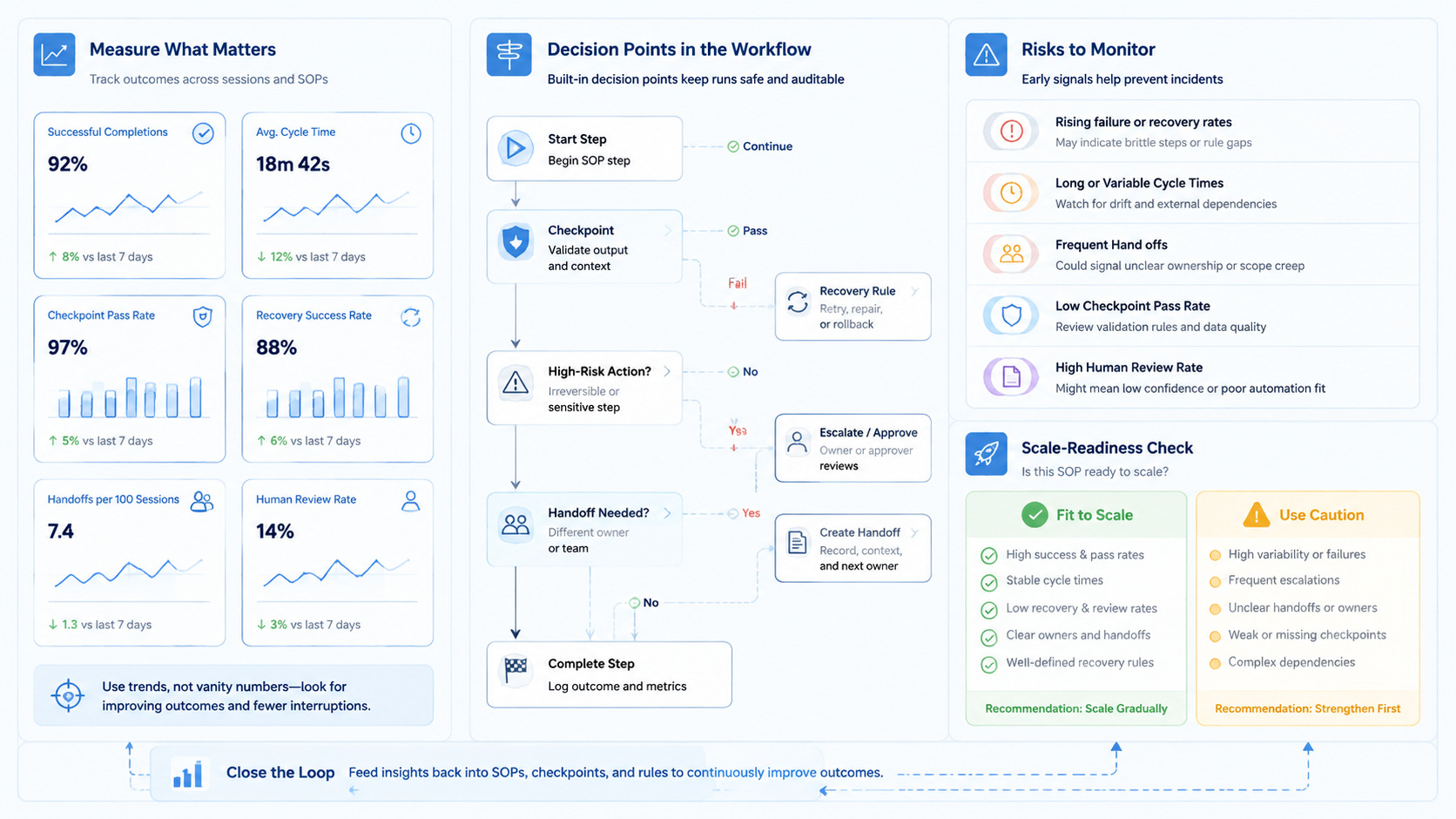
Use this platform model when the browser task is repeatable and the account context is known. It is weaker when the task depends on open-ended negotiation, sensitive judgment, or unclear source data.
Good fit:
- Same workflow runs daily
- Operators already follow a written SOP
- Browser state can be inspected
- Exceptions can be routed to a human
- Results can be compared across runs
Poor fit:
- The task changes every time
- The worker must infer policy decisions
- No one owns failed steps
- The team cannot define a safe stop rule
The most common mistake is treating a browser SOP as only a sequence of clicks. The better model is execution plus review. Moimobi's device isolation and browser profile approach help separate account environments when SOPs involve logged-in work.
Measurement and Recovery Checks
Measure the pilot before expanding it. A browser SOP is ready to scale only when the team can explain both successful and failed runs.
Track:
- Task attempts
- Completion rate
- Human takeover events
- Recovered failures
- Average review time
- Accounts or profiles with repeated issues
One useful check is the "handoff test." If an operator can open the task record and continue without asking what happened, the workflow is becoming operational. If the operator needs private chat context, the record is too thin.
Moimobi can connect browser SOPs with mobile automation when the same account workflow moves from web dashboards to mobile apps.
Frequently Asked Questions
What is an AI worker platform?
It is software for assigning AI workers to tasks, tools, environments, and review flows.
How is it different from normal browser automation?
Browser automation runs actions. A worker platform adds account context, task ownership, review rules, and recovery records.
What browser SOP should a team automate first?
Start with a daily task that has a clear output, such as a dashboard check, CRM field update, or publishing handoff.
Does every SOP need AI?
No. Deterministic scripts may be enough for simple steps. AI is more useful when the worker must interpret visible context.
How should teams handle exceptions?
Define pause rules before launch. Missing data, unfamiliar screens, and uncertain actions should trigger human review.
Can one AI worker use many accounts?
It can, but grouped account access is easier to review than open-ended access.
Where does Moimobi fit?
Moimobi provides execution environments for browser, cloud phone, and mobile workflows that need account separation.
Conclusion
Use the worker platform for browser SOPs when the workflow is narrow, repeated, and reviewable. Start with one browser task, one account group, and one clear completion record.
Before scaling, run the handoff test. If another operator can understand the task result without asking for context, the SOP is ready for the next worker or account group.



