
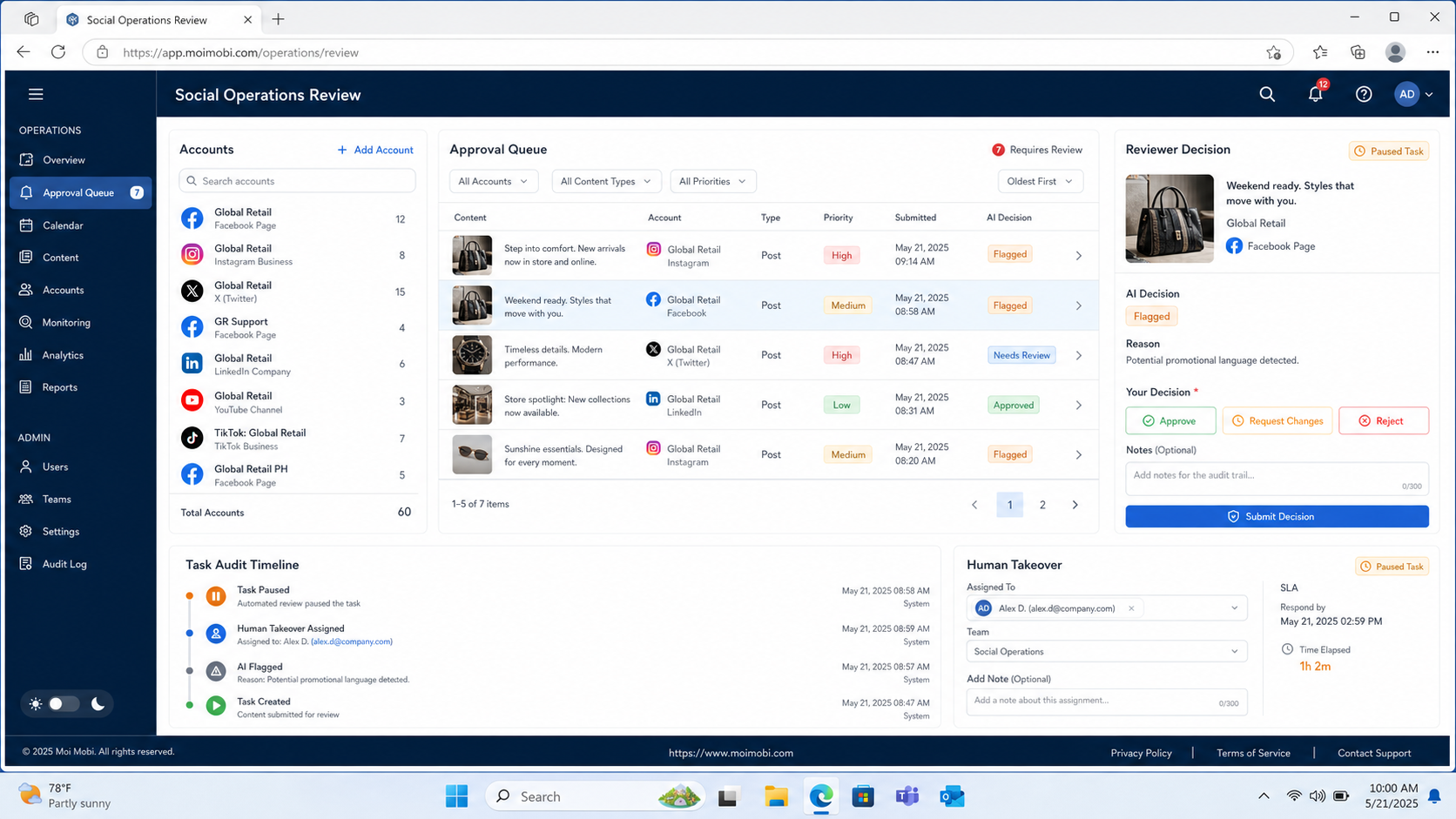
AI automation review controls for social media operations are the approval, permission, evidence, and stop rules that keep social workflows accountable. They decide what an automated step may prepare, what a person must approve, and how the team can reconstruct an outcome later.
For a marketing team, the practical question is not whether AI can draft a caption or sort inbound replies. The question is whether an account owner can see the proposed action, approve the right actions, and pause a workflow before a mistake spreads across channels. A useful control layer makes the workflow easier to operate, not slower to operate.
This guide focuses on legitimate publishing, customer-engagement, and monitoring work. It does not treat repeated unsolicited outreach, fake engagement, or attempts to evade a platform's rules as operational goals.
Key takeaways
- Review controls work best when they are assigned by action risk, not by a single blanket approval rule.
- Every account needs a named owner, a permitted action set, and a record of what happened.
- Start with a small pilot and measure approval delays, exceptions, reversals, and recovery time.
- Automation should prepare repeatable work. People should retain judgment for sensitive or irreversible actions.
What AI Automation Review Controls Cover in Social Media Operations
The core control model has four parts: identity, scope, approval, and evidence. Identity answers which team member and account are involved. Scope says which actions are allowed. Approval determines when an action waits for a person. Evidence keeps the input, decision, timestamp, and outcome together.
This distinction matters because not every action has the same consequence. An AI-created draft can usually wait in a queue. Publishing to a brand account, responding to a complaint, or changing account settings deserves a clearer handoff. Meta's platform documentation similarly treats permissions and authorization as explicit application concerns rather than assumptions that a workflow can make on its own. Meta Platform Terms explain that access and use remain subject to platform rules and permissions.
| Workflow action | Default control | Evidence to retain |
|---|---|---|
| Draft a post or reply | Queue for editorial review | Prompt, draft version, reviewer decision |
| Publish planned content | Account-owner approval or an approved schedule | Account, channel, time, final copy |
| Handle a sensitive message | Mandatory human takeover | Reason, assigned owner, resolution status |
| Change account access or routing | Restricted administrator action | Requester, approver, before-and-after state |
The review state should travel with the task. A separate spreadsheet, chat message, and browser tab make later review difficult. A shared multi-account management workflow gives teams a clearer place to assign an account, set a role, and inspect work that is pending or stopped.
Review queues also need a clear status vocabulary. Use states such as draft, awaiting review, approved, scheduled, completed, paused, and failed. Avoid a catch-all state such as “in progress.” It hides whether work is waiting on a person, a platform permission, or an execution environment.
A small example illustrates the difference. A campaign manager may approve a content batch on Monday. The channel editor can then approve final platform wording on Tuesday. The system can publish only the approved items, retain the final copy, and return failed items to the same queue. Each person sees the part of the process they own.
Why AI Automation Review Controls Need Role-Based Decisions
Role-based decisions prevent two common errors: an unqualified person approving a high-impact action, and a qualified person being asked to review low-risk work all day. Assign authority by decision type, not job title alone. An editor may approve wording, a support lead may approve a reply path, and an administrator may approve access changes.
This design also improves handoffs. When a task moves from content preparation to publishing, the record retains the responsible role and the next owner. Teams do not need to reconstruct a decision from a private message after an issue occurs.
The policy should be visible to the operators who use it. A short action matrix is usually better than a long policy document. For example, “draft and queue” may be allowed for a campaign coordinator, while “publish outside the approved calendar” requires an account owner. Keep exceptions narrow and recorded.
Build the Preflight Checklist Before Automation Starts
Review controls fail when the team starts with a tool instead of an operating boundary. Set these fields before enabling any recurring action:
- Account owner: name one business owner for each social account, even where several people can work on it.
- Permitted actions: distinguish drafting, scheduling, publishing, replying, monitoring, and administrative changes.
- Approval trigger: define the actions that require editorial approval, customer-service approval, or administrator approval.
- Escalation route: identify who receives a complaint, policy question, missing permission, or failed run.
- Retention record: decide which task inputs, approvals, and outcomes are retained for review.
Teams using mobile apps should also document the execution environment. A device isolation approach helps keep account workspaces distinct, while the control policy explains which operator is authorized to act inside each workspace. The infrastructure does not replace approval; it makes the ownership boundary easier to apply.
A Practical Approval Workflow for Social Media Operations
Use a short sequence that reflects the action's risk instead of asking someone to approve every keystroke.
- Create the task. Record the account, objective, channel, proposed action, and deadline. A content task should state whether it is a draft, an approved schedule, or a publish request.
- Apply the policy. The workflow checks the action category against the account's permitted actions. If a rule is missing, the task should stop rather than guess.
- Review the output. An editor checks tone, claims, links, and channel fit. A customer-support owner handles questions that need context or a commitment.
- Execute in the assigned workspace. The action runs only after the policy and approval state allow it. For mobile-app work, a cloud phone can be one part of the controlled execution environment; the approval record remains separate from the device.
- Capture the result. Save the final action, completion state, error state, and next owner. A failed action should produce a recoverable task, not an invisible retry loop.
TikTok's Content Posting API guidance is a useful reminder that publishing integrations have explicit authorization and product requirements. Treat platform access as a controlled dependency, not as a permanent permission granted to every workflow.
Workflow controls should also distinguish a planned schedule from a fresh request. An approved calendar can allow a bounded publish window, provided the account, asset, and copy have not changed. A fresh request should return to review when it adds a new claim, destination, target account, or audience condition.
For customer engagement, use a different boundary. AI may classify a message, collect its history, and prepare a response option. The workflow should route payment disputes, safety concerns, account complaints, or contractual questions to a human owner. This keeps automation focused on preparation and routing rather than unsupported decisions.
Fit and Limits: Who Needs Stronger Controls?
Teams with several account owners, scheduled publishing, shared customer queues, approvals, or regulated brand claims.
A single creator with one account and a small draft backlog may only need a content queue and a publish checklist.
Complaints, legal requests, pricing exceptions, crisis communications, and account-access changes need human responsibility.
Controls are not a substitute for platform policies. They are a way to make a team's own choices visible. NIST's AI Risk Management Framework recommends governance, measurement, and ongoing management of AI risks. In a social workflow, that translates into defined owners, observable decisions, and a repeatable way to pause or correct work.
Pilot, Measure, and Recover Before Expanding
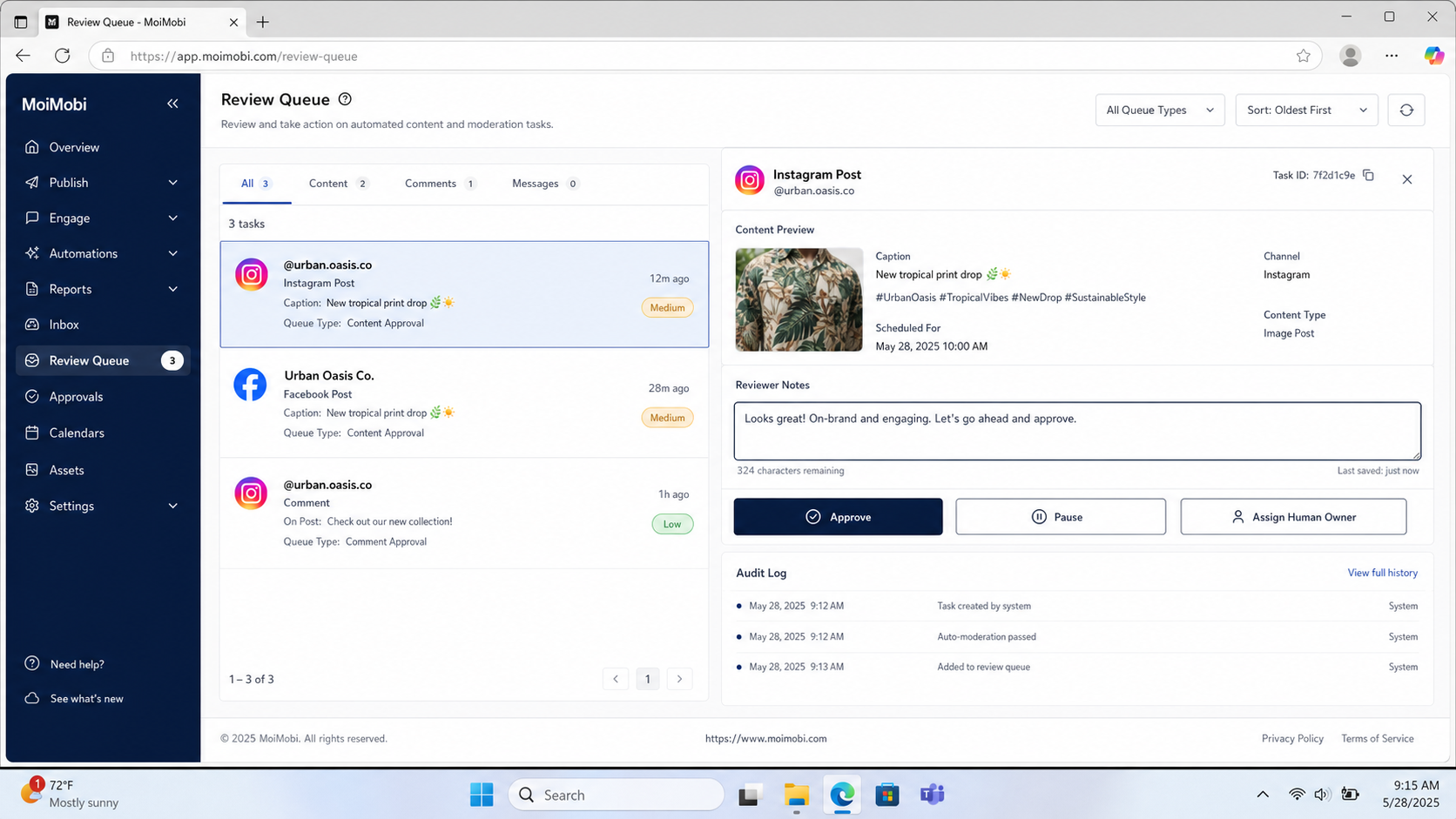
Run a pilot on one account role and one task type. For example, use AI to prepare product-post drafts for a single editor, while keeping publication behind an approval gate. Do not expand to customer replies or multiple channels until the team can explain every exception from the pilot.
Track four measures weekly:
- Approval lead time: how long a valid task waits for a decision.
- Override rate: how often reviewers rewrite, reject, or reroute an output.
- Exception rate: how often a task lacks a permission, owner, or usable input.
- Recovery time: how quickly the team resolves a failed or paused task.
Set a stop rule as well. Pause a workflow when the same exception repeats, when account ownership is unclear, or when the output needs repeated manual correction. A social media marketing workflow is more valuable when it includes a clean feedback loop than when it simply moves a larger volume of tasks.
Use a short review meeting after the first pilot cycle. Bring three examples: one cleanly approved task, one rejected task, and one recovered failure. The goal is to determine whether the policy was unclear, the input was incomplete, or the assigned environment could not complete the action. Change one control at a time so the next pilot shows what improved.
Expansion should follow evidence, not enthusiasm. Add a second account only after the first account has consistent ownership, visible exceptions, and a workable recovery path. Add a new action type only after the team can measure it with the same record quality.
Common Mistakes That Weaken Review Controls
Using one approval rule for every action. Reviewing a saved draft and changing account access are not comparable events. Match the gate to the consequence.
Treating approval as a button without context. A reviewer needs the target account, source material, final copy, destination, and reason for the task. A bare “approve” request creates shallow reviews.
Allowing silent retries. Repeated failures can conceal missing permissions, expired sessions, or a broken input. Send failed tasks to a visible queue with a named recovery owner.
Leaving account roles informal. When ownership is only known in chat, handoffs fail. Store the role with the account and task.
Measuring only throughput. Faster posting is not a useful result if rejection, corrections, or customer escalations rise. Use the pilot measures together.
Giving automation permanent authority. Permissions, team roles, and campaign scope change over time. Reconfirm the action matrix at regular operating reviews and after a major account or workflow change.
Storing evidence without access boundaries. Audit records can contain campaign details and customer context. Limit who can view or export them, and use a retention period that fits the operational purpose.
Frequently Asked Questions
Do all AI-generated social posts need human approval?
Not necessarily. Teams can pre-approve narrow templates and schedules. New claims, new channels, or sensitive campaigns should retain review.
What is the first control to add?
Start with account ownership. A task cannot be responsibly approved or recovered without a named owner.
Can review controls slow a small team down?
They can if every low-risk draft needs the same escalation. Use lighter checks for repeatable work and stronger gates for publishing or customer commitments.
What should an audit trail include?
Keep the task purpose, account, proposed action, approval decision, actor, timestamp, result, and error state. Retain only what the team needs for legitimate operations and governance.
How should a failed publishing task be handled?
Mark it as failed or paused, preserve the error context, and assign a recovery owner. Do not silently retry across accounts.
Are AI review controls only for enterprise teams?
No. A small team can begin with a content queue, account owner, and publish checklist. The same foundations scale as roles and channels grow.
How often should the approval policy be reviewed?
Review it after a new channel, account owner, content category, or recurring exception. Teams with stable work can also include it in a regular operations review.
What counts as a good pilot outcome?
A good pilot makes ownership and exceptions clearer. It does not need to maximize volume. The team should be able to explain approvals, rejections, and recoveries without searching across tools.
Should AI answer customer complaints automatically?
No. AI can prepare context or a draft, but complaints and high-impact decisions should route to a person with authority to resolve them.
Conclusion
The strongest AI automation review controls make operational responsibility visible. Start with account ownership, define the action boundary, record approvals, and make failures recoverable. Then test one workflow on a small scale before expanding it.
For social media teams, the priority order is simple: protect account ownership first, review consequential actions second, and improve the workflow from observed exceptions third. That sequence gives automation a clear job without asking it to replace human judgment.
Keep the policy close to the work. An approval record is useful only when the assigned team can see it before an action runs. A short, visible action matrix and a named recovery owner usually create more operational value than a large rulebook that nobody opens during a campaign.



