
Account linkage risk is the operational risk created when a team cannot clearly separate, explain, or investigate how approved accounts, people, devices, sessions, and tasks relate to one another. Reusing a mobile environment is not automatically wrong. It becomes a problem when the reuse is undocumented, access is shared without an owner, or a team cannot reconstruct what changed after an incident.
For legitimate social, support, e-commerce, and mobile-app operations, the objective is not to hide activity or work around platform controls. The objective is accountable execution. Each approved workspace needs a defined business purpose, a responsible person, clear access rules, and enough evidence to investigate a failure without guessing.
This guide treats account linkage risk as a governance and troubleshooting problem. It explains the signs to inspect, the records to keep, when to pause a workflow, and how a team can test a cleaner operating model before expanding it.
Key Takeaways
- Reuse creates risk when ownership, task history, and change records are unclear.
- A mobile environment should map to an approved workflow, not become an anonymous shared resource.
- Logs need task, owner, environment, and outcome context to support useful diagnosis.
- A small pilot with review gates is safer than moving every team workflow at once.
- No environment design guarantees account outcomes or replaces platform rules.
Account Linkage Risk Starts With Missing Context
Account linkage risk is often described as a device problem. In practice, it is usually a missing-context problem. A team sees an unexpected login prompt, a task failure, a duplicated reply, or a support escalation. Nobody can quickly answer which environment ran the task, who had access, whether a setting changed, or whether another workflow used the same workspace.
That uncertainty slows recovery. It can also lead to poor decisions, such as rotating several environments at once or changing credentials before the original issue is understood. A clean record gives the team a narrower first question: what happened in this approved workspace, during this specific task, under this owner?
The NIST guidance on log management frames logging as an organization-wide practice for investigation and operations. For a mobile workflow, that does not mean collecting every screen action or personal detail. It means recording the operational facts that explain an authorized task: environment identifier, account role, operator, task type, time, change request, result, and evidence location.
Symptoms That Need Investigation
Start with operational symptoms, not assumptions about a platform. The same symptom can have several causes: a password reset, a role change, a task collision, a network outage, or an app update. The table below helps keep the first response proportional.
| Observed symptom | Likely operational cause | First action |
|---|---|---|
| Two people report the same task completed | Shared queue ownership or unclear handoff | Pause duplicate assignments and inspect task IDs |
| An environment has unknown login or setting changes | Shared access or missing change record | Restrict access and review the workspace log |
| A repeat task behaves differently after maintenance | Version, configuration, or routing change | Compare the change record before retrying |
| Support cannot identify the responsible owner | Environment was reused without reassignment | Freeze new work and establish ownership |
| Several unrelated tasks fail together | Shared dependency or broad configuration issue | Check the common dependency before changing accounts |
Why Reused Mobile Environments Create Account Linkage Risk
Reuse is reasonable when the previous work is closed, the next assignment is approved, and the transition is recorded. The risk increases when a mobile environment remains a general-purpose pool with no clear lifecycle. A device can then carry unreviewed application state, stale permissions, open tasks, old recovery contacts, or unknown operator access into a new workflow.
The common mistake is treating an environment as a blank unit once the visible task ends. Operationally, it is not blank until the team has completed a handoff check. That check should confirm who owns it next, which account role it will support, which credentials or secrets remain authorized, what data must be cleared under the organization’s policy, and which task is allowed to start next.
Android’s dedicated-device guidance is useful here because it treats managed devices as purpose-bound enterprise assets rather than casual shared phones. The same framing works for cloud and remote Android execution: a workspace needs a declared role, governed configuration, and an accountable administrator.
For teams that operate mobile workflows at scale, a cloud phone should therefore be assigned as a workspace, not handed around as a generic device. The important boundary is business ownership. One approved account role can have an environment record, a task history, and a recovery owner without suggesting that the environment is intended to evade a platform’s rules.
Diagnose Account Linkage Risk Before You Change Anything
Do not begin by resetting settings, moving tasks, or changing multiple variables. Those actions can erase the evidence needed to identify the actual operational cause. Begin with low-impact checks and move outward only when the records point to a broader problem.
- Identify the affected task. Record the task ID, account role, observed symptom, and first timestamp.
- Confirm the workspace owner. Check the current assignee, backup owner, and approval record before anyone changes access.
- Review recent changes. Compare application, permission, configuration, routing, and task-schedule changes against the last known good run.
- Check for task collisions. Look for another operator, automation, or queue item targeting the same account role or environment.
- Test one approved variable. Use a controlled retry or a replacement workspace only after the preceding checks are documented.
- Record the outcome. Close the incident with a cause category, evidence link, and prevention action.
This order separates observation from intervention. The OWASP Logging Cheat Sheet recommends logging context such as identities, actions, outcomes, and event sources while avoiding unnecessary sensitive data. For a mobile operating team, that is a practical standard: record enough to reconstruct the task, but do not copy secrets or customer content into a general operations log.
The diagnostic record should also distinguish an account issue from an environment issue. A failed app action could relate to credentials, a platform policy, app availability, task timing, or network health. The team should not label every failure as account linkage risk simply because it occurred on a reused environment.
Build a Reuse Policy That Teams Can Follow
Good reuse policies are short enough to follow during ordinary work. They define when an environment may be reassigned, who can approve the reassignment, and which evidence must exist before the next task begins. They also define which work is not suitable for reuse without a deeper review.
Use a simple assignment record with the following fields:
- Environment ID and device type
- Approved account role and business purpose
- Primary owner and escalation owner
- Access role changes and approver
- Last completed task and last known good outcome
- Required cleanup or handoff checks
- Next review date and evidence location
Assign access using least-privilege principles. NIST SP 800-53 includes access-control and configuration-management families that support this general approach: give people only the access needed for an approved duty, and make changes traceable. A small team may use a shared checklist. A larger operation may use roles, approval queues, and immutable task records. The principle is the same.
For execution teams, device isolation is useful when it supports that policy with a distinct workspace and a cleaner handoff boundary. It is not a substitute for authorization, consent, or platform compliance. A poorly governed isolated environment is still poorly governed.
Pause Conditions: When Not to Continue
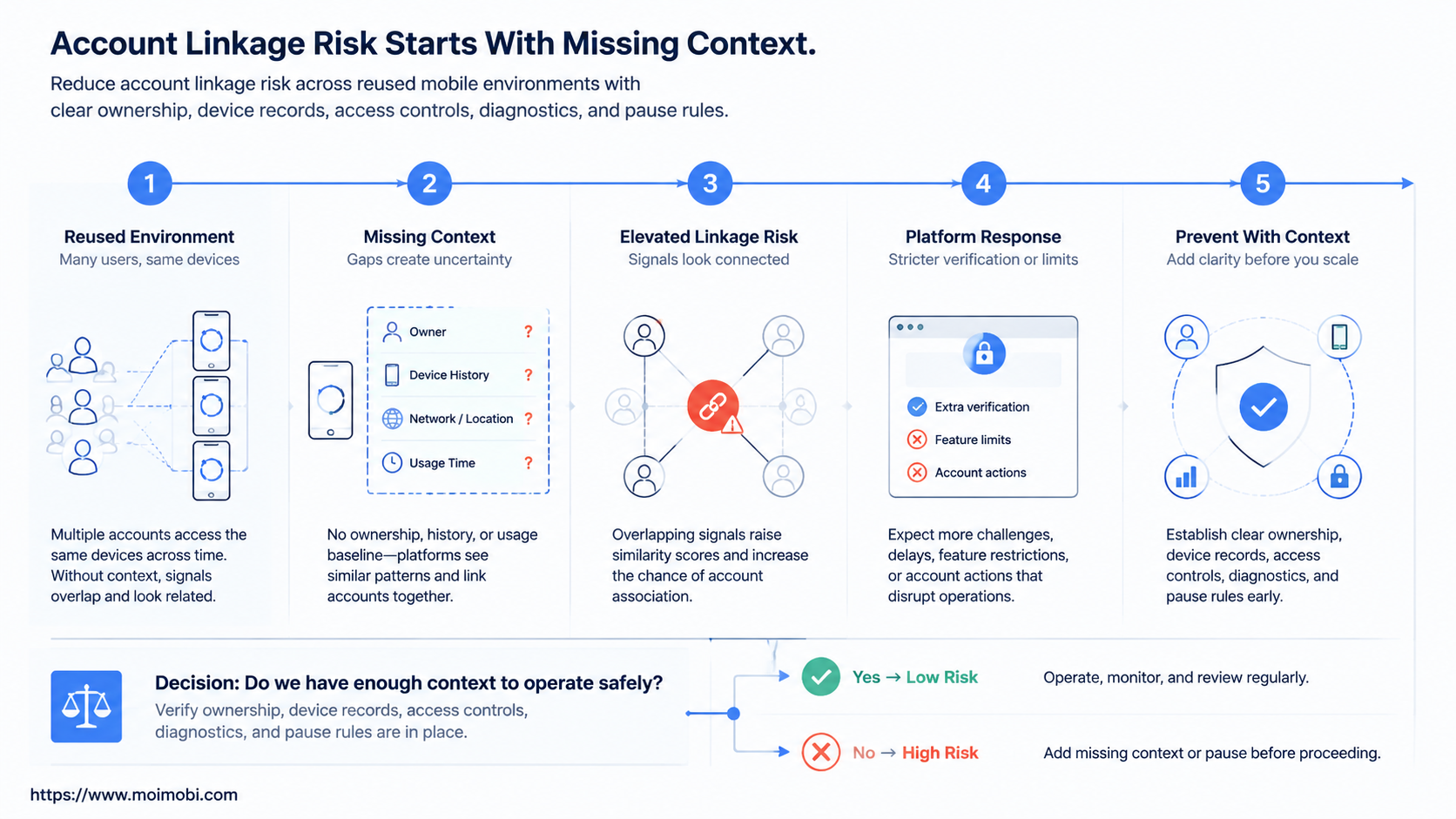
Some situations require a pause instead of a fast retry. Continuing work with unclear ownership can widen the incident and make later review harder. Use explicit stop rules so operators do not need to improvise under pressure.
Pause a workflow when any of these conditions applies:
- The team cannot identify the current workspace owner.
- Two workflows appear to target the same account role without a documented handoff.
- A credential, permission, or recovery method changed without an approval record.
- The environment contains unresolved tasks, exports, or customer-data handling questions.
- A broader app, network, or provider outage could explain the symptom.
- A requested action would conflict with the platform’s terms, user consent, or internal policy.
The next step is not to create a replacement environment blindly. Open an incident record, preserve the task evidence, restrict unnecessary access, and assign a reviewer. When a workload depends on several mobile workspaces, use mobile automation only with task-level ownership and a review path. Automation can repeat a known procedure; it cannot decide whether an ambiguous incident is safe to continue.
Run a Small Pilot and Measure the Result
Start with one approved workflow rather than a large migration. Pick a task that has a clear beginning, end, owner, and success definition. Create the environment record, run the handoff checklist, and test the response to one simulated configuration or access issue. The aim is to validate the team’s ability to observe and recover, not to maximize throughput on day one.
Measure operational clarity, not only completed tasks. A useful weekly review asks four questions:
- Could the team identify the workspace and owner for every incident?
- Were changes linked to an approver and a rollback step?
- Did any task collide with another task or operator?
- Did the team know when to pause rather than retry?
Use those answers to improve the assignment policy. If a team needs to coordinate several legitimate account workspaces, multi-account management should make role ownership, task allocation, and evidence review clearer. It should not be used to conceal activity or bypass restrictions.
Common Mistakes That Increase Account Linkage Risk
Treating a workspace as disposable. A mobile environment has a task history and access history. Reassign it only after the prior work has a recorded closure and a new owner accepts the handoff.
Making broad changes during an incident. Changing access, network settings, application state, and task schedules together destroys the comparison point. Make one documented change at a time.
Logging too little or too much. Minimal logs cannot explain a failure. Excessive logs may expose credentials or customer data. Keep task context, decisions, timestamps, and evidence references; keep secrets in the approved secure system.
Using one person’s memory as the control. A reliable workflow must be understandable by the next on-call operator. Put the owner, purpose, next review date, and pause conditions in the record.
Ignoring platform and consent boundaries. Environment management does not authorize unsolicited outreach, deceptive behavior, or violations of a service’s rules. Operational controls should support permitted work only.
Frequently Asked Questions
Is reused mobile environment access always a problem?
No. Reuse can be routine when the assignment, access, prior task closure, and next workflow are documented. The problem is untracked reuse.
What is the fastest first check after an unexpected task result?
Identify the task ID, workspace, current owner, and most recent change. Those four fields usually determine whether to investigate a task, an environment, or a shared dependency.
Should every account have its own mobile environment?
Not necessarily. Choose separation based on business ownership, data handling, recovery needs, and task collision risk. A smaller approved model may be easier to govern well.
Can isolation guarantee that an account will not face restrictions?
No. Isolation supports operational boundaries. Platform outcomes depend on many factors, including the platform’s policies and the underlying activity.
Which data should an incident record include?
Include a workspace identifier, task identifier, owner, time, observed result, recent approved changes, and evidence link. Do not place credentials or unnecessary customer data in the general record.
When should a team escalate to a security or compliance owner?
Escalate when access is unknown, sensitive data may be involved, an unapproved change occurred, or the intended action may conflict with policy or consent requirements.
How can a small team start without complex tooling?
Use one shared register, a short handoff checklist, named owners, and an incident note template. Add workflow tooling after the team can consistently follow the basic control loop.
Does automation replace incident judgment?
No. Automation can execute approved repeatable steps and capture task evidence. A person still needs to decide whether a new, unclear, or policy-sensitive situation should proceed.
Conclusion
Account linkage risk across reused mobile environments is best managed as an ownership and evidence problem. Start by mapping each environment to an approved role, owner, task history, and handoff rule. Then add a diagnostic order that preserves evidence before changes are made.
The priority order is simple: establish ownership first, record changes second, test one variable at a time third, and pause when the facts are unclear. This creates a more reliable operating system for legitimate mobile work without promising outcomes that no environment can guarantee.



