Key Takeaways
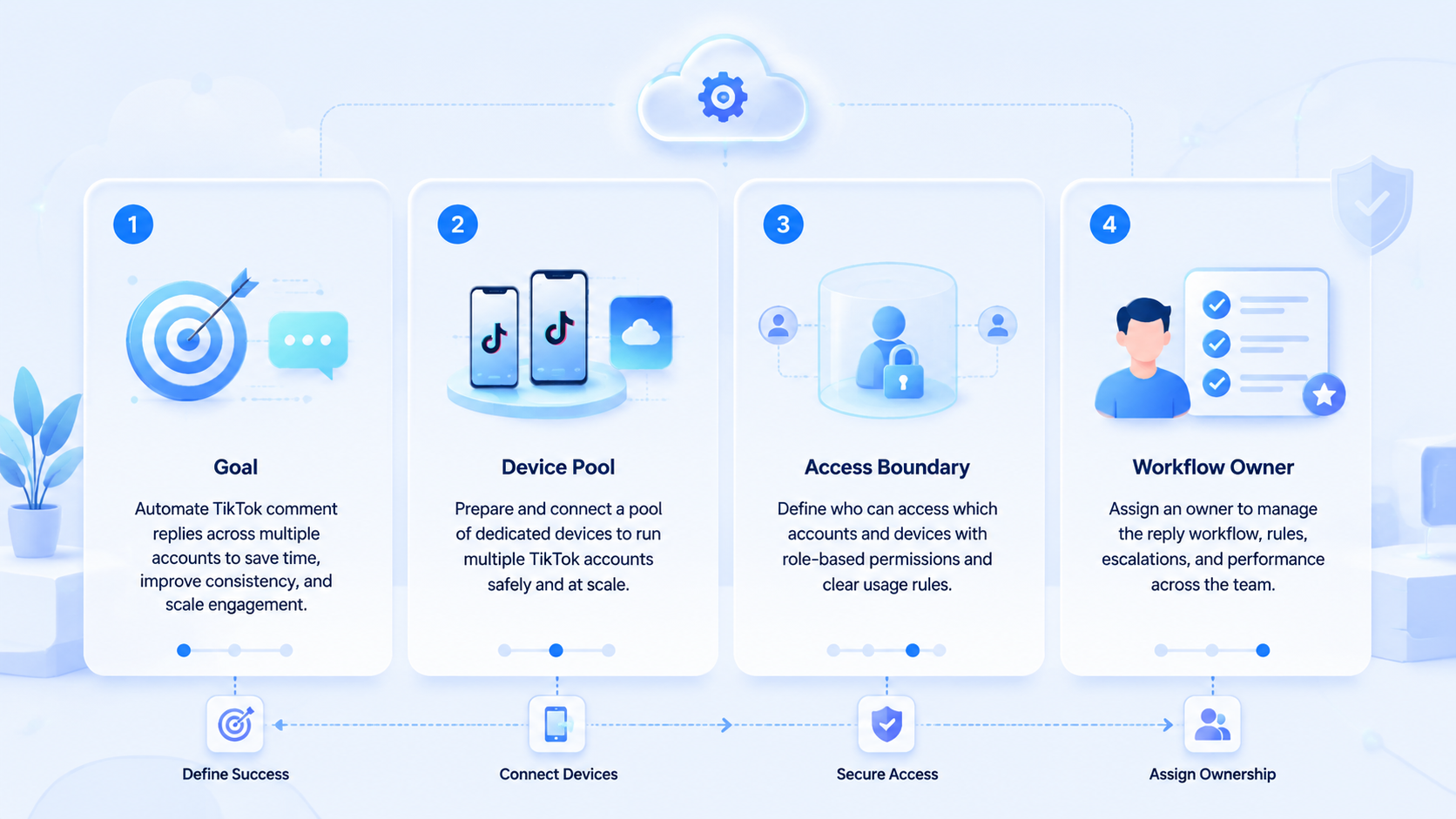
- TikTok comment reply automation is a queue and workflow problem before it is a tooling problem.
- Teams need clear reply ownership, isolated execution environments, and review rules for edge cases.
- TikTok already gives account owners comment controls and comment insights, which shape the workflow.
- The best pilot proves recovery quality and handoff quality before it proves speed.
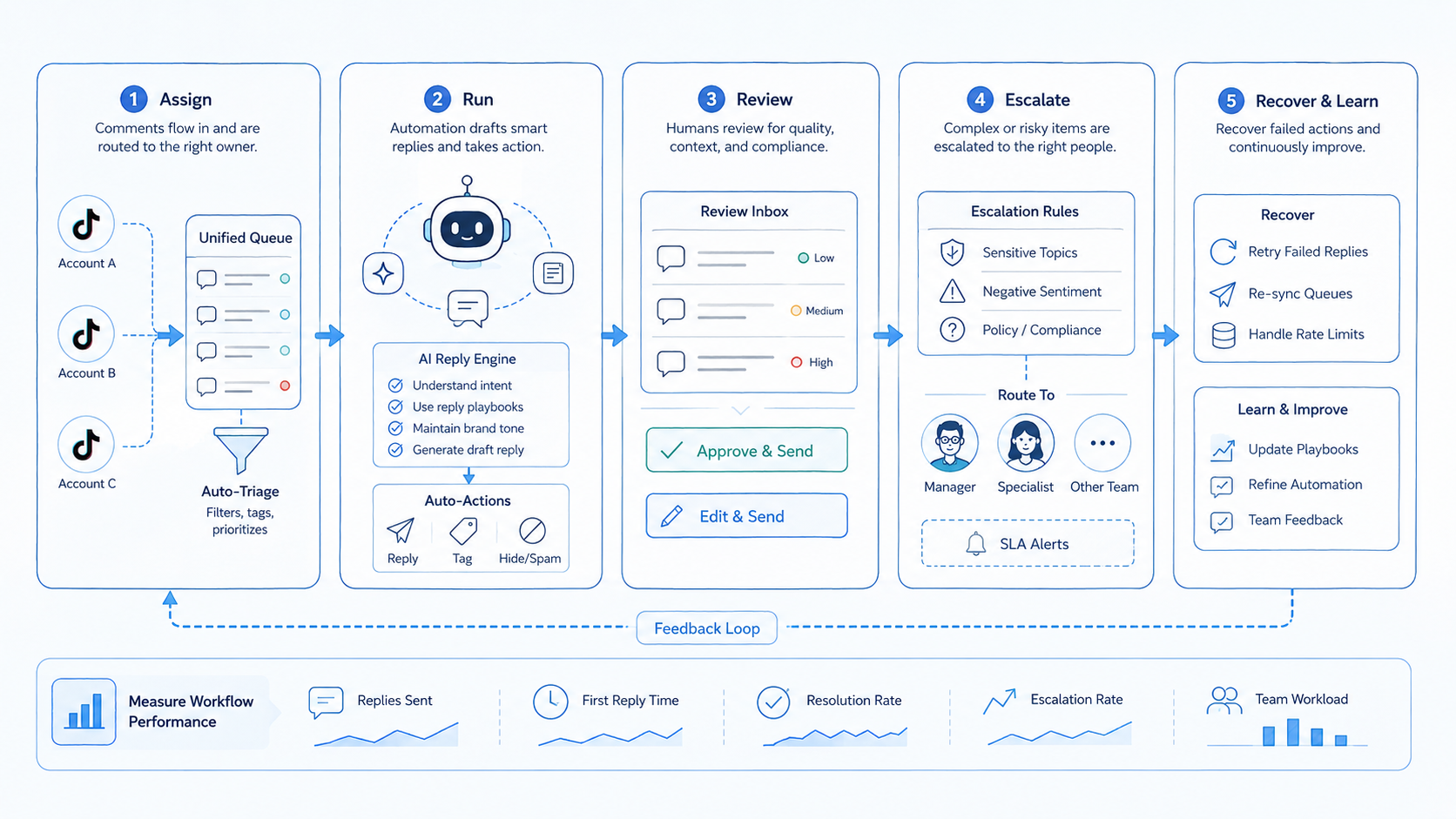
TikTok comment reply automation is a structured workflow for sorting, assigning, replying to, and reviewing comment conversations across many accounts. For multi-account teams, the goal is not just faster replies. The goal is consistent handling with fewer missed threads, fewer duplicated replies, and cleaner escalation when the comment needs a person.
That is why teams usually fail when they approach the topic as a simple "auto reply" feature. The real challenge is operational: who owns the queue, which account or device handles the reply, what gets escalated, and how the team reviews failures. A stable stack for this work often combines a clear engagement workflow with an isolated execution layer such as mobile automation, cloud phone, or broader multi-account management.
TikTok documentation matters here. Manage comments on TikTok shows that accounts can control who may comment and how comments are filtered.1 Comment insights on TikTok shows that comment activity can be reviewed as a signal.2 For the execution layer, Android Enterprise and Playwright both reinforce the same idea: separated work should run in separated environments.4 3
The Core Idea Behind TikTok Comment Reply Automation for Multi-Account Teams
The core idea is simple. Teams should treat comments as a managed queue with rules, not as a stream that every operator touches whenever they have time.
Three parts define the workflow:
| Part | What it does | Why it matters |
|---|---|---|
| Routing | Moves comments to the right account, owner, or stage | Prevents duplicate or missed replies |
| Execution | Runs the actual reply task in a clean environment | Keeps account work isolated and reviewable |
| Review | Checks response quality, exceptions, and backlog | Shows where automation stops and humans step in |
TikTok comment reply automation becomes useful once a team has repeated comment patterns, multiple operators, or linked content and sales motions. It becomes messy when the same queue is shared informally across the team.
Why Teams Search for This Topic
Most teams reach this topic after the same pain points appear:
- comments arrive faster than one operator can handle,
- high-value threads get buried under routine replies,
- multiple accounts need the same response logic,
- or brand, creator, and support teams start stepping on each other.
Many teams also discover that comment handling is where response quality and workload planning finally become visible. Publishing can be scheduled. Comment operations expose whether the team can sustain follow-up.
That is why TikTok account workflows and social media marketing are a better next step than a generic bot page. The operations question is about queue design and execution capacity, not just message generation.
Who Benefits Most and In What Situations
TikTok comment reply automation is a strong match for:
Best fit
- Agencies that manage many client accounts.
- Creator teams with separate publishing and engagement roles.
- Commerce or lead-gen teams that treat comments as conversion signals.
- Operations teams that already review engagement queues daily.
Weak fit
- Solo creators with low comment volume.
- Teams without escalation rules.
- Accounts that still rely on shared devices and ad hoc handoff.
- Workflows that cannot separate routine replies from sensitive cases.
How to Evaluate or Start Using TikTok Comment Reply Automation for Multi-Account Teams
Start with checkpoint logic instead of full automation logic.
- Checkpoint 1: define which comments are routine, which need review, and which should never be handled by the routine reply path.
- Checkpoint 2: assign reply ownership by account group or campaign group.
- Checkpoint 3: bind the reply workflow to a clean browser or device context.
- Checkpoint 4: log each failed reply, timeout, or escalation.
- Checkpoint 5: review queue age, completion rate, and exception rate daily.
Pass / fail checks
- Pass: one queue has one owner, one execution path, and one review rule.
- Fail: comments move between people with no log and no next-step decision.
If the team needs broader infrastructure around the workflow, cloud phone for TikTok and device isolation are usually the next pages to compare.
Mistakes That Reduce Results
The biggest mistake is trying to handle every comment with the same rule. A routine acknowledgment, a support issue, and a pricing question do not belong in one reply bucket.
Another common mistake is ignoring queue recovery. Teams measure how many comments were answered, but not how many got stuck in review, failed in execution, or bounced between operators.
A third mistake is putting a multi-account reply workflow on top of shared, unclear environments. That is where Android antidetect or device isolation often become part of the evaluation.
What not to do
- Do not let publishing and reply handling compete for the same device slot without a schedule.
- Do not treat escalations as exceptions that can live in chat forever.
- Do not count speed as success if the team cannot explain failed or duplicated replies.
Pilot Rollout, Measurement, and Recovery Checks
The useful pilot is small and measurable.
| Measurement | What to watch | Recovery question |
|---|---|---|
| Queue age | How long comments wait before assignment | Who clears aged items? |
| Completion rate | How many queued comments reach a final state | What blocks the unfinished ones? |
| Exception rate | How often comments need manual review | Is the routing rule too broad? |
| Duplicate reply rate | How often two handlers touch one thread | Where did ownership break? |
| Recovery speed | How fast the team explains a failed reply run | Was the failure logged with enough detail? |
The pilot should end with a hard decision. Either the queue design is ready to expand, or the team needs another loop to fix ownership, routing, or recovery.
A Practical Queue Design for TikTok Comment Reply Automation
Many teams improve results by splitting the comment queue into three simple lanes instead of one flat inbox.
| Lane | Typical comment type | Next action |
|---|---|---|
| Routine engagement | Short reactions and lightweight audience replies | Reply through the standard workflow |
| Business or support intent | Price questions, product questions, delivery or support requests | Escalate to the right owner or team queue |
| Needs review | Unclear tone, moderation issues, ambiguous requests | Hold for human review before reply |
This lane model reduces two common failures. First, it lowers duplicate replies because people know which comments belong to which queue. Second, it gives the team a clear reason for manual takeover instead of forcing every comment through the same automation path.
What a Good Daily Review Looks Like
Comment reply automation needs a daily review because queue quality drifts fast when many accounts are active.
- Review aged comments that did not reach a final state.
- Check whether duplicate replies came from routing mistakes or shared ownership.
- Check whether the same exception type appeared across several accounts.
- Confirm that high-intent comments reached the correct escalation lane.
- Confirm that one owner is still responsible for each queue group.
If the team cannot answer those five questions at the end of the day, the workflow is not ready for more volume.
TikTok Comment Reply Automation Capacity Planning
Capacity is not only about how many comments the team answered. It is also about whether the same model still works when the queue doubles next week.
Look at these practical signals before you expand:
- comment age stays inside the team target,
- exceptions are concentrated in known lanes instead of appearing everywhere,
- owners can reopen the same environment without rebuilding context,
- and escalation work does not pile up faster than routine work clears.
For teams comparing execution layers, device isolation and cloud phone for TikTok matter because reply work often happens alongside publishing and campaign monitoring. The more accounts involved, the more important clean environment assignment becomes.
One more practical check helps before expansion. Review whether the same saved replies, escalation notes, and queue labels still make sense across different account groups. If one creator account, one support-heavy account, and one campaign account all need different handling rules, the team should split the queue design before it adds more volume. That extra separation is often what keeps a growing reply program understandable.
Another useful review step is to inspect a small sample of finished comment threads at the end of each week. The team should check whether routine replies stayed in the routine lane, whether conversion-oriented comments reached the right owner, and whether unclear threads were escalated fast enough. That weekly sample gives managers a tighter signal than raw reply volume because it shows whether the workflow still matches real comment intent.
Frequently Asked Questions
Is TikTok comment reply automation the same as bulk auto replies?
No. Multi-account teams need routing, review, and escalation, not just reply output.
Can every comment be handled the same way?
Usually no. Teams should separate routine, support, and high-intent threads.
What should a team measure first?
Queue age, completion rate, and exception rate are a strong start.
Does this require cloud phones?
Not always, but many mobile-first teams need isolated execution environments.
When is manual review still necessary?
It is still necessary for sensitive, unclear, or high-value comment threads.
What breaks the workflow most often?
Shared ownership, mixed environments, and missing recovery logs.
What should a team do next?
Run a small pilot with one comment queue, one owner model, and one recovery review.
Conclusion
TikTok comment reply automation for multi-account teams works when the team designs the queue before it scales the replies. The workflow needs clear ownership, a stable execution path, and a recovery check that explains what failed and who handles it next.
Before rollout, validate three things: your comment classes are clear, your execution environment is separated, and your backlog review has a real owner. If those checks hold, the team can expand with less operational noise.
Sources